命令需支持 skill 的宿主,Codex 里要用 $ponytail:ponytail-review 形式调用;Codex 安装后需在 /hooks 信任两个生命周期钩子并新开线程;只应从 GitHub 的 DietrichGebert/ponytail 或 npm 的 @dietrichgebert/ponytail 安装,官方不发布 .exe/.dll 文件

ponytail
DietrichGebertMIT活跃维护给 AI 编程助手注入「最懒资深开发」思维,用 YAGNI 原则压制过度设计,让 agent 少写不必要的代码。
Makes your AI agent think like the laziest senior dev in the room. The best code is the code you never wrote.
v5.3.3发布于 2026-10-29 03:11 UTC188,245star +2,253 / 7 天10,458fork同步于 2026-11-10 17:17 UTC
/plugin marketplace add DietrichGebert/ponytail
/plugin install ponytail@ponytail 硬件要求按 README 说明
README 未说明,纯提示词/插件方案,无显存或 GPU 要求
给 AI 编程助手装上「最懒资深工程师」思维,只写任务真正需要的代码
给 AI 编程助手注入「最懒资深开发」思维,用 YAGNI 原则压制过度设计,让 agent 少写不必要的代码。
核心能力
- 先复用仓库已有组件,避免手写或引入新库
- 按 lite/full/ultra 三档调节精简强度
- /ponytail-review 审查改动周边代码,查 bug 与安全
- /ponytail-audit 按优先级扫描整个仓库
- 用 shortcut: 注释标记临时妥协并汇总成债务清单
容易踩的坑
内容由模型根据 README 生成,可能不完整或不准确,以官方文档为准。看原文 README
- v5.3.3最新正式版2026-10-29 · 2026-10-29 03:11 UTC
This one cleans up the band. On Team, Enterprise and managed machines the warning on your first prompt is gone, and the band shows your model and session name again. In VS Code it stays on one line, other plugins' commands no longer print under ponytail's name, and the noisy "duplicate?" hint is gone.
What's Changed
- fix(band): show the level again after /clear and /resume by @timofeevAV in https://github.com/DietrichGebert/ponytail/pull/1161
- fix(map): raise the git ls-files buffer so large repos keep tracked files by @HyperionBurn in https://github.com/DietrichGebert/ponytail/pull/1156
- ci: run agentic benchmark selftest in test workflow by @ml-lubich in https://github.com/DietrichGebert/ponytail/pull/1154
- docs: clarify Cursor mode state scope by @Boulea7 in https://github.com/DietrichGebert/ponytail/pull/1135
- fix(codex): small composer icon instead of the 554 KB logo by @DietrichGebert in https://github.com/DietrichGebert/ponytail/pull/1164
- fix(hooks): 15 s hook timeout so a slow node start on Windows keeps its output by @DietrichGebert in https://github.com/DietrichGebert/ponytail/pull/1165
- fix(hooks): give the codebase map 3 s so a slow Windows start keeps it by @DietrichGebert in https://github.com/DietrichGebert/ponytail/pull/1166
- fix(bench): wait for the killed todo server before the workdir cleanup by @devohmycode in https://github.com/DietrichGebert/ponytail/pull/1116
- fix(band): find the transcript without a classic hook by @trhinehart-attentive in https://github.com/DietrichGebert/ponytail/pull/1242
- fix(band): watch only /clear, /resume and /branch, so other plugins' output is not labelled ponytail by @ph3on1x in https://github.com/DietrichGebert/ponytail/pull/1291
- fix(band): size the row to bodyColumns only in the terminal by @lelmarir in https://github.com/DietrichGebert/ponytail/pull/1302
- fix(band): drop the duplicate? hint, count only project files, tighter details view by @DietrichGebert in https://github.com/DietrichGebert/ponytail/pull/1305
- chore: release v5.3.3 by @DietrichGebert in https://github.com/DietrichGebert/ponytail/pull/1307
New Contributors
- @timofeevAV made their first contribution in https://github.com/DietrichGebert/ponytail/pull/1161
- @HyperionBurn made their first contribution in https://github.com/DietrichGebert/ponytail/pull/1156
- @ml-lubich made their first contribution in https://github.com/DietrichGebert/ponytail/pull/1154
- @trhinehart-attentive made their first contribution in https://github.com/DietrichGebert/ponytail/pull/1242
- @ph3on1x made their first contribution in https://github.com/DietrichGebert/ponytail/pull/1291
- @lelmarir made their first contribution in https://github.com/DietrichGebert/ponytail/pull/1302
Full Changelog: https://github.com/DietrichGebert/ponytail/compare/v5.3.2...v5.3.3
- v5.3.22026-10-16 · 2026-10-16 23:15 UTC
查看更新说明
Ponytail 5.3.2 brings your old sessions to the board.
/ponytail band importreads your past Claude Code sessions once and adds them with their cost, agent time and tokens, so you can compare them with today's. The board also shows which model each session used.What's Changed
- feat(band): past sessions and the model on the board by @DietrichGebert in https://github.com/DietrichGebert/ponytail/pull/1152
- chore: release v5.3.2 by @DietrichGebert in https://github.com/DietrichGebert/ponytail/pull/1153
Full Changelog: https://github.com/DietrichGebert/ponytail/compare/v5.3.1...v5.3.2
- v5.3.12026-10-16 · 2026-10-16 13:40 UTC
查看更新说明
Ponytail 5.3.1 fixes the band from 5.3. Other mods above the Claude Code prompt now show below the band instead of disappearing, and on Windows the band finds its files without
HOMEand writes the task ledger and board withoutmkdir. Thanks to @AllDmeat and @mohofo7 for the fixes, and to @tomkor and @1410822048 for the reports.What's Changed
- fix(band): stack other mods' bands below ours instead of replacing them by @AllDmeat in https://github.com/DietrichGebert/ponytail/pull/1146
- fix(band): fall back to USERPROFILE when HOME is unset by @mohofo7 in https://github.com/DietrichGebert/ponytail/pull/1144
- fix(band): write the ledger and board without mkdir by @mohofo7 in https://github.com/DietrichGebert/ponytail/pull/1145
- chore: release v5.3.1 by @DietrichGebert in https://github.com/DietrichGebert/ponytail/pull/1147
New Contributors
- @AllDmeat made their first contribution in https://github.com/DietrichGebert/ponytail/pull/1146
- @mohofo7 made their first contribution in https://github.com/DietrichGebert/ponytail/pull/1144
Full Changelog: https://github.com/DietrichGebert/ponytail/compare/v5.3.0...v5.3.1
- v5.3.02026-10-16 · 2026-10-16 07:52 UTC
查看更新说明
Ponytail 5.3 puts a band above the Claude Code prompt: what the current task costs, its tokens and agent time, how much existing code it reused, and whether the tests still pass. One click opens the board, a local page with every task across your projects and a card to share. Everything stays on your machine by default,
/ponytail bandhides it, and it needs Claude Code 2.1.290 or later.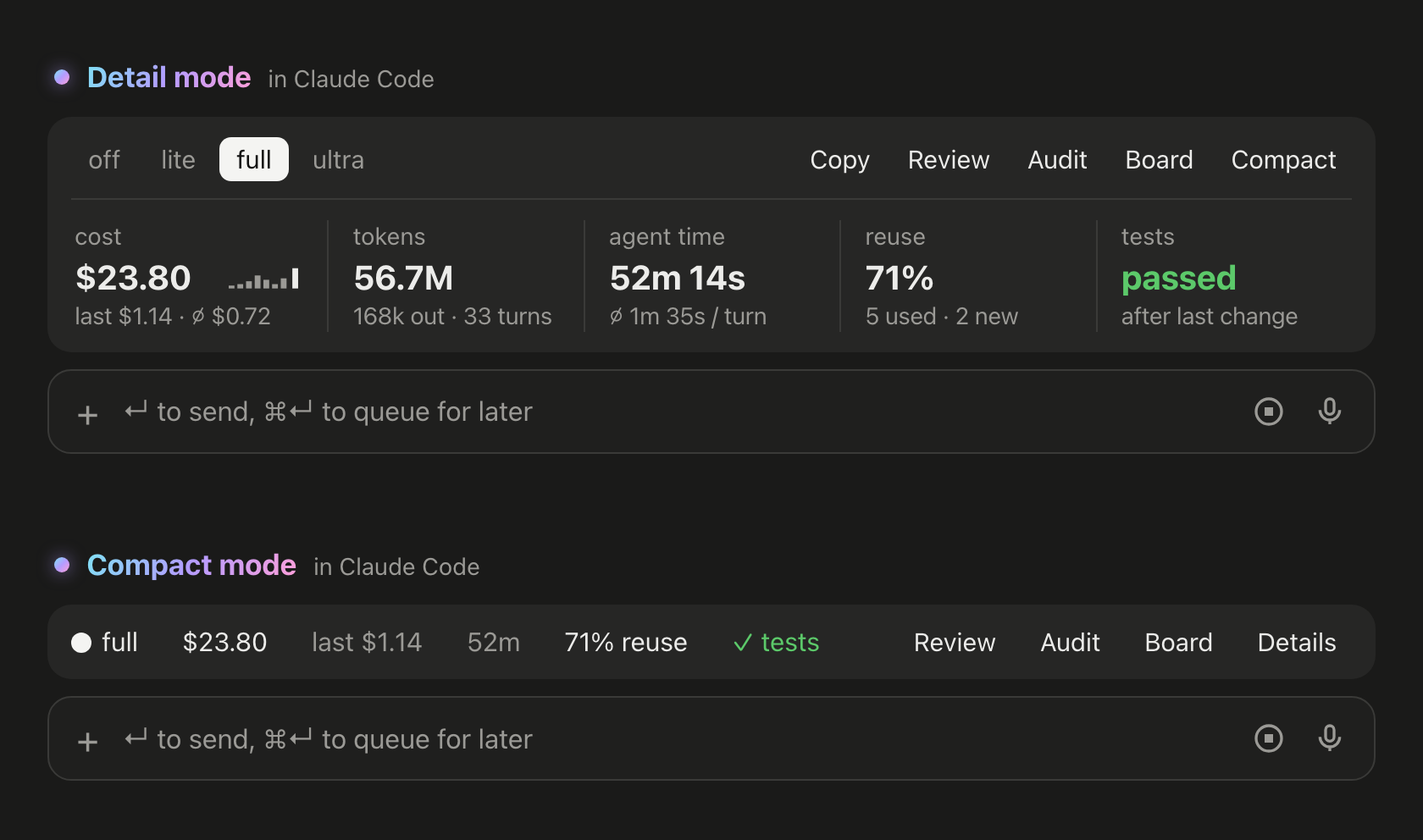
What's Changed
- fix(qoder): keep the ruleset on the /ponytail default turn by @htjworld in https://github.com/DietrichGebert/ponytail/pull/1115
- fix(hermes): send the off notice after /ponytail off (#1121) by @szsunyuan in https://github.com/DietrichGebert/ponytail/pull/1122
- fix(skills): remove misleading one-shot revert instructions by @kaya0s in https://github.com/DietrichGebert/ponytail/pull/1125
- feat: the band and the board in Claude Code by @DietrichGebert in https://github.com/DietrichGebert/ponytail/pull/1138
- chore: release v5.3.0 by @DietrichGebert in https://github.com/DietrichGebert/ponytail/pull/1139
New Contributors
- @htjworld made their first contribution in https://github.com/DietrichGebert/ponytail/pull/1115
Full Changelog: https://github.com/DietrichGebert/ponytail/compare/v5.2.0...v5.3.0
- v5.2.02026-10-13 · 2026-10-13 01:48 UTC
查看更新说明
Mostly fixes for the level you pick. It now survives context compaction instead of falling back to the default, and on macOS the hooks can no longer lose their output, so the ruleset always arrives.
Also in here: the Cursor installer leaves hooks.json files it doesn't understand alone and no longer removes your own hooks with a similar name, OpenCode doesn't get stuck in review anymore and supports
/ponytail default, pi completes/ponytailarguments, and OMP starts new sessions at the default level. Thanks to everyone who sent fixes!What's Changed
- fix(bench): a crashed cell no longer crashes the run summary by @DietrichGebert in https://github.com/DietrichGebert/ponytail/pull/1110
- docs: manual Hermes install until Hermes fixes its plugin.json check by @DietrichGebert in https://github.com/DietrichGebert/ponytail/pull/1111
- feat(pi-extension): autocomplete /ponytail arguments by @ruttybob in https://github.com/DietrichGebert/ponytail/pull/1080
- fix(hooks): write hook output synchronously so process.exit cannot drop it by @DietrichGebert in https://github.com/DietrichGebert/ponytail/pull/1112
- fix: preserve invalid Cursor hook configurations during install by @ac1982 in https://github.com/DietrichGebert/ponytail/pull/1059
- fix(cursor-hooks): preserve similarly named user hooks by @LurigeLars in https://github.com/DietrichGebert/ponytail/pull/1052
- fix(qoder): honor QODER_CONFIG_DIR for mode state by @Vaishnavi220506 in https://github.com/DietrichGebert/ponytail/pull/1057
- fix: keep the live ponytail level across context compaction by @devohmycode in https://github.com/DietrichGebert/ponytail/pull/1074
- fix(opencode): never save review as a level, support /ponytail default by @manuvarghese456-collab in https://github.com/DietrichGebert/ponytail/pull/1103
- fix(pi): restore the session's mode after OMP session switches by @andrebrait in https://github.com/DietrichGebert/ponytail/pull/1050
- chore(hermes): drop the unreachable review mode by @manuvarghese456-collab in https://github.com/DietrichGebert/ponytail/pull/1105
- fix(uninstall): remove the OpenCode mode flag by @manuvarghese456-collab in https://github.com/DietrichGebert/ponytail/pull/1104
- test: compare the statusline copy path JSON-escaped in hooks.test.js by @Bettinho179 in https://github.com/DietrichGebert/ponytail/pull/1046
- chore: release v5.2.0 by @DietrichGebert in https://github.com/DietrichGebert/ponytail/pull/1113
New Contributors
- @ruttybob made their first contribution in https://github.com/DietrichGebert/ponytail/pull/1080
- @ac1982 made their first contribution in https://github.com/DietrichGebert/ponytail/pull/1059
- @LurigeLars made their first contribution in https://github.com/DietrichGebert/ponytail/pull/1052
- @devohmycode made their first contribution in https://github.com/DietrichGebert/ponytail/pull/1074
- @manuvarghese456-collab made their first contribution in https://github.com/DietrichGebert/ponytail/pull/1103
- @andrebrait made their first contribution in https://github.com/DietrichGebert/ponytail/pull/1050
- @Bettinho179 made their first contribution in https://github.com/DietrichGebert/ponytail/pull/1046
Full Changelog: https://github.com/DietrichGebert/ponytail/compare/v5.1.1...v5.2.0
用户点评
登录用户的真实使用记录,可按版本和硬件筛选共 0 条
还没有人点评。第一个说出真实体验的人最有价值。
Already built with Ponytail
You know him. Long ponytail. Oval glasses. Has been at the company longer than the version control. You show him fifty lines; he looks at them, says nothing, and replaces them with one.
Ponytail puts him inside your AI agent.
Numbers
Two things the chart does not show: in a blind comparison, Ponytail 5's replies beat the previous Ponytail's 110 to 67. And on the six security tasks (SQL injection, path traversal, forged tokens, rate limiting, malformed CSV rows, caching) it passed all 30 runs: less code, no less safe. Method, per-task tables and limits: benchmarks/results/2026-10-07-agentic.md.
The rule was never "fewest tokens." It is: write only what the task needs, and never cut validation, error handling, security, or accessibility. The code ends up small because it is necessary, not golfed. Lower cost and latency are a side effect.
Before / after
You ask for a date picker. Without Ponytail, the agent installs a date picker library or builds a whole calendar by hand: 335 lines. Ponytail 5 first looks at what is already there: the repo has an Input component, and every browser has a date picker. It puts the two together. 10 lines.
More survivors in examples/.
The review, rebuilt
/ponytail-review used to look only for code to cut. Now it reviews like the senior dev who gets paged when it breaks: it reads the code your change touches, not just the diff, and checks bugs, security, real load, missing tests, speed, and what to cut. Each finding says what the code does, what goes wrong, how to fix it, and what happens if you don't.
The audit, rebuilt
/ponytail-audit runs the same checks on the whole repo. It maps the code first: entry points, how data moves, what load the project expects. Then it ranks what it finds and tells you what to fix first. The old audit only listed what to delete.
New in 5.3: the band
In Claude Code, ponytail now shows a band above the prompt: what the current task costs, how many tokens and how much agent time it used, how often it reused existing code instead of writing new code, and whether the tests passed after the last change. Its buttons switch the level, run /ponytail-review or /ponytail-audit, copy the task as Markdown, and fold the band into one line. Don't want it? /ponytail band hides it, the same command brings it back. Needs Claude Code 2.1.290 or later, in the terminal or the desktop app. It does not show in the VS Code chat panel, cloud sessions or claude -p.
Board opens a local page with every task across your projects: cost, agent time and tokens over time, every session with its tests, and the days you worked. By default, everything stays on your machine, in ~/.config/ponytail/band/. /ponytail band import adds your past Claude Code sessions to it, with their cost, agent time and tokens.
How it works
The ladder runs after it understands the problem, not instead of it: it reads the code the change touches and traces the real flow before picking a rung. Lazy about the solution, never about reading.
Lazy, not negligent: trust-boundary validation, data-loss handling, security, and accessibility are never on the chopping block.
Logic with a branch, a loop, a parser, money or security leaves one small test behind. Every reply ends with what was skipped or not checked and any risk you should know.
The prompt
Ponytail is one prompt: skills/ponytail/SKILL.md. The compact version, for agents that read a rules file, is AGENTS.md. Everything else in this repo loads that prompt into different agents.
Install
Claude Code, as two separate prompts:
/plugin marketplace add DietrichGebert/ponytail
/plugin install ponytail@ponytail
Codex:
codex plugin marketplace add DietrichGebert/ponytail
codex plugin add ponytail@ponytail
Then open /hooks in Codex, trust its two lifecycle hooks, and start a new thread.
Any other agent: copy AGENTS.md into your project, or ask your agent to install skills/ponytail/SKILL.md as a skill. Step by step for Copilot, Cursor, OpenCode, Gemini and the rest: INSTALL.md.
That was it. He'd be proud. He won't say it.
Active every session, with a handful of commands (see Commands). /ponytail ultra exists for when the codebase has wronged you personally. Startup and mode-change text shows the current mode.
Only install ponytail from DietrichGebert/ponytail on GitHub or @dietrichgebert/ponytail on npm. It never ships .exe or .dll files; a copy that does is not mine.
Commands
| Command | What it does |
|---|---|
/ponytail [lite | full | ultra | off] | Set the intensity, or turn it off. No argument switches ponytail on at the default level if it is off, and otherwise reports the current level. |
/ponytail band [on | off] | Claude Code only: hide or show the band above the prompt. No argument switches it. The level stays. |
/ponytail band import | Claude Code only: add your past Claude Code sessions to the board, with their cost, agent time and tokens. |
/ponytail-review | Review the current diff like the senior dev who gets paged when it breaks: bugs, security, real load, risky code without a test, slow paths, and what to cut. Each finding says what the code does, what goes wrong, how to fix it, and what happens if you don't. Name a target in plain words to narrow or widen it: uncommitted, staged, branch, or a PR link. |
/ponytail-audit | The same check for the whole repo, most important first. |
/ponytail-debt | Harvest the shortcut: comments you've deferred into a ledger, so "later" doesn't become "never". |
/ponytail-gain | Show the measured impact scoreboard (less code, less cost, more speed) from the benchmark. |
/ponytail-help | Quick reference for the commands above. |
Commands need a skill-capable host (Claude Code, Codex, Devin CLI, OpenCode, Gemini, Antigravity CLI, pi, Hermes Agent, Qoder, Grok Build). In Codex CLI and the IDE extension they're skills under the plugin's namespace; invoke with $ponytail:ponytail-review. Cursor with the hooks gets /ponytail level switching only, typed as a plain message. The instruction-only adapters (Cursor's rule file, Windsurf, Cline, Copilot, Kiro, Antigravity's AGENTS.md fallback) load the always-on ruleset without the commands.
FAQ
Does it need a config file?
No. An optional ~/.config/ponytail/config.json or PONYTAIL_DEFAULT_MODE env var can set the default level, but nothing is required.
Why does it write shortcut: comments?
They mark a deliberate shortcut and when to revisit it, and /ponytail-debt collects them into a ledger. Want another word, or none? Say so in your project's CLAUDE.md or AGENTS.md, then run /ponytail-debt <your word>.
What if I really need the 120-line cache class? You don't. Insist anyway and he'll build it. Slowly. Correctly. While looking at you.
Does it scale? The code you never wrote scales infinitely. Zero bugs, zero CVEs, 100% uptime since forever.
Why "ponytail"? You know exactly why.
Sponsors
License
MIT. The shortest license that works.