仓库只消费 ONNX,需先用 ultralytics 或自写脚本导出 ONNX,再用 trtexec 序列化为 engine;视频硬解与 OpenGL 多路渲染是可选路线,需按独立文档额外编译;编译需手动指定 OpenCV_DIR 与 TensorRT_ROOT 路径。
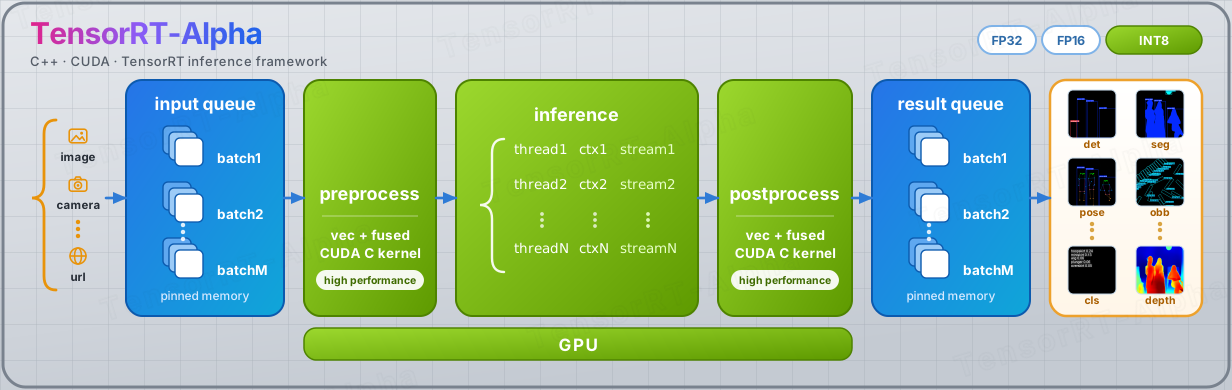
TensorRT-Alpha
FeiYull活跃维护基于 TensorRT 和 CUDA 加速 YOLO 系列模型部署的 C++ 示例库,覆盖检测、姿态、分割、深度估计、OBB 和分类等任务,帮你在 NVIDIA 显卡上把推理跑得更快。
🔥🔥🔥TensorRT for YOLO26 (det/pose/seg/depth/obb/cls), YOLOv11,YOLOv10 YOLOv9,YOLOv8, ... 🚀🚀🚀 CUDA IS ALL YOU NEED. 🍎🍎🍎
v2.0.0发布于 2026-10-27 03:55 UTC1,467star199fork同步于 2026-11-10 11:48 UTC
git clone -b v2-dev https://github.com/FeiYull/TensorRT-Alpha.git
cd TensorRT-Alpha
cmake -S . -B build -DCMAKE_BUILD_TYPE=Release -DOpenCV_DIR=<opencv_cmake_dir> -DTensorRT_ROOT=<TensorRT_dir> -DCMAKE_CUDA_COMPILER=/usr/local/cuda-12.9/bin/nvcc
cmake --build build -j24 硬件要求按 README 说明
README 未说明具体显存要求;依赖 CUDA 12.9 与 TensorRT 10.16,需 NVIDIA GPU;Nvidia Nano 等边缘设备仍在计划测试中。
需要 CUDA
基于 TensorRT + CUDA 的 C++ 推理仓库,手写全部 CUDA 算子,端到端 GPU 跑 YOLO 系列多任务
基于 TensorRT 和 CUDA 加速 YOLO 系列模型部署的 C++ 示例库,覆盖检测、姿态、分割、深度估计、OBB 和分类等任务,帮你在 NVIDIA 显卡上把推理跑得更快。
核心能力
- 数据源到渲染全程 GPU,零 CPU 往返
- 1 engine + N context 多 batch 并发推理
- 手写 CUDA 预处理与后处理算子族
- 支持图片、视频流、webcam、URL 多种输入源
- 对齐 ultralytics PyTorch 推理精度
容易踩的坑
内容由模型根据 README 生成,可能不完整或不准确,以官方文档为准。看原文 README
- v2.0.0最新正式版2026-10-27 · 2026-10-27 03:55 UTC
v2.0.0 — Masks Leave the CPU, Builds Get Out of Your Way, Multi-Stream Turns On
v1.3 removed the CPU from the data path. v2.0 removes it from the result path.
Every segmentation mask, depth map and semantic map used to be resized, binarized and alpha-blended by hand on the host — for every instance, every frame, in floating point. That work now happens on the device, in the same CUDA kernels the models themselves use, and both renderers share one implementation of it. The pictures did not change. Not by a single byte.
Alongside it: three build layouts instead of one, six one-line build scripts, twenty-six sample programs that finally look like each other, and multi-stream inference that runs up to nine 1080p feeds on one GPU — the last of those at 60% and climbing.
TL;DR
v1.3.0 (Oct 21) v2.0.0 (today) Registered models 34 (3 of them legacy duplicates) 31 — one implementation each Build layouts 1 3 (+ optional OpenCV=OFFbuild)Mask / depth / sem composition per-pixel loops on the host CUDA kernels, on the device Multi-stream pipeline only, no CLI up to 9× 1080p verified, 60% shipped Build entry point one README full of flags six scripts, one line each Tests always built off by default, opt-in Rendering backends OpenCV OpenCV + OpenGL (CUDA interop)
🧠 Masks stopped crossing the bus
A 1080p segmentation frame with a dozen instances used to cost, per instance: one full-frame bilinear upsample, one threshold pass, and one alpha-blended pixel loop — all on the CPU, all in
float, all inside the renderer. That was the last place where a GPU pipeline quietly handed its work back to the host, and it showed: with rendering enabled,seganddetwere within 13 ms of each other over 520 frames, because the renderer was the cost.Now:
seg_mask_postdoes binarization, box cropping, in-place 0/1 float conversion and candidate counting in a single pass over the device bufferCvScaleMaskPlanis a kernel-for-kernel port of ATen's bilinear upsample — the same coefficients, the same rounding, the same edge handlingoverlay_stagecomposites masks, depth maps and semantic maps into the frame on the device, shared by the OpenCV and the OpenGL renderer
The host is left with a
cudaMemcpy, amemcpy, and four box coordinates per instance. No pixel loop survives anywhere on the CPU.The proof it is not a different picture:
Check Result Masks vs F.interpolate+> 0.5(PyTorch)0 / 2,064,960 pixels differ Rendered output vs the old host path MD5 identical, byte for byte ⚙️ Three builds, six scripts, no flags to remember
The pipeline now ships as three coherent layouts, each with a name that says exactly what is inside:
Build directory TensorRT OpenCV FFmpeg OpenGL What it is build✅ ✅ — — default: images, folders, cameras, videos build-ffm✅ ✅ ✅ — + NVDEC hardware decoding `buil - v1.3.02026-10-21 · 2026-10-21 12:35 UTC
查看更新说明
v1.3.0 — Hardware Decode, Zero-Copy, and the End of the Host Round Trip
1080p inference: 4.78 ms → 1.70 ms per frame. CPU cost: 13.2 ms → 2.3 ms. Output: still bit-identical.
Four days after v1.0.0 the decoder finally stopped handing every frame back to the CPU just so the model could upload it to the GPU again. That single round trip — 12.75 MB per frame, 60 times a second — was the last big thing standing between this project and the hardware it runs on. It is gone.
TL;DR
v1.0.0 (Oct 17) v1.3.0 (today) Decode backend cv::VideoCaptureonlyopencv/ffmpeg/auto, plus NVDECPer-frame host round trip mandatory (6.2 MB down + 6.55 MB up) skipped when nothing reads host pixels 1080p frame time 4.780 ms 1.695 ms (2.8×) CPU per frame 13.203 ms 2.318 ms (5.7× less) Containers OpenCV only ships FFmpeg 9.0 with cuvid Platforms verified Windows Windows + Ubuntu 24.04 Since v1.0.0: 15 commits, 208 files, +10,659 / −2,122 lines, and one consistent direction — take the CPU out of the hot path.
Highlights
2.8× end-to-end, CPU cost down to one fifth
1080p, YOLO26n, batch 2, two independent rounds, median of three runs each:
Backend ms / frame CPU ms / frame OpenCV ( cv::VideoCapture)4.780 13.203 FFmpeg, software decode 2.174 9.115 FFmpeg + NVDEC (new) 1.695 2.318 The CPU number matters more than the wall-clock one. The decode thread used to be the bottleneck — the GPU sat at 26–32% utilisation waiting for pixels. It no longer is.
Faster than software decode by 28% — on the same GPU work
Hardware decode usually wins because it offloads the CPU. Here it also wins on latency: 1.695 vs 2.174 ms. The model reads the decoder's output in place; the pixels never leave the device.
It does not need a big machine
Normalized frame time, same source, CPU affinity restricted to N cores:
Cores OpenCV Software NVDEC 32 1.00 1.00 1.00 8 1.18 1.41 1.03 4 1.80 2.70 1.03 2 2.71 3.94 1.09 Software decode degrades 4× when you take the cores away. NVDEC loses 9%. On anything smaller than a workstation, this is the difference between "runs" and "does not".
Pixel-exact against the software path
Metric Result Mean absolute difference 0.594 LSB Max difference 3 LSB Pixels off by more than 8 LSB 0.000% OpenCV vs FFmpeg software decode is even stronger: mean 0.000, max 0 — bit-identical. The residual against NVDEC comes from BT.709 vs BT.601 matrix handling, handled explicitly (
sws_setColorspaceDetails), not by luck.Opt-in by design: if you change nothing, nothing changes
FFmpeg is off by default (
TRT_ALPHA_WITH_FFMPEG=OFF), and the runtime default is still--decode opencv. Not passing the new flags produces byte-for-byte the same pipeline as v1.2.1 — including the three-copy decode path, deliberately.
What's new
Decode backend selection
--decode opencv | ffmpeg | auto— libavformat/libavcodec as a first-class alternative--hwaccel auto | none | nvdec— cuVID with explicit failure when requested and unavailable- Images, image directories and cameras stay on OpenCV regardless
Zero-copy device path
Batch::deviceBuffer+core::stageBatchPixels(): the model reads decoder output where the decoder wrote it- The 6.55 MB/frame H2D upload is gone on the NVDEC path
Skipping the copy nobody asked for
--host-copy auto | on | off— with no renderer attached, frames stay on the device (0.475 ms of a 1.70 ms frame)Frame::image()/rendered()return an empty view rather than a device pointer
Genuinely asynchronous transfer
- D2H now targets page-locked memory. Against pageable mem
- v1.0.02026-10-17 · 2026-10-17 12:05 UTC
查看更新说明
🔥 TensorRT-Alpha v1.0.0 — CUDA Is All You Need
A ground-up rewrite, not a version bump. Every CUDA kernel handwritten. Zero CPU round-trips. Every model bit-exact against ultralytics.
Three years of deployment mileage, one brand-new engine block underneath.
🚀 Headline numbers
Result ⏱️ End-to-end, YOLO26, 1080p, batch=2 2.248 ms / frame → ~445 FPS ceiling ⚡ Inference vs ultralytics 14.1× faster (GPU TensorRT vs CPU torch) 🧠 Preprocess — 5 ops fused into 1 kernel 31.8× faster (0.043 ms vs 1.380 ms) 🎯 Postprocess — decode + NMS, all on GPU 7.3× faster 💾 1 engine + N contexts, 4 workers 356 → 309 MiB VRAM 🧪 Test coverage 34 CTest suites, all green 📦 Codebase 213 files / ~40.9k lines, 21 hand-written CUDA op files
🎉 What's inside
🧬 Architecture — rebuilt from zero
- 🏗️ Three-stage pipeline:
source → pool → render, fully decoupled, every stage a replaceable interface. - 🧊
coreis OpenCV-free and nvonnxparser-free — engine, memory pool, bounded queue, worker pool, model registry. Clean layering that survives the next refactor. - 🧩
BatchResultas the cross-layer contract — tasks never touch each other's buffers, and the compiler enforces it. - 🔌 Pluggable datasource / renderer — OpenCV today, GStreamer or NVDEC tomorrow, with zero changes to the pipeline.
- 🧱 Layout as an axis-letter string — static / dynamic batch, NCHW / NHWC, all resolved from one place.
- 📜 Engine-declared shapes are the single source of truth — mismatch fails loudly. No silent reshaping, ever.
⚡ CUDA kernels — all handwritten, all ours
- 🖼️ Bit-exact OpenCV-equivalent preprocessing ops:
resize,copyMakeBorder,cvtColor,hwc2chw,normalize,pil_resample,center_crop. - 🔥 Fused variants that collapse the whole 5-step preprocess into one kernel launch.
- 🎯 Full postprocess family in CUDA:
decode,topk,nms_utral, fused + vectorized fused decode-NMS for det and obb. - 🎭 Seg masks on GPU:
mask_coeff_dot,scale_mask— no CPU interpolation, no round-trip. - 🗂️ Legacy kernels archived, not deleted —
kernels/legacy/keeps every old implementation intact for reference. - 🧪 Kernel-level unit tests — accuracy compared op-by-op, not just "looks right on one image".
🎯 Model coverage — 21 models, one CLI
- 🐣 YOLO26 in 7 tasks, all shipping:
det·seg·obb·cls·depth·sem·pose. - ✅ fp32 / fp16 / int8 / onnx — every YOLO26 task, engines and calibration verified.
- 🦖 14 legacy families carried over and re-plumbed: YOLOv3 / v4 / v5 / v6 / v7 / v8 / v8-pose / v8-seg / YOLOX / YOLOR / YOLO-NAS / EfficientDet / YuNet / U2Net.
- 🎛️
trt_alpha list— every registered model, one command.
🖥️ CLI — one binary, everything
- 🚀
trt_alpha run— one--sourceauto-detects image / image directory / video / RTSP / RTMP / HTTP(S) / UDP / webcam id. - 📊
trt_alpha bench— per-stage timing with p50 / p90 / p99 and FPS, not a hand-waved average. - 🧾
trt_alpha list— the whole model registry. - 🔍 Runtime config introspection — startup prints what was actually loaded, and flags dead keys in your INI as
[unused]. - 🧯 Hardened argument parsing — no sentinel-value traps, no silent fallbacks to defaults.
🎨 Concurrency &
- 🏗️ Three-stage pipeline:
用户点评
登录用户的真实使用记录,可按版本和硬件筛选共 0 条
还没有人点评。第一个说出真实体验的人最有价值。
简介
C++ 推理仓库,基于 TensorRT + CUDA,手写全部 CUDA C 算子:
- 端到端 GPU 推理:数据源 → 组批 → GPU 前处理 → 推理 → GPU 后处理 → 渲染 / 保存,全程零 CPU 往返。
- 多 batch 推理:
1 engine + N context并发,每个 worker 独占一条cudaStream。 - 无损复刻原始 PyTorch 推理:对齐 ultralytics 官方实现,见 严格精度对齐。
- 多种输入源:图片、图片目录、视频流(RTSP / RTMP / HTTP(S) / UDP)、webcam、URL —— 一个
--source自动判别。 - 高性能视频解码:借助 FFmpeg 硬解(NVDEC)加速视频解码。
- TODO:Nvidia Nano 等多款边缘设备(计划测试中)
- TODO:支持 GStreamer —— 可拆卸 OpenCV,替换为 GStreamer 数据源
- TODO:
trt_alpha build—— ONNX → engine 一键序列化 - TODO:展示更细粒度的性能测试 —— 用 Nsight Systems 剖析整条流水线的时间线(H2D / 推理 / D2H / 后处理 / 渲染的排布与空泡),用 Nsight Compute 逐个 CUDA kernel 剖析(占用率、访存、瓶颈定位)
- TODO:更多模型系列
- 2026.10.27 📚 文档重构:README 只保留 TensorRT + OpenCV 一条默认路线,FFmpeg 硬解与 FFmpeg + OpenGL 多路渲染各自独立成篇;六个编译脚本统一命名
build_<系统>_<库组合> - 2026.10.24 🎮 多路渲染收口:CUDA-GL interop 零拷贝显示、单击放大、per-source 结果队列;9 路 1080p 稳定(pinned 内存受
RLIMIT_MEMLOCK限制时自动降级并只告警一次) - 2026.10.24 🧩 三套构建目录定型(
build/build-ffm/build-gl)+ 两个开关(test 默认关、sample 默认开);移除 yolov8_old / yolov8_pose_old / yolov8_seg_old - 2026.10.24 ⚡ seg / depth / sem 结果合成全部下沉到 CUDA,OpenCV 与 GL 两个渲染器共用同一套实现
- 2026.10.23 🖼️ 多路视频 + OpenGL 渲染后端(GLFW + CUDA-GL interop);OpenCV 降为可选后端(
-DTRT_ALPHA_WITH_OPENCV=OFF) - 2026.10.21 🚀 release v1.3.0:FFmpeg 硬解改为编译期可选(
--decode ffmpeg/--hwaccel nvdec),NVDEC 显存直通 + pinned 回拷,[source]段与三态HostCopy - 2026.10.20 🐛 修复非 640 输入(如 672)在 fused 预处理中的
float4对齐越界 - 2026.10.19 📦 samples 改为一任务一示例;清理无用参数与
input_output_names;补训练 / 部署文档(英 / 中) - 2026.10.18 🚀 YOLOV11 / YOLOV8 / YOLOV9 / YOLOV10 接入,全部走 YOLO26 的 fused 前后处理:yolov11 五任务;yolov8 重写五任务;yolov9 det + seg;yolov10 det(仅 one2many)。与 python 逐框对拍实测:框 ≤3.4e-4 px、conf ≤2e-6、mask 逐像素 0 差异
- 2026.10.16 💖 release v1.0
- 2026.10.15 🐧 Linux 支持:GCC 13 移植、行尾 / 编辑器策略归一、引擎序列化脚本;Windows 运行时 DLL 自动部署;参数解析与源探测硬化 +
run全参数矩阵测试脚本 - 2026.10.14 🧠 YOLO26 全任务族补齐:cls / depth / obb / pose / seg / sem;首页架构图
- 2026.10.12 🎯 YOLO26-det 接入:后处理算子族(decode / NMS / 融合 / 向量化),命名统一
yolo26→yolov26 - 2026.10.11 ⚡ 逐位对齐 OpenCV 的 CUDA 预处理算子族(resize / copyMakeBorder / cvtColor / hwc2chw / normalize + 融合核)
- 2026.10.10 📦 legacy CUDA 核归档到
kernels/legacy/,公开头注释全面英译 - 2026.10.07 🔍 代码评审硬化:batch 上限守卫、丢帧策略、覆盖输入守卫;CTest 入场(32 项)
- 2026.10.06 🛡️ 运行期配置透视(
logConfigBox+ 死键[unused]判定);URL 流(rtsp / rtmp / http(s) / udp)+ 目录源 + 输出目录规则 - 2026.10.05 🔢 输入布局抽象(轴字母串
Layout);静态 / 动态 batch 语义统一,以引擎 profile 为唯一真相源 - 2026.10.04 📄 两级配置:新增
configs/base.ini,模型 ini 只保留特有字段 - 2026.10.03 ⚙️ 高层
InferAPI(InferParams/Infer/Stream/Result)+ renderer 可插拔 - 2026.10.01 🚀
1 engine + N context:共享ICudaEngine,4 worker 显存 ~356 → 309 MiB - 2026.09.30 🧩 目录按任务拆分
det/seg/kpt;CLI--net支持全部模型并自动推导configs/<net>.ini - 2026.09.29 🎯 任务类型扩展:YOLOv8-seg / U2Net(seg)、YOLOv8-pose(kpt)
- 2026.09.28 🔥 YOLOv3 / YOLOv4 / YOLO-NAS / EfficientDet / YuNet 接入(det 共 11 个)
- 2026.09.27 ⚡ 新增
trt_alpha bench(分步耗时 + p50/p90/p99 + FPS);YOLOv5 / v6 / v7 / YOLOX / YOLOR 接入 - 2026.09.26 🖥️ CLI
list/run端到端推理;日志模块与内存池收尾 - 2026.09.25 🔧 三级流水线骨架(source → pool → render)完成
- 2026.09.24 🎉 全面重构:新框架
core+kernels,第一个模型 YOLOv8 跑通 - 2026.09.20 🔥 重构框架,实现更高性能,解决历史遗留 bug
- ...
- 2023.01.01 🔥 更新 yolov3, yolov4, yolov5, yolov6
- 2023.01.04 🍅 更新 yolov7, yolox, yolor
- 2023.01.05 🎉 更新 u2net, libfacedetection
- 2023.01.08 🚀 全网最快支持 yolov8 的 tensorrt 部署
- 2023.01.20 🍏 更新 efficientdet, pphumanseg
- 2023.12.09 🍁 更新 yolov8-pose
- 2023.12.19 🍉 更新 yolov8-seg
- 2023.12.27 💖 更新 yolonas
严格精度对齐
更多参考:对齐时,关闭矩形推理
部分性能展示
安装依赖
| 依赖 | 版本 | 说明 |
|---|---|---|
| CUDA | 12.9 | 预处理 / 后处理由 CUDA C 实现,支持双 batch |
| TensorRT | 10.16 | 支持 FP32 / FP16 / INT8 量化 |
| OpenCV | >= 4.5 | 解码 + 窗口 + 存图 |
| C++ | C++17 | |
| gcc(Linux) | 13.3 | |
| Visual Studio(Windows) | 2017 / 2019 / 2022 |
具体安装步骤:Windows or Ubuntu 24.04 or Docker
视频硬解和多路 GL 渲染是另外两条可选路线,依赖、编译、执行分别写在:
快速开始
git clone -b v2-dev https://github.com/FeiYull/TensorRT-Alpha.git
cd TensorRT-Alpha
cmake -S D:\VS2022_Project\TensorRT-Alpha `
      -B D:\VS2022_Project\TensorRT-Alpha\build `
      -G "Visual Studio 17 2022" -A x64 `
      -DOpenCV_DIR=D:/ThirdParty/opencv/build/x64/vc16/lib `
      -DTensorRT_ROOT=D:/ThirdParty/TensorRT-10.16.1.11

cmake --build build --config Release -j 24
.\build\bin\Release\trt_alpha.exe list
cmake -S ~/workspace/TensorRT-Alpha -B ~/workspace/TensorRT-Alpha/build \
      -DCMAKE_BUILD_TYPE=Release \
      -DOpenCV_DIR=/home/feiyull/thirdparty/opencv4.8.1/lib/cmake/opencv4 \
      -DTensorRT_ROOT=/home/feiyull/thirdparty/TensorRT-10.16.1.11 \
      -DCMAKE_CUDA_COMPILER=/usr/local/cuda-12.9/bin/nvcc

cmake --build build -j24
./build/bin/Release/trt_alpha list
要 Debug:多配置生成器把 --config Release 换成 Debug;单配置生成器重配一次 -DCMAKE_BUILD_TYPE=Debug。产物进 bin/Debug/。
# ONNX:用 ultralytics 官方命令行导出
pip install ultralytics
yolo export model=yolo26n.pt format=onnx imgsz=640 batch=2 opset=17 simplify=True

# 序列化:ONNX -> engine
trtexec --onnx=yolo26n.onnx --saveEngine=engines/yolov26n.trt --noTF32
更多参考:导出与序列化
上面
yolo export只是拿 ultralytics 举个例,不代表只能用 ultralytics。换 MMDetection / Detectron2 / PaddleDetection / 自己写的 PyTorch 训练脚本,流程完全一样:先在各自框架里手动导出 ONNX,再交给trtexec序列化。本仓库只消费 ONNX,不负责导出。
./build/bin/Release/trt_alpha run --net yolov26 --source data/bus.jpg --show    # 图片
./build/bin/Release/trt_alpha run --net yolov26 --source data/people.mp4 --show   # 视频
./build/bin/Release/trt_alpha run --net yolov26 --source data/images/ --save output/det/   # 目录
./build/bin/Release/trt_alpha run --net yolov26 --source 0 --show              # 相机
./build/bin/Release/trt_alpha run --net yolov26 --source data/bus.jpg --save output/det/
# 量化模型换 --engine
./build/bin/Release/trt_alpha run --net yolov26 --source data/bus.jpg --engine engines/yolov26n_fp16.trt --show
Windows 下把 ./build/bin/Release/trt_alpha 换成 .\build\bin\Release\trt_alpha.exe。
更多参考:CLI 完整用法
源码里直接调用:
#include "trt_alpha/infer/infer.hpp"

int main(){
    trt_alpha::InferParams p;
    p.model_type  = trt_alpha::ModelType::yolov26; // det, pose, cls, obb, depth
    p.source = "xxx.jpg";                          // xx.jpg, xx.mp4, camera_id, url, images' path
    // p.engine = "engines/yolov26.trt" p.config_path = "configs/yolov26.ini"
    trt_alpha::Infer  model(p);   trt_alpha::Stream stream = model.async();    trt_alpha::Result r;
    while (stream.get(r)){
        // here:get the results of inference
        // ......
    }
    stream.stop();
    return 1;
}
更多参考:samples/sample_infer/sample_infer.cpp
模型支持
✅ 已跑通并实测 · 🚧 规划中 · — 未提供 · 📥 点击下载 onnx
| model | fp32 | fp16 | int8 | 下载onnx |
|---|---|---|---|---|
| YOLO26 | ||||
| yolo26-det | ✅ | ✅ | ✅ | 📥 |
| yolo26-seg | ✅ | ✅ | ✅ | 📥 |
| yolo26-obb | ✅ | ✅ | ✅ | 📥 |
| yolo26-cls | ✅ | ✅ | ✅ | 📥 |
| yolo26-depth | ✅ | ✅ | ✅ | 📥 |
| yolo26-sem | ✅ | ✅ | ✅ | 📥 |
| yolo26-pose | ✅ | ✅ | ✅ | 📥 |
| yolo26-tracking | 🚧 | 🚧 | 🚧 | — |
| YOLOV11 | ||||
| yolov11_det | ✅ | ✅ | ✅ | 📥 |
| yolov11_seg | ✅ | ✅ | ✅ | 📥 |
| yolov11_obb | ✅ | ✅ | ✅ | 📥 |
| yolov11_cls | ✅ | ✅ | ✅ | 📥 |
| yolov11_pose | ✅ | ✅ | ✅ | 📥 |
| YOLOV9 | ||||
| yolov9_det | ✅ | ✅ | ✅ | 📥 |
| yolov9_seg | ✅ | ✅ | ✅ | 📥 |
| YOLOV10 | ||||
| yolov10_det | ✅ | ✅ | ✅ | 📥 |
其他(沿用 legacy 资产)
| model | fp32 | fp16 | int8 | 下载onnx |
|---|---|---|---|---|
| yolov3 | ✅ | — | — | 📥 |
| yolov4 | ✅ | — | — | 📥 |
| yolov5 | ✅ | — | — | 📥 |
| yolov6 | ✅ | — | — | 📥 |
| yolov7 | ✅ | — | — | 📥 |
| yolov8_det | ✅ | ✅ | ✅ | 📥 |
| yolov8_seg | ✅ | ✅ | ✅ | 📥 |
| yolov8_cls | ✅ | ✅ | ✅ | 📥 |
| yolov8_pose | ✅ | ✅ | ✅ | 📥 |
| yolov8_obb | ✅ | ✅ | ✅ | 📥 |
| yolox | ✅ | — | — | 📥 |
| yolor | ✅ | — | — | 📥 |
| yolo_nas | ✅ | — | — | 📥 |
| efficientdet | ✅ | — | — | 📥 |
| yunet | ✅ | — | — | 📥 |
| u2net | ✅ | — | — | 📥 |
目录结构
app/                 CLI(run / bench / list / build)
cmake/               OpenCV / TensorRT / CUDA 探测 + 运行时部署
configs/             模型 INI(base.ini + <model>.ini 两级)
data/                图片 / 视频 / classes(需自行放入)
include/trt_alpha/   公共头
  ├── core/          引擎 / 内存池 / 队列 / 池 / 模型注册(零 OpenCV)
  ├── datasource/    数据源接口(OpenCV 实现,可替换为 GStreamer)
  ├── pipeline/      三级流水线调度
  ├── renderer/      渲染接口(OpenCV 实现)
  ├── kernels/       CUDA 算子(ops/ = 预处理 / 后处理算子族,legacy/ = 旧实现归档)
  └── det|seg|kpt|cls|depth|sem|obb/  任务类型与模型
src/                 实现
samples/             使用示例(含 sample_infer 高层 API 示例)
test/                单元测试(默认不编,-DTRT_ALPHA_BUILD_TESTS=ON)
scripts/             编译脚本(build_<系统>_<库组合>)+ 引擎序列化 / 参数矩阵
其他
1.配置文件
2.量化
3.部署自己训练的模型
4.FFmpeg 硬解(--decode / --hwaccel)
5.FFmpeg + OpenGL 多路渲染(--render gl)
Citation
@misc{FeiYull_TensorRT-Alpha,
  author = {FeiYull},
  title = {TensorRT-Alpha},
  year = {2023},
  publisher = {GitHub},
  journal = {GitHub repository},
  howpublished = {https://github.com/FeiYull/tensorrt-alpha}
}

ultralytics
ultralytics·Python
YOLO 系列官方实现库,一套 PyTorch 代码覆盖目标检测、实例与语义分割、图像分类、姿态估计和目标跟踪,训练到部署全流程打通。
目标检测+4检测 / 分割
63270+8712kv8.4.2082026-11-10 09:31 UTC

yolov5
ultralytics·Python
基于 PyTorch 的目标检测全家桶,覆盖训练、推理、实例分割、图像分类和模型导出,开箱即用,适合快速落地视觉任务。
目标检测+4检测 / 分割
58258+517kv7.02026-11-07 16:59 UTC
pytorch-image-models
huggingface·Python
收录最全的 PyTorch 图像骨干网络合集,涵盖 ResNet、ViT、ConvNeXt 等主流模型,自带训练、评估、推理和导出脚本及预训练权重,省去自己搭网络和找权重的麻烦。
图像分类+4检测 / 分割
37272+75.2kv1.0.312026-11-07 23:22 UTC

detectron2
facebookresearch·Python
Detectron2 是 Facebook 开源的目标检测与分割平台,提供模块化架构和丰富预训练模型,方便快速搭建和训练视觉识别任务。
目标检测+4检测 / 分割
34980+57.9kv0.62026-10-27 09:21 UTC