快速开始依赖单独克隆 docker-kong 仓库,而非本仓库;默认占用 8000(代理)、8001(Admin API)、8002(Kong Manager)端口;需设置 KONG_DATABASE=postgres 并启用 database profile,否则不是该启动方式。
kong
KongApache-2.0活跃维护云原生 API 网关,同时充当 LLM 与 AI 服务的统一入口,集中处理路由、鉴权、限流和可观测性。
🦍 The API and AI Gateway
3.9.4发布于 2026-10-12 07:27 UTC44,375star +9 / 7 天5,239fork同步于 2026-11-10 17:19 UTC
git clone https://github.com/Kong/docker-kong
cd docker-kong/compose/
KONG_DATABASE=postgres docker-compose --profile database up 硬件要求按 README 说明
README 未说明;仅提及可运行于云、裸金属、容器及 Kubernetes,未给出 CPU/内存/GPU 要求。
云原生 API 与 LLM/MCP 网关,用插件统一代理、路由和 AI 流量治理
云原生 API 网关,同时充当 LLM 与 AI 服务的统一入口,集中处理路由、鉴权、限流和可观测性。
核心能力
- 通过 RESTful Admin API 或声明式配置做路由、负载均衡与健康检查
- 用 JWT、Basic Auth、OAuth、ACL 等插件做认证授权
- 统一 LLM API 跨 OpenAI、Anthropic、Gemini、Bedrock 等多家供应商路由
- 提供 MCP 流量治理、安全与可观测性,并可从 REST 自动生成 MCP
- 支持无数据库声明式部署与控制面/数据面分离的混合部署
容易踩的坑
内容由模型根据 README 生成,可能不完整或不准确,以官方文档为准。看原文 README
- 3.9.4最新正式版2026-10-12 · 2026-10-12 07:27 UTC
- 3.9.32026-06-17 · 2026-06-17 06:02 UTC
查看更新说明
- 3.9.22026-06-04 · 2026-06-04 07:12 UTC
查看更新说明
- 3.9.12025-06-04 · 2025-06-04 09:20 UTC
查看更新说明
- 3.9.02024-12-13 · 2024-12-13 04:17 UTC
查看更新说明
用户点评
登录用户的真实使用记录,可按版本和硬件筛选共 0 条
还没有人点评。第一个说出真实体验的人最有价值。






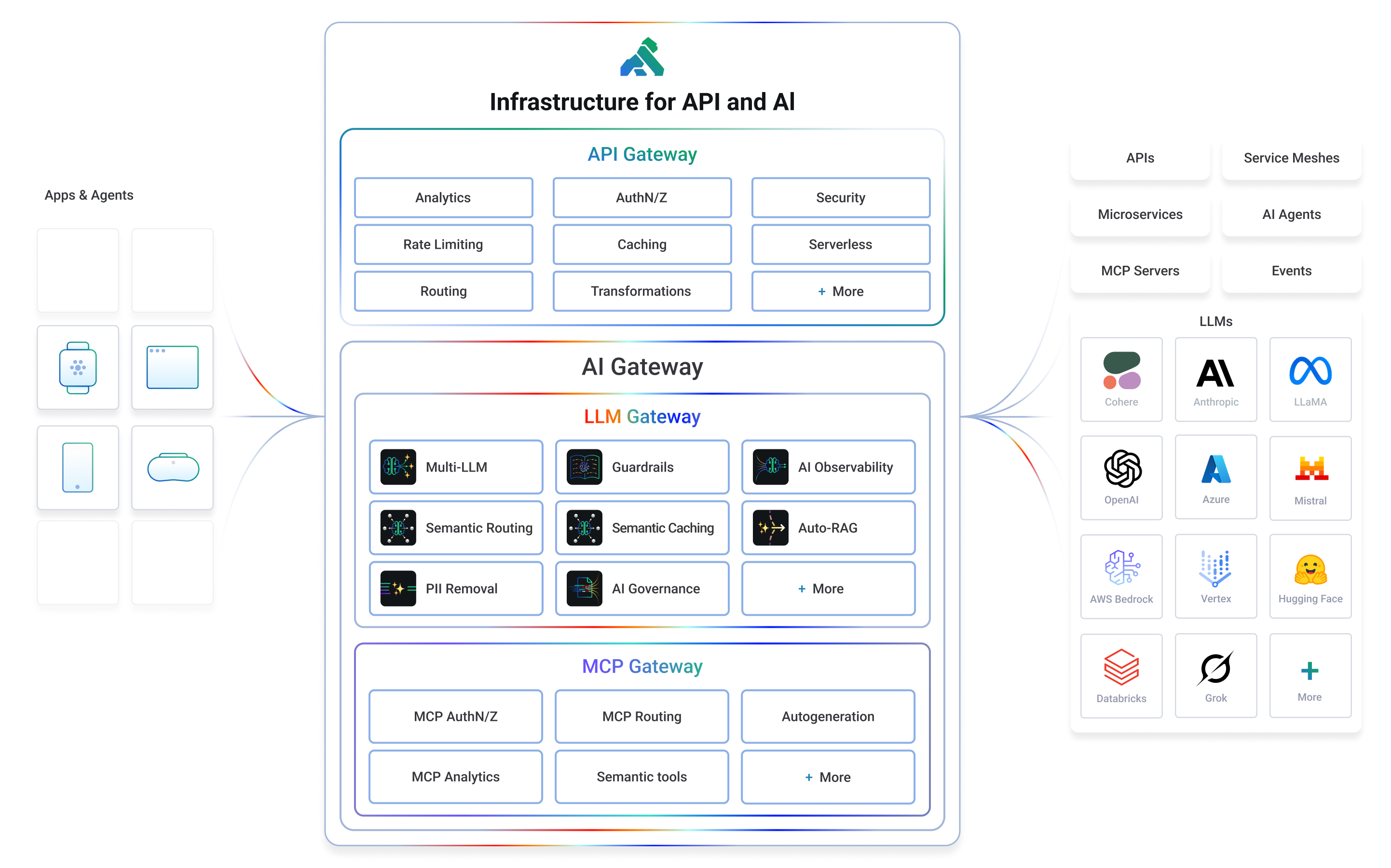
Kong or Kong Gateway is a cloud-native, platform-agnostic, scalable API 𖧹 LLM 𖧹 MCP Gateway distinguished for its high performance and extensibility via plugins. It also provides advanced AI traffic capabilities with multi-LLM support, semantic security, MCP traffic security and analytics, and more.
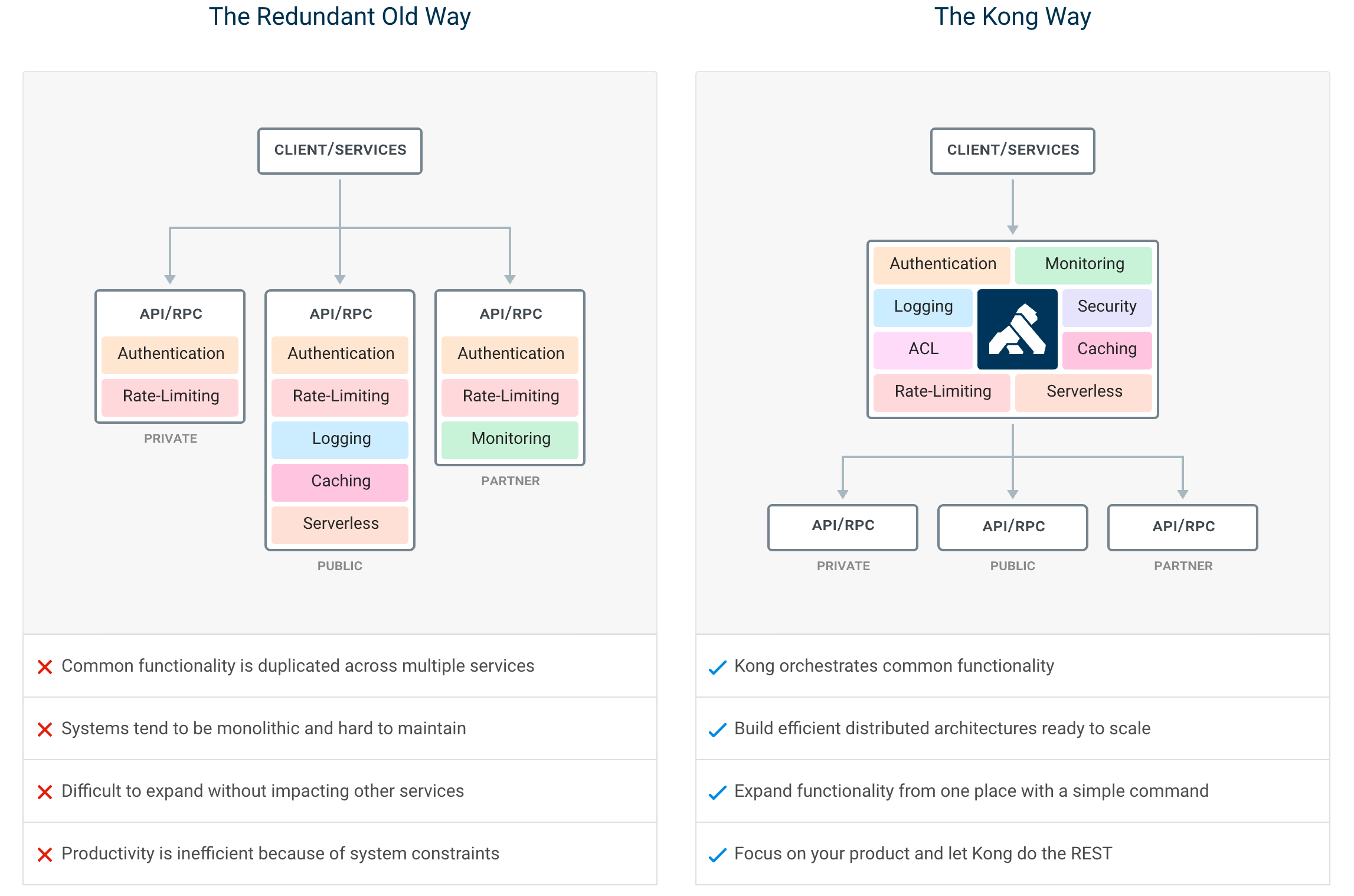
By providing functionality for proxying, routing, load balancing, health checking, authentication (and more), Kong serves as the central layer for orchestrating microservices or conventional API traffic - and agentic LLM and MCP as well - with ease.
Kong runs natively on Kubernetes thanks to its official Kubernetes Ingress Controller.
Installation | Documentation | Discussions | Forum | Blog | Builds | AI Gateway | Cloud Hosted Kong
Getting Started
If you prefer to use a cloud-hosted Kong, you can sign up for a free trial of Kong Konnect and get started in minutes. If not, you can follow the instructions below to get started with Kong on your own infrastructure.
Let’s test drive Kong by adding authentication to an API in under 5 minutes.
We suggest using the docker-compose distribution via the instructions below, but there is also a docker installation procedure if you’d prefer to run the Kong Gateway in DB-less mode.
Whether you’re running in the cloud, on bare metal, or using containers, you can find every supported distribution on our official installation page.
- To start, clone the Docker repository and navigate to the compose folder.
  $ git clone https://github.com/Kong/docker-kong
  $ cd docker-kong/compose/
- Start the Gateway stack using:
$ KONG_DATABASE=postgres docker-compose --profile database up
The Gateway is now available on the following ports on localhost:
:8000- send traffic to your service via Kong:8001- configure Kong using Admin API or via decK:8002- access Kong's management Web UI (Kong Manager) on localhost:8002
Next, follow the quick start guide to tour the Gateway features.
Getting started with AI Gateway for LLM and MCP
If you would like to get started with Kong AI Gateway capabilities including LLM and MCP features, please refer to the official AI documentation.
Features
By centralizing common API, AI and MCP functionality across all your organization's services, Kong Gateway creates more freedom for engineering teams to focus on the challenges that matter most.
The top Kong features include:
- Advanced routing, load balancing, health checking - all configurable via a RESTful admin API or declarative configuration.
- Authentication and authorization for APIs using methods like JWT, basic auth, OAuth, ACLs and more.
- Universal LLM API to route across multiple providers like OpenAI, Anthropic, GCP Gemini, AWS Bedrock, Azure AI, Databricks, Mistral, Huggingface and more.
- MCP traffic governance, MCP security and MCP observability in addition to MCP autogeneration from any RESTful API.
- 60+ AI features like AI observability, semantic security and caching, semantic routing and more.
- Proxy, SSL/TLS termination, and connectivity support for L4 or L7 traffic.
- Plugins for enforcing traffic controls, rate limiting, req/res transformations, logging, monitoring and including a plugin developer hub.
- Sophisticated deployment models like Declarative Databaseless Deployment and Hybrid Deployment (control plane/data plane separation) without any vendor lock-in.
- Native ingress controller support for serving Kubernetes.
Plugin Hub
Plugins provide advanced functionality that extends the use of the Gateway. Many of the Kong Inc. and community-developed plugins like AWS Lambda, Correlation ID, and Response Transformer are showcased at the Plugin Hub.
Contribute to the Plugin Hub and ensure your next innovative idea is published and available to the broader community!
Contributing
We ❤️ pull requests, and we’re continually working hard to make it as easy as possible for developers to contribute. Before beginning development with the Kong Gateway, please familiarize yourself with the following developer resources:
- Community Pledge (COMMUNITY_PLEDGE.md) for our pledge to interact with you, the open source community.
- Contributor Guide (CONTRIBUTING.md) to learn about how to contribute to Kong.
- Development Guide (DEVELOPER.md): Setting up your development environment.
- CODE_OF_CONDUCT and COPYRIGHT
Use the Plugin Development Guide for building new and creative plugins, or browse the online version of Kong's source code documentation in the Plugin Development Kit (PDK) Reference. Developers can build plugins in Lua, Go or JavaScript.
Releases
Please see the Changelog for more details about a given release. The SemVer Specification is followed when versioning Gateway releases.
Join the Community
- Check out the docs
- Join the Kong discussions forum
- Join the Kong discussions at the Kong Nation forum: https://discuss.konghq.com/
- Join our Community Slack
- Read up on the latest happenings at our blog
- Follow us on X
- Subscribe to our YouTube channel
- Visit our homepage to learn more
Konnect Cloud
Kong Inc. offers commercial subscriptions that enhance the Kong Gateway in a variety of ways. Customers of Kong's Konnect Cloud subscription take advantage of additional gateway functionality, commercial support, and access to Kong's managed (SaaS) control plane platform. The Konnect Cloud platform features include real-time analytics, a service catalog, developer portals, and so much more! Get started with Konnect Cloud.
License
Copyright 2016-2026 Kong Inc.

Licensed under the Apache License, Version 2.0 (the "License");
you may not use this file except in compliance with the License.
You may obtain a copy of the License at

   https://www.apache.org/licenses/LICENSE-2.0

Unless required by applicable law or agreed to in writing, software
distributed under the License is distributed on an "AS IS" BASIS,
WITHOUT WARRANTIES OR CONDITIONS OF ANY KIND, either express or implied.
See the License for the specific language governing permissions and
limitations under the License.

traefik
traefik·Go
云原生反向代理和负载均衡器,自动发现 Docker、Kubernetes 等服务并配置路由,内置 Let's Encrypt 证书管理,适合做微服务入口网关。
反向代理+4网关与路由
65512+276.3kv3.7.172026-11-10 15:02 UTC

litellm
BerriAI·Python
统一调用 100+ 家 LLM API 的 AI 网关,用 OpenAI 格式或原生格式接入,自带成本追踪、限流护栏、负载均衡和日志。
AI 网关+4网关与路由
63051+19913kv1.108.32026-11-10 17:16 UTC

new-api
QuantumNous·Go
自托管的 LLM 网关,统一兼容 OpenAI、Claude、Gemini 等接口,提供模型路由、访问控制、用量统计与成本核算,方便团队集中管理和分发大模型调用。
LLM 网关+4网关与路由
51701+18813kv1.0.0-rc.492026-11-10 16:46 UTC
one-api
songquanpeng·JavaScript
把 OpenAI、Claude、Gemini、通义千问等十几家主流大模型统一到一个 API 下,方便做密钥管理和二次分发,单文件部署开箱即用。
LLM API 网关+4网关与路由
37397+506.9kv0.6.102026-01-09 03:26 UTC