Web/无头模式启动前必须先运行 init-community-encryption-key.sh 生成密钥,否则启动失败;该密钥文件需单独备份并跨升级保留,丢失后已存的数据源密码和 AI API Key 将无法解密;服务默认只绑定 127.0.0.1:10825,且无用户权限隔离,不要暴露到公网;5.3.0 起数据目录改为 /root/.chat2db-community,不会自动迁移旧镜像的 /root/.chat2db 数据。

Chat2DB
OtterMind活跃维护跨平台本地优先的数据库客户端和 SQL 工作台,支持 40+ 数据库,可接入自有 AI 模型生成、解释和优化查询,桌面、Web、Docker、CLI 多端可用。
Chat2DB is a free, cross-platform, local-first database client and SQL workspace for developers, DBAs, analysts, and data teams. Connect to 40+ databases, manage data, edit and run SQL, and use your own AI model to generate, explain, and optimize queries. Available on desktop, web, Docker, and CLI, with MCP support.
v5.3.9-beta.2发布于 2026-10-29 07:04 UTC28,354star +1 / 7 天3,046fork同步于 2026-11-10 05:21 UTC
git clone https://github.com/OtterMind/Chat2DB.git && cd Chat2DB
./script/security/init-community-encryption-key.sh
docker run --detach --name chat2db-community --restart unless-stopped --publish 127.0.0.1:10825:10825 --volume "$HOME/.chat2db-community-docker:/root/.chat2db-community" --env CHAT2DB_COMMUNITY_ENCRYPTION_KEY_FILE=/run/secrets/chat2db-community-encryption.key --volume "$HOME/.config/chat2db-community/encryption.key:/run/secrets/chat2db-community-encryption.key:ro" chat2db/chat2db:latest 硬件要求按 README 说明
Docker 部署要求 Docker 19.03.0+、2 核以上 CPU、4 GiB 以上内存;桌面版支持 Windows、macOS、Linux。README 未说明 GPU 或显存要求。
有 Docker 镜像
本地优先的跨平台数据库客户端与 SQL 工作台,接入自有 AI 模型生成、解释和优化 SQL
跨平台本地优先的数据库客户端和 SQL 工作台,支持 40+ 数据库,可接入自有 AI 模型生成、解释和优化查询,桌面、Web、Docker、CLI 多端可用。
核心能力
- 支持 40+ 数据库,新 JDBC 数据库仅需配置即可接入
- SQL 工作区提供补全、格式化、执行、保存与执行历史
- 接入自有 AI 模型,用自然语言生成、解释和优化 SQL
- 可视化浏览元数据、管理表与对象、就地编辑数据
- 支持数据导入导出、仪表盘图表,另有带 MCP 的开源 CLI
容易踩的坑
内容由模型根据 README 生成,可能不完整或不准确,以官方文档为准。看原文 README
- v5.3.9-beta.2Chat2DB v5.3.9-beta.2最新正式版2026-10-29 · 2026-10-29 07:04 UTC
Chat2DB Community 5.3.9-beta.2 adds reusable import format templates, resumable data imports and error-handling policies, improves transfer progress, and fixes SQL and local-file tab restoration.
Beta release: Enable “Receive beta versions” in Settings → About to receive beta updates, or download an installer below.
Added (3)
- Reusable import format templates: save, apply and delete parsing settings for CSV, Excel and JSON files, so recurring imports need less setup. #2991
- Resumable data imports: continue failed or cancelled CSV, Excel and JSON imports from saved progress. The task center groups continuation attempts and keeps each run’s logs available. #2991
- Import error-handling policies: stop on invalid rows or skip them, and download rejected rows for review. Supported databases also allow duplicate-key rows to be ignored. #2991
Optimization (5)
- Clearer import flow: detect the selected file format and report format or mapping problems before execution. SQL files go directly to confirmation. #2991
- More informative transfer progress: data imports distinguish processed, stored and rejected rows; exports show exported rows and processing speed. #2991
- SQL import batch logs: show each batch’s statements, statement count and known affected rows, identifying statements whose row counts are unavailable. #2991
- Configurable CSV exports: choose the output encoding and delimiter to match receiving tools. #2991
- On-demand large-value reads: improve large-value reading and explain when content has expired or cannot be read. #2980
Fixed (3)
- Saved SQL restoration: reopening a saved SQL tab after restarting the application now restores its saved content. #2986
- Local-file tab restoration: reduce unnecessary loading when restoring multiple files and prevent background reads from changing the active tab or overwriting edits. #2992
- Row counts: fix request validation that prevented row counting for some table-data and SQL-result views. #2991
Full Changelog: https://github.com/OtterMind/Chat2DB/compare/v5.3.8...v5.3.9-beta.2
- v5.3.8Chat2DB v5.3.82026-10-09 · 2026-10-09 11:46 UTC
查看更新说明
Chat2DB Community 5.3.8 reads, copies and exports complete large values instead of truncated previews - including for views, aggregations and tables without a primary key - adds the SQLX command line integration to Settings, and fixes table browsing and the KingbaseES procedure list.
Added (1)
- SQLX command line integration: install, update and locate the OtterMind SQLX CLI from Settings, import the connections Chat2DB already stores, and see the Skill command an agent needs; credentials go to the child process on stdin and are never written to disk, the renderer or the logs. by @openai0229 in #2959
Optimization (1)
- Complete large values for view, copy and export: JSON / LONGTEXT / BLOB values are completed from a snapshot captured while the query runs, so the grid, every copy format (cell, selection,
INSERT/UPDATE/WHERE, IN Values, TSV, Markdown) and exports return the full content even when there is no primary key to re-query; the captured content is freed when the result is discarded or when it expires. by @openai0229 in #2972
Fixed (2)
- KingbaseES procedure list: procedures come from
sys_catalog.sys_procinstead of the JDBC driver query that failed withoperator does not exist: boolean || oid, covering V8R3 and V8R6+. by @openai0229 in #2956 - Table data tabs no longer re-browse on every switch: switching tabs no longer re-issues the request and resets to page 1, a failed first page offers a retry, and a layout change keeps the pane's active tab. by @openai0229 in #2961
Full Changelog: https://github.com/OtterMind/Chat2DB/compare/v5.3.7...v5.3.8
- v5.4.0-beta.1Chat2DB v5.4.0-beta.12026-09-23 · 2026-09-23 05:14 UTC
查看更新说明
Chat2DB Community 5.4.0-beta.1 — early preview
This is an early preview of the 5.4 line: it is not a regular Beta release, and not a stable release.
- The Latest release on this page is still the stable v5.3.7. Only clients that enabled Beta updates receive this build in the app; everyone else can install it from the files below.
- The regular Beta channel is unaffected: the next regular Beta is
5.3.8-beta.1, published from the mainline. If you only follow the regular Beta channel, do not install this preview. - This preview is versioned above the regular Beta line, so once it is installed the app will not offer
5.3.8-beta.xanymore. To go back to the regular line, download that version's installer and install it over this build — a downgrade install is supported. - The feature line is not final: APIs and interactions may still change, and it is not recommended for daily production use.
What's new
Optional Pi Agent runtime
- Choose Pi Agent (gold Beta tag) in the runtime selector in the AI input's bottom bar; the first selection asks for confirmation and then downloads a separate Pi process on demand. With the selector on Default, the AI panel behaves exactly as before.
- A conversation can use this runtime to carry out tasks.
File and terminal tools for the Agent
- Files: read, search, write and edit files in the tool working directory, which you can set in Settings.
- Terminal: Bash and PowerShell stay off by default; once enabled, every command still needs your approval.
Skills
- Three bundled skills — charts, skill management and MCP management — ship with the app and are updated with each release.
- Personal skills live in
~/.chat2db-skills/and take effect as soon as you edit them.
External MCP servers
- Ask the Agent in the conversation to add, change or remove an MCP server (stdio or Streamable HTTP); there is no settings page for it.
- The tools a server provides appear in the conversation, and a server added mid-conversation is callable right away.
- Changing a server's command or arguments asks for approval again.
Approvals and session output files
- Anything that changes data asks first: run once, always allow this tool, allow the whole MCP server, or deny — and the answer is remembered.
- Results that exceed the context are saved as files inside the conversation, where you can view, search and download them.
How to test
- In the app: open Settings → About Us, enable Receive Beta versions, then use Check for updates.
- Or download an installer from this page: macOS (dmg), Windows (msi), Linux (deb, rpm, AppImage).
- Please report problems as an Issue with the version
5.4.0-beta.1, your operating system and the steps to reproduce. Logs can be opened from the desktop menu Help → Open Log.
Known limitations
- Windows and Linux desktops have not been through a full regression pass; reports from those platforms are welcome.
- Terminal and MCP are preview capabilities: MCP servers that need an interactive OAuth login are not supported, and neither are the MCP resources, prompts or sampling surfaces.
What's Changed
- feat(agent): integrate Pi V2 with recovery, charts and object tools by @openai0229 in https://github.com/OtterMind/Chat2DB/pull/2906
- ci(release): publish Beta builds as releases that keep Latest stable by @openai0229 in https://github.com/OtterMind/Chat2DB/pull/2953
Full Changelog: https://github.com/OtterMind/Chat2DB/compare/v5.3.7...v5.4.0-beta.1
- v5.3.7Chat2DB v5.3.72026-09-22 · 2026-09-22 02:20 UTC
查看更新说明
Chat2DB Community 5.3.7 adds in-app desktop updates for the packaged macOS, Windows and Linux builds; import preview with field mapping and per-format configuration for CSV, Excel, JSON and SQL imports plus an ultra-fast CSV import mode; an Update Time column in the table list; Oracle
EXPLAIN PLANresults; and 31 further improvements and fixes across the query console, task center, dashboards, AI features and connection handling.Added (5)
- In-app desktop updates: the packaged macOS, Windows and Linux builds discover and install new versions, and a package is installed only after its signed manifest is verified. Settings → About gained a "Receive beta versions" switch. A downloaded update is kept when the application restarts or checks for updates again, so it installs without downloading again and also works offline (a beta update is no longer discarded after a restart); on macOS the update helper runs independently of the application so the update survives the application closing; an install that replaces the whole package restores and reopens the previous version when an update fails; on Windows the installer falls back to a compatible launch mode and keeps the original installation directory when the automatic install cannot start; the verification run no longer opens a temporary application window. Repeated clicks on "Check for updates" send a single request, the button shows a loading state, and a check reports its result at most once; an unreachable update source reports a failed check instead of "no new version available". by @haizhi03 @openai0229 in #2698 #2917 #2923 #2931 #2943 #2947 #2949
- Import preview, field mapping and basic configuration: CSV, XLS, XLSX, JSON and SQL imports can be previewed before they run, the mapping between source and target fields can be adjusted, individual fields can be skipped, and unmapped fields can take a default value or
NULL. CSV supports the file encoding, delimiter, quote and escape characters, header and data row ranges, null handling and date/number formats; Excel/XLS select the worksheet, header row, first and last data row and the column range, treat empty fields as NULL, and set the date, time and decimal formats for text cells; JSON selects the encoding, the data structure (array of objects, single object, JSON Lines) and the data node path, and can skip individual nested fields; SQL supports a file encoding (detected automatically or given explicitly, such as GBK). The preview and the import run use the same options, so the mapping shows what is imported. by @openai0229 in #2921 - Ultra-fast CSV import mode: after the file preview an "Ultra-fast mode" can be enabled, which imports in parallel batches over a dedicated connection and adapts concurrency and batch size to the measured throughput; a failure or cancellation cancels the registered statements and waits for every worker to stop, and the standard mode stays the default. by @liushikuan63 in #2908
- Update Time column in the table list: shown after Create Time, left empty when unknown, translated in all five languages. by @openai0229 in #2915
- Oracle
EXPLAIN PLANshows the execution plan: the statement runs under a generated statement id, the plan is read back fromPLAN_TABLEthroughDBMS_XPLAN.DISPLAYand returned as a result set; a missingPLAN_TABLEreports an actionable message, andEXPLAIN PLAN ... INTO <custom table>still goes to the database. by @openai0229 in #2945
Optimization (4)
- SQL execution log filtering: records can be filtered by data source, database, schema and SQL content, and the available filters follow the capabilities of the data source, which makes a specific execution record much easier to find.
- More reliable task center polling and paging: records are merged by id and update time, terminal states and already loaded history are kept, responses that arrive after a task was deleted or the panel was closed are dropped, a failed loa
- v5.3.7-beta.4Chat2DB v5.3.7-beta.4pre-release2026-09-21 · 2026-09-21 04:57 UTC
查看更新说明
Chat2DB Community 5.3.7-beta.4 is a Beta prerelease. Oracle
EXPLAIN PLANnow returns the execution plan instead of reporting success with nothing to show; on some macOS machines a desktop update stopped after the application closed, and the update helper now runs independently of the application so the update completes and restarts into the new version; desktop installs that update by replacing the whole package no longer keep an unverified installation when an update fails, and instead restore and relaunch the previous version.Added (1)
- Running
EXPLAIN PLANin the Oracle SQL console now shows the execution plan instead of "executed successfully" with no result: the statement runs under a generated statement id, and the plan is read back fromPLAN_TABLEthroughDBMS_XPLAN.DISPLAYand returned as a result set. A missingPLAN_TABLEreports an actionable message,EXPLAIN PLAN ... INTO <custom table>still goes to the database, and requesting the plan of a statement that already is an explain command no longer nests twoEXPLAIN PLANclauses by @openai0229 in PR #2945.
Fixed (2)
- (macOS) On some machines an update stopped after the application closed: the update helper ended together with the application, so the version never changed. The helper now runs independently of the application, the application waits until the helper has accepted the plan before closing, and the update restarts into the new version by @openai0229 in PR #2943.
- Desktop installs that update by replacing the whole package (macOS, Linux AppImage) no longer keep an unverified installation when an update fails: the updater keeps the previous version aside and restores and relaunches it when the trial or the restart does not report a healthy startup. It also refuses to switch while another instance of the same application is running, which used to make the trial exit immediately and was reported as a trial failure, and the update log now records the failing process id, exit status and elapsed time by @openai0229 in PR #2943.
Full Changelog: https://github.com/OtterMind/Chat2DB/compare/v5.3.7-beta.3...v5.3.7-beta.4
- Running
用户点评
登录用户的真实使用记录,可按版本和硬件筛选共 0 条
还没有人点评。第一个说出真实体验的人最有价值。
What is Chat2DB?
Chat2DB Community is a free, cross-platform database client for Windows, macOS, and Linux. It runs entirely on your machine and combines a full-featured SQL workspace with an AI assistant that you connect to your own model.
- 40+ databases — MySQL, PostgreSQL, Oracle, SQL Server, ClickHouse, MongoDB, Redis, SQLite, MariaDB, TiDB, Hive, DB2, Snowflake, BigQuery, Elasticsearch, Trino, TimescaleDB, Greenplum, YugabyteDB, CrateDB, QuestDB, Apache IoTDB, Firebird, HSQLDB, Apache Derby, and more via plugins — new JDBC databases can be added through configuration only, without code changes.
- SQL workspace — editing, completion, formatting, execution, saved SQL, and execution history.
- AI assistant — bring your own AI model to generate, explain, and optimize SQL in natural language.
- Database management — browse metadata, manage tables and objects (DDL/DML), and edit data in place.
- Data import and export, dashboards and charts, and an open-source CLI with MCP support.
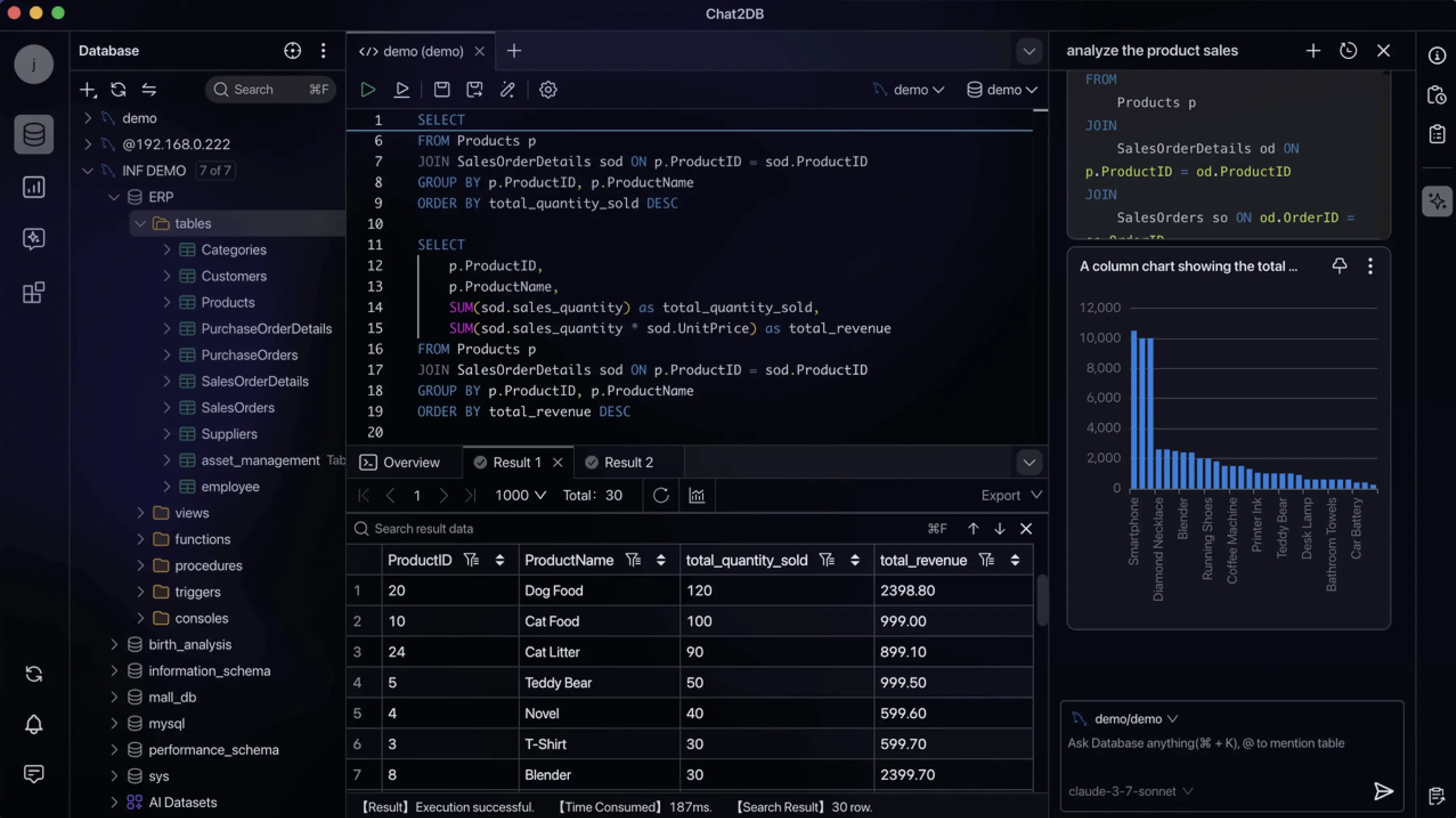
Screenshots
| Dashboards and charts | ER diagrams |
|---|---|
 | 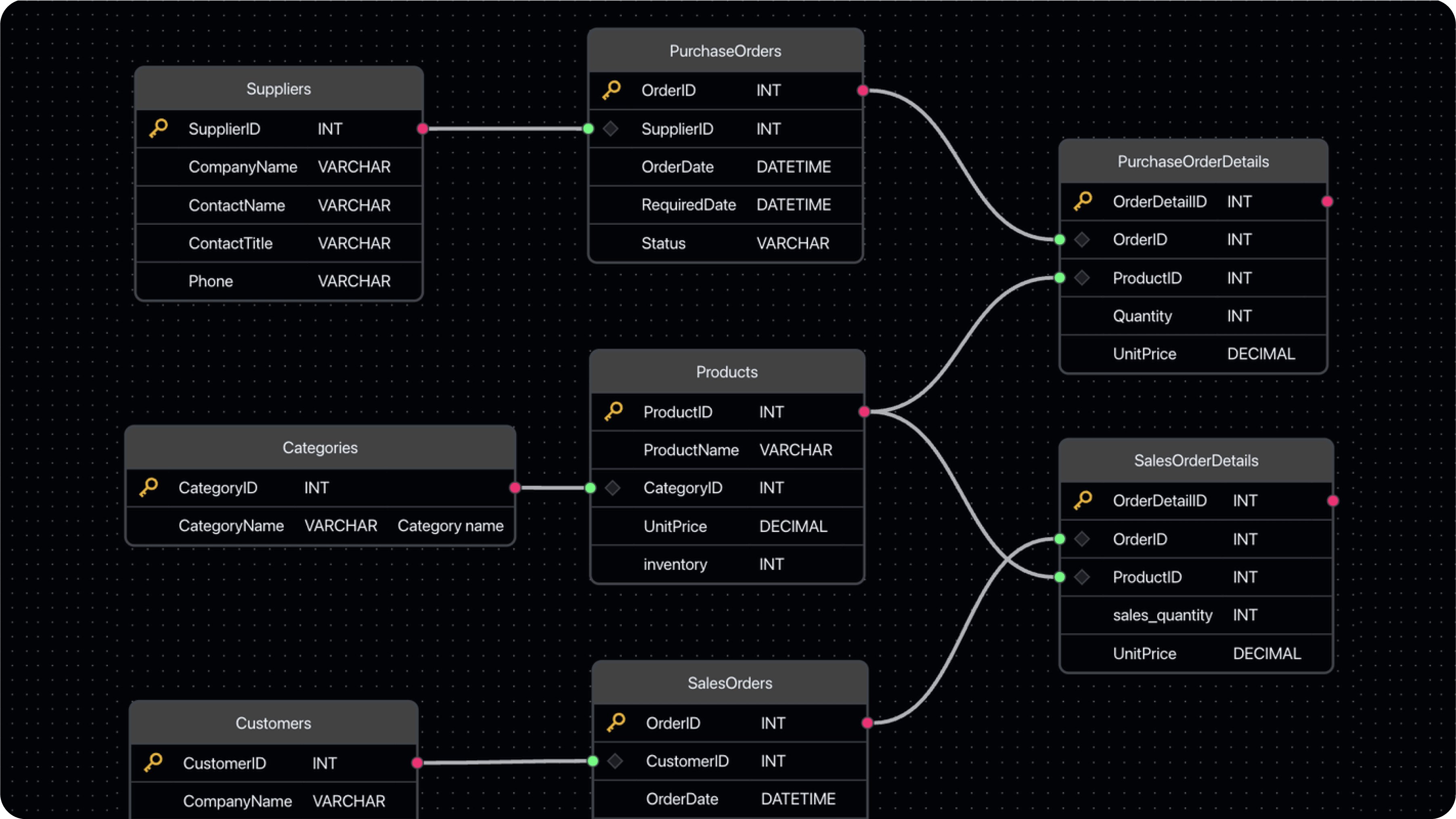 |
| Visual data management | Data import and export |
|---|---|
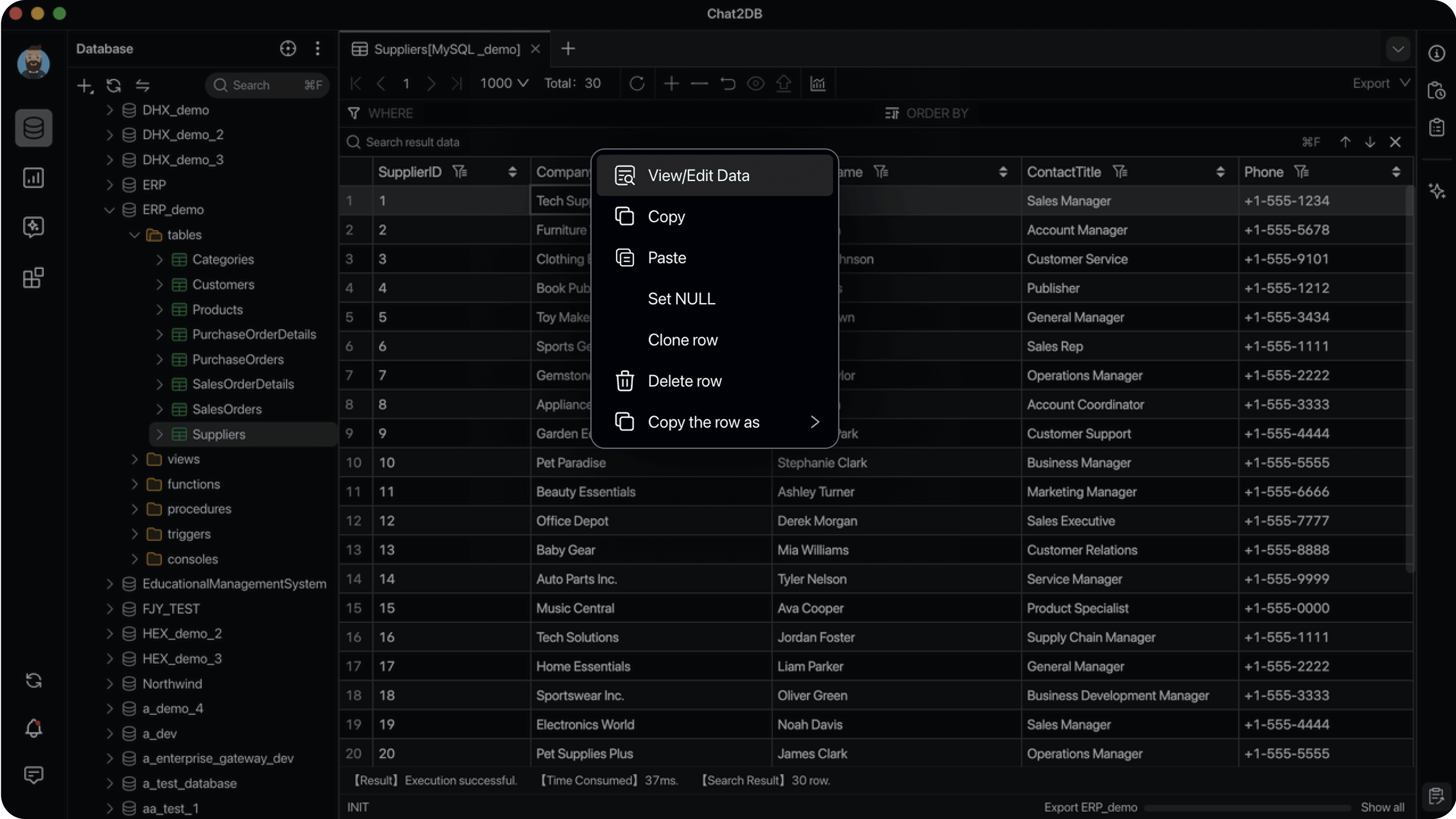 | 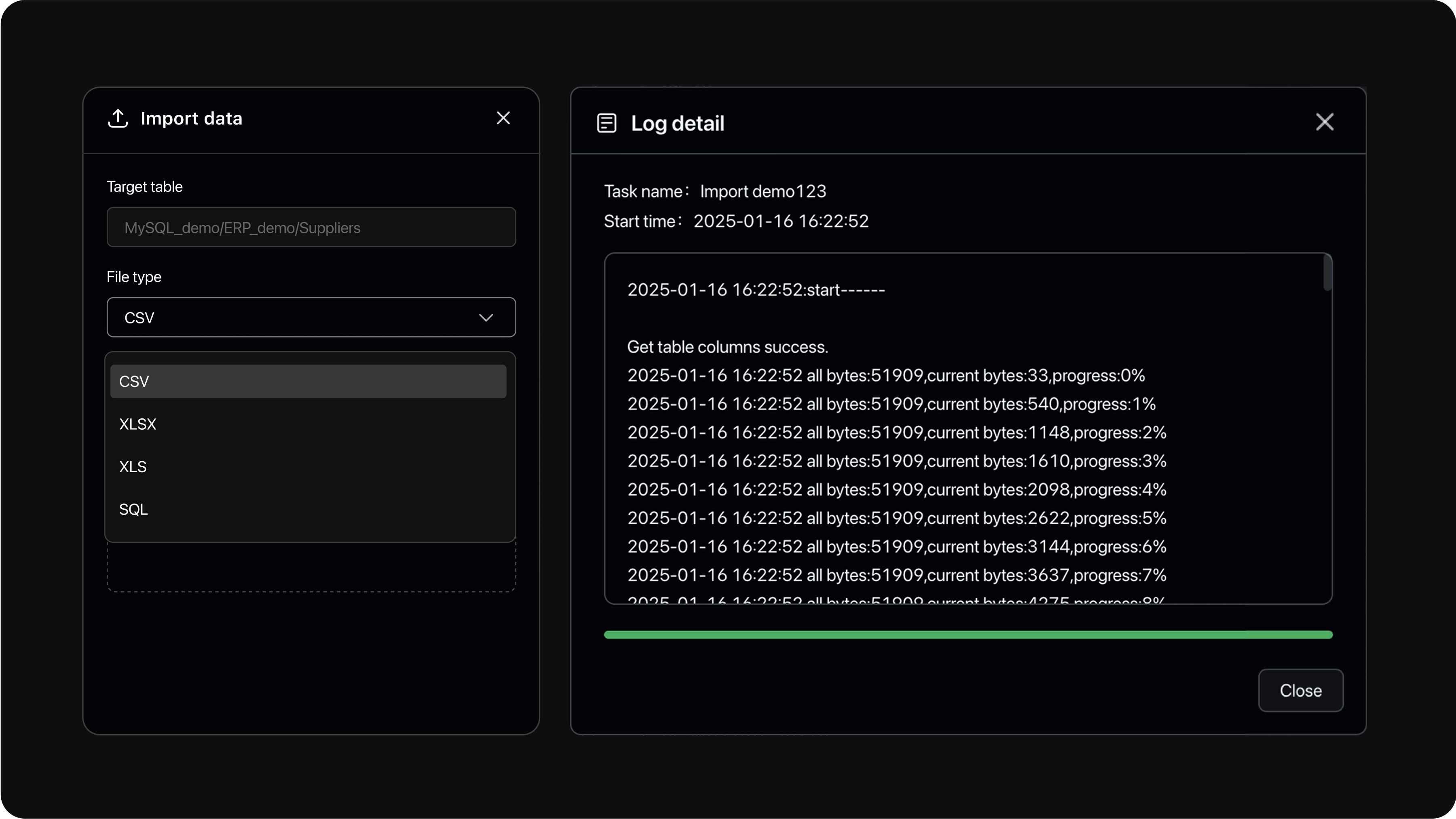 |
Early preview
The next feature line ships as an early preview before it reaches the regular Beta channel:
- Chat2DB Community 5.4.0-beta.1 (early preview) — installers for macOS, Windows and Linux.
- It adds an optional local agent runtime with skills, external MCP servers, and file and terminal tools; choose Pi Agent in the AI input's runtime selector to enable it (the first selection asks for confirmation and downloads the runtime).
- This preview is neither the stable nor the regular Beta release:
Lateststays on the stable build, and the regular Beta line continues with5.3.8-beta.x. Enable Receive Beta versions in Settings → About Us to receive it in the app.
Quick Start
Option 1: Desktop App
Download the installer for your platform from GitHub Releases, install it, and start connecting to your databases. No further setup is required.
Option 2: Docker
Requirements: Docker 19.03.0+, Docker Compose 2.0.0+ (Compose V2, only for the Compose variant), 2+ CPU cores, 4+ GiB RAM.
First create the encryption key (see Encryption Key for why it matters), then start the container:
# Run once from a repository checkout. Re-running reuses the same valid key.
git clone https://github.com/OtterMind/Chat2DB.git && cd Chat2DB
./script/security/init-community-encryption-key.sh

docker run --detach \
  --name chat2db-community \
  --restart unless-stopped \
  --publish 127.0.0.1:10825:10825 \
  --volume "$HOME/.chat2db-community-docker:/root/.chat2db-community" \
  --env CHAT2DB_COMMUNITY_ENCRYPTION_KEY_FILE=/run/secrets/chat2db-community-encryption.key \
  --volume "$HOME/.config/chat2db-community/encryption.key:/run/secrets/chat2db-community-encryption.key:ro" \
  chat2db/chat2db:latest
Then open http://localhost:10825 in your browser.
Alternatively, use the bundled Compose definition:
./script/security/init-community-encryption-key.sh
docker compose --file docker/docker-compose.yml up --detach
Notes:
- To update, pull the new image, remove the old container, and run the start command again. Keep
~/.config/chat2db-community/encryption.keyacross rebuilds. - The
docker runexample stores application data in$HOME/.chat2db-community-docker; the Compose definition uses thechat2db-community-datanamed volume. These locations do not share data. - Chat2DB Community 5.3.0 uses the independent
/root/.chat2db-communitydirectory and does not automatically migrate data from earlier images that used/root/.chat2db.
Security Notes
Chat2DB Community is a single-user, local-first application. It has no user
accounts or authorization boundaries between users. Keep the HTTP service
bound to 127.0.0.1 or ::1 and do not expose it to other users or
untrusted networks.
Custom JDBC drivers are executable Java code — install them only from sources you trust. Imported configuration files, archives, SQL files, database contents, and AI responses remain untrusted data. See the Security Policy for the complete trust boundary and vulnerability reporting process.
If you find this project useful, please give us a Star ⭐️ — it really helps!
Encryption Key
Chat2DB Community encrypts stored datasource passwords and AI model API keys with AES-256-GCM using a per-installation key. Create it once from a repository checkout (requires openssl):
./script/security/init-community-encryption-key.sh
The key is written to ~/.config/chat2db-community/encryption.key. Back this file up separately and keep it across upgrades and container rebuilds — replacing or losing it makes previously stored datasource passwords and AI model API keys unreadable. Web/headless startup fails when no valid key is provided; only Desktop mode creates a missing key automatically.
The key must be valid Base64 that decodes to exactly 32 bytes. The bundled initializer generates the standard padded form: 44 Base64 characters ending in =. It is cryptographic key material, not a human-readable password. Datasource passwords and AI API keys use the same key with separate authenticated AAD values, so ciphertext from one purpose cannot be decrypted as the other.
To use a custom path, pass it to the script and configure the same path when starting Chat2DB:
./script/security/init-community-encryption-key.sh /secure/path/chat2db-community.key

java -Dloader.path=chat2db-community-server/chat2db-community-start/target/lib \
    -Dchat2db.runtime.mode=community \
    -Dchat2db.mode=WEB \
    -Dchat2db.gui=false \
    -Dchat2db.network.status=OFFLINE \
    -Dchat2db.community.encryption-key-file=/secure/path/chat2db-community.key \
    -Dserver.address=127.0.0.1 \
    -Dserver.port=10825 \
    -jar chat2db-community-server/chat2db-community-start/target/chat2db-community.jar
The script's key-file path priority is the positional argument, CHAT2DB_COMMUNITY_ENCRYPTION_KEY_FILE, then the default path. It reuses a valid regular file, rejects symbolic links and non-regular files, and refuses to overwrite an invalid file. Keep the key readable only by the Chat2DB process owner.
Key configuration is resolved in this order:
- JVM property
chat2db.community.encryption-keycontaining the Base64 key. - Environment variable
CHAT2DB_COMMUNITY_ENCRYPTION_KEYcontaining the Base64 key. - JVM property
chat2db.community.encryption-key-filecontaining a key-file path. - Environment variable
CHAT2DB_COMMUNITY_ENCRYPTION_KEY_FILEcontaining a key-file path. - Default file
~/.config/chat2db-community/encryption.key.
The first configured value is authoritative. A blank value, malformed Base64, a key that does not decode to 32 bytes, or an invalid key file fails startup instead of falling through to the next source. File-based configuration is recommended because it avoids placing the key value directly in process arguments or environment variables.
Automatic key-file creation depends on chat2db.mode, not chat2db.gui. Community Desktop mode (chat2db.runtime.mode=community with chat2db.mode=DESKTOP) creates the selected key file when no inline key is configured and the file is missing. Any non-Desktop mode, including normal Web/headless startup, never creates a missing key and fails until a valid key is provided or initialized. The resolved key is cached for the process lifetime, so changing key configuration requires an application restart.
Build from Source
Prerequisites
- Java runtime: Eclipse Temurin 17
- Node.js 18.17.0 or later
- Maven 3.8 or later
Clone the Repository
git clone https://github.com/OtterMind/Chat2DB.git
Frontend
Use Yarn with the checked-in lockfile.
cd Chat2DB/chat2db-community-client
yarn install --frozen-lockfile
yarn run start:community:hot
Backend
cd Chat2DB
mvn -B clean package -Dmaven.test.skip=true -Dchat2db.finalName=chat2db-community \
    -f chat2db-community-server/pom.xml \
    -pl chat2db-community-start -am
./script/security/init-community-encryption-key.sh
java -Dloader.path=chat2db-community-server/chat2db-community-start/target/lib \
    -Dchat2db.gui=false \
    -Dchat2db.runtime.mode=community \
    -Dchat2db.mode=WEB \
    -Dchat2db.network.status=OFFLINE \
    -Dchat2db.community.encryption-key-file="$HOME/.config/chat2db-community/encryption.key" \
    -Dserver.address=127.0.0.1 \
    -Dserver.port=10825 \
    -Dspring.profiles.active=dev \
    -jar chat2db-community-server/chat2db-community-start/target/chat2db-community.jar
Build a Local Docker Image
./docker/docker-build.sh 5.3.0 chat2db/chat2db:5.3.0
Database guides
Step-by-step guides for connecting Chat2DB Community to specific databases:
- BigQuery — Google BigQuery via a Google Cloud service account.
Community vs Commercial Editions
The Community edition contains the full local database client described above, including custom AI model support. The commercial Pro and Enterprise editions build on the same core and add hosted AI services, user accounts, cloud storage and multi-device sync, and team collaboration and governance features. See chat2db.ai for details.
Contributing
We welcome bug reports, feature requests, documentation improvements, testing feedback, and pull requests from the community.
Before opening an issue or submitting a pull request, please read our Contributing Guide. It explains how to report bugs, suggest improvements, and make contributions easier for maintainers to review.
- For bugs and feature requests, please use GitHub Issues.
- For questions, setup help, and open-ended discussions, please use GitHub Discussions.
- If your pull request is related to an issue, please link it in the PR description.
Community and Support
- GitHub Issues: report a bug or request a feature
- GitHub Discussions: ask questions and share ideas
- Discord: join our Discord server
- Email: [email protected]
Acknowledgments
Thanks to everyone who has contributed to Chat2DB.
License
Chat2DB Community version 5.3.0 and later is available under the license terms in this repository. This is a source-available license based on the Apache License 2.0 with additional conditions. Chat2DB releases published before version 5.3.0, including version 0.3.7 and the earlier historical tags, remain under the Apache License 2.0.

dbeaver
dbeaver·Java
免费通用的数据库管理工具和 SQL 客户端,支持 MySQL、Oracle、DB2、Databricks 等多种数据库,用图形界面统一管理连接、执行查询和查看 ERD。
数据库客户端+4数据库工具
52377+484.5k26.2.42026-11-10 03:53 UTC

tidb
pingcap·Go
面向不可预测增长的 Agent 负载设计的分布式数据库,原生支持事务、分析与向量检索,避免数据孤岛和资源争抢。
分布式数据库+4数据库工具
40724+96.3kv8.5.82026-11-10 04:53 UTC
dbx
t8y2·Rust
25 MB 的轻量跨平台数据库客户端,一个界面连 MySQL、PostgreSQL、Redis、MongoDB、达梦等 100+ 数据库,还自带 AI 助手、MCP Server 和 CLI。
数据库客户端+4数据库工具
29780+3092.7kpackages-v0.4.1412026-11-10 01:18 UTC

sqlitebrowser
sqlitebrowser·C++
SQLite 数据库的图形化浏览与管理工具,支持跨平台建表、查询、编辑数据和导入导出,不用写 SQL 也能操作数据库文件。
SQLite+4数据库工具
24770+82.4kv3.13.12026-11-09 01:47 UTC