需要 Python >= 3.12;示例依赖 MONAI 的 DynUNet,需自行安装 monai;示例会通过 download_dataset 下载 ACDC 数据集,首次运行需联网。
MIPCandy
ProjectNeuraApache-2.0更新放缓十秒内为 PyTorch 医学影像模型搭好完整实验流水线,覆盖分类、检测、分割等任务,省去重复搭建训练流程的麻烦。
Build a complete experiment pipeline for your PyTorch MIP model in 10 seconds.
1.1.3发布于 2026-06-27 01:58 UTC294star44fork同步于 2026-11-07 07:30 UTC
pip install "mipcandy[standard]" 硬件要求按 README 说明
README 未说明具体显存或 GPU 型号要求;代码中提供 auto_device() 自动选择设备,示例中数据集可切到 CPU 处理。
面向医学图像处理的 PyTorch 框架,内置常用网络与训练推理评估流水线,省去搭建实验的时间
十秒内为 PyTorch 医学影像模型搭好完整实验流水线,覆盖分类、检测、分割等任务,省去重复搭建训练流程的麻烦。
核心能力
- 内置分割等任务的训练、推理、评估流水线
- 提供 DynUNet 等常用网络架构的开箱即用封装
- 集成 Notion、WandB、TensorBoard 前端看板
- 提供 NNUNetDataset 与随机 ROI 数据集等数据工具
- 用 inspect 自动统计数据集信息并缓存标注
容易踩的坑
内容由模型根据 README 生成,可能不完整或不准确,以官方文档为准。看原文 README
- 1.1.3最新正式版2026-06-27 · 2026-06-27 01:58 UTC
What's Changed
- Expose
Trainer.set_seedas a standalone helper function by @ATATC in https://github.com/ProjectNeura/MIPCandy/pull/243 - Streamline
Predictorto use lazy evaluation for memory efficiency by @perctrix in https://github.com/ProjectNeura/MIPCandy/pull/229 - Weak references in dump_allocated_tensors may crash profiler during training by @ATATC in https://github.com/ProjectNeura/MIPCandy/pull/244
Full Changelog: https://github.com/ProjectNeura/MIPCandy/compare/1.1.2...1.1.3
- Expose
- 1.1.3-beta.0pre-release2026-06-06 · 2026-06-06 16:36 UTC
查看更新说明
What's Changed
- Weak references in dump_allocated_tensors may crash profiler during training by @ATATC in https://github.com/ProjectNeura/MIPCandy/pull/244
Full Changelog: https://github.com/ProjectNeura/MIPCandy/compare/1.1.3-alpha.0...1.1.3-beta.0
- 1.1.3-alpha.0pre-release2026-06-03 · 2026-06-03 14:26 UTC
查看更新说明
What's Changed
- Expose
Trainer.set_seedas a standalone helper function by @ATATC in https://github.com/ProjectNeura/MIPCandy/pull/243 - Streamline
Predictorto use lazy evaluation for memory efficiency by @perctrix in https://github.com/ProjectNeura/MIPCandy/pull/229
Full Changelog: https://github.com/ProjectNeura/MIPCandy/compare/1.1.2...1.1.3-alpha.0
- Expose
- 1.1.22026-04-25 · 2026-04-25 15:01 UTC
查看更新说明
What's Changed
- Memory leak in visualization functions on headless servers by @ATATC in https://github.com/ProjectNeura/MIPCandy/pull/239
- Enhance the error message in
overlayby @ATATC in https://github.com/ProjectNeura/MIPCandy/pull/241
Full Changelog: https://github.com/ProjectNeura/MIPCandy/compare/1.1.1...1.1.2
- 1.1.2-beta.0pre-release2026-04-14 · 2026-04-14 16:13 UTC
查看更新说明
What's Changed
- Enhance the error message in
overlayby @ATATC in https://github.com/ProjectNeura/MIPCandy/pull/241
Full Changelog: https://github.com/ProjectNeura/MIPCandy/compare/1.1.2-alpha.1...1.1.2-beta.0%22
- Enhance the error message in
用户点评
登录用户的真实使用记录,可按版本和硬件筛选共 0 条
还没有人点评。第一个说出真实体验的人最有价值。
MIP Candy: A Candy for Medical Image Processing


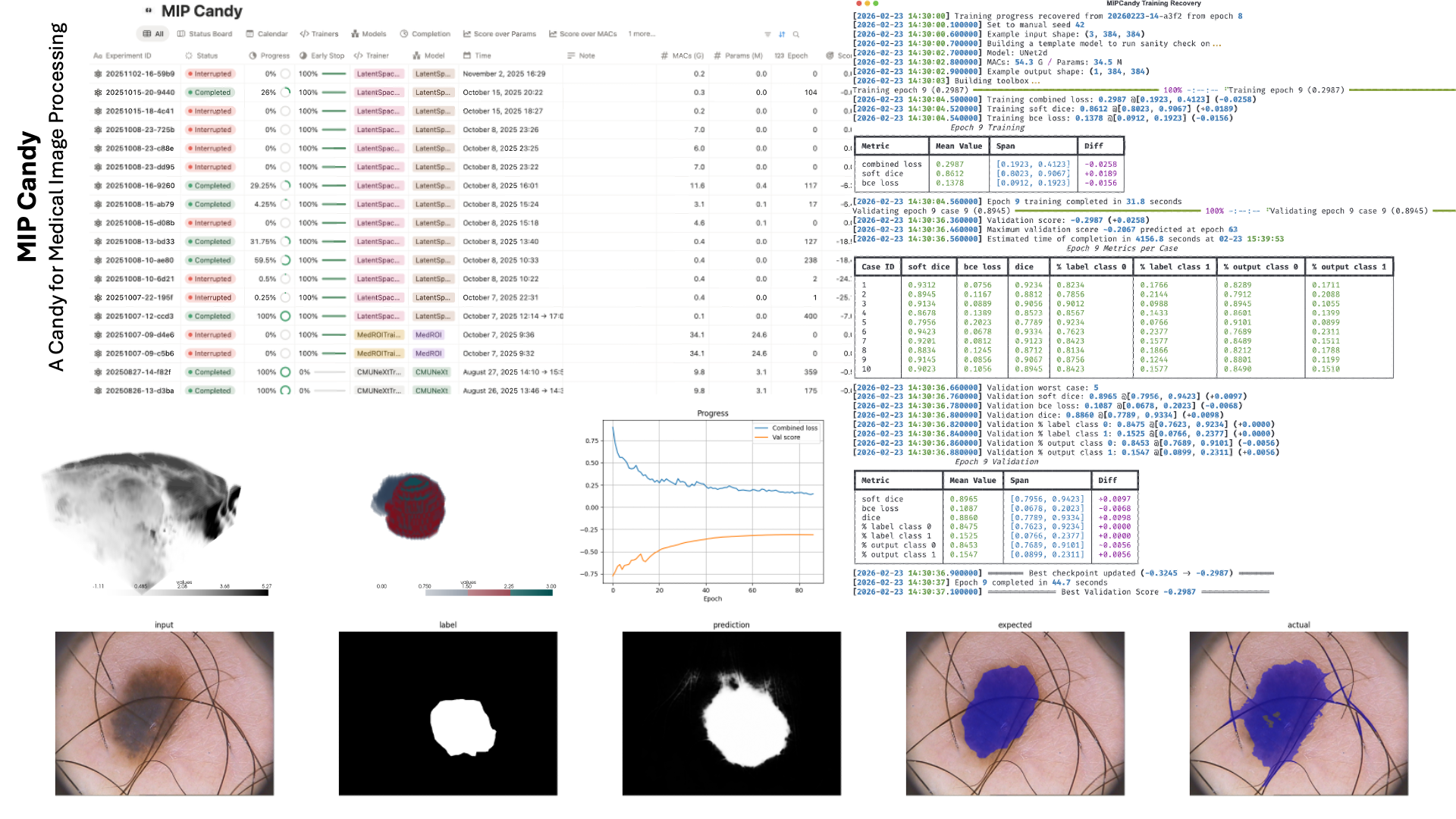
MIP Candy is Project Neura's next-generation infrastructure framework for medical image processing. It defines a handful of common network architectures with their corresponding training, inference, and evaluation pipelines that are out-of-the-box ready to use. Additionally, it also provides integrations with popular frontend dashboards such as Notion, WandB, and TensorBoard.
We provide a flexible and extensible framework for medical image processing researchers to quickly prototype their ideas. MIP Candy takes care of all the rest, so you can focus on only the key experiment designs.
:link: Home
:link: Docs
Citation
Should you find our work helpful to you, please cite our publication.
@misc{fu2026mipcandymodularpytorch,
    title = {MIP Candy: A Modular PyTorch Framework for Medical Image Processing},
    author = {Tianhao Fu and Yucheng Chen},
    year = {2026},
    eprint = {2602.21033},
    archivePrefix = {arXiv},
    primaryClass = {cs.CV},
    url = {https://arxiv.org/abs/2602.21033},
}
Installation
Note that MIP Candy requires Python >= 3.12.
pip install "mipcandy[standard]"
Quick Start
Below is an example using the ACDC dataset. The example code replicates most of nnU-Net's features but without augmentations.
from typing import override
from os.path import exists

from monai.networks.nets import DynUNet
from torch import nn
from torch.utils.data import DataLoader

from mipcandy import SegmentationTrainer, AmbiguousShape, auto_device, download_dataset, NNUNetDataset, inspect, \
    load_inspection_annotations, RandomROIDataset


class UNetTrainer(SegmentationTrainer):
    @override
    def build_network(self, example_shape: AmbiguousShape) -> nn.Module:
        kernel_size = [[3, 3, 3]] * 5
        strides = [[1, 1, 1]] + [[2, 2, 2]] * 4
        return DynUNet(spatial_dims=3, in_channels=example_shape[0], out_channels=self.num_classes,
                       kernel_size=kernel_size, strides=strides, upsample_kernel_size=strides,
                       deep_supervision=self.deep_supervision, deep_supr_num=2, res_block=True)


if __name__ == "__main__":
    device = auto_device()
    download_dataset("nnunet_datasets/ACDC", "tutorial/datasets/ACDC")
    dataset = NNUNetDataset("tutorial/datasets/ACDC", align_spacing=True)
    if exists("tutorial/datasets/ACDC/annotations.json"):
        annotations = load_inspection_annotations("tutorial/datasets/ACDC/annotations.json", dataset)
    else:
        dataset.device(device=device)
        annotations = inspect(dataset)
        dataset.device(device="cpu")
        annotations.save("tutorial/datasets/ACDC/annotations.json")
    dataset = RandomROIDataset(annotations, 2)
    train, val = dataset.fold()
    train_loader = DataLoader(train, 2, True, num_workers=2, prefetch_factor=2, persistent_workers=True)
    val_loader = DataLoader(val, 1, False)
    trainer = UNetTrainer("tutorial", train_loader, val_loader, device=device)
    trainer.train(1000, note="example with the ACDC dataset")

ultralytics
ultralytics·Python
YOLO 系列官方实现库,一套 PyTorch 代码覆盖目标检测、实例与语义分割、图像分类、姿态估计和目标跟踪,训练到部署全流程打通。
目标检测+4检测 / 分割
63270+8712kv8.4.2082026-11-10 09:31 UTC

yolov5
ultralytics·Python
基于 PyTorch 的目标检测全家桶,覆盖训练、推理、实例分割、图像分类和模型导出,开箱即用,适合快速落地视觉任务。
目标检测+4检测 / 分割
58258+517kv7.02026-11-07 16:59 UTC
pytorch-image-models
huggingface·Python
收录最全的 PyTorch 图像骨干网络合集,涵盖 ResNet、ViT、ConvNeXt 等主流模型,自带训练、评估、推理和导出脚本及预训练权重,省去自己搭网络和找权重的麻烦。
图像分类+4检测 / 分割
37272+75.2kv1.0.312026-11-07 23:22 UTC

detectron2
facebookresearch·Python
Detectron2 是 Facebook 开源的目标检测与分割平台,提供模块化架构和丰富预训练模型,方便快速搭建和训练视觉识别任务。
目标检测+4检测 / 分割
34980+57.9kv0.62026-10-27 09:21 UTC