需安装 funasr>=1.3.26,旧版本要先升级才能跑示例;长音频必须先分段(示例用 FSMN-VAD)再送入编码器;容器端口固定为 50000,且 ghcr.io 镜像当前为私有,匿名拉取会返回 401,需本地构建;说话人分离不是 SenseVoiceSmall 的输出,需另配 FSMN-VAD 与 CAM++ 组合流程。
SenseVoice
QwenAudioMIT活跃维护多语种语音理解模型,一次推理就能完成中英日韩粤语音识别、语种判别、情绪识别和音频事件检测,适合做语音交互与音频分析。
Open-source SenseVoiceSmall model for Mandarin, Cantonese, English, Japanese, and Korean ASR, language ID, emotion recognition, and audio event detection.
runtime-llamacpp-v0.2.1发布于 2026-08-27 13:45 UTC9,731star +21 / 7 天846fork同步于 2026-11-10 11:30 UTC
pip install -r requirements.txt
pip install -U "funasr>=1.3.26" 硬件要求按 README 说明
README 未说明具体显存要求;Docker 默认以 GPU 运行(--gpus all),也支持通过 SENSEVOICE_DEVICE=cpu 纯 CPU 运行,未列出支持的 GPU 厂商或型号。
纯 CPU 可运行有 Docker 镜像
多语言语音理解基础模型,一次推理同时给出转写、语种、情绪和音频事件标签
多语种语音理解模型,一次推理就能完成中英日韩粤语音识别、语种判别、情绪识别和音频事件检测,适合做语音交互与音频分析。
核心能力
- 非自回归端到端框架,低延迟推理
- 支持中粤英日韩五语种 ASR 与语种识别
- 输出情绪标签与背景音乐、掌声、笑声等事件标签
- 提供微调脚本与数据准备工具 sensevoice2jsonl
- 提供多并发服务部署与多语言客户端
容易踩的坑
内容由模型根据 README 生成,可能不完整或不准确,以官方文档为准。看原文 README
- runtime-llamacpp-v0.2.1FunASR llama.cpp runtime v0.2.1最新正式版2026-08-27 · 2026-08-27 13:45 UTC
Prebuilt self-contained binaries for the FunASR llama.cpp / GGUF runtime, including SenseVoice, Fun-ASR-Nano, and Paraformer with built-in FSMN-VAD.
v0.2.1
- Fixes Vulkan selection when a requested device is reported as an integrated GPU (
GGML_BACKEND_DEVICE_TYPE_IGPU). - Prefers a matching discrete GPU and falls back to a matching integrated GPU.
- Provides nine desktop archives for Linux, macOS, and Windows, including Vulkan and Windows CUDA variants.
- The Windows Vulkan package is ready for Radeon 780M retesting. This selector fix does not claim to resolve the separate Radeon RX 9070 XT
0xC0000005initialization crash. - Android/Mali is not an official prebuilt or validated target in this release.
Quick start
pip install -U huggingface_hub
bash download-funasr-model.sh sensevoice
Then run
llama-funasr-sensevoice. Use the default x64 asset for broad CPU compatibility, the x64-avx2 asset on CPUs with AVX2/FMA/F16C/BMI2, or a Vulkan/CUDA asset only with a compatible driver. The Windows CUDA asset targets architecture 86; build from source for other GPU architectures.Provenance
These nine binaries are byte-for-byte identical to the digest-verified assets from the canonical
modelscope/FunASRruntime v0.2.1. They were built from exact FunASR commitc69e69a0b78fb9becc8b2be91db8ae57d2a41f3cby Actions run 32991388379. GitHub's generated source archives on this mirror tag are snapshots of the SenseVoice repository; use the canonical FunASR commit above for the native runtime source.Canonical documentation: https://www.funasr.com/en/deploy/llama-cpp.html
SHA-256
9657e519986a5db72082aab508439559987fd4e563733d11da4662f898c75c45 funasr-llamacpp-linux-arm64.tar.gz 32e459673297fc01fcda6901ca7d63cc9e64896a43a3c9edcb7a8e1ef70fcd04 funasr-llamacpp-linux-x64-avx2.tar.gz d45d3acb77e05c4bae94d818ed4a5c66852be87b22c52723bd576377c055c6e6 funasr-llamacpp-linux-x64-vulkan.tar.gz 1bc83dd36d11b1a2b9a45faaf77a5d1014000ac641c93dfec73d24d71ec51caf funasr-llamacpp-linux-x64.tar.gz bc63c4d4b96f2465f1d258600668a971f4f600d661f1859b03797cefaa417167 funasr-llamacpp-macos-arm64.tar.gz 67e428a91614f8a0c1d53dc2d79cce8efc7916c030ae2ddce2cbcf667ec1c502 funasr-llamacpp-windows-x64-avx2.zip af32e0ef352880fcfd5589e0152c44038bc81f462f42c7a6ca91a0d9879bac58 funasr-llamacpp-windows-x64-cuda.zip 5fd179c6aefc18477eb79fa6235c70d131a96eba621318bb84e901ae85035578 funasr-llamacpp-windows-x64-vulkan.zip b8f2b8f241b57921d82d64068d9b5695629779f3db5f3205a730cb3810232bb4 funasr-llamacpp-windows-x64.zip - Fixes Vulkan selection when a requested device is reported as an integrated GPU (
- runtime-llamacpp-v0.1.9FunASR llama.cpp runtime v0.1.92026-07-24 · 2026-07-24 13:36 UTC
查看更新说明
Prebuilt self-contained binaries for the FunASR llama.cpp / GGUF runtime, with SenseVoice, Paraformer, and Fun-ASR-Nano support plus built-in FSMN-VAD.
This release moves the SenseVoice Latest Release source snapshot onto current
main, including theyaml.SafeLoadersecurity fix from #312. Users downloading GitHub's generated source archives no longer receive the older unsafe YAML loader fromruntime-llamacpp-v0.1.4.Choose an asset
- Default
linux-x64/windows-x64: maximum CPU compatibility. linux-x64-avx2/windows-x64-avx2: higher throughput on CPUs with AVX2, FMA, F16C, and BMI2.linux-x64-vulkan/windows-x64-vulkan: Vulkan backend; requires a working Vulkan driver and ICD.windows-x64-cuda: CUDA backend targeting architecture 86; build from source for other GPU architectures.- Native
linux-arm64andmacos-arm64packages are included.
Download a default quantized model with:
pip install -U huggingface_hub
bash download-funasr-model.sh sensevoice
Then run
llama-funasr-sensevoice; no Python ASR runtime or local compilation is required.All nine files are byte-for-byte identical to the digest-verified assets from
modelscope/FunASRruntime v0.1.9.Documentation: https://github.com/QwenAudio/SenseVoice/blob/runtime-llamacpp-v0.1.9/runtime/llama.cpp/README.md
- Default
- runtime-llamacpp-v0.1.4FunASR llama.cpp runtime v0.1.42026-06-29 · 2026-06-29 13:24 UTC
查看更新说明
Prebuilt self-contained binaries for the FunASR llama.cpp / GGUF runtime.
This release keeps the default x64 assets conservative for maximum CPU compatibility and adds explicit
x64-avx2assets for CPUs with AVX2/FMA/F16C/BMI2. If v0.1.3 fixed SIGILL but was too slow on your machine, tryfunasr-llamacpp-windows-x64-avx2.zip.Use the default x64 package if the AVX2 package fails with
Illegal instruction/SIGILL. - runtime-llamacpp-v0.1.3FunASR llama.cpp runtime v0.1.32026-06-28 · 2026-06-28 17:26 UTC
查看更新说明
Portable rebuild of the FunASR llama.cpp / GGUF runtime binaries.
This release rebuilds the v0.1.2 runtime with conservative CPU flags for the generic x64 assets. In particular, it disables ggml native CPU tuning and high-ISA AVX/AVX2/AVX512/VNNI/FMA/F16C/BMI2 flags so the prebuilt binaries do not depend on the GitHub Actions runner CPU instruction set.
Use this version if v0.1.2 crashes with
Illegal instruction,SIGILL, or Windows error0xC000001D. - runtime-llamacpp-v0.1.2FunASR llama.cpp runtime v0.1.22026-06-21 · 2026-06-21 17:55 UTC
查看更新说明
Prebuilt self-contained binaries for running SenseVoice (and Paraformer / Fun-ASR-Nano) locally with the FunASR llama.cpp / GGUF runtime — built-in FSMN-VAD, whisper.cpp-style on-device ASR, strong on Chinese & Cantonese.
New: q8 GGUF models are ~half the size of f16 with the same accuracy.
bash download-funasr-model.sh sensevoice ./gguf
llama-funasr-sensevoice -m ./gguf/sensevoice-small-q8.gguf --vad ./gguf/fsmn-vad.gguf -a audio.wav
No Python, no build. Linux (x64/arm64), macOS (arm64), Windows (x64). Docs:
runtime/llama.cpp/README.md.
用户点评
登录用户的真实使用记录,可按版本和硬件筛选共 0 条
还没有人点评。第一个说出真实体验的人最有价值。
Introduction
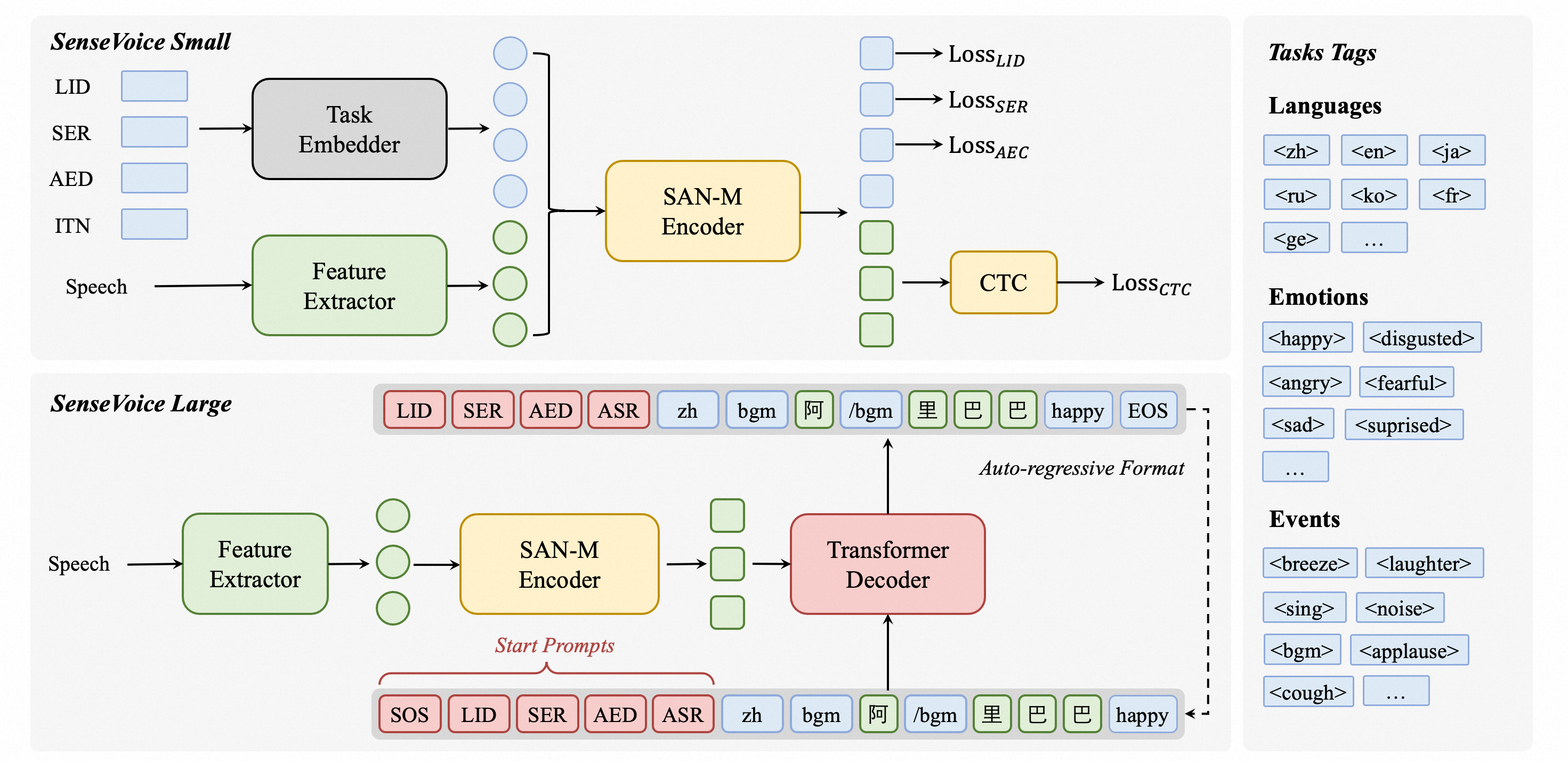
SenseVoice is a speech foundation model with multiple speech understanding capabilities, including automatic speech recognition (ASR), spoken language identification (LID), speech emotion recognition (SER), and audio event detection (AED).
Model Zoo: modelscope, huggingface, paper
Online Demo: modelscope demo, huggingface space
Released checkpoint scope: SenseVoiceSmall supports ASR and language ID for Mandarin, Cantonese, English, Japanese, and Korean, together with emotion and audio-event tags. Speaker diarization is a composed FunASR pipeline using separate FSMN-VAD and CAM++ models; it is not an output of the SenseVoiceSmall checkpoint itself.
Highlights 🎯
SenseVoice focuses on high-accuracy multilingual speech recognition, speech emotion recognition, and audio event detection.
- Research scope vs released checkpoint: The broader SenseVoice work reports training on more than 400,000 hours and support for more than 50 languages. The released SenseVoiceSmall checkpoint linked above supports Mandarin, Cantonese, English, Japanese, and Korean; the benchmark comparisons below are task- and language-specific.
- Rich transcribe:
- Possess excellent emotion recognition capabilities, achieving and surpassing the effectiveness of the current best emotion recognition models on test data.
- Offer sound event detection capabilities, supporting the detection of various common human-computer interaction events such as bgm, applause, laughter, crying, coughing, and sneezing.
- Efficient Inference: SenseVoiceSmall uses a non-autoregressive end-to-end framework for low-latency inference; see the benchmark setup and comparison below.
- Convenient Finetuning: Provide convenient finetuning scripts and strategies, allowing users to easily address long-tail sample issues according to their business scenarios.
- Service Deployment: Offer service deployment pipeline, supporting multi-concurrent requests, with client-side languages including Python, C++, HTML, Java, and C#, among others.
What's New 🔥
- Current deployment path: install
funasr==1.4.14for SenseVoice Python, OpenAI-compatible service, and container workflows. Release notes · SenseVoice releases - Long audio without VAD:
long_audio_no_vad.pyuses bounded overlapping windows and preserves raw chunk outputs, so hour-scale recordings do not require one unbounded GPU allocation. Run it -> - Integrated diarization alternative: the wider FunASR ecosystem supports OpenMOSS/MOSS-Transcribe-Diarize for offline transcription, timestamps, and anonymous speaker labels without composing external VAD and speaker models. Deployment guide ->
See Releases for the complete version history.
Benchmarks 📝
Multilingual Speech Recognition
We compared the performance of multilingual speech recognition between SenseVoice and Whisper on open-source benchmark datasets, including AISHELL-1, AISHELL-2, Wenetspeech, LibriSpeech, and Common Voice. In terms of Chinese and Cantonese recognition, the SenseVoice-Small model has advantages.
Speech Emotion Recognition
Due to the current lack of widely-used benchmarks and methods for speech emotion recognition, we conducted evaluations across various metrics on multiple test sets and performed a comprehensive comparison with numerous results from recent benchmarks. The selected test sets encompass data in both Chinese and English, and include multiple styles such as performances, films, and natural conversations. Without finetuning on the target data, SenseVoice was able to achieve and exceed the performance of the current best speech emotion recognition models.
For a reproducible zero-shot CASIA or RAVDESS rerun, use the SER evaluation contract. It reads the raw SenseVoice emotion tag and reports both UA and WA instead of deriving labels from formatted transcription text.
Furthermore, we compared multiple open-source speech emotion recognition models on the test sets, and the results indicate that the SenseVoice-Large model achieved the best performance on nearly all datasets, while the SenseVoice-Small model also surpassed other open-source models on the majority of the datasets.
Audio Event Detection
Although trained exclusively on speech data, SenseVoice can still function as a standalone event detection model. We compared its performance on the environmental sound classification ESC-50 dataset against the widely used industry models BEATS and PANN. The SenseVoice model achieved commendable results on these tasks. However, due to limitations in training data and methodology, its event classification performance has some gaps compared to specialized AED models.
Computational Efficiency
In the benchmark setup shown below, SenseVoiceSmall uses a non-autoregressive end-to-end architecture and, at a similar parameter count, runs more than 5 times faster than Whisper-Small and 15 times faster than Whisper-Large.
Requirements
pip install -r requirements.txt
SenseVoiceSmall examples and the composed FunASR diarization path require funasr>=1.3.26. If you installed this repository earlier, run pip install -U "funasr>=1.3.26" before retrying the demos.
Usage
Inference
Supports common audio formats. Long recordings must be segmented before they are sent to the encoder; the example below uses FSMN-VAD for that segmentation.
from funasr import AutoModel
from funasr.utils.postprocess_utils import rich_transcription_postprocess

model_dir = "iic/SenseVoiceSmall"


model = AutoModel(
    model=model_dir,
    trust_remote_code=True,
    remote_code="./model.py",
    vad_model="fsmn-vad",
    vad_kwargs={"max_single_segment_time": 30000},
    device="cuda:0",
)

# en
res = model.generate(
    input=f"{model.model_path}/example/en.mp3",
    cache={},
    language="auto",  # "zh", "en", "yue", "ja", "ko", "nospeech"
    use_itn=True,
    batch_size_s=60,
    merge_vad=True,  #
    merge_length_s=15,
)
text = rich_transcription_postprocess(res[0]["text"])
print(text)
model_dir: The name of the model, or the path to the model on the local disk.trust_remote_code:- When
True, it means that the model's code implementation is loaded fromremote_code, which specifies the exact location of themodelcode (for example,model.pyin the current directory). It supports absolute paths, relative paths, and network URLs. - When
False, it indicates that the model's code implementation is the integrated version within FunASR. At this time, modifications made tomodel.pyin the current directory will not be effective, as the version loaded is the internal one from FunASR. For the model code, click here to view.
- When
vad_model: This indicates the activation of VAD (Voice Activity Detection). The purpose of VAD is to split long audio into shorter clips. In this case, the inference time includes both VAD and SenseVoice total consumption, and represents the end-to-end latency. If you wish to test the SenseVoice model's inference time separately, the VAD model can be disabled.vad_kwargs: Specifies the configurations for the VAD model.max_single_segment_time: denotes the maximum duration for audio segmentation by thevad_model, with the unit being milliseconds (ms).use_itn: Whether the output result includes punctuation and inverse text normalization.batch_size_s: Indicates the use of dynamic batching, where the total duration of audio in the batch is measured in seconds (s).merge_vad: Whether to merge short audio fragments segmented by the VAD model, with the merged length beingmerge_length_s, in seconds (s).ban_emo_unk: Whether to ban the output of theemo_unktoken.
Long audio without VAD
Passing an hour-long waveform to one model.generate call can make encoder
memory grow far beyond the audio file size. When VAD is not acceptable, use the
bounded-memory reference script instead. It decodes through ffmpeg, runs
SenseVoice on fixed 30-second windows with 2 seconds of overlap, and does not
configure a VAD model:
python long_audio_no_vad.py meeting.mp3 \
  --output meeting.txt \
  --window-seconds 30 \
  --overlap-seconds 2
The merged transcript removes only exact text repeated across adjacent window
boundaries. meeting.chunks.jsonl retains every raw model response and window
offset, so nonmatching output is never silently discarded; pass --no-dedupe
to disable even exact-overlap removal. Window offsets describe input boundaries,
not word timestamps. This path avoids whole-recording encoder OOM, but fixed
boundaries can still change recognition around a cut. The VAD pipeline above
remains the recommended default when content-based segmentation is acceptable.
Speaker Diarization
This example composes SenseVoiceSmall with separate FSMN-VAD, CAM++, and punctuation models through FunASR. CAM++ provides the speaker labels; the SenseVoiceSmall checkpoint itself does not:
from funasr import AutoModel
from funasr.utils.postprocess_utils import rich_transcription_postprocess

model = AutoModel(
    model="iic/SenseVoiceSmall",
    trust_remote_code=True,
    remote_code="./model.py",
    vad_model="fsmn-vad",
    vad_kwargs={"max_single_segment_time": 30000},
    spk_model="cam++",
    punc_model="ct-punc",
    device="cuda:0",
)
res = model.generate(
    input="example.wav",
    cache={},
    language="auto",
    use_itn=True,
    batch_size_s=60,
    merge_vad=True,
    merge_length_s=15,
)
# Per-sentence results with speaker labels
for sent in res[0]["sentence_info"]:
    text = rich_transcription_postprocess(sent["text"])
    print(f"Speaker {sent['spk']}: [{sent['start']}ms - {sent['end']}ms] {text}")
Use the current repository model.py with FunASR 1.4.15 or newer. A local source
update is needed when using remote_code="./model.py"; upgrading the Python
package alone does not update that file. This composition was tested on a
fixed public sample, not validated for diarization accuracy.
With output_timestamp=True, timestamp contains [start_ms, end_ms] pairs
aligned one-to-one with words. Older copies of this repository returned
[token, start_seconds, end_seconds] triples, which are incompatible with
FunASR's VAD timestamp aggregation. Direct callers must now read the token or
word from words, not from timestamp[i][0]. See demo2.py.
Speaker labels are anonymous clusters, not recognized personal identities.
If all inputs are short audios (<30s), and batch inference is needed to speed up inference efficiency, the VAD model can be removed, and batch_size can be set accordingly.
model = AutoModel(model=model_dir, trust_remote_code=True, device="cuda:0")

res = model.generate(
    input=f"{model.model_path}/example/en.mp3",
    cache={},
    language="zh", # "zh", "en", "yue", "ja", "ko", "nospeech"
    use_itn=False,
    batch_size=64,
)
For more usage, please refer to docs
Inference directly
Supports input of audio in any format, with an input duration limit of 30 seconds or less.
from model import SenseVoiceSmall
from funasr.utils.postprocess_utils import rich_transcription_postprocess

model_dir = "iic/SenseVoiceSmall"
m, kwargs = SenseVoiceSmall.from_pretrained(model=model_dir, device="cuda:0")
m.eval()

res = m.inference(
    data_in=f"{kwargs['model_path']}/example/en.mp3",
    language="auto", # "zh", "en", "yue", "ja", "ko", "nospeech"
    use_itn=False,
    ban_emo_unk=False,
    **kwargs,
)

text = rich_transcription_postprocess(res[0][0]["text"])
print(text)
Export and Test
ONNX
# pip3 install -U funasr funasr-onnx
from pathlib import Path
from funasr_onnx import SenseVoiceSmall
from funasr_onnx.utils.postprocess_utils import rich_transcription_postprocess


model_dir = "iic/SenseVoiceSmall"

model = SenseVoiceSmall(model_dir, batch_size=10, quantize=True)

# inference
wav_or_scp = ["{}/.cache/modelscope/hub/{}/example/en.mp3".format(Path.home(), model_dir)]

res = model(wav_or_scp, language="auto", use_itn=True)
print([rich_transcription_postprocess(i) for i in res])
Note: ONNX model is exported to the original model directory.
Libtorch
from pathlib import Path
from funasr_torch import SenseVoiceSmall
from funasr_torch.utils.postprocess_utils import rich_transcription_postprocess


model_dir = "iic/SenseVoiceSmall"

model = SenseVoiceSmall(model_dir, batch_size=10, device="cuda:0")

wav_or_scp = ["{}/.cache/modelscope/hub/{}/example/en.mp3".format(Path.home(), model_dir)]

res = model(wav_or_scp, language="auto", use_itn=True)
print([rich_transcription_postprocess(i) for i in res])
Note: Libtorch model is exported to the original model directory.
Run on CPU / edge — llama.cpp / GGUF (no GPU, no Python)
Run SenseVoice as a single self-contained binary — this is to SenseVoice what whisper.cpp is to Whisper, but with far stronger Chinese & Cantonese accuracy. Built-in FSMN-VAD, no Python at runtime.
bash runtime/llama.cpp/download-funasr-model.sh sensevoice ./gguf
llama-funasr-sensevoice -m ./gguf/sensevoice-small-f16.gguf --vad ./gguf/fsmn-vad.gguf -a audio.wav
Prebuilt binaries: Releases · Download & quickstart: funasr.com/llama-cpp · GGUF: Hugging Face · Docs & benchmarks: runtime/llama.cpp/
Service
Deployment with FastAPI
export SENSEVOICE_DEVICE=cuda:0
fastapi run --port 50000
Finetune
Requirements
git clone https://github.com/modelscope/FunASR.git && cd FunASR
pip3 install -e ./
🐳 Docker Support
SenseVoice can be built and run using Docker to simplify setup, ensure reproducibility, and support both CPU and GPU inference.
Build with Docker
docker build -t sensevoice .
The build workflow also publishes
ghcr.io/qwenaudio/sensevoice, but the package is currently private and anonymous pulls return HTTP 401. Use the local build above until the container package is marked Public.
Run (GPU – default)
docker run --rm --gpus all -p 50000:50000 -v sensevoice-models:/models sensevoice
Run (CPU-only)
docker run --rm -e SENSEVOICE_DEVICE=cpu -p 50000:50000 -v sensevoice-models:/models sensevoice
The container listens on port 50000. After it is healthy, open http://127.0.0.1:50000/docs.
Docker Compose
Docker Compose builds the same image and keeps the model cache on the sensevoice-models volume. The default compose file does not request GPUs, so it starts on CPU hosts. For GPU, use the docker run --gpus all command above.
Start Stack
docker compose up --build
# CPU is the default. Equivalent: SENSEVOICE_DEVICE=cpu docker compose up --build
Data prepare
Data examples
{"key": "YOU0000008470_S0000238_punc_itn", "text_language": "<|en|>", "emo_target": "<|NEUTRAL|>", "event_target": "<|Speech|>", "with_or_wo_itn": "<|withitn|>", "target": "Including legal due diligence, subscription agreement, negotiation.", "source": "/cpfs01/shared/Group-speech/beinian.lzr/data/industrial_data/english_all/audio/YOU0000008470_S0000238.wav", "target_len": 7, "source_len": 140}
{"key": "AUD0000001556_S0007580", "text_language": "<|en|>", "emo_target": "<|NEUTRAL|>", "event_target": "<|Speech|>", "with_or_wo_itn": "<|woitn|>", "target": "there is a tendency to identify the self or take interest in what one has got used to", "source": "/cpfs01/shared/Group-speech/beinian.lzr/data/industrial_data/english_all/audio/AUD0000001556_S0007580.wav", "target_len": 18, "source_len": 360}
Full ref to data/train_example.jsonl
Description:
key: audio file unique IDsource:path to the audio filesource_len:number of fbank frames of the audio filetarget:transcriptiontarget_len:length of targettext_language:language id of the audio fileemo_target:emotion label of the audio fileevent_target:event label of the audio filewith_or_wo_itn:whether includes punctuation and inverse text normalization
train_text.txt
BAC009S0764W0121 甚至出现交易几乎停滞的情况
BAC009S0916W0489 湖北一公司以员工名义贷款数十员工负债千万
asr_example_cn_en 所有只要处理 data 不管你是做 machine learning 做 deep learning 做 data analytics 做 data science 也好 scientist 也好通通都要都做的基本功啊那 again 先先对有一些>也许对
ID0012W0014 he tried to think how it could be
train_wav.scp
BAC009S0764W0121 https://isv-data.oss-cn-hangzhou.aliyuncs.com/ics/MaaS/ASR/test_audio/BAC009S0764W0121.wav
BAC009S0916W0489 https://isv-data.oss-cn-hangzhou.aliyuncs.com/ics/MaaS/ASR/test_audio/BAC009S0916W0489.wav
asr_example_cn_en https://isv-data.oss-cn-hangzhou.aliyuncs.com/ics/MaaS/ASR/test_audio/asr_example_cn_en.wav
ID0012W0014 https://isv-data.oss-cn-hangzhou.aliyuncs.com/ics/MaaS/ASR/test_audio/asr_example_en.wav
train_text_language.txt
The language ids include <|zh|>、<|en|>、<|yue|>、<|ja|> and <|ko|>.
BAC009S0764W0121 <|zh|>
BAC009S0916W0489 <|zh|>
asr_example_cn_en <|zh|>
ID0012W0014 <|en|>
train_emo.txt
The emotion labels include<|HAPPY|>、<|SAD|>、<|ANGRY|>、<|NEUTRAL|>、<|FEARFUL|>、<|DISGUSTED|> and <|SURPRISED|>.
BAC009S0764W0121 <|NEUTRAL|>
BAC009S0916W0489 <|NEUTRAL|>
asr_example_cn_en <|NEUTRAL|>
ID0012W0014 <|NEUTRAL|>
train_event.txt
The event labels include<|BGM|>、<|Speech|>、<|Applause|>、<|Laughter|>、<|Cry|>、<|Sneeze|>、<|Breath|> and <|Cough|>.
BAC009S0764W0121 <|Speech|>
BAC009S0916W0489 <|Speech|>
asr_example_cn_en <|Speech|>
ID0012W0014 <|Speech|>
Command
# generate train.jsonl and val.jsonl from wav.scp, text.txt, text_language.txt, emo_target.txt, event_target.txt
sensevoice2jsonl \
++scp_file_list='["../../../data/list/train_wav.scp", "../../../data/list/train_text.txt", "../../../data/list/train_text_language.txt", "../../../data/list/train_emo.txt", "../../../data/list/train_event.txt"]' \
++data_type_list='["source", "target", "text_language", "emo_target", "event_target"]' \
++jsonl_file_out="../../../data/list/train.jsonl"
If there is no train_text_language.txt, train_emo_target.txt and train_event_target.txt, the language, emotion and event label will be predicted automatically by using the SenseVoice model.
# generate train.jsonl and val.jsonl from wav.scp and text.txt
sensevoice2jsonl \
++scp_file_list='["../../../data/list/train_wav.scp", "../../../data/list/train_text.txt"]' \
++data_type_list='["source", "target"]' \
++jsonl_file_out="../../../data/list/train.jsonl" \
++model_dir='iic/SenseVoiceSmall'
Finetune
Ensure to modify the train_tool in finetune.sh to the absolute path of funasr/bin/train_ds.py from the FunASR installation directory you have set up earlier.
bash finetune.sh
WebUI
python webui.py
Remarkable Third-Party Work
- Triton (GPU) Deployment Best Practices: Using Triton + TensorRT, tested with FP32, achieving an acceleration ratio of 526 on V100 GPU. FP16 support is in progress. Repository
- Sherpa-onnx Deployment Best Practices: Supports using SenseVoice in 10 programming languages: C++, C, Python, C#, Go, Swift, Kotlin, Java, JavaScript, and Dart. Also supports deploying SenseVoice on platforms like iOS, Android, and Raspberry Pi. Repository
- Orca integrates SenseVoice as local, offline speech-to-text through sherpa-onnx, with automatic Chinese, English, Japanese, Korean, and Cantonese detection on macOS, Linux, and Windows. The integration was merged in #7436 and is available in the v1.4.159-rc.1 prerelease; Orca v1.4.158 stable predates it.
- SenseVoice.cpp. Inference of SenseVoice in pure C/C++ based on GGML, supporting 3-bit, 4-bit, 5-bit, 8-bit quantization, etc. with no third-party dependencies.
- streaming-sensevoice processes inference in chunks. To achieve pseudo-streaming, it employs a truncated attention mechanism, sacrificing some accuracy. Additionally, this technology supports CTC prefix beam search and hot-word boosting features.
- OmniSenseVoice is optimized for lightning-fast inference and batching process.
- SenseVoice Hotword,Neural Network Hotword Enhancement,Contextualized End-to-End Speech Recognition with Contextual Phrase Prediction Network。
Ecosystem
SenseVoice is part of the FunAudioLLM family:
| Project | Description | Stars |
|---|---|---|
| FunASR | Industrial speech recognition toolkit — VAD, ASR, punctuation, diarization |  |
| Fun-ASR | LLM-based ASR family — Nano for zh/en/ja + Chinese dialects; MLT-Nano for 31 languages |  |
| CosyVoice | Natural speech generation — multi-language, zero-shot cloning |  |
| FunClip | AI-powered video clipping with speech recognition |  |
License
- Source code in this repository is licensed under the MIT License.
- Model weights are distributed separately and follow the terms on each model card. The official SenseVoiceSmall model card links to the FunASR Model Open Source License Agreement; other artifacts and conversions may list different terms, so check their model cards before use.
- The maintainers have provided an official SenseVoiceSmall license clarification for the FunASR Model Open Source License Agreement v1.1: Commercial use of the official SenseVoiceSmall weights is permitted when the model license is followed; Section 3 is a responsibility and risk disclaimer rather than an additional non-commercial restriction; and fine-tuned derivative weights may remain private. The Section 2.2 attribution and model-name requirements still apply. This clarification covers the official weights only, so check the terms for third-party conversions and bundled artifacts separately.
Community
If you encounter problems in use, you can directly raise Issues on the github page.
You can also scan the following DingTalk group QR code to join the community group for communication and discussion.
| FunASR |
|---|

VoiceStudio
debpalash·Python
本地运行的 ElevenLabs 开源替代品,支持声音克隆、语音设计、视频配音、听写、转写和有声书制作,覆盖 646 种语言。
语音克隆+4语音推理
107004+359812kv0.5.72026-11-10 16:38 UTC

voicebox
jamiepine·Python
开源 AI 语音工作室,支持声音克隆、语音听写和语音生成,基于 Qwen3-TTS 与 Whisper,可在 CUDA 或 MLX 上本地运行。
语音克隆+4语音推理
60349+5967.6kv0.5.02026-10-07 01:17 UTC
whisper.cpp
ggml-org·C++
OpenAI Whisper 语音识别模型的 C/C++ 移植版,无需 Python 和 GPU 依赖,在普通 CPU 上就能跑语音转文字。
语音识别+4语音推理
55060+736.3kv1.9.52026-11-10 08:39 UTC
faster-whisper
SYSTRAN·Python
基于 CTranslate2 重实现的 Whisper 语音转文字推理引擎,通过量化与高效推理大幅提速并降低显存占用,适合本地部署转录。
语音识别+4语音推理
26639+672.2kv1.2.12026-11-10 10:13 UTC