GPU 模式需加 -DLOD_WITH_TENSORRT=ON 重新编译,否则 learning/fused 会被拒绝;首次运行要花约一分钟构建 TensorRT 引擎并缓存到 ~/.cache;用 GPU 模式时须把 sensor_height 设成实际雷达离地高度以匹配 nuScenes 安装高度;Autoware 话题只在编译时找到 autoware_perception_msgs 才发布。

lidar_obstacle_detector
SS47816MIT活跃维护面向 ROS 1/2 的实时 3D 激光雷达障碍物检测工具,集地面分割、聚类、跟踪与轨迹预测于一体,单核 CPU 约 10ms 处理一帧,可选 TensorRT 加速的 CenterPoint。
Real-time 3D LiDAR obstacle detection, tracking & trajectory prediction for ROS 1 / ROS 2: ground segmentation, clustering, 2.5D occupancy, optional GPU CenterPoint (TensorRT). ~10 ms/scan on one CPU core.
2.0.0发布于 2026-10-23 14:00 UTC419star67fork同步于 2026-11-10 18:00 UTC
git clone https://github.com/SS47816/lidar_obstacle_detector.git && cd .. && rosdep install --from-paths src --ignore-src -r -y && colcon build --cmake-args -DCMAKE_BUILD_TYPE=Release 硬件要求按 README 说明
CPU 模式无需 GPU,单核约 10 ms/帧;GPU 模式需 NVIDIA Ampere 或更新架构(含 Jetson Orin)、CUDA 11.4–13、TensorRT ≥ 10,README 未给出显存要求。
需要 CUDA
ROS 1/2 实时 3D 激光雷达感知节点,单核 CPU 就能检测、跟踪并预测障碍物
面向 ROS 1/2 的实时 3D 激光雷达障碍物检测工具,集地面分割、聚类、跟踪与轨迹预测于一体,单核 CPU 约 10ms 处理一帧,可选 TensorRT 加速的 CenterPoint。
核心能力
- 用 Patchwork++ 加高程图做地面分割
- 用 Kalman 滤波加 GIoU 关联跟踪目标并输出速度
- 未识别物体转成 2.5D 柱体,跨帧融合抑制闪烁
- 可选 TensorRT CenterPoint 融合出类别与精确框
- 输出 vision_msgs、Autoware、nav2 占据栅格等话题
容易踩的坑
内容由模型根据 README 生成,可能不完整或不准确,以官方文档为准。看原文 README
- 2.0.02.0.0: detect, track and predict every obstacle最新正式版2026-10-23 · 2026-10-23 14:00 UTC
lidar_obstacle_detector 2.0.0 is a ground-up rewrite: real-time 3D lidar perception for ROS 1 and ROS 2 that detects, tracks and predicts every obstacle, model-free on a CPU or fused with a GPU detector.
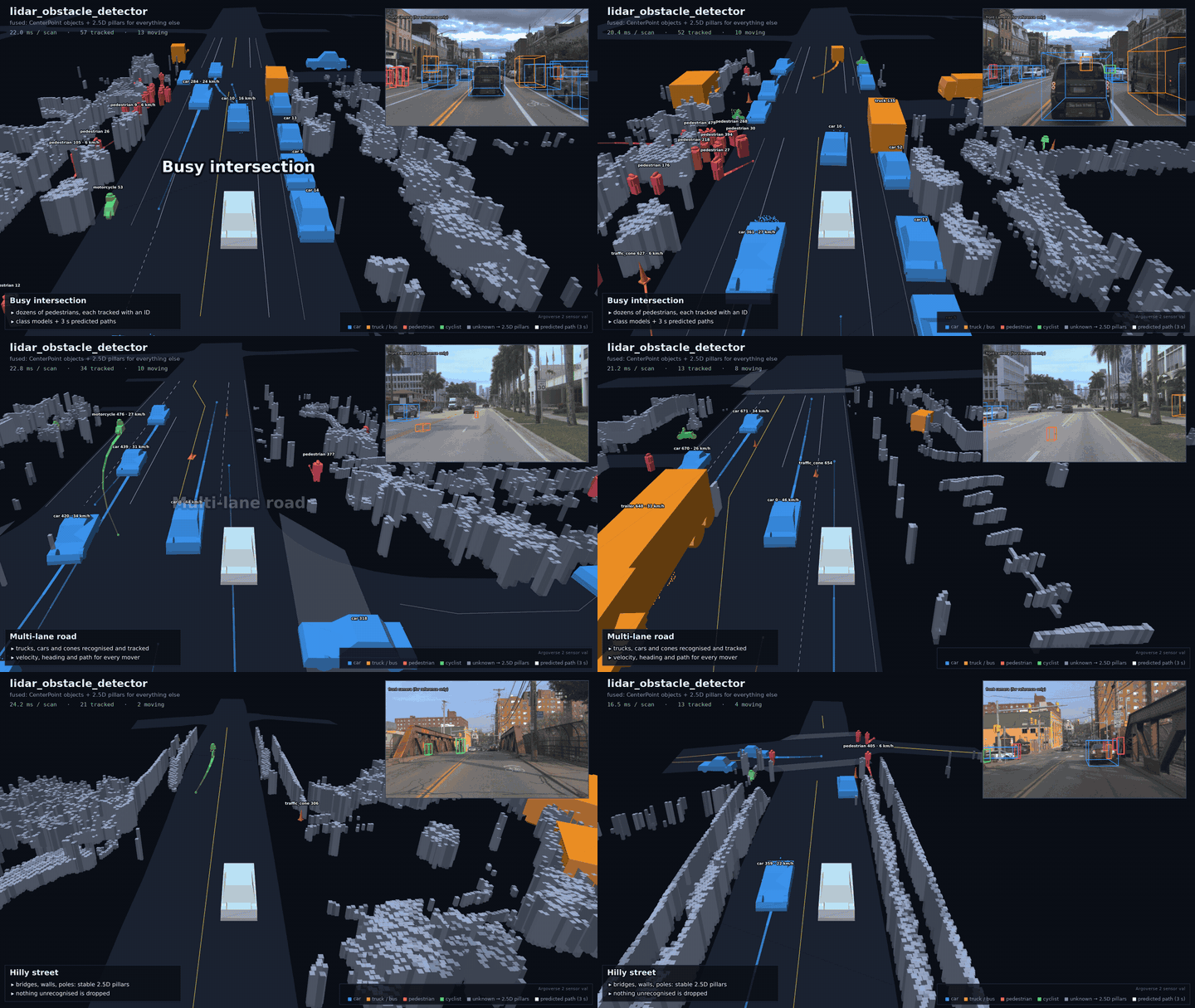
Highlights
- Three detector modes:
clustering: CPU, about 10 ms per 95k-point scan on one core.learning: NVIDIA CUDA-CenterPoint via TensorRT, with multi-sweep input.fused: recognised objects become tracked boxes, and everything else becomes 2.5D pillars, so nothing is dropped.
- Tracking and prediction: Kalman filter with GIoU Hungarian association, heading from motion, 3 s constant-turn-rate paths, and Autoware
PredictedObjects. - Occupancy: 2.5D pillars fused over time (flicker 37% → 13%), a nav2-ready occupancy grid with ray-cast free space, and 3D voxels.
- Ground: Patchwork++ with elevation-map refinement. Only 5% of object points are lost on hilly roads, down from 26%.
- Accuracy on Argoverse 2:
- recall@1m 0.66 (CPU) / 0.91 (GPU)
- coverage 99%
- IDF1* 0.73 / 0.86
- Accuracy on nuScenes val: recall@1m 0.98 with the GPU detector.
- Integrations: ROS 1 Noetic and ROS 2 Humble / Jazzy, vision_msgs, Autoware, jsk, RViz class models, and a Foxglove layout.
- Reproducible: public benchmark tooling, unit tests, CI, and pixi environments that need no system ROS.
Assets
lidar_obstacle_detector_demo.mp4: the full-resolution demo video.lidar_obstacle_detector_demo.mcap+foxglove_layout.json: open them in app.foxglove.dev. The recording is the ROS 2 node inclusteringmode on an Argoverse 2 drive.
See the README, benchmarks and CHANGELOG. The previous ROS 1-only release stays available at the
v1-ros1-legacytag.Demo data: Argoverse 2 (CC BY-NC-SA 4.0).
- Three detector modes:
用户点评
登录用户的真实使用记录,可按版本和硬件筛选共 0 条
还没有人点评。第一个说出真实体验的人最有价值。
Why lidar_obstacle_detector?
- Fast. 10.4 ms per 95k-point scan on one CPU core (Argoverse 2), 3.4 ms on nuScenes. That includes ground segmentation, clustering, tracking and occupancy.
- Nothing is dropped. Recognised objects become tracked boxes. Everything else (walls, poles, debris, an overturned bin) becomes 2.5D pillars: on Argoverse 2, 99% of labelled objects are covered by a box or by pillars.
- Stable. Pillars are fused over time, which cuts their scan-to-scan flicker from 37% to 13%. Boxes keep their shape and heading along a track.
- Tracks with velocity and a future. A Kalman filter with GIoU association tracks every object. Moving objects take their heading from their motion and get a 3 s predicted path (constant turn rate and velocity).
- Optional GPU detector. NVIDIA CUDA-CenterPoint (TensorRT) with multi-sweep input adds
class labels and precise boxes:
- recall@1m 0.91 on Argoverse 2 and 0.98 on nuScenes val
- IDF1* 0.86 / 0.88
- 25.5 ms per scan in
fusedmode on an RTX 3090 Ti
- Robust ground segmentation. Patchwork++ plus an elevation-map refinement. Only 5% of object points are lost to the ground on hilly Pittsburgh streets.
- Drop-in for your stack. ROS 1 and ROS 2 nodes, live-tunable parameters, and outputs for
vision_msgs, Autoware (DetectedObjects,PredictedObjects), jsk, nav2 occupancy grids, RViz and Foxglove. - Reproducible. A public benchmark on Argoverse 2 and nuScenes, unit tests, CI on Noetic, Humble and Jazzy, and a one-command pixi setup with no system ROS needed.
Quick start
# ROS 2 (Humble / Jazzy), in your workspace's src/
git clone https://github.com/SS47816/lidar_obstacle_detector.git && cd ..
rosdep install --from-paths src --ignore-src -r -y && colcon build --cmake-args -DCMAKE_BUILD_TYPE=Release
source install/setup.bash
ros2 launch lidar_obstacle_detector obstacle_detector.launch.py points:=/your/points tracking_frame:=odom rviz:=true
No ROS installed? pixi run -e jazzy build builds everything, ROS 2 Jazzy included, inside the
repository folder (see Installation).
Detector modes
Two detectors, three ways to combine them (detector_method):
| Mode | Objects (tracked boxes) | Everything else | Needs |
|---|---|---|---|
clustering (default) | every obstacle, class unknown | also reported as 2.5D pillars | CPU |
learning | 10 nuScenes classes: car, truck, bus, trailer, construction vehicle, pedestrian, bicycle, motorcycle, barrier, traffic cone | not reported | NVIDIA GPU |
fused | the 10 classes, each absorbing the clusters that belong to it | 2.5D pillars, untracked | NVIDIA GPU |
[!WARNING]
learningonly reports what the network was trained on. A fallen tree, a wheelchair or a shopping trolley is invisible to it. Usefusedon a robot that has to stop for them.
fused follows the output model used by production AV stacks: what the network recognises is
tracked and predicted as an object, and what it doesn't is still there as occupied space.
| Argoverse 2, 15 val logs | Recall@1m | Coverage | IDF1* | ID switches | Moving heading err. | Runtime |
|---|---|---|---|---|---|---|
clustering (fast, CPU) | 0.66 | 99.5% | 0.73 | 1,725 | 14° | 10.4 ms |
learning (CenterPoint, 10 sweeps) | 0.91 | 94.7% | 0.86 | 1,024 | 2.4° | 23.7 ms |
fused | 0.91 | 99.0% | 0.86 | 1,034 | 2.4° | 25.5 ms |
Coverage is the share of labelled objects that are reported, either as a box or by pillars in their footprint. Recall@1m counts boxes only.
Outputs
| ROS 2 topic | Type | Content |
|---|---|---|
~/detections | vision_msgs/Detection3DArray | boxes, class, score; id is the track id |
~/objects | autoware_perception_msgs/DetectedObjects | boxes with velocity and heading availability |
~/predicted_objects | autoware_perception_msgs/PredictedObjects | tracked objects with their 3 s predicted path |
~/pillars | sensor_msgs/PointCloud2 | 2.5D pillars: x, y, z (top), z_min (ground), observed |
~/occupancy | nav_msgs/OccupancyGrid | free / occupied / unknown (ray-cast), for nav2 or costmaps |
~/occupancy_voxels | sensor_msgs/PointCloud2 | occupied 3D voxels |
~/markers | visualization_msgs/MarkerArray | class models, boxes, ids, velocities, predicted paths, pillars |
~/cloud_ground, ~/cloud_obstacles | sensor_msgs/PointCloud2 | segmented input |
Autoware topics are published when autoware_perception_msgs is found at build time. Clouds,
pillars and occupancy are only converted into messages when something subscribes. On ROS 1 the
node publishes the same content as jsk boxes, autoware_msgs/DetectedObjectArray, markers,
pillars and occupancy (see ROS 1).
Try it in Foxglove
config/foxglove_layout.json is a ready-made
Foxglove layout: 3D view with models, pillars and paths, the camera, and
the detections. Download the demo recording lidar_obstacle_detector_demo.mcap from the
latest release (the ROS 2 node in clustering mode on an Argoverse 2
drive), open it in app.foxglove.dev (no install needed) and import
the layout. To record your own, run the node with
mesh_uri:=https://raw.githubusercontent.com/SS47816/lidar_obstacle_detector/main/meshes/ so the
models load in the browser.
Pipeline
flowchart LR
  A[PointCloud2] --> B["Preprocess<br/>ROI · ego removal · voxel grid"]
  B --> C["Ground<br/>Patchwork++ + elevation-map refinement"]
  C --> D["Clustering<br/>height-aware BEV grid | adaptive Euclidean"]
  A --> N["CenterPoint (GPU, optional)<br/>10 ego-compensated sweeps"]
  D --> M{"detector_method"}
  N --> M
  M --> E["Objects<br/>L-shape boxes | learned boxes"]
  M --> P["2.5D pillars<br/>fused over time"]
  E --> F["Tracking + prediction<br/>Kalman · Hungarian (GIoU) · CTRV paths"]
  F --> G["vision_msgs · Autoware · jsk · markers"]
  P --> O["pillars · occupancy grid · voxels"]
| Preset | Ground | Clustering | Boxes | Use it for |
|---|---|---|---|---|
fast (default) | Patchwork++ | BEV grid | L-shape | most robots and vehicles |
accurate | Patchwork++ | adaptive Euclidean | L-shape | highest clustering recall, 2–3× the compute |
legacy | RANSAC | Euclidean | axis-aligned | the classic pipeline; no pillars or occupancy |
Benchmark
Class-agnostic results on 15 Argoverse 2 validation logs (2 × 32-beam lidar, 10 Hz, 2,350 scans) and the 10 nuScenes-mini scenes (32-beam, 20 Hz). The ROI is ±40 m. Objects are vehicles, pedestrians and cyclists with at least 5 lidar points. CPU timings are on one core of an i9-12900K; GPU rows add an RTX 3090 Ti. "*" metrics ignore predictions far from any labelled object, because walls, poles and vegetation are correctly reported but not labelled.
| Dataset | Mode | Recall@1m | [email protected] | Coverage | Under-seg | IDF1* | ID switches | Obj. pts lost to ground | Runtime [ms] |
|---|---|---|---|---|---|---|---|---|---|
| Argoverse 2 | legacy (classic) | 0.53 | 0.42 | 72.7% | 28% | 0.51 | 4,653 | 26% | 30.5 |
| Argoverse 2 | fast | 0.66 | 0.62 | 99.5% | 10% | 0.73 | 1,725 | 5% | 10.4 |
| Argoverse 2 | accurate | 0.70 | 0.63 | 99.5% | 9% | 0.71 | 1,749 | 5% | 32.2 |
| Argoverse 2 | learning (GPU) | 0.91 | 0.91 | 94.7% | 2% | 0.86 | 1,024 | 5% | 23.7 |
| Argoverse 2 | fused (GPU) | 0.91 | 0.91 | 99.0% | 2% | 0.86 | 1,034 | 5% | 25.5 |
| nuScenes mini | legacy (classic) | 0.38 | 0.31 | 58.1% | 9% | 0.57 | 425 | 5% | 6.7 |
| nuScenes mini | fast | 0.42 | 0.36 | 98.3% | 11% | 0.58 | 363 | 6% | 3.4 |
| nuScenes mini | accurate | 0.41 | 0.34 | 98.3% | 8% | 0.57 | 390 | 6% | 6.8 |
| nuScenes val | fast | 0.38 | 0.32 | 99.1% | 17% | 0.55 | 135 | 5% | 3.5 |
| nuScenes val | learning (GPU) | 0.98 | 0.96 | 99.0% | 1% | 0.88 | 77 | 5% | 14.9 |
| nuScenes val | fused (GPU) | 0.98 | 0.96 | 99.8% | 1% | 0.88 | 82 | 5% | 16.0 |
CenterPoint was trained on nuScenes, so on nuScenes it is scored on the two mini val scenes only. On Argoverse 2, a lidar setup and city it has never seen, it is still far ahead of clustering. Multi-sweep input and every other component are ablated in docs/benchmarks.md, which also explains each metric.
Installation
ROS 2 (Humble, Jazzy)
cd ~/ros2_ws/src
git clone https://github.com/SS47816/lidar_obstacle_detector.git
cd ..
rosdep install --from-paths src --ignore-src -r -y
colcon build --packages-select lidar_obstacle_detector --cmake-args -DCMAKE_BUILD_TYPE=Release
source install/setup.bash
ROS 1 (Noetic)
cd ~/catkin_ws/src
git clone https://github.com/SS47816/lidar_obstacle_detector.git
cd ..
rosdep install --from-paths src --ignore-src -r -y
catkin_make -DCMAKE_BUILD_TYPE=Release   # or: catkin build
source devel/setup.bash
Without a system ROS install (pixi)
pixi installs ROS from RoboStack into the repository folder. It needs no root access and works on any Linux distribution:
pixi run -e jazzy build      # ROS 2 Jazzy (colcon), then: pixi shell -e jazzy
pixi run -e noetic build     # ROS 1 Noetic (catkin build)
pixi run -e core test        # the ROS-agnostic library + unit tests
pixi run -e gpu gpu-test     # with CUDA-CenterPoint (NVIDIA driver >= 570)
GPU detector (optional)
You need an NVIDIA GPU (Ampere or newer, or Jetson Orin), CUDA 11.4–13, TensorRT ≥ 10 and protobuf. Then:
colcon build --packages-select lidar_obstacle_detector --cmake-args -DLOD_WITH_TENSORRT=ON
CMake downloads NVIDIA's prebuilt sparse-convolution library and the ONNX models, and checks
their SHA-256. The first run builds a TensorRT engine for your GPU (about a minute) and caches it
in ~/.cache/lidar_obstacle_detector. Set detector_method: fused, and set sensor_height to
your lidar's height above the ground: the network expects nuScenes' mounting height, and the
input is shifted to match. Multi-sweep input needs tracking_frame (e.g. odom). Without a
TensorRT build, the GPU modes are rejected with an error and the node keeps running.
Usage
ROS 2
ros2 launch lidar_obstacle_detector obstacle_detector.launch.py points:=/velodyne_points
# options: preset:=fast|accurate|legacy  tracking_frame:=odom  target_frame:=base_link  rviz:=true
Every parameter can be changed while the node runs, with rqt_reconfigure or
ros2 param set /obstacle_detector cluster_threshold 0.5. The defaults are in
config/obstacle_detector.yaml.
ROS 1
roslaunch lidar_obstacle_detector mai_city.launch
Topics are set with the parameters lidar_points_topic, cloud_ground_topic,
cloud_clusters_topic, jsk_bboxes_topic, autoware_objects_topic, markers_topic,
occupancy_topic, occupancy_voxels_topic and pillars_topic. Boxes are published in
bbox_target_frame. Every algorithm parameter is exposed through dynamic_reconfigure.
Demo with the MAI City dataset
- Download the bags from the MAI City dataset.
- Play them:
- ROS 1:
roslaunch lidar_obstacle_detector mai_city.launch, thenrosbag play 00.bag. - ROS 2: convert the bag first with
pip install rosbags && rosbags-convert --src 00.bag --dst 00, then runros2 launch lidar_obstacle_detector mai_city.launch.pyandros2 bag play 00 --clock.
- ROS 1:
You can also replay Argoverse 2 or nuScenes sequences into ROS 2 with
tools/python/lod_bench/replay_ros2.py (see Reproducing the benchmark).
C++ library (no ROS)
#include <lidar_obstacle_detector/obstacle_detector.hpp>
using namespace lidar_obstacle_detector;

PipelineConfig cfg = PipelineConfig::preset("fast");
setParameter(&cfg, "detector_method", "fused");  // needs a TensorRT build
ObstacleDetector<pcl::PointXYZI> detector(cfg);

auto result = detector.process(cloud, stamp_seconds, odom_T_lidar);
for (const Box &b : result.boxes) {
  // b.id, b.label, b.score, b.center, b.size, b.yaw, b.velocity, b.predicted_path
}
// result.pillars (2.5D), result.occupancy (2D grid), result.occupied_voxels
ObstacleDetector::setLearnedDetector() plugs in your own network (any LearnedDetector that
returns labelled boxes). Fusion, tracking, prediction and the ROS outputs then work unchanged.
Parameters
Every parameter has the same name in ROS 1, ROS 2 and the benchmark CLI. The full list, with ranges, is in core/src/config.cpp. The ones you are most likely to change:
| Parameter | Default | Meaning |
|---|---|---|
detector_method | clustering | clustering, learning or fused (see Detector modes) |
tracking_frame | "" | fixed frame (e.g. odom). Velocities are then absolute, and multi-sweep input and pillar fusion turn on |
sensor_height | 1.73 | lidar height above the ground [m] |
roi_{min,max}_{x,y,z} | -30/70, ±30, -2.5/1 | region of interest in the lidar frame (x forward, z up) |
ego_{min,max}_{x,y,z} | box around your vehicle; its points are removed | |
cluster_threshold | 0.6 | max gap between points of one object [m] |
cluster_min_size | 10 | minimum points per obstacle |
pillar_memory | 2.0 | how long pillars are remembered when occluded [s] (0 = this scan only) |
prediction_horizon | 3.0 | length of predicted paths [s] (0 = off) |
occupancy_min_height, occupancy_max_height | 0.2, 2.5 | height band above the local ground that counts as occupied [m] |
Tuning for your lidar. With sparse sensors (32 beams or fewer, e.g. nuScenes), use
cluster_min_size: 5 and cluster_range_gain: 0.04 to keep small and distant objects. On
nuScenes this raises recall@1m from 0.42 to 0.55 (fast) and from 0.41 to 0.57 (accurate).
With dense 64- or 128-beam sensors, keep the
defaults. For many long trucks in clustering mode, try cluster_track_guided: true: it cuts
split trucks by a quarter, at a small cost in recall (see
docs/benchmarks.md).
Reproducing the benchmark
pixi run -e core build
# Argoverse 2 (no account needed) and nuScenes (free account) -> common format
pixi run -e core python -I tools/python/lod_bench/prepare_av2.py --root ~/datasets/av2/sensor/val --out ~/datasets/lod_bench/av2
pixi run -e core python -I tools/python/lod_bench/prepare_nuscenes.py --root ~/datasets/nuscenes --out ~/datasets/lod_bench/nuscenes
# run + evaluate a preset (--set key=value to change parameters)
pixi run -e core python -I tools/python/lod_bench/run.py --data ~/datasets/lod_bench/av2 --runs ~/datasets/lod_bench/runs --name fast --preset fast
The demo videos are rendered with tools/python/lod_bench/render_showcase.py (map, camera and
models) and render_demo.py (chase camera, bird's-eye comparison).
Roadmap
- ROS 2 support, multi-object tracking with velocities, L-shape boxes, Patchwork++
- Occupancy grid and 2.5D pillars fused over time
- NVIDIA CUDA-CenterPoint with multi-sweep input, and
fusedmode - Trajectory prediction (CTRV) with Autoware
PredictedObjects - Map-aware prediction (lane following)
- NVIDIA CUDA-PointPillars as a second learned backend
- Release on the ROS buildfarm (
apt install ros-<distro>-lidar-obstacle-detector) - Python bindings
- Motion undistortion of rotating lidar scans
The previous ROS 1-only release is still available at the
v1-ros1-legacy tag. See the changelog for
everything in 2.0.
Contributing
Issues, discussions and pull requests are welcome; see CONTRIBUTING.md. If lidar_obstacle_detector is useful to you, a ⭐ helps others find it.
Citation
If you use this package, please cite it (see CITATION.cff). Please also cite Patchwork++ (Lee et al., IROS 2022), L-shape fitting (Zhang et al., IV 2017) and, for the GPU modes, CenterPoint (Yin et al., CVPR 2021).
License
MIT, see LICENSE. Vendored code: Patchwork++ (third_party/patchworkpp, BSD-2-Clause) and NVIDIA CUDA-CenterPoint (third_party/cuda_centerpoint, MIT).

PythonRobotics
AtsushiSakai·Python
用 Python 实现机器人算法的示例代码与配套教材,覆盖定位、建图、路径规划、控制等模块,适合边跑可视化动画边学自动驾驶与自主导航。
路径规划+4自动驾驶
30888+147.4k2026-11-10 15:16 UTC

OpenPCDet
open-mmlab·Python
基于 PyTorch 的激光雷达 3D 目标检测工具箱,统一了 PointPillar、PV-RCNN 等主流点云检测模型的训练与评测流程,省去自己搭框架的麻烦。
3D目标检测+4自动驾驶
5766+41.5k2025-10-08 10:56 UTC
mrpt
MRPT·C++
一套面向移动机器人和自动驾驶的 C++ 工具库,提供 SLAM、计算机视觉、地图构建、粒子滤波和运动估计等模块,省去从零搭建底层算法。
移动机器人+4自动驾驶
2175+16623.6.22026-11-07 22:34 UTC
AutonomousVehicleControlBeginnersGuide
ShisatoYano·Python
用 Python 仿真加开源教材一步步搭建自动驾驶系统,可在同一框架里替换对比定位、规划与控制算法,适合入门学习。
自动驾驶+4自动驾驶
1939+33222026-11-08 08:38 UTC