免费版只有 3 种路径查找算法,CMYK 分色、批量处理、HPGL 导出、视频处理等属于闭源 Premium 版;HPGL 导出和 MP4/MOV 导出仅 Premium 支持;Premium 版首次运行需输入 License Key。

DrawingBotV3
SonarSonicGPL-3.0长期未更新把图片自动转成矢量线稿,并生成 G-code、HPGL 等绘图仪指令,方便用笔式绘图机或 CNC 设备实际画出来。
DrawingBotV3 is a software for converting images into vector art
v1.6.25-stable-free发布于 2025-10-08 20:44 UTC530star56fork同步于 2026-11-07 07:33 UTC
从 https://github.com/SonarSonic/DrawingBotV3/releases/latest 下载对应平台安装包(.msi/.zip/.pkg/.deb/.rpm)后运行安装 硬件要求按 README 说明
README 未说明显存或 GPU 要求;软件提供 Windows、macOS(M1/M2/Intel)和 Linux(deb/rpm)安装包,属于桌面应用。
支持 Apple Silicon
把图片转成矢量绘画和 GCode 的开源桌面工具,适合笔式绘图仪和数字艺术创作
把图片自动转成矢量线稿,并生成 G-code、HPGL 等绘图仪指令,方便用笔式绘图机或 CNC 设备实际画出来。
核心能力
- 内置 Sketch Lines、Squares、Spiral 三种路径查找算法
- 对路径做简化、合并、过滤和排序优化,加快绘图速度
- 提供 60+ 图像滤镜,用于导入图片的预处理
- 支持按笔或按整幅图导出 SVG、PDF、GCode 等格式
- 可把绘图结果发送给 vpype 做进一步优化处理
容易踩的坑
内容由模型根据 README 生成,可能不完整或不准确,以官方文档为准。看原文 README
- v1.6.25-stable-free最新正式版2025-10-08 · 2025-10-08 20:44 UTC
- Improved: Quality and Accuracy of Voronoi Triangulation + Voronoi Tree
- Fixed: Default Presets not being saved when restarting the application
- Fixed: Path Optimization not optimizing paths with multiple sub paths when exporting
- Fixed: TopologyException preventing Voronoi Diagrams from completing
- v1.6.24-stable-free2025-07-30 · 2025-07-30 12:31 UTC
查看更新说明
- Fixed: Application crashing when running Color Match with OpenCL Acceleration enabled.
- v1.6.23-stable-free2025-07-06 · 2025-07-06 18:42 UTC
查看更新说明
- Improved: Performance of Streamlines Edge Field during Refine ETF stage, when OpenCL is enabled
- Improved: Accuracy of 'Split drawings by travel' on drawings containing curves
- Improved: macOS desktop icons have been updated to match Apple Style Guidelines - thanks to reidab
- Improved: Linux desktop icons will now show the correct icon instead of the java default
- Fixed: Sketch PFMS 'Should Lift Pen' - preventing the PFM from completing in some situations / not having any affect
- Fixed: Color Match 'Pen Limit' not having any effect on non-sketch PFMs
- Fixed: Application startup failing when no OpenCL library is detected
- Fixed: Streamlines Edge Field crashing in a long running applications with 'CL_OUT_OF_RESOURCES'
- Fixed: Validation of user 'eraseMin' / 'eraseMax' settings
- Fixed: macOS applications not minimizing properly on Free Version
- Fixed: Linux packages failing to install due to unsupported .zst compression
- Fixed: Linux application installation failing on Fedora Linux due to missing ocl-icd-opencl-dev
- Fixed: Linux freezing when opening directories / webpages
- Note: Linux users are recommended to install the correct OpenCL library for their distro to benefit from full hardware acceleration.
- v1.6.22-stable-free2025-03-19 · 2025-03-19 16:01 UTC
查看更新说明
- Added: 'Split drawings by travel' for exporting multiple files split by pen-down distance, can be configured in File / Preferences / Export Settings / Path Optimisation
- Added: 'Allow multiple moves in exported paths' option to allow multiple path moves in exported vector paths, allows for better compatibility with other software e.g. Cricut Design Space, can be configured in File / Preferences / Export Settings / Path Optimisation
- Improved: SVG Loading / SVG Converter to allow loading of invalid / malformed SVG files, the majority of SVGs will now load successfully
- Improved: Tweaked default pen settings column sizing to show full hex values
- Fixed: The application not starting when the recent projects file is corrupted/empty
- v1.6.21-stable-free2024-11-14 · 2024-11-14 19:07 UTC
查看更新说明
- Added: Windows Code Signing, removes Unknown Publisher warnings
- Fixed: Batch Processing not starting, 'sourceImage' is null
- Fixed: SVG Converter not filling some shapes, where negative scaling is applied
用户点评
登录用户的真实使用记录,可按版本和硬件筛选共 0 条
还没有人点评。第一个说出真实体验的人最有价值。
Drawing Bot V3



About
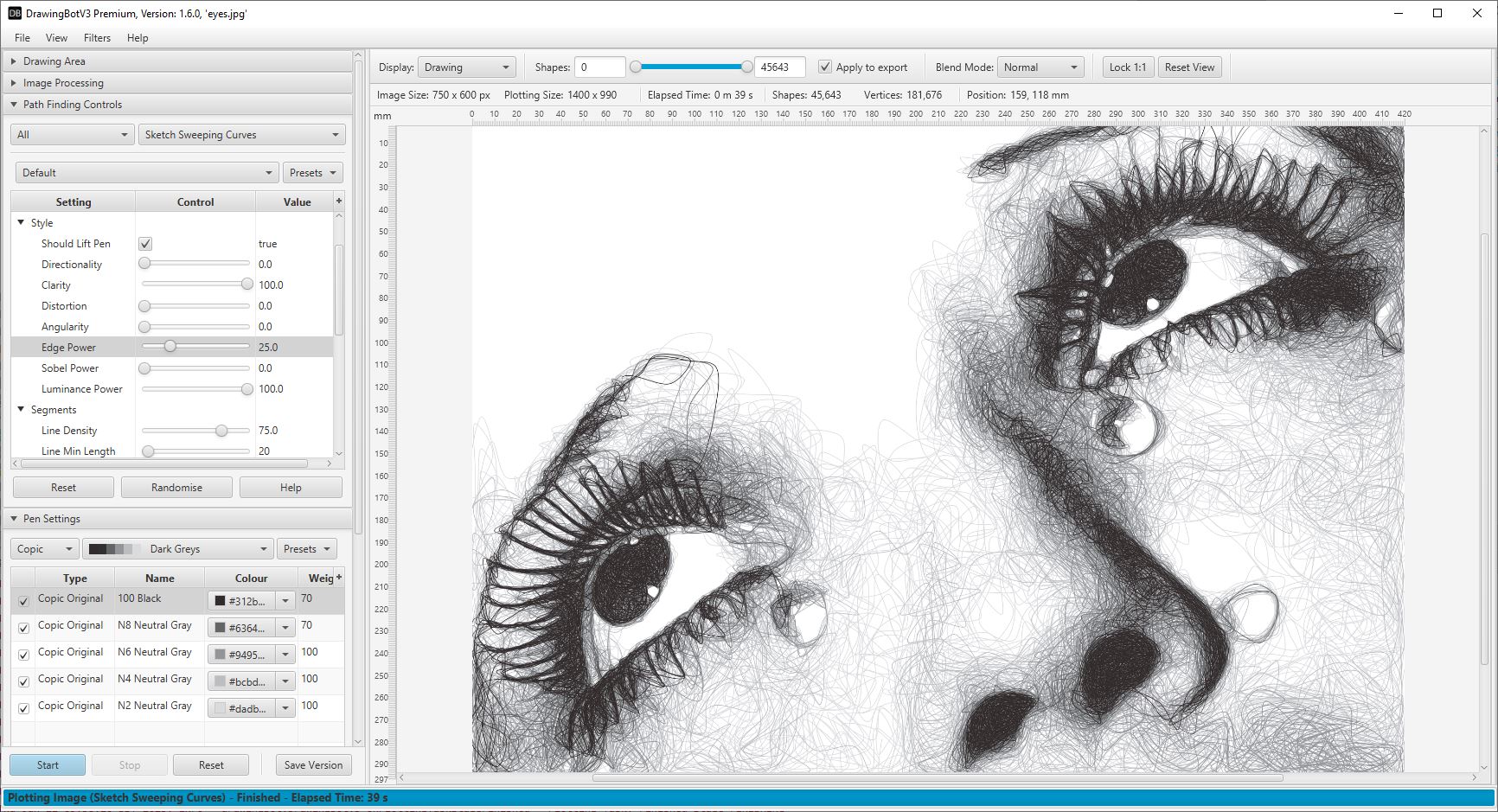
DrawingBotV3 is a software for converting images to stylised drawings with many applications including Pen Plotter Art, Digital Artwork, Image/Video Stylisation, NFT Creation, Embroidery and Graphic Design. With an intuitive User Interface allowing both Beginners and Advanced users to create beautiful artwork without any programming knowledge. Featuring over 50 in-built styles which are all highly customisable, the possibilities are endless!
You can find the full documentation here.
There are two versions, Free and Premium.
- The Free version is Open-Source and can be downloaded here.
- The Premium version is Closed-Source and can be purchased here
Both versions are available for Windows, Mac and Linux.
Join our Discord Server to chat all things DrawingBotV3!
Examples
Features - Free Version
- 3 Path Finding Algorithms: all highly configurable to create unique drawing styles.
- Automatic Path Optimisation for Faster Plots: Line Simplifying, Merging, Filtering, Sorting
- Pen Settings: configurable colour / stroke width / distribution weight / blend modes - perfect for multi-layered plots.
- 60+ Image Filters: for pre processing the imported image
- Advanced User Interface: with live drawing preview and intuitive controls
- User configurable Drawing Area, with Padding / Scaling Modes
- Version Control: Save your favourite versions as you go and reload them.
- Project Saving & Loading: save your work and continue where you left off!
- Special pens: for Original Colour/Grayscale Sampling
- Presets: can be saved/imported/exported for sharing different styles with other users
- Multiple Export Options: can be exported per/pen or per/drawing in multiple file types
- GCode Export: configurable Drawing Area, XYZ Offsets / Auto Homing.
- vpype Integration: automatically send plots to vpype for further optimization and processing
Features - Premium Version
- All the features included in the Free Version
- 50 Path Finding Algorithms: includes 47 more Path Finding Modules!
- CMYK separation: effortlessly create images using CMYK Pens
- Colour Match: create multi-colour plots with your own pens using the Colour Match separation feature!
- Batch Processing: Process entire folders of images export them in multiple formats automatically
- Export Animations: You can export animations of your creations as Image Sequences or MP4/MOV files!
- Style Controls: Adds style controls to Sketch PFMS, to create more stylised outputs!
- Plotter / Serial Port Connection: Connect to HPGL based plotters and control them over the serial port.
- Video Processing: Convert every frame from imported video files automatically
- HPGL Export: Export files for plotters, with configurable Hard-Clip limits, X-Axis Mirror, Y-Axis Mirror, X-Axis Alignment, Y-Axis Alignment, Rotation, Curve Flatness, Pen Velocity and the initial Pen Number.
- Hardware Accelerated Renderer: Fast OpenGL Based Renderer to preview drawings in higher clarity and speed!
- Pen Calibration Tools: Use the special Pen Calibration PFM, to calibrate the pens you're using for even better results!
Supported File Types
Import Formats:
    Images: [.tif, .tga, .png, .jpg, .gif, .bmp, .jpeg]
    Videos: [.mp4, .mov, .avi]

Export Formats:
    Vectors: [.svg, .pdf, .hpgl (Premium)],
    Images/Image Sequences: [.png, .jpg, .jpeg, .tif, .tga]
    Videos: [.mp4 (Premium), .mov (Premium)]
    GCode: [.gcode, .txt],
Installation
Step 1) Download the latest version: Premium Version or Free Version
You can choose from the following installers
-
Windows - Installer (.msi) -
- Windows 11, 10, 8, 7, Vista
-
Windows - Portable (.zip)
- Windows 11, 10, 8, 7, Vista
-
MacOS - Installer (.pkg)
- M1, M2 or Intel based
-
Linux Debian - Installer (.deb)
- Ubuntu, Linux Mint etc.
-
Linux Red Hat - Installer (.rpm)
- Fedora, CentOS, RHEL etc.
Step 2) Download and run the installer.
Step 3) (Premium Only) - The first time you run the software you'll need to enter your License Key find out more here.
Path Finding Modules
Free
- Sketch Lines PFM
- Sketch Squares PFM
- Spiral PFM
Premium
- Sketch Curves PFM
- Sketch Quad Beziers PFM
- Sketch Cubic Beziers PFM
- Sketch Catmull-Roms PFM
- Sketch Shapes PFM
- Sketch Sobel Edges PFM
- Sketch Waves PFM
- Sketch Flow Field
- Sketch Superformula
- Sketch Sweeping Curves
- Streamlines Edge Field
- Streamlines Flow Field
- Streamlines Superformula
- ECS Drawing
- Spiral Sawtooth
- Spiral Circular Scribbles
- Hatch Sawtooth
- Hatch Circular Scribbles
- Adaptive Shapes
- Adaptive Triangulation
- Adaptive Tree
- Adaptive Stippling
- Adaptive Dashes
- Adaptive Letters
- Adaptive Diagram
- Adaptive Circular Scribbles
- Adaptive TSP
- LBG Shapes
- LBG Triangulation
- LBG Tree
- LBG Stippling
- LBG Dashes
- LBG Letters
- LBG Diagram
- LBG Circular Scribbles
- LBG Quad Tiles
- LBG TSP
- Voronoi Shapes
- Voronoi Triangulation
- Voronoi Tree
- Voronoi Stippling
- Voronoi Dashes
- Voronoi Letters
- Voronoi Diagram
- Voronoi TSP
- Mosaic Rectangles
- Mosaic Voronoi
- Mosaic Triangulation
- Mosaic Segments
- Mosaic Custom
- Layers PFM
- SVG Converter
- Pen Calibration
More info here
DrawingBotV3 started as an expansion of Drawbot Image to GCode V2 originally written by Scott Cooper, thanks to Scott for allowing me to publish this version! Since then it has grown into a fully fledged software for creating art.
oomwoo
makerspet·Python
开源扫地机器人项目,用 ESP32、树莓派和激光雷达搭建可 DIY 的自主清扫机器人,支持 SLAM 建图与 Home Assistant 接入。
扫地机器人+43D 打印
13046+398192026-11-09 06:41 UTC

meshlab
cnr-isti-vclab·C++
开源的三维网格处理系统,支持网格编辑、简化、重建和点云处理,适合处理扫描或打印前的 3D 模型。
网格处理+43D 打印
5908+3923MeshLab-2025.072026-11-02 18:56 UTC

Slicer
Slicer·C++
跨平台开源医学影像可视化与计算软件,支持CT、神经影像等数据处理,可用于图像引导治疗和3D打印建模。
医学影像+43D 打印
2714+4807docs-resources2026-11-10 04:24 UTC
UVtools
sn4k3·C#
面向 MSLA/DLP 光固化 3D 打印的切片文件分析与处理工具,能检查、校准、修复、转换和编辑打印文件,帮你在上机前发现并解决模型问题。
光固化打印+43D 打印
1653+2145v7.1.22026-10-26 22:46 UTC