Linux 若未用自动安装脚本或依赖检测失败,需手动运行 install-dependencies.sh 安装依赖;下载 .AppImage 包后必须先赋予可执行权限才能运行;作者自述没有实体光固化打印机,实验性功能需自行承担风险
UVtools
sn4k3AGPL-3.0活跃维护面向 MSLA/DLP 光固化 3D 打印的切片文件分析与处理工具,能检查、校准、修复、转换和编辑打印文件,帮你在上机前发现并解决模型问题。
MSLA/DLP, file analysis, calibration, repair, conversion and manipulation
v7.1.2发布于 2026-10-26 22:47 UTC1,653star +2 / 7 天145fork同步于 2026-11-10 11:47 UTC
winget install -e --id PTRTECH.UVtools
bash -c "$(curl -fsSL https://raw.githubusercontent.com/sn4k3/UVtools/master/Scripts/install-uvtools.sh)" 硬件要求按 README 说明
README 未说明显存或 GPU 要求;macOS 需 13 Monterey 或更高版本、8GB 内存加每 CPU 核心 512MB,Windows 与 Linux 未给出具体硬件门槛
支持 Apple Silicon
光固化3D打印切片文件的分析、修复、转换与校准工具,支持多种打印机格式
面向 MSLA/DLP 光固化 3D 打印的切片文件分析与处理工具,能检查、校准、修复、转换和编辑打印文件,帮你在上机前发现并解决模型问题。
核心能力
- 逐层查看、修改并提取切片图层与缩略图
- 检测并修复孤岛、悬垂、树脂陷阱、吸盘等缺陷
- 在数十种光固化打印机文件格式间互相转换
- 内置校准测试与打印参数建议自动修正
- 提供 UVtools.Core 的 .NET 库及 PowerShell、Python 脚本接口
容易踩的坑
内容由模型根据 README 生成,可能不完整或不准确,以官方文档为准。看原文 README
- v7.1.2最新正式版2026-10-26 · 2026-10-26 22:47 UTC
- (Improvement) Linux: Present better error messages when libcvextern fails to load, and add a check for missing dependencies
- (Fix) Linux: libcvextern no longer requires the system libtiff.so.5 and libsqlite3, fixing startup on Debian 13 and Ubuntu 24.04+ (#1161)
- (Fix) macOS: The missing dependencies window never listed the libcvextern dependencies
- (Fix) Repair layers: Attach islands could hang forever on files with cloned layers, such as from timelapse, clone layers, double exposure, lithophane, stir resin and the calibration tests, as the clones shared the same lock
- (Fix) Issues: Resin traps, suction cups and print height issues on a single layer had their area calculated as a volume, multiplied by the layer height in pixels
- (Fix) Issues: Ignoring an island also ignored the islands with the same pixels on other layers
- v7.1.12026-10-25 · 2026-10-25 17:30 UTC
查看更新说明
- PCB exposure:
- (Fix) Gerber X2 attributes (%TO, %TA, %TD) and other unsupported extended commands were parsed as coordinates and D codes, a net or component name like TX0, Y1 or D12 drew phantom copper or changed the aperture, dropping the next pads and tracks (#1159).
- (Fix) Gerber arcs exact to the file resolution were rejected, mostly small arcs in inch files with few decimals (Eagle 2.4), and the next track then started from the arc start. An arc that can't be resolved is now drawn as a straight segment and still moves to its end point.
- (Fix) Gerber aperture macro primitives were rotated clockwise instead of counterclockwise, and the center line rotation was rounded to whole degrees.
- (Fix) defining a Gerber aperture also selected it, the following tracks and pads used the new aperture instead of the selected one.
- (Fix) Gerber aperture macros flashed with clear polarity (%LPC) added copper instead of clearing it.
- (Fix) Gerber aperture holes and macro parts with the exposure off erased the copper under them, and a clear flash with a hole added copper in the hole. They now show what is under them.
- (Fix) Gerber rectangle pads were one pixel larger on each axis, and with "Size scale" they grew to the right and down only instead of staying centered.
- (Fix) Gerber coordinates with a + sign were ignored, and only the first command of an extended block with several (%FSLAX24Y24MOIN%) was read, so such inch files were read as millimeters.
- (Improvement) unsupported Gerber commands that change the image (step and repeat, block apertures,
aperture mirroring, rotation and scaling) are recorded in
GerberFormat.UnsupportedCommands.
- (Add) 3D preview: zoom level on the toolbar, relative to the whole model fitting the view (1x), click to fit the model to the view.
- (Add) 3D preview: "Auto zoom & center issues" setting (on by default), independent of the layer preview one. When off, selecting an issue centers the camera on it keeping the zoom. Hold [ALT] while selecting the issue to invert the behavior.
- (Add) Issues: "Group each island with the floating parts resting on it" setting (off by default). The pixels of an
island no longer support the layer above, everything that rests only on an island is floating too and is shown with it
as a single island issue, from its lowest layer, the one to support, up to where it joins the supported model.
Islands that join each other are merged in the same issue, and removing the issue removes the whole floating part.
The repair tool still works on each island alone. Also available in the command line as
print-issues --group-islands(#1047). - (Fix) About window was showing available ram instead of used ram.
- (Fix) Typos in OSLA documentation by @hamidzr (#1160)
- (Upgrade) .NET from 10.0.12 to 10.0.13
- PCB exposure:
- v7.1.02026-10-16 · 2026-10-16 21:22 UTC
查看更新说明
- (Change) Use NuGet mini runtimes for Windows, macOS, Ubuntu 24.04 x64 and Debian 13 (Trixie) ARM64, with custom cvextern overrides from build/platforms when available.
- (Fix) Anycubic PWSZ: saved files could be rejected by Photon Workshop because optional resin names were added to legacy user resins; omit absent names and preserve existing values (#1155).
- (Fix) Convert: thumbnails are now matched to the target format by size instead of by order, formats that list the largest thumbnail first (CTB, Chitubox ZIP, PHZ, ...) swapped the small and large previews when converted to formats that list the smallest first (GR1, GOO, CXDLP, ...), shrinking the large one and upscaling the small one (#1121).
- (Fix) Anycubic ZIP formats (PWSZ and PW0 layers): opening high resolution files could fail with "Failed to allocate" because every decoded layer image was kept in memory until the garbage collector freed it.
- (Fix) Image formats: saving leaked one layer image per save.
- (Fix) LGS: saving a file without a thumbnail leaked the generated preview image.
- (Improvement) Layer preview: rotate and mirror are now applied when drawing instead of rotating and flipping the full resolution layer image on every change, which is faster on high resolutions. Rotating keeps the zoom and the view centered on the same spot of the layer instead of zooming to fit, it still zooms to fit when the whole layer was in view.
- (Add) Layer preview: "Real aspect ratio" toggle on the toolbar, and its "Real aspect ratio on load" setting, to show the layer with the physical proportions of the printer pixels, printers with non-square LCD pixels, for example the Halot Mage S, looked stretched. It is enabled by default and view only, the layer image is never resized (#918).
- (Improvement) Layer preview: the crosshairs, the print volume, layer and contour bounds, the enclosing circles, the centroids and the triangles count are now drawn as vectors over the layer image instead of into it, they are crisp at any zoom, their text stays upright when the preview is rotated, and toggling them or zooming across the crosshair fade level no longer renders the layer image again. Their thickness and diameter settings are now in screen pixels, scaled to half of the value (at least 1) which is the same as before at 50% zoom.
- (Improvement) Layer preview: the layer bitmap is reused while the layer resolution doesn't change instead of allocating a new one for every layer, which is faster and reduces the memory churn on high resolution layers.
- (Improvement) Layer preview: layers with nothing to color (no issues, difference, outlines, masks or pixel editor operations on the layer) are displayed as the 8-bit image they are, instead of being expanded to a 32-bit image and bitmap. On a 13312x5120 layer it needs 142 MB instead of 598 MB, and changing the layer takes about 8 ms instead of 29 ms. Layers with colored pixels still use the 32-bit image, and the pixel editor always does.
- (Add) Layer preview: "Layer image sampling" setting (Auto, Nearest, Smooth), Auto is the default. Zoomed out, the layer is now drawn averaged instead of skipping pixels, which removed the aliasing and the shimmering of high resolution layers when panning or scrolling the layers. It is still sharp pixels when zoomed in. Choose Nearest to get the previous look.
- (Add) Layer preview: the layer difference (difference, similarity and onion skin) is drawn by the GPU ("GPU rendering" in the Difference menu, and a setting, on by default). The previous and next layers are drawn over the layer as tinted layers by the layer image box, which keeps the layer as the 8-bit image it is, instead of the CPU mixing the layers into a 32-bit image. The difference is the same as the CPU version; in the similarity the anti-aliased pixels of the other layers blend with the layer instead of replacing it; in the onion skin the ghosts have the same colors and priority, but t
- v7.0.32026-10-09 · 2026-10-09 02:57 UTC
查看更新说明
- File formats:
- (Add) CXDLPv4: Support for the Creality HALOT-X1 (#1016), its layers use a different codec of 3 bit gray pixel pairs per row, which is detected when opening the file and used when the machine is a HALOT-X1 or the resolution is 15120x6230. Files of the other printers keep using the classic codec
- (Fix) CXDLPv4: Anti-aliasing reported as 0 when the file header has a level of 0
- (Add) VLR: Vlare file format of the Peopoly Phenom Forge (#513), it shares the OSF structure with a bigger header and a different layer codec
- (Fix) PWSZ (Anycubic zip formats): overlapping or touching contours were filled as holes, for example supports inside the model, causing false islands and overhangs, the layers are now filled with the non-zero winding rule (#970)
- (Fix) CXDLP: Print parameters were truncated instead of rounded to the integers the format stores, lift and retract speeds below 60 mm/min became 0 (#1116)
- (Improvement) Edit print parameters: the values are limited to what the file format can store, for example the CXDLP speeds step in 60 mm/min and its integer fields have no decimals, and the confirmation shows the value that will be stored (#1116)
- (Add) PrusaSlicer printer: Creality Halot X1
- (Fix) Layer tracker: the issues were drawn at wrong positions after maximize or restore the window
- (Fix) AdvancedImageBox: The pixel grid image border and the selection were drawn over the scroll bars area when the image was clipped by the viewport, they are now clipped to the viewport (#959)
- File formats:
- v7.0.22026-10-06 · 2026-10-06 23:07 UTC
查看更新说明
- File formats:
- (Improvement) Encoding is up to 10x faster for GR1 and MDLP, 2x for PWS, and 25-35% faster for cbddlp, N4/N7, and Photon S; decoding PWS, cbddlp, FDG, and PHZ is 25-45% faster. Runs are found with vectorized searches, and the duplicated CTB, anti-aliasing plane, and column line codecs are now shared
- (Improvement) CTB, PHZ, and FDG layer encryption is processed 4 bytes at a time, and the CTB encrypted encoder writes layers in batches instead of keeping all of them in memory
- (Improvement) Thumbnail encoding and decoding no longer compares strings or queries the channel count per pixel
- (Improvement) QDT and SVGX decoding parse without allocating a string per token, SVGX decoding no longer searches the layer group linearly, and its encoding no longer creates a native wrapper per contour point
- (Improvement) Truncated CTB RLE data now fails with a corrupted data error instead of an index out of range
- (Fix) Anet: the last pixel of the layer was lost when it differed from the previous one, making the file unreadable
- (Fix) OSF: encoding failed when the layer content touched the last row of the image,
Layer.LastPixelIndexpointed one row below the last pixel - (Fix) cbddlp: layers with anti-aliasing 1 turned every gray pixel black, and identical layers did not copy the page number
- (Fix) OSLA: the preview table padding used the layer table size
- (Fix) Encoding layers to a zip with the cache enabled skipped the duplicated layers
- (Fix) The hash helpers shared non-thread safe instances, and the AES padding bytes were not zeroed
- (Fix) ZCode: wrong exception arguments for a too long G-code line; QDT: swapped resolution names on header errors
- (Fix) Crash
Cannot access a disposed objectonImage.MeasureOverride(#1150): the thumbnail and tool preview bitmaps are now disposed after the UI applied the new image, and the PCB exposure preview no longer leaks the previous bitmap - Windows and controls:
- (Improvement) 3D layer preview: model volume, weight, cost and base contact are cached instead of recomputed from the whole mesh on every plate change, clicking where the model is not hit skips the full mesh picking, and the orientation cube, peel curve and measure overlay no longer allocate geometries, pens and brushes on every frame
- (Improvement) PCB exposure and Lithophane previews are rendered off the UI thread, outdated renders are discarded
- (Improvement) Moving files and layers in the PCB exposure and Phased exposure tools no longer rebuilds the list
- (Improvement) Tool windows scripting inputs share one numeric input implementation, and icon only buttons have tooltips
- (Fix) Scripting: the save file dialog input was ignored when a file was picked, and the open file text was joined wrong
- (Fix) 3D layer preview: wrong center of mass vertex on the wireframe
- (Fix) Message window: custom button tags were lost
- (Fix) Settings: parallelism and decimal values were parsed with the current culture instead of the invariant one
- (Fix) Tool window: the layer count text, and Enter triggering the first button by default
- (Fix) Layer import: unreadable images crashed the preview, and the filter index was not validated
- (Fix) Pixel editor profiles: selection with no profile and out of range indexes
- (Fix) Suggestion settings: stale content kept when no suggestion was active
- (Fix) Benchmark: a zero duration produced a division by zero
- (Fix) Error when executing UVtooldCmd run with a script (#1138)
- (Fix)
LayerCachedisposed the wrongSkiaSurfacewhen the layer was changed, and did not release the framebuffer - (Fix) Zstd: the fastest compression level was not really the fastest
- (Improvement) Update
NativeCompressionsand use it LZ4 codec - (Update) Benchmark 13900K reference values
- (Drop)
K4os.Compression.LZ4library
- File formats:
用户点评
登录用户的真实使用记录,可按版本和硬件筛选共 0 条
还没有人点评。第一个说出真实体验的人最有价值。
UVtools









Download the latest version at:
https://github.com/sn4k3/UVtools/releases/latest
To auto-install on Windows (package manager):
- Winget:
winget install -e --id PTRTECH.UVtools - Chocolatey:
choco install -y uvtools
Note: Winget is included on Windows 10 with recent updates and Windows 11 by default.
To auto-install on Linux and macOS:
bash -c "$(curl -fsSL https://raw.githubusercontent.com/sn4k3/UVtools/master/Scripts/install-uvtools.sh)"
To downgrade to a previous version:
# Replace x.x.x by the version you want to install
bash -c "$(curl -fsSL https://raw.githubusercontent.com/sn4k3/UVtools/master/Scripts/install-uvtools.sh)" -- x.x.x
MSLA/DLP, file analysis, calibration, repair, conversion and manipulation
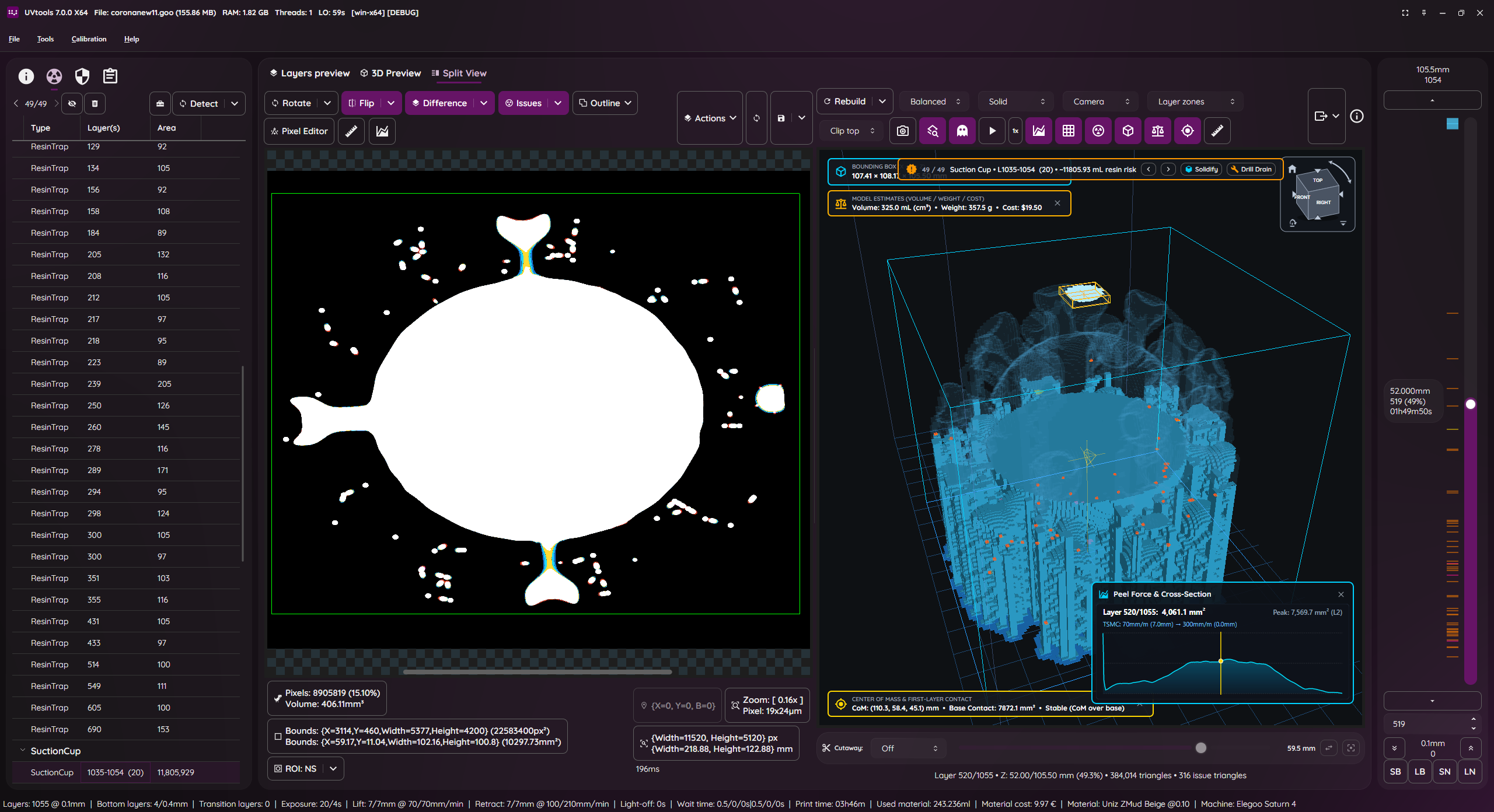
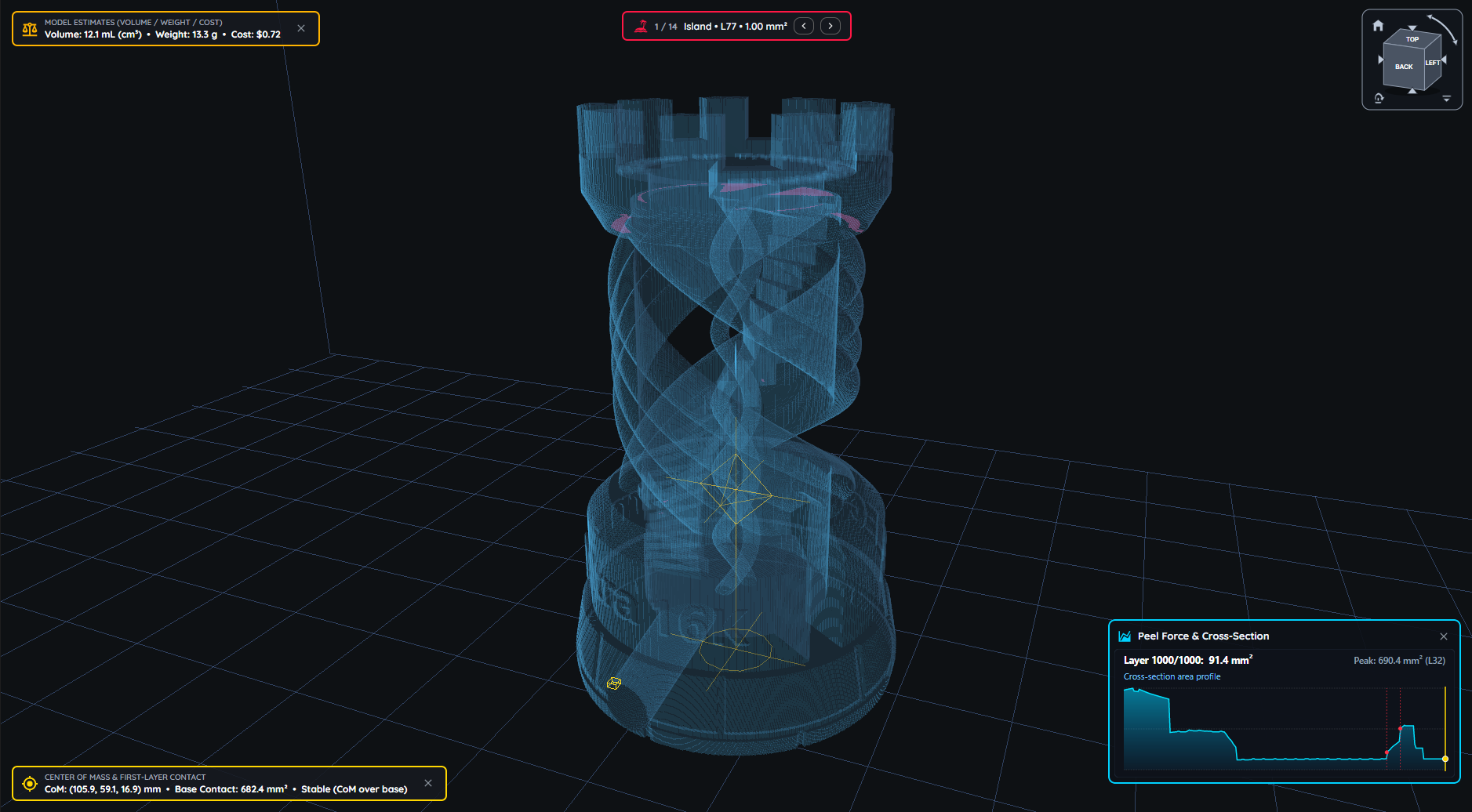
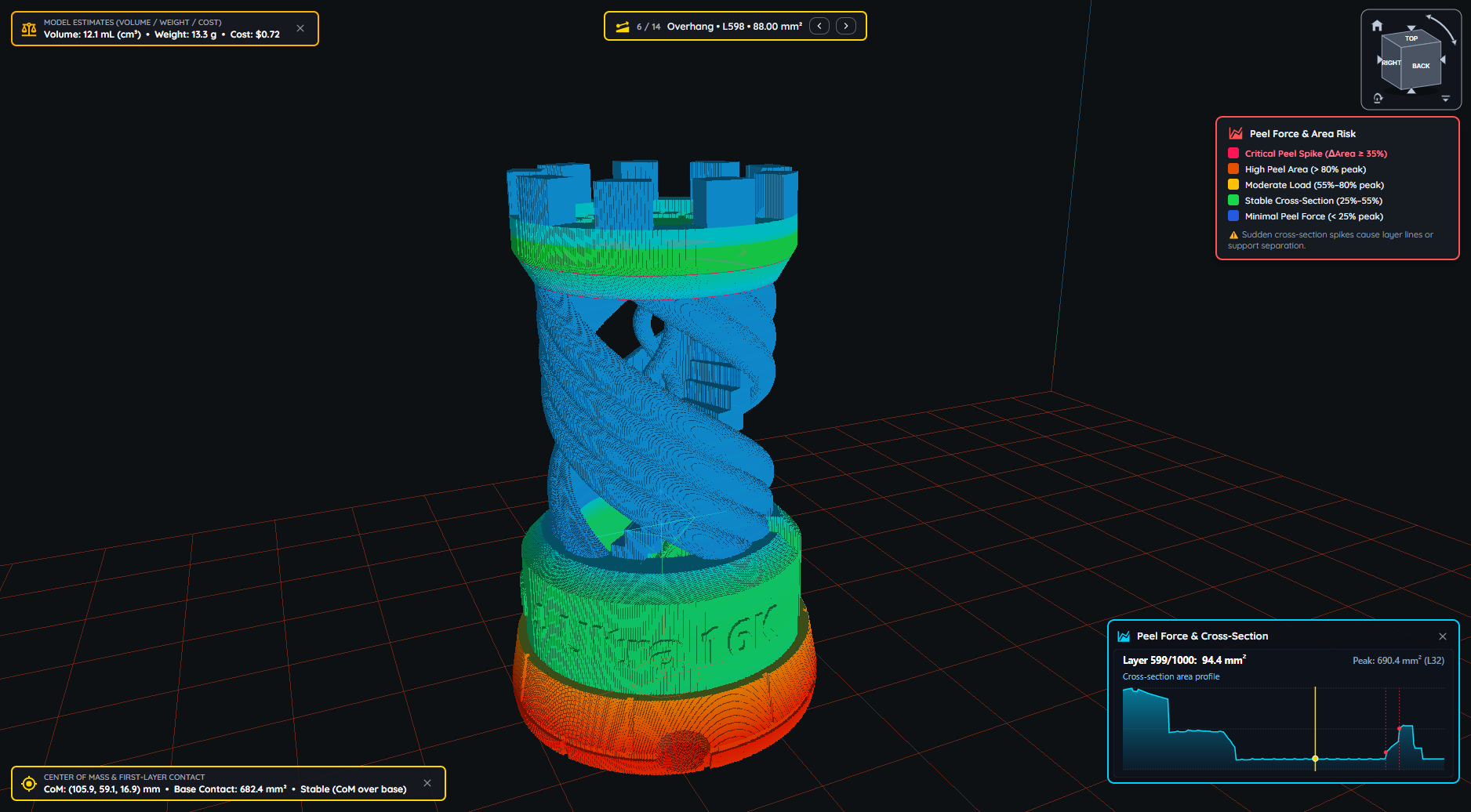
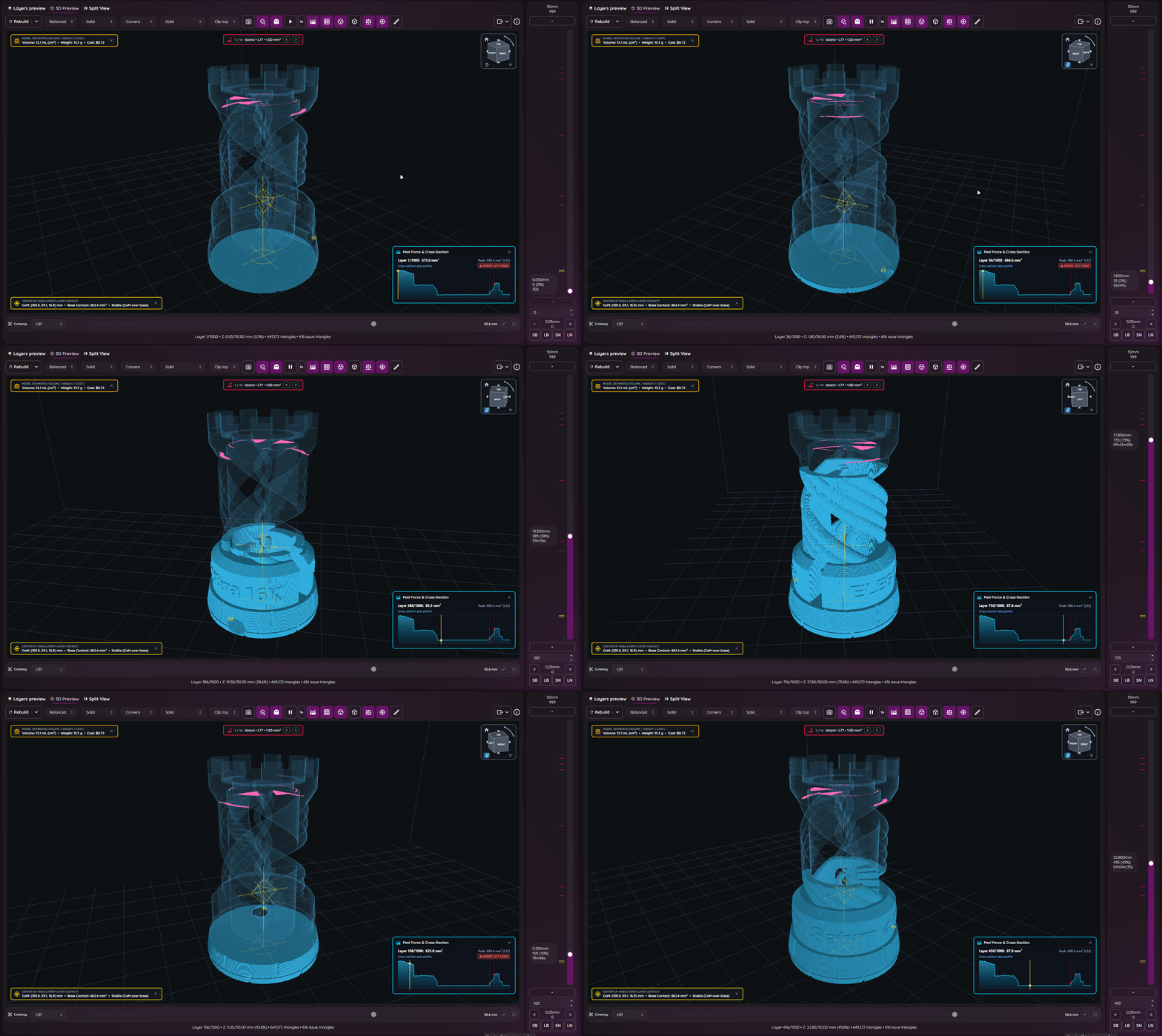
This simple tool can give you insight of supports and find key failures.
Did you forget what resin or other settings you used on a project?
This can also save you, check every setting that was used with or change them!
- Facebook group: https://www.facebook.com/groups/uvtools
- Discussions: https://github.com/sn4k3/UVtools/discussions
Why this project?
I don't own a Prusa SL1 or any other resin printer, for now I’m only an FDM user with Prusa MK3 and an Ender3. PrusaSlicer is my only choice, why? Because I think it's the best and features more, at least for me, simple but powerful.
So why this project? Well, in fact, I’m looking for a resin printer. I like to study and learn first before buying and get good and don't regret. While inspecting, I found that resin printers firmwares are not as universal as FDM, too many file formats and there before each printer can use their own property file, this of course limit the software selection. For example, only PrusaSlicer can slice SL1 files. So with that in mind, I'm preparing when I get a resin printer in the future, I can use PrusaSlicer instead of others. I've explored the other slicers and again, no one gives me joy, and I feel them unstable, many users slice model on PrusaSlicer just to get those supports and export STL to load in another, that means again PrusaSlicer is on the win side, the problem is they can't slice directly on PrusaSlicer, so, in the end, my project aims to do almost that, configure a printer on PrusaSlicer, e.g.: EPAX X1, slice, export a file, convert SL1 to native printer file and print.
Please note I don't own any resin printer! All my work is virtual and calculated, so, use experimental functions with care! Once things got confirmed, a list will show. But also, I need victims for a test subject. Proceed at your own risk!
Features
- View, modify and extract layer by layer
- View, modify and extract thumbnails
- Export file to a folder
- View and edit all used properties/settings
- Many tools to mutate and filter layers
- Check for issues and repair/remove them as possible:
- Islands
- Overhangs
- Resin traps
- Suction cups
- Touching bounds
- Print height
- Empty layers
- Suggestions and auto corrections:
- Layer height
- Bottom layer count
- Wait time before cure
- Wait time after cure
- Transition layer count
- Model position
- Convert format to another format
- Calibration tests
- Portable (No installation needed)
Known File Formats
- SL1, SL1S (PrusaSlicer)
- Photon, Photons, CBDDLP, CTB, PHZ, FDG, ZIP (ThickBox)
- PWS, PW0, PWX, DLP, DL2P, PWMO, PWMA, PWMS, PWMX, PMX2, PWMB, PWSQ, PX6S, PM3, PM3N, PM3M, PM4M, PM4U, PM3R, PM5, PM5S, PWC, PM7, PM7M, PWSZ, PP1, PP1M (Photon Workshop)
- JXS (GKone Slicer)
- ZCode (UnitMaker)
- ZCodex (Z-Suite)
- CWS (NovaMaker), RGB.CWS (Nova Bene4 Mono / Elfin2 Mono SE)
- XML.CWS (Wanhao Workshop)
- MDLP (Makerbase MKS-DLP v1)
- GR1 (GR1 Workshop)
- CXDLP, CXDLPV4 (Creality Box)
- GOO (Elegoo)
- PRZ (Phrozen Sonic Mini 8K S)
- LGS (Longer Orange 10), LGS30 (Longer Orange 30), LGS120 (Longer Orange 120), LGS4K (Longer Orange 4K & mono)
- Flashforge SVGX
- Anet N4, Anet N7
- QDT (Emake3D Galaxy 1)
- OSLA (Open SLA universal binary file)
- OSF (Vlare Open File Format), VLR (Vlare / Peopoly)
- NanoDLP (Zip)
- UVJ (Vendor-neutral format for manual manipulation)
- VDT (Voxeldance Tango), VDA.ZIP (Voxeldance Additive)
- ZIP (Generic / Frozen Zip)
- ZIP (Klipper)
- Image files (png, jpg, jpeg, jp2, tif, bmp, pbm, pgm, ras, sr)
PrusaSlicer
- Installation: https://github.com/sn4k3/UVtools/wiki/Setup-PrusaSlicer
- Available printers: https://github.com/sn4k3/UVtools/tree/master/PrusaSlicer/printer
- Available profiles:
- From 0.01 mm to 0.20 mm
- Light, Medium and Heavy Supports
- Custom "Material Notes" and "Printer Notes" keywords:
- TransitionLayerCount_xxx: Sets the number of transition layers
- BottomLightOffDelay_xxx: Sets the bottom light off delay time in seconds
- LightOffDelay_xxx: Sets the light off delay time in seconds
- BottomWaitTimeBeforeCure_xxx: Sets the bottom wait time before cure in seconds
- WaitTimeBeforeCure_xxx: Sets the wait time before cure in seconds
- BottomWaitTimeAfterCure_xxx: Sets the bottom wait time after cure in seconds
- WaitTimeAfterCure_xxx: Sets the wait time after cure in seconds
- BottomLiftHeight_xxx: Sets the bottom lift height in millimeters
- BottomLiftSpeed_xxx: Sets the bottom lift speed in millimeters/minute
- BottomLiftHeight2_xxx: Sets the second bottom lift height in millimeters
- BottomLiftSpeed2_xxx: Sets the second bottom lift speed in millimeters/minute
- LiftHeight_xxx: Sets the lift height in millimeters
- LiftSpeed_xxx: Sets the lift speed in millimeters/minute
- LiftHeight2_xxx: Sets the second lift height in millimeters
- LiftSpeed2_xxx: Sets the second lift speed in millimeters/minute
- BottomWaitTimeAfterLift_xxx: Sets the bottom wait time after lift in seconds
- WaitTimeAfterLift_xxx: Sets the wait time after lift in seconds
- BottomRetractSpeed_xxx: Sets the bottom retract speed in millimeters/minute
- BottomRetractHeight2_xxx: Sets the second bottom retract height in millimeters
- BottomRetractSpeed2_xxx: Sets the second bottom retract speed in millimeters/minute
- RetractSpeed_xxx: Sets the retract speed in millimeters/minute
- RetractHeight2_xxx: Sets the second retract height in millimeters
- RetractSpeed2_xxx: Sets the second retract speed in millimeters/minute
- BottomLightPWM_xxx: Sets the bottom LED light power (0–255)
- LightPWM_xxx: Sets the LED light power (0–255)
- FILEVERSION_n: Sets the output file format version/revision
- FILECLASS_xxx: Sets the output file format class to be auto-converted once open on UVtools
- FILEFORMAT_xxx: Sets the output file format extension to be auto-converted once open on UVtools
- LAYERIMAGEFORMAT_xxx: Sets the layer image format required for the converted file if the format have multiple options (For Archives with PNG's)
Note that some variables will only work if the target format supports them, otherwise they will be ignored.
Replace the "xxx" by your desired value in the correct units
Command-line
UVtoolsCmd (Console) executable
Usage:
  UVtoolsCmd [command] [options]

Options:
  -q, --quiet     Make output silent but exceptions error will still show
  --no-progress   Show no progress
  --dummy         Do not save alterations to file
  --core-version  Show core version information
  --version       Show version information
  -?, -h, --help  Show help and usage information

Commands:
  set-properties <input-file> <property=value>                                            Set properties in a file or to it layers with new values
  run <input-file> <classes/files>                                                        Run operations, suggestions and/or scripts
  convert <input-file> <target-type/ext> <output-file>                                    Convert input file into a output file format by a known type or extension []
  extract <input-file> <output-folder>                                                    Extract file contents to a folder []
  copy-parameters <input-file> <target-files>                                             Copy print parameters from one file to another
  set-preview, set-thumbnail <input-file> <file path|layer index|:random-layer|:heatmap>  Sets and replace thumbnail(s) in the file [default: :heatmap]
  compare <input-file-a> <input-file-b>                                                   Compare two files and output the differences
  print-issues <input-file>                                                               Detect and print issues
  print-properties <input-file>                                                           Prints available properties
  print-gcode <input-file>                                                                Prints the gcode of the file if available
  print-machines                                                                          Prints machine settings
  print-formats                                                                           Prints the available formats
Note: On each command you can use -? to see specific command help and extra options
UVtools (UI) executable
- Open file(s):
- Syntax: UVtools <file1> [file2] [file3] ...
- Example 1: UVtools C:\model.osla
- Example 2: UVtools C:\model.zip D:\other_model.osla
- Note: When an invalid file is passed, the program will open as default.
- Redirect a command to UVtoolsCmd:
- Syntax: UVtools --cmd <commands ...>
- Example 1: UVtools --cmd convert C:\model.osla zip
- Note: This can be used when UVtoolsCmd is not directly exposed, for example, if you are running via a
.AppImage.
All commands will be redirected toUVtoolsCmdand the UI will not run. It still shows the terminal window.
Legacy
The following commands are the old way and commands under the UI executable, they will be removed soon, try to not use them, please prefer UVtoolsCmd.
- Convert a file into another type(s)
- Syntax: UVtools -c/--convert <input_file> <output_file1_or_ext> [output_file2_or_ext] ...
- Example 1: UVtools -c model.zip osla
- Example 2: UVtools -c model.zip model_converted.osla
- Example 3: UVtools --convert model.zip model_converted.osla model_converted.zcode
- Note: Nothing happens when providing wrong files, will quit.
- Extract a file to a folder
- Syntax: UVtools -e/--extract <input_file> [output_folder]
- Example 1: UVtools -e model.zip
- Example 2: UVtools -e model.zip mymodel
- Example 3: UVtools --extract model.zip.
- Note: Nothing happens when providing the wrong files / folder, will quit.
- Export a file to a 3D mesh
- Syntax: UVtools --export-mesh <input_file> [output_mesh_file]
- Example 1: UVtools --export-mesh model.zip
- Example 2: UVtools --export-mesh model.zip model_exported.stl
- Note: Nothing happens when providing wrong files, will quit.
- Run an operation and save the file
- Syntax: UVtools --run-operation <input_file> <operation_file.uvtop>
- Example 1: UVtools --run-operation model.zip MyMorph.uvtop
- Note: Nothing happens when providing wrong files, will quit.
- Run a script and save the file
- Syntax: UVtools --run-script <input_file> <script_file.cs>
- Example 1: UVtools --run-script model.zip myScript.cs
- Note: Nothing happens when providing wrong files, will quit.
- Copy print parameters from one file to another
- Syntax: UVtools --copy-parameters <from_file> <to_file>
- Example 1: UVtools --copy-parameters model.zip otherfile.zip
- Note: Nothing happens when providing wrong files, will quit.
Requirements
Windows
- Windows 10 or greater
- If on Windows 10/11 N or NK:
- Media Feature Pack must be installed
- Press Windows + R
- Type: appwiz.cpl (and press Enter key)
- Click on: Turn Windows features on or off
- Check the "Media Extensions" and click Ok
- If on Windows 10/11 N or NK:
- 8GB RAM or higher + 512MB per CPU core
- 64-bit System
- 1920 x 1080 @ 100% scale as minimum resolution
Linux
- 8GB RAM or higher + 512MB per CPU core
- 64-bit System
- 1920 x 1080 @ 100% scale as minimum resolution
Installing the dependencies
Copy the following script, paste and run on a terminal:
(Required if you didn't use the auto installer or if it
failed to detect and install dependencies)
[ "$(command -v apt-get)" -a -z "$(command -v curl)" ] && sudo apt-get install -y curl
[ "$(command -v pacman)" -a -z "$(command -v curl)" ] && sudo pacman -S curl
[ "$(command -v dnf)" -a -z "$(command -v curl)" ] && sudo dnf install -y curl
[ "$(command -v zypper)" -a -z "$(command -v curl)" ] && sudo zypper install -y curl
sudo bash -c "$(curl -fsSL https://raw.githubusercontent.com/sn4k3/UVtools/master/Scripts/install-dependencies.sh)"
To run UVtools, open it folder on a terminal and call one of:
- Double-click
UVtoolsfile ./UVtoolsbash UVtools.shdotnet UVtools.dll[For universal package only, requires dotnet-runtime]- As a practical alternative, you can create a shortcut on Desktop
If you download the .AppImage package variant, you must set run permissions to it before attempting to run it:

Mac
- macOS 13 Monterey or higher
- 8GB RAM or higher + 512MB per CPU core
- Install UVtools via the auto installer
To run UVtools, open its folder on a terminal and call one of:
- Double-click
UVtoolsfile ./UVtools.app/Contents/MacOS/UVtoolsbash UVtools.app/Contents/MacOS/UVtools.sh- As a practical alternative, you can create a shortcut on Desktop
How to use
There are multiple ways to open your file in UVtools:
- Open UVtools and load your file (CTRL + O) (File → Open)
- Open UVtools and drag and drop your file inside the window
- Drag and drop the file into UVtools.exe
- Set UVtools the default program to open your files
Library -> Developers
Are you a developer? This project includes a .NET library (UVtools.Core) that can be referenced in your application to make use of my work. Easy-to-use calls that allow you to work with the formats. For more information, navigate the main code to see some calls.
Nuget package: https://www.nuget.org/packages/UVtools.Core
dotnet add package UVtools.Core
Scripting:
Develop and build from Source
Build directions
The fastest way to compile the project is by run the build/compile.bat, however, if you wish to develop with Visual
Studio follow the following steps:
- Install Visual Studio and include .NET development support
- Install the .NET 6.0 SDK if not included on the previous installation
- Install the Avalonia for Visual Studio:
- Install the Wix Toolset: (Required only for MSI build, optional)
dotnet tool install --global wix- Visual Studio HeatWave extension
- Open UVtools.sln
- Build
TODO
- More file formats
- Cleanup and performance (always)
- See features request under GitHub
Support my work / Donate
All my work here is given for free (OpenSource), it took some hours to build, test and polish the program.
If you're happy to contribute to a better program and for my work, I will appreciate the tip.
Use one of the following methods:


Contributors

Citation
If you use UVtools in academic or scientific work, Please cite the specific UVtools version used in your research. The citation year should correspond to that version's release year.
APA 7
Conceição, T. M. F. (2026). UVtools: MSLA/DLP file analysis, calibration, repair, conversion and manipulation (Version 6.0.3) [Computer software]. GitHub. https://github.com/sn4k3/UVtools/releases/tag/v6.0.3
In-text citation: (Conceição, 2026)
Harvard
Conceição, Tiago M. F. (2026) UVtools: MSLA/DLP file analysis, calibration, repair, conversion and manipulation, version 6.0.3 [computer software]. Available at: https://github.com/sn4k3/UVtools/releases/tag/v6.0.3 (Accessed: 23 June 2026).
In-text citation: (Conceição, 2026)
IEEE
T. M. F. Conceição, “UVtools: MSLA/DLP file analysis, calibration, repair, conversion and manipulation,” version 6.0.3, 2026. [Computer software]. Available: https://github.com/sn4k3/UVtools/releases/tag/v6.0.3
In-text citation: [1]
Chicago
Conceição, Tiago M. F. UVtools: MSLA/DLP File Analysis, Calibration, Repair, Conversion and Manipulation. Version 6.0.3. Computer software. 2026. https://github.com/sn4k3/UVtools/releases/tag/v6.0.3
Vancouver
Conceição TMF. UVtools: MSLA/DLP file analysis, calibration, repair, conversion and manipulation [computer software]. Version 6.0.3. 2026. Available from: https://github.com/sn4k3/UVtools/releases/tag/v6.0.3
MLA 9
Conceição, Tiago M. F. UVtools: MSLA/DLP File Analysis, Calibration, Repair, Conversion and Manipulation. Version 6.0.3, GitHub, 2026, https://github.com/sn4k3/UVtools/releases/tag/v6.0.3
Generic citation
File processing was performed using UVtools, an open-source application for MSLA/DLP file analysis, calibration, repair, conversion and manipulation (Conceição, 2026).
BibTeX
@software{conceicao_uvtools,
author  = {Conceição, Tiago M. F.},
title   = {{UVtools}: MSLA/DLP File Analysis, Calibration, Repair,
Conversion and Manipulation},
version = {VERSION_USED},
year    = {VERSION_RELEASE_YEAR},
url     = {https://github.com/sn4k3/UVtools/releases/tag/VERSION_TAG},
note    = {Open-source computer software}
}
oomwoo
makerspet·Python
开源扫地机器人项目,用 ESP32、树莓派和激光雷达搭建可 DIY 的自主清扫机器人,支持 SLAM 建图与 Home Assistant 接入。
扫地机器人+43D 打印
13048+398202026-11-09 06:41 UTC

meshlab
cnr-isti-vclab·C++
开源的三维网格处理系统,支持网格编辑、简化、重建和点云处理,适合处理扫描或打印前的 3D 模型。
网格处理+43D 打印
5908+3923MeshLab-2025.072026-11-02 18:56 UTC

Slicer
Slicer·C++
跨平台开源医学影像可视化与计算软件,支持CT、神经影像等数据处理,可用于图像引导治疗和3D打印建模。
医学影像+43D 打印
2714+4807docs-resources2026-11-10 04:24 UTC
Multi-Agent-CAD
Pan-Chera·Python
把文本生成 CAD 模型拆成多个智能体协作完成,通过约束式测试时计算提升生成质量,适合机械设计与 3D 打印场景。
多智能体+43D 打印
1074+2100v1.0.02026-11-04 10:11 UTC