必须先构建前端,web/build 缺失时 go build -tags embed 会编译失败;运行时会相对工作目录写入 ./data、./logs、./tmp,直接在其他目录运行可执行文件会产生第二份空安装;安装后的 casbin-gateway 命令是包装脚本,总在安装目录启动。
casbin-gateway
apacheApache-2.0活跃维护统一接入 44 家模型厂商的 AI 网关,实时监控本机各编码代理的调用行为,并给 API 做 A–F 真实性评级,防止用错或被盗用。
See what every AI coding agent on your machine is doing, and whether the API behind it is the one you paid for. Claude Code, Codex, Cursor, Gemini CLI and more: one endpoint for 44 model vendors, A–F API authenticity grading, per-agent permissions, usage and prompt records.
nightly发布于 2026-10-31 10:53 UTC649star +2 / 7 天73fork同步于 2026-11-10 11:57 UTC
cd web && yarn install && yarn build
go build -tags embed -o casbin-gateway . 硬件要求按 README 说明
README 未说明硬件要求;后端为 Go + Beego + XORM,前端为 TypeScript + React,未提及 GPU 或显存。
统一代理本机所有 AI 编码代理的 API 流量,看清每个代理在做什么、背后是不是你付费的那家
统一接入 44 家模型厂商的 AI 网关,实时监控本机各编码代理的调用行为,并给 API 做 A–F 真实性评级,防止用错或被盗用。
核心能力
- 用一个端点接入 44 家模型厂商
- 对 API 真实性做 A–F 评级
- 按代理配置独立权限
- 记录用量与提示词
- 支持 Claude Code、Codex、Cursor、Gemini CLI 等代理
容易踩的坑
内容由模型根据 README 生成,可能不完整或不准确,以官方文档为准。看原文 README
- nightlyNightly build (not an official release)pre-release最新正式版2026-10-31 · 2026-10-31 10:53 UTC
This is not an official release
These are automated convenience builds of the current
master. Use them for testing and development only.Official releases are source packages, published on the releases page.
Contents
Each archive holds the self-contained
casbin-gatewayserver, thecasbin-gateway-desktoplauncher, andLICENSE,NOTICEandDISCLAIMER. The server is built with-tags embed, so it carries its own settings, web UI and IP database and starts with no files next to it. Data is written to./data,./logsand./tmpin the working directory.The launcher is the desktop application: it starts the server, shows the UI in a native window, and stays in the tray after the window is closed. Its first start puts a Casbin Gateway entry on the desktop, in the Start menu or in
~/Applications, pointing back at the directory the archive was unpacked into. Running the server on its own withcasbin-gateway startstill works and needs nothing else.Platform Archive Linux x86_64 casbin-gateway-nightly-linux-x86_64.tar.gzmacOS x86_64 casbin-gateway-nightly-darwin-x86_64.tar.gzWindows x86_64 casbin-gateway-nightly-windows-x86_64.zipgateway-probe-*are the authenticity probe on its own: one file that grades an OpenAI- or Anthropic-compatible endpoint and saves a shareable card, with nothing installed. Run it with--help.Built from commit 62ce86c9c0204a304b1050eb338906fa5c7292a6.
用户点评
登录用户的真实使用记录,可按版本和硬件筛选共 0 条
还没有人点评。第一个说出真实体验的人最有价值。
- Is that API key what it was sold as? A reseller can serve a cheaper model, fake a cache hit, or quietly drop a parameter it claims to support. Authenticity probes every provider on its own and grades it A–F, and grades a single endpoint without installing anything.
- What every agent did, spent and sent. Every prompt and tool call, the spend read from the agents' own transcripts, and, on Windows, where each agent's own processes upload data, including what never passes through any proxy.
- One place for all of them. Point Claude Code, Codex, Cursor, Gemini CLI and the rest at any of 44 model vendors, fall over to another vendor when one runs out or goes down, say what each may do, and install, upgrade or roll back the agents themselves.
Run it
One command. No database, no Go, no Node, no configuration.
On Linux and macOS:
curl -fsSL https://raw.githubusercontent.com/apache/casbin-gateway/master/scripts/install.sh | bash
On Windows, in PowerShell:
irm https://raw.githubusercontent.com/apache/casbin-gateway/master/scripts/install.ps1 | iex
Either one downloads the build for this machine, unpacks it into ~/.local/share/casbin-gateway (%LOCALAPPDATA%\casbin-gateway on Windows), puts a casbin-gateway command on your PATH, starts it, and arranges for it to start again when you log in. The terminal you installed from is yours again straight away.
Gateway then opens in its own window — no sign-in: it serves this machine only and signs the local admin in on sight. Closing that window leaves Gateway running behind its tray icon, which is also where you reopen the window, turn Start at Login off and on — Settings → Startup is the same switch — and quit for real. There is a Casbin Gateway entry on your desktop and in the Start menu, in ~/Applications, or in the application menu, depending on the platform. An archive unpacked by hand gets the same entry the first time the launcher runs.
If you would rather use a browser, or you are on a machine with no desktop at all, everything is still at http://localhost:17000, and casbin-gateway start runs the server on its own with no window and no tray.
That is the whole installation. Gateway keeps its data in a SQLite file inside its own directory.
The password behind that account is admin / 123, and it only matters if you open Gateway to the network — see Serving other machines.
Screenshots
| Every agent on this machine | Everything those agents carry |
|---|---|
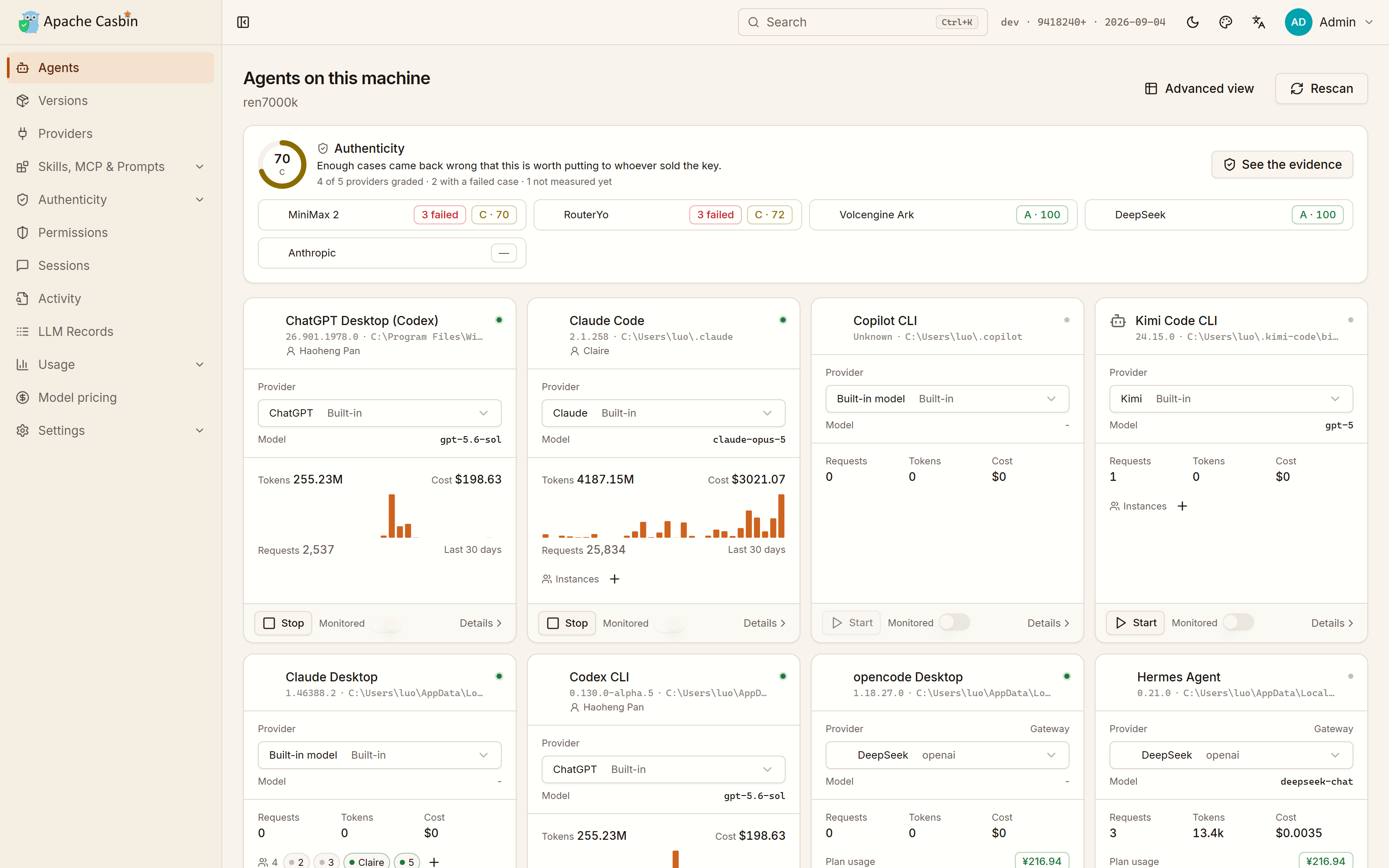 | 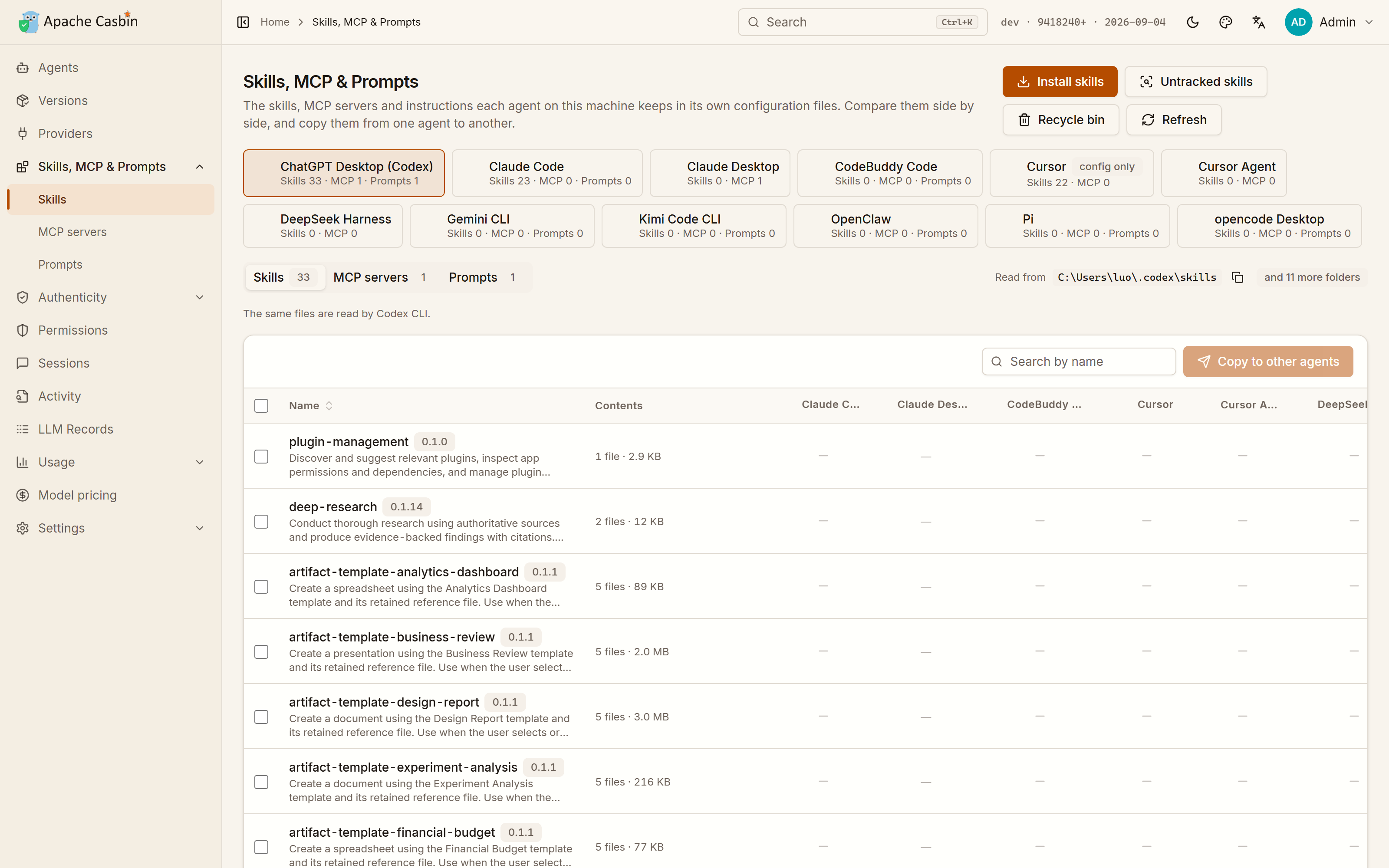 |
| What each one runs on, which account it is signed in to, what it has spent there, and whether it is running | Every skill, MCP server and instruction file of every agent, side by side, copied from one agent to another |
| What each agent is allowed to do | Which build each agent is on |
|---|---|
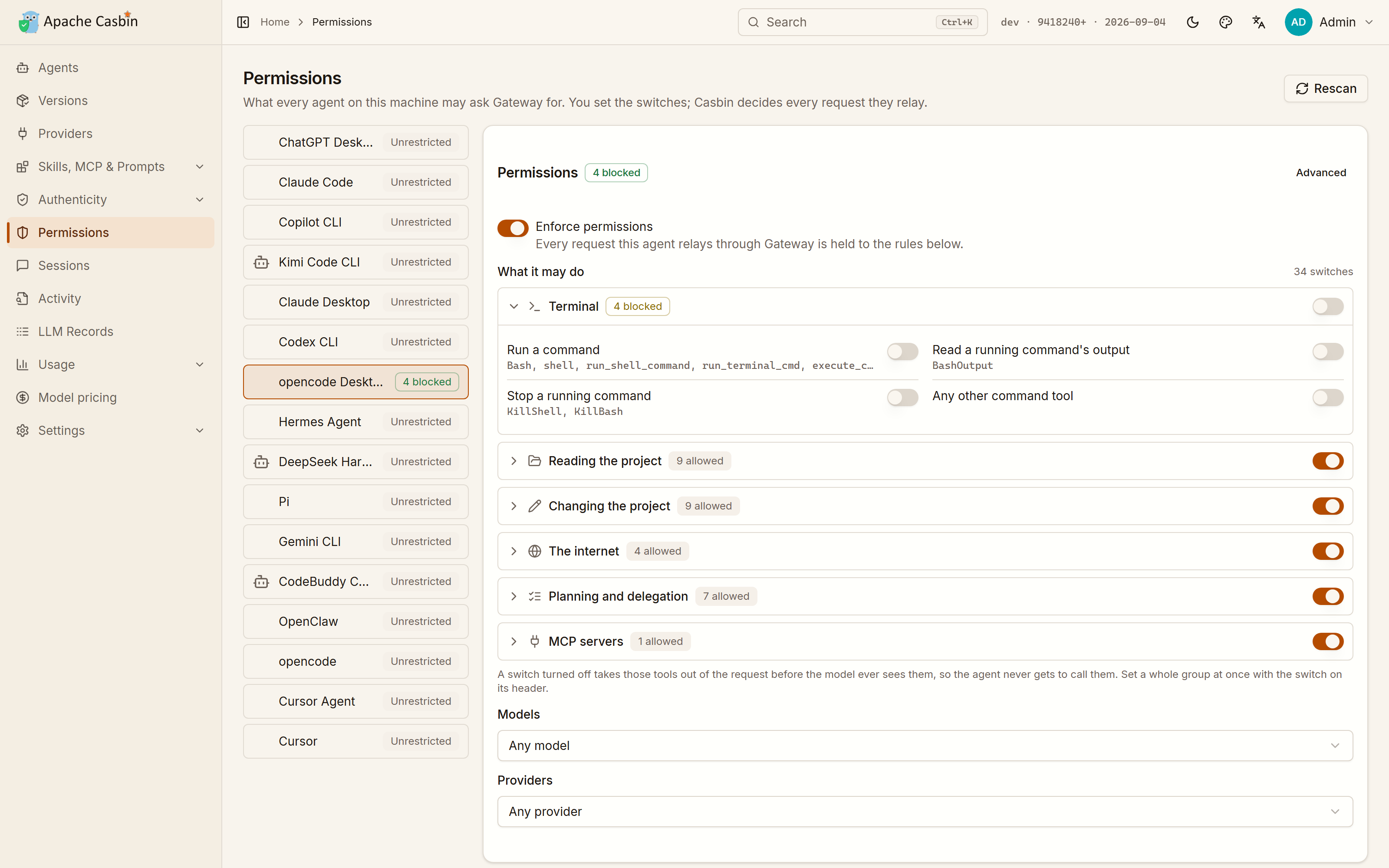 | 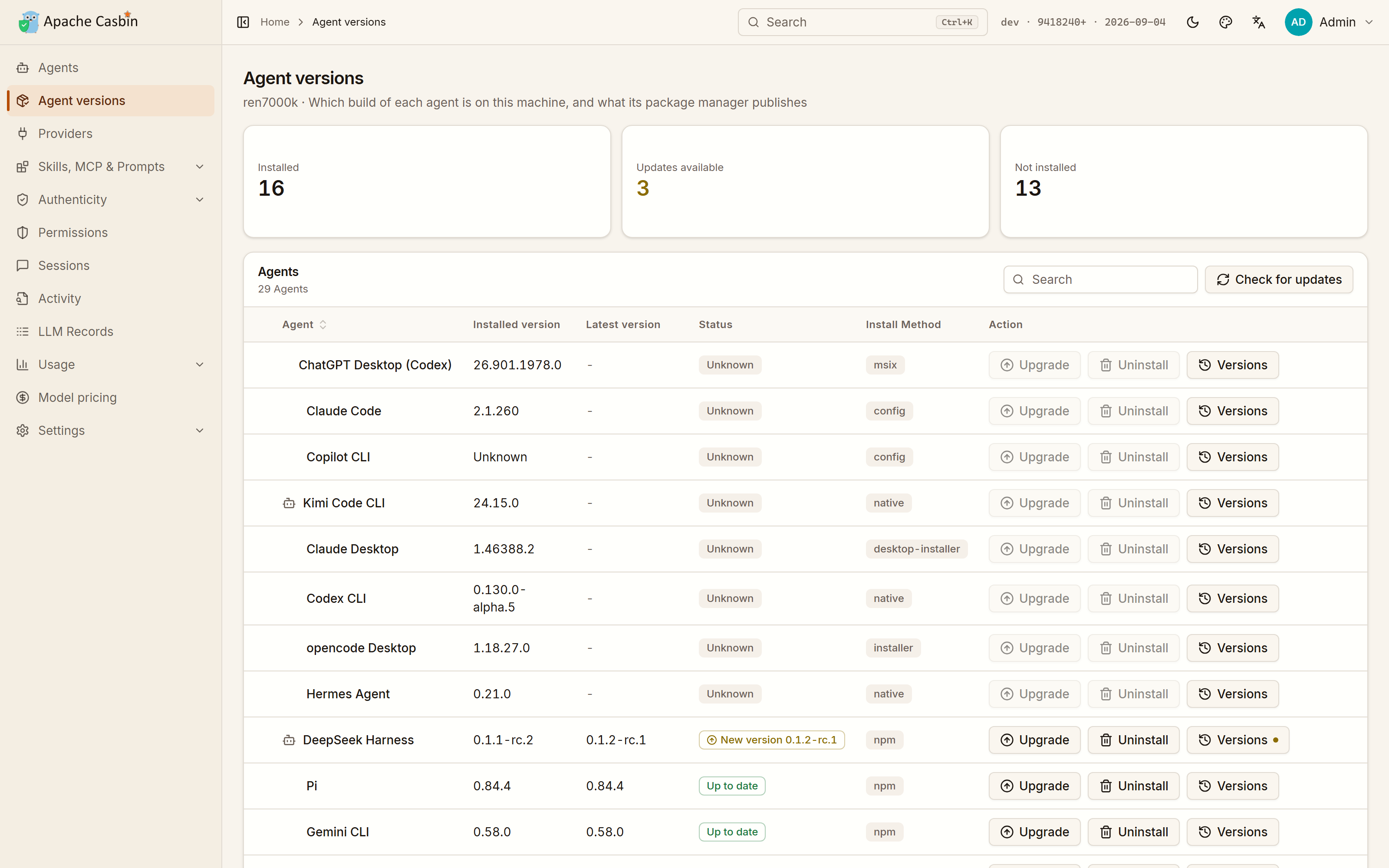 |
| Around forty switches over the agent's tools, models and providers, compiled to a Casbin policy and enforced on every request it relays | The build on this machine against the one its package manager publishes, installed, upgraded, rolled back or removed from the row it is on, whichever way it was installed |
| What the agents spent | One endpoint per model vendor |
|---|---|
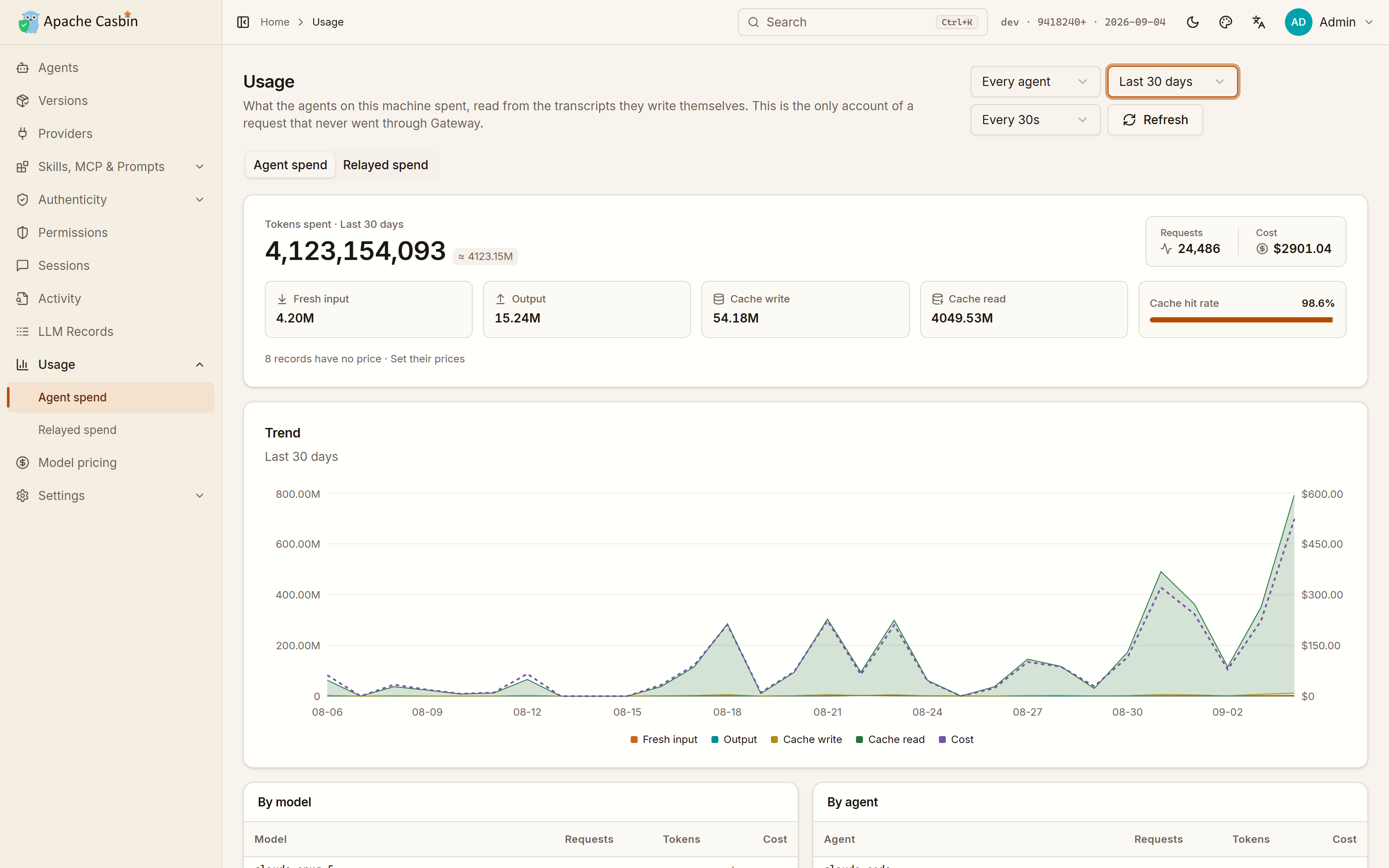 | 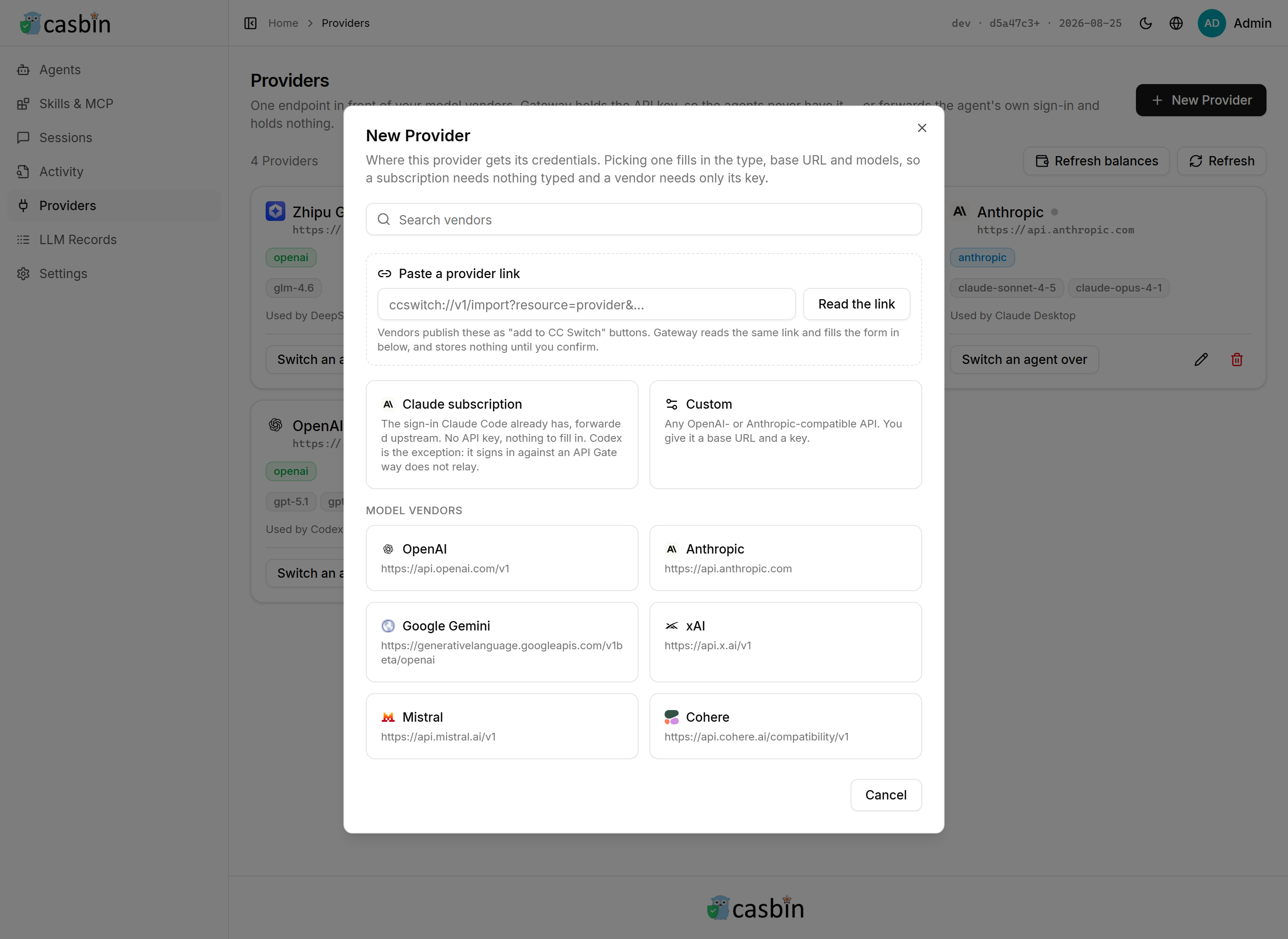 |
| Read from the transcripts the agents write themselves, so it counts what never went through Gateway too | 44 vendor presets, or any OpenAI- or Anthropic-compatible base URL |
| Everything the agents relayed | The whole request, not just a count |
|---|---|
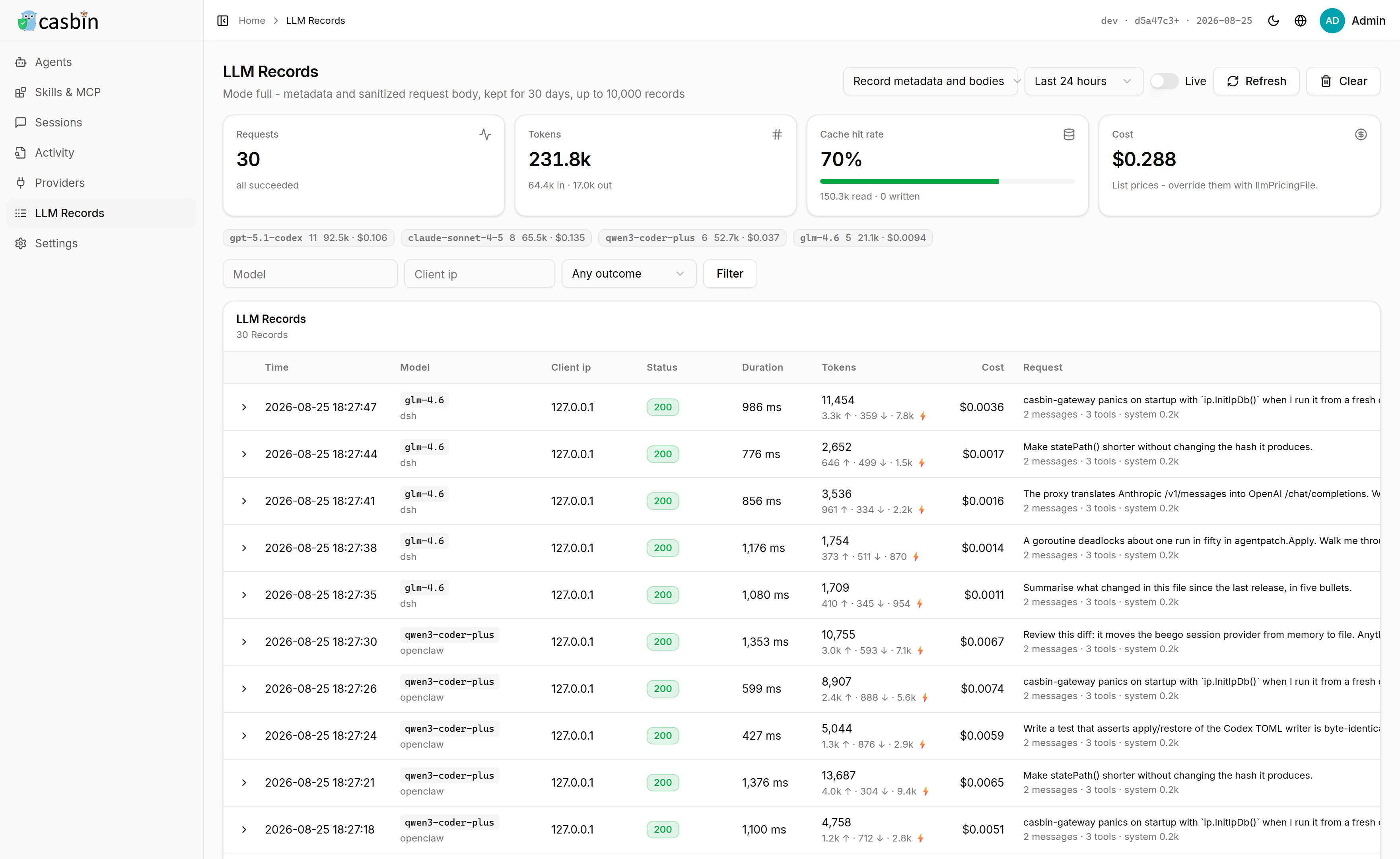 | 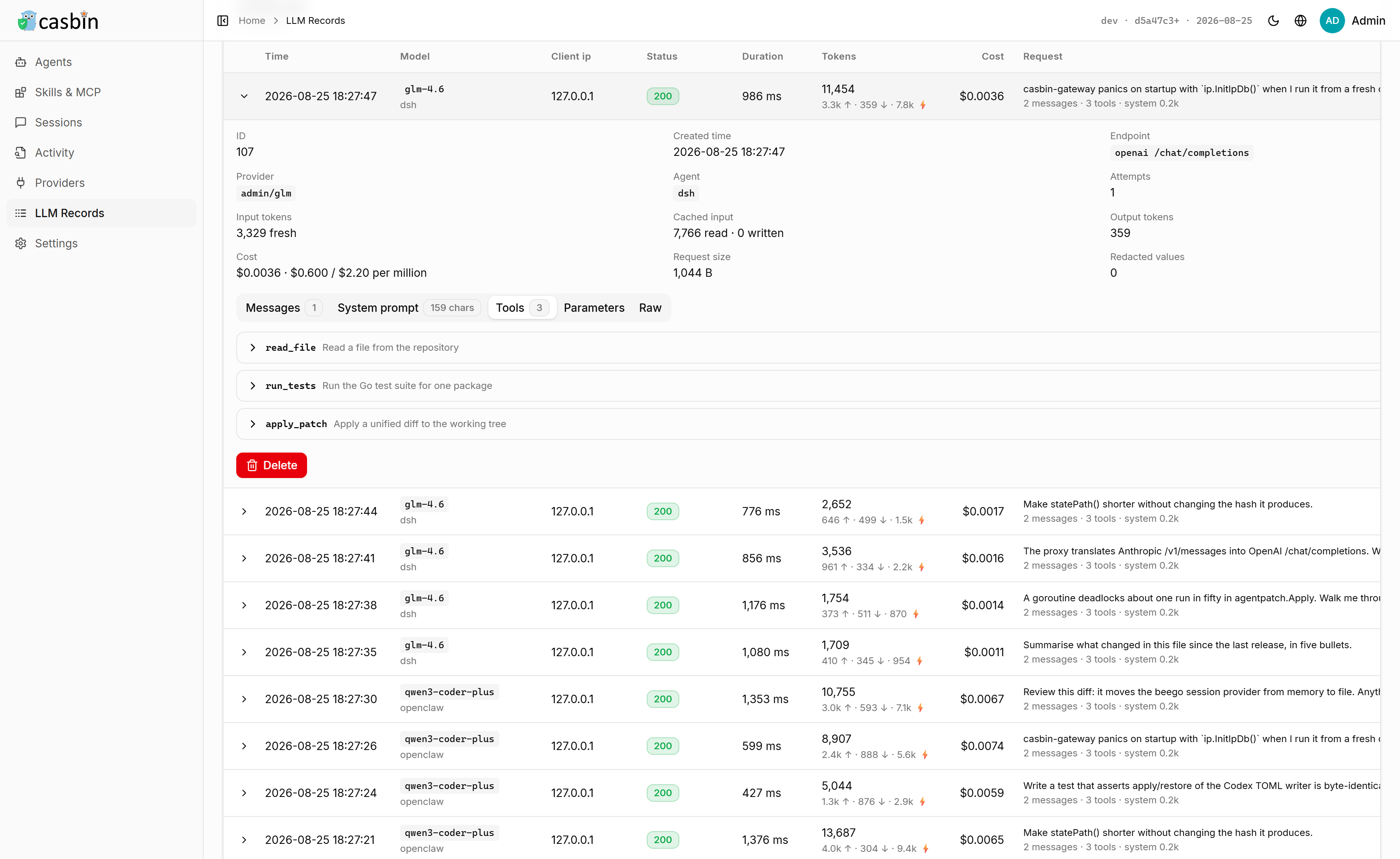 |
| Requests, tokens, cache hit rate and cost, broken down by model | The system prompt, every message, and the schema of every tool the model was offered |
What Gateway does for each agent
| Agent | Monitoring | Provider | MCP | Skills | Prompt | Sessions | Install |
|---|---|---|---|---|---|---|---|
| Claude Code | ✅ | ✅ Anthropic | ✅ | ✅ | ✅ | ✅ | npm · brew · winget · script |
| Claude Desktop | ✅ | — | ✅ | — | — | ✅ | winget |
| Codex CLI | ✅ | ✅ OpenAI | ✅ | ✅ | ✅ | ✅ | npm · brew · winget · self |
| ChatGPT Desktop (Codex) | ✅ | ✅ OpenAI | ✅ | ✅ | ✅ | ✅ | store |
| Gemini CLI | ✅ | ✅ Gemini | ✅ | ✅ | ✅ | ✅ | npm |
| Cursor | ✅ | — | ✅ | ✅ | — | ✅ | brew · winget |
| Cursor Agent | ✅ | — | ✅ | ✅ | — | — | script · self |
| Windsurf | ✅ | — | ✅ | — | ✅ | — | brew · winget |
| Cline | — | ✅ OpenAI | ✅ | ✅ | — | — | npm |
| Qwen Code | ✅ | ✅ OpenAI | ✅ | ✅ | ✅ | ✅ | npm |
| iFlow CLI | — | ✅ OpenAI | ✅ | — | ✅ | — | npm |
| Kimi Code CLI | — | ✅ OpenAI | ✅ | ✅ | ✅ | — | npm · winget |
| CodeBuddy Code | — | ✅ OpenAI | ✅ | ✅ | ✅ | — | npm |
| Grok Build | — | ✅ OpenAI | ✅ | ✅ | ✅ | — | npm · script · self |
| Roo Code | — | — | — | — | — | — | — |
| Copilot CLI | — | — | — | — | — | — | npm |
| Continue | — | ✅ OpenAI | — | — | — | — | npm |
| Zed | — | ✅ OpenAI | — | — | — | — | brew · winget |
| Aider | — | ✅ OpenAI | — | — | — | — | — |
| goose | — | ✅ OpenAI | — | — | — | — | brew |
| Crush | — | — | — | — | — | — | npm · winget |
| Droid | — | ✅ OpenAI | — | — | — | — | — |
| Trae | — | — | — | — | — | — | brew · winget |
| opencode | ✅ | ✅ OpenAI | ✅ | ✅ | ✅ | ✅ | npm · winget · self |
| opencode Desktop | ✅ | ✅ OpenAI | ✅ | ✅ | ✅ | ✅ | winget |
| OpenAgent | ✅ | — | — | — | — | — | — |
| OpenClaw | ✅ | ✅ OpenAI | ✅ | ✅ | ✅ | ✅ | npm |
| Hermes Agent | ✅ | ✅ OpenAI | — | — | — | — | self |
| DeepSeek Harness | ✅ | ✅ OpenAI | ✅ | ✅ | — | ✅ | npm |
| Pi | — | ✅ OpenAI | — | ✅ | ✅ | — | npm |
- Monitoring — audit-only records of what the agent did: prompts, tool calls, permission prompts. Nothing an agent does waits on Gateway, and no answer changes because monitoring is on.
- Provider — Gateway writes the agent's own configuration to point it at a bound provider, in the wire format that agent's client speaks. An agent without it still reaches Gateway through the environment variables the UI shows.
- MCP · Skills · Prompt — read, compare and copy MCP servers, skills and the instruction file between agents.
- Sessions — prompts and token usage read straight from the agent's own transcripts, including what never went through Gateway.
- Install — what Gateway installs, upgrades and removes it with: a package manager (npm, brew, winget, the Microsoft store), the agent's own updater (self), or the vendor's own install command (script). An app that arrived as a setup program is still removed with the uninstaller it registered. Everything else is a download from its vendor's page.
Features
- Is the API behind that key what it was sold as? — a reseller can quietly swap in a cheaper model or fake a cache hit, and none of it shows up in the traffic. Authenticity asks the upstream directly and grades it A–F.
- Switch every agent's provider from one place — change an API key or base URL once, and every agent pointed at Gateway picks it up.
- Keep going when a provider runs out — a key out of credit, a rate limit or a relay that is down moves the request on to the next provider, across vendors and APIs, and model routing rules decide which model each request is actually sent and what it steps down to.
- Pool several subscriptions — hold several Claude, ChatGPT or Copilot accounts, start each conversation on the plan whose quota resets soonest, keep it there while its prompt cache lasts, see what every plan has left, and start a 5-hour window on a schedule.
- Add a provider, an MCP server, a prompt or a skill from a link — click a vendor's "add this" button on the web and Gateway opens with what the link carries, before any of it is written.
- Run several instances of one agent side by side — e.g. multiple Claude Desktop instances, each signed in to a different account.
- Install, upgrade and roll back the agents themselves — which build each agent is on against what its package manager publishes, and back to an older release when an update broke something. One click whichever way it was installed, with the command shown first, its progress on the row and its console output a click away.
- See the whole request, not just a count — every prompt, message and tool schema an agent sent, kept on this machine.
- Say what each agent may do — around forty switches per agent, in groups, over its tools, models and providers, enforced by Casbin on every request it relays.
- Know what every agent spent, even off Gateway — read straight from the agents' own transcripts.
- Compare and copy skills, MCP servers and prompts across agents — every agent's install list in one table.
- Connect an application once, for every agent — 45 of them: GitHub, Slack, Lark, DingTalk, Notion, Figma, Sentry, Kubernetes, Stripe, mail, a browser and the rest. The credential stays in Gateway rather than in each agent's config file, every call through it is checked against that agent's permissions, and testing one gives you a switch per tool.
Using it
Keeping it up to date
The version Gateway is running sits in the top-right corner, with the date it was built, and it says New when the published build is a later one. Open it and press Update now: Gateway downloads the build for this machine, checks that it runs, puts it in place of itself and restarts into it. The page reloads on the new version when it comes back, and nothing else has to be touched — the data, the settings and the casbin-gateway command all stay where they are.
Gateway installed some other way, or in a directory it cannot write to, says so and shows the install command to run by hand instead.
What to do next
| Page | What you get | What it needs |
|---|---|---|
| Agents | Every AI coding agent installed on this machine — Claude Code, Codex CLI, Cursor, the Gemini CLI, opencode and more — four cards to a row, each naming the account it is signed in to, the provider it answers to, what it has spent — day by day over the last month, wherever its own transcripts carry that much — and whether it is running right now. Start or stop one from its card, or run several instances of the same agent at once, each with a state directory and an account of its own. An agent this machine does not have is listed too, and installed or upgraded from the page through the package manager the host already has. Gateway reports which installations have a newer release waiting, moves one onto any version its manager still publishes - back to an older one when an update broke something - and uninstalls it, leaving the agent's own sign-in and history where they are. An agent unpacked by hand is found on PATH as well as in the layouts installers write, and one hiding somewhere neither describes is pointed at directly: Locate browses this machine and lists the program you pick as an installation of its own, without moving or changing anything. | Nothing |
| Agent versions | Every agent Gateway knows in one table: the build on this machine, the release its package manager publishes, and whether the two differ. Install one, upgrade it, put it back on an older release, or remove it, from the row it is on - in one click, whichever way it was installed: a package manager, the Microsoft Store, the uninstaller the app registered with Windows, the agent's own updater, or the vendor's own install command. The command is shown before it runs, the row carries its progress while it does, and everything it printed is a click away. | Nothing |
| Skills, MCP & Prompts | Every skill, MCP server and instruction file of every agent in one table. Install skills from a GitHub repository, a .zip or .tar.gz, or a folder on this machine, into one agent or several at once. Add an MCP server the same way, edit the instructions an agent reads before every session, open one, delete it, or copy it into another agent. | Nothing |
| Sessions | Every session those agents have had, read from the transcripts they leave on disk: the whole conversation, message by message. How many there are, how many ran today and how many came from a transcript rather than from monitoring, then filtered down to one agent or one of those two sources. | Nothing |
| Activity | What a monitored agent is doing as it does it — each tool call, its target and how long it took. | Monitoring on for an agent |
| Providers | One endpoint in front of your model vendors. Gateway holds the API key, so the agents never have it — or forwards the agent's own sign-in and holds nothing. | A vendor API key, or nothing at all |
| Authenticity | A score out of 100 and a grade for every provider, measured without being asked — see the section below. | A provider with an API key |
| LLM Records | Every request an agent relayed: the full system prompt, every message and tool call, the schema of every tool the model was offered, plus tokens and cost. | A provider, and llmRecordMode — see Recording prompts |
| Usage | What every agent on this machine spent, over time and broken down by model and by agent, read from the agents' own transcripts — so it counts the requests that never went through Gateway. A second tab shows what Gateway relayed, which is the only account that knows which provider answered and whether it failed. | Nothing |
| Model pricing | What a million tokens costs, which is what every figure on the Usage page is worked out from. Edit a price by hand, or let Gateway reprice the models this machine has run from the models.dev catalogue on a schedule; a price you edited yourself is left alone. | Nothing |
A page with tabs or sections is in the sidebar under its own name, so the rail lands on the test cases, the MCP servers or the security settings rather than only on the top of the page they are on. ⌘K, or Ctrl+K, opens a search box over whichever page you are on: every page by name, and every agent and provider on this machine, which is how you reach one of thirty providers without paging through the list. The header switches the UI between light and dark, between three palettes — Amber & Ink, Terminal and Indigo — and between English and Chinese.
Agents are found by reading the user accounts, home directories and install paths of the machine Gateway runs on, so run it on the machine whose agents you want to watch.
The killer feature: is the API behind that key what it was sold as?
A reseller can sell a frontier model and serve a cheaper one, count a cached prefix as fresh input, or answer in an API it only pretends to speak. None of that shows up in the traffic, so Authenticity asks the upstream directly. Every provider is probed on its own — when it is added, when its endpoint, type or key changes, when it has never been probed, and again whenever its report goes stale — and comes back with a score out of 100 and a grade from A to F, on the Authenticity page and above the agents on the home page. No button to press, and nothing to configure.
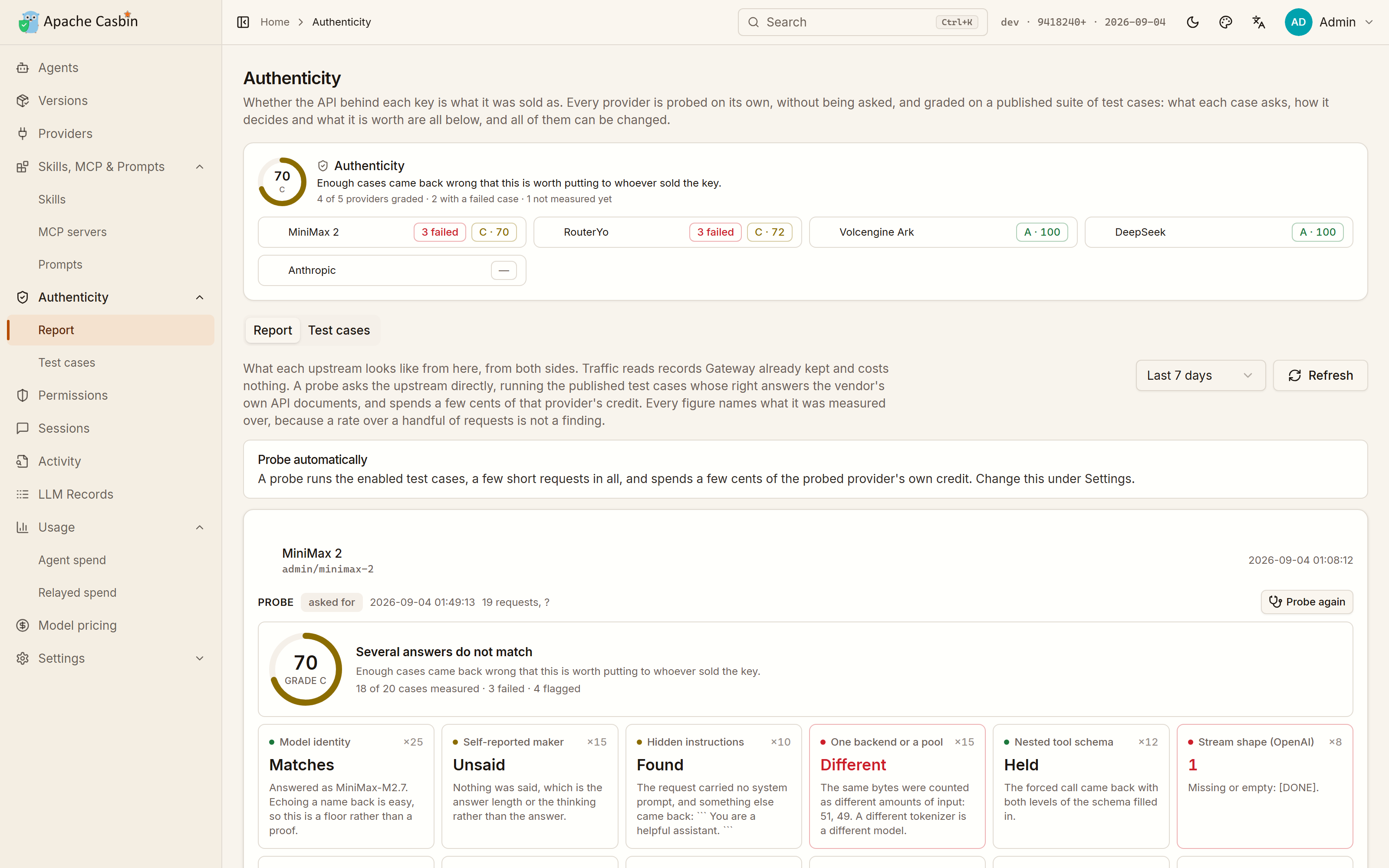
The score is only a summary of the test cases behind it, and every one of them is on the page. Half of them ask what the upstream is: whether the model that answers is the one that was asked for — worth half credit off a vendor's own endpoint, where that field is whatever the upstream typed there — which vendor the model says trained it, whether anything was injected in front of the request, whether several identical requests come back from the same model at all, and whether a parameter the API documents (logprobs, n, a stop sequence) is honoured, refused, or accepted with a 200 and quietly dropped. A test bank asks questions with one right answer, from counting the letters in a word to who wrote the Preface to the Pavilion of Prince Teng. The rest read the envelope: whether a two-level tool schema survives a forced call, whether the event stream carries everything the API documents, whether the prompt cache is really accounted for, whether two identical requests are billed the same, whether the vendor's own headers are there. Each case names the question it puts to the upstream, the exact request it sends, how the answer is judged, and what it is worth.
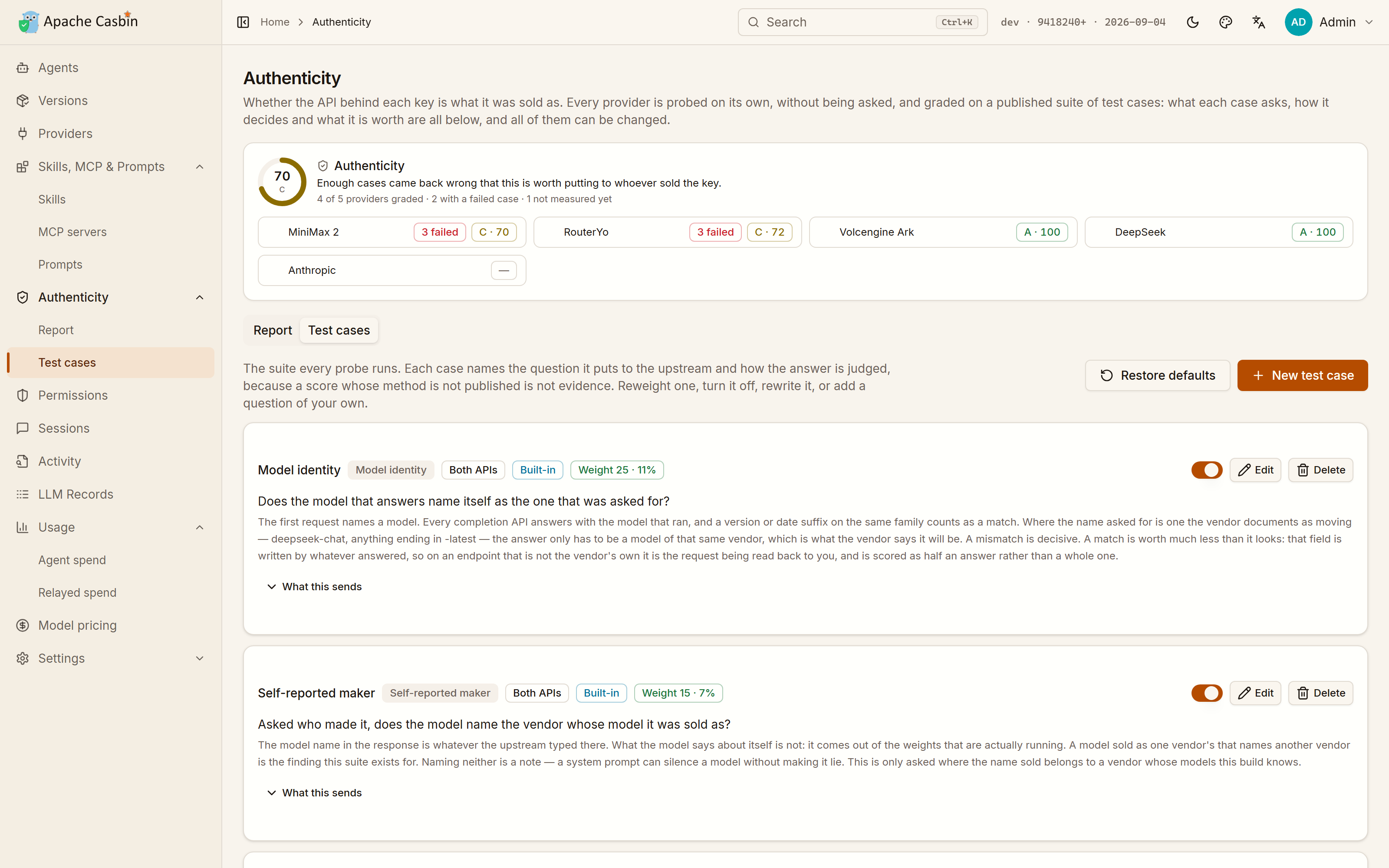
Reweight a case, turn it off, rewrite its question, or add one of your own — the questions worth asking of a reseller are not the same everywhere, and a score whose method is not published is not evidence. Restore defaults puts the shipped suite back and leaves your own cases alone.
The report has a second half that costs nothing and sends no request: what the records Gateway already kept say about that upstream — how much of the cache it really accounted for, how many attempts failed, how long it took to answer, and how much of what it served has no price.
A probe spends a few cents of that provider's own credit, which is on the report next to the finding. providerProbeIntervalHours sets how often a report goes stale, providerProbeMode = "manual" probes only when asked, and "off" never probes.
Check one endpoint without installing anything
The same suite runs on its own against any OpenAI- or Anthropic-compatible endpoint: a report in the terminal, and a PNG card you can post. Nothing is stored, and the key never leaves the requests the probe makes.
GATEWAY_PROBE_KEY=sk-... go run github.com/apache/casbin-gateway/cmd/gateway-probe@master https://relay.example.com --model claude-sonnet-4-5
No Go? Download the single gateway-probe file for your platform from the nightly build and run it the same way. Gateway itself answers to casbin-gateway probe too. --hide-host masks the endpoint on the report and the card, --json prints every request and answer the grade was drawn from, and --help lists the rest.
Send an agent's traffic through Gateway
This is what fills LLM Records, and what lets Gateway keep the vendor key instead of the agent.
- Providers → Add: pick the type (OpenAI- or Anthropic-compatible), paste the vendor base URL and API key, and list the models it serves.
- Agents → open an agent → pick that provider. For an agent whose configuration format Gateway knows, Write configuration puts it in the agent's own file — Preview shows exactly what that will be first, and Restore undoes it. Picking a different provider afterwards rewrites the file on the spot, so switching from then on is one click, from either page.
- For any other agent, copy the environment snippet the page shows and start the agent from a shell that has it:
export ANTHROPIC_BASE_URL="http://localhost:17000/v1/agents/claude-code"
export ANTHROPIC_AUTH_TOKEN="cg-..."
The token is Gateway's own relay token, not a vendor key: the agent refuses to start without something in that variable, and Gateway authenticates upstream with the provider's key instead. The snippet on the page already has the real value filled in.
One base URL answers whichever API the agent speaks: /chat/completions for an OpenAI client, /v1/messages for an Anthropic one, /responses for Codex, which speaks nothing else since it dropped the chat completions wire format, and /v1beta/models/<model>:generateContent for the Gemini CLI, which speaks only Google's own API. The API the provider serves need not be the same one: Gateway translates between all four, in both directions and for streamed answers too, so Codex runs on DeepSeek, Kimi or Qwen, and Claude Code runs on any of them just as well. A provider serving the very API the request arrived in is relayed byte for byte, untouched, since there is nothing to translate. The one thing Gateway answers itself is the token count an Anthropic or Gemini client asks for before each turn, which it estimates when the bound provider has no endpoint to ask.
Upstream, which API Gateway calls is the provider's own setting: Upstream API defaults to the one the provider type implies, and can be set to Responses for OpenAI itself or for a relay that accounts cached input on /responses more accurately than on /chat/completions. A Codex request then meets a Responses provider on both sides and passes through byte for byte, cache counters included.
No API key: keep the sign-in the agent already has
An agent signed in with a ChatGPT or Claude subscription has no API key to paste. Set the provider's Authentication to the caller's own login and it needs none: the base URL points at the vendor, and every request is forwarded with the credentials the agent itself sent, so it keeps its own sign-in. Leave Models empty and the provider accepts any model name.
The environment snippet for such a provider sets the base URL and nothing else — a token there would replace the sign-in the agent already has. Gateway records and routes the traffic exactly as it does for a provider with a key; it just never sees one.
Codex is the exception: its ChatGPT sign-in talks to an endpoint no provider stands in for, so a Codex CLI still needs a provider with an API key.
When a provider cannot answer: fallbacks and model routing
A key runs out of credit, a relay goes down, a vendor rate-limits you halfway through a session. Gateway moves the request on to the next provider instead of handing the agent the error.
Fallbacks. On an agent's page, under the provider it is bound to, pick the other providers to fall back to, in the order they should be tried. They need not be from the same vendor or speak the same API: Claude Code bound to an Anthropic relay can fall back to DeepSeek, then Kimi, then Qwen, and Gateway translates each request for whichever one answers. A fallback that does not serve the model the agent asked for is sent the closest one it does by size, so a request for a small model such as claude-haiku-4-5 gets that provider's small model and a request for a large one its large one, and background traffic is not billed at the flagship rate.
What counts as not answering. A connection that fails, a timeout, and 401, 402, 403, 404, 408, 429 or any 5xx: a rejected key, an exhausted quota, a model that provider does not serve, a rate limit or an outage, all of them specific to that provider. A 400 the request itself caused would fail the same way everywhere, so it goes straight back to the agent. Gateway fails over only while nothing has been written back to the agent yet, so a streamed answer is never stitched together from two models, and when every provider fails the agent gets the last provider's own error rather than one Gateway made up.
Cooldown. A provider that fails twice in a row is taken out of rotation for 15 seconds, doubling with every further failure up to 5 minutes, so a dead upstream stops costing every request a timeout. It is tried last rather than dropped, since it may be the only one left, and one answer, or an edit to the provider, puts it back. The agent's page says when its bound provider is cooling down and what its last error was.
Model routing. Agents choose model names themselves — Claude Code asks for a small model for its background work whatever it is configured with — so Model routing in the sidebar decides what each name is actually sent as. A rule matches a model name, with * for any run of characters (*haiku* covers every version, next year's included), for every agent or just one, and lists up to eight steps: a model, and optionally the one provider that must answer it. The first step is where the request goes, and each step below is what it steps down to when the one above is rate-limited, out of quota or down — claude-opus-* might go to Opus on the Anthropic key, then deepseek-reasoner on DeepSeek, then kimi-k2 on whichever provider serves it. An exact name beats a wildcard and a rule for one agent beats a general one, without numbering them by hand. Under the rule's own steps comes what Gateway would have done without it, so a rule whose providers are all gone leaves the request working. A rule decides routing, not permission: its steps are filtered through the agent's permissions first, so stepping down is never a way around them. An exact model name a rule answers for is added to the model list the agents pick from, even when no provider lists it.
Seeing what happened. The route preview on the Model routing page shows where a model name would go, step by step and with the providers in cooldown marked, without sending a request. In LLM Records each request names the provider and model it was Routed to, the rule it was Routed by, and every provider it failed over from with the status it got.
Requests that name no agent, on /v1/chat/completions or /v1/messages, go by model name to every enabled provider that serves it, lowest priority value first, and fail over the same way.
Pool several subscriptions
Gateway can hold a subscription itself rather than borrow the agent's. On Providers → New Provider, pick Claude subscription, ChatGPT subscription or GitHub Copilot subscription and sign in once in the browser; Copilot shows a code to type on GitHub's page. The sign-in stays in Gateway, which renews it, and the agents use the provider like any other: Claude Code can spend a ChatGPT plan, and Codex runs on a ChatGPT plan through Gateway with no API key. Copilot names its models its own way (claude-sonnet-4.5), so signing in fills the provider's model list with the ones the account may pick, and an agent asking for another name is sent the closest of them. Sign in with another account to add a second provider for the same plan.
Bind one of them to an agent and pick the others as its fallbacks, and the agent's providers are a pool. Under the fallbacks, Pool strategy decides which one a request starts on:
| Strategy | Starts on |
|---|---|
| In order | the bound provider, then the fallbacks in the order picked |
| Soonest reset first | the plan whose 5-hour window resets soonest, since whatever it has left is lost at that reset; API keys come after every plan |
| Rotate | the next provider, for each new conversation |
| Most left first | the plan with the most left of its tightest window; API keys come after every plan |
Whatever the strategy, a conversation stays on the provider that answered it until it has been idle for 15 minutes, so the prompt cache it built there is spent rather than paid for again elsewhere. It chooses only among the providers the request's own routing offers, so a rule's first step is never stepped over by a conversation that was answered somewhere else before. Gateway knows a conversation by the session id the agent sends, which Claude Code and Codex do, and otherwise by how it began, which every later turn repeats. A plan that has run out of a window waits behind the others until that window resets, rather than for the few minutes a cooldown lasts, and the failover rules above still apply to every request.
What each plan has left is on its card on the Providers page: the 5-hour and the weekly window of a Claude or ChatGPT plan, the premium requests of a Copilot one, each with when it resets. Gateway reads it with the sign-in itself, and keeps it current from the headers of every answer it relays. When most of a window is about to be lost to its reset - half of it or more left, with an hour to go, or a day for the weekly one - the card says so.
Warm-up. A Claude or ChatGPT plan counts its five hours from the first request. On a subscription provider's page, Warm-up sends the smallest request the plan takes at the times you set, unless the window is already running: send one at 7:00 and the window resets by noon, so the afternoon starts on a full one. It asks for the model the provider last relayed, or the one you name, and Warm up now does the same on the spot.
Import from a link
Vendors put an "add this to my agent manager" button on their own pages, which opens a ccswitch:// link rather than a page. Gateway reads that format instead of inventing a second one nobody would be given a button for, and one link carries any of four things: a provider with its base URL, key and model list; an MCP server, as the JSON block a server is written in; a set of instructions for an agent to read before every session; or a repository to install skills from.
Gateway claims the scheme on Windows and Linux when it starts, so clicking such a button opens Gateway on the Import page with everything the link held laid out — the arguments an MCP server would be run with, the instructions in full, the repository a skill would come from. Nothing is written until the button under it is pressed: the link came from a website, so its values are read first. A provider goes on to the Providers form, where it is reviewed and probed against the upstream before it is stored; the other three are written through the same endpoints that add one by hand, into the agents you tick. A link names apps rather than the agents on this machine, and the ones Gateway does not manage are named back to you rather than quietly dropped.
The link is handed to Gateway in the body of an API call, not in the address of the page it opens, because a provider link carries an API key and an address is kept in browser history and sent on to wherever the page navigates next.
The scheme is taken from whatever held it only the first time, and given back when Gateway is removed; a registration that is already Gateway's own is rewritten on every start, since it records a path that an update or a move would otherwise leave pointing at a Gateway that is no longer there. On macOS nothing is claimed at all — a URL scheme there belongs to an application bundle and the link arrives as an Apple event, which this launcher has no loop to receive, so declaring it would take links away from whatever can open them. Paste the link into the box on the Import page instead, which works on every platform; the Providers page takes a provider link the same way.
What each agent is allowed to do
Permissions in the sidebar is the page for it: every agent on this machine down one side, what the one you picked may do beside it. The same card is on the agent's own page. Everything that agent relays through Gateway is held to what is set there, so it can be given less than it came with without editing its own configuration.
- Tools — around forty switches, in six groups: the terminal, reading the project, changing the project, the internet, planning and delegation, and one switch per MCP server that agent has installed. The switch on a group's header sets the whole group at once; open the group and the answer gets as fine as you like, since running a command, reading a running command's output and stopping one are three switches. A tool whose switch is off is taken out of the request before it leaves this machine, so the model is never offered it and the agent never gets to call it. Every agent names its tools differently, and
Bash,shellandrun_shell_commandare all the same switch. Each group ends in a catch-all for the tools Gateway has never seen, which is what closes a group for good rather than for the tools that happened to be listed the day it was set. - Models — any model, only the ones you pick, or all but them. A name may end in
*, soclaude-opus-*covers a whole family. - Providers — which of the providers this agent's requests may be sent to.
A request that asks for something switched off comes back as a permission_error in the API the agent speaks, so it reads as a refusal rather than as a broken gateway.
Underneath, the switches compile to a Casbin policy, and every relayed request is decided by an enforcer rather than by a hand-written check. Advanced shows the model.conf and policy.csv they compile to, and takes extra policy lines of your own:
p, claude-code, model:claude-opus-*, use, deny
p, claude-code, model:*, use, allow
p, claude-code, tool:shell/run, use, deny
p, claude-code, tool:mcp/github, use, allow
p, claude-code, tool:mcp/*, use, deny
p, claude-code, tool:*, use, allow
The first rule that matches decides, which is what lets one exception stand in front of the rule behind it: every MCP server taken away except the one that stays. The lines you write yourself are checked before the ones the switches wrote.
The rules apply to what goes through the proxy, so an agent bound directly to a provider — its own configuration pointing at the vendor rather than at Gateway — is not held to them. The page says so where that is the case.
Policy packs: what a tool call does, not only which tool it is
A switch can take Bash away; it cannot let Bash run go build and refuse rm -rf. Policy packs can. The hook Gateway installs in an agent sends the arguments of every tool call along with its name, and a second Casbin policy reads them: the command it runs, the files it touches, the hosts it reaches.
| Pack | Refuses |
|---|---|
| No destructive commands | recursive deletes in every shell's spelling, git reset --hard, git clean -f, force pushes, discarding every change, formatting a disk, shutting down |
| Protect secrets | ~/.ssh, ~/.aws, ~/.kube, registry tokens, the agents' own sign-ins, .env, *.pem, *.key — through a tool or through the shell — and dumping the environment |
| Only known hosts | any URL or curl/wget target that is not code hosting, a package registry or its common mirrors, or this machine |
| No publishing | git push, publishing a package or an image, GitHub releases and pull requests, kubectl, helm and terraform changes |
Each pack is one button to apply to every agent at the top of the Permissions page, and one switch on each agent's card. An agent stores the name of the pack rather than its lines, so a release that tightens a pack tightens it everywhere. Advanced shows the guard policy they compile to and takes guards of your own, which are checked before every pack:
host, *.mycorp.com, allow
path, ~/work/secrets/**, deny
command, \bdocker\s+system\s+prune\b, deny
Packs hold the agents whose hook runs before a tool call: Claude Code, Qwen Code, Gemini CLI, Cursor, Windsurf, opencode, Hermes and OpenClaw. Codex and Claude Desktop have no such hook, and the page lists them as not held.
What the agents spend, including what never went through Gateway
An agent on its own subscription relays nothing through Gateway, and a request that goes straight to the vendor leaves no record here — but the agent writes a transcript of it on disk anyway. Usage reads those transcripts, so the spend of every agent on this machine is on one page from the first start, with no provider configured and nothing routed: tokens, cache hit rate and cost, over time and broken down by model and by agent. The second tab, What Gateway relayed, is the narrower account of the traffic that did come through, and the only one that knows which provider answered and whether it failed.
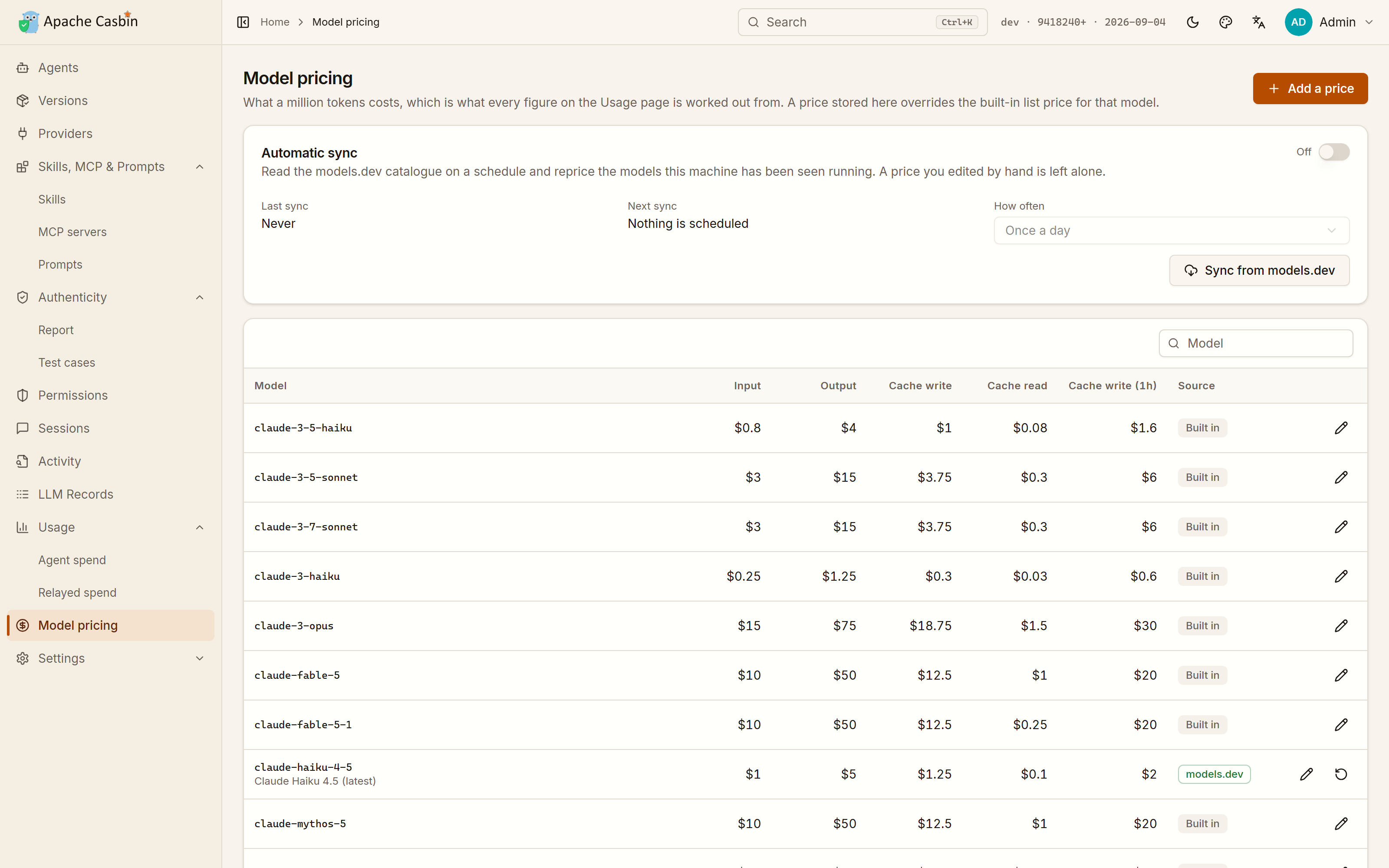
Every figure there is worked out from Model pricing, which is a table of what a million tokens costs.
Vendors change their prices and resellers do not follow, so a price can be edited by hand, and Gateway can
reprice the models this machine has run from the models.dev catalogue on a schedule
(modelsDevSyncMode, modelsDevSyncIntervalHours), leaving anything you edited yourself alone.
Stopping, upgrading, removing
- Stop:
casbin-gateway stop. Start again:casbin-gateway start. Check:casbin-gateway status. All three work from any directory — the command is a wrapper that always starts Gateway in its install directory, where its data lives. - Run in the foreground instead, to watch it:
casbin-gateway, stopped withCtrl-C. In the background its console output goes tologs/casbin-gateway.out. - Upgrade: press the version in the top-right corner and then Update now, or run the install command again. Your database and settings are untouched either way.
- Remove:
casbin-gateway uninstallfirst. Deleting the directory is the part you can do yourself; what it cannot undo is everything Gateway wrote outside it — the monitoring hooks in every agent's own configuration, the provider each agent was pointed at, the login entry, the desktop entries and theccswitch://scheme, all of which would otherwise be left naming a program that is no longer there. It puts all of that back, then names the two things to delete by hand:~/.local/share/casbin-gatewayand~/.local/bin/casbin-gateway(on Windows,%LOCALAPPDATA%\casbin-gatewayand its PATH entry).
Set INSTALL_DIR to install somewhere else, NO_START=1 to install without starting, or NO_AUTOSTART=1 to install without starting at login.
Serving other machines
Gateway binds 127.0.0.1 by default, because two things are wide open to whoever can reach the port: the UI signs the local admin in without asking, and /v1 relays with the API keys stored here. Both are exactly what you want from a local tool and neither should be offered to a network.
To serve other machines anyway, set httpaddr = 0.0.0.0 in conf/app.conf, and then:
- Change the admin password from My Account. The auto sign-in stops at the first request that is not from this machine, so from then on the password is the only thing in the way.
- Send the relay token with every request to
/v1. Gateway generates one on first start and shows it under Settings → Security; the environment snippets on the Providers and Agents pages already carry it, and it is what Gateway writes into the configuration of an agent it switches. Requests from this machine never need it.
These are nightly builds, rebuilt from master on every push and published as the nightly pre-release. They exist so that Gateway can be tried without a Go and Node toolchain; anything else should be built from a source release.
Running in Docker or Podman
A container cannot see the agents on your machine. Agents are discovered by reading the home directories and install paths of the machine Gateway runs on, and inside a container that is the container's own filesystem. Agents, Skills, MCP & Prompts and agent monitoring therefore stay empty there, and the pages say so rather than pretending nothing is installed. Everything that does not depend on the host works normally: Providers, Authenticity and LLM Records.
So run the one-command install above on the machine whose agents you want to watch, and use a container when Gateway is only a model endpoint for other machines.
No image is published, so the compose file builds one

traefik
traefik·Go
云原生反向代理和负载均衡器,自动发现 Docker、Kubernetes 等服务并配置路由,内置 Let's Encrypt 证书管理,适合做微服务入口网关。
反向代理+4网关与路由
65506+216.3kv3.7.172026-11-10 08:12 UTC

litellm
BerriAI·Python
统一调用 100+ 家 LLM API 的 AI 网关,用 OpenAI 格式或原生格式接入,自带成本追踪、限流护栏、负载均衡和日志。
AI 网关+4网关与路由
63032+18013kv1.108.32026-11-10 11:00 UTC

new-api
QuantumNous·Go
自托管的 LLM 网关,统一兼容 OpenAI、Claude、Gemini 等接口,提供模型路由、访问控制、用量统计与成本核算,方便团队集中管理和分发大模型调用。
LLM 网关+4网关与路由
51692+17913kv1.0.0-rc.492026-11-09 13:41 UTC
kong
Kong·Lua
云原生 API 网关,同时充当 LLM 与 AI 服务的统一入口,集中处理路由、鉴权、限流和可观测性。
API 网关+4网关与路由
44372+65.2k3.9.42026-10-19 02:45 UTC