- 在 Claude Desktop / Cursor 里做盘中问答:需要模型直接调多周期指标和筛选器时,省掉自己封装数据层;换成让模型读 CSV 或网页,指标口径和复权处理都得自己兜。
- 快速验证交易想法:用内置回测工具跑一轮粗筛,比搭 backtrader/vectorbt 环境快;但只适合做方向性验证,不适合当生产回测引擎。
- 多市场横向扫描:股票、加密、外汇、期货共用一套工具接口,做跨市场筛选时不用为每个数据源写适配层。
- 给内部 AI 助手加财经新闻情绪:接 Marketaux 后补上情绪维度;不接的话这块能力直接缺失,README 里也明说了要另配 token。
tradingview-mcp
atilaahmettanerMIT活跃维护 有专家点评给 AI 助手接上行情分析能力的 MCP 服务,提供选股筛选、多周期技术分析、回测和情绪指标,覆盖加密货币、股票、外汇与期货。
MCP server for market analysis in AI assistants: screeners, multi-timeframe technical analysis, backtests and sentiment for crypto, stocks, forex and futures. 39 tools. Self-host free, or use the hosted version, TradingMCP.
暂无版本5,263star +34 / 7 天1,030fork同步于 2026-11-11 05:34 UTC
专家点评
上手难度:进阶更新于 2026-11-11给 AI 客户端接行情与技术分析的 MCP 服务,替代自己写 TradingView 抓取脚本
适用场景
踩坑
- 数据来自公开端点抓取,不是官方 API:端点结构变动或限流时工具会静默失败或返回空,issue 里已有 BUG 类报告但数量少、信息不足以判断根因,上线前要自己加返回校验。
- Python 版本卡在 3.13:3.14 不支持,Windows 首次启动容易超时,环境不固定就会在装完第一步卡住。
- macOS 上 Claude Desktop 找不到 uvx,必须写全路径;新闻情绪工具不配 MARKETAUX_API_TOKEN 就只返回未配置提示,容易误判成工具坏了。
同类对比
要稳定、可审计的行情源就用官方数据 API(Polygon、Alpha Vantage、交易所直连)自己封 MCP;要做严肃回测选 vectorbt 或 backtrader,这个项目的回测只适合做初步筛选。
pip install tradingview-mcp-server
uvx --from tradingview-mcp-server tradingview-mcp 硬件要求按 README 说明
README 未说明硬件要求;服务端抓取公开行情数据,本地仅需能运行 Python 环境,未提及 GPU 或显存。
项目说明
由 README 自动翻译提炼给 AI 助手接入行情数据与技术分析的 MCP 服务器,覆盖股票、加密、外汇和期货
给 AI 助手接上行情分析能力的 MCP 服务,提供选股筛选、多周期技术分析、回测和情绪指标,覆盖加密货币、股票、外汇与期货。
核心能力
- 提供 39 个技术分析工具,含筛选器、多周期分析与回测
- 从公开端点抓取实时行情,无需 TradingView 账号或 API 密钥
- 支持 Claude、ChatGPT、Cursor、Copilot 等任意 MCP 客户端
- 可选接入 Marketaux 提供财经新闻与情绪分析
- 支持 pip 安装或 uvx 直接拉起,也可从源码运行
容易踩的坑
Python 3.14 暂不支持,Windows 首次启动易超时,建议固定到 Python 3.13;新闻与情绪工具需另设 MARKETAUX_API_TOKEN,否则返回未配置提示;macOS 上 Claude Desktop 可能找不到 uvx,需在配置里写完整路径。
内容由模型根据 README 生成,可能不完整或不准确,以官方文档为准。看原文 README
暂无 release 数据(可能没有发版,或尚未同步)。
用户点评
登录用户的真实使用记录,可按版本和硬件筛选共 0 条
还没有人点评。第一个说出真实体验的人最有价值。
TradingView MCP Market Data & Technical Analysis for AI Assistants
TradingView MCP server — real-time market data, technical indicators, screeners, and backtesting for Claude, ChatGPT, Cursor, Copilot, and any MCP client. Stocks, crypto, forex & futures across global exchanges. Backtesting + live sentiment + Yahoo Finance + 39 technical-analysis tools — the most complete TradingView MCP toolkit, all in one server.
Don't want to install anything? TradingMCP, the hosted version of this server, gives you all 39 tools in your AI app. In Claude, Cursor or Grok, add https://mcp.tradingmcp.ai/mcp as a connector and sign in: no key to paste. ChatGPT, Copilot and other MCP clients connect with a private link. From $9/mo with a 14-day money-back guarantee; self-hosting stays free.
Morning market brief in one prompt: ask "give me this morning's market brief" and get global indices, futures, the Bitcoin pulse and the hosted Markets panel in one answer. Charts are drawn right in the chat (demo below). In Grok Bot, add the Market Brief bot to get one on weekday mornings.
🆕 The hosted version (TradingMCP) now draws. Ask for a chart and an interactive candlestick view (1d / 1h / 15m, optional Bollinger overlay) renders live inside the conversation via MCP Apps — and the AI reads the band values back to you:
Add one URL and sign in (or pip install), then just ask. Real output, straight from the live server:
Try these first — they work in Claude, ChatGPT, Cursor, or any MCP client:
Show today's top crypto gainers on Binance
Run a full technical analysis of NVDA
What's the multi-timeframe read on gold?
Backtest an RSI strategy on BTC on the daily timeframe
[!NOTE] Independent open-source project — not affiliated with, endorsed by, or associated with TradingView Inc. "TradingView" is a trademark of its respective owner; this project consumes third-party market data and is not a TradingView product.
[!NOTE] Does it need — or risk — your TradingView account? No. This server does not log into, scrape, or automate a TradingView session, and it requires no TradingView account or API key. Market data is fetched server-side from public endpoints, so there is no account of yours in the loop and no browser/UI automation. (This is different from MCP servers that drive the TradingView Desktop app via Chrome DevTools.) You are responsible for ensuring your own use complies with the terms of any data source you point it at.
"TradingView MCP" now means two very different kinds of project. Both are useful — for different jobs:
| This project — data & analysis API | Desktop-automation MCPs | |
|---|---|---|
| What you need | Nothing — public market data | TradingView Desktop, usually with a paid TradingView plan |
| Where it works | Claude.ai, Claude Code, ChatGPT, Cursor, Copilot — any MCP client | Mostly Claude Code, on your own machine |
| When your machine is off | Hosted version keeps answering, 24/7 | Stops |
| Screeners & backtesting | Built in (39 tools, multi-exchange) | Whatever the TradingView UI offers |
| Charts | Interactive in-conversation charts (MCP Apps, hosted) | TradingView's own charts |
| Your TradingView account | Not needed, never touched | Drives your logged-in session |
If you want an AI clicking around your TradingView Desktop — editing Pine Script, drawing on charts, using replay — check out tradesdontlie/tradingview-mcp. If you want headless market data, screeners and backtesting available to any AI client, with nothing installed and no TradingView account in the loop — that's this project.
[!IMPORTANT] Not financial advice. Nothing produced by this software is investment, financial, legal, tax, or accounting advice. tradingview-mcp is an informational and educational analysis tool. Its outputs, including indicators, scores, signals, "trade setups", entries, stop losses, and targets, are computed from third party market data and are not recommendations to buy, sell, or hold any asset. It does not execute trades, manage money, or guarantee any result. Trading and investing carry a substantial risk of loss, and you can lose some or all of your capital. Always do your own research and consult a licensed professional before making any financial decision. You are solely responsible for your own decisions and for complying with the laws and regulations that apply to you. Market data may be delayed, inaccurate, or incomplete, and is provided without warranty.
[!TIP] Prefer zero setup? Use the hosted version. TradingMCP serves all 39 tools in Claude, ChatGPT, Cursor, Grok and Copilot — no
uv,pandas, or Python to wrangle, and in Claude, Cursor and Grok you just sign in instead of pasting a key. From $9/mo (Pro) or $29/mo (Pro+ — higher limits), with a 14-day money-back guarantee. Self-hosting stays free forever; hosted is just for folks who'd rather skip the ops. (Full self-host vs hosted comparison in Quick Start below.)






⭐ If this tool improves your workflow, please star the repo and consider sponsoring — it keeps the project alive and growing!
🎥 Framework Demo
🆕 What's New
Stability & Strategy Expansion (May 2026)
- Async hot-path tools — 7 high-traffic tools (
yahoo_price,stock_extended_hours,top_gainers,volume_breakout_scanner,multi_timeframe_analysis,financial_news,combined_analysis) converted toasync def. FastMCP runs sync tools serialized on the event loop — async unlocks real intra-server parallelism so concurrent tool calls actually overlap.combined_analysisadditionally fans its 3 sub-calls out viaasyncio.gatherfor ~3× wall-clock improvement on the power tool.yahoo_price/stock_extended_hoursusehttpx.AsyncClientfor true non-blocking I/O; sync-library tools (tradingview_ta,tradingview-screener,feedparser) are off-loaded viaasyncio.to_thread. (PR — open) - 9 backtest strategies (up from 6) — added
rsi_pullback,keltner_breakout, andtriple_ema, covering trend-pullback, ATR-normalized breakout, and SMA200-filtered EMA cross edges.compare_strategiesnow ranks the full 9. - Resilience layer — automatic retry + 60-second TTL cache on the TradingView screener provider, eliminating transient
"Expecting value"errors oncombined_analysisandmulti_timeframe_analysis. (PR #32 — merged) - Financial news service rebuild — replaces deprecated Reuters RSS endpoints with Yahoo Finance, MarketWatch, and CNBC. Fixes the long-standing
count: 0bug onfinancial_news. (PR #33 — merged) - TA throttle — caps concurrent
tradingview_tacalls (default 4) + min 0.8s spacing between starts. Prevents parallel bursts ofcombined_analysis/multi_timeframe_analysisfrom hitting TradingView's empty-body rate-limit cliff. Tunable via env vars. (PR #34 — merged) - Walk-forward backtesting (
walk_forward_backtest_strategy) — train/test split with overfitting verdict (ROBUST / MODERATE / WEAK / OVERFITTED). - Hourly (1h) timeframe support across
backtest_strategy,compare_strategies, andwalk_forward_backtest_strategy. - Full trade log + equity curve outputs (
include_trade_log=True,include_equity_curve=True).
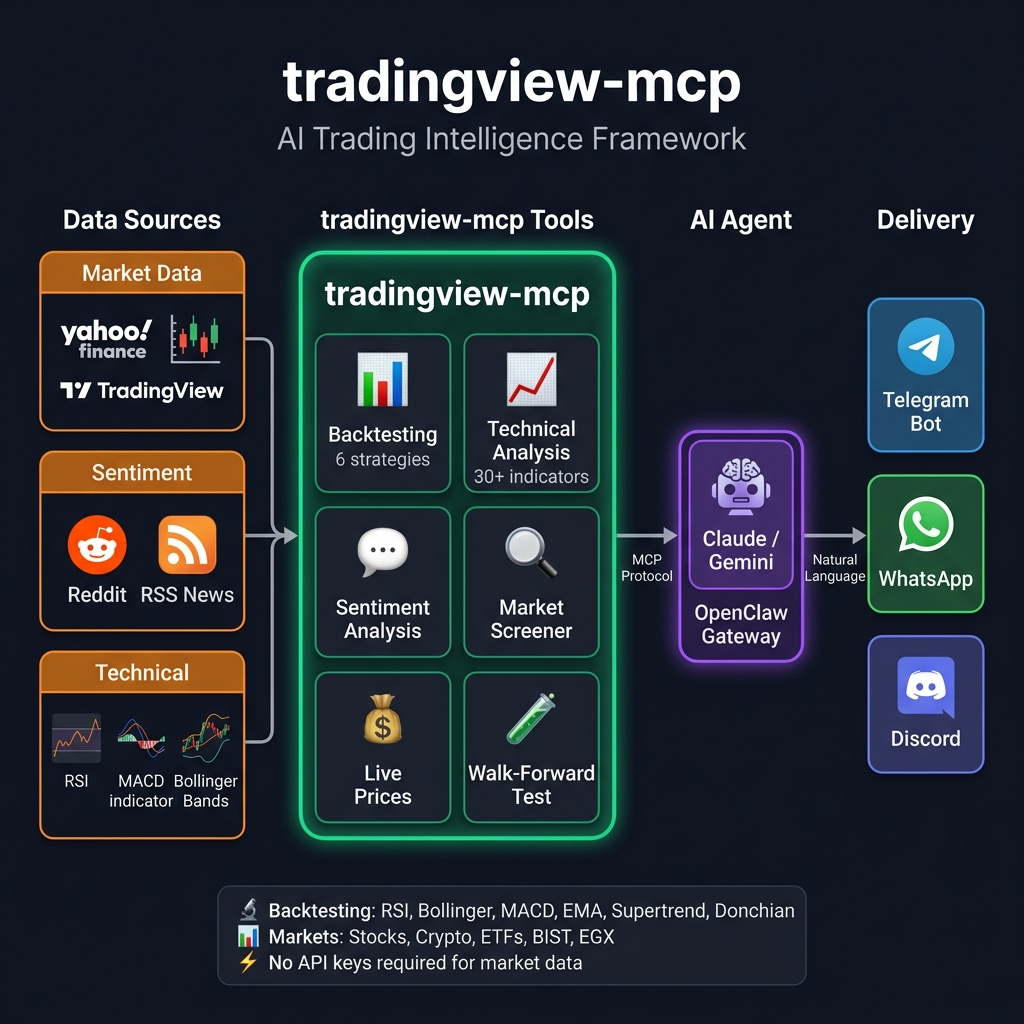
🏗️ Architecture
✨ Why tradingview-mcp?
| Feature | tradingview-mcp | Traditional Setups | Bloomberg Terminal |
|---|---|---|---|
| Setup Time | 5 minutes | Hours (Docker, Conda...) | Weeks (Contracts) |
| Cost | Free & Open Source | Variable | $30k+/year |
| Backtesting | ✅ 9 strategies + Walk-forward + Sharpe | ❌ Manual scripting | ✅ Proprietary |
| News & Sentiment | ✅ Licensed news + per-ticker sentiment (Marketaux) | ❌ Separate setup | ✅ Terminal |
| Market Data | ✅ Live / Real-Time | Historical / Delayed | Live |
| API Keys | None required | Multiple (OpenAI, etc.) | N/A |
[!WARNING] Security notice: impersonating copies of this repository. This project is Python-only and has no official npm / Node.js package. The only official sources are this repository (
atilaahmettaner/tradingview-mcp), the PyPI packagetradingview-mcp-server, and the hosted version, TradingMCP, at tradingmcp.ai (formerly pro.cryptosieve.com).Copies of this repository published under other accounts add a
package.jsonwhose dependencies install malware through npm (for exampleoracle-redis, MAL-2026-16390). If you cloned a "tradingview-mcp" repository from another account and rannpm install, treat that machine as compromised. Thanks to @roberttidball for the report (#101).
🚀 Quick Start (5 Minutes)
Two ways to run it — the same 39 tools either way:
| 🧑💻 Self-host (this repo) | ☁️ Hosted — TradingMCP | |
|---|---|---|
| Price | Free forever (MIT) | $9/mo Pro · $29/mo Pro+ · 14-day money-back guarantee |
| Time to first call | ~5 minutes (Python + uv) | ~60 seconds (add one URL, sign in) |
| Updates & ops | You run and update it | Managed — always on the latest |
| Runs on | Your machine or VPS | Hosted, streamed from the edge |
| Limits | Your hardware | 2,500/mo · 60/min (Pro) → 10,000/mo · 150/min (Pro+) |
| Best for | Tinkerers, forkers, full control | Folks who'd rather skip the ops |
☁️ Zero setup: add
https://mcp.tradingmcp.ai/mcpas a connector in Claude, Cursor or Grok and sign in; ChatGPT, Copilot and other clients use your private link → get started with TradingMCP from $9/mo (14-day money-back guarantee) · setup guide. Everything below is for self-hosting.
Install via pip
pip install tradingview-mcp-server
Optional: news & sentiment (free Marketaux key)
financial_news and market_sentiment (plus the news/sentiment parts of
combined_analysis) are powered by Marketaux —
licensed market news with per-entity sentiment. Grab a free API key
(100 requests/day; the server caches for 4h and shares one fetch between news
and sentiment, so the free tier goes a long way) and set:
export MARKETAUX_API_TOKEN=your_token_here # optional
Without a token those two tools return a friendly "not configured" note — all other tools work normally.
Claude Desktop Config (claude_desktop_config.json)
Note: On macOS, GUI apps like Claude Desktop may not have
~/.local/binin their PATH. Use the full path touvxto avoid "command not found" errors.
{
  "mcpServers": {
    "tradingview": {
      "command": "/Users/YOUR_USERNAME/.local/bin/uvx",
      "args": ["--from", "tradingview-mcp-server", "tradingview-mcp"]
    }
  }
}
On Linux, replace /Users/YOUR_USERNAME with /home/YOUR_USERNAME. On Windows, use %USERPROFILE%\.local\bin\uvx.exe.
Codex Plugin Config
This repository also includes mcp-only Codex plugin metadata:
.codex-plugin/plugin.json.codex-mcp.json
The plugin uses the same PyPI package entrypoint:
{
  "mcpServers": {
    "tradingview": {
      "command": "uvx",
      "args": ["--from", "tradingview-mcp-server", "tradingview-mcp"]
    }
  }
}
After installing or enabling the Codex plugin, restart Codex so the MCP server is loaded in the next session. Depending on your Codex version, codex mcp list may show registered MCP servers, but tool availability should be verified in a fresh Codex session.
Or run from source
git clone https://github.com/atilaahmettaner/tradingview-mcp
cd tradingview-mcp
uv run tradingview-mcp
TradingView launched its own MCP server in public beta on 16 Sep 2026. It is a good product, and for some jobs it is the better pick. Here is the honest difference (competitor facts checked Oct 2026 against TradingView's own MCP docs, launch post and pricing page):
- Analysis, not just data. TradingMCP runs multi-timeframe analysis, walk-forward backtests, smart-money and volume scans, and draws interactive charts in the chat. TradingView's MCP returns data, screens and a single-timeframe technical rating; its tool list has no backtesting or chart rendering (docs, checked Oct 2026).
- Morning market brief in one prompt. Global market snapshot, futures overview, Bitcoin pulse and the Markets panel in a single answer.
- $9 all-in, nothing else to subscribe to. TradingView's MCP is included only in paid TradingView plans, Essential and higher; trial plans don't include it (docs, pricing, checked Oct 2026). TradingMCP is $9/mo Pro or $29/mo Pro+ with a 14-day money-back guarantee, and self-hosting this repo stays free.
Where TradingView's MCP wins: fundamentals and analyst forecasts, SEC filings and earnings-call transcripts, editing your TradingView watchlists and alerts, and data that comes officially from TradingView itself (docs, checked Oct 2026). If that is what you need, use theirs, or run both side by side.
Try TradingMCP · works in Claude, ChatGPT, Cursor, Grok, Copilot or any MCP client.
🛠️ Troubleshooting
🪟 Windows: MCP error -32001: Request timed out on first launch
Symptom — you see this in the Claude Desktop logs shortly after adding the config:
[tradingview] Server started and connected successfully
[tradingview] Message from client: initialize ...
[60 seconds later]
[tradingview] notifications/cancelled — reason: "MCP error -32001: Request timed out"
Why it happens: Python 3.14 is not supported yet. uvx downloads tradingview-mcp-server, creates a fresh virtualenv, and installs dependencies the first time it runs. Some native dependencies in the MCP stack do not currently publish compatible Python 3.14 wheels, so installation can fall back to source builds or fail before Claude Desktop finishes initializing the server.
Fix — pin to Python 3.13 (has prebuilt pandas wheels):
{
  "mcpServers": {
    "tradingview": {
      "command": "uvx",
      "args": ["--python", "3.13", "--from", "tradingview-mcp-server", "tradingview-mcp"]
    }
  }
}
On macOS use the full path to uvx (see the note in Quick Start). On Windows uvx is typically %USERPROFILE%\.local\bin\uvx.exe.
Alternative — pre-install once, then let Claude Desktop reuse the cache:
# Run in a terminal before launching Claude Desktop
uv tool install --python 3.13 tradingview-mcp-server
After the install finishes, start Claude Desktop with the normal config and the server will come up instantly (cache is already warm).
⚠️ Error Envelope Format
Tools that have adopted the structured error format return either their normal payload or an error envelope:
{"error": {"code": "ALL_BATCHES_FAILED", "message": "All 5 batches failed; first error: JSONDecodeError(...)", "batches_attempted": 5, "batches_failed": 5, "first_error": "...", "retryable": true}}
Why: the previous [] / {"error": "Analysis failed: ..."} strings made it impossible to distinguish "no matches today" from "upstream rate-limit cliff." The new envelope is programmatically branchable by code, and retryable tells the caller whether waiting and retrying can help (upstream storms pass; a missing dependency won't fix itself).
Full coverage (every failure mode — upstream outage, empty symbol list, missing dependency, unexpected exception — returns an envelope, never a raw string/traceback): top_gainers, top_losers, bollinger_scan, rating_filter, volume_breakout_scanner, smart_volume_scanner.
Partial adoption (main error paths return envelopes): coin_analysis, volume_confirmation_analysis, consecutive_candles_scan, futures_market_overview, futures_top_movers, stock_prices, and the backtest input guards. Remaining tools migrate in batches — tracked in #76.
Detecting an error:
result = volume_breakout_scanner(exchange="KUCOIN")
if isinstance(result, dict) and "error" in result:
    code = result["error"]["code"]
    if result["error"].get("retryable"):
        # Wait + retry, raise alert, fall back to single-batch call, etc.
        ...
else:
    for row in result:
        ...
Stable codes are defined in core/errors.py.
📱 Use via Telegram, WhatsApp & More (OpenClaw)
Connect this server to Telegram, WhatsApp, Discord and 20+ messaging platforms using OpenClaw — a self-hosted AI gateway. Tested & verified on Hetzner VPS (Ubuntu 24.04).
How It Works
OpenClaw routes Telegram messages to an AI agent. The agent uses
trading.py— a thin Python wrapper — to calltradingview-mcpfunctions and return formatted results. No MCP protocol needed between OpenClaw and the server; it's a direct Python import.
Telegram → OpenClaw agent (AI model) → trading.py (bash) → tradingview-mcp → Yahoo Finance
Quick Setup
# 1. Install UV and tradingview-mcp
curl -LsSf https://astral.sh/uv/install.sh | sh && source ~/.bashrc
uv tool install tradingview-mcp-server

# 2. Configure OpenClaw channels
cat > ~/.openclaw/openclaw.json << 'EOF'
{
  channels: {
    telegram: {
      botToken: "YOUR_BOT_TOKEN_HERE",
    },
  },
}
EOF

# 3. Configure gateway + agent
openclaw config set gateway.mode local
openclaw config set acp.defaultAgent main

# 4. Set your AI model (choose ONE option below)
openclaw configure --section model

# 5. Install the skill + tool wrapper
mkdir -p ~/.agents/skills/tradingview-mcp ~/.openclaw/tools
curl -fsSL https://raw.githubusercontent.com/atilaahmettaner/tradingview-mcp/main/openclaw/SKILL.md \
  -o ~/.agents/skills/tradingview-mcp/SKILL.md
curl -fsSL https://raw.githubusercontent.com/atilaahmettaner/tradingview-mcp/main/openclaw/trading.py \
  -o ~/.openclaw/tools/trading.py && chmod +x ~/.openclaw/tools/trading.py

# 6. Start the gateway
openclaw gateway install
systemctl --user start openclaw-gateway.service
Choose Your AI Model
OpenRouter is not required — use whichever provider you have a key for:
| Provider | Model ID for OpenClaw | Get Key |
|---|---|---|
| OpenRouter (aggregator — access to all models) | openrouter/google/gemini-3-flash-preview | openrouter.ai/keys |
| Anthropic (Claude direct) | anthropic/claude-sonnet-4-5 | console.anthropic.com |
| Google (Gemini direct) | google/gemini-2.5-flash | aistudio.google.com |
| OpenAI (GPT direct) | openai/gpt-4o-mini | platform.openai.com |
# Examples — set your chosen model:
openclaw config set agents.defaults.model "openrouter/google/gemini-3-flash-preview"  # via OpenRouter
openclaw config set agents.defaults.model "anthropic/claude-sonnet-4-5"               # Anthropic direct
openclaw config set agents.defaults.model "google/gemini-2.5-flash"                   # Google direct
⚠️ Important: Prefix must match your provider.
google/...needs a Google API key.openrouter/...needs an OpenRouter key.
⚠️ Common Mistakes
| Symptom | Cause | Fix |
|---|---|---|
Unrecognized keys: mcpServers | mcpServers not supported in this version | Remove from config, use bash wrapper |
No API key for provider "google" | Used google/model but only have OpenRouter key | Use openrouter/google/model instead |
which agent? loop | acp.defaultAgent not set | openclaw config set acp.defaultAgent main |
| Gateway won't start | gateway.mode missing | openclaw config set gateway.mode local |
Test Your Bot
Once running, send your Telegram bot:
market snapshot
backtest RSI strategy for AAPL, 1 year
compare all strategies for BTC-USD
Unlike basic screeners, this framework deploys specialized AI agents that debate findings in real-time:
- 🛠️ Technical Analyst — Bollinger Bands (±3 proprietary rating), RSI, MACD
- 🌊 Sentiment & Momentum Analyst — Reddit community sentiment + price momentum
- 🛡️ Risk Manager — Volatility, drawdown risk, mean-reversion signals
Output: STRONG BUY / BUY / HOLD / SELL / STRONG SELL with confidence score
🔧 All 39 MCP Tools
📊 Backtesting Engine
| Tool | Description |
|---|---|
backtest_strategy | Backtest 1 of 9 strategies with institutional metrics (Sharpe, Calmar, Expectancy). Supports 1d and 1h timeframes; optional full trade log + equity curve. |
compare_strategies | Run all 9 strategies on the same symbol and rank by performance. |
walk_forward_backtest_strategy | Train/test split walk-forward validation with overfitting verdict (ROBUST / MODERATE / WEAK / OVERFITTED). |
9 Strategies to Test:
rsi— RSI oversold/overbought mean reversionbollinger— Bollinger Band mean reversionmacd— MACD golden/death crossema_cross— EMA 20/50 Golden/Death Crosssupertrend— ATR-based Supertrend trend following 🔥donchian— Donchian Channel breakout (Turtle Trader style)rsi_pullback— Dip-buy in confirmed uptrend (SMA50>SMA200 + RSI<40 entry) 🆕keltner_breakout— ATR-normalized breakout (EMA20 + 2·ATR upper band) 🆕triple_ema— EMA 20/50 cross gated by SMA200 trend filter 🆕
🆕 strategies require
period='1y'or'2y'so the SMA200 trend filter can complete its warmup.
Metrics you get: Win Rate, Total Return, Sharpe Ratio, Calmar Ratio, Max Drawdown, Profit Factor, Expectancy, Best/Worst Trade, vs Buy-and-Hold, with realistic commission + slippage simulation.
Example prompt: "Compare all 9 strategies on MSFT for 2 years"
→ #1 triple_ema:        +15.1% | Sharpe:  0.0 | WR: 100%
→ #2 keltner_breakout:  +14.3% | Sharpe:  4.7 | WR:  40%
→ #3 bollinger:         +12.2% | Sharpe:  4.1 | WR:  64%
→ Buy & Hold:            -2.1%
💰 Yahoo Finance — Real-Time Prices (New in v0.6.0)
| Tool | Description |
|---|---|
yahoo_price | Real-time quote: price, change %, 52w high/low, market state |
market_snapshot | Global overview: S&P500, NASDAQ, VIX, BTC, ETH, EUR/USD, SPY, GLD |
Supports: Stocks (AAPL, TSLA, NVDA), Crypto (BTC-USD, ETH-USD, SOL-USD), ETFs (SPY, QQQ, GLD), Indices (^GSPC, ^DJI, ^IXIC, ^VIX), FX (EURUSD=X), Turkish (THYAO.IS, SASA.IS)
🌍 Global Stock Screener — Common & Preferred Shares
| Tool | Description |
|---|---|
stock_screener | List common or preferred stocks for any TradingView country market (america, korea, germany, brazil, …) with price, currency, % change, dividend yield — ranked by market cap. The API twin of TradingView's "Common stock" / "Preferred stock" symbol-search filter. |
stock_prices | Direct price lookup for specific symbols (comma-separated EXCHANGE:SYMBOL, e.g. NASDAQ:NVDA, KRX:005930) — price, currency, daily % change, with unrecognized tickers named in not_found. |
🧠 AI Sentiment & Intelligence
| Tool | Description |
|---|---|
market_sentiment | Reddit sentiment across finance communities (bullish/bearish score, top posts) |
financial_news | Live RSS headlines from Yahoo Finance, MarketWatch, CNBC, CoinDesk, CoinTelegraph |
combined_analysis | Power Tool: TradingView technicals + Reddit sentiment + live news → confluence decision. Now backed by retry + 60s cache for resilience against transient screener errors. |
📈 Technical Analysis Core
| Tool | Description |
|---|---|
get_technical_analysis | Full TA: RSI, MACD, Bollinger, 23 indicators with BUY/SELL/HOLD |
get_multiple_analysis | Bulk TA for multiple symbols at once |
get_bollinger_band_analysis | Proprietary ±3 BB rating system |
get_stock_decision | 3-layer decision engine (ranking + trade setup + quality score) |
screen_stocks | Multi-exchange screener with 20+ filter criteria |
scan_by_signal | Scan by signal type (oversold, trending, breakout...) |
get_candlestick_patterns | 15 candlestick pattern detector |
get_multi_timeframe_analysis | Weekly→Daily→4H→1H→15m alignment analysis |
🌍 Multi-Exchange Support
| Exchange | Tools |
|---|---|
| Binance | Crypto screener, all pairs |
| KuCoin / Bybit+ | Crypto screener |
| NASDAQ / NYSE | US stocks (AAPL, TSLA, NVDA...) |
| EGX (Egypt) | egx_market_overview, egx_stock_screener, egx_trade_plan, egx_fibonacci_retracement |
| Turkish (BIST) | Via TradingView screener |
| Europe & Canada | Euronext (Paris, Amsterdam, Brussels, Lisbon), LSE, Xetra, Frankfurt, Milan, SIX, Madrid, TSX, TSX Venture |
| India & Indonesia | NSE, BSE (NIFTY, BANKNIFTY, SENSEX), IDX (Jakarta Composite) |
💬 Example AI Conversations
You: "Give me a full market snapshot right now"
AI: [market_snapshot] → S&P500 -3.4%, BTC +0.1%, VIX 31 (+13%), EUR/USD 1.15

You: "What is Reddit saying about NVDA?"
AI: [market_sentiment] → Strongly Bullish (0.41) | 23 posts | 18 bullish

You: "Backtest RSI strategy on BTC-USD for 2 years"
AI: [backtest_strategy] → +31.5% return | 100% win rate | 2 trades | B&H: -5%

You: "Which of the 9 strategies worked best on MSFT in the last 2 years?"
AI: [compare_strategies] → triple_ema #1 (+15.1%, WR 100%), keltner_breakout #2 (+14.3%), macd last (-23.4%)

You: "Run walk-forward backtest on supertrend for SPY"
AI: [walk_forward_backtest_strategy] → Verdict: ROBUST (avg robustness 0.92) | OOS return +8.5%

You: "Analyze TSLA with all signals: technical + sentiment + news"
AI: [combined_analysis] → BUY (Technical STRONG BUY + Bullish Reddit + Positive news)
💖 Support the Project
This framework is free and open source, built in spare time. If it saves you hours of research or helps you make better decisions, please consider sponsoring:
| Tier | Monthly | What You Get |
|---|---|---|
| ☕ Coffee | $5 | Heartfelt gratitude + name in README |
| 🚀 Supporter | $15 | Above + priority bug fixes |
| 💎 Pro | $30 | Above + priority feature requests |
Every sponsor directly funds new features like Walk-Forward Backtesting, Twitter/X sentiment, and managed cloud hosting.
📋 Roadmap
- TradingView technical analysis (30+ indicators)
- Multi-exchange screener (Binance, KuCoin, MEXC, EGX, US, European, Canadian, Indian and Indonesian stocks)
- Reddit sentiment analysis
- Live financial news (Yahoo / MarketWatch / CNBC / CoinDesk / CoinTelegraph)
- Yahoo Finance real-time prices
- Backtesting engine (9 strategies + Sharpe / Calmar / Expectancy)
- Walk-forward backtesting (overfitting detection)
- Resilience layer (retry + TTL cache) on screener provider
- Hourly (1h) backtesting timeframe
- Twitter/X market sentiment
- Paper trading simulation
- Managed cloud hosting (no local setup)
📄 License
MIT License — see LICENSE for details.
Disclaimer: This tool is for educational and research purposes only. It does not constitute financial advice. Always do your own research before making investment decisions.
daily_stock_analysis
ZhuLinsen·Python
用大模型自动分析 A 股等多市场股票,整合多源行情、实时新闻和决策看板,还能零成本定时跑并推送结果。
股票分析+4量化交易进阶
69613+195257kv3.34.02026-11-10 11:51 UTC

Vibe-Trading
HKUDS·Python
用大模型智能体做量化交易,支持多智能体协作、策略回测和 MCP 接入,让个人也能搭起自己的自动交易助手。
量化交易+4量化交易进阶
38021+2186.2kv0.1.192026-11-10 14:01 UTC
FinceptTerminal
Fincept-Corporation·C++
对标彭博终端的开源金融分析平台,集成行情分析、投资研究与经济数据工具,并内置 AI 智能体辅助数据驱动决策。
金融终端+4量化交易进阶
33670+1044.8kv4.5.22026-11-09 13:04 UTC
akshare
akfamily·Python
开箱即用的 Python 财经数据接口库,一行代码就能拉取股票、债券、期货、外汇和宏观经济等公开数据,省去到处爬数据、清洗数据的麻烦。
财经数据接口+4量化交易入门
23289+363.6kv1.20.372026-11-11 03:48 UTC