默认走 OpenAI API,需自行传入 OpenAI 客户端和 API key,否则 VLM 功能不可用;音视频处理需另装系统依赖 ffmpeg;语义分块、LlamaIndex 转换等能力要额外安装对应 extras,否则会报错。
thepipe
emcfMIT活跃维护用视觉语言模型从 PDF、Word、PPT 和扫描件等难搞文档里提取干净结构化数据,省去手工清洗的麻烦。
Get clean data from tricky documents, powered by vision-language models ⚡
v2.0.0发布于 2026-09-28 01:07 UTC1,529star100fork同步于 2026-11-07 07:31 UTC
pip install thepipe-api
pip install thepipe-api[all] 硬件要求按 README 说明
默认安装只含 CPU 友好依赖,可在受限环境和 CI 中运行;GPU 加速需装 thepipe-api[gpu](PyTorch + Whisper + Sentence Transformers)。README 未给出具体显存要求。
纯 CPU 可运行
用视觉语言模型从 PDF、Office、音视频等复杂文件里抽取干净 markdown 与结构化数据
用视觉语言模型从 PDF、Word、PPT 和扫描件等难搞文档里提取干净结构化数据,省去手工清洗的麻烦。
核心能力
- 用 VLM 逐页转写扫描件并裁剪图表图片
- 支持 PDF、Word、PPT、Notebook、视频、音频等来源
- 提供按页、按长度、按章节、按关键词等多种分块方式
- 用 pydantic schema 做结构化抽取并返回 token 用量
- chunks_to_messages 可直接拼成 OpenAI 多模态消息
容易踩的坑
内容由模型根据 README 生成,可能不完整或不准确,以官方文档为准。看原文 README
- v2.0.0thepipe 2.0.0最新正式版2026-09-28 · 2026-09-28 01:07 UTC
thepipe 2.0 is out. 🎉 There are two major changes:
- thepipe is now taking an agent forward approach. What I mean by this, is that over time, the project and UX will become more optimized for AI agents, and less so for humans.
- Richer library, fewer dependencies, and fewer bugs: Document Layout Analysis (commonly known as DLA), provenance, gutting the web scraper, and many bug fixes.
The latest and greatest feature, is a very lightweight abstraction for Document Layout Analysis, generalized to work with any vision-language model via an OpenAI-compatible client. Until now, when you scraped a PDF with a VLM,
chunk.imageswas the full page render. That was fine for feeding a multimodal model, but the images were large, they wasted tokens on content already in the scraped text, and even frontier LLMs were unable to interpret finely detailed technical figures within these page images.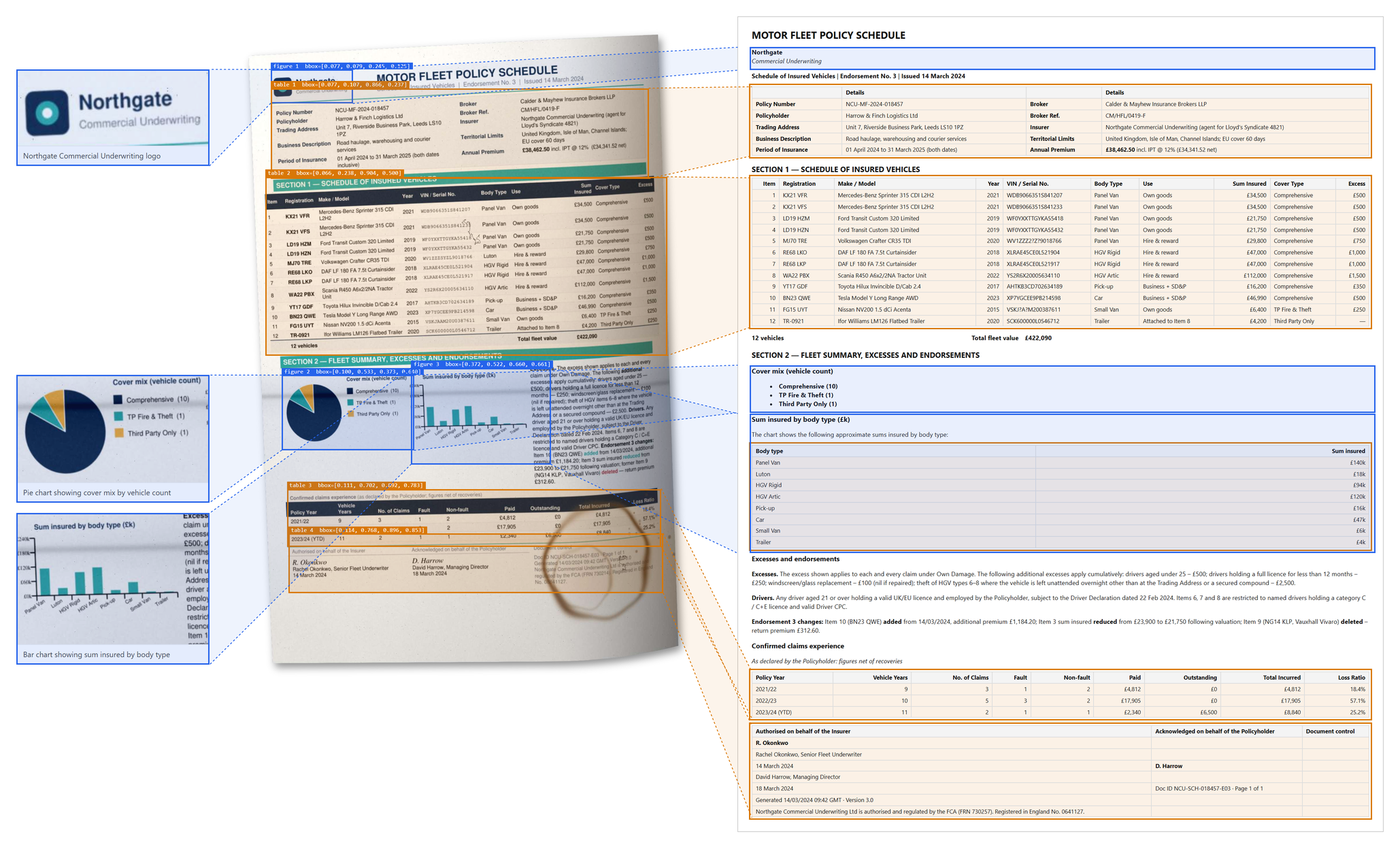
Achieve this with
from openai import OpenAI
from thepipe.scraper import scrape_file

chunks = scrape_file(
    filepath="fleet_schedule.pdf",
    openai_client=OpenAI(),
    model="gpt-5.6-luna"
)

c = chunks[0]
print(c.text)                     # markdown, tables included
print(c.metadata["figures"])      # [{"description": "Pie chart of vehicle classes", "bbox": [0.08, 0.61, 0.47, 0.93]}, ...]
c.images[0].save("figure_0.png")  # the cropped pie chart
Removing the web scraping was a tough decision, and one that I thought about for about an entire year. The reality is that, while it presents as functional, and may even work for a while, modern web technology largely blocks naive scrapers - for real web scraping you are better off with something like BrowserUse or Firecrawl, which can interact with the page as well - capabilities which i am not interested in building out and maintaining. thepipe is an excellent choice for parsing PDFs and other files for downstream use with large language models, multimodal models, and vector databases. I want to lock in on just that.
Onto the next important change: Provenance. Chunks contain metadata on where they came from.
Chunknow has ametadatadict, and every scraper fills it in. Chunkers preserve them (or concatenate/merge them when appropriate)Some smaller, more boring changes to get out of the way:
- replaced
moviepywithffmpeg. Having the heavy (and rapidly evolving) moviepy dependency gone in the main installation route, makes for a much simpler install, given we only used one feature from moviepy. max_input_image_size(also--max-input-image-sizeon the CLI) caps the pixel size of images sent to the VLM. Useful if you're cost-sensitive; leave it if you're scraping dense scans with high accuracy requirements.chunk_by_lengthhad a bug where the recursive call overwrote its own results. Fixed, with a test..csvfiles detected astext/csvnow actually route to the spreadsheet scraper.- Directory scraping enforces the root boundary; symlinks can't walk out of it (#44, thanks @0xmrma).
extract()now takes a PydanticBaseModelschema and useschat.completions.parseunder the hood, so you get validated, typed objects back instead of loosely-shaped JSON. This is a breaking change from the 1.x dict-schema API.- Fixed an OS command injection vulnerability in
scrape_github(CWE-78, #39, thanks @0xmrma). Web scraping is gone now, but if you're pinned to 1.x you should be aware of it. - Video and audio are now transcribed with Whisper as a whole file rather than in chopped-up segments, which removes the word-splitting artifacts at segment boundaries.
chunk_by_keywordswas setting the wrongpathon its output chunks. Fixed.- PDF pages and directory files are now scraped in parallel (
max_workersonscrape_file/scrape_directory), and all VLM calls go through a process-wid
用户点评
登录用户的真实使用记录,可按版本和硬件筛选共 0 条
还没有人点评。第一个说出真实体验的人最有价值。
Extract clean data from tricky documents ⚡
thepi.pe is a package that can scrape clean markdown, multimodal media, and structured data from complex files. It uses vision-language models (VLMs) under the hood for superior output quality, and works out-of-the-box with any LLM, VLM, or vector database. It can extract well-formatted data from a wide range of sources, including PDFs, Word docs, Powerpoints, Python notebooks, videos, audio, and more. If you've tried PyMuPDF, Markitdown, Azure Document Intelligence, and Docling, this will be the last library you try.
Features 🌟
- Get clean markdown, tables, and images from any file
- Document AI that works out-of-the-box with any multimodal LLM
- AI-native file type detection, layout analysis, and structured data extraction
Get started in 5 minutes 🚀
Thepipe can be installed via the command line:
pip install thepipe-api
The default install only pulls in CPU-friendly dependencies so it is suitable for constrained environments and CI systems. GPU-enabled libraries such as PyTorch and Triton are left as optional extras.
Optional extras
The package exposes a set of extras so you can opt-in to heavier dependencies on demand:
| Extra | Installs | When to use it |
|---|---|---|
thepipe-api[audio] | openai-whisper | Local audio/video transcription via Whisper. |
thepipe-api[semantic] | sentence-transformers | Semantic chunking with transformer embeddings. |
thepipe-api[llama-index] | llama-index-core | Chunk.to_llamaindex() conversions. |
thepipe-api[gpu] | PyTorch + Whisper + Sentence Transformers | Full GPU acceleration with VLM fine-tuning workloads. |
If you are targeting CPU-only machines but still need the extras that depend on PyTorch, install the CPU wheels directly from the PyTorch index first and then add the extra. For example:
pip install torch --index-url https://download.pytorch.org/whl/cpu
pip install thepipe-api[semantic]
If you need full functionality with media-rich sources such as video and audio, you can choose to install the following system dependencies:
apt-get update && apt-get install -y ffmpeg
and use the global installation with pip:
pip install thepipe-api[all]
Default setup (OpenAI)
By default, thepipe uses the OpenAI API, so VLM features will work out-of-the-box provided you pass in an OpenAI client.
Custom VLM server setup (OpenRouter, OpenLLM, etc.)
If you wish to use a local vision-language model or a different cloud provider, you can provide a custom OpenAI client, for example, by setting the base url to https://openrouter.ai/api/v1 for OpenRouter, or http://localhost:3000/v1 for a local server such as OpenLLM. Note that uou must also pass the api key to your non-OpenAI cloud provider into the OpenAI client. The model name can be changed with the model parameter. By default, the model will be gpt-5.6-luna.
Scraping
Scraping clean markdown from a file is simple:
from thepipe.scraper import scrape_file

chunks = scrape_file("paper.pdf")

for c in chunks:
  print(c.text)
For enhanced scraping, you can pass in an OpenAI-compatible client and a vision-language model:
from openai import OpenAI
from thepipe.scraper import scrape_file

client = OpenAI()

chunks = scrape_file(
  filepath="paper.pdf",
  openai_client=client, # openai-like client; enables AI scraping
  model="gpt-5.6-luna" # vision-capable model
)
All available options are shown below:
from thepipe.scraper import scrape_file

chunks = scrape_file(
  filepath="paper.pdf", # path to the file to scrape
  verbose=True, # print progress logs
  chunking_method=chunk_by_page, # chunking function
  openai_client=client, # openai-like client; enables AI scraping
  model="gpt-5.6-luna", # vision-capable model (default: DEFAULT_AI_MODEL)
  include_input_images=True, # sends page images to VLM for enhanced scraping
  include_output_images=True, # include scraped images in the returned chunks
  max_input_image_size=1024, # max pixel size of the largest axis of images sent to the VLM (does not affect output images)
)
AI scraping works well when you need visual figures, bounding boxes, and OCR on image-only scans. Below, a skewed, stained scanned document with no text layer is scraped into clean markdown, with its tables and figures located:
Chunking
To satisfy token-limit constraints, the following chunking methods are available to split the content into smaller chunks.
chunk_by_document: Returns one chunk with the entire content of the file.chunk_by_page: Returns one chunk for each page (for example: each PDF page or PowerPoint slide).chunk_by_length: Splits chunks by length.chunk_by_section: Splits chunks by markdown section.chunk_by_keyword: Splits chunks at keywords.chunk_semantic(experimental, requires sentence-transformers): Returns chunks split by spikes in semantic changes, with a configurable threshold.chunk_agentic(experimental, requires OpenAI): Returns chunks split by an LLM agent that attempts to find semantically meaningful sections.
For example,
from thepipe.scraper import scrape_file
from thepipe.chunker import chunk_by_document, chunk_by_page

# optionally, pass in chunking_method
# chunk_by_document returns one chunk for the entire document
chunks = scrape_file(
  filepath="paper.pdf",
  chunking_method=chunk_by_document
)

# you can also re-chunk later.
# chunk_by_page returns one chunk for each page (for example: each PDF page or PowerPoint slide).
chunks = chunk_by_page(chunks)
OpenAI Chat Integration 🤖
from openai import OpenAI
from thepipe.core import chunks_to_messages

# Initialize OpenAI client
client = OpenAI()

# Use OpenAI-formatted chat messages
messages = [{
  "role": "user",
  "content": [{
      "type": "text",
      "text": "What is the paper about?"
    }]
}]

# Simply add the scraped chunks to the messages
messages += chunks_to_messages(chunks)

# Call LLM
response = client.chat.completions.create(
    model="gpt-5.6-luna",
    messages=messages,
)
chunks_to_messages takes in an optional text_only parameter to only output text from the source document. This is useful for downstream use with LLMs that lack multimodal capabilities.
⚠️ It is important to be mindful of your model's token limit. Be sure your prompt is within the token limit of your model. You can use chunking to split your messages into smaller chunks.
LLamaIndex Integration 🦙
Install the optional extra and then call .to_llamaindex:
pip install thepipe-api[llama-index]
After installation, a chunk can be converted to LlamaIndex Document/ImageDocument with .to_llamaindex. Without the extra, a helpful error is raised instead of failing at import time.
Structured extraction 🗂️
Extraction uses OpenAI structured outputs, so results always conform to your pydantic schema.
from thepipe.extract import extract
from openai import OpenAI
from pydantic import BaseModel

client = OpenAI()

class LineItem(BaseModel):
    description: str
    amount_usd: float

results, tokens_used = extract(
    chunks=chunks,
    schema=LineItem,
    multiple_extractions=True,  # extract multiple rows of data per chunk
    openai_client=client
)
Running the test suite 🧪
Install the package in editable mode with the extras you rely on, then execute:
pip install -e ".[all]"
python -m unittest discover
Sponsors
Please consider supporting thepipe by becoming a sponsor. Your support helps me maintain and improve the project while helping the open-source community discover your work.
Visit Cal.com for an open-source scheduling tool that helps you book meetings with ease. It's the perfect solution for busy professionals who want to streamline their scheduling process.
Looking for enterprise-ready document processing and intelligent automation? Discover how Trellis AI can streamline your workflows and enhance productivity.
How it works 🛠️
thepipe uses a combination of computer-vision models and heuristics to scrape clean content from the source for downstream use with large language models, or vision-language models. You can feed the resulting markdown chunks directly into a model, or store them in a vector database such as ChromaDB, LLamaIndex, or an equivalent RAG framework.
Supported File Types 📚
| Source | Input types | Multimodal | Notes |
|---|---|---|---|
.pdf | ✔️ | Extracts page markdown and page images. With an OpenAI client, a VLM transcribes each page to markdown and returns cropped images/diagrams/charts instead of full page renders | |
| Word Document | .docx | ✔️ | Extracts text, tables, and images |
| PowerPoint | .pptx | ✔️ | Extracts text and images from slides |
| Video | .mp4, .mov, .wmv | ✔️ | Uses Whisper for transcription and extracts frames |
| Audio | .mp3, .wav | ✔️ | Uses Whisper for transcription |
| Jupyter Notebook | .ipynb | ✔️ | Extracts markdown, code, outputs, and images |
| Spreadsheet | .csv, .xls, .xlsx | ❌ | Converts each row to JSON format, including row index for each |
| Plaintext | .txt, .md, .rtf, etc | ❌ | Simple text extraction |
| Image | .jpg, .jpeg, .png | ✔️ | Uses VLM for OCR in text-only mode |
| ZIP File | .zip | ✔️ | Extracts and processes contained files |
| Directory | any path/to/folder | ✔️ | Recursively processes all files in directory. Optionally use inclusion_pattern to pass regex strings for file inclusion rules. |
Configuration & Environment
Set these environment variables to control API keys, hosting, and model defaults:
# Image hosting: instead of embedding base64 data URLs in LLM messages, save
# images to ./images and reference them as {HOST_URL}/images/{id}.jpg.
# HOST_URL must serve that folder (e.g. via your own API) and is required
# when HOST_IMAGES is true.
export HOST_IMAGES=true
export HOST_URL=https://your-domain.com

# Control scraping defaults
export DEFAULT_AI_MODEL=gpt-5.6-luna
export DEFAULT_EMBEDDING_MODEL=sentence-transformers/all-MiniLM-L6-v2

# Window length (in seconds) for splitting audio/video transcripts into chunks
export MAX_WHISPER_DURATION=600
Audio and video scraping (pip install thepipe-api[audio]) require the ffmpeg binary on your PATH.
CLI Usage
thepipe <source> [options]
AI scraping options
--openai-api-key=KEY To enable VLM scraping, pass in your OpenAI API key
--openai-model=MODEL Model to use for scraping (default is DEFAULT_AI_MODEL, currently gpt-5.6-luna)
--openai-base-url=URL Custom LLM endpoint, for local LLMs or hosted APIs like OpenRouter (default: https://api.openai.com/v1)
--ai_extraction ⚠️ DEPRECATED; will get API key from OPENAI_API_KEY environment variable
General scraping options
--text_only Output text only (suppress images)
--inclusion_pattern=REGEX Include only files whose _full path* matches REGEX (for dirs/zips)
--verbose Print detailed progress messages
Contributing
This package is quite opinionated in its design and implementation. Some modules are tightly coupled to the overall architecture, while others are designed to be hacked.
Before contributing, please create an issue on GitHub to discuss your ideas and how to best implement them. Pull requests that do not follow this process will be closed.

MiniCPM-V
OpenBMB·Python
MiniCPM-V 是面壁智能开源的多模态视觉语言模型,能在手机、PC 等本地设备上完成看图、听音和对话交互,无需依赖云端。
多模态+4视觉语言模型
27119+342.1k202505272026-11-09 07:37 UTC

LLaVA
haotian-liu·Python
开源的多模态视觉指令微调模型,让 LLaMA 类大模型能看图对话,效果对标 GPT-4V,适合做图文问答和视觉助手。
视觉指令微调+4视觉语言模型
250752.8kv1.2.02024-08-12 09:52 UTC
screenpipe
screenpipe·Rust
持续录制电脑屏幕和音频,把日常工作流整理成可检索的记录,帮你找出值得自动化的环节,并为 AI 智能体提供上下文。
屏幕录制+4视觉语言模型
22323+642.3kapp-v2.7.1452026-11-10 00:40 UTC

Qwen3-VL
QwenLM·Jupyter Notebook
阿里云通义团队开源的多模态大模型系列,能同时理解图像和文本,用于视觉问答、图文推理等视觉语言任务。
多模态大模型+4视觉语言模型
20192+171.9k2026-01-30 04:47 UTC