README 未说明具体依赖版本、默认端口或额外模型下载等注意事项
Windows 运行安装脚本:https://factory797.github.io/quadplay/tools/windows-install-quadplay.cmd
macOS/Linux 下载源码包:https://github.com/morgan3d/quadplay/archive/main.zip 硬件要求按 README 说明
README 未说明具体硬件要求;支持在任意笔记本、桌面、平板或手机上创建和游玩,也可用树莓派或旧电脑搭建自制街机。
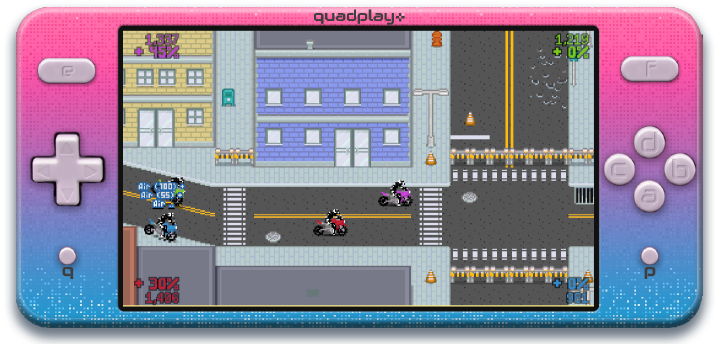
quadplay✜ 是一个幻想主机,让你在任何设备上编写并游玩复古风格电子游戏
quadplay✜ 是一个浏览器里的幻想主机,集成了 2D 游戏引擎、模拟器和 IDE,让开发者用 JavaScript 直接编写和运行复古风格游戏。
核心能力
- 内置网页 IDE,可在浏览器中直接编辑和运行游戏
- 附带多款完整游戏及源码,可直接游玩学习
- 提供大量示例程序,覆盖物理、动画、输入等技巧
- 支持笔记本、手机、平板及树莓派自制街机等多平台
容易踩的坑
内容由模型根据 README 生成,可能不完整或不准确,以官方文档为准。看原文 README
- 2026-10-25最新正式版2026-10-25 · 2026-10-25 21:02 UTC
- Rasterization primitives of the virtual GPU moved from JavaScript to C compiled to WebAssembly with SIMD.
On cross-origin isolated pages the GPU worker shares its framebuffer memory with the main thread.
Exported games include an
.htaccessfor Apache, and the manual's Deploying Games section describes the headers for itch.io, nginx, and other hosts - API and language changes:
- optimized map span rendering and fixed off-by one errors; 4x speedup of Warlock 3D example
touchpointer input is now in world space instead of camera space- Allowed a larger set of unicode superscripts in code
particle_libparticle systems are now explicitly in world spacetitlecase()splice()andspliced()for arrays and strings- CSV data files can now disable typed parsing using
"parse_as_strings" - Frame hooks specific to a mode are removed when that mode exits via
set_mode()orpop_mode(), includingdelay()frame hooks - Constants with url fields are now supported for nested objects and arrays
- Introduced
iterated(), a functional version ofiterate()that is similar tomap()orfilter()in other languages draw_sprite_corner_rect()now supports transformed sprites- Local save game storage increased dramatically, and guarantees indefinite lifetime
- iOS for games with saved storage now requires installing the game on the home screen
- IDE changes:
- Moved debugger options from the Game menu to the Tools menu
- The emulator view in the IDE can now be vertically resized to show more emulator or more debugger and help info
- The project pane can now be auto-hiding or pinned in every IDE editor layout
- Debugger now links to the source line that triggered a mode transition
- Debugger now prints the
game_framesat which a mode transition occurred - Sprite sheet dimensions now shown in the resource display of the debugger
- Resource display now links back to the asseet consuming those resources
- Code editor now inserts spaces instead of tabs
- Bug fixes:
- Nested object/array constants now show descriptions in the constant editor
"raw"constant values are now visualized correctly in the constant editorformat_number(n, "commas")now rounds before formatting- Added workaround for quadplay hot-reloading when Chrome Memory Saver/Edge Sleeping Tabs is enabled in the browser
- Fixed IDE cursor horizontal misalignment in long code lines
- Statement resource counter now correctly processes single-line control flow as multiple statements
- Statement resource counter now correctly ignores leading and trailing blank lines in files
- Fixed vertical offset on pane resizing in the IDE
- Fixed game version change not forcing full reload
- Fixed iOS Safari audio loss when page is defocused
- Fixed Go to Definition not working when the function was defined after the usage point in the file
- Detected missing python-tk for homebrew/apt installs
- Fixed controller vibration crash on Firefox
- Fixed iOS touch events for late-2025 iOS/Safari zoom change
- quadplay Discord linked from Console/gear menu
- Rasterization primitives of the virtual GPU moved from JavaScript to C compiled to WebAssembly with SIMD.
On cross-origin isolated pages the GPU worker shares its framebuffer memory with the main thread.
Exported games include an
- 2025-08-292025-08-30 · 2025-08-30 11:30 UTC
查看更新说明
- New example, "GUI" using
cursor_lib.pyxl - API and language changes:
- Released the docs for the experimental HTTP API. Note that this API is blocked for safety reasons in the quadplay launcher and kiosk mode, but exported games may use it.
- Added support for numbers as strings in CSV file parsing (example:
"=""12345""") - Documented CSV parsing options for array-of-structs
- Renamed
scripts/midi_8x8.pyxltoscripts/midi_8x8_lib.pyxl swap()pass_through()
- Asset changes:
- New lock, unlock, binocular sprites for
shapes.sprite.json cursor-13x13.sprite.jsonenglish_common_table.data.jsonandenglish_common_array.data.jsonhit-12.sound.json
- New lock, unlock, binocular sprites for
- IDE changes:
- "Go to API" dropdown list for code files for jumping to constants, variables, functions, and events
- Blocks surrounded by
if DEBUG:no longer count against the statement limit (case insensitive, and any identifier beginning with the prefixDEBUGmatches) - Launching the IDE in --serve mode on macOS now opens the Firewall settings panel to make it easier to configure security
- Added full documentation generation for libraries
- Initialization during declaration of a variable to
∅,false,0, or""now does not count against the statement limit
- Incompatible API changes:
play_sound(sound, loop default false, volume default 100%, pan default 0%, pitch default 100%, time default 0, playback_rate default 100%, stopped default false)->play_sound(sound, volume default 100%, pan default 0%, pitch default 100%, time default 0, playback_rate default 100%, loop default false, stopped default false)
- Bug fixes:
- Blank lines at the start of the program no longer count against the statements limit
- Prevented
"raw"constants from crashing the constant editor in the IDE - All trailing whitespace is trimmed from CSV files on load, so multiple blank lines do not create empty rows
- Workaround for
crypto.randomUUID() is not a function parse()andunparse()now handle escape sequences including double quotes correctly- Touching off of the system dropdown menu on mobile for an exported game now closes the menu
- System dropdown menu on mobile is now larger
- Pause menu now supports touch controls as well as mouse, gamepad, and keyboard
- Prevented Safari from caching
version.jsto ensure the latest version of the runtime is always loaded - Fixed a 1px offset in the controllers display on exported games
- New example, "GUI" using
- 2025-08-122025-08-12 · 2025-08-12 12:42 UTC
查看更新说明
- IDE improvements:
- New Find in files (grep) feature
- Code editor now has a custom context (right click) menu
- Added Go to Definition to the context menu
- Added Preview Export action in the Tools menu
- API and language changes:
evaluate_constant_expression()penultimate_value()pause_menu()string_compress()string_decompress()device_control("get_mouse_state")now includes mousewheeldxy valueslocal_time()andutc_time()are now constant throughout a frameremove_values()now accepts an optional comparatorcontains()andfind()now accept a string or integer as a comparator key- PyxlScript now supports general-purpose
pop_modehandlers with nofromclause - Increased
save_local()size per key to 32,768 characters from 16,384 - Removed
push_guest_menu_mode()[usepause_menu("Online -> Guest")] - Removed long-deprecated
is_NaN()[useis_nan()] - Removed long-in-beta
launch_game()
- Libraries:
cursor_lib.pyxlnow includes scroll box support
- Assets:
- Added
good-03.sound.json
- Added
- Exported games
- Added import/export of save games to a local file to the console menu. Automatically appears
for all quadplay games that use
save_localorload_local - Option to disable the arcade keyboard menu items for games run from a separate browser (vs. the launcher)
- Improved UI of the quadplay HTML menu bar above the emulator
- Only show the Quit/Close option when it will work
- Added import/export of save games to a local file to the console menu. Automatically appears
for all quadplay games that use
- Bug fixes:
- Constant colors specified using #RGB/#RGBA in the game.json no longer crash the gui editors. Instead they are automatically converted to objects when edited.
todo()statements at top level are now displayed correctly in the TODO debugger tab- Tooltips now appear on the code editor buttons
- Undo and Redo buttons now work again in the code editor
- Corrected 1/2 texel offset for sprites in Warlock demo that led to gaps in walls
draw_textwas returning incorrect vertical bounds for multi-line text and aligning to "bottom" poorly as a result.
- IDE improvements:
- 2025-08-032025-08-03 · 2025-08-03 21:30 UTC
查看更新说明
- New example: "Fill Window"
- New library:
screen_lib.pyxllibrary - API changes:
- Advanced Conduit network API for MMO and explicit network multiplayer state synchronization (see the Conduit section of the manual)
device_control("get_display")device_control("enable_feature", "custom_screen_size")"timer"format forformat_number()utc_now()utc_time()gamepad.x_framesandgamepad.y_framesCREDITS.versionset_random_seed()andmake_random()now allow a string as the seed- Clarified
local_time()documentation - Improved random number generator initialization so that sequences with similar seeds diverge more quickly
- Added game.json
online_menuoption to disable the Online menu item in the System Menu for games that should not support Online play or use the Conduit API - New
QUADPLAY_INFOglobal constant - Incompatible change: Removed
gamepad.aa,gamepad.bb, etc. andtouch.aaaliases. Use the already existinggamepad.a_pressed, etc. instead. Leftgamepad.xxandgamepad.yyfor now becausegamepad.x and |sign(gamepad.dx)|is an awkward alternative - Increased
save_local()size per key to 16384 characters from 4096
- Asset changes:
deja-bold-15.font.jsonnovarese-20.font.jsonnovarese-bold-20.font.jsonsilence.sound.jsongood-00.sound.jsongood-01.sound.jsongood-02.sound.json- Added
english_offensive_table.data.jsondictionary - Added black star and black heart to
deja-6anddeja-7fonts - Repacked
kenney-1bit-14x14.pngso that it can work with Tiled; redrew a small number of sprites - Fixed
baselinevalues on many fonts
- IDE improvements:
- Asset import dialog now shows a preview of the contents
- Moved the toolbar buttons closer to the right edge on mobile
- Added code-defined constants and variables to the autogenerated program documentation
- Added game.json-defined constants to the autogenerated program documentation
- Increased editor selection background contrast
- Long output in the debug pane now wraps around the file:line marker instead of overlapping it
- Runtime improvements:
- Added game version number to autogenerated credits
- All assets and scripts are forced to refresh from the server and bypass the browser cache if either the quadplay version or the game version has changed since the previous load
- Background is now black with full-screen boot screen for deployed games
- Upgraded to peer.js 1.5.5
- The GPU will cache frames with duplicate commands instead of re-rendering them. This is a significant mobile battery optimization for strategy and other games that tend to update at a rate lower than the full 60 Hz
- Reduced memory allocation/garbage collection for using threaded virtual GPU
- Backspace on the keyboard maps to P1 button (b) in addition to the previous Enter and H keys
- Bug fixes:
spritesheet.size_in_spriteswas transposed, is now fixed- Generated documentation now is restricted to top-level functions and variables
- ESC now always cancels all open modal IDE dialogs
- Fullscreen emulator screen was 2px smaller than the actual display
- Slider tracks are now visible on Safari
- Version now appears in the IDE's metadata editor
- Prevented reload by swiping down on the toolbar on iOS Safari
- 2025-06-152025-06-16 · 2025-06-16 06:39 UTC
查看更新说明
- Redesigned the deployed HTML game toolbar to be more minimal and easier for users to understand
- Made intro animations (pause message and quadplay boot animation) skippable with any user input
- Increased loading speed by async loading more of the implementation
- Increased exported game loading speed by factoring more IDE code out of the emulator
- Merged inactive pause and background pause and the sleep versions into a single setting
- Fixed quadplay sleep problems during intro sequence for deployed games
- Fixed
dice_set_initial_positions()indice_lib.pyxlfailing withNaNresults for narrow dice trays - Changed
highscorestohigh_scoresin the game.json specification to be consistent with other quadplay naming conventions - Added
show_start_animationoption for exported games (defaults to true) - Added
mobile_touch_gamepadoption for exported games (defaults to true) - Removed support for legacy game.json files that use
*to denote the start mode - Added support for .csv.zip and .txt.zip compressed text files
- Added
set_tableoption for CSV constants and assets for creating a set data structure of unique keys from a CSV file - Rewrote asset loader for speed and code maintainability
- Added
jsziplibrary dependency - IDE button colors now match the emulator theme
- IDE tab colors now match the emulator theme
- Added
english_all_table.data.jsondictionary - Added
english_all_array.data.jsonword list - Added
english_sensitive_table.data.jsondictionary - Improved
ivanhoe-12font readability - Added
ivanhoe-bold-12font
用户点评
登录用户的真实使用记录,可按版本和硬件筛选共 0 条
还没有人点评。第一个说出真实体验的人最有价值。
quadplay✜ is a fantasy console for creating and playing retro-style video games on any device.

quadplay✜ is maintained by Shmuel Ravensky. It was originally created by Morgan at CasualEffects, who still contributes.
Platforms
Create and play games on any laptop, desktop, tablet, or phone. Or, build your own programmable arcade machine from a Raspberry Pi or or old computer. Here are some of the many supported quadplay platforms:
Games
Full
These full games are included, with source code. Click to play:
Examples
These short example programs demonstrate specific quadplay features and programming techniques:
Features
- Create games on Windows, macOS, Linux
- Play your games in any modern web browser on a phone, laptop, desktop, tablet, Raspberry Pi, or other computer
- 60 fps @ 384 x 224 pixels = 12:7 aspect ≈ 16:9.3
- 4096 sRGB (4:4:4) colors
- Four players with virtual controls for D-pad and eight buttons
- Local and safe online multiplayer
- Supports Xbox, Playstation, SNES, Stadia, Switch, 8bitdo, touch screen, and other controllers
- Hundreds of built-in sprites, sounds, and fonts
- Program in PyxlScript, a friendly Python-like language
- Native 2.5D graphics with z-order and order-independent, 4-bit alpha transparency
- 9.4 MB of total sprite memory
- Up to 64 sprite and font sheets per game of up to 1024 x 1024 each
- Optional 640 x 360, 384 x 224, 320 x 180, 192 x 112, 128 x 128, and 64 x 64 screen modes
- Free and open source
Every quadplay✜ game automatically runs on every quadplay device, at full frame rate and with input prompts adapted for that keyboard, controller, or touch screen.
quadplay✜ also allows advanced users to unlock low-level access and break full compatibility. This lets you make games that use the full capabilities of a specific controller, mouse, or display, as well as make your own tools with file system access.
Join the Quadplay Revolution
You can use an external editor (like VSCode) or simply work entirely within the provided the browser-based development environment.
To get started, you'll need only a computer with Windows, macOS, Linux, or Raspberry Pi OS and the following freely-available software.
Required:
- This SDK, which includes the IDE and assets
- Python 3.13
- A modern web browser such as Chrome, Edge, Brave, Safari, or Firefox
- On some Linux distributions you might need to install
tkinter, e.g. on Fedorasudo dnf install -y python3-tkinter
Optional:
- The manual
- A code editor such as VS Code, Emacs, or VIM. Use Python mode or install our provided PyxlScript editor extensions
- A TMX map editor such as Tiled or TileKit
- A sprite and font pixel editor such as Piskel or GrafX2
- A SFX generator and audio editor such as Audacity
- An account on the forums
- Follow development online at @CasualEffects
See the manual for a getting started guide, the change log, road map, and notes.
License
The quadplay✜ runtime, compiler, and emulator are licensed as LGPL3.
You can create closed-source games with it and distribute your games however you want, including commercially.
If you modify the runtime library, compiler, or emulator, then you must redistribute those changes under the LGPL3.
Portions of the IDE are under different, less-restrictive open source licenses (BSD, MIT, and public domain).
quadplay✜ automatically adds asset and library licenses to your game's credits screen. You don't have to do any work to satisfy attribution clauses from open source or Creative Commons licenses.
All sounds, sprites, and games distributed with quadplay✜ are Creative Commons licensed. The copyright and license on each of those is in a JSON file next to the asset.
© 2020-2026 Shmuel Ravensky and Morgan McGuire

shadPS4
shadps4-emu·C++
用 C++ 编写的 PlayStation 4 模拟器,支持 Windows、Linux、macOS 和 FreeBSD,让玩家能在电脑上运行 PS4 游戏。
PS4模拟器+4模拟器
34107+232.9kv.0.21.02026-11-10 10:57 UTC
v86
copy·JavaScript
在浏览器里跑完整 x86 PC 的模拟器,带 x86 到 WebAssembly 的 JIT 编译器,可直接启动 Linux 等系统。
x86 模拟器+3模拟器
23670+31.9klatest2026-10-30 21:48 UTC

ish
ish-app·C
在 iOS 设备上跑起 Linux shell 的模拟器,靠用户态 x86 模拟执行命令行工具,让 iPhone/iPad 也能用上熟悉的 Linux 命令环境。
iOS 模拟器+4模拟器
20697+141.6kbuilds/8132026-11-07 00:46 UTC
rpcs3
RPCS3·C++
跨平台的 PlayStation 3 模拟器与调试器,用 C++ 编写,支持 OpenGL 和 Vulkan 渲染,让玩家能在 PC 上运行 PS3 游戏并调试。
PS3模拟器+4模拟器
20384+172.6kv0.0.432026-11-10 08:33 UTC