用 Gemini、OpenAI 等云端模型需先配置 LANGEXTRACT_API_KEY 或 OPENAI_API_KEY;用 OpenAI 需额外安装 pip install langextract[openai];少样本示例中的 extraction_text 应逐字取自示例原文,否则会触发 Prompt alignment 警告,且无法在源文本定位的抽取结果 char_interval 为 None。
langextract
googleApache-2.0活跃维护用 LLM 从非结构化文本中抽取结构化信息,并给出精确的原文出处定位和交互式可视化,方便核对抽取结果。
A Python library for extracting structured information from unstructured text using LLMs with precise source grounding and interactive visualization.
v1.7.2发布于 2026-11-07 09:16 UTC39,297star +23 / 7 天2,750fork同步于 2026-11-10 11:20 UTC
pip install langextract 硬件要求按 README 说明
README 未说明显存或 GPU 要求;云端模型(Gemini、OpenAI)无需本地算力,本地模型通过 Ollama 运行。
有 Docker 镜像
用 LLM 从非结构化文本抽取结构化信息,并把每个结果精确映射回原文位置
用 LLM 从非结构化文本中抽取结构化信息,并给出精确的原文出处定位和交互式可视化,方便核对抽取结果。
核心能力
- 把抽取结果映射到源文本的精确字符区间,便于高亮核对
- 用少样本示例约束输出 schema,Gemini 上可走受控生成
- 长文档分块并行处理并多轮扫描,提升召回率
- 生成自包含的交互式 HTML 文件,可视化审阅抽取结果
- 内置 Ollama 接口,可接本地开源模型,也支持自定义 provider
容易踩的坑
内容由模型根据 README 生成,可能不完整或不准确,以官方文档为准。看原文 README
- v1.7.2最新正式版2026-11-07 · 2026-11-07 09:16 UTC
Highlights
- Support
google-genai3.0, which replacedhttpxwithhttpx2, so Gemini retries transient network errors again (#605). - Escape extraction data embedded in
visualize()output (#573) and declare a UTF-8 charset in visualization HTML (#466). - Route
gpt-6model IDs to the OpenAI provider (#599) and sendmax_output_tokensasmax_completion_tokensto OpenAI (#600). - Stop
dict_to_annotated_documentfrom mutating its input (#577), load annotated documents saved withnullextractions (#584), and retokenize aDocumentafter itstextchanges (#583). - Preserve literal strings such as
NAandNULLwhen loading CSV datasets (#556). - Apply explicit
temperatureconsistently inextract()(#571) and skip empty extraction values that cannot be grounded (#567). - Fix URL fetching and file encoding in documentation and examples (#550, #572).
- Add a pull request security check, harden CI workflows, pin GitHub Actions to commit SHAs, and update live API tests (CI only; #566, #569, #594, #595, #601, #606).
Compatibility notes
- Requests to
api.openai.com(including regional*.api.openai.comendpoints) now sendmax_output_tokensasmax_completion_tokens. Otherbase_urlendpoints still receivemax_tokens(#600). - An explicit
extract(temperature=...)now overrides atemperatureinlanguage_model_paramsorconfig.provider_kwargs, and is forwarded whenconfigis used. With a pre-builtmodel, it is ignored with a warning (#571). - CSV dataset loading now keeps values such as
"NA","NULL", and empty fields as strings instead of reading them as missing (NaN) values (#556). - Empty or whitespace-only extraction values are now skipped instead of producing ungrounded extractions (#567).
Full Changelog: https://github.com/google/langextract/compare/v1.7.1...v1.7.2
- Support
- v1.7.12026-10-08 · 2026-10-08 22:57 UTC
查看更新说明
Highlights
- Fix Gemini thinking configuration passthrough, batch tool placement, and typed configuration serialization (#553).
- Fix Vertex AI batch jobs failing at import when
google_searchis configured without options (#561). - Surface blocked or failed Gemini batch items instead of returning empty output (#537).
- Fix legacy
format_typenormalization in extraction (#544). - Release completed prompts before building the next batch, reducing retained memory (#543).
- Clarify suppressed parsing errors (#521).
- Harden fork live tests and dispatch them from
main(CI only; #552).
Compatibility notes
- In batch mode with the default
ignore_item_errors=False, blocked items, items with a Vertex AI error status, and items that return no text with a finish reason other thanSTOP(for example,MAX_TOKENS) now raiseInferenceRuntimeErrorinstead of returning empty output, and results from that call are not cached. Setignore_item_errors=Trueto continue past them (#537). - A
thinking_configpassed to the Gemini provider is now sent to the API; v1.7.0 ignored it. Callers that already set it may see different output, latency, or cost, or an API error if the model rejects the setting (#553). - Batch cache keys now include tools. Cache entries written by v1.7.0 will not be reused, even for requests without tools, and repeated requests may incur new API charges (#553).
- In strict mode, empty cached batch results are rechecked, because the cache cannot distinguish a genuine empty completion from a previously ignored failure. This may repeat requests and incur API charges. Nonempty cache hits and explicit ignore mode are unchanged (#537).
- In Vertex AI batch mode, any tool other than
google_searchwith an empty configuration, such ascode_executionorurl_context, now fails before upload with anInferenceRuntimeErrorcaused byInferenceConfigError. Set an option on the tool if it has one, or disable batch mode (#561).
Full Changelog: https://github.com/google/langextract/compare/v1.7.0...v1.7.1
- v1.7.02026-09-13 · 2026-09-13 18:57 UTC
查看更新说明
Highlights
- Improve source alignment for repeated mentions, with an option to retain the previous alignment algorithm (#485).
- Fix provider-plugin generation, generated schemas, and packaging (#513).
- Forward Gemini generation settings, including output-token limits (#509).
- Surface blocked, refused, or missing-text Gemini/OpenAI responses as inference errors (#534).
- Route OpenAI reasoning and GPT-3.5 model IDs correctly and discover reasoning-model API keys automatically (#494).
Compatibility notes
- Repeated-mention source spans may change. Set
resolver_params={"exact_alignment_algorithm": "difflib"}to retain the previous exact-alignment behavior. - Callers may now receive an inference error where an unusable model response previously appeared to succeed. Valid empty strings with normal completion remain allowed.
- GPT-3.5 requires
use_schema_constraints=False. Explicit output-token limits for OpenAI reasoning models remain a separate follow-up.
Full Changelog: https://github.com/google/langextract/compare/v1.6.0...v1.7.0
- v1.6.02026-07-02 · 2026-07-02 06:23 UTC
查看更新说明
Highlights
- Add user-provided
output_schemasupport for Gemini and OpenAI. - Add Ollama GPT-OSS JSON chat support.
Full Changelog: https://github.com/google/langextract/compare/v1.5.0...v1.6.0
- Add user-provided
- v1.5.02026-05-20 · 2026-05-20 03:17 UTC
查看更新说明
Highlights
- Add OpenAI Batch API support.
- Update the default Gemini Flash model to
gemini-3.5-flash.
Full Changelog: https://github.com/google/langextract/compare/v1.4.0...v1.5.0
用户点评
登录用户的真实使用记录,可按版本和硬件筛选共 0 条
还没有人点评。第一个说出真实体验的人最有价值。
LangExtract



Table of Contents
- Introduction
- Why LangExtract?
- Quick Start
- Installation
- API Key Setup for Cloud Models
- Adding Custom Model Providers
- Using OpenAI Models
- Using Local LLMs with Ollama
- More Examples
- Community Providers
- Contributing
- Testing
- How to Cite
- Disclaimer
Introduction
LangExtract is a Python library that uses LLMs to extract structured information from unstructured text documents based on user-defined instructions. It processes materials such as clinical notes or reports, identifying and organizing key details while ensuring the extracted data corresponds to the source text.
Why LangExtract?
- Precise Source Grounding: Maps every extraction to its exact location in the source text, enabling visual highlighting for easy traceability and verification.
- Reliable Structured Outputs: Enforces a consistent output schema based on your few-shot examples, leveraging controlled generation in supported models like Gemini to guarantee robust, structured results.
- Optimized for Long Documents: Overcomes the "needle-in-a-haystack" challenge of large document extraction by using an optimized strategy of text chunking, parallel processing, and multiple passes for higher recall.
- Interactive Visualization: Instantly generates a self-contained, interactive HTML file to visualize and review thousands of extracted entities in their original context.
- Flexible LLM Support: Supports your preferred models, from cloud-based LLMs like the Google Gemini family to local open-source models via the built-in Ollama interface.
- Adaptable to Any Domain: Define extraction tasks for any domain using just a few examples. LangExtract adapts to your needs without requiring any model fine-tuning.
- Leverages LLM World Knowledge: Utilize precise prompt wording and few-shot examples to influence how the extraction task may utilize LLM knowledge. The accuracy of any inferred information and its adherence to the task specification are contingent upon the selected LLM, the complexity of the task, the clarity of the prompt instructions, and the nature of the prompt examples.
Quick Start
Note: Using cloud-hosted models like Gemini requires an API key. See the API Key Setup section for instructions on how to get and configure your key.
Extract structured information with just a few lines of code.
1. Define Your Extraction Task
First, create a prompt that clearly describes what you want to extract. Then, provide a high-quality example to guide the model.
import langextract as lx
import textwrap

# 1. Define the prompt and extraction rules
prompt = textwrap.dedent("""\
    Extract characters, emotions, and relationships in order of appearance.
    Use exact text for extractions. Do not paraphrase or overlap entities.
    Provide meaningful attributes for each entity to add context.""")

# 2. Provide a high-quality example to guide the model
examples = [
    lx.data.ExampleData(
        text="ROMEO. But soft! What light through yonder window breaks? It is the east, and Juliet is the sun.",
        extractions=[
            lx.data.Extraction(
                extraction_class="character",
                extraction_text="ROMEO",
                attributes={"emotional_state": "wonder"}
            ),
            lx.data.Extraction(
                extraction_class="emotion",
                extraction_text="But soft!",
                attributes={"feeling": "gentle awe"}
            ),
            lx.data.Extraction(
                extraction_class="relationship",
                extraction_text="Juliet is the sun",
                attributes={"type": "metaphor"}
            ),
        ]
    )
]
Note: Examples drive model behavior. Each
extraction_textshould ideally be verbatim from the example'stext(no paraphrasing), listed in order of appearance. LangExtract raisesPrompt alignmentwarnings by default if examples don't follow this pattern—resolve these for best results.Grounding: LLMs may occasionally extract content from few-shot examples rather than the input text. LangExtract automatically detects this: extractions that cannot be located in the source text will have
char_interval = None. Filter these out with[e for e in result.extractions if e.char_interval]to keep only grounded results.
2. Run the Extraction
Provide your input text and the prompt materials to the lx.extract function.
# The input text to be processed
input_text = "Lady Juliet gazed longingly at the stars, her heart aching for Romeo"

# Run the extraction
result = lx.extract(
    text_or_documents=input_text,
    prompt_description=prompt,
    examples=examples,
    model_id="gemini-3.5-flash",
)
For advanced constraints beyond examples, such as enum values on extraction
attributes, Gemini and OpenAI support output_schema with or without
few-shot examples. See
Custom output schemas.
Model Selection:
gemini-3.5-flashis the recommended default, offering strong extraction quality for LangExtract's schema-constrained workflows. For high-volume or cost-sensitive workloads, consider the current stable Flash-Lite model,gemini-3.1-flash-lite; for highly complex tasks requiring deeper reasoning, evaluate a current Gemini Pro model from the official model documentation. For large-scale or production use, a paid Gemini tier is suggested to increase throughput and avoid rate limits. See the rate-limit documentation for details.Model Lifecycle: Note that Gemini models have a lifecycle with defined retirement dates. Users should consult the official model version documentation to stay informed about the latest stable and legacy versions.
3. Visualize the Results
The extractions can be saved to a .jsonl file, a popular format for working with language model data. LangExtract can then generate an interactive HTML visualization from this file to review the entities in context.
# Save the results to a JSONL file
lx.io.save_annotated_documents([result], output_name="extraction_results.jsonl", output_dir=".")

# Generate the visualization from the file
html_content = lx.visualize("extraction_results.jsonl")
with open("visualization.html", "w", encoding="utf-8") as f:
    if hasattr(html_content, 'data'):
        f.write(html_content.data)  # For Jupyter/Colab
    else:
        f.write(html_content)
This creates an animated and interactive HTML file:
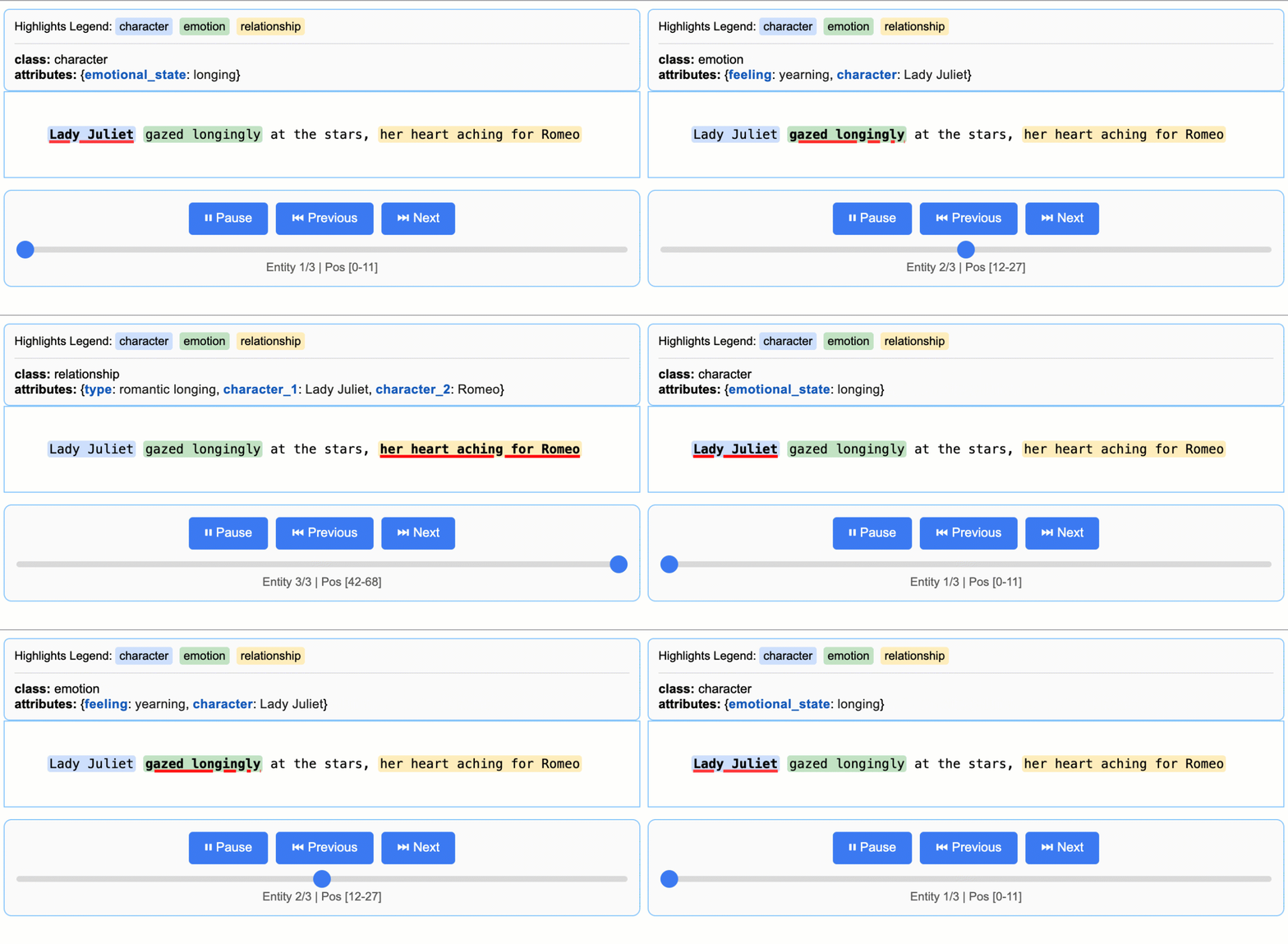
Note on LLM Knowledge Utilization: This example demonstrates extractions that stay close to the text evidence - extracting "longing" for Lady Juliet's emotional state and identifying "yearning" from "gazed longingly at the stars." The task could be modified to generate attributes that draw more heavily from the LLM's world knowledge (e.g., adding
"identity": "Capulet family daughter"or"literary_context": "tragic heroine"). The balance between text-evidence and knowledge-inference is controlled by your prompt instructions and example attributes.
Scaling to Longer Documents
For larger texts, you can process entire documents directly from URLs with parallel processing and enhanced sensitivity:
# Process Romeo & Juliet directly from Project Gutenberg
result = lx.extract(
    text_or_documents="https://www.gutenberg.org/files/1513/1513-0.txt",
    fetch_urls=True,
    prompt_description=prompt,
    examples=examples,
    model_id="gemini-3.5-flash",
    extraction_passes=3,    # Improves recall through multiple passes
    max_workers=20,         # Parallel processing for speed
    max_char_buffer=1000    # Smaller contexts for better accuracy
)
This approach can extract hundreds of entities from full novels while maintaining high accuracy. The interactive visualization seamlessly handles large result sets, making it easy to explore hundreds of entities from the output JSONL file. See the full Romeo and Juliet extraction example → for detailed results and performance insights.
Vertex AI Batch Processing
Save costs on large-scale tasks by enabling Vertex AI Batch API with
language_model_params that include vertexai=True, project, location,
and a batch config.
See an example of the Vertex AI Batch API usage in this example.
Installation
From PyPI
pip install langextract
Recommended for most users. For isolated environments, consider using a virtual environment:
python -m venv langextract_env
source langextract_env/bin/activate  # On Windows: langextract_env\Scripts\activate
pip install langextract
From Source
LangExtract uses modern Python packaging with pyproject.toml for dependency management:
Installing with -e puts the package in development mode, allowing you to modify the code without reinstalling.
git clone https://github.com/google/langextract.git
cd langextract

# For basic installation:
pip install -e .

# For development (includes linting tools):
pip install -e ".[dev]"

# For testing (includes pytest):
pip install -e ".[test]"
Docker
docker build -t langextract .
docker run --rm -e LANGEXTRACT_API_KEY="your-api-key" langextract python your_script.py
API Key Setup for Cloud Models
When using LangExtract with cloud-hosted models (like Gemini or OpenAI), you'll need to set up an API key. On-device models don't require an API key. For developers using local LLMs, LangExtract offers built-in support for Ollama and can be extended to other third-party APIs by updating the inference endpoints.
API Key Sources
Get API keys from:
- AI Studio for Gemini models
- Vertex AI for enterprise use
- OpenAI Platform for OpenAI models
Setting up API key in your environment
Option 1: Environment Variable
export LANGEXTRACT_API_KEY="your-api-key-here"
Option 2: .env File (Recommended)
Add your API key to a .env file:
# Add API key to .env file
cat >> .env << 'EOF'
LANGEXTRACT_API_KEY=your-api-key-here
EOF

# Keep your API key secure
echo '.env' >> .gitignore
In your Python code:
import langextract as lx

result = lx.extract(
    text_or_documents=input_text,
    prompt_description="Extract information...",
    examples=[...],
    model_id="gemini-3.5-flash"
)
Option 3: Direct API Key (Not Recommended for Production)
You can also provide the API key directly in your code, though this is not recommended for production use:
result = lx.extract(
    text_or_documents=input_text,
    prompt_description="Extract information...",
    examples=[...],
    model_id="gemini-3.5-flash",
    api_key="your-api-key-here"  # Only use this for testing/development
)
Option 4: Vertex AI (Service Accounts)
Use Vertex AI for authentication with service accounts:
result = lx.extract(
    text_or_documents=input_text,
    prompt_description="Extract information...",
    examples=[...],
    model_id="gemini-3.5-flash",
    language_model_params={
        "vertexai": True,
        "project": "your-project-id",
        "location": "global"  # or regional endpoint
    }
)
Adding Custom Model Providers
LangExtract supports custom LLM providers via a lightweight plugin system. You can add support for new models without changing core code.
- Add new model support independently of the core library
- Distribute your provider as a separate Python package
- Keep custom dependencies isolated
- Override or extend built-in providers via priority-based resolution
See the detailed guide in Provider System Documentation to learn how to:
- Register a provider with
@router.register(...)fromlangextract.providers - Publish an entry point for discovery
- Optionally provide a schema with
get_schema_class()for structured output - Integrate with the factory via
create_model(...)
Using OpenAI Models
LangExtract supports OpenAI models (requires optional dependency: pip install langextract[openai]):
import langextract as lx

# OPENAI_API_KEY in the environment is picked up automatically; pass
# api_key=... explicitly only if you need to override it.
result = lx.extract(
    text_or_documents=input_text,
    prompt_description=prompt,
    examples=examples,
    model_id="gpt-4o",  # Automatically selects OpenAI provider
)
The OpenAI provider uses structured outputs or JSON mode and auto-determines
fence behavior — leave fence_output and use_schema_constraints unset.
output_schema is also supported for OpenAI models that support structured
outputs; provide a LangExtract output-envelope JSON schema, preferably with the
lx.schema helpers.
For large, non-latency-sensitive OpenAI workloads, enable the OpenAI Batch API
with language_model_params. Batch mode is opt-in and falls back to realtime
calls when the prompt count is below the configured threshold.
result = lx.extract(
    text_or_documents=documents,
    prompt_description=prompt,
    examples=examples,
    model_id="gpt-4o-mini",
    language_model_params={
        "batch": {
            "enabled": True,
            "threshold": 50,
            "poll_interval": 10,
        }
    },
)
For OpenAI-compatible endpoints or non-GPT model IDs (which skip auto-routing), use ModelConfig with an explicit provider:
from langextract.factory import ModelConfig

result = lx.extract(
    text_or_documents=input_text,
    prompt_description=prompt,
    examples=examples,
    config=ModelConfig(
        model_id="my-openai-compatible-model",
        provider="openai",
        provider_kwargs={"api_key": "sk-...", "base_url": "https://..."},
    ),
)
Using Local LLMs with Ollama
LangExtract supports local inference using Ollama, allowing you to run models without API keys:
import langextract as lx

result = lx.extract(
    text_or_documents=input_text,
    prompt_description=prompt,
    examples=examples,
    model_id="gemma2:2b",  # Automatically selects Ollama provider
    model_url="http://localhost:11434",
)
The Ollama provider exposes FormatModeSchema for JSON mode. Leave fence_output
and use_schema_constraints unset so the factory auto-configures from the provider's
schema. Ollama does not currently support output_schema.
Quick setup: Install Ollama from ollama.com, run ollama pull gemma2:2b, then ollama serve.
For detailed installation, Docker setup, and examples, see examples/ollama/.
More Examples
Additional examples of LangExtract in action:
Romeo and Juliet Full Text Extraction
LangExtract can process complete documents directly from URLs. This example demonstrates extraction from the full text of Romeo and Juliet from Project Gutenberg (147,843 characters), showing parallel processing, sequential extraction passes, and performance optimization for long document processing.
View Romeo and Juliet Full Text Example →
Medication Extraction
Disclaimer: This demonstration is for illustrative purposes of LangExtract's baseline capability only. It does not represent a finished or approved product, is not intended to diagnose or suggest treatment of any disease or condition, and should not be used for medical advice.
LangExtract excels at extracting structured medical information from clinical text. These examples demonstrate both basic entity recognition (medication names, dosages, routes) and relationship extraction (connecting medications to their attributes), showing LangExtract's effectiveness for healthcare applications.
Radiology Report Structuring: RadExtract
Explore RadExtract, a live interactive demo on HuggingFace Spaces that shows how LangExtract can automatically structure radiology reports. Try it directly in your browser with no setup required.
Community Providers
Extend LangExtract with custom model providers! Check out our Community Provider Plugins registry to discover providers created by the community or add your own.
For detailed instructions on creating a provider plugin, see the Custom Provider Plugin Example.
Contributing
Contributions are welcome! See CONTRIBUTING.md to get started with development, testing, and pull requests. You must sign a Contributor License Agreement before submitting patches.
Thanks to everyone who has contributed.
Testing
To run tests locally from the source:
# Clone the repository
git clone https://github.com/google/langextract.git
cd langextract

# Install with test dependencies
pip install -e ".[test]"

# Run all tests
pytest tests
Or reproduce the full CI matrix locally with tox:
tox # runs pylint + pytest on Python 3.10 and 3.11
Ollama Integration Testing
If you have Ollama installed locally, you can run integration tests:
# Test Ollama integration (requires Ollama running with gemma2:2b model)
tox -e ollama-integration
This test will automatically detect if Ollama is available and run real inference tests.
Development
Code Formatting
This project uses automated formatting tools to maintain consistent code style:
# Auto-format all code
./autoformat.sh

# Or run formatters separately
isort langextract tests --profile google --line-length 80
pyink langextract tests --config pyproject.toml
Pre-commit Hooks
For automatic formatting checks:
pre-commit install  # One-time setup
pre-commit run --all-files  # Manual run
Linting
Run linting before submitting PRs:
pylint --rcfile=.pylintrc langextract tests
See CONTRIBUTING.md for full development guidelines.
How to Cite
If you use LangExtract in your research, please cite it:
@software{goel_langextract,
  author  = {Goel, Akshay},
  title   = {{LangExtract}},
  year    = {2026},
  version = {1.6.0},
  doi     = {10.5281/zenodo.21126643},
  url     = {https://github.com/google/langextract}
}
Cite the version you used — each release has its own DOI on
Zenodo. If your style rejects
@software, use @misc.
Disclaimer
This is not an officially supported Google product. If you use LangExtract in production or publications, please cite accordingly and acknowledge usage. Use is subject to the Apache 2.0 License. For health-related applications, use of LangExtract is also subject to the Health AI Developer Foundations Terms of Use.
Happy Extracting!

transformers
huggingface·Python
统一加载和运行文本、视觉、音频、多模态的预训练模型,覆盖推理与训练,省去为每个模型重写代码的麻烦。
预训练模型+4训练框架
168730+11835kv5.22.22026-11-10 10:57 UTC
LlamaFactory
hiyouga·Python
一套统一接口搞定 100+ 大语言模型和多模态模型的微调,支持 LoRA 等高效训练方式,省去为每个模型单独写训练脚本的麻烦。
微调框架+4训练框架
75971+489.4kv0.9.52026-11-09 14:55 UTC
keras
keras-team·Python
面向人类友好的深度学习 API,用 Python 编写,可跑在 TensorFlow、JAX、PyTorch 上,帮开发者快速搭建和训练神经网络。
深度学习+4训练框架
64419+320kv3.15.12026-11-10 11:13 UTC
laya
NandhaKishorM·Python
单次前向传播即可对任意文本做类型化选择、打分和是非判断的非自回归决策引擎,支持100多种语言,并按请求自动路由到合适的检查点。
决策引擎+4训练框架
35327+1453.2kv0.4.302026-11-09 06:53 UTC