macOS 为自签名包,首次打开需按文档处理系统审批;Windows 安装器需 WebView2(已含 bootstrapper);需先在 Models → Decision models 接入决策模型并发布路由计划,否则无法路由
HiRoute
higress-groupApache-2.0活跃维护本地模型路由器,把日常 agent 任务分给便宜模型,难题留给最强模型,让 Codex 和 Claude Code 订阅更耐用、更省钱。
Make Codex and Claude Code subscriptions go further: a local model router that gives routine agent work to economical models and keeps your strongest model for the hard parts.
v0.6.0发布于 2026-11-09 04:31 UTC427star +5 / 7 天51fork同步于 2026-11-10 18:00 UTC
从 https://hiroute.ai/en/download/ 下载对应平台安装包;macOS 拖入 Applications,Windows 运行 x64 安装器,Omarchy 用 pacman 安装签名包 硬件要求按 README 说明
README 未说明显存或 GPU 要求;提供 macOS 15+(Apple silicon 与 Intel)、Windows x64 桌面版,以及 Linux Web UI 和 CLI。
支持 Apple Silicon
本地模型路由器,把日常 Agent 任务交给便宜模型,强模型只处理难题
本地模型路由器,把日常 agent 任务分给便宜模型,难题留给最强模型,让 Codex 和 Claude Code 订阅更耐用、更省钱。
核心能力
- 按上一轮得分、当前难度、问题延续性三问决策选模型
- 低分保护机制在便宜模型失手时把下一轮交给主模型
- 仅在用户新消息或上下文重建边界切换模型以保住缓存
- 按信任等级逐步放量试用新模型,主模型兜底
- 会话时间线展示实际模型、路由原因与成本估算
容易踩的坑
内容由模型根据 README 生成,可能不完整或不准确,以官方文档为准。看原文 README
- v0.6.0HiRoute 0.6.0最新正式版2026-11-09 · 2026-11-09 04:31 UTC
HiRoute 0.6.0 adds signed Omarchy Desktop packages and improves Responses session continuity, model routing controls, and decision model management.
- Install Omarchy Desktop on ARM64 and x86_64 with pacman and open HiRoute from Apps. Reuse a compatible Linux service or set up the background service from the bundled runtime. The app offers explicit upgrade, interrupted-install recovery, and runtime removal. Omarchy installation and signature verification
- Keep tool calls and reasoning connected across Codex compaction and later requests. Portable reasoning summaries survive upstream model changes, and long tool sessions retain scoring evidence.
- Choose reasoning effort for fixed plans in Codex. Save model routing again and restart Codex to load the updated catalog. Execution uses each candidate's configured effort.
- Preserve Hermes routing attribution when a resumed session selects a named provider.
- Account for shared decision calls in API key allowances. Known charges reserve and settle against the allowance. Calls with unknown prices can proceed and remain unpriced.
- Preview active route, draft and publication references before removing a decision model. Usage history, shared API connections, and their keys are retained.
- Improve Windows Task Scheduler ownership checks and recover Gateway replay after scratch directories are cleared.
Downloads cover macOS 15 or later on Apple silicon and Intel, Windows x64 Desktop, Linux Web UI and CLI, and Omarchy Desktop. Downloads and installation guides
- windows-diagnostics-0.5.4-dev.1-issue-408HiRoute 0.5.4-dev.1 Windows diagnostics for #408pre-release2026-11-07 · 2026-11-07 07:32 UTC
查看更新说明
Temporary HiRoute 0.5.4-dev.1 Windows x64 installer for #408. It verifies the Task Scheduler principal and logon trigger using the identities stored in the task definition. Run it from the Windows account that originally installed HiRoute and keep the existing installation files and data in place.
The installer was built from
1e6d1edfd8b0c337c688f99322eb867206603882. Its SHA-256 isa8e74fd02b1855d45d5776e858088710b8cecace6ee72204c28b3c2a262feb12.Installer build · Windows Server and Windows 11 Task Scheduler regressions
- v0.5.3HiRoute 0.5.32026-11-06 · 2026-11-06 04:43 UTC
查看更新说明
HiRoute 0.5.3 fixes native image replay and request-value integrity, and improves Windows installation and update diagnostics.
- Preserve complete Base64 image data in Responses and Chat Completions requests, fixing Codex Desktop image calls routed through magpie to Qoder.
- Keep client marker-shaped strings and JSON objects literal. Preserve nested schemas, tool identities, search history and fixed reasoning settings while streaming genuine request-owned references.
- Restore blocking socket reads for fragmented Claude native probe requests on Windows.
- Configure model connection timeout separately from the full request deadline.
- Report actionable Windows installer, updater, silent-uninstall and rollback failures, and retire owned update stages safely.
All public packages are built from frozen source
a1cbc5d96c0e8a207ecf276dda89c2c7cc78b4e1. The complete candidate matrix passed; installed macOS image/stream/tool-continuation checks, Linux runtime/live inference and Windows standard-user installation, Source/Plan/Codex management and normal-uninstall restoration have source-bound evidence. The maintainer also confirmed a normal conversation in the independent Codex Desktop.Windows native acceptance uses the maintainer-approved Server 2025 environment for both selections and retains the actual OS in its identity. The installer has
native_runtime: deferred: five in-app update/fault-recovery scenarios remainnot_assessedunder the exact-artifact maintainer decision. Windows acceptance excludes the standalone Claude authentication check and its dependent configuration/managed-launch/recovery journey; independent collaboration and Worker guards remain selected. Detailed measured coverage and the recorded UI observation are in the acceptance scope. - windows-diagnostics-0.5.2-dev.1HiRoute 0.5.2-dev.1 Windows diagnosticspre-release2026-11-05 · 2026-11-05 04:05 UTC
查看更新说明
Windows x64 development installer for diagnosing #372.
If setup fails, keep the dialog open and press Ctrl+C. The copied diagnostic includes the failed operation, I/O error kind and any available Win32 error code or Task Scheduler HRESULT. If standalone rollback also fails, its details appear separately. The report omits account names, file paths and raw logs.
The native Windows build verified that a real file sharing violation reaches the installer diagnostic as Win32 error 32.
SHA-256 for HiRoute-0.5.2-dev.1.exe
420dcbb4622d78f14ab761b79946b4864b1c2d35649342c53ed0ab6fa94c1981 - v0.5.1HiRoute 0.5.12026-11-05 · 2026-11-05 00:42 UTC
查看更新说明
HiRoute 0.5.1 improves Windows installation and manual upgrades. Setup now detects a running HiRoute instance before replacing files and can copy a short diagnostic report if setup fails. Newly launched Windows Agent processes see changes to the user's PATH without requiring a daemon restart.
- Windows Agent discovery recognizes DSH Desktop and keeps useful scan diagnostics.
- Codex Desktop can use an independent connection. CLI Worker requests wait for completion by default, and stopping a Worker retains its progress and outcome.
- Decision classification errors stay with the affected request. The console retries busy reads and reduces Home suggestion work.
- Website downloads use shorter, versioned filenames for Windows, macOS, and Linux.
See the installation guides for platform-specific instructions.
用户点评
登录用户的真实使用记录,可按版本和硬件筛选共 0 条
还没有人点评。第一个说出真实体验的人最有价值。
Real-world cost savings
In a real research and architecture-review task, Qwen 3.8 Flash did the research and GPT-6 Astra made the critical decision. At the same acceptance standard, the task cost about 90% less than running everything on Astra.

API-equivalent estimates. Full case study
Switching models keeps the savings
HiRoute changes models only at clear boundaries: a new user message, or context compaction and rebuild. Tool calls within a turn stay on the same model. A switch misses the cache once, then later calls hit it again, so cache loss does not eat into the savings. Switching Models Loses Cache, Not the Savings
Familiar Agents, more model choices
Keep working in Codex, Claude Code, Qoder, Pi, OpenCode, Hermes or DeepSeek Harness. HiRoute runs locally and brings supported subscriptions, API connections and local models into one place. For example, combine an economical API model with your Codex subscription, or use a smaller and a stronger model from the same supported source.
| What you want | What HiRoute provides |
|---|---|
| Spend less on your strongest model | Route routine work to economical models and keep the primary model for complex stages and low-score protection. |
| Keep your workflow | Continue in your familiar Agent while models share the work within a session. |
| Try a new model gradually | Start at a trust level you choose, keep a familiar primary model as backup and adjust with evidence from your own tasks. |
| Understand each decision | Inspect the actual models, routing reasons, stage performance, usage and cost estimates. |
One task, the right model for each stage
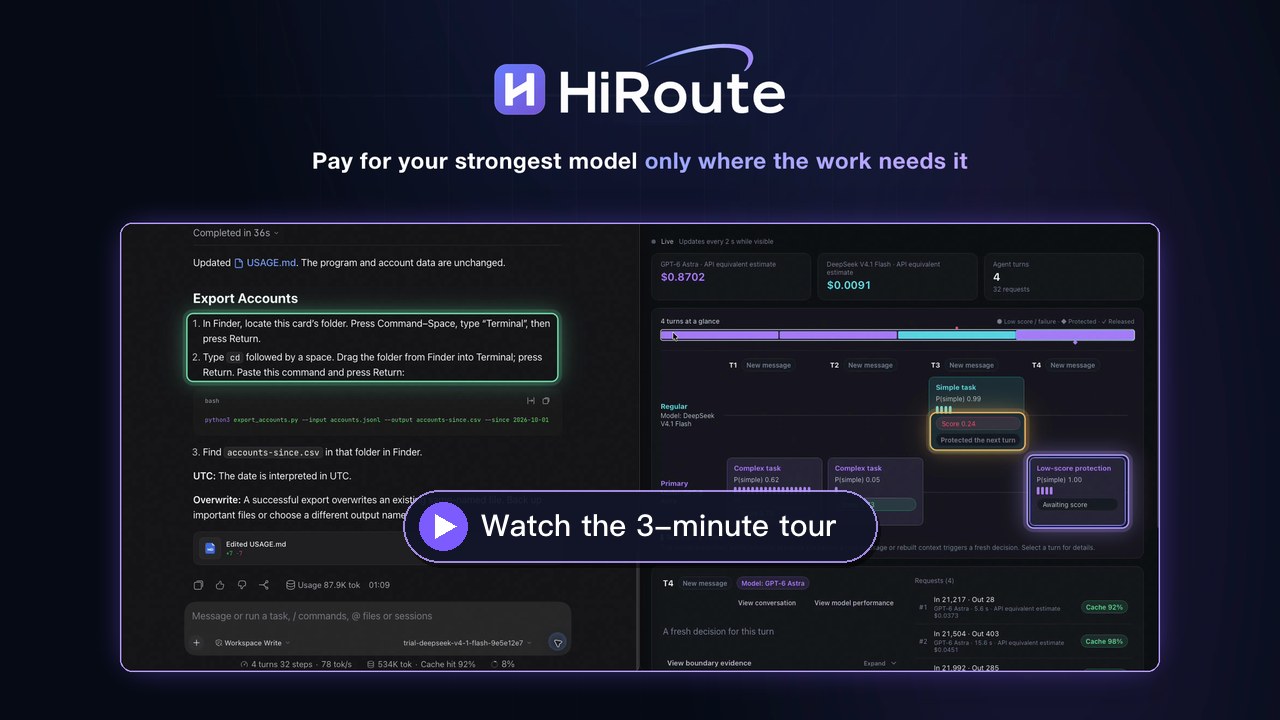
Each new message gets a fresh decision. A decision model answers three independent questions anchored on the task's timeline, and HiRoute combines the answers with your plan:
- Previous: how did the last step go? A competence score, also used for model performance reports and trust suggestions.
- Current: how hard is this step? A simple probability. Only simple-enough work can go to the economical model.
- Next: will the last step's problem carry into the next? When a step scored below the competence floor and its problem still applies to the work ahead, low-score protection hands the next turn to your primary model. Once it no longer applies, protection is released.
The decision model only answers; thresholds, model choice and execution stay in HiRoute, so you can retune routing without rewriting prompts. The first turn has no previous step, so only difficulty applies.
Keep asking follow-up questions or let your Agent advance a long task. HiRoute can reassess at supported new-input and context-reconstruction boundaries; tool continuations normally reuse the stage's decision. See routing behavior and supported-client limits.
Try new models with a primary model ready to help
Start from New models on Home. Instead of switching everything at once, HiRoute rolls a new model out by task difficulty.
- Trust sets a difficulty bar. System One estimates how simple each turn is. Turns that clear the bar go to the new model; harder work stays with your primary model.
- Open up gradually. Move from Trial to Familiar, Trusted or Hands-off as the new model proves itself, and it takes on more of your work.
- Primary still backs it up. If a new-model stage scores below the competence floor and the problem still matters, low-score protection hands the next turn to your primary model.
Adjust with evidence from your own tasks
The session timeline shows which model actually ran and why. Model performance reports bring together stage scores, the share handled by the regular group and available cost estimates. When there is enough evidence, a report suggests a step up or step down; replay the setting on your own records, inspect the changes and choose whether to publish.
You can also tailor the judgment criteria to your own tasks and compare prompt changes using the published evaluation method.
How well does the routing policy work?
Both approaches receive the same task context and complete routing policy. One selects a model group directly; the other answers three questions and lets HiRoute combine the answers. The comparison uses engineering workflows and mathematical dependency states.

| Scenario | Decision model | Full-policy direct selection | Three-question routing |
|---|---|---|---|
| Engineering | Jev 1.14 | 67.31% | 96.15% |
| Engineering | OpenAI Decisions / gpt-6-luna | 50.00% | 91.35% |
| Mathematical dependency states | Jev 1.14 | 54.86% | 100.00% |
| Mathematical dependency states | OpenAI Decisions / gpt-6-luna | 65.97% | 88.89% |
Metric: final group-selection accuracy, averaged equally across workflow families. Engineering has 80 determinate cases across 26 workflows; mathematics has 40 across six. This is a post-hoc reviewed subset, with the same exclusions applied to every model and both formats after inspecting outputs. Original labels and full-population results remain available. Jev calls ran on 28 October 2026 and OpenAI calls on 29 October; inputs and policy match, but the calls were not contemporaneous.
The results measure conformance to the stated routing policy, not task completion or realized savings. The OpenAI results come from the study's research adapter, not from HiRoute's built-in OpenAI connection. Use the study and cases to evaluate decision prompts against your own tasks.
Comparison, exclusions and saved responses · Dataset construction and review
Get started
Download HiRoute · Installation guides · Latest release
HiRoute provides macOS, Windows x64, and Omarchy desktop apps, plus a Linux Web UI and CLI. The download page lists published packages.
Version 0.6.0 keeps Responses tool calls and reasoning connected across compaction, offers a reasoning picker in Codex for fixed routing plans, and shows which active routes block decision model removal.
- Connect your models. Add a supported subscription or API connection and choose an economical model plus a primary model.
- Set the division of work. Connect a decision model in Models → Decision models, choose a trust level, then publish and map the plan to your Agent. Built-in connections support Bailian, OpenAI, OpenRouter Jev, TypeSafe and compatible endpoints without self-hosting Jev.
- Work as usual. Continue in your Agent, then inspect model switches and execution reports in HiRoute.
macOS: download the DMG, drag HiRoute into Applications, and follow the self-signed package instructions if macOS asks for approval. Supports macOS 15+ on Apple silicon and Intel.
Windows: use the x64 Desktop installer. It installs for the current user and includes the background service, WebView2 bootstrapper and CLI; no Python or administrator privileges are required. See the Windows installation guide for checksum verification, first launch and recovery.
Omarchy users can verify the signed Arch package, install it with pacman,
and open HiRoute from the launcher. Follow the Omarchy installation guide.
Linux standalone installs the current-user CLI and daemon on x86_64 or ARM64 without sudo.
curl -fsSL https://hiroute.ai/install.sh | sh
hiroute service start --output json
hiroute system status --output json
Open the Web UI to connect models, configure routes and Agents, and inspect sessions in your browser:
hiroute console init --mode loopback --port 5838
hiroute service restart --output json
hiroute console open
Open the printed single-use login URL. For a remote host, use the remote-access or SSH-tunnel instructions. The CLI remains available for terminal and automation workflows. The installer verifies the published manifest and checksums; service startup is explicit. See the Linux Web UI and CLI guide and CLI reference.
Go further
- Other routing modes: fixed model, custom branches and free first, alongside difficulty routing. Model routing
- Agent collaboration: expose Worker plans for delegated tasks. Task routing
- Your own decision service: configure criteria or implement the optional decision extension API.
- Detailed behavior: candidate fallback, scoring eligibility, recovery and client limits are documented in the routing guide.
News
- Latest stable release and release notes
- 2026-10-14 — Switching Models Loses Cache, Not the Savings
- All news and case studies · Experiments
Contribute
Start with the contributing guide for setup and validation, and the code map to find each capability's implementation. HiRoute uses Apache License 2.0. Report bugs and feature requests through GitHub Issues; follow SECURITY.md for security reports and crash-report handling.
Community link: LINUX DO (technical discussion community).

traefik
traefik·Go
云原生反向代理和负载均衡器,自动发现 Docker、Kubernetes 等服务并配置路由,内置 Let's Encrypt 证书管理,适合做微服务入口网关。
反向代理+4网关与路由
65512+276.3kv3.7.172026-11-10 15:02 UTC

litellm
BerriAI·Python
统一调用 100+ 家 LLM API 的 AI 网关,用 OpenAI 格式或原生格式接入,自带成本追踪、限流护栏、负载均衡和日志。
AI 网关+4网关与路由
63051+19913kv1.108.32026-11-10 17:16 UTC

new-api
QuantumNous·Go
自托管的 LLM 网关,统一兼容 OpenAI、Claude、Gemini 等接口,提供模型路由、访问控制、用量统计与成本核算,方便团队集中管理和分发大模型调用。
LLM 网关+4网关与路由
51701+18813kv1.0.0-rc.492026-11-10 16:46 UTC
kong
Kong·Lua
云原生 API 网关,同时充当 LLM 与 AI 服务的统一入口,集中处理路由、鉴权、限流和可观测性。
API 网关+4网关与路由
44375+95.2k3.9.42026-10-19 02:45 UTC