必须预先安装与 GoCV 版本匹配的 OpenCV 4.12.0,否则无法编译;所有 Mat 必须手动 Close,否则因 C 内存不受 GC 管理而泄漏;人脸检测示例需额外下载 haarcascade 分类器 XML 文件。
gocv
hybridgroup更新放缓用 Go 语言调用 OpenCV 做计算机视觉的封装库,支持 DNN 推理、CUDA 加速、OpenVINO 和扩展模块,省去写 C++ 胶水代码的麻烦。
Go package for computer vision using OpenCV 4 and beyond. Includes support for DNN, CUDA, OpenCV Contrib, and OpenVINO.
v0.43.0发布于 2026-01-05 21:10 UTC7,518star +1 / 7 天898fork同步于 2026-11-10 23:33 UTC
需先安装匹配的 OpenCV 4.12.0,再按平台参考 https://gocv.io/getting-started/ 安装;运行示例:go run -tags matprofile cmd/version/main.go 硬件要求按 README 说明
README 未说明具体显存要求;CUDA 加速需 Nvidia GPU,OpenVINO 需 Intel 工具包,普通使用在 Linux、macOS、Windows 上运行。
需要 CUDA
Go 语言的 OpenCV 4 绑定库,让 Go 程序直接调用计算机视觉能力
用 Go 语言调用 OpenCV 做计算机视觉的封装库,支持 DNN 推理、CUDA 加速、OpenVINO 和扩展模块,省去写 C++ 胶水代码的麻烦。
核心能力
- 提供 OpenCV 4 的 Go 语言绑定,封装 C++ 类
- 支持 DNN 模块做深度学习推理
- 可通过 CUDA 使用 Nvidia GPU 加速
- 支持 Intel OpenVINO 工具包
- 内置 Mat 内存泄漏检测 profiler
容易踩的坑
内容由模型根据 README 生成,可能不完整或不准确,以官方文档为准。看原文 README
- v0.43.00.43.0最新正式版2026-01-05 · 2026-01-05 21:10 UTC
- all
- update to OpenCV 4.13
- core
- add Copy method to Mat (#1346)
- improve implementation for NewPointVectorFromPoints
- cuda
- add implmentations for more arith functions
- imgproc
- added in missing colormaps
- paramters types in improc dilate and erode functions
- use same test values as OpenCV tests for TestMinAreaRect and TestMinAreaRect2f
- videoio
- add RetrieveChannel function to make it possible to capture both video and audio
- examples
- Fix bugs and memory leaks in yolov8 example (#1349)
- contrib
- add support for Macbeth Chart module (MCC) (#1336)
- install
- windows: split download and build scripts for easier usage/integration
- all
- v0.42.00.42.02025-07-29 · 2025-07-29 10:01 UTC
查看更新说明
- all
- Update to OpenCV 4.12.0
- Expose GpuMat's underlying object pointer
- Add support for reduced size OpenCV builds using build tags for specific modules (cuda, contrib, etc.)
- cuda
- Add LShift and RShift function implementations
- Add Compare function implementation
- Add implementations for Norm, CalcNorm, and CalcNormDiff functions
- Add Cuda Morphology Filter (#1311)
- core
- Add ReshapeWithSize() to provide specific control over the reshape operation
- Add MeanStdDevWithMask for cv::meanStdDev with the optional mask
- video
- Add video tracker implementation using Vit DNN
- Add cv::stereoRectify binding
- docker
- Update OpenCV containers to 4.12.0
- docs
- Update ROADMAP links and add missing tracker functions
- Update README with new features and usage
- build
- Use build tags for reduced size OpenCV builds with specific modules
- bugfix
- Fix bug where the package name was mismatched with contrib (#1293)
- all
- v0.41.00.41.02025-03-20 · 2025-03-20 15:46 UTC
查看更新说明
- all
- opencv: patch for gstreamer cmake to handle static linking
- bugfix
- correct ifndef for wrappers to avoid include conflcts
- temporary fix for https://github.com/docker/setup-qemu-action/issues/198
- core
- add exception handling functions and try/catch blocks
- return error from calls to OpenCV functions that cause exceptions. The error shows the OpenCV exception description from the exception caught.
- features2d
- Add BRISK with params support (#1280)
- Params for features2d (#1283)
- photo
- add Decolor() function
- video
- ApplyWithParams for MOG2 bg subtractor (#1284)
- build
- add manually launched workflows to build ffmpeg, gstreamer, and opencv docker images
- add
Dockerfile.opencv-ubuntu-24.04for Ubuntu 24.04 support - add
opencv-ubuntu-24-04step for build img workflow
- docker
- add static image with opencv and ffmpeg without gstreamer
- gstreamer with a specific set of plugins
- use OpenCV patch to build fully static GStreamer with plugins included
- docs
- update ROADMAP for some functions that were completed already
- Update wrong links in Readme for face detection from URL and find chessboard
- make
- add install task for Ubuntu Manic Minotaur using @chewxy PR #1157
- update make tasks for jetson based on latest available info
- Update Makefile (#1276)
- all
- v0.40.00.40.02025-01-13 · 2025-01-13 15:23 UTC
查看更新说明
- all
- Add support for OpenCV 4.11.0
- Update license year to 2025
- bugfix
- Correct signature for FindHomography, since dst is actually target format for the operation, not something changed by the operation
- core
- Added new Mat constructor and tests
- Added NewMatFromPoint2fVector function
- videoio
- Change type of VideoCaptureProperties to int32
- Added VideoWriterFile with API and API Params
- docker
- Alpine static improved (#1243)
- make
- Improve Linux distro dtection code, and add specific dependendcies for Ubunutu 24.04
- examples
- GStreamer VideoWriter example
- build
- Update homebrew when running macOS tests
- Update GH actions in linux build to latest versions
- all
- v0.39.00.39.02024-10-17 · 2024-10-17 10:22 UTC
查看更新说明
- bugfix
- Fixed MinGW link typo in README.md.
- Fixed function name typo (#1236).
- core
- Added
FaceDetectorYNexample. - Query I/O API backends registry (#1237).
- Face detector YN face recognizer SF (#1232).
- Added
- cuda
- Added
createLookUpTableandsplitfunctions. - Added missing CUDA
imgprocstandalone functions. - Added
XXXWithStreamstandalone functions.
- Added
- docker
- Added Dockerfile for container that can perform static builds of your own GoCV project (HighGUI not supported by static builds).
- Added Dockerfile example showing how to build using static linking.
- Added static build examples.
- Updated version for
gocv-static-builderimage.
- build
- Updated workflow for Docker builds to latest versions.
- Used most recent NVIDIA CUDA base image.
- Used static FFmpeg build for static OpenCV build.
- Downgraded static build to Go 1.22 to avoid Go issue #68976.
- Modified Dockerfile used for static builds to build own versions for static linking.
- Corrected build options for OpenCV on arm64 for static builds.
- Separated build tags and linker flags for arm64 and amd64 targets.
- Modified LDFLAGS for correct static compilation.
- Removed extra file to clear space for static build/standard dev build images.
- Added options for Linux arm64 and separate Darwin builds.
- cgo
- Changed tags for static OpenCV to
opencvstatic. - Added options for Linux arm64 and separate Darwin builds.
- Removed unneeded lib from link for Linux/arm64.
- Modified LDFLAGS for correct static compilation.
- Changed tags for static OpenCV to
- docs
- Added missing
videoiofunctions to ROADMAP. - Updated ROADMAP with missing
objdetectfunctions for DNN faces, and movedarucounderobjdetectmodule. - Simplified the YOLO example.
- Added missing
- bugfix
用户点评
登录用户的真实使用记录,可按版本和硬件筛选共 0 条
还没有人点评。第一个说出真实体验的人最有价值。
GoCV



The GoCV package provides Go language bindings for the OpenCV 4 computer vision library.
The GoCV package supports the latest releases of Go and OpenCV (v4.12.0) on Linux, Docker, macOS, and Windows. Our ongoing mission is help the Go programming language be a "first-class" client compatible with the latest developments in the OpenCV ecosystem.
GoCV supports CUDA for hardware acceleration using Nvidia GPUs. Check out the CUDA README for more info on how to use GoCV with OpenCV/CUDA.
GoCV also supports Intel OpenVINO. Check out the OpenVINO README for more info on how to use GoCV with the Intel OpenVINO toolkit.
How to use
Hello, video
This example opens a video capture device using device "0", reads frames, and shows the video in a GUI window:
package main

import (
	"gocv.io/x/gocv"
)

func main() {
	webcam, _ := gocv.OpenVideoCapture(0)
	window := gocv.NewWindow("Hello")
	img := gocv.NewMat()

	for {
		webcam.Read(&img)
		window.IMShow(img)
		window.WaitKey(1)
	}
}
Face detect
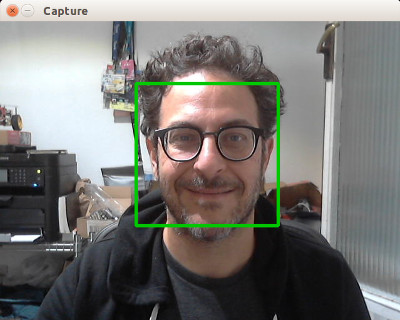
This is a more complete example that opens a video capture device using device "0". It also uses the CascadeClassifier class to load an external data file containing the classifier data. The program grabs each frame from the video, then uses the classifier to detect faces. If any faces are found, it draws a green rectangle around each one, then displays the video in an output window:
package main

import (
	"fmt"
	"image/color"

	"gocv.io/x/gocv"
)

func main() {
    // set to use a video capture device 0
    deviceID := 0

	// open webcam
	webcam, err := gocv.OpenVideoCapture(deviceID)
	if err != nil {
		fmt.Println(err)
		return
	}
	defer webcam.Close()

	// open display window
	window := gocv.NewWindow("Face Detect")
	defer window.Close()

	// prepare image matrix
	img := gocv.NewMat()
	defer img.Close()

	// color for the rect when faces detected
	blue := color.RGBA{0, 0, 255, 0}

	// load classifier to recognize faces
	classifier := gocv.NewCascadeClassifier()
	defer classifier.Close()

	if !classifier.Load("data/haarcascade_frontalface_default.xml") {
		fmt.Println("Error reading cascade file: data/haarcascade_frontalface_default.xml")
		return
	}

	fmt.Printf("start reading camera device: %v\n", deviceID)
	for {
		if ok := webcam.Read(&img); !ok {
			fmt.Printf("cannot read device %v\n", deviceID)
			return
		}
		if img.Empty() {
			continue
		}

		// detect faces
		rects := classifier.DetectMultiScale(img)
		fmt.Printf("found %d faces\n", len(rects))

		// draw a rectangle around each face on the original image
		for _, r := range rects {
			gocv.Rectangle(&img, r, blue, 3)
		}

		// show the image in the window, and wait 1 millisecond
		window.IMShow(img)
		window.WaitKey(1)
	}
}
More examples
There are examples in the cmd directory of this repo in the form of various useful command line utilities, such as capturing an image file, streaming mjpeg video, counting objects that cross a line, and using OpenCV with a DNN for face tracking.
How to install
To install GoCV, you must first have the matching version of OpenCV installed on your system. The current release of GoCV requires OpenCV 4.12.0.
We have instructions for Linux, macOS, Windows, and other platform options as well.
Linux
Please see our web site at https://gocv.io/getting-started/linux/
macOS
Please see our web site at https://gocv.io/getting-started/macos/
Windows
Please see our web site at https://gocv.io/getting-started/windows/
Docker
Please see our web site at https://gocv.io/getting-started/docker/
Android
There is some work in progress for running GoCV on Android using Gomobile. For information on how to install OpenCV/GoCV for Android, please see: https://gist.github.com/ogero/c19458cf64bd3e91faae85c3ac8874120
See original discussion here: https://github.com/hybridgroup/gocv/issues/235
Profiling
Since memory allocations for images in GoCV are done through C based code, the go garbage collector will not clean all resources associated with a Mat. As a result, any Mat created must be closed to avoid memory leaks.
To ease the detection and repair of the resource leaks, GoCV provides a Mat profiler that records when each Mat is created and closed. Each time a Mat is allocated, the stack trace is added to the profile. When it is closed, the stack trace is removed. See the runtime/pprof documentation.
In order to include the MatProfile custom profiler, you MUST build or run your application or tests using the -tags matprofile build tag. For example:
go run -tags matprofile cmd/version/main.go
You can get the profile's count at any time using:
gocv.MatProfile.Count()
You can display the current entries (the stack traces) with:
var b bytes.Buffer
gocv.MatProfile.WriteTo(&b, 1)
fmt.Print(b.String())
This can be very helpful to track down a leak. For example, suppose you have the following nonsense program:
package main

import (
	"bytes"
	"fmt"

	"gocv.io/x/gocv"
)

func leak() {
	gocv.NewMat()
}

func main() {
	fmt.Printf("initial MatProfile count: %v\n", gocv.MatProfile.Count())
	leak()

	fmt.Printf("final MatProfile count: %v\n", gocv.MatProfile.Count())
	var b bytes.Buffer
	gocv.MatProfile.WriteTo(&b, 1)
	fmt.Print(b.String())
}
Running this program produces the following output:
initial MatProfile count: 0
final MatProfile count: 1
gocv.io/x/gocv.Mat profile: total 1
1 @ 0x40b936c 0x40b93b7 0x40b94e2 0x40b95af 0x402cd87 0x40558e1
#	0x40b936b	gocv.io/x/gocv.newMat+0x4b	/go/src/gocv.io/x/gocv/core.go:153
#	0x40b93b6	gocv.io/x/gocv.NewMat+0x26	/go/src/gocv.io/x/gocv/core.go:159
#	0x40b94e1	main.leak+0x21			/go/src/github.com/dougnd/gocvprofexample/main.go:11
#	0x40b95ae	main.main+0xae			/go/src/github.com/dougnd/gocvprofexample/main.go:16
#	0x402cd86	runtime.main+0x206		/usr/local/Cellar/go/1.11.1/libexec/src/runtime/proc.go:201
We can see that this program would leak memory. As it exited, it had one Mat that was never closed. The stack trace points to exactly which line the allocation happened on (line 11, the gocv.NewMat()).
Furthermore, if the program is a long running process or if GoCV is being used on a web server, it may be helpful to install the HTTP interface )). For example:
package main

import (
	"net/http"
	_ "net/http/pprof"
	"time"

	"gocv.io/x/gocv"
)

func leak() {
	gocv.NewMat()
}

func main() {
	go func() {
		ticker := time.NewTicker(time.Second)
		for {
			<-ticker.C
			leak()
		}
	}()

	http.ListenAndServe("localhost:6060", nil)
}
This will leak a Mat once per second. You can see the current profile count and stack traces by going to the installed HTTP debug interface: http://localhost:6060/debug/pprof/gocv.io/x/gocv.Mat.
How to contribute
Please take a look at our CONTRIBUTING.md document to understand our contribution guidelines.
Then check out our ROADMAP.md document to know what to work on next.
Why this project exists
The https://github.com/go-opencv/go-opencv package for Go and OpenCV did not support any version above OpenCV 2.x, and work on adding support for OpenCV 3 had stalled for over a year, mostly due to the complexity of SWIG. That is why we started this project.
The GoCV package uses a C-style wrapper around the OpenCV 4 C++ classes to avoid having to deal with applying SWIG to a huge existing codebase. The mappings are intended to match as closely as possible to the original OpenCV project structure, to make it easier to find things, and to be able to figure out where to add support to GoCV for additional OpenCV image filters, algorithms, and other features.
For example, the OpenCV videoio module wrappers can be found in the GoCV package in the videoio.* files.
This package was inspired by the original https://github.com/go-opencv/go-opencv project, the blog post https://medium.com/@peterleyssens/using-opencv-3-from-golang-5510c312a3c and the repo at https://github.com/sensorbee/opencv thank you all!
License
Licensed under the Apache 2.0 license. Copyright (c) 2017-2026 The Hybrid Group.
Logo generated by GopherizeMe - https://gopherize.me
opencv
opencv·C++
开源计算机视觉库,提供图像处理、视频分析和深度学习推理的 C++ 接口,是视觉应用开发的基础设施。
计算机视觉+4图像处理进阶
91523+4757k5.1.02026-11-10 12:05 UTC
upscayl
upscayl·TypeScript
跨平台的开源 AI 图片放大工具,基于 ESRGAN 等模型把低分辨率图片无损放大并增强细节,有图形界面,普通用户也能直接上手。
图像超分+4图像处理进阶
52181+3012.7kv2.15.02026-10-05 19:13 UTC
supervision
roboflow·Python
一套可复用的计算机视觉工具库,提供目标检测、实例分割、分类等任务的标注处理、指标计算与可视化组件,帮开发者省去重复造轮子的时间。
计算机视觉+4图像处理入门
51585+524.9k0.31.62026-11-10 15:41 UTC

sharp
lovell·JavaScript
基于 libvips 的高性能 Node.js 图像处理库,能快速完成 JPEG、PNG、WebP、AVIF、TIFF 的缩放裁剪与格式转换,适合服务端批量处理图片。
图像处理+4图像处理进阶
32840+111.4kv0.35.52026-11-10 15:57 UTC