安装后健康检查为空时需另配视觉引擎,推荐免费 Gemini API key 或安装 Antigravity CLI 登录;复用本机 Claude Code、Codex 等登录需逐项授权,否则不会加入引擎池;复用他人 CLI 额度会在 meta.warnings 中标注,注意配额消耗
modlens
liustackMIT活跃维护给 DeepSeek、GLM 等纯文本编码助手外挂视觉能力的插件,粘贴图片即可输出包含 OCR、版面和语义的结构化 JSON 证据。
The first vision plugin for DeepSeek Harness, and the vision bridge for every text-only coding agent. Paste an image, get structured JSON evidence (OCR, layout, semantics). | 全网最强 DeepSeek Harness 外挂视觉插件,为 DeepSeek、GLM 等纯文本模型外挂视觉能力,粘贴图片即得结构化 JSON 证据(OCR、版面、语义)。
v3.27.3发布于 2026-11-07 16:34 UTC4,888star +48 / 7 天153fork同步于 2026-11-10 11:37 UTC
npx -y @deepseek-ai/dsh plugin --profile web add @liustack/[email protected]
npx -y skills add liustack/modlens --skill modlens --global 硬件要求按 README 说明
README 未说明显存或 GPU 要求;视觉推理走云端 API 或本机已登录的 agent CLI,本地只需 Node.js 环境
给纯文本模型外挂视觉能力的插件,粘贴图片即得结构化 JSON 证据
给 DeepSeek、GLM 等纯文本编码助手外挂视觉能力的插件,粘贴图片即可输出包含 OCR、版面和语义的结构化 JSON 证据。
核心能力
- 粘贴图片直接读取,无需先存文件再传路径
- 输出全文转录、阅读顺序版面区域、实体与关系列表
- 支持六个内置视觉引擎并组成故障转移链
- 逗号分隔多密钥在鉴权或限流失败时自动轮换
- 可复用本机已登录的 Codex、OpenCode、Pi 等 CLI
容易踩的坑
内容由模型根据 README 生成,可能不完整或不准确,以官方文档为准。看原文 README
- v3.27.3最新正式版2026-11-07 · 2026-11-07 16:34 UTC
- dsh: GLM vision models keep their native sight behind gateways that spell versions with dashes (#126). The name check that keeps native vision models out of the
(modlens vision)wrap only knew the dotted spelling (glm-5.3-flash,glm-4.6v). Gateways such as Raccoon serve the same models assn-glm-5-3-flashandsn-glm-4-6v, so after adding the gateway prefix tofamilies, a catalog that omits modalities would have handed a vision model a wrapper twin. Both spellings are now excluded, and the text-onlysn-glm-5-3still wraps. Default family matching stays prefix-only: a gateway namespace is opted in throughfamilies, as before.
- dsh: GLM vision models keep their native sight behind gateways that spell versions with dashes (#126). The name check that keeps native vision models out of the
- v3.27.22026-10-23 · 2026-10-23 15:40 UTC
查看更新说明
- dsh: a resumed session no longer re-reads every image in its history (#122). Paste evidence lived only in memory, so after dsh restarted or resumed a session, the first request sent every image in the history back through the engine one by one, and a history of 20 images froze the session for minutes. Each successful reading is now kept in
~/.modlens/dsh-evidence/and a restarted plugin answers from there. The session log is untouched. Only attachments whose id is the sha256 of their bytes are kept, so an entry can never answer for a different picture, and the original file name is not stored. Entries are tied to the engine in~/.modlens/config.json, so switching provider or model reads the images again. The directory is 0700 and its files 0600. Entries unread for 30 days are removed, the store is capped at 64 MB with the least recently read going first, and deleting the directory is always safe. The engine still reads one image at a time: running several at once could trip a rate limit that cools the API key for every harness sharing it. Thanks to @cutefelix.
- dsh: a resumed session no longer re-reads every image in its history (#122). Paste evidence lived only in memory, so after dsh restarted or resumed a session, the first request sent every image in the history back through the engine one by one, and a history of 20 images froze the session for minutes. Each successful reading is now kept in
- v3.27.12026-10-15 · 2026-10-15 19:20 UTC
查看更新说明
- Packaging: the
binpath no longer trips npm's publish warning. npm 11 strips the leading./frombintargets at publish time and reports it as "script name dist/main.js was invalid and removed", which reads like themodlenscommand was dropped. It never was: every published version kept the entry and installs the command. The path is now written the way npm stores it, so the warning is gone.
- Packaging: the
- v3.27.02026-10-15 · 2026-10-15 18:57 UTC
查看更新说明
- dsh: reread a pasted image with a new focus (#121). Paste evidence carried no handle back to the image, so a model that wanted a second look (say, the axis labels) could only guess at files in the attachment store. The evidence now has an
attachment-id: sha256:…line, andmodlens_read_imagetakes that id as itspath, so the plugin pulls the bytes from the attachment store and reads them again with the givenprompt. Only images this plugin read in the session resolve (the 256 most recent in the history being sent). An unknown id gets a fixed error asking for the file instead, and never echoes what the model passed. No host path goes on the wire: the store layout is dsh's own, and the path carries the user's home directory. Thanks to @cutefelix.
- dsh: reread a pasted image with a new focus (#121). Paste evidence carried no handle back to the image, so a model that wanted a second look (say, the axis labels) could only guess at files in the attachment store. The evidence now has an
- v3.26.62026-10-04 · 2026-10-04 07:38 UTC
查看更新说明
- dsh: a route still starting up at boot gets wrapped once it is ready (#116). Auto-discovery only swept on
llm/adapters-updated. An account route registers once per boot, and if the sweep probed it while it was still initializing (listModelsthrew or listed nothing yet), the plugin let go of it and waited for the next topology change. On a quiet machine that change never came, so themodlens-*wrapper stayed missing until something unrelated touched the registry. A sweep that leaves a route unresolved now runs again after 5 seconds, 30 seconds and 2 minutes. A topology event starts that round over, and unloading the plugin cancels a pending retry. A route that simply has nothing to wrap costs three extra probes, not endless polling. Thanks to @Ztyss for instrumenting a live host down to the exact branch that lost the wakeup.
- dsh: a route still starting up at boot gets wrapped once it is ready (#116). Auto-discovery only swept on
用户点评
登录用户的真实使用记录,可按版本和硬件筛选共 0 条
还没有人点评。第一个说出真实体验的人最有价值。
DeepSeek's flagship chat models, and GLM-5.3 itself, are text-only and cannot read images. GLM-5.3-Flash is native multimodal. ModLens is a plug-in vision engine that gives a text-only model sight. ModLens reads images pasted straight into the chat, no saving to a file and passing a path first.
Talk to us
Issues are welcome any time: open one. Follow the liustack WeChat official account, and come find me on X: @liustack. What you built with it, which harness you are on, and what should come next are all shared on WeChat and X. A proper community space is on the way.
Highlights
🥇 The most capable vision plugin for DeepSeek Harness (dsh): install it instantly with one command: npx -y @deepseek-ai/dsh plugin --profile web add @liustack/[email protected]. See the setup guide for installation and update details. If the command line is not your thing but you still want to try DSH, check out AIManager, the lightest desktop wrapper for DeepSeek Harness. It gets you started with zero code or configuration and installs every dependency for you with one click.
Pasting an image works two ways. ① Just paste. On a text-only model the pasted image lands as a private temp file and its path enters the composer (the same interaction OpenCode and Pi ship), then the modlens_read_image tool takes it from there. ② Pick a (modlens vision) entry in the model selector (it remembers your choice, so once is enough), then paste: the thumbnail stays visible in your message, closer to the Codex app feel, and the image is converted to structured evidence at request time, answered by the same underlying route. The plugin auto-discovers every provider route carrying eligible text-only DeepSeek, GLM, or MiMo Pro models and adds a wrapped entry per route. A stock install gets DeepSeek-V4-Flash (modlens vision) and DeepSeek-V4-Pro (modlens vision), while extra routes like opencode-go or zai get their own. Native vision models in those families, including GLM-5.3-Flash, are excluded automatically. Which paste route applies is the host's per-model call: only a model its metadata positively confirms text-only is taken over, anything unconfirmed is left alone, so vision models keep their native paste (details).
Paste images directly in every harness. No saving to a file and passing a path first.
A hotkey that captures the screen into DeepSeek Harness is a separate plugin: dsh-screenshot.
- The lightest touch on the market. No hooks, no wrappers, no local proxy daemon, not a single line changed in any harness config: on the skill harnesses it is exactly one skill folder, on dsh exactly one plugin. Uninstalling is deleting a folder, and your agents are back to stock.
- Zero-config start. Reuses existing setup in Claude Code, Codex, OpenCode, and Pi, plus other multimodal models already on your machine. Nothing installed locally? Antigravity CLI is a free no-key channel, and a free Gemini key brings a read down to 5-10 seconds. API keys from every major OpenAI-compatible provider work too.
- Comma-separated keys rotate on auth, rate-limit, or quota failures. Other failures skip remaining keys and keep the existing provider failover.
- Evidence, not imagination. Full transcription, reading-order layout regions, entity and relation lists. The model quotes specifics.
- Install once, use everywhere. Verified on real machines in Claude Code, Codex, Pi, and OpenCode.
Install in other harnesses
Option 1, install with skills.sh:
npx -y skills add liustack/modlens --skill modlens --global
This installs the modlens skill at user level. Restart the harness, then ask
your AI to configure modlens and run its health check.
Option 2, hand the install to your AI. Send it this line:
Install and configure the modlens skill following https://github.com/liustack/modlens/blob/main/INSTALL.md, then run the health check and tell me the result.
The install starts by checking what your machine already has. An existing login in Claude Code, Codex, OpenCode, or Pi can be enough: modlens asks before reusing any of them, and the health check tells you where things stand.
After either option, only if the health check comes back empty, set up a free engine. The recommended choice is a free Gemini API key (about three minutes at Google AI Studio, no credit card), which also makes every read 5-10 seconds. A free OpenAI-compatible key from another platform works too. To avoid any sign-up, install Antigravity CLI instead, then sign in:
curl -fsSL https://antigravity.google/cli/install.sh | bash
agy                                                           # sign in, then exit
The install also inventories vision reachable through your other local harness CLIs (Codex, OpenCode, Pi) and asks, per harness, whether modlens may reuse it. Granted logins join the engine pool as equals, and every reused read is labeled with whose quota it spent.
On DeepSeek Harness the command line is not the only way in. Settings → Plugins → Plugin config carries a ModLens card (from dsh 0.1.7 on, open the sidebar's Plugins page and pick @liustack/modlens under Installed): switch the engine, tick which local CLIs auto mode may reuse, hit save and it takes effect.
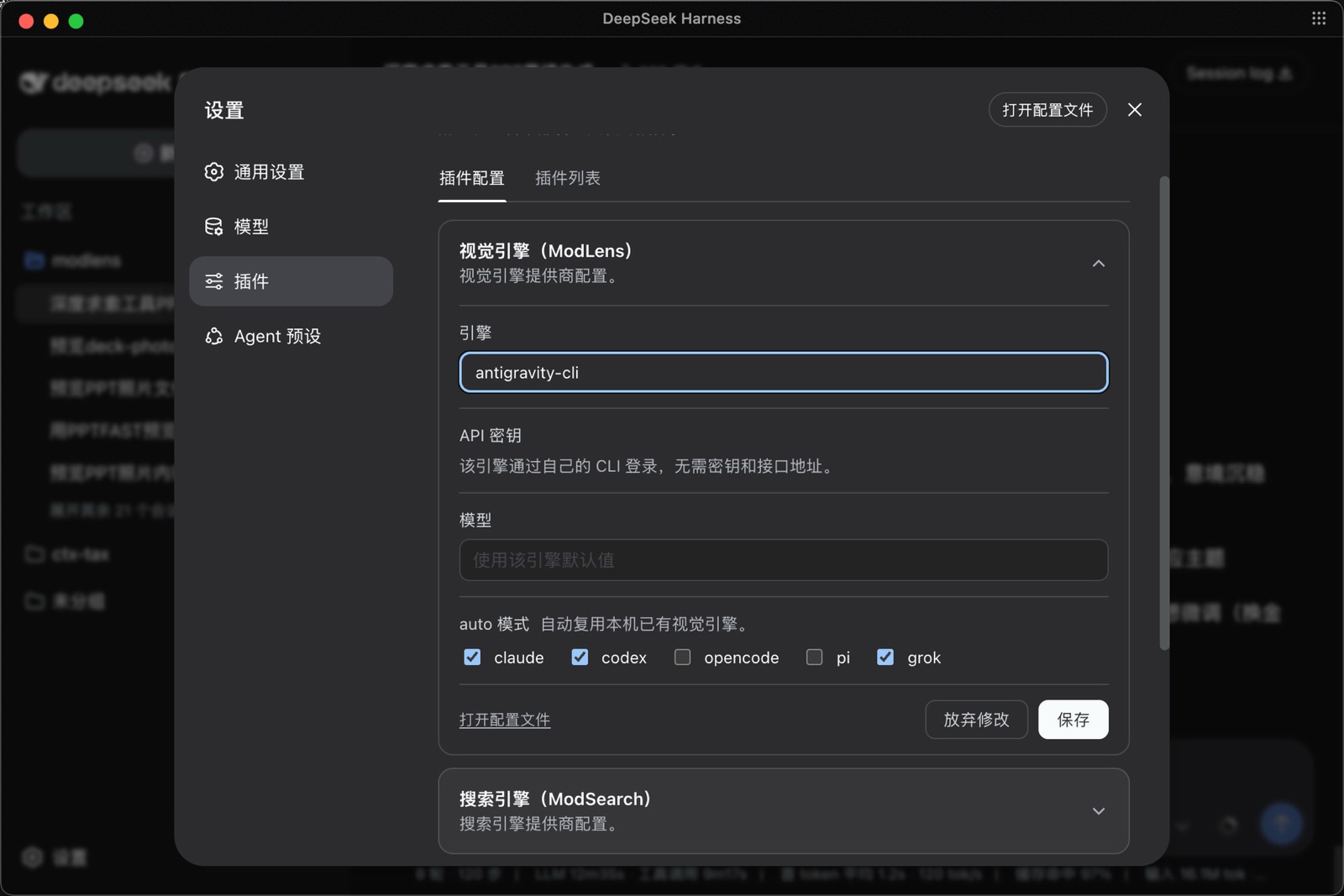
Usage
Once installed, just chat. Paste an image or drop a path, ask anything, and the skill triggers on its own: the image goes to a vision engine and the answer comes back grounded in what it read. Paste once, and later questions about the same image do not need another paste.
Vision engines: six built-in providers, four reusable CLIs, one failover chain
ModLens does not depend on any single vision service. Ten sources of vision in total: six built-in providers, any one of which is enough, plus four local agent CLIs whose logins can be reused. The built-ins:
| Provider | What it needs | Speed per read | Good for |
|---|---|---|---|
gemini-api | a free Gemini API key (3 minutes, no card) | 5-10s | the recommended default |
openai | any OpenAI-compatible endpoint (key + baseUrl + model) | 5-10s | qwen-vl, GLM, self-hosted gateways |
anthropic | an Anthropic API key | 5-10s | machines already holding one |
antigravity-cli | the free agy CLI, one browser sign-in, no key | 15-45s | zero-signup starts |
claude-cli | a signed-in Claude Code | 20-45s | riding your existing Claude subscription |
kimi-cli | a signed-in Kimi Code | 20-45s | riding your existing Kimi subscription, named explicitly |
Without a pinned provider, every configured engine forms one failover chain: the fast API providers try first, the agent CLIs back them up, the first good result wins, and meta.attempts records every attempt so a fallback is never silent.
openai is a universal socket, not just OpenAI
Any endpoint speaking the OpenAI chat-completions protocol with image input plugs straight in — that covers most of the vision-model world:
modlens config set openai.baseUrl https://dashscope.aliyuncs.com/compatible-mode/v1   # qwen-vl
modlens config set openai.apiKey  <key>
modlens config set openai.model   qwen3-vl-plus
apiKey (and the matching env var) also accepts a comma-separated list. ModLens rotates to the next key after authentication, rate-limit, or quota failures. Network, 5xx, and parse failures skip remaining keys and keep provider failover.
The same three keys work for GLM's open platform, SiliconFlow, OpenRouter, a self-hosted vLLM/Ollama, or any gateway of your own. If your favorite vision model has an OpenAI-compatible API, ModLens can drive it.
Reusing what your machine already has
Two more sources of vision need zero new keys, each behind one explicit consent recorded in config:
- The harness you are talking in right now. Running inside Claude Code with a subscription signed in?
claude-clireads images through it out of the box. The install flow asks the same question for whichever harness you install into. - Every other agent CLI on the machine.
modlens doctordiscovers them, you grant per harness, and they join the same failover chain with no priority over your own keys. Every reused read is labeled inmeta.warningswith whose quota it spent, so nothing is ever silently billed:
| Reused CLI | What it needs | Grant with | Rides as |
|---|---|---|---|
| Codex | a signed-in Codex CLI with a vision model | config set reuse.codex true | agent lane, 15-45s |
| OpenCode | a vision model configured in OpenCode | config set reuse.opencode true | agent lane, 15-45s |
| Pi | model credentials held by Pi | config set reuse.pi true | an API key upgrades to the 5-10s inline lane, OAuth drives Pi itself |
| Grok | a signed-in Grok CLI (SuperGrok) | config set reuse.grok true | agent lane, 15-45s |
Picking and routing
Two knobs: modlens config set provider <name> states a preference (the chain still backs it up), -p <name> pins exactly one with no fallback. Machines behind a proxy set HTTPS_PROXY or modlens config set proxy <url> and the API providers route through it. An internal endpoint can opt out with modlens config set openai.proxy "". Details: the CLI manual for defaults and flags, Configuration for every key, and Security for who fetches what on remote URLs.
See it work
Unedited runs, all driving a text-only DeepSeek-V4-Flash.
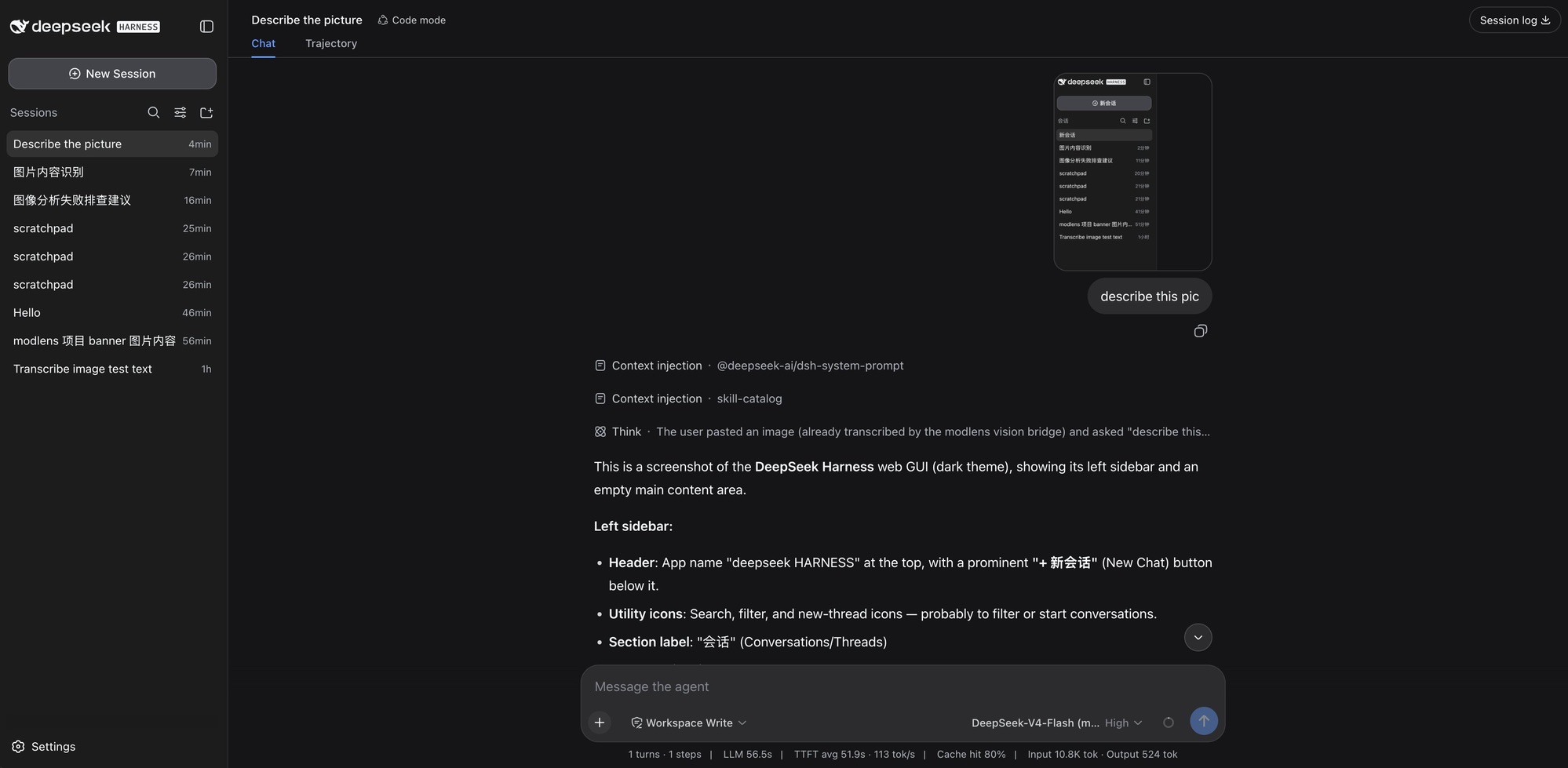
The newest one first: pasting a screenshot straight into DeepSeek Harness on the DeepSeek-V4-Flash (modlens vision) variant. The paste keeps its native thumbnail, the trajectory shows the image arriving "already transcribed by the modlens vision bridge", and the answer walks the UI element by element.
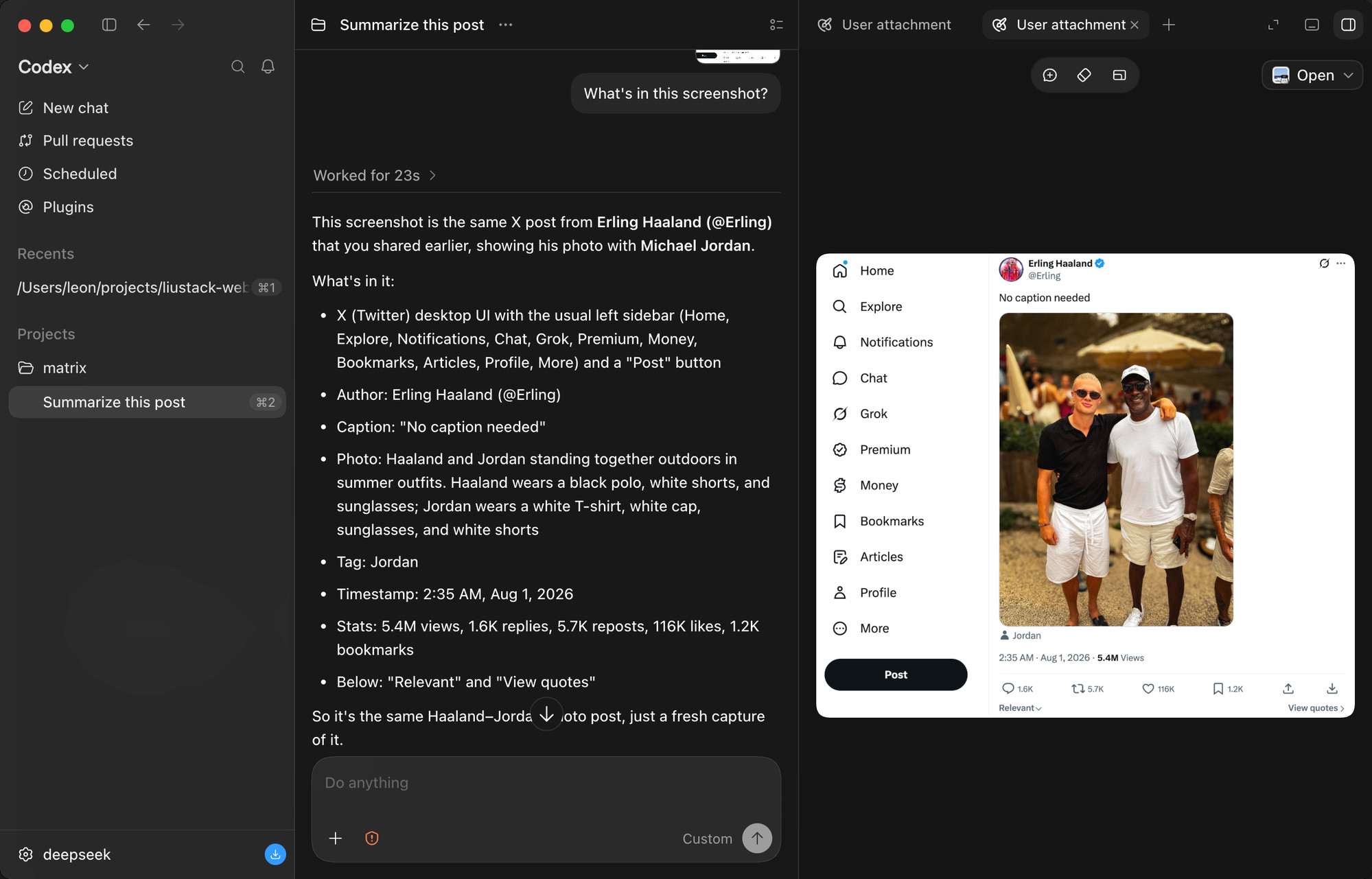
A tweet screenshot in the Codex desktop app. It reads the author, the caption, the photo itself (down to what both people are wearing), the timestamp, and every engagement number: 5.4M views, 1.6K replies, 5.7K reposts, 116K likes.
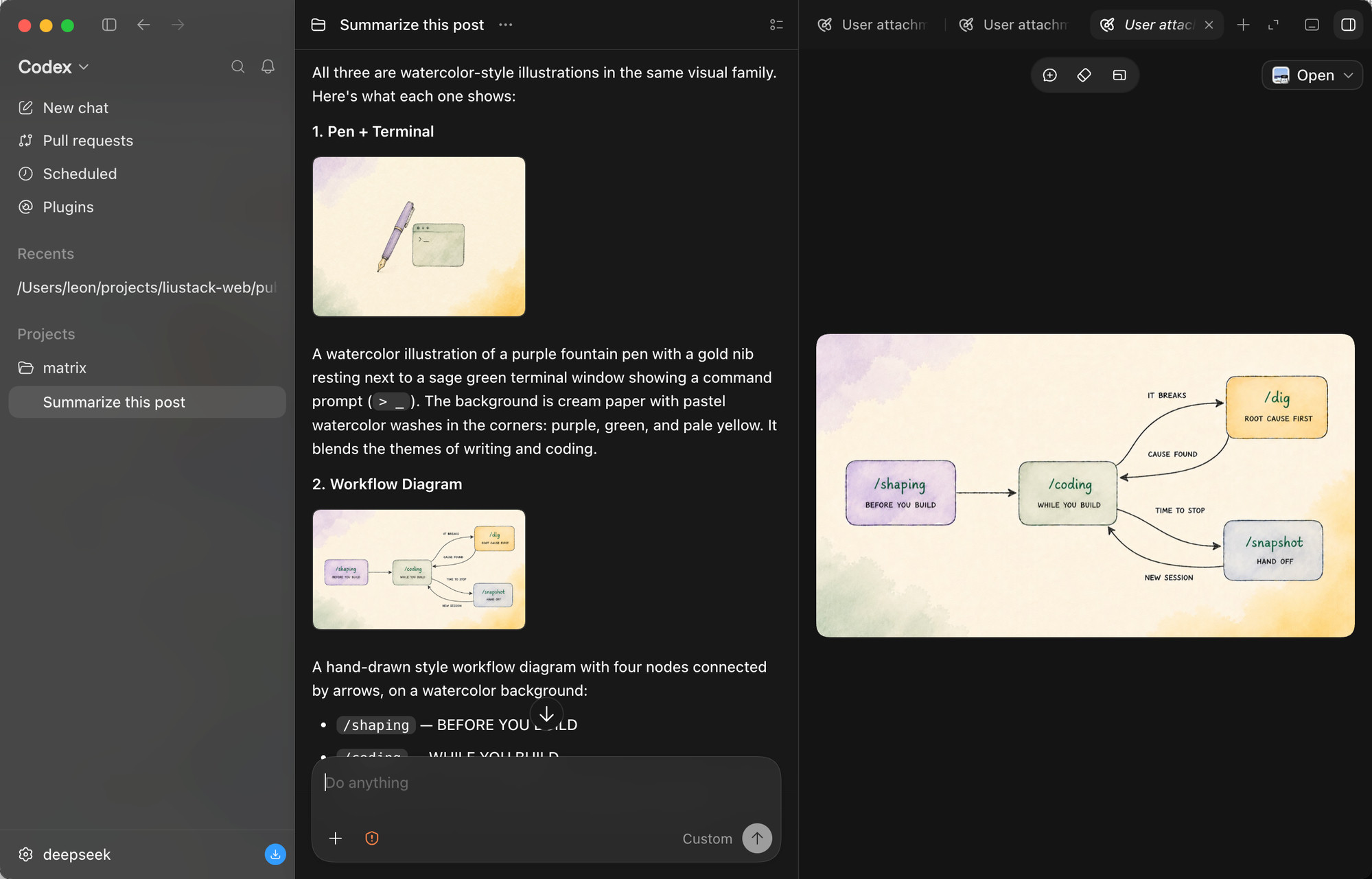
Three images pasted at once. The model reads them one by one, spots that they belong to one visual family, and describes each illustration's content and style.
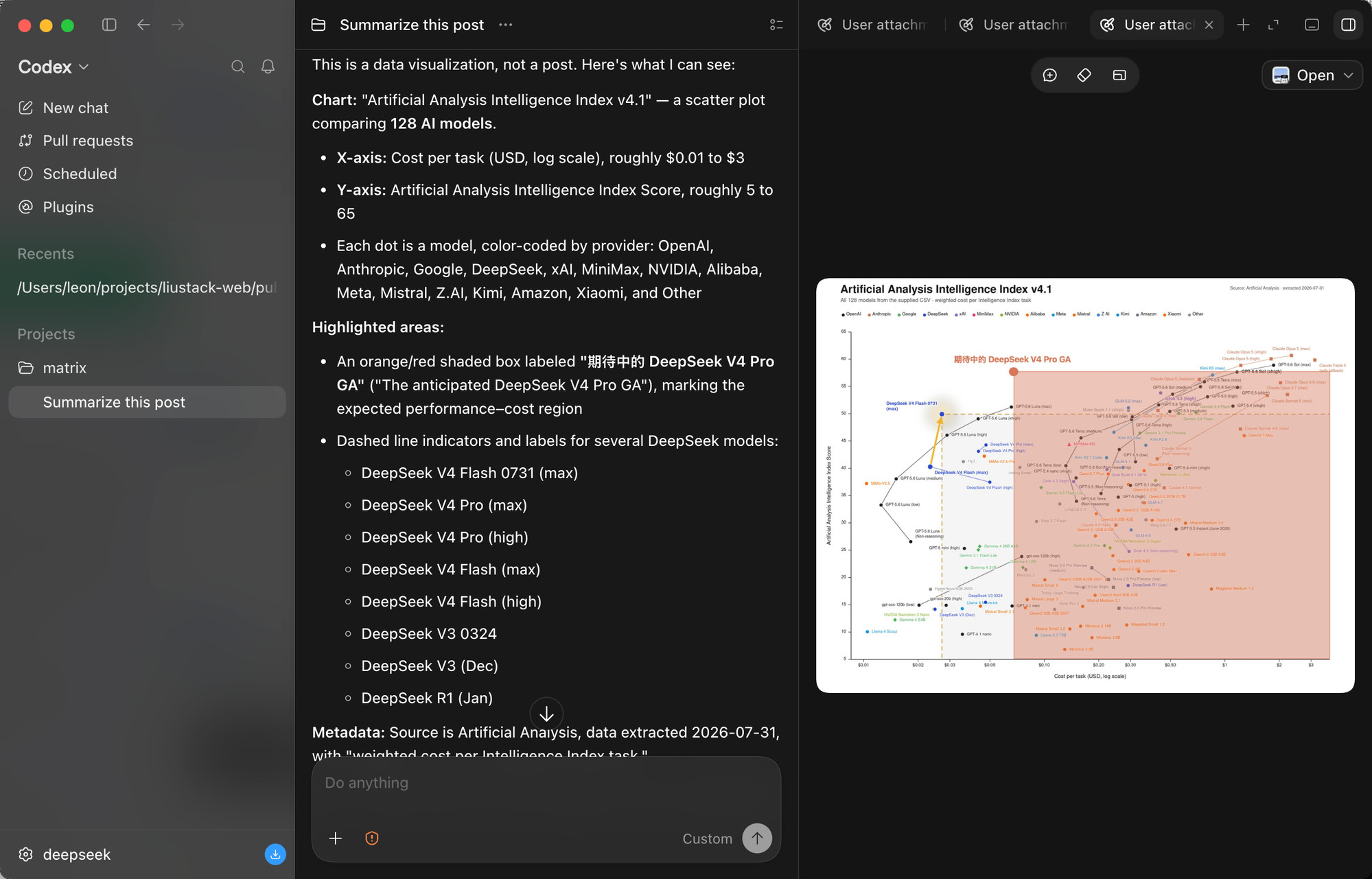
The stress test: a scatter plot comparing 128 AI models. It reads both axes, the log scale, the per-provider color coding, the highlighted region, and every DeepSeek model called out with dashed markers. Dense charts are where vision bridges most often fail.
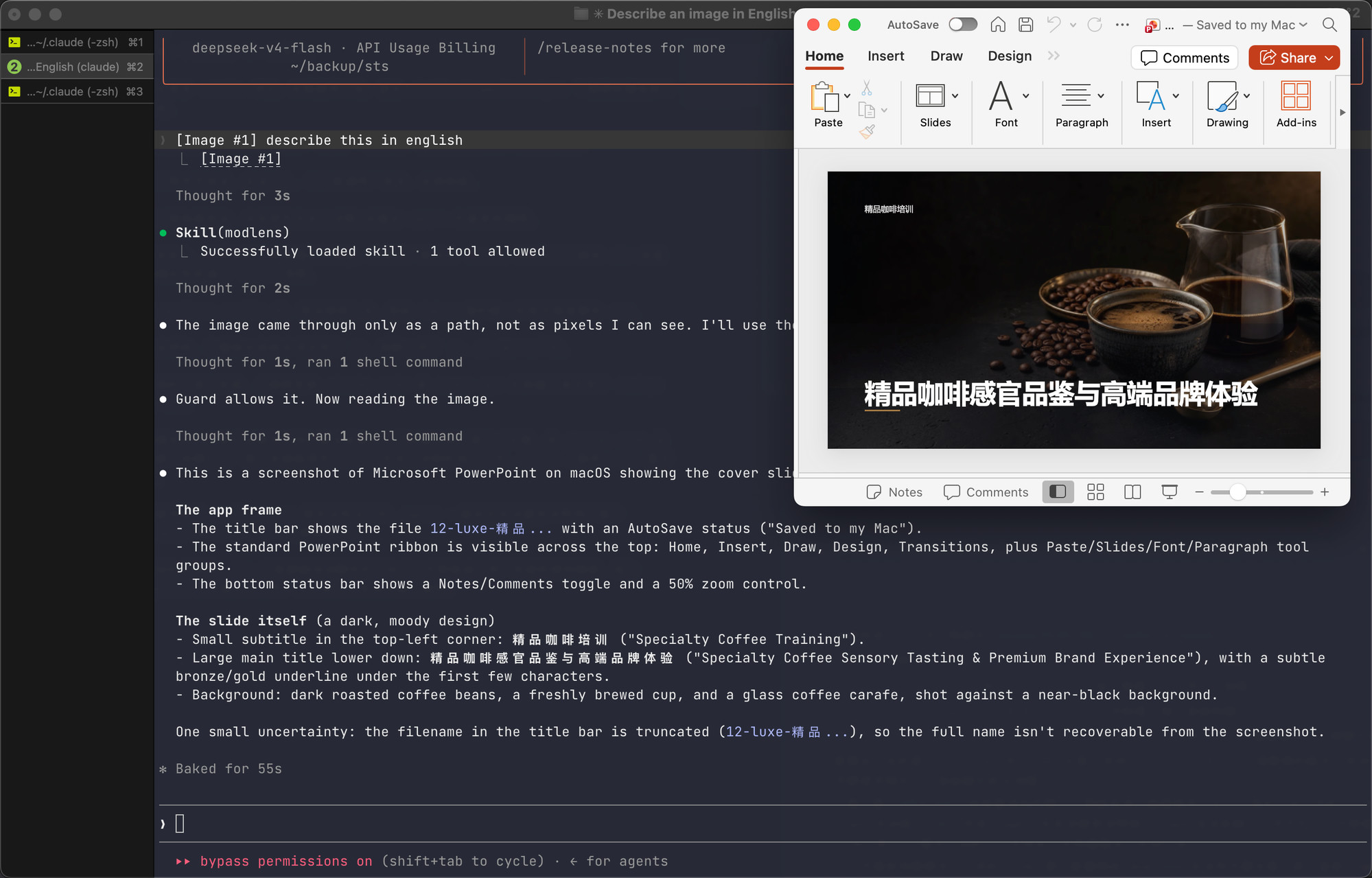
And the paste path, end to end, in a Claude Code terminal on DeepSeek. The pasted image arrives as a path rather than pixels, the skill triggers on its own, the guard confirms the model truly has no vision, and the slide's full content comes back: titles, layout, background, plus an honestly stated uncertainty about the truncated filename.
Documentation
| Doc | Read it when |
|---|---|
| Install guide | Installing the skill step by step (written for an agent) |
| CLI manual | The CLI the skill drives: flags, config, doctor |
| Troubleshooting | A command failed and the message needs decoding |
| Configuration | Setting a key, switching providers, fixing config |
| Output contract | Parsing the JSON or building on it |
| Harness setup | Wiring it into Codex, Claude Code, Pi, or OpenCode |
| Security | File permissions, image content as untrusted input |
| CHANGELOG | Finding what changed in a version |
Contributing
ModLens does not accept pull requests. The project is maintained by a single author who reviews every line, which is a deliberate choice for reliability. Two effective ways to contribute:
- Open an issue. Bugs, suggestions, confusing errors, unclear docs. Issues are read and shape what gets built next.
- Fork it. Under MIT your copy is fully yours to modify and publish.
Shameless plug
ModSearch is ModLens's sibling project, the same craft applied to another missing sense: it gives models with no web access web search, X search, and single-page fetch. Free, no signup, no API key. A model that needs ModLens for its eyes usually needs ModSearch for the web:
npx -y @deepseek-ai/dsh plugin --profile web add @liustack/modsearch@latest
Follow the liustack WeChat official account: AI startup opportunities, indie-dev insights, and hands-on AI tooling, delivered as they happen. Scan the QR code in WeChat, or search for "liustack":
⭐ If it helps, star ModLens and ModSearch. Stars are how the next developer finds them.
Key ecosystem partners
The projects worth recommending in the DeepSeek Harness ecosystem.
- 🛒 dsh-market — The plugin market inside DeepSeek Harness. Browse 800+ community plugins with category filters and screenshot previews, one-click install and update, and live theme switching. Most need no restart. DeepSeek Harness 的可视化插件市场。设置页里直接逛社区全部 800+ 插件:分类筛选、截图预览、一键安装与更新、主题即点即换,装完多数免重启。
- 🖥️ DeepSeek Harness Desktop — A desktop front end for DeepSeek Harness. Start and manage the Harness service on your own machine without installing Node.js or running a command. A plugin market, remote control from a phone, and IM channels are on its roadmap. Site 为 DeepSeek Harness 生态打造的现代化桌面端。不用配置 Node.js,也不用敲命令,就能启动和管理本机的 Harness 服务。后续还会支持插件市场、移动端远程控制和 IM Channels。官网
Star History
Disclaimer
Provided as-is under the MIT License below. The author makes no warranty and gives no endorsement for any particular use, commercial use included. Your use of upstream engines (Antigravity CLI, the Gemini, OpenAI, and Anthropic APIs, and any OpenAI-compatible endpoint) is governed by their own terms and quotas, which you are responsible for.
License
MIT

MiniCPM-V
OpenBMB·Python
MiniCPM-V 是面壁智能开源的多模态视觉语言模型,能在手机、PC 等本地设备上完成看图、听音和对话交互,无需依赖云端。
多模态+4视觉语言模型
27119+342.1k202505272026-11-09 07:37 UTC

LLaVA
haotian-liu·Python
开源的多模态视觉指令微调模型,让 LLaMA 类大模型能看图对话,效果对标 GPT-4V,适合做图文问答和视觉助手。
视觉指令微调+4视觉语言模型
250752.8kv1.2.02024-08-12 09:52 UTC
screenpipe
screenpipe·Rust
持续录制电脑屏幕和音频,把日常工作流整理成可检索的记录,帮你找出值得自动化的环节,并为 AI 智能体提供上下文。
屏幕录制+4视觉语言模型
22323+642.3kapp-v2.7.1452026-11-10 00:40 UTC

Qwen3-VL
QwenLM·Jupyter Notebook
阿里云通义团队开源的多模态大模型系列,能同时理解图像和文本,用于视觉问答、图文推理等视觉语言任务。
多模态大模型+4视觉语言模型
20192+171.9k2026-01-30 04:47 UTC