从源码构建需先装 Rust 与 Node.js 并启用 pnpm(corepack enable);Web 版清空浏览器站点数据会删除笔记,需用 File Menu 的 Backup 导出 zip 备份;Web 版抓取 RSS 常被 CORS 拦截,需配置 CORS 代理或自建代理。
mdSilo-app
mdSiloAGPL-3.0活跃维护轻量级本地知识库与订阅阅读器,用 Markdown 编辑笔记,支持知识图谱、看板、思维导图和图表,把笔记、电子书和播客订阅集中管理。
Lightweight Knowledge Base and Feed Reader.
mdsilo-v0.8.0发布于 2026-11-08 21:20 UTC853star49fork同步于 2026-11-10 23:53 UTC
pnpm install && pnpm tauri build
pnpm start:web 硬件要求按 README 说明
README 未说明显存或 GPU 要求;桌面版基于 Tauri,支持 Windows、macOS、Linux,另有纯浏览器 Web 版(文件存于 IndexedDB)。
本地优先的 Markdown 知识库,把阅读、批注、议题与写作串成一个闭环
轻量级本地知识库与订阅阅读器,用 Markdown 编辑笔记,支持知识图谱、看板、思维导图和图表,把笔记、电子书和播客订阅集中管理。
核心能力
- 书籍批注存为同名 Markdown 文件,可编辑可搜索可链接
- 支持 [[笔记]]、{{书与高亮}}、issue 链接的双向链接与关系图
- 内置 GitHub 风格议题追踪,含标签、里程碑与看板
- RSS/Atom/JSON Feed 与播客客户端,可把频道转成 EPUB 阅读
- 通过 Git 一键同步,并可发布为 GitHub Pages 静态站点
容易踩的坑
内容由模型根据 README 生成,可能不完整或不准确,以官方文档为准。看原文 README
- mdsilo-v0.8.0mdSilo Desktop v0.8.0最新正式版2026-11-08 · 2026-11-08 21:20 UTC
- Feat: OPDS catalogs in Feeds, browse, search and download books.
- Feat: Customize fonts and theme.
- Feat: Custom plugins.
- Feat: Drag and drop to move files and folders in the explorer tree.
- Feat: Support JSON feed and make/update book from feed.
- Feat: support MDict files (.mdx/.mdd) and customize web resource on Dictionary.
- Feat: Word lens shows a short meaning under the words of your vocabulary.
- Improve: Look up the text selected in a note/book in the dictionaries, Wikipedia as dictionary source.
- Improve: Ask before syncing files over 50 MB (books, dictionary files).
- Performance: Index book(epub/mobi/azw/azw3/fb) in Rust end.
- Performance: Faster Library and lists, using react-virtuoso+OverlayScrollbars
- Plugins: Speed reading mode and share quote via plugins.
- mdsilo-v0.7.0mdSilo Desktop v0.7.02026-10-31 · 2026-10-31 17:12 UTC
查看更新说明
- Feat: ebook reader
- Feat: Git sync
- Feat: Publish as a static site
- Improve Linking and Graph
- mdsilo-v0.6.2mdSilo Desktop v0.6.22026-10-26 · 2026-10-26 20:13 UTC
查看更新说明
- Fix bugs and improve performance.
- Upgrade dependencies and toolchain to latest version.
- mdsilo-v0.6.1mdSilo Desktop v0.6.12026-10-23 · 2026-10-23 23:41 UTC
查看更新说明
- Feat: support comments
<!-- ... -->in Markdown - Feat: move table rows and columns (close #780)
- Fix tray icon missing
- Fix Link Editor bug on creating link
- Fix bug on inserting local image and displaying images with paths relative to the note
- Feat: support comments
- mdsilo-v0.6.0mdSilo Desktop v0.6.02026-10-07 · 2026-10-07 04:31 UTC
查看更新说明
- Sidebar workspace explorer: expand folders in place as a multi-level tree (close #751).
- Sidebar: resize by dragging its edge; tree scrolls horizontally for deep folders.
- Faster folder listing in sidebar explorer, rust end and frontend.
- Feed reader: resizable channel and article columns, channel list scrolls horizontally.
- Upgrade zustand 5, immer 11: faster store updates
- Notes kept in an immutable bucketed NoteMap: editing a note no longer copies all notes.
- Fix wiki links with
_/*in title (e.g.[[_draft_]]): parsed as links, no longer broken on save. - Backlinks: faster computing (parse cached per note), mentions exclude link text, plain text context.
- Fix inserting local image: enable Tauri 2 asset protocol, resolve local image paths, insert at the current cursor.
- Fix raw mode (Markdown source): upgrade CodeMirror packages to latest, one copy of each; editor lifecycle safe in StrictMode.
- Fix app hanging in loading after reload / dev tools: dir watcher no longer blocks a backend thread, one watcher and listener at a time.
- Fix creating link from the selection toolbar: the link editor shows again; toolbar commands act on the editor's own schema and view.
- CSP allows Tauri 2 IPC (
ipc:,http://ipc.localhost): no more fallback to the slower postMessage IPC. - Tooltip built on tippy.js directly:
@tippyjs/reactreadelement.ref, removed in React 19. - Rename/delete note: update links with alias, escapes, several per line; skip code; wait for notes loaded.
- SideMenu Orientation setting with Auto, Vertical, and Horizontal options.
- Add frontend test with more coverage.
- Personal issue tracker.
用户点评
登录用户的真实使用记录,可按版本和硬件筛选共 0 条
还没有人点评。第一个说出真实体验的人最有价值。
mdSilo
A hub for your personal I/O: Reading → Issue → Writing.
mdSilo is a local-first workspace where what you read, what you think and what you write live together, linked, searchable and yours. It is a Markdown notebook, a book reader, a feed reader and an issue tracker in one small app (React + Tauri), on top of plain files.
Try it in your browser · User manual · Discord · Bluesky

Why mdSilo
For a human brain, reading and writing are the I/O: the way a thinking system talks with the world. Most note apps only care about the last step, the writing. But writing without reading is empty, and what you read is gone in a week if there is no place to digest it.
So mdSilo is built around the whole loop, and gives each step its own tool:
| Step | Tool | In mdSilo | |
|---|---|---|---|
| 📖 | Reading (input) | Reader, Feeds, Podcasts | Books (EPUB, PDF, MOBI, FB2, CBZ...), RSS/Atom/JSON Feed, podcasts and clipped web pages; highlight and annotate anything |
| 🧩 | Issue (process) | Issues, Projects | A GitHub-like tracker for the questions, ideas and tasks that reading raises: labels, milestones, boards |
| ✍️ | Writing (output) | WYSIWYG Markdown editor | Notes, a personal wiki, mind maps, diagrams, math |
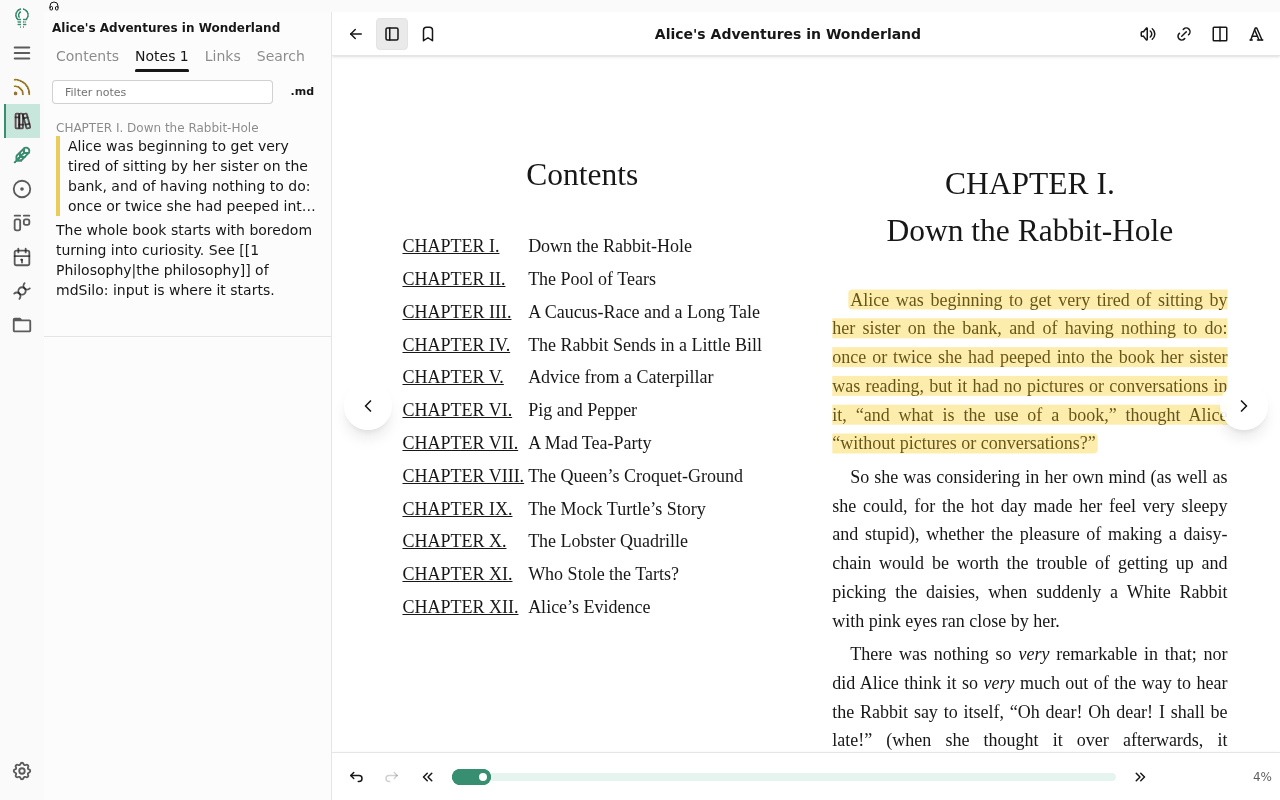
And links close the loop: a note links to a book ({{Alice's Adventures in Wonderland}}), to a sentence in it, to an issue ([@3](https://github.com/mdSilo/mdSilo-app/blob/HEAD/issue:3)) and to other notes ([[Philosophy]]). Every link is two-way, and the Graph draws the whole network.
Everything is a plain file in a folder you choose: Markdown for notes and annotations, JSON for issues and the library. No account, no server, no lock-in; sync it with git right from the app (or with anything else), and publish the notes you choose as a website.
Features
📖 Read: the input
- Book reader for EPUB, PDF, MOBI/AZW3, FB2 and CBZ; TXT, Markdown and HTML are converted on import. Paging or scrolling, themes, fonts, margins, footnotes, image and table viewer
- Highlight, write notes, bookmark: kept as a Markdown file next to the book (
Foo.epub.md), a note like any other: editable, searchable, linkable - Look up as you read: your dictionaries in your order (Wiktionary, Wikipedia, Urban Dictionary, Merriam-Webster, sites you add, MDict files), with pronunciations, in books and notes; translation, read aloud
- Vocabulary: words kept with their pronunciation and the sentence they came from, studied as flash cards; the word lens shows their meaning under them in the books
- Parallel reading: two books side by side, each with its own notes
- Library: covers, groups, status, search, drag and drop; books are identified by content, so a renamed book is still the same book
- Feeds & podcasts: RSS/Atom/JSON Feed client with full text, starred articles, clipping to notes and a podcast player; turn a channel into an EPUB and read a month of news as a book
🧩 Process: Issue

- Issues with labels, milestones, due dates, subtasks, comments and a timeline, plus a GitHub-style filter (
is:open label:question sort:due) - Projects: Kanban boards and tables, with any statuses you want (To read → Reading → Digesting → Written up)
- Born where the thought is: select a sentence in a book or a note and choose New issue of it; the quote and a link back become the issue
- Tasks in notes:
- [ ]checkboxes and#todo##doing##done#tags are collected in one list and can become issues that stay in sync

✍️ Write: the output

- All-in-one editor: WYSIWYG, raw Markdown and Mind Map views of the same file
- Markdown and more: tables, task lists,
==highlight==, math and chemistry (KaTeX), notices, mermaid / echarts / abc music, chemical structures (SMILES), code highlighting, embeds, attachments - Slash commands, a hovering toolbar and hotkeys: never leave the keyboard
- Export to PDF and PNG
🔗 Link and see

- Bidirectional links:
[[notes]],{{books and highlights}},[@12](https://github.com/mdSilo/mdSilo-app/blob/HEAD/issue:12),#tags#, backlinks and unlinked mentions - Graph: notes, books, issues and tags in one network
- Chronicle: daily journals and a GitHub-like activity heat map of your writing and reading
- Full-text search over notes, annotations and the text of your books, Chinese included
- Dark and light, 10 themes; Windows, macOS, Linux and Web; free and open source
🔄 Sync and publish
- Git sync with GitHub, Gitea, GitLab or any git host over HTTPS with a token: commit, pull and push in one click, every few minutes or when the app closes. Books sync only if you choose; the token stays on the device
- No lost edits: changes on two devices merge; when both changed the same lines, your version is kept beside the note as a conflict copy, and the app's data merges field by field
- Publish a static site to GitHub Pages (or export it to a folder): the folders you tick, with backlinks, graph, search, tag pages, book annotations and issues with their milestones and boards. Math, mermaid, echarts and SMILES are drawn as you publish; links to private notes become plain text
🛠️ Plugins and customization
Make mdSilo your own: add your own fonts for reading and writing, define a color theme, and extend the app with plugins. some plugins here you can try out: https://github.com/mdSilo/mdSilo-app/tree/main/examples/plugins
Learn more
The user manual covers every part in detail (also in Chinese: 中文手册). The web version opens with the manual already in your workspace (in Chinese for a Chinese browser), together with a public domain sample book (Project Gutenberg) and a few issues to play with; click around and break things. When you are done, File Menu > Remove demo clears all of it in one click and keeps what you made.
Appendix: Reference
Get the app
You can get the app on release page or build from the source code:
- install Rust: https://www.rust-lang.org/tools/install
- install Node js: https://nodejs.org, and pnpm:
corepack enable(or see https://pnpm.io/installation) git clone https://github.com/mdSilo/mdSilo-app.gitcd mdSilo-apppnpm install && pnpm tauri build
Then you can find the app in ./src-tauri/target/release folder.
Web version
The web version shares the frontend code in ./src with the desktop app, files are stored in the browser (IndexedDB) instead of the disk. No Rust is needed:
pnpm start:web: dev server on http://localhost:3001pnpm build:web: build to./dist-web, a static site that can be served by any web server (setMDSILO_WEB_BASE=/sub/path/to serve from a sub path)
How it works: vite.web.config.mts replaces the Tauri APIs (@tauri-apps/api/*, @tauri-apps/plugin-dialog) with the stand-ins in ./src/host/web, which handle the same commands as the Rust end (src-tauri/src/lib.rs) on a virtual file system in IndexedDB. A service worker (./web/public/fs-sw.js) serves the stored files by URL, so images and attachments can be displayed. It also makes the web version an installable app (PWA, web/public/manifest.webmanifest): the build writes its files into the worker (web/pwa-precache.mjs), which keeps them for offline use; a new build installs as an update the app offers to reload into. Folders and files on your device can be imported via the Open Folder / Open File dialog, exported files are downloaded by the browser.
Backup: clearing the site data of the browser deletes the notes, so back up regularly via the File Menu (the folder icon of the side menu) > Backup, which downloads all files as a zip. To restore, unzip it and import the folder via Open Folder > Import Folder.
RSS feeds: browsers block most feeds by CORS, so a feed is fetched directly first, then via a CORS proxy. The proxy in use, in order:
- Settings > RSS CORS Proxy, e.g.
https://proxy.example.com/?url={url}({url}is replaced by the encoded feed url, otherwise the url is appended);noneto disable - build time default:
MDSILO_WEB_CORS_PROXY=https://proxy.example.com/?url={url} pnpm build:web - the built-in proxy
/__cors_proxy__ofpnpm start:web/pnpm preview:web, if detected - a public proxy (allorigins) on static hosting, which can see the feed urls
To run your own proxy (same API, GET to public http(s) addresses only):
- Node:
node web/cors-proxy.mjs(no dependencies; envPORT, default 8787,HOST,ALLOW_ORIGIN) - Cloudflare Workers, for static hosting w/o a server (free tier is enough):
npx wrangler deploy web/cors-proxy-worker.mjs --name mdsilo-cors-proxy --compatibility-date 2024-09-01 --var ALLOW_ORIGIN:https://<your site origin>
Deploy to GitHub Pages: .github/workflows/deploy-web.yml builds and deploys on push to main (or run it manually). Enable it in repo Settings > Pages > Source: GitHub Actions. With repo secrets CLOUDFLARE_API_TOKEN (Workers edit permission) and CLOUDFLARE_ACCOUNT_ID, it also deploys the Cloudflare Worker proxy and builds it in as the default; or set repo variable MDSILO_WEB_CORS_PROXY to use an existing proxy. Other variables: MDSILO_WEB_BASE (default /<repo name>/, use / for a custom domain), MDSILO_WEB_ORIGIN (origin allowed by the proxy, default https://<owner>.github.io), MDSILO_CORS_WORKER_NAME.
Tech Stack
- Editor Framework: ProseMirror
- Frontend Framework: React
- Cross-platform: Tauri
Road map
Input
- RSS, Atom, JSON Feed and podcasts
- Read and annotate EPUB, PDF, MOBI, FB2, CBZ; library, parallel reading, dictionaries (web and MDict), vocabulary, word lens, read aloud
- Feeds into books
- OPDS catalogs
- AI helpers
Process
- Issues, labels, milestones, subtasks, due dates
- Projects: boards and tables
- Tasks in notes, issues from highlights and selections
- Vocabulary: record and revise the new things
- Flashcards
Output
- Markdown: style, link, image, headings and TOC, lists, tables, quotes
- Extensions: mark, underline, sup, highlighted code, math and chemistry, notices, wikilink
[[]], hashtag#tag#, diagrams (mermaid, echarts, abc), chemical structures (SMILES), embeds, attached PDF - WYSIWYG, Markdown and Mind Map; slash commands, hovering toolbar, hotkeys
- Export as PDF and PNG
- Drawing
- Block reference
- Publish a static site (GitHub Pages)
Link and see
- Backlinks, unlinked mentions, links to books and issues
- Graph, Chronicle, activity heat map
- Full-text search
- Version control: git sync
Extension
- Plugin, some examples: https://github.com/mdSilo/mdSilo-app/tree/main/examples/plugins
- Customize theme
- Dictionary: .mdx/.mdd mdict dictionary files
Cross-platform
- Windows, macOS, Linux
- Web: https://mdsilo.github.io/mdSilo-app/
- Mobile: iOS/iPadOS and Android
Any questions, feedback or suggestions?
You can follow us on Bluesky or go to our Discord. We are waiting there for you.
koreader
koreader·Lua
基于 LuaJIT 的电子书阅读器,支持 PDF、EPUB、DjVu、FB2 等格式,可运行在 Kindle、Kobo、PocketBook 等墨水屏设备和 Android 上。
电子书阅读器+4电子书阅读器
31023+802.0kv2026.07.12026-11-10 21:45 UTC
calibre
kovidgoyal·Python
功能完整的电子书管理工具,能整理书库、转换 EPUB、MOBI 等格式,并支持编辑元数据和推送到 Kindle 阅读。
电子书管理+4电子书阅读器
26410+332.8kv9.18.02026-11-10 15:16 UTC

readest
readest·TypeScript
一款现代跨平台电子书阅读器,支持 EPUB、MOBI、Kindle 等格式,界面直观、工具丰富,适合重度阅读用户在多设备间无缝阅读。
电子书阅读器+4电子书阅读器
26164+1171.9kv0.12.202026-11-10 18:27 UTC
calibre-web
janeczku·Fluent
把 Calibre 书库变成网页版书架,支持在线浏览、阅读和下载电子书,方便多设备访问自己的藏书。
电子书管理+4电子书阅读器
18551+91.9k0.6.272026-10-10 05:40 UTC