venv 方式要求 Python 3.10;默认会向 wandb 记录指标,需先 wandb login 或设置 WANDB_MODE=disabled 关闭;Llama3-8B/70B 的 16k 上下文需额外传 CLI 参数,且部分模型在 H100/A40 上不受支持;前缀缓存、路由策略等新特性只在 canary 分支。
vidur
microsoftMIT活跃维护面向 LLM 推理系统的可扩展仿真器,能在不实际部署集群的情况下,大规模、高精度地模拟 Transformer 推理性能,用于容量规划与架构选型。
Accurate, large-scale, and extensible simulator for LLM inference Systems
暂无版本720star142fork同步于 2026-11-07 07:28 UTC
mamba env create -p ./env -f ./environment.yml
mamba env update -f environment-dev.yml
python -m vidur.main 硬件要求按 README 说明
模拟运行本身不需要 GPU,仅初始性能剖析阶段需要;README 列出的支持设备包括 A100 80GB DGX、H100 DGX、4xA100 80GB Pairwise NVLink 节点和 8xA40 Pairwise NVLink 节点。
多卡 / 张量并行
高保真 LLM 推理系统模拟器,无需 GPU 即可评估不同模型、负载与部署配置下的性能
面向 LLM 推理系统的可扩展仿真器,能在不实际部署集群的情况下,大规模、高精度地模拟 Transformer 推理性能,用于容量规划与架构选型。
核心能力
- 模拟 TTFT、TPOT、请求端到端时延与批大小等系统指标
- 支持容量规划,搜索每美元容量最优的部署配置
- 可快速试验新调度算法与投机解码等优化
- 支持 TP/PP 组合,覆盖 A100、H100、A40 等 SKU
- 输出 wandb 指标与 Chrome trace 便于分析
容易踩的坑
内容由模型根据 README 生成,可能不完整或不准确,以官方文档为准。看原文 README
暂无 release 数据(可能没有发版,或尚未同步)。
用户点评
登录用户的真实使用记录,可按版本和硬件筛选共 0 条
还没有人点评。第一个说出真实体验的人最有价值。
Vidur: LLM Inference System Simulator
Vidur is a high-fidelity and extensible LLM inference system simulator. It can help you with:
-
Study the system performance of models under different workloads and configurations.
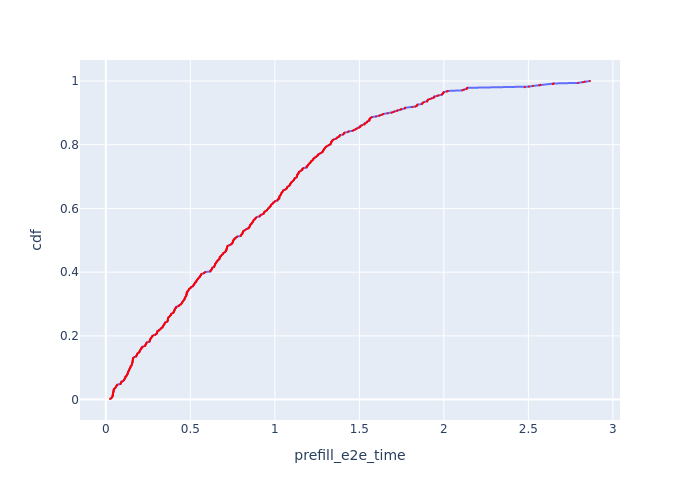
TTFT TPOT Request E2E Time Batch Size 


Llama-3-8Brunning the AzureLLMInferenceTrace2023_conv trace on singleA100 80GBat 6.45 QPS -
Capacity planning and finding the best deployment configuration for your LLM deployments.
 Capacity per dollar for different deployment configurations vs TTFT-P90 and TBT-P99 for LLaMA2-70B.
-
Quickly test new research ideas like new scheduling algorithms, optimizations like speculative decoding, etc.
... all without access to GPUs except for a quick initial profiling phase 🎉. We highly recommend checking out our MLSys'24 paper and talk for more details.
Supported Models
Instructions on adding a new model to existing or new SKUs can be found here.
| Model / Device | A100 80GB DGX | H100 DGX | 4xA100 80GB Pairwise NVLink Node | 8xA40 Pairwise NVLink Node |
|---|---|---|---|---|
meta-llama/Meta-Llama-3-8B | ✅ | ❌ | ✅ | ❌ |
meta-llama/Meta-Llama-3-70B | ✅ | ❌ | ✅ | ❌ |
meta-llama/Llama-2-7b-hf | ✅ | ✅ | ✅ | ✅ |
codellama/CodeLlama-34b-Instruct-hf" | ✅ | ✅ | ✅ | ✅ |
meta-llama/Llama-2-70b-hf | ✅ | ✅ | ✅ | ✅ |
internlm/internlm-20b | ✅ | ✅ | ✅ | ✅ |
Qwen/Qwen-72B | ✅ | ✅ | ✅ | ✅ |
-
All models support a maximum context length of 4k except
Llama3-8BandLlama3-70Bwhich support 16k context length by passing additional CLI params:--random_forrest_execution_time_predictor_config_prediction_max_prefill_chunk_size 16384 \ --random_forrest_execution_time_predictor_config_prediction_max_batch_size 512 \ --random_forrest_execution_time_predictor_config_prediction_max_tokens_per_request 16384 -
Pipeline parallelism is supported for all models. The PP dimension should divide the number of layers in the model.
-
In DGX nodes, there are 8 GPUs, fully connected via NVLink. So TP1, TP2, TP4 and TP8 are supported.
-
In 4x pairwise NVLink nodes, there are 4 GPUs, so TP1, TP2 and TP4 are supported. TP4 here is less performant than TP4 in DGX nodes because (GPU1, GPU2) are connected via NVLink and (GPU3, GPU4) are connected via NVLink. but between these layers, the interconnect is slower.
-
You can use any combination of TP and PP. For example, you can run LLaMA2-70B on TP2-PP2 on a 4xA100 80GB Pairwise NVLink Node.
Setup
Using mamba
To run the simulator, create a mamba environment with the given dependency file.
mamba env create -p ./env -f ./environment.yml
mamba env update -f environment-dev.yml
Using venv
- Ensure that you have Python 3.10 installed on your system. Refer https://www.bitecode.dev/p/installing-python-the-bare-minimum
cdinto the repository root- Create a virtual environment using
venvmodule usingpython3.10 -m venv .venv - Activate the virtual environment using
source .venv/bin/activate - Install the dependencies using
python -m pip install -r requirements.txt - Run
deactivateto deactivate the virtual environment
Using conda (Least recommended)
To run the simulator, create a conda environment with the given dependency file.
conda env create -p ./env -f ./environment.yml
conda env update -f environment-dev.yml
Setting up wandb (Optional)
First, setup your account on https://<your-org>.wandb.io/ or public wandb, obtain the api key and then run the following command,
wandb login --host https://<your-org>.wandb.io
To opt out of wandb, pick any one of the following methods:
export WANDB_MODE=disabledin your shell or add this in~/.zshrcor~/.bashrc. Remember to reload usingsource ~/.zshrc.- Set
wandb_projectandwandb_groupas""invidur/config/default.yml. Also, remove these CLI params from the shell command with which the simulator is invoked.
Running the simulator
To run the simulator, execute the following command from the repository root,
python -m vidur.main
or a big example with all the parameters,
python -m vidur.main \
--replica_config_device a100 \
--replica_config_model_name meta-llama/Meta-Llama-3-8B \
--cluster_config_num_replicas 1 \
--replica_config_tensor_parallel_size 1 \
--replica_config_num_pipeline_stages 1 \
--request_generator_config_type synthetic \
--synthetic_request_generator_config_num_requests 512 \
--length_generator_config_type trace \
--trace_request_length_generator_config_max_tokens 16384 \
--trace_request_length_generator_config_trace_file ./data/processed_traces/splitwise_conv.csv \
--interval_generator_config_type poisson \
--poisson_request_interval_generator_config_qps 6.45 \
--replica_scheduler_config_type sarathi \
--sarathi_scheduler_config_batch_size_cap 512 \
--sarathi_scheduler_config_chunk_size 512 \
--random_forrest_execution_time_predictor_config_prediction_max_prefill_chunk_size 16384 \
--random_forrest_execution_time_predictor_config_prediction_max_batch_size 512 \
--random_forrest_execution_time_predictor_config_prediction_max_tokens_per_request 16384
or to get information on all parameters,
python -m vidur.main -h
Simulator Output
-
The metrics will be logged to wandb directly and a copy will be stored in the
simulator_output/<TIMESTAMP>directory. A description of all the logged metrics can be found here. -
Vidur exports chrome traces of each simulation. The trace can be found in the
simulator_outputdirectory. The trace can be opened by navigating tochrome://tracing/oredge://tracing/and loading the trace.
Formatting Code
To format code, execute the following command:
make format
Using Canary Build
We have been working on several improvements for the simulator, including support for prefix caching, different routing policies, reducing memory requirements for the simulator, etc. However, there are some sharp edges that we are working on resolving. In the meantime, if you are looking for support for any of these features, please use the canary branch.
Contributing
This project welcomes contributions and suggestions. Most contributions require you to agree to a Contributor License Agreement (CLA) declaring that you have the right to, and actually do, grant us the rights to use your contribution. For details, visit https://cla.opensource.microsoft.com.
When you submit a pull request, a CLA bot will automatically determine whether you need to provide a CLA and decorate the PR appropriately (e.g., status check, comment). Simply follow the instructions provided by the bot. You will only need to do this once across all repos using our CLA.
This project has adopted the Microsoft Open Source Code of Conduct. For more information see the Code of Conduct FAQ or contact [email protected] with any additional questions or comments.
Trademarks
This project may contain trademarks or logos for projects, products, or services. Authorized use of Microsoft trademarks or logos is subject to and must follow Microsoft's Trademark & Brand Guidelines. Use of Microsoft trademarks or logos in modified versions of this project must not cause confusion or imply Microsoft sponsorship. Any use of third-party trademarks or logos are subject to those third-party's policies.