本扩展不是 Jupyter 内核,必须自行准备已安装 jupyter 包的 Python 环境或其他语言的 kernelspec;使用 Python 时还需另外安装 Python 扩展;默认会自动安装多个配套扩展,需要时可手动禁用
vscode-jupyter
microsoftMIT活跃维护在 VS Code 里直接跑 Jupyter Notebook 的官方扩展,支持单元格执行、内核切换和变量查看,省去在浏览器和编辑器之间来回切换。
VS Code Jupyter extension
v2025.9.1发布于 2025-10-13 23:20 UTC1,545star396fork同步于 2026-11-10 17:50 UTC
在 VS Code 扩展市场安装 ms-toolsai.jupyter 与 ms-python.python,然后在命令面板执行 Jupyter: Create New Jupyter Notebook 硬件要求按 README 说明
README 未说明硬件要求,仅需安装 VS Code 及带 Jupyter 包的 Python 环境
VS Code 的 Jupyter 笔记本扩展,让任意 Python 环境充当内核并在编辑器里跑 notebook
在 VS Code 里直接跑 Jupyter Notebook 的官方扩展,支持单元格执行、内核切换和变量查看,省去在浏览器和编辑器之间来回切换。
核心能力
- 复用 VS Code 内置 Notebook UI,支持热退出、查找替换与代码折叠
- 自动安装 Keymap、渲染器、Cell Tags 等配套扩展
- 支持 Python、Julia、R、C# 等多种语言内核
- 提供 notebook 专用 diff 工具,对比代码、输出与元数据
- 可在 vscode.dev、github.dev 与 Codespaces 浏览器中使用
容易踩的坑
内容由模型根据 README 生成,可能不完整或不准确,以官方文档为准。看原文 README
- v2025.9.1最新正式版2025-10-13 · 2025-10-13 23:20 UTC
Changes:
- #17020: Fix spawn calls to use Windows path quoting
- #17047: Revert "Fix spawn calls to use Windows path quoting (#17020)"
This list of changes was auto generated.
- v2025.9.02025-10-07 · 2025-10-07 21:15 UTC
查看更新说明
Changes:
- #17020: Fix spawn calls to use Windows path quoting
- #16933: Fix Windows path quoting for usernames with special characters
- #16957: Signing of zmq binaries
- #16993: Use
--ignore-scriptswhen running npm ci as done in all other places - #16991: Bump mamba-org/setup-micromamba from 2.0.5 to 2.0.7
- #16976: aug endgame bump for sept insiders
- #16968: aug endgame bump
- #16956: Remove dead code and outdated comments
- #16959: Enhance endgame plan with testing tips
This list of changes was auto generated.
- v2025.8.02025-09-10 · 2025-09-10 18:52 UTC
查看更新说明
Changes:
- #16925: Bump sha.js from 2.4.11 to 2.4.12
- #16927: Bump cipher-base from 1.0.4 to 1.0.6
- #16922: Bump screenshot-desktop from 1.14.0 to 1.15.2
- #16928: Skip flaky test in pre-release versions
- #16926: Default version of IPyWidgets to 8
- #16917: Fix top level variables in test explorer
- #16918: Add types to fix ts warnings
- #16904: Allow sentinel ext to use shutdown api
- #16903: Bump actions/checkout from 4 to 5
- #16885: Add support for custom CDN URLs
- #16872: Run tests against pre-release versions
- #16899: Remove unwanted logging
- #16888: Bump tmp from 0.0.29 to 0.2.4
- #16891: Fix appending rich widgets into an output
- #16893: Support different formats of grep for model
- #16892: Avoid unncessary logging
- #16887: Bump engine version
- #16890: Typos in package.nls.json
- #16886: Fix local nbextensions path resolution for kernels launched from local kernelspec
- #16884: Bump actions/download-artifact from 4 to 5
- #16881: Update package and build scripts
- #16775: Add API method to shutdown Jupyter kernels programmatically (Proposed API)
- #16883: Fix environment variable handling in jupyter paths unit tests
- #16870: Remove testMandatory and suiteMandatory functions
- #16873: Skip flaky tests
- #16871: Bump version for next release
This list of changes was auto generated.
- v1.0.94pre-release2025-08-13 · 2025-08-13 23:46 UTC
查看更新说明
Changes:
- #16903: Bump actions/checkout from 4 to 5
- #16885: Add support for custom CDN URLs
- #16872: Run tests against pre-release versions
- #16899: Remove unwanted logging
- #16888: Bump tmp from 0.0.29 to 0.2.4
- #16891: Fix appending rich widgets into an output
- #16893: Support different formats of grep for model
- #16892: Avoid unncessary logging
- #16887: Bump engine version
- #16890: Typos in package.nls.json
- #16886: Fix local nbextensions path resolution for kernels launched from local kernelspec
- #16884: Bump actions/download-artifact from 4 to 5
- #16881: Update package and build scripts
- #16775: Add API method to shutdown Jupyter kernels programmatically (Proposed API)
- #16883: Fix environment variable handling in jupyter paths unit tests
- #16870: Remove testMandatory and suiteMandatory functions
- #16873: Skip flaky tests
- #16871: Bump version for next release
This list of changes was auto generated.
- v2025.7.02025-08-05 · 2025-08-05 23:27 UTC
查看更新说明
Changes:
- #16858: Updates Python packages and address a number of CI test failures
- #16848: Update npm packages
- #16852: Skip failing tests
- #16821: Use UV installer for package installation as fallback
- #16808: Remove installing npm in global agent setup
- #16806: Create npm test script (for agents)
- #16805: Update instructions for coding agent and formating
- #16804: Custom copilot agent setup
- #16802: Refer to typescript dev steps for coding agent
- #16797: Fallback to Python Env API to install packages
- #16801: Updates to plan prompt
- #16798: Update documentation
- #16796: Update build tasks
- #16794: Update prompts
- #16793: Merge plan prmopts
- #16791: Update instructions
- #16790: Convert chat modes into prompts
- #16789: Update prompts
- #16782: Remove unwanted packages and use built in uuid
- #16779: Use esbuild for web testing
- #16778: Restore web tests
- #16776: Update npm scripts
- #16774: AI ready repo
- #16772: Update npm dependencies
- #16771: Repo level and feature level copilot instructions
- #16768: bump jupyter extension version
This list of changes was auto generated.
用户点评
登录用户的真实使用记录,可按版本和硬件筛选共 0 条
还没有人点评。第一个说出真实体验的人最有价值。
Jupyter Extension for Visual Studio Code
A Visual Studio Code extension that provides basic notebook support for language kernels that are supported in Jupyter Notebooks today, and allows any Python environment to be used as a Jupyter kernel. This is NOT a Jupyter kernel--you must have Python environment in which you've installed the Jupyter package, though many language kernels will work with no modification. To enable advanced features, modifications may be needed in the VS Code language extensions.

| Link | Description |
|---|---|
| File an issue | Report problems and suggest enhancements |
| Go to docs | Jupyter extension and data science in VS Code documentation, tutorials, and more |
| Discussions | Post questions, and engage in community discussions |
Work in the browser
Editing Jupyter notebooks in VS Code can also be done on the browser in two ways.
- The Jupyter extension has support for a web based interface provided by vscode.dev (which includes github.dev, available by typing '.' when viewing a repo on github.com)
- The Jupyter extension can be installed on VS Code in GitHub Codespaces the same way it is done locally (or sync your VS Code settings to have your extensions installed automatically on Codespaces).
Installed extensions
The Jupyter Extension will automatically install the following extensions by default to provide enhanced Jupyter notebook experiences in VS Code.
- Jupyter Keymap - to provide Jupyter-consistent keymaps
- Jupyter Notebook Renderers - to provide renderers for MIME types such as latex, plotly, vega, etc.
- Jupyter Cell Tags and Jupyter Slide Show - to provide the ability to tag cells in notebooks and support for presentations
You can also install the Jupyter PowerToys extension to try out experimental features (not installed by default). Extensions installed through the marketplace are subject to the Marketplace Terms of Use, and any or all of these extensions can be disabled or uninstalled.
Working with Python
Quick Start
- Step 1. Install VS Code
- Step 2. Install Anaconda/Miniconda or another Python environment in which you've installed the Jupyter package
- Since not working with Python, make sure to have a Jupyter Kernel that corresponds to the language you would like to use installed on your machine.
- Step 3. Install the Jupyter Extension and the Python Extension
- Step 4. Open or create a notebook file by opening the Command Palette (
Ctrl+Shift+P) and selectJupyter: Create New Jupyter Notebook. - Step 5. Select your kernel by clicking on the kernel picker in the top right of the notebook or by invoking the
Notebook: Select Notebook Kernelcommand and start coding!
Working with other Languages
The Jupyter Extension supports other languages in addition to Python such as Julia, R, and C#.
Quick Start
- Step 1. Install VS Code
- Step 2. Since not working with Python, make sure to have a Jupyter kernelspec that corresponds to the language you would like to use installed on your machine.
- Step 3. Install the Jupyter Extension
- Step 4. Open or create a notebook file and start coding!
Notebook support
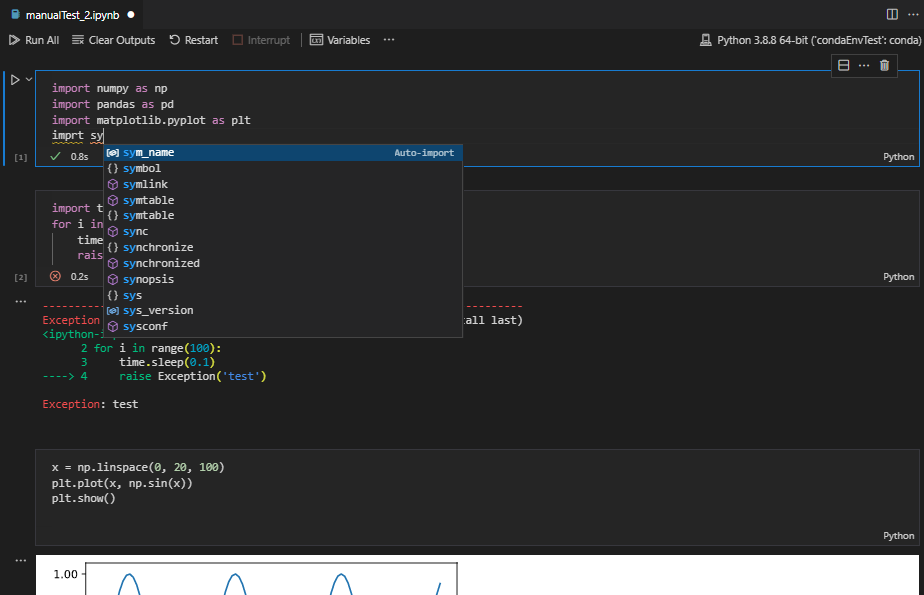
The Jupyter Extension uses the built-in notebook support from VS Code. This UI gives a number of advantages to users of notebooks:
- Out of the box support for VS Code's vast array of basic code editing features like hot exit, find & replace, and code folding.
- Editor extensions like VIM, bracket colorization, linters and many more are available while editing a cell.
- Deep integration with general workbench and file-based features in VS Code like outline view (Table of Contents), breadcrumbs and other operations.
- Fast load times for Jupyter notebook (.ipynb) files. Any notebook file is loaded and rendered as quickly as possible, while execution-related operations are initialized behind the scenes.
- Includes a notebook-friendly diff tool, making it much easier to compare and see differences between code cells, output and metadata.
- Extensibility beyond what the Jupyter extension provides. Extensions can now add their own language or runtime-specific take on notebooks, such as the .NET Interactive Notebooks and Gather
- While the Jupyter extension comes packaged with a large set of the most commonly used renderers for output, the marketplace supports custom installable renderers to make working with your notebooks even more productive. To get started writing your own, see VS Code's renderer api documentation.
Useful commands
Open the Command Palette (Command+Shift+P on macOS and Ctrl+Shift+P on Windows/Linux) and type in one of the following commands:
| Command | Description |
|---|---|
Jupyter: Create New Jupyter Notebook | Creates a new Jupyter Notebook |
Notebook: Select Notebook Kernel | Select or switch kernels within your notebook |
Notebook: Change Cell Language | Change the language of the cell currently in focus |
Jupyter: Export to HTML Jupyter: Export to PDF | Create a presentation-friendly version of your notebook in HTML or PDF |
To see all available Jupyter Notebook commands, open the Command Palette and type Jupyter or Notebook.
Context Keys for Key bindings
You can use the extension's context keys in 'when' clauses. Here's an example:
  {
    "key": "ctrl+i",
    "command": "jupyter.runAndDebugCell",
    "when": "!jupyter.webExtension"
  }
That keybinding states the jupyter.runAndDebugCell command should map to CTRL+I when not in the jupyter.webExtension.
The full list of context keys can be found here: https://github.com/microsoft/vscode-jupyter/wiki/Extensibility-for-other-extensions#context-keys-for-keybindings
Feature details
Learn more about the rich features of the Jupyter extension:
-
IntelliSense: Edit your code with auto-completion, code navigation, syntax checking and more.
-
Jupyter Notebooks: Create and edit Jupyter Notebooks, add and run code/markdown cells, render plots, create presentation-friendly versions of your notebook by exporting to HTML or PDF and more.
Supported locales
The extension is available in multiple languages: de, en, es, fa, fr, it, ja, ko-kr, nl, pl, pt-br, ru, tr, zh-cn, zh-tw
Questions, issues, feature requests, and contributions
-
If you have a question about how to accomplish something with the extension, please ask on Discussions. Our wiki can be a source of information as well.
-
Any and all feedback is appreciated and welcome! If you come across a problem or bug with the extension, please file an issue.
- If someone has already filed an issue that encompasses your feedback, please leave a 👍/👎 reaction on the issue.
-
Contributions are always welcome, so please see our contributing guide for more details.
-
If you're interested in the development of the extension, you can read about our development process
Data and telemetry
The Microsoft Jupyter Extension for Visual Studio Code collects usage data and sends it to Microsoft to help improve our products and services. Read our privacy statement to learn more. This extension respects the telemetry.telemetryLevel setting which you can learn more about at https://code.visualstudio.com/docs/supporting/faq#_how-to-disable-telemetry-reporting.
Trademarks
This project may contain trademarks or logos for projects, products, or services. Authorized use of Microsoft trademarks or logos is subject to and must follow Microsoft's Trademark & Brand Guidelines. Use of Microsoft trademarks or logos in modified versions of this project must not cause confusion or imply Microsoft sponsorship. Any use of third-party trademarks or logos are subject to those third-party's policies.
vscode
microsoft·TypeScript
微软开源的跨平台代码编辑器,基于 Electron 和 TypeScript 构建,支持插件扩展、调试和 Git 集成,适合日常开发写代码。
代码编辑器+4编辑器 / IDE
195262+17844k1.145.22026-11-10 17:16 UTC
neovim
neovim·Vim Script
Vim 的分支版本,用 Lua 做配置和插件开发,内置 LSP 与异步 API,让终端编辑器更好扩展、更好用。
文本编辑器+4编辑器 / IDE
103547+857.4kv0.12.62026-11-10 16:22 UTC
zed
zed-industries·Rust
用 Rust 打造的高性能多人协作代码编辑器,由 Atom 和 Tree-sitter 作者开发,主打低延迟编辑与实时协同编码。
代码编辑器+4编辑器 / IDE
94661+80912kv1.27.02026-11-10 16:11 UTC

AFFiNE
toeverything·TypeScript
把文档、白板、表格融为一体的开源知识库,可离线使用、支持多人实时协作,是 Notion 和 Miro 的替代方案。
知识库+4编辑器 / IDE
74421+1345.5kv2026.11.9-canary.9072026-11-10 16:20 UTC