首次使用需先执行 vllm-playground pull 预下载容器镜像,GPU 镜像约 10GB;MCP 功能要求 Python 3.10+;Claude Code 集成需 vLLM v0.12.0+、65K+ 上下文的模型并单独安装 ttyd 与 Claude Code 本体;默认端口 7860,被占用时用 vllm-playground stop 处理。
vllm-playground
micytaoApache-2.0活跃维护给 vLLM 推理服务器套上现代化 Web 界面,方便管理和对话,兼容 GPU/CPU,并针对 macOS Apple Silicon 与 OpenShift/Kubernetes 部署做了优化。
A modern web interface for managing and interacting with vLLM servers (www.github.com/vllm-project/vllm). Supports both GPU and CPU modes, with special optimizations for macOS Apple Silicon and enterprise deployment on OpenShift/Kubernetes.
v0.2.0发布于 2026-10-16 19:31 UTC547star +1 / 7 天77fork同步于 2026-11-11 05:53 UTC
pip install vllm-playground
vllm-playground pull
vllm-playground 硬件要求按 README 说明
支持 GPU 与 CPU 模式;GPU 镜像可选 NVIDIA、AMD ROCm、Google TPU,CPU 镜像单独提供;macOS Apple Silicon 支持 CPU 模式与 Metal GPU 加速(需另装 vllm-metal)。README 未给出具体显存数值。
支持 Apple Silicon支持 ROCm / AMD
给 vLLM 服务器套上现代 Web 界面,管理、对话、多实例一站搞定
给 vLLM 推理服务器套上现代化 Web 界面,方便管理和对话,兼容 GPU/CPU,并针对 macOS Apple Silicon 与 OpenShift/Kubernetes 部署做了优化。
核心能力
- 通过 Web UI 启动并管理 vLLM 服务器,支持子进程、容器、远程三种后端
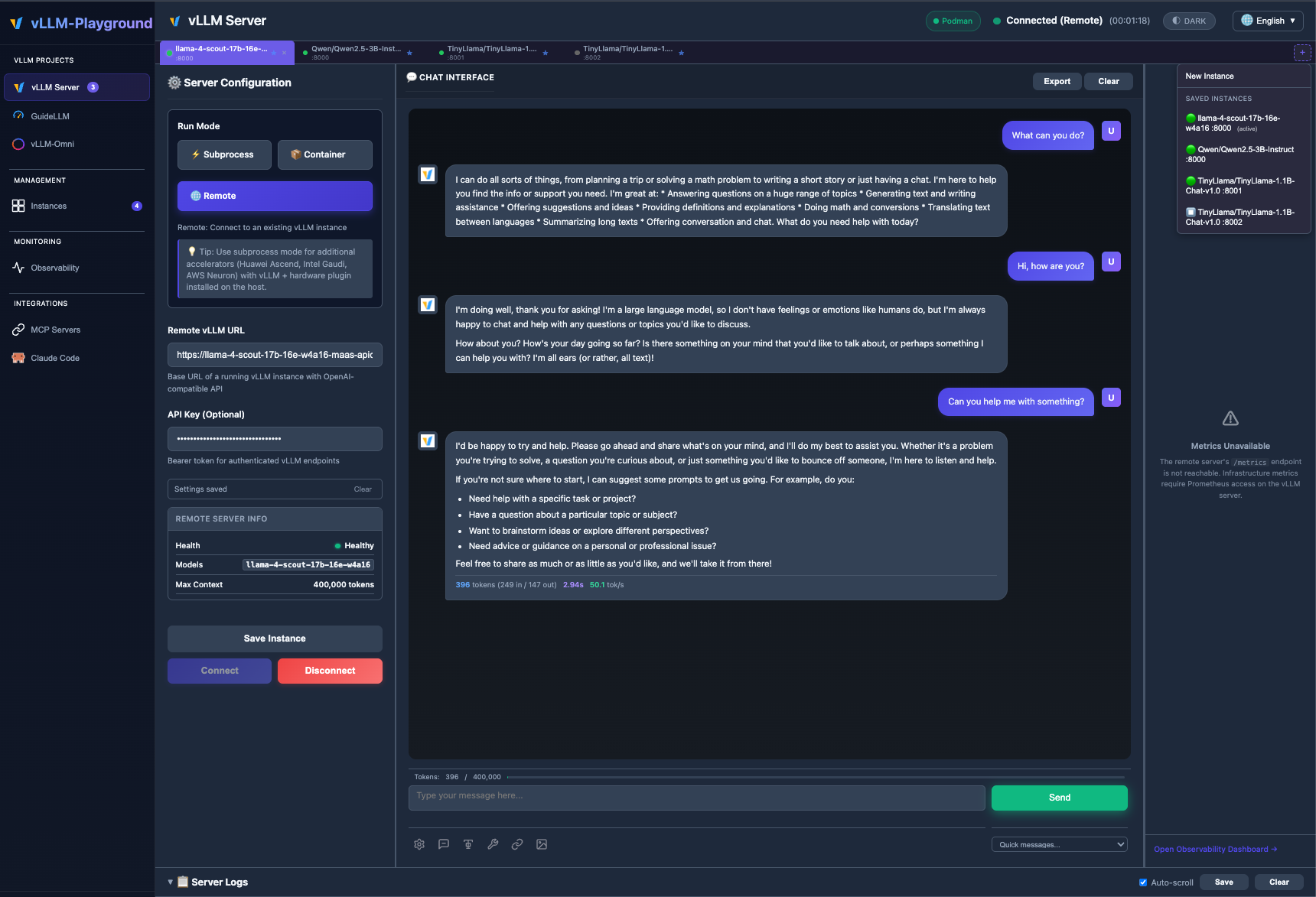
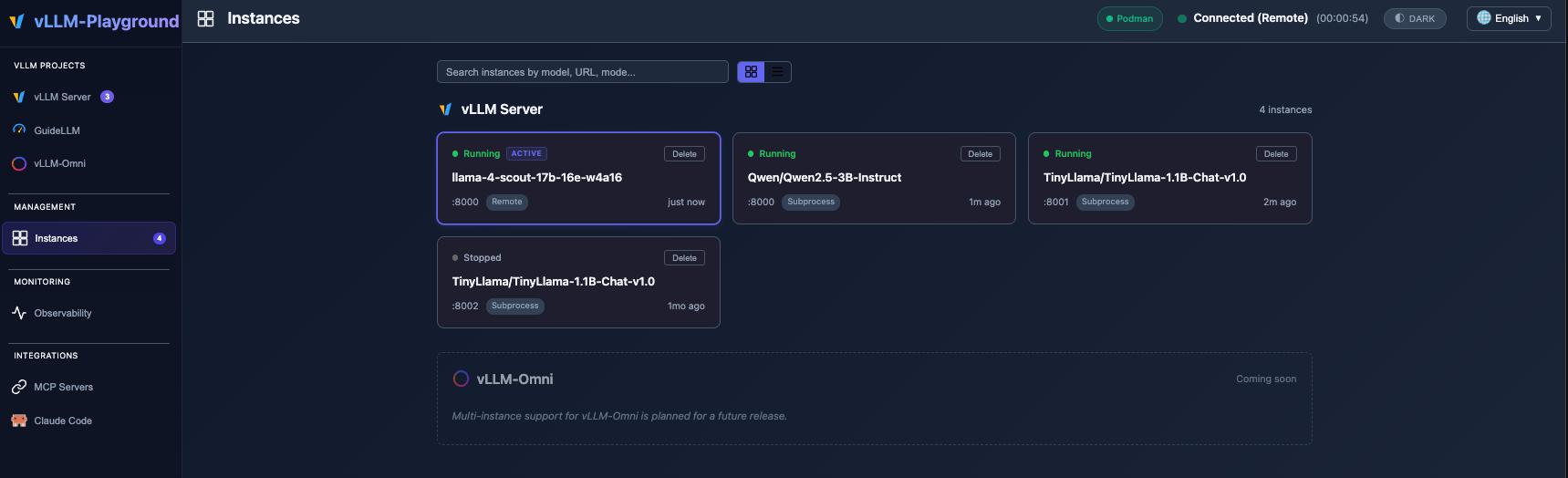
- 多实例并行运行,用标签页和 Instances 页统一管理并保存配置
- 支持 VLM 视觉模型上传图片对话,以及 MCP 工具调用与结构化输出
- 内置 Claude Code 集成,用开源模型充当本地编码助手后端
- 集成 GuideLLM 做负载测试,并提供一键 vLLM 社区 Recipes 配置
容易踩的坑
内容由模型根据 README 生成,可能不完整或不准确,以官方文档为准。看原文 README
- v0.2.0最新正式版2026-10-16 · 2026-10-16 19:31 UTC
vLLM Playground v0.2.0 - Decision Models (Experimental)
Release Date: October 2026
This release introduces Decision Models, a new experimental tab for exploring structured-read decision capabilities powered by DiffusionGemma and the Jev / System One API. It also includes security hardening for debug endpoints and SQL injection prevention.
Highlights
Decision Models Tab
A brand-new Decision Models section under the Experimental category in the sidebar. This is a fully isolated sandbox for structured-read decisions -- it manages its own dedicated container, ports, and lifecycle, so it never interferes with the main vLLM Server flow.
- Gallery of 12 use cases across 4 primitive categories, each with a ready-to-run payload:
- Noul (Yes/No Probability) -- Billing Dispute Gate, RAG Passage Reranking
- Choice (Pick One Option) -- Support Ticket Routing, Agent Tool Selection, Citation Verification, Confidence-Gated Model Routing
- Score (Ordered Scale) -- Urgency Scoring
- Combination (Multiple Primitives) -- Chained Multi-Question Triage, LLM Guardrails, Content Moderation, Race Lane Decider, Rubric Grading Puzzle
- Category tab bar -- Filter use cases by primitive type with pill-style tabs showing per-category counts, or view all grouped under section headings.
- Mock-by-default evaluation -- Every use case can be tried instantly with a deterministic mock evaluator (no GPU required). When a live Decision Server is connected, evaluation is transparently proxied to it.
- Managed container lifecycle -- Pull, start, health-wait, and stop a dedicated vLLM nightly container running
google/diffusiongemma-26B-A4B-it, fully isolated from the main vLLM Server instances.
Remote Jev Endpoint Support
Connect to an externally-managed Jev API (e.g.
https://api.typesafe.ai) instead of running a local container.- Run Mode toggle -- Switch between Local (launch a container) and Remote (connect to an existing endpoint) with a single click.
- Credential validation at connect time -- The connection flow now sends a probe request to
/v1/systemoneto verify the API key and model before showing "Connected". Previously, only a/healthreachability check was performed. jev-latestdefault -- Remote mode defaults to thejev-latestmodel alias (the official Jev API model), not the local DiffusionGemma HuggingFace ID.- Settings persistence -- Remote endpoint URL and API key are saved to and restored from the Settings store.
New Use Cases from Official TypeSafe Cookbooks
Five new use cases sourced from the most popular Jev production patterns (838 catalogued builds, 545 shipped products):
- LLM Guardrails (3x Noul + Score) -- Screen messages for jailbreak, harmful requests, and medical advice with a severity rating. Based on the Guardrails for LLMs cookbook.
- Content Moderation (Choice + 2x Noul) -- Classify chat messages by purpose, flag toxicity, and detect spoilers. Based on the Twitch Chat Filter cookbook.
- RAG Passage Reranking (Noul) -- Score candidate passages against a query for search result reranking. Reported 20x faster and 10x cheaper than LLM-based reranking. Based on the Re-ranking cookbook.
- Citation Verification (Choice) -- Check whether a source document supports, contradicts, or says nothing about a claim. Based on the Double-checking Citations cookbook.
- Confidence-Gated Model Routing (Choice) -- Pick fast/standard/reasoning model tier based on request complexity. The #1 Jev production pattern with 64+ shipped products.
Interactive Demos
- Race Lane Decider -- A live control-loop demo with polished emoji visuals, lane dividers, proximity glow, and crash animation. Each tick compress
- Gallery of 12 use cases across 4 primitive categories, each with a ready-to-run payload:
- v0.1.92026-09-20 · 2026-09-20 06:07 UTC
查看更新说明
vLLM Playground v0.1.9 - CI/CD Pipeline, Configurable Container Images & Remote Fixes
Release Date: September 2026
This release ships a full CI/CD pipeline (automated tests + GitHub Actions on every PR, plus a gated PyPI release process), a new Settings tab for configurable container image versions, and fixes real chat-error handling and MaaS gateway support in Remote mode.
Highlights
CI/CD Pipeline
Every pull request now runs a layered test suite automatically: lint/format, unit tests (Python 3.9/3.11/3.12), FastAPI API tests, container-manager tests against a real Podman daemon, Kubernetes-manager tests against a real
kindcluster, and Playwright frontend smoke tests — all in about two minutes.- Releases are tag-triggered (
vX.Y.Z), version/changelog-verified, and re-tested against a fast safety-net subset right before publish, then shipped to PyPI via Trusted Publishing (OIDC) — no stored API token. - While building this pipeline, a one-off container-build check caught (and this release fixes) two pre-existing bugs: both the Podman and OpenShift container images failed to start with
ModuleNotFoundError: No module named 'vllm_playground', becauseapp.pywas being run as a bare script instead of as part of the installed package. Both Containerfiles are fixed and verified to boot and respond on/api/status. Building the container images is not part of the automated CI/CD pipeline itself — container/OpenShift deployment is a secondary use case, so this was a manual, ad-hoc verification rather than a standing gate.
Configurable Container Image Versions
New Settings tab lets you pick vLLM/vLLM-Omni container image versions per accelerator from a dropdown (sourced live from Docker Hub, cached, with an offline fallback list) instead of relying on hardcoded tags.
- Per-accelerator overrides persist and default back to the built-in version when unset; picking the default-tagged option resets it.
- Version bumps:
vllm/vllm-openaiandvllm/vllm-openai-rocm→ v0.29.0,vllm/vllm-omniandvllm/vllm-omni-rocm→ v0.28.0. - CPU mode now uses the official multi-arch
vllm/vllm-openai-cpu:v0.29.0image (covers macOS ARM64 + Linux x86_64) instead of a self-built Quay image. - AMD GPU default switched from
rocm/vllm:latestto the versionedvllm/vllm-openai-rocmso the AMD dropdown has real tags to offer.
Remote Mode Fixes
- Fixed silent "No response from model" failures during streaming chat in Remote mode: upstream error responses were being serialized as invalid JSON (Python dict
repr, notjson.dumps), which the frontend'sJSON.parsesilently dropped. Errors now surface as real, readable messages. - Added generic support for MaaS/KServe-style gateways that advertise a dedicated base URL per model (via
GET /v1/models) instead of one shared OpenAI-compatible root — Remote mode now detects and uses per-model URLs automatically, with a self-healing retry if the shared root 404s. - Fixed a token-count fallback bug that fabricated "1 out" tokens on failed requests, and distinguished a genuinely empty-but-successful response (e.g. an embedding-only model selected for chat) from a real failure.
Recipes Catalog
- Synced the recipes catalog with the latest upstream vLLM recipes (as of 2026-07-02), including the new
ArceeAI/Trinity-Large-Thinkingrecipe.
Upgrade Notes
- If you run the OpenShift or Podman container images built from this repo's
Containerfiles, upgrade to this release — prior images failed to start at all. - No settings migration needed; existing container image tags keep working unless you explicitly pick an override in the new Settings tab.
Full test suite:
pytest tests/unit tests/api tests/container tests/k8s tests/frontend— all passing in CI on Python 3.9, 3.11, and 3.12. - Releases are tag-triggered (
- v0.1.82026-04-07 · 2026-04-07 21:18 UTC
查看更新说明
Release Date: April 2026
This release ships multi-instance management (registry-backed tabs and Management → Instances), improves remote and LiteLLM connectivity and model selection, and fixes benchmarking so auth and model IDs match the server you target.
Install:
pip install vllm-playground==0.1.8— https://pypi.org/project/vllm-playground/
Highlights
Multi-Instance Backends
Run and manage several vLLM servers at once — subprocess, container, and remote — each as its own Instance with isolated chat, logs, and metrics.
- Instance registry with persistence under
~/.vllm-playground/instances.json - Per-instance tabs on the vLLM Server page; switch active instance with one click
- Management → Instances grid: search, status, connect/stop, and saved configurations
- See the Multi-Instance Guide for workflows and tips
Remote Server & LiteLLM
- Resilient remote URLs — normalization for OpenAI-compatible roots and LiteLLM-style bases; connect probing without requiring
/healthon every deployment - Chat model list from
/v1/models— populate the model dropdown from the active server; better alignment with served-model aliases and remote catalogs - Context length — improved handling when gateways expose limits via model metadata (e.g. LiteLLM
model/info-style data)
Benchmarking (Built-in & GuideLLM)
- Bearer
Authorizationfor OpenAI-compatible remote targets (LiteLLM, etc.) - Optional API key from the UI for remote benchmarks; keys are not applied to localhost/container targets (avoids breaking local vLLM with gateway tokens)
- Model ID matches the selected instance — when GuideLLM / built-in benchmark sends
instance_id, the OpenAImodelfield (and GuideLLM--modelwhen set) comes from that registry entry (served_model_name, thenmodel, then saved config), fixing typical 404 model not found when the UI session was still on a different remote model
UI & Reliability
- GuideLLM target-instance dropdown stability when the instance list updates
- GPU memory utilization input normalized (e.g. fractional vs percentage)
- Mode switch clears stale remote model selection where appropriate
Upgrade
pip install --upgrade vllm-playgroundFrom Source
git clone https://github.com/micytao/vllm-playground.git
cd vllm-playground
pip install -e .
vllm-playground
Documentation
- Changelog — Version history
- Multi-Instance Guide — Instances, tabs, and management UI
- Installation Guide — Setup instructions
Links
- PyPI: https://pypi.org/project/vllm-playground/
- vLLM Workshop: https://micytao.github.io/vllm-workshop/
- Instance registry with persistence under
- v0.1.72026-03-04 · 2026-03-04 22:14 UTC
查看更新说明
vLLM Playground v0.1.7 - Hotfix & Tutorials
Release Date: March 2026
This release fixes six bugs and adds an embedded Tutorials page.
Note: v0.1.6 has been yanked from PyPI due to the container mode bug below. Users should upgrade to v0.1.7.
Bug Fixes
Container Mode Switching Broken
The
getConfig()function inapp.jswas missing an explicit branch for thecontainerradio button. Additionally, the fallback default was changed from'container'(v0.1.5) to'remote'(v0.1.6), which meant selecting container mode silently sentrun_mode: 'remote'to the backend. The server would then attempt to connect to a remote URL (typically empty), breaking the vLLM server entirely.Fix: Restored the default to
'container'(matching v0.1.5) and added explicit handling for all three modes (subprocess,container,remote).Logprobs Tooltip Clipped on First Line
The logprobs probability tooltip (shown when hovering over tokens with logprobs enabled) was clipped when appearing on the first line of a chat response. The
.message-contentcontainer hadoverflow: hidden, which prevented the absolutely-positioned tooltip from extending above the message bubble.Fix: Changed
.message-contentfromoverflow: hiddentooverflow: visible.Logprobs Crash on Metal/CPU
When logprobs were enabled with Metal or CPU compute mode, vLLM hit an
IndexError: list index out of rangein_create_chat_logprobsin both streaming and non-streaming modes. This is an upstream vLLM bug.Fix: Two-layer workaround based on compute mode (not run mode):
- Force non-streaming mode when logprobs are enabled with Metal or CPU compute mode selected
- If vLLM still returns a 500 error, transparently retry the request without logprobs and show a notification: "Logprobs not available — vLLM backend does not support logprobs for this model/platform."
GPU compute mode and remote mode are unaffected and continue to use streaming with logprobs. The workaround correctly handles the edge case where remote mode hides (but retains) the compute mode radio state — remote mode always allows streaming regardless of the hidden compute selection.
Mode Switch Config Leak
When switching from container or subprocess mode to remote mode, form fields like
served_model_name,enable_tool_calling, andtool_call_parserretained their stale values from the previous mode. Since these fields are part of the hidden "local server settings" section, they were invisible to the user but still read bygetConfig(). Ifserved_model_namewas set (e.g., "my-coder"), it overrode the auto-discovered remote model name, causing chat requests to target a nonexistent model and returning "no response from model."Fix: Two layers of protection:
toggleRunMode()auto-clearsserved_model_name,enable_tool_calling, andtool_call_parserwhen switching to remote modegetConfig()explicitly skips these fields for remote mode as a safety net
Stale Observability Data After Mode Switch
After stopping a server (container, subprocess, or remote) and starting a new one in a different mode, the observability dashboard continued to display metrics from the previous session. The
MetricStoreand legacy metrics were not cleared on server stop.Fix:
start_server()now clears all metrics data (MetricStore.latest,MetricStore.history,latest_vllm_metrics,metrics_history) when a new server starts, so the observability dashboard begins fresh. Old metrics remain visible after stopping for post-mortem analysis.Claude Code Not Detected on VPS/Linux
The Claude Code CLI installed via the official
curl -fsSL https://claude.ai/install.sh | bashmethod installs to~/.local/bin/claude, which is often not in the$PATHof the Python process running vLLM Playground. Similarly, npm global installs may go to~/.npm-global/bin/.Fix: `find_cl
- v0.1.62026-03-02 · 2026-03-02 19:10 UTC
查看更新说明
vLLM Playground v0.1.6 - Observability Dashboard & Context Insights
Release Date: March 2026
This release adds a comprehensive Observability Dashboard with real-time vLLM server metrics, a PagedAttention Visualizer for KV cache insight, Token Counter & Logprobs Visualizer for per-token analysis, a Speculative Decoding Dashboard, and persistent user settings.
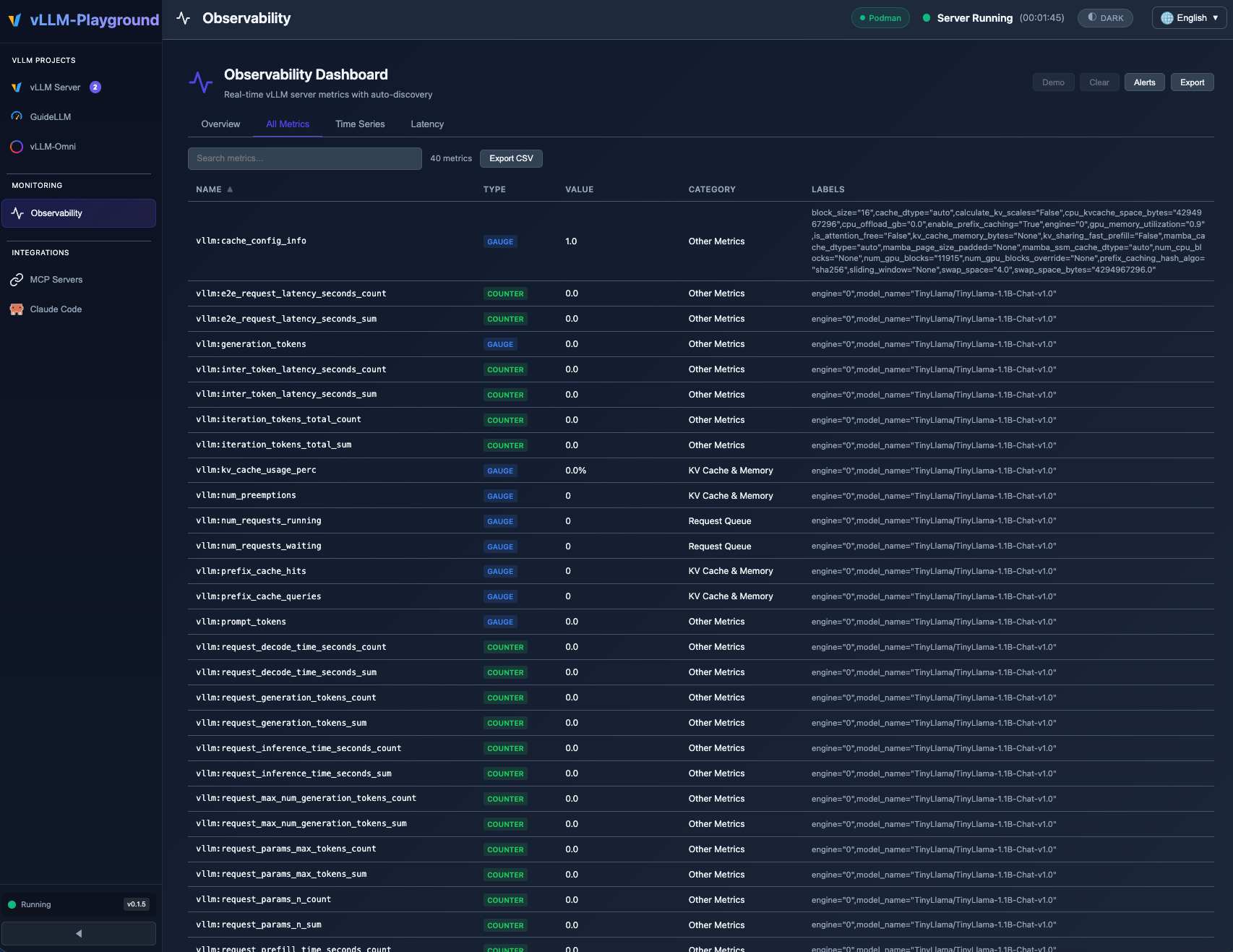
Real-time Observability Dashboard with auto-discovered vLLM metrics, category filtering, and threshold alerts.
Highlights
- Observability Dashboard - Full-page metrics dashboard with auto-discovery, time-series charts, and threshold alerts
- PagedAttention Visualizer - Real-time KV cache utilization heatmap with eviction alerts
- Token Counter & Logprobs - Live token estimation, per-token probability heatmap, and alternative token tooltips
- Speculative Decoding Dashboard - Acceptance rate, speedup factor, and token count tracking
- Settings Persistence - User preferences saved to
~/.vllm-playground/settings.json
Observability Dashboard
A dedicated full-page dashboard for monitoring vLLM server health and performance in real time. Access it from the Observability navigation item.
Overview Tab
Categorized metric cards with color-coded threshold indicators (normal / warning / danger):
Category Example Metrics KV Cache & Memory KV Cache Usage, GPU/CPU Cache Usage, Prefix Cache Hit Rate Throughput Prompt Throughput, Generation Throughput Scheduling Running Requests, Waiting Requests, Preemptions Latency Time to First Token (TTFT), Time per Output Token (TPOT), E2E Latency All Metrics Tab
Searchable, sortable table of every metric exposed by the vLLM
/metricsendpoint. Unregistered metrics auto-appear with sensible defaults -- no configuration needed.Time Series Tab
Interactive time-series charts powered by uPlot:
- Select any combination of metrics to plot
- Configurable time windows (1m, 5m, 15m, 1h)
- History persists across tab switches and page navigations
- Export metric data as JSON
Alerts
Configurable threshold alerts with visual and historical tracking:
- Per-metric warning and danger thresholds
- Alert history log with timestamps
- Alerts badge in the navigation sidebar
Generic Metrics Architecture
A new modular architecture powers the dashboard:
Module Purpose metrics-registry.jsSingle source of truth for metric metadata, categories, formats, and thresholds metrics-poller.jsPub/sub poller that fetches /api/metricsand distributes data to all subscribersobservability.jsFull-page dashboard UI with tabs, charts, and alerts Adding a new curated metric requires a single entry in the registry. The dashboard, sidebar, and alerts pick it up automatically.
PagedAttention Visualizer
Real-time visualization of vLLM's PagedAttention KV cache, displayed as a collapsible panel in the main chat view.
Features
- Block Heatmap - Canvas-rendered heatmap showing cache block utilization over time (up to 40 data points)
- Usage Gauge - Circular progress indicator for current KV cache usage percentage
- Prefix Cache Stats - Hit rate, total hits, and total queries
- Eviction Alerts - Three-level warning system:
- Normal (< 90% usage)
- Warning (90-95% usage)
- Critical (> 95% usage, preemptions detected)
Data is sourced from the shared metrics poller, so enabling the visualizer adds no extra API calls.
Token Counter, Logprobs & Speculative Decoding
Live Token Counter
A real-time token estimator displayed alongside the chat input:
- Input estimation - Approximates token count as you type (using server-side
/tokenizewhen av
用户点评
登录用户的真实使用记录,可按版本和硬件筛选共 0 条
还没有人点评。第一个说出真实体验的人最有价值。
vLLM Playground
A modern web interface for managing and interacting with vLLM servers (www.github.com/vllm-project/vllm). Supports GPU and CPU modes, with special optimizations for macOS Apple Silicon and enterprise deployment on OpenShift/Kubernetes.
🆕 vLLM-Omni Multimodal Generation
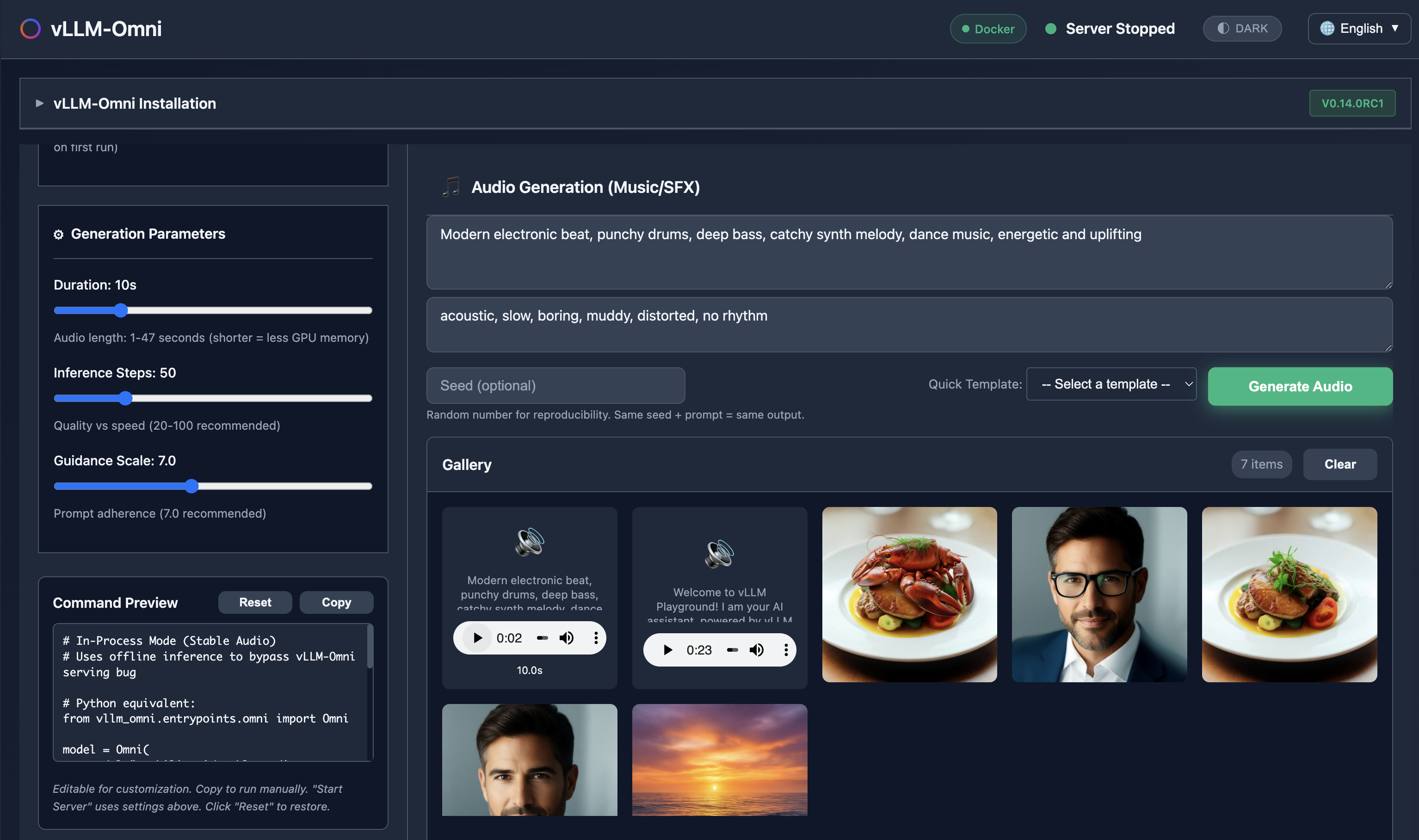
Generate images, edit photos, create speech, and produce music - all with vLLM-Omni integration.
✨ Claude Code Integration
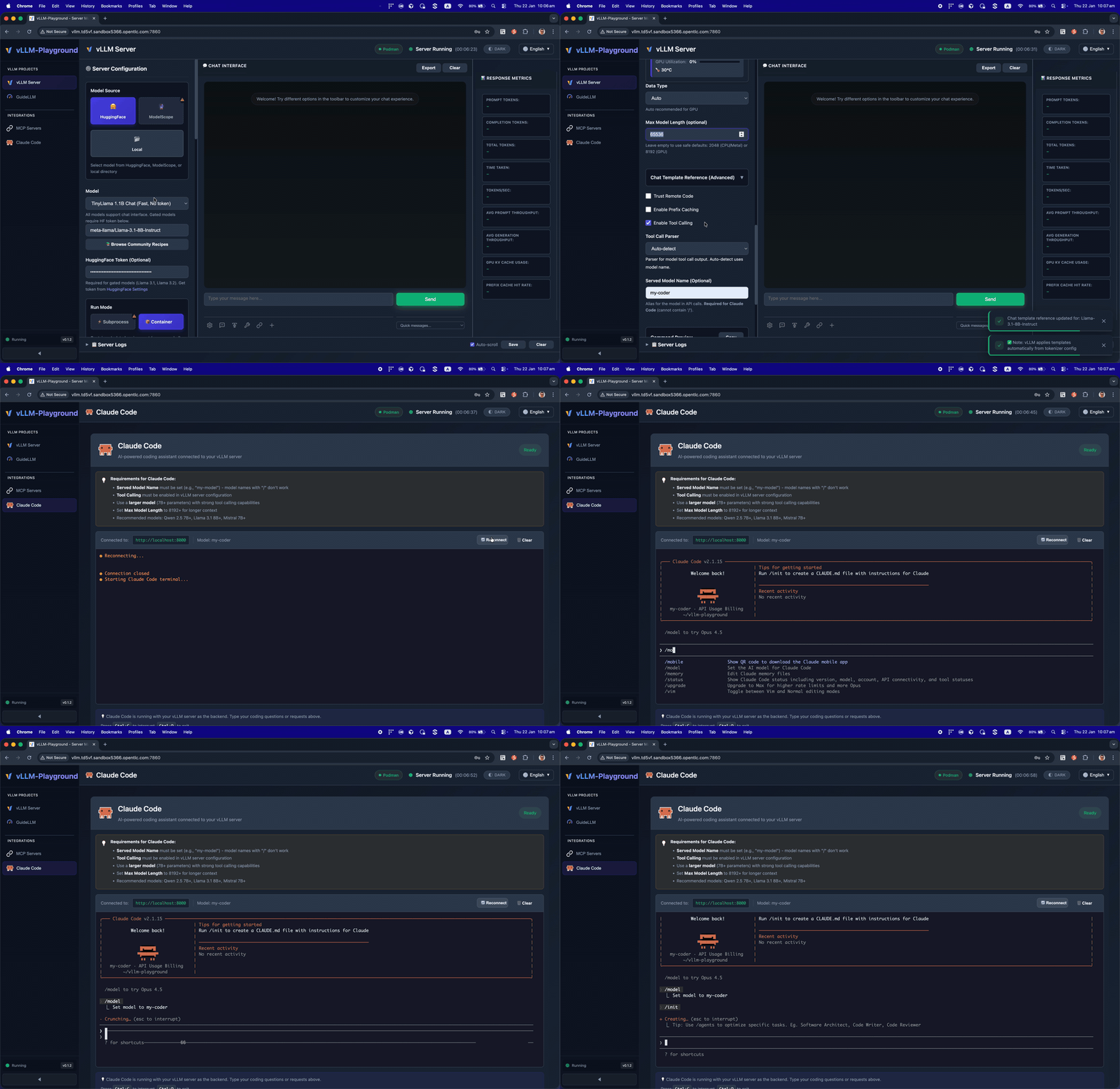
Run Claude Code with open-source models served by vLLM - your private, local coding assistant.
✨ Agentic-Ready with MCP Support
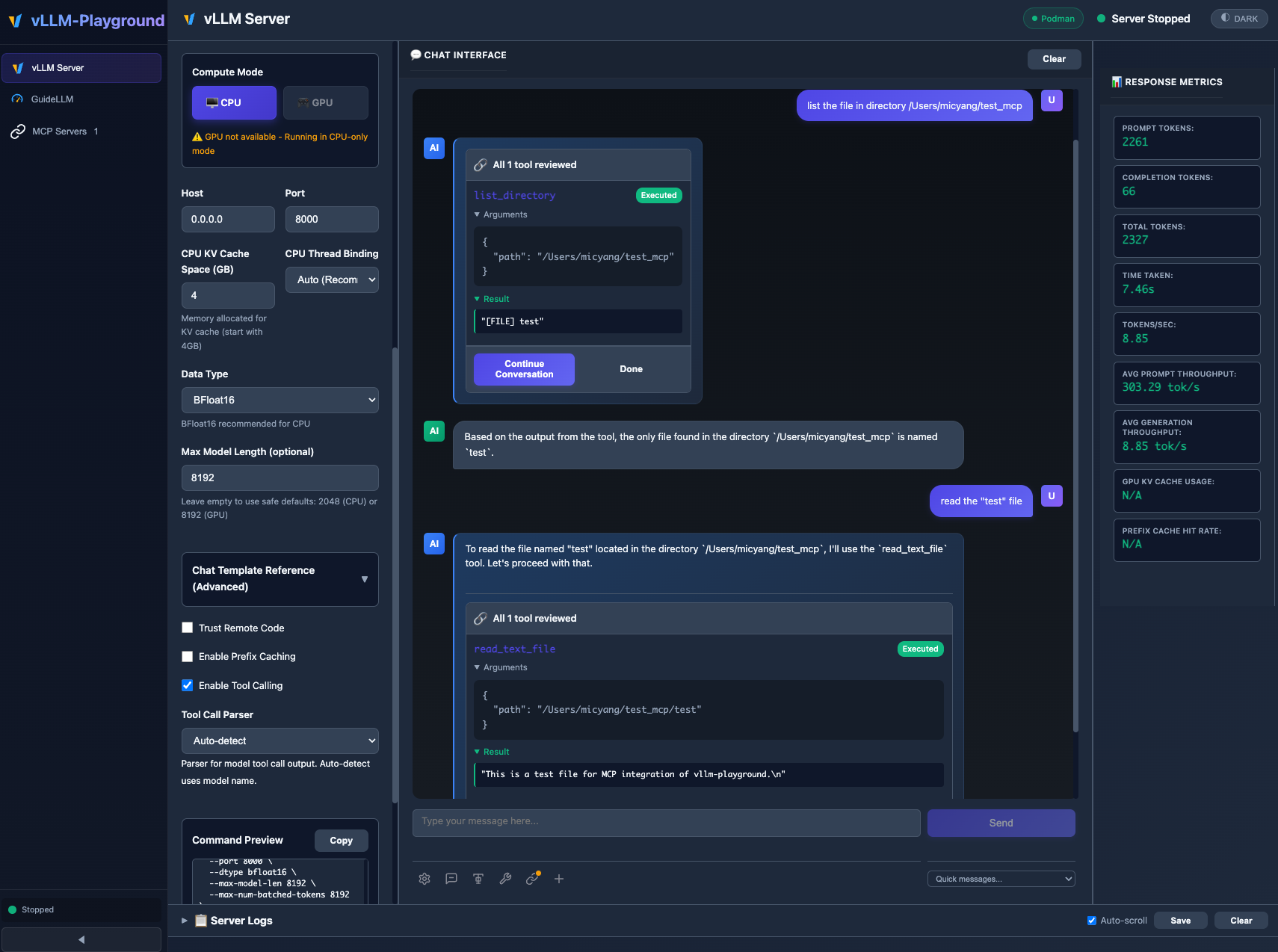
MCP (Model Context Protocol) integration enables models to use external tools with human-in-the-loop approval.
🖼️ VLM (Vision Language Model)
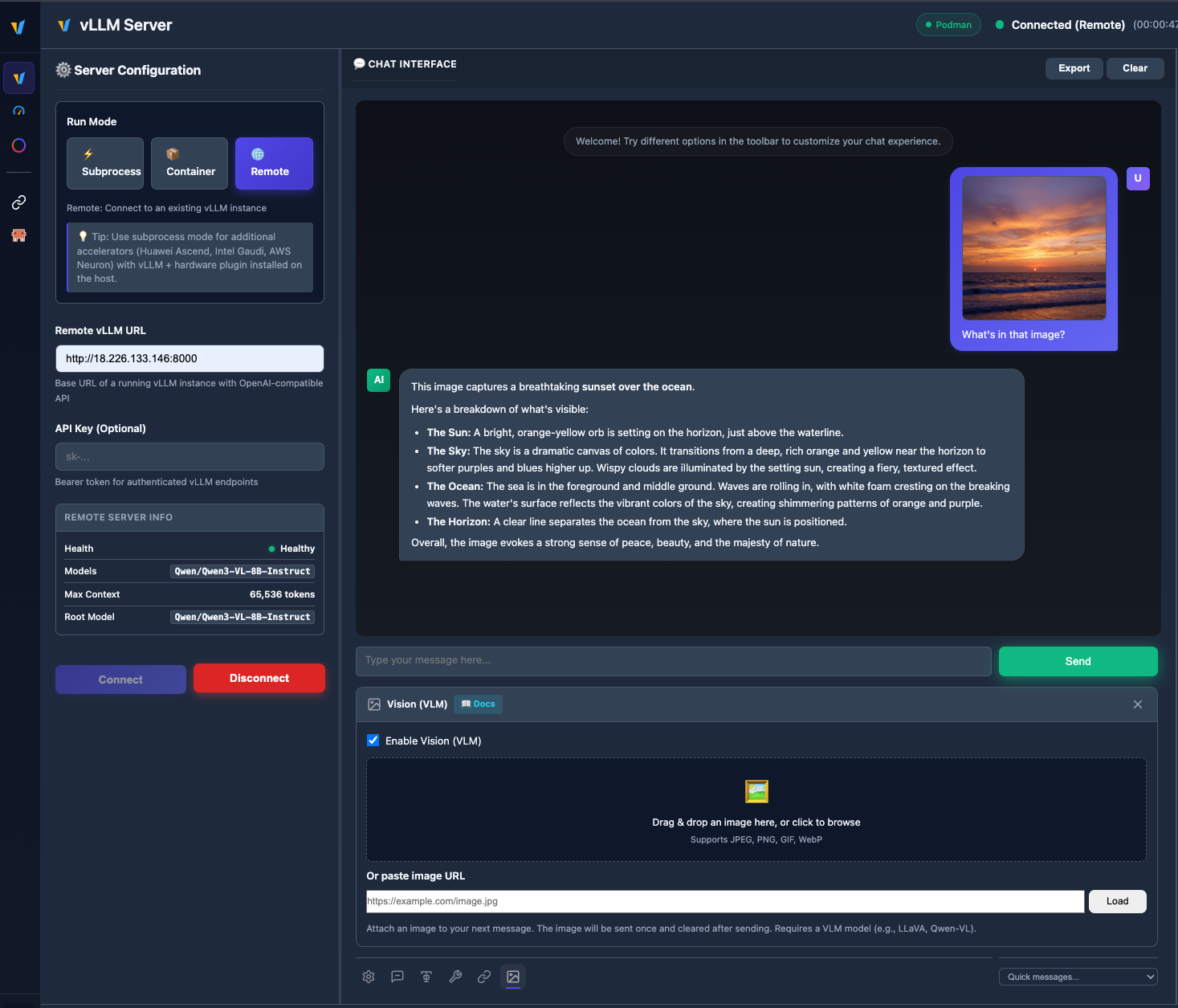
Upload images and chat with vision models like Qwen2.5-VL, LLaVA, and more.
🧩 Multiple instances & backends
Run subprocess, container, and remote vLLM servers side by side; switch tabs, save configs, and manage everything from Management → Instances. See Multi-Instance Guide for details.
🆕 What's New in v0.2.0
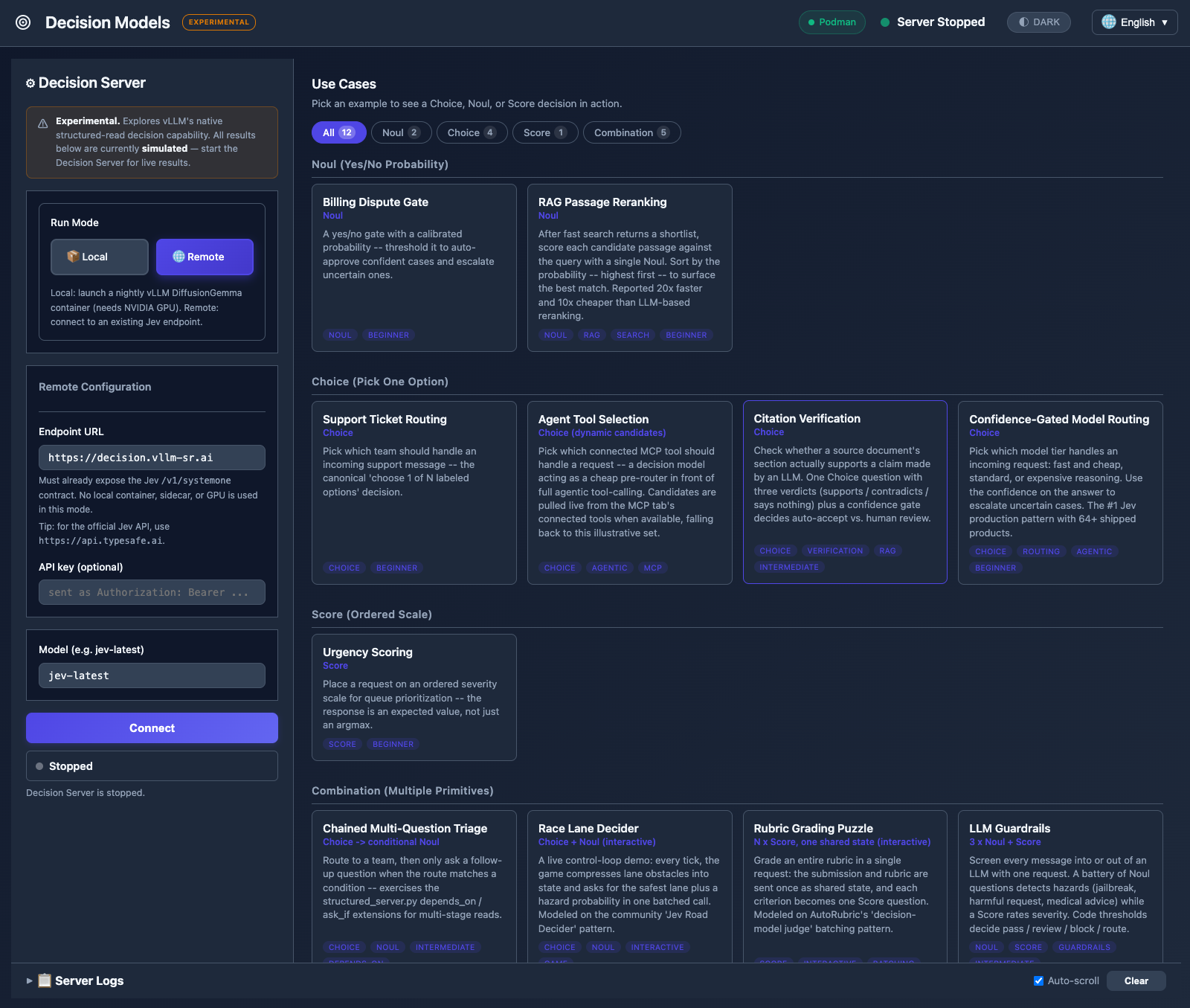
- Decision Models (Experimental) — A brand-new sandbox tab for structured-read decisions powered by DiffusionGemma and Jev / System One. Gallery of 12 use cases across 4 tabbed categories (Noul, Choice, Score, Combination), mock-by-default evaluation, and two interactive demos (Race Lane Decider, Rubric Grading Puzzle). Fully isolated from the main Server Config flow — see Decision Models Guide.
- Remote Jev endpoint — Connect to an external Jev API (e.g.
https://api.typesafe.ai) with API key authentication. Credentials are validated at connect time with a probe request, not just a reachability check. - 5 new use cases from TypeSafe cookbooks — LLM Guardrails, Content Moderation, RAG Passage Reranking, Citation Verification, and Confidence-Gated Model Routing, organized into a tabbed category gallery with count badges.
- Security hardening — Debug endpoints gated behind explicit opt-in (CWE-862); SQL injection template literal fix.
v0.1.9 added CI/CD pipeline, configurable container images, and remote mode fixes; v0.1.8 added multi-instance backends — see Changelog for the full history.
🚀 Quick Start
# Install from PyPI
pip install vllm-playground

# Pre-download container image (~10GB for GPU)
vllm-playground pull

# Start the playground
vllm-playground
Open http://localhost:7860 and click "Start Server" - that's it! 🎉
CLI Options
vllm-playground pull                # Pre-download GPU image (NVIDIA)
vllm-playground pull --nvidia       # Pre-download NVIDIA GPU image
vllm-playground pull --amd          # Pre-download AMD ROCm image
vllm-playground pull --tpu          # Pre-download Google TPU image
vllm-playground pull --cpu          # Pre-download CPU image
vllm-playground pull --all          # Pre-download all images
vllm-playground --port 8080         # Custom port
vllm-playground stop                # Stop running instance
vllm-playground status              # Check status
✨ Key Features
| Feature | Description |
|---|---|
| 🧠 Decision Models | Structured-read decisions (Noul, Choice, Score) with Jev/DiffusionGemma — local or remote |
| 🌐 Remote Server | Connect to any remote vLLM instance via URL + API key |
| 🧩 Multi-instance | Several backends at once (subprocess, container, remote); tabs + Instances page |
| 🖼️ VLM Support | Upload images and chat with vision models (Qwen2.5-VL, LLaVA) |
| 🤖 Claude Code | Use open-source models as Claude Code backend via vLLM |
| 💬 Modern Chat UI | Markdown-rendered chat with streaming responses |
| 🔧 Tool Calling | Function calling with Llama, Mistral, Qwen, and more |
| 🔗 MCP Integration | Connect to MCP servers for agentic capabilities |
| 🏗️ Structured Outputs | Constrain responses to JSON Schema, Regex, or Grammar |
| 🐳 Container Mode | Zero-setup vLLM via automatic container management |
| ☸️ OpenShift/K8s | Enterprise deployment with dynamic pod creation |
| 📊 Benchmarking | GuideLLM integration for load testing |
| 📚 Recipes | One-click configs from vLLM community recipes |
📦 Installation Options
| Method | Command | Best For |
|---|---|---|
| PyPI | pip install vllm-playground | Most users |
| With Benchmarking | pip install vllm-playground[benchmark] | Load testing |
| From Source | git clone + python run.py | Development |
| OpenShift/K8s | ./openshift/deploy.sh | Enterprise |
📖 See Installation Guide for detailed instructions.
🔧 Configuration
Tool Calling
Enable in Server Configuration before starting:
- Check "Enable Tool Calling"
- Select parser (or "Auto-detect")
- Start server
- Define tools in the 🔧 toolbar panel
Supported Models:
- Llama 3.x (
llama3_json) - Mistral (
mistral) - Qwen (
hermes) - Hermes (
hermes)
Claude Code Integration
Use vLLM to serve open-source models as a backend for Claude Code:
- Go to Claude Code in the sidebar
- Start vLLM with a recommended model (see tips on the page)
- The embedded terminal connects automatically
Requirements:
- vLLM v0.12.0+ (for Anthropic Messages API)
- Model with native 65K+ context and tool calling support
- ttyd installed for web terminal
Recommended Model for most GPUs:
meta-llama/Llama-3.1-8B-Instruct
--max-model-len 65536 --enable-auto-tool-choice --tool-call-parser llama3_json
Note: This integration demonstrates using vLLM as a backend for Claude Code. Claude Code is a separate product by Anthropic - users must install it independently and comply with Anthropic's Commercial Terms of Service. vLLM Playground provides the terminal interface only.
MCP Servers
Connect to external tools via Model Context Protocol:
- Go to MCP Servers in the sidebar
- Add a server (presets available: Filesystem, Git, Fetch, Time)
- Connect and enable in chat panel
⚠️ MCP requires Python 3.10+
CPU Mode (macOS)
Edit config/vllm_cpu.env:
export VLLM_CPU_KVCACHE_SPACE=40
export VLLM_CPU_OMP_THREADS_BIND=auto
Metal GPU Support (macOS Apple Silicon)
vLLM Playground supports Apple Silicon GPU acceleration:
- Install vllm-metal following official instructions
- Configure playground to use Metal:
- Run Mode: Subprocess
- Compute Mode: Metal
- Venv Path:
~/.venv-vllm-metal(or your installation path)
See macOS Metal Guide for details.
Custom vLLM Installations
Use specific vLLM versions or custom builds:
- Install vLLM in a virtual environment
- Configure playground:
- Run Mode: Subprocess
- Venv Path:
/path/to/your/venv
See Custom venv Guide for details.
📖 Documentation
Getting Started
- Installation Guide - All installation methods
- Quick Start - Get running in minutes
- macOS CPU Guide - Apple Silicon CPU setup
- macOS Metal Guide - Apple Silicon GPU acceleration
- Custom venv Guide - Using custom vLLM installations
Features
- Features Overview - Complete feature list
- Multi-Instance Guide - Multiple backends, tabs, and Instances management
- Gated Models Guide - Access Llama, Gemma, etc.
Deployment
- OpenShift/K8s Deployment - Enterprise deployment
- Architecture Overview - System design
- Container Variants - Container options
Reference
- Troubleshooting - Common issues
- Performance Metrics - Benchmarking
- Command Reference - CLI cheat sheet
Releases
- Changelog - Version history and changes
- v0.2.0 - Decision Models (Experimental), remote Jev endpoint, category gallery
- v0.1.9 - CI/CD pipeline, configurable container images, remote mode fixes
- v0.1.8 - Multi-instance backends & remote polish
- v0.1.7 - Hotfix & tutorials
- v0.1.6 - Observability dashboard, PagedAttention visualizer, token counter, logprobs
- v0.1.5 - Remote server, VLM vision support, markdown rendering
- v0.1.4 - vLLM-Omni multimodal, Studio UI
- v0.1.3 - Multi-accelerators, Claude Code, vLLM-Metal
- v0.1.2 - ModelScope integration, i18n improvements
- v0.1.1 - MCP integration, runtime detection
- v0.1.0 - First release, modern UI, tool calling
🏗️ Architecture
┌──────────────────┐
│   User Browser   │
└────────┬─────────┘
         │ http://localhost:7860
         ↓
┌──────────────────┐
│   Web UI (Host)  │  ← FastAPI + JavaScript
└────────┬─────────┘
         │
    ┌────┴────┐
    ↓         ↓
┌───────-─┐ ┌────────┐
│ vLLM    │ │  MCP   │  ← Containers / External Servers
│Container│ │Servers │
└────────-┘ └────────┘
📖 See Architecture Overview for details.
🆘 Quick Troubleshooting
| Issue | Solution |
|---|---|
| Port in use | vllm-playground stop |
| Container won't start | podman logs vllm-service |
| Tool calling fails | Restart with "Enable Tool Calling" checked |
| Image pull errors | vllm-playground pull --all |
📖 See Troubleshooting Guide for more.
🔗 Related Projects
- vLLM - High-throughput LLM serving
- Claude Code - Anthropic's agentic coding tool
- LLMCompressor Playground - Model compression & quantization
- GuideLLM - Performance benchmarking
- MCP Servers - Official MCP servers
📝 License
Apache 2.0 License - See LICENSE file for details.
🤝 Contributing
Contributions welcome! Please see CONTRIBUTING.md for setup instructions and guidelines.
Made with ❤️ for the vLLM community