模型权重在启动时单独下载,不包含在源码包中;需保持 Transformers 4.x 并安装 funasr>=1.4.9,否则启动失败;MOSS 后端需先自行启动 vLLM 服务,默认地址为 http://127.0.0.1:8898/v1。
FunClip
modelscopeMIT活跃维护基于 FunASR 的本地视频转写与字幕生成工具,带 Gradio 界面,还能用大模型辅助自动剪辑,适合做中文视频内容创作。
FunASR-powered video transcription, subtitle generation, and LLM-assisted clipping tool with a local Gradio UI.
v2.2.1发布于 2026-09-01 06:37 UTC6,526star +19 / 7 天773fork同步于 2026-11-10 05:33 UTC
git clone https://github.com/modelscope/FunClip.git
cd FunClip
python3.12 -m venv .venv
. .venv/bin/activate
python -m pip install -r requirements.txt
python funclip/launch.py 硬件要求按 README 说明
README 未说明具体显存要求;提到 Whisper 带时间戳识别需大量 GPU 显存,纯离线转写可走 FunASR 的 llama.cpp/GGUF CPU 路径。
本地部署的视频转写与智能剪辑工具,用 FunASR 识别语音后按文本或说话人剪出片段
基于 FunASR 的本地视频转写与字幕生成工具,带 Gradio 界面,还能用大模型辅助自动剪辑,适合做中文视频内容创作。
核心能力
- 用 Paraformer-Large 做中文语音识别并预测时间戳
- 支持 SeACo-Paraformer 热词定制提升实体词识别
- 用 CAM++ 说话人模型按说话人 ID 定向裁剪
- Gradio 界面支持多段自由剪辑并导出 SRT 字幕
- 接入 LLM 按文本内容自动挑选剪辑片段
容易踩的坑
内容由模型根据 README 生成,可能不完整或不准确,以官方文档为准。看原文 README
- v2.2.1FunClip v2.2.1最新正式版2026-09-01 · 2026-09-01 06:37 UTC
FunClip v2.2.1
FunClip v2.2.1 makes embedded subtitle colors reliable and packages the latest MOSS deployment boundaries as a stable, checksum-protected snapshot.
Highlights
- Preserve selected subtitle colors with a Pillow RGBA renderer and the bundled font. The standard subtitle path no longer depends on ImageMagick text rasterization.
- Keep subtitle timing, bottom-center placement,
SubtitlesClipcomposition, and FFmpeg video encoding unchanged. - Clarify that MOSS-Transcribe-Diarize produces anonymous speaker labels for turns within one recording. It does not identify a known person or provide voiceprint verification.
- Retain the third-party MOSS path for long-form ASR, segment timestamps, speaker SRT, and speaker-based clipping without an external VAD or speaker model.
Install or upgrade
Download either source archive below, verify it with
SHA256SUMS, extract it, and install the declared dependencies:sha256sum -c SHA256SUMS --ignore-missing pip install -U -r requirements.txt python funclip/launch.pyThe current MOSS and subtitle integration requires
funasr>=1.4.9. Model weights are downloaded separately when FunClip starts.Assets
FunClip-2.2.1.tar.gz: versioned source archive for Linux and macOS workflows.FunClip-2.2.1.zip: versioned source archive for Windows and general-purpose extraction.SHA256SUMS: SHA-256 digests for both archives.
The archives contain tracked FunClip application source, documentation, fonts, and dependency manifests. Runtime dependencies and model weights are not bundled; model weights are not bundled because every model retains its own license and distribution terms.
Validation
- Subtitle foreground regression covers black, white, green, and red pixels.
SubtitlesClipplusCompositeVideoClipverifies final-frame color composition.- A one-second encoded MP4 was decoded with 1,297 red subtitle pixels and zero white subtitle pixels.
- Release archives are built twice and compared byte-for-byte before the signed tag is published.
Changes since v2.2.0
See the full changelog.
FunClip v2.2.1 通过 Pillow RGBA 渲染器和项目自带字体可靠保留用户选择的字幕颜色,标准字幕路径不再依赖 ImageMagick 文字栅格化。该版本同时明确 MOSS-Transcribe-Diarize 只返回同一录音内的匿名说话人标签,不提供已知人物身份识别或声纹验证。下载
tar.gz或zip后请先使用SHA256SUMS校验,再执行pip install -U -r requirements.txt。归档包含 Git 已跟踪的应用源码、文档、字体和依赖清单,不包含运行依赖或模型权重。 - v2.2.0FunClip v2.2.02026-08-30 · 2026-08-30 16:32 UTC
查看更新说明
MOSS speaker-aware clipping
FunClip v2.2.0 adds an opt-in
--model mosspath for the third-party OpenMOSS MOSS-Transcribe-Diarize model through a local or remote vLLM transcription service. OpenMOSS owns and maintains the model; this release integrates its public serving contract and does not bundle model weights.What is included
- long-form ASR, anonymous speaker diarization labels, and segment timestamps without an external VAD or speaker model
- SRT generation with
spkS01,spkS02, and other model-provided speaker IDs - speaker-based audio/video clipping, including turns shorter than one second
- explicit failure on a truncated final MOSS segment instead of silently dropping partial output
- environment-only bearer credential handling through
MOSS_API_KEY - pinned model revision and bilingual deployment guidance
Start
pip install -U -r requirements.txt
python funclip/launch.py --model moss --moss-backend vllm
The default service URL is
http://127.0.0.1:8898/v1; override it with--moss-base-url. See the production guide.Boundaries
MOSS timestamps are segment-level. SRT, speaker clipping, and LLM timestamp clipping are supported; precise arbitrary text clipping remains on Paraformer. Do not attach an external
vad_modelorspk_model, because pre-chunking can break global speaker-label consistency.Validation
The exact release content is commit
c205bf32a8b11226ff5e8acb9a3c7a1f00cd3b06. The suite completed with 84 passed and 1 skipped. A live H100/vLLM test produced two speaker segments, valid SRT, and the expected S02 clip. Verify downloaded assets withSHA256SUMS.Source PR: #207 OpenMOSS integration context: OpenMOSS/MOSS-Transcribe-Diarize#48
Deployment guide
- v2.1.1FunClip v2.1.12026-08-03 · 2026-08-03 13:17 UTC
查看更新说明
FunClip v2.1.1
FunClip v2.1.1 is a patch release for reliable fresh installs, safer container startup, and more predictable transcript-driven clipping.
Highlights
- Keep the supported Gradio 4 runtime on
starlette<1.0. Starlette 1.x changedJinja2Templates.TemplateResponseincompatibly and caused the FunClip index route to return HTTP 500 on fresh installations. - Allow explicit
--listendeployments to bypass Gradio's internal localhost probe without automatically enablingshare=True. A public Gradio tunnel is created only when the user passes--share. - Match requested clipping text case-insensitively while preserving the original transcript text and timestamps in generated clips and subtitles.
- Add MiniMax M2.7 and MiniMax M2.7-highspeed to the OpenAI-compatible LLM routing used for transcript-driven clipping.
- Retain Fun-ASR-Nano, SenseVoice, Paraformer, TwelveLabs Pegasus, and the existing community API fallback paths.
Install or upgrade
Download either source archive below, verify it with
SHA256SUMS, extract it, and install the declared dependencies:sha256sum -c SHA256SUMS --ignore-missing pip install -U -r requirements.txt python funclip/launch.pyFor a container or remote host, bind all interfaces explicitly:
python funclip/launch.py --listenAdd
--shareonly when you intentionally want a public Gradio sharing URL. Windows users can verify a downloaded archive withGet-FileHash -Algorithm SHA256and compare it withSHA256SUMS.FunClip's Fun-ASR-Nano, SenseVoice, and subtitle compatibility paths continue to require
funasr>=1.3.29.Assets
FunClip-2.1.1.tar.gz: versioned source archive for Linux and macOS workflows.FunClip-2.1.1.zip: versioned source archive for Windows and general-purpose extraction.SHA256SUMS: SHA-256 digests for both archives.
The archives contain the tracked FunClip application source, documentation, and dependency manifest. Runtime dependencies and model weights are not bundled; model weights are not bundled because each model retains its own license and distribution terms.
Validation
- Gradio 4.31.3 and 4.44.1 index-route smoke tests return HTTP 200 with FastAPI 0.141.1 and Starlette 0.52.1.
- The maintained repository suite passes 67 tests; the only skipped case is the live TwelveLabs test requiring an external API key.
- Release assets are built twice and compared byte-for-byte before publication.
Changes since v2.1.0
See the full changelog.
FunClip v2.1.1 是面向新安装、容器部署与文本剪辑稳定性的补丁版本。该版本将 Gradio 4 的运行环境约束为
starlette<1.0,避免首页模板返回 HTTP 500;显式--listen只跳过容器内 localhost 探测,不会自动开启share=True,只有用户主动传入--share才创建公网链接。同时,文本剪辑匹配改为大小写不敏感,并新增 MiniMax M2.7 与 MiniMax M2.7-highspeed 路由。下载tar.gz或zip后请先使用SHA256SUMS校验,再执行pip install -U -r requirements.txt。归档包含 Git 已跟踪的应用源码、文档和依赖清单,不包含运行依赖或模型权重。 - Keep the supported Gradio 4 runtime on
- v2.1.0FunClip v2.1.02026-07-24 · 2026-07-24 14:49 UTC
查看更新说明
FunClip v2.1.0
FunClip v2.1.0 is the project's first versioned GitHub release and a stable rollback point for the current local video-clipping application.
Highlights
- Select Paraformer for precise timestamp-based clipping, Fun-ASR-Nano for high-accuracy transcription, or SenseVoice for multilingual ASR with emotion and audio-event tags.
- Use transcript-driven LLM clipping through the supported providers, or optional TwelveLabs Pegasus for content-aware video selection.
- Require
funasr>=1.3.29, including SenseVoice VAD-regionsentence_infotimestamps plus the real-time final-text and short-tail fixes from 1.3.28. - Run the same public application in the FunClip Hugging Face Space.
Install
Download either source archive below, verify it with
SHA256SUMS, extract it, and install the declared dependencies:sha256sum -c SHA256SUMS --ignore-missing pip install -r requirements.txt python funclip/launch.pyWindows users can verify a downloaded archive with
Get-FileHash -Algorithm SHA256and compare the result withSHA256SUMS.Assets
FunClip-2.1.0.tar.gz: versioned source archive for Linux and macOS workflows.FunClip-2.1.0.zip: versioned source archive for Windows and general-purpose extraction.SHA256SUMS: SHA-256 digests for both archives.
The archives contain the tracked FunClip application source, documentation, and dependency manifest. Runtime dependencies and model weights are not bundled; model weights are not bundled because each model retains its own license and distribution terms.
FunClip v2.1.0 是项目首个带版本号的 GitHub Release,为当前本地视频剪辑应用提供稳定下载和回退节点。版本支持 Paraformer、Fun-ASR-Nano、SenseVoice、基于字幕的大模型智能剪辑及可选的 TwelveLabs Pegasus,并要求
funasr>=1.3.29。下载tar.gz或zip后,请先使用SHA256SUMS校验,再安装requirements.txt。归档仅包含 Git 已跟踪的应用源码、文档和依赖清单,不包含运行依赖或模型权重。
用户点评
登录用户的真实使用记录,可按版本和硬件筛选共 0 条
还没有人点评。第一个说出真实体验的人最有价值。
「简体中文 | English」
⚡ Open-source, accurate and easy-to-use video clipping tool 🧠 Explore LLM based video clipping with FunClip
FunClip is a fully open-source, locally deployed automated video clipping tool. It leverages Alibaba TONGYI speech lab's open-source FunASR Paraformer series models to perform speech recognition on videos. Then, users can freely choose text segments or speakers from the recognition results and click the clip button to obtain the video clip corresponding to the selected segments (Quick Experience Modelscope⭐ HuggingFace🤗).
Highlights🎨
- 🔥Try AI clipping using LLM in FunClip now.
- FunClip integrates Alibaba's open-source industrial-grade model Paraformer-Large, which is one of the best-performing open-source Chinese ASR models available, with over 13 million downloads on Modelscope. It can also accurately predict timestamps in an integrated manner.
- FunClip incorporates the hotword customization feature of SeACo-Paraformer, allowing users to specify certain entity words, names, etc., as hotwords during the ASR process to enhance recognition results.
- FunClip integrates the CAM++ speaker recognition model, enabling users to use the auto-recognized speaker ID as the target for trimming, to clip segments from a specific speaker.
- The functionalities are realized through Gradio interaction, offering simple installation and ease of use. It can also be deployed on a server and accessed via a browser.
- FunClip supports multi-segment free clipping and automatically returns full video SRT subtitles and target segment SRT subtitles, offering a simple and convenient user experience.
What's New🚀
- 2026/09/01 FunClip v2.2.1 preserves selected subtitle colors with a Pillow renderer and publishes the latest MOSS speaker-label boundaries in checksum-protected source archives.
- 2026/08/30 FunClip v2.2.0 adds the third-party MOSS-Transcribe-Diarize path for long-form ASR, timestamps, and anonymous speaker labels without external VAD or speaker models.
- 2026/08/03 FunClip v2.1.1 improves fresh Gradio installs, private-by-default container startup, case-insensitive matching, and MiniMax routing.
See GitHub Releases for the complete history and downloadable assets.
On Going🌵
- FunClip will support Whisper model for English users, coming soon (ASR using Whisper with timestamp requires massive GPU memory, we support timestamp prediction for vanilla Paraformer in FunASR to achieving this).
- FunClip will further explore large language model based AI clipping. Feedback and prompt-setting tips are welcome.
- Reverse periods choosing while clipping.
- Removing silence periods.
Install🔨
Python env install
Use a separate Python environment for FunClip. The commands below use Python 3.12; install a matching PyTorch/torchaudio pair for your platform before the remaining requirements. See the installation and troubleshooting guide for the Linux CPU recipe, Windows activation and certificate errors.
git clone https://github.com/modelscope/FunClip.git
cd FunClip
python3.12 -m venv .venv
. .venv/bin/activate
python -m pip install -r requirements.txt
python -m pip check
python funclip/launch.py --help
Keep this environment on the repository's Transformers 4.x requirements. Nano's separate native Transformers 5.x quickstart is not an upgrade command for an existing FunClip installation.
For a versioned snapshot, download FunClip-2.2.1.tar.gz or FunClip-2.2.1.zip, then verify it with the published SHA256SUMS. Model weights are downloaded separately when FunClip starts and are not included in these source archives.
FunClip v2.2.1 keeps the supported Gradio 4 runtime and renders built-in subtitles with Pillow so the selected foreground color survives video encoding. Existing installations should run python -m pip install -U -r requirements.txt inside their FunClip environment before restarting.
FunClip's current model and subtitle compatibility paths require funasr>=1.4.9. This includes the MOSS vLLM adapter, long-audio generation controls, normalized sentence_info speaker segments, and the earlier SenseVoice and realtime fixes. If you installed FunClip before this requirement was updated, run python -m pip install -U "funasr>=1.4.9" before starting the Gradio service. Release notes · PyPI
imagemagick install (Optional)
The built-in subtitle renderer in v2.2.1 uses Pillow and the bundled font, so standard subtitle clipping no longer requires ImageMagick. Install ImageMagick only for the legacy funclip/test/imagemagick_test.py example or your own MoviePy TextClip workflow.
Use FunClip
A. Use FunClip as local Gradio Service
You can establish your own FunClip service which is same as Modelscope Space as follow:
python funclip/launch.py
# '-m fun-asr-nano' for the flagship Fun-ASR-Nano model (Mandarin, English,
# Japanese, 7 Chinese dialect groups, and 26 regional accents)
# '-m sensevoice' for SenseVoice model (multilingual ASR + emotion + audio event detection)
# '--model moss' for OpenMOSS long-form ASR + anonymous speaker labels + timestamps
# '-l en' for English audio recognize
# '-p xxx' for setting port number
# '-s True' for establishing service for public accessing
Model selection quick start
| Scenario | Command |
|---|---|
| Default Chinese video clipping with Paraformer | python funclip/launch.py |
| High-accuracy transcription with the flagship Fun-ASR-Nano checkpoint (use Paraformer for precise text-based clipping) | python funclip/launch.py -m fun-asr-nano |
| Multilingual ASR with emotion and audio event tags | python funclip/launch.py -m sensevoice |
| MOSS through a local vLLM transcription service | python funclip/launch.py --model moss --moss-backend vllm |
| English video clipping with the Paraformer English model | python funclip/launch.py -l en |
MOSS-Transcribe-Diarize backend
MOSS-Transcribe-Diarize is a third-party OpenMOSS model, not a FunASR or FunClip model. FunClip pins the published Hugging Face object OpenMOSS-Team/MOSS-Transcribe-Diarize at revision e8681d68e7042738ffca8ac8212bc8fcb1131ab8. Start and verify the vLLM service using the bilingual production guide, then run:
# vLLM is the default MOSS backend and defaults to http://127.0.0.1:8898/v1
python funclip/launch.py --model moss --moss-backend vllm

# Optional bearer credentials are read from the environment, not the command line
MOSS_API_KEY=replace-me python funclip/launch.py --model moss
MOSS performs segmentation and speaker diarization end to end. Its spkS01, spkS02, ... values are anonymous speaker labels within the current recording; the model does not identify a known person, verify an enrolled voiceprint, or guarantee label continuity across separate recordings. Do not attach an external vad_model or spk_model, because chunking would break consistent speaker assignment within the recording. Its timestamps are segment-level: SRT, speaker clipping, and LLM timestamp clipping are supported, while precise arbitrary text clipping still requires Paraformer's token timestamps. FunClip currently exposes the vLLM path because it is compatible with the standard Transformers 4.x environment and has an end-to-end tested OpenAI transcription contract.
If you only need offline speech transcription on CPU or edge devices and do not need FunClip's video clipping UI, use the FunASR llama.cpp / GGUF runtime instead: funasr.com/llama-cpp · Fun-ASR-Nano-GGUF · SenseVoiceSmall-GGUF.
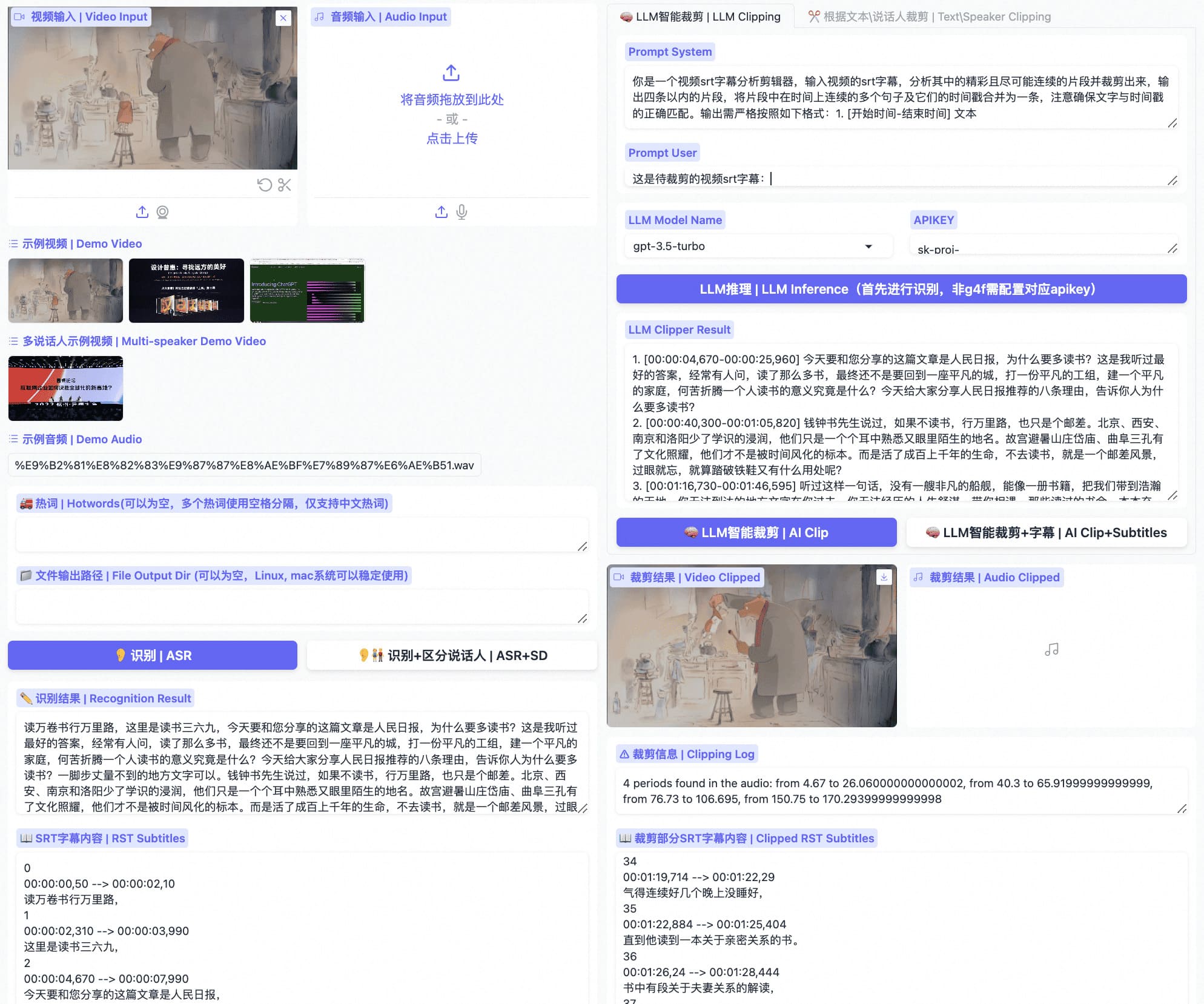
then visit localhost:7860 you will get a Gradio service like below and you can use FunClip following the steps:
- Step1: Upload your video file (or try the example videos below)
- Step2: Copy the text segments you need to 'Text to Clip'
- Step3: Adjust subtitle settings (if needed)
- Step4: Click 'Clip' or 'Clip and Generate Subtitles'
Follow the guide below to explore LLM based clipping:
Using OrcaRouter as your LLM gateway (optional)
Besides the transcript-based LLMs above, FunClip can route LLM-assisted clipping through OrcaRouter, an OpenAI-compatible smart-routing gateway. Select any orcarouter/ model in the LLM Model Name dropdown (orcarouter/auto routes each request to the best model for the task), paste an OrcaRouter API key in the APIKEY box, and click 'LLM Inference' — FunClip sends the transcript and prompts to https://api.orcarouter.ai/v1/chat/completions, and the returned segments work with the existing 'AI Clip' button unchanged.
OrcaRouter exposes one endpoint for all frontier and open-weight models, so you can switch routing targets without changing FunClip. It also offers gateway-level, zero-trust controls for AI agents on the same endpoint. Enforcement follows the Guardrail or Firewall policy attached to the relevant scope for prompts, responses, and tool calls that traverse the gateway; select the documented tight posture to enable default-deny behavior. Enforcement is opt-in — this integration supplies only the base URL, API key, and model, and does not attach a policy by itself. Apply a policy via the security quickstart; see Guardrails and Firewall for how coverage is scoped.
Set ORCAROUTER_API_KEY (and optionally ORCAROUTER_API_BASE, which defaults to https://api.orcarouter.ai/v1) instead of pasting the key into the UI if you prefer environment-based configuration. A key is available at https://www.orcarouter.ai.
Using Cheaper Inference as your LLM gateway (optional)
FunClip can also send LLM-assisted clipping through Cheaper Inference, an OpenAI-compatible LLM gateway. One API key gives access to models from several labs. Select any cheaperinference/ model in the LLM Model Name dropdown, paste a Cheaper Inference API key in the APIKEY box, and click 'LLM Inference'. FunClip removes the cheaperinference/ prefix and sends the transcript and prompts to https://api.cheaperinference.com/v1/chat/completions. The returned segments work with the existing 'AI Clip' button.
Set CHEAPER_INFERENCE_API_KEY (and optionally CHEAPER_INFERENCE_API_BASE, which defaults to https://api.cheaperinference.com/v1) instead of pasting the key into the UI if you prefer environment-based configuration. A key is available at https://cheaperinference.com/signup.
Content-aware clipping with TwelveLabs Pegasus (optional)
Besides the transcript-based LLMs above, FunClip can optionally use TwelveLabs Pegasus, a video understanding model that reasons over the actual video (visuals + audio) rather than only the ASR transcript. This helps pick highlight segments even when the transcript alone is ambiguous (e.g. action, scene changes, on-screen events). To use it, select the pegasus1.5 model name, paste your TwelveLabs API key, upload a video, and click 'LLM Inference' — Pegasus returns segments in the same N. [start-end] text format, so the existing 'AI Clip' button works unchanged. It needs pip install twelvelabs, and a free API key is available at https://twelvelabs.io.
B. Experience FunClip in Modelscope
C. Use FunClip in command line
FunClip supports you to recognize and clip with commands:
# download the example video used in the commands below
mkdir -p examples
wget "https://huggingface.co/spaces/R1ckShi/FunClip/resolve/main/examples/2022%E4%BA%91%E6%A0%96%E5%A4%A7%E4%BC%9A_%E7%89%87%E6%AE%B5.mp4" -O "examples/2022云栖大会_片段.mp4"

# step1: Recognize
python funclip/videoclipper.py --stage 1 \
                       --file examples/2022云栖大会_片段.mp4 \
                       --output_dir ./output
# now you can find recognition results and entire SRT file in ./output/
# step2: Clip
python funclip/videoclipper.py --stage 2 \
                       --file examples/2022云栖大会_片段.mp4 \
                       --output_dir ./output \
                       --dest_text '我们把它跟乡村振兴去结合起来,利用我们的设计的能力' \
                       --start_ost 0 \
                       --end_ost 100 \
                       --output_file './output/res.mp4'
Community Communication🍟
FunClip was first open-sourced by the FunASR team, and useful PRs are welcome.
For questions, ideas, and community projects, use GitHub Discussions. You do not need to join a chat group to participate.
The archived images docs/images/dingding.png and docs/images/wechat.png are expired invitations, not current joining links. The DingTalk image states an expiry of April 22, 2025; the WeChat image states a seven-day validity ending July 15. No replacement group invitation has been verified here.
Ecosystem
FunClip is part of the FunAudioLLM family:
| Project | Description | Stars |
|---|---|---|
| FunASR | Industrial speech recognition toolkit — VAD, ASR, punctuation, diarization |  |
| Fun-ASR-Nano | End-to-end LLM-based ASR — flagship and separate 31-language MLT checkpoints, streaming, hotwords (HF model) |  |
| SenseVoice | Multilingual speech understanding — ASR + emotion + audio events (HF model) |  |
| CosyVoice | Natural speech generation — multi-language, zero-shot cloning |  |
📚FunASR Paper: 📚SeACo-Paraformer Paper:
License
- FunClip source code is licensed under the MIT License.
- Model weights are downloaded separately and are governed by the terms on their model pages. The default Paraformer-Large, SeACo-Paraformer, and CAM++ pages currently list Apache License 2.0; check the applicable model page before redistribution.
Star History

VoiceStudio
debpalash·Python
本地运行的 ElevenLabs 开源替代品,支持声音克隆、语音设计、视频配音、听写、转写和有声书制作,覆盖 646 种语言。
语音克隆+4语音推理
106379+325512kv0.5.72026-11-10 05:13 UTC

voicebox
jamiepine·Python
开源 AI 语音工作室,支持声音克隆、语音听写和语音生成,基于 Qwen3-TTS 与 Whisper,可在 CUDA 或 MLX 上本地运行。
语音克隆+4语音推理
60319+5667.6kv0.5.02026-10-07 01:17 UTC
whisper.cpp
ggml-org·C++
OpenAI Whisper 语音识别模型的 C/C++ 移植版,无需 Python 和 GPU 依赖,在普通 CPU 上就能跑语音转文字。
语音识别+4语音推理
55056+696.3kv1.9.52026-11-09 13:02 UTC
faster-whisper
SYSTRAN·Python
基于 CTranslate2 重实现的 Whisper 语音转文字推理引擎,通过量化与高效推理大幅提速并降低显存占用,适合本地部署转录。
语音识别+4语音推理
26633+612.2kv1.2.12026-11-06 17:24 UTC