独立发布版通常落后于 git 版本,想要最新功能需从源码安装;使用 Assistant 调用 OpenAI 等外部模型需配置 API Key 并联网;转写依赖 Whisper、pyannote.audio、speechbrain 等较多包,需按 requirements.txt 装齐
StoryToolkitAI
octimotGPL-3.0活跃维护用 AI 给视频素材做转录、内容理解和全文检索的剪辑辅助工具,可接入 ChatGPT 等模型,并与 DaVinci Resolve 集成。
An editing tool that uses AI to transcribe, understand content and search for anything in your footage, integrated with ChatGPT and other AI models
v0.25.1发布于 2025-02-20 11:20 UTC1,071star93fork同步于 2026-11-07 07:33 UTC
从 https://github.com/octimot/StoryToolkitAI/releases 下载独立版;或按 INSTALLATION.md 从源码安装 硬件要求按 README 说明
README 未说明具体显存或 GPU 型号要求,仅称转写、索引和搜索在本地机器上运行,需机器自身支持;用外部 LLM 时需相应服务或本地模型。
本地运行的 AI 剪辑助手,转写并索引素材,用大模型搜索和生成故事
用 AI 给视频素材做转录、内容理解和全文检索的剪辑辅助工具,可接入 ChatGPT 等模型,并与 DaVinci Resolve 集成。
核心能力
- 本地 Whisper 自动转写并索引整段视频素材
- 用自然语言语义搜索素材,无需精确关键词
- 调用 OpenAI、ollama、vLLM 等大模型生成故事与选段
- 导出 EDL/XML/Fountain 供剪辑软件使用
- 集成 DaVinci Resolve Studio 18+ 的时间线标记与字幕
容易踩的坑
内容由模型根据 README 生成,可能不完整或不准确,以官方文档为准。看原文 README
- v0.25.1StoryToolkitAI v0.25.1 - projects and more LLMs最新正式版2025-02-20 · 2025-02-20 11:20 UTC
What's new in this release
Main new features:
- Projects create and manage projects, link transcriptions, stories, and text files from your computer perform project-wide searches and manage project files easier
- Expanded LLM Support ability to use additional models (using ollama, LM studio etc.) added support for open source reasoning models (e.g. DeepSeek-r1) and OpenAI o1, o1-mini, o3-mini models
- Whisper Turbo Support transcribe significantly faster with Whisper Large-v3 Turbo without sacrificing quality
- Improved Assistant slash-based keyword prompts instead of square brackets (e.g., use /help for details) ability to reload available Assistant models dynamically from the settings improved usage calculation and model selection
- Auto-Export for Transcriptions Include custom export formats that the tool will use during ingest and editing
See CHANGELOG.md for more info.
Important notes:
This is release is still experimental! Please backup your config and project files stored in your documents folder before updating to this version, as this update will change their structure irreversibly. If you want to downgrade to a previous version, you will need to manually restore the backup files that you made before updating!
Download links
This update is available early for Frequent Users only, to download see this post.
Everyone else can download version 0.23.2 from here.
Help us make a better tool!
This tool and its code is free and open source.
If you find the tool useful, please consider becoming a patron.
This way, we can speed up development to work on cool features that you might need and keep up with rapid advancements in AI.
It also helps if you report any potential bugs or problems using the Issues tab here on Github: https://github.com/octimot/StoryToolkitAI/issues
Installation
macOS
Requirements
macOS 13 Ventura or newer Intel or arm64 (M1, M2 etc.) 8 GB RAM
Installation Steps
Download the zip file suitable for your platform (arm64 for M1, M2 etc. or x86_64 for Intel machines). Unzip, copy the app file into your Applications folder, then double-click and it should start.
Windows
Requirements
Windows 10 or newer
Installation
Just follow the installer to get the tool on your machine.
Notes for Windows
Starting with this standalone version, we're using Python 3.11 as the main runtime, which means that the tool might have problems connecting with the Resolve API if you have other Python versions installed on the machine. Please refer to this section about the Davinci Resolve Studio integration
Do not install this version of the tool in Program Files unless you know what you're doing. Some users have experienced permission issues which will make some features unusable.
If the tool returns errors or would not start after updating an older version, we recommend completely uninstalling and re-installing before reporting the issue.
If you get an error saying something like "Microsoft De
- v0.23.2StoryToolkitAI v0.23.2 - stories and speakers beta2024-01-26 · 2024-01-26 12:55 UTC
查看更新说明
What's new in this release
Main new features:
- Story Editor make selections from your transcripts to create timelines that can be imported into your editing or screenwriting software
- Speaker Detection detect speaker changes in audio either while ingesting or directly from the transcription window
- Meta Transcription Segments add speakers, notes, etc. to your transcripts using SHIFT+ENTER while editing a transcript
- Major improvements to the Assistant including the ability to provide new Transcriptions or Stories as responses
A few highlights:
- Export Story Editor content as EDL, XML or Fountain for editing in Resolve, Premiere, Final Cut Pro, Avid, etc.
- Ability to request transcription and story responses from the Assistant using the
[t]or[st]keywords - Ability to create new transcriptions, groups and stories based on Assistant responses
- Ability to change the models and settings used for the Assistant
- Ability to edit the Assistant chat history by enabling or disabling messages via right click context menu
- Ability to reuse Assistant prompts via right click context menu
- Ability to copy the Assistant prompts and conversations to clipboard via right click context menu
- Support for storytoolkit.ai Assistant Models
- Automatic Speaker Change Detection via Ingest or from the Transcription Window
- Ability to add transcript meta segments, such as speaker, notes, etc.
- Find and Replace for Transcriptions via Find window
- Improved handling of timecodes for EDL, XML, AVID DS and Fusion Comp exports
See CHANGELOG.md for more info.
Help us make a better tool!
This tool and its code is free and open source.
If you find the tool useful, please consider becoming a patron.
This way, we can speed up development to work on cool features that you might need and keep up with rapid advancements in AI.
It also helps if you report any potential bugs or problems using the Issues tab here on Github: https://github.com/octimot/StoryToolkitAI/issues
Installation
macOS
Requirements
macOS 12.6 Monterey or newer Intel or arm64 (M1, M2 etc.) 8 GB RAM
Installation Steps
Download the zip file that fits with your platform. Unzip, copy the app file into your Applications folder, then double-click and it should start.
Please also read Info For All Platforms below.
Unsafe warnings
If you get something like "StoryToolkitAI is damaged and can't be opened", try to right click and then click open in the dropdown menu. It will warn you that it's unsafe, but that's just because we haven't notarized the tool with Apple.
If you still have problems opening it, try to take it out of quarantine: open up Terminal and execute:
xattr -d com.apple.quarantine ./StoryToolkitAI.0.23.1.arm64.app(or x86_64 if Intel).
More details on the issue here.Windows
Requirements
Windows 10 or newer
Installation
Just follow the installer to get the tool on your machine.
Notes for Windows
Do not install this version of the tool in Program Files unless you know what you're doing. Some users have experienced permission issues which will make some features unusable.
If the tool returns errors or would not start after updating an older version, we recomme
- v0.23.1StoryToolkitAI v0.23.1 - stories and speakers alpha2024-01-24 · 2024-01-24 11:27 UTC
查看更新说明
What's new in this release
Main new features:
- Story Editor make selections from your transcripts to create timelines that can be imported into your editing or screenwriting software
- Speaker Detection detect speaker changes in audio either while ingesting or directly from the transcription window
- Meta Transcription Segments add speakers, notes, etc. to your transcripts using SHIFT+ENTER while editing a transcript
- Major improvements to the Assistant including the ability to provide new Transcriptions or Stories as responses
A few highlights:
- Export Story Editor content as EDL, XML or Fountain for editing in Resolve, Premiere, Final Cut Pro, Avid, etc.
- Ability to request transcription and story responses from the Assistant using the
[t]or[st]keywords - Ability to create new transcriptions, groups and stories based on Assistant responses
- Ability to change the models and settings used for the Assistant
- Ability to edit the Assistant chat history by enabling or disabling messages via right click context menu
- Ability to reuse Assistant prompts via right click context menu
- Ability to copy the Assistant prompts and conversations to clipboard via right click context menu
- Support for storytoolkit.ai Assistant Models
- Automatic Speaker Change Detection via Ingest or from the Transcription Window
- Ability to add transcript meta segments, such as speaker, notes, etc.
- Find and Replace for Transcriptions via Find window
- Improved handling of timecodes for EDL, XML, AVID DS and Fusion Comp exports
Download links
This update is available early for Frequent Users only, to download see this post.
Everyone else can still download version 0.19.5 from here.
Help us make a better tool!
This tool and its code is free and open source.
If you find the tool useful, please consider becoming a patron.
This way, we can speed up development to work on cool features that you might need and keep up with rapid advancements in AI.
It also helps if you report any potential bugs or problems using the Issues tab here on Github: https://github.com/octimot/StoryToolkitAI/issues
Installation
macOS
Requirements
macOS 12.6 Monterey or newer Intel or arm64 (M1, M2 etc.) 8 GB RAM
Installation Steps
Download the zip file that fits with your platform. Unzip, copy the app file into your Applications folder, then double-click and it should start.
Please also read Info For All Platforms below.
Unsafe warnings
If you get something like "StoryToolkitAI is damaged and can't be opened", try to right click and then click open in the dropdown menu. It will warn you that it's unsafe, but that's just because we haven't notarized the tool with Apple.
If you still have problems opening it, try to take it out of quarantine: open up Terminal and execute:
xattr -d com.apple.quarantine ./StoryToolkitAI.0.23.1.arm64.app(or x86_64 if Intel).
More details on the issue here.Windows
Requirements
Windows 10 or newer
Installation
Just follow the installer to get the tool on your machine.
Notes for Windows
Do not install this version of the tool in Program Files unless you know what you're doing. Some user
- v0.19.5StoryToolkitAI v0.19.5 - alpha video search public2023-08-21 · 2023-08-21 06:26 UTC
查看更新说明
Release Info
This release focuses on improving some of the functions introduced in the previous versions.
Key Features
- Full video indexing and search (v. 0.19.2+ - How-To)
- Free Automatic Transcriptions on your local machine
- Free Automatic Translation to English on your local machine
- ChatGPT integration - talk to AI about your content, or generate new ideas
- Search Content intuitively without having to type in exact words
- Transcript Groups - group transcript lines into whatever you need to find them easier
- Automatic Question detection in transcripts
- Multi-format export of transcripts, including SRT, TXT, AVID DS and as Fusion Text node
- Import of existing SRT files
- Easy copy of timecoded transcript text to clipboard etc.
Resolve Studio Integrations
- Mark and Navigate Resolve Timelines via Transcript, plus other handy Resolve-only features
- Advanced Search of Resolve timeline markers using AI
- Copy Resolve timeline markers to transcript and vice-versa for advanced search
- Direct import of subtitles into Resolve bin
For a detalied list of version to version changes, see the Changelog.
Please report any issues that you might encounter here.
StoryToolkitAI Patreon
If you find the tool useful, please consider becoming a patron. This way, we can speed up development to work on cool features that you might need and keep up with rapid advancements in AI.
Installation:
IMPORTANT NOTE
We recommend backing up the configuration folder your user directory if you update from versions earlier than 0.18.0, since this version contains a major overhaul of the tool file structure.
macOS
Requirements
macOS 12.6 Monterey or newer Intel or arm64 (M1, M2 etc.) 8 GB RAM
Installation Steps
Download the zip file that fits with your platform. Unzip, copy the app file into your Applications folder, then double-click and it should start.
Please also read Info For All Platforms below.
Unsafe warnings
If you get something like "StoryToolkitAI is damaged and can't be opened", try to right click and then click open in the dropdown menu. It will warn you that it's unsafe, but that's just because we haven't notarized the tool with Apple.
If you still have problems opening it, try to take it out of quarantine: open up Terminal and execute:
xattr -d com.apple.quarantine ./StoryToolkitAI.0.18.0.1.arm64.app(or x86_64 if Intel).
More details on the issue here.Console Mode
Note: The standalone version does not open up the console. If you're interested to see what is happening behind the hood, open a terminal in the folder where you have the tool (typically in your Downloads or Applications folder) and run this command:
./[STORYTOOLKITAI_APP_NAME].app/Contents/MacOS/[STORYTOOLKIT_APP_NAME]

# (but replace [STORYTOOLKIT_APP_NAME] with the name of your release)
Windows
Requirements
Windows 10 or newer CUDA-enabled graphics card
Installation
Just follow the installer to get the tool on your machine.
Notes for Windows
Do not install this version of the tool in Program Files unless you know what you're doing. Some users have experienced permission issues which will make some features unusable.
If the tool returns errors or would not start after updating an older version, we recommend completely uninstalling and re-installing before reporting the issue.
You don't need to have Python installed on your machine for the standalone version to w
- v0.19.4StoryToolkitAI v0.19.4 - alpha video search2023-07-04 · 2023-07-04 08:54 UTC
查看更新说明
What's new in this release
AI-Powered Text to Image Search in Videos - find anything you can describe with words in your footage (quick demo)!
And a new UI that makes the tool look less like it's supposed to run on a Windows 95 machine...
A few highlights:
- Advanced Video Search - find anything you can describe with words in your footage
- New User Interface
- Ingesting of video content which includes AI based scene detection and video content indexing
- New Ingest window to handle both Transcriptions and Video Indexing
- A better Queue system which allows queuing and managing of all CPU/GPU intensive tasks
- Improved Advanced Search
- Easier handling of multiple files when using the Transcription Settings window
- Right-click context menu on transcripts for easier access to functions
- Improved handling of Transcript Groups
- Significant code refactoring and cleanup, multiple bug fixes etc.
Download links
This update is available early for Frequent User and Producer tiers only, to download see this post.
For everyone else, download version 0.17.16 from here.
StoryToolkitAI Patreon
BTW, if you find the tool useful, please consider becoming a patron. This way, we can speed up development to work on cool features that you might need and keep up with rapid advancements in AI.
Installation:
IMPORTANT NOTE We recommend backing up the configuration folder your user directory if you update from versions earlier than 0.18.0, since this version contains a major overhaul of the tool file structure.
macOS
Requirements
macOS 12.6 Monterey or newer Intel or arm64 (M1, M2 etc.) 8 GB RAM
Installation Steps
Download the zip file that fits with your platform. Unzip, copy the app file into your Applications folder, then double-click and it should start.
Please also read Info For All Platforms below.
Unsafe warnings
If you get something like "StoryToolkitAI is damaged and can't be opened", try to right click and then click open in the dropdown menu. It will warn you that it's unsafe, but that's just because we haven't notarized the tool with Apple.
If you still have problems opening it, try to take it out of quarantine: open up Terminal and execute:
xattr -d com.apple.quarantine ./StoryToolkitAI.0.18.0.1.arm64.app(or x86_64 if Intel).
More details on the issue here.Console Mode
Note: The standalone version does not open up the console. If you're interested to see what is happening behind the hood, open a terminal in the folder where you have the tool (typically in your Downloads or Applications folder) and run this command:
./[STORYTOOLKITAI_APP_NAME].app/Contents/MacOS/[STORYTOOLKIT_APP_NAME]

# (but replace [STORYTOOLKIT_APP_NAME] with the name of your release)
Windows
Requirements
Windows 10 or newer CUDA-enabled graphics card
Installation
Just follow the installer to get the tool on your machine.
Notes for Windows
Do not install this version of the tool in Program Files unless you know what you're doing. Some users have experienced permission issues which will make some features unusable.
In case some functions return errors, a first good step is to uninstall the tool using the uninstaller and then re-install it again.
You don't need to have Python installed on your machine for the standalone version to work, only if you want to use the Resolve API with the tool. But, if you have Resolve Studio installed and the tool doesn't start, it's probably because you have multiple Python versions installed on your machine (see #22). This
用户点评
登录用户的真实使用记录,可按版本和硬件筛选共 0 条
还没有人点评。第一个说出真实体验的人最有价值。
StoryToolkitAI
Description
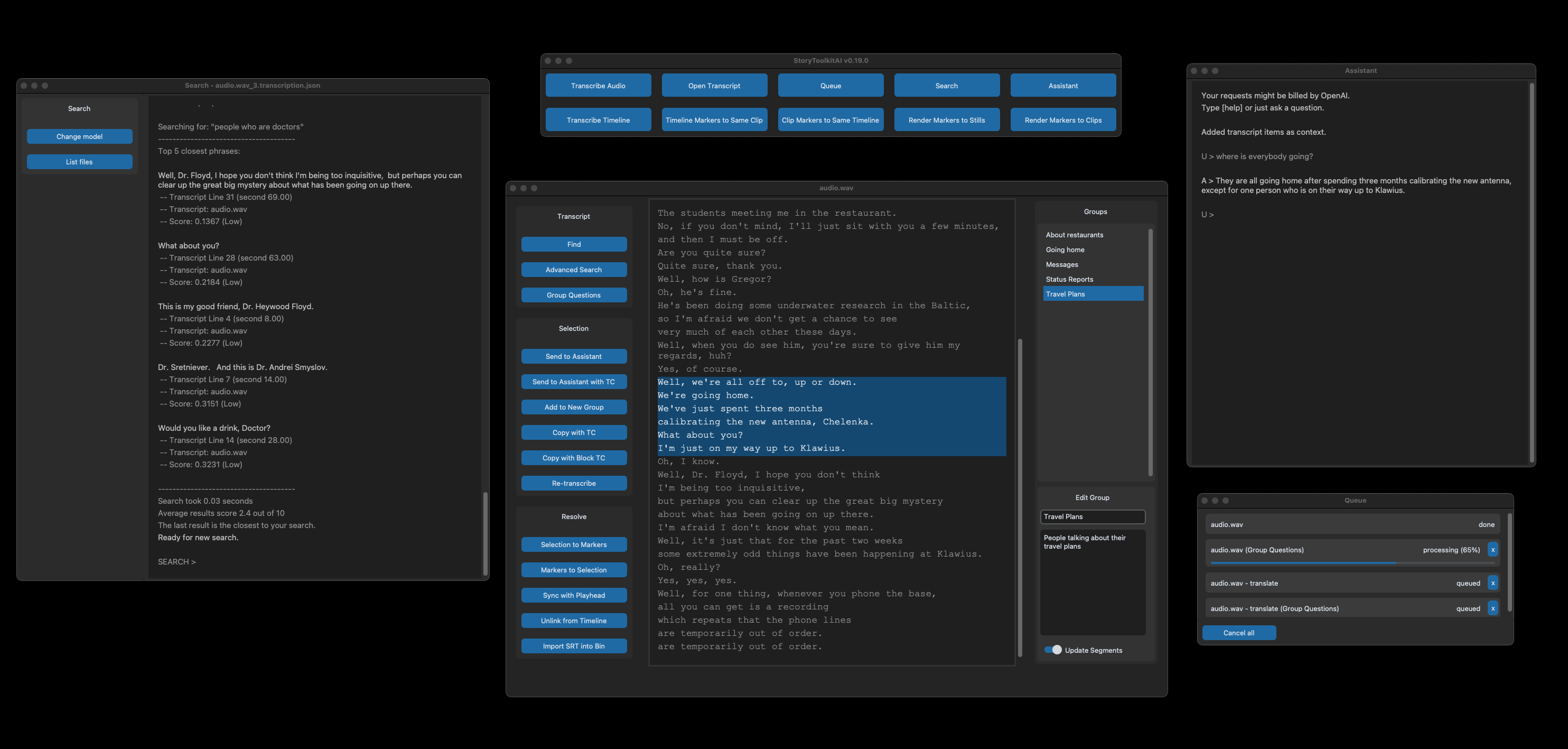
StoryToolkitAI is a film editing tool that tries to understand your footage and helps you edit more efficiently with the assistance of AI.
It transcribes, indexes scenes, helps you search through your footage, automatically selects and creates stories using large language models (OpenAI GPT-4, llama, DeepSeek etc.), which you can then import into your editing software via EDL or XML.
The tool works locally on your machine, independent of any other editing software, but it also integrates with DaVinci Resolve Studio 18+.
Key Features
- Full video indexing and search (How-To)
- Free Automatic Transcriptions on your local machine
- Free Automatic Translation to English on your local machine
- Compatible with OpenAI, ollama, vLLM, LM Studio etc. - chat to AI about your content, or generate new ideas
- Search Content intuitively without having to type in exact words
- Story Editor - write screenplays containing your transcripts and export them for editing (EDL/XML/Fountain) (v. 0.20.1+)
- Translate transcripts to other languages using OpenAI GPT (v. 0.22.0+)
- Ask AI to create Stories and Selections based on your footage using OpenAI GPT (v. 0.22.0+)
- Automatic Speaker Detection in transcripts (v. 0.23.0+)
- Project File Management for more intuitive workflows and easier search
- Automatic Question detection in transcripts
- Transcript Groups - group transcript lines into whatever you need to find them easier
- Multi-format export of transcripts, including SRT, TXT, AVID DS and as Fusion Text node
- Import of existing SRT files
- Easy copy of timecoded transcript text to clipboard etc.
Resolve Studio Integrations
- Mark and Navigate Resolve Timelines via Transcript, plus other handy Resolve-only features
- Advanced Search of Resolve timeline markers using AI
- Copy Resolve timeline markers to transcript and vice-versa for advanced search
- Direct import of subtitles into Resolve bin
Planned Features
- Automatic Topic Classification to help you discover ideas in your transcripts
- Integration with other AI tools
- Integration with other software / standalone players
- Plus more flashy features as clickbait to unrealistically raise expectations and destroy competition
Some of the above features are only available in the non-standalone version of the tool, but they will be available in the standalone version in the next release.
For detailed features info, go here.
Download, Setup & Installation
To download the latest standalone release, see the releases page.
However, the standalone releases will most likely always be behind the git version, so, if you're comfortable with the terminal / command line and want to always have access to the newest features, we recommend that you try to install the tool from source.
For detailed installation instructions go here.
Is it really free?
Yes, the tool runs locally and there's no need for any additional account to transcribe, index video or search. These features will always be free as long as your machine supports them without external services.
The only feature that now requires external services is the Assistant when you want to use on external LLM providers (OpenAI etc.). However, you can run local LLMs too!
We rely on the support of our Patreon members! If you want to support development and get access to new features earlier, check out our Patreon page.
About data privacy
By the way, if you feel that your content is sensitive or subject to privacy laws, no worries: the tool does not send anything that you don't want to the Internet, it only uses your local machine to transcribe and translate your audio.
Currently, the only features that send data from your machine to the Internet are:
- The StoryToolkitAI API Key check to storytoolkit.ai (only when entered in the Settings Window)
- The Assistant, to OpenAI, storytoolkit.ai or other external providers (only contexts and messages that you select and send).
The tool also checks for updates on every start.
Code
This tool is coded by Octavian Mot, your unfriendly filmmaker who hates to code and tries to keep it together as half of mots. Our team uses it daily in our editing room which allows us to update it with features that we need and think will be useful to others.
But, keep in mind that the tool is still being actively developed, raw and unpolished.
Feel free to get in touch with criticism, or weird ideas for new features.
The tool would be useless without using the following open source projects:
- OpenAI Whisper
- Sentence Transformers
- pyannote.audio
- speechbrain
- spaCy
- CustomTkinter
- and many other packages listed in requirements.txt
Code contributions are welcome!
Please open an issue with what you're trying to solve first and let's discuss it there. Maintainers should also read the development guide.
Known issues and Troubleshooting
For troubleshooting and possible solutions to known issues, see the known issues section here or do a quick search in the Issues tab
Please report any problems directly in the Issues tab, here on Github: https://github.com/octimot/StoryToolkitAI/issues

VoiceStudio
debpalash·Python
本地运行的 ElevenLabs 开源替代品,支持声音克隆、语音设计、视频配音、听写、转写和有声书制作,覆盖 646 种语言。
语音克隆+4语音推理进阶
107215+409112kv0.5.8-beta.42026-11-10 23:08 UTC

voicebox
jamiepine·Python
开源 AI 语音工作室,支持声音克隆、语音听写和语音生成,基于 Qwen3-TTS 与 Whisper,可在 CUDA 或 MLX 上本地运行。
语音克隆+4语音推理硬核
60390+6377.6kv0.5.02026-10-07 01:17 UTC
whisper.cpp
ggml-org·C++
OpenAI Whisper 语音识别模型的 C/C++ 移植版,无需 Python 和 GPU 依赖,在普通 CPU 上就能跑语音转文字。
语音识别+4语音推理进阶
55073+866.3kv1.9.52026-11-10 12:09 UTC
faster-whisper
SYSTRAN·Python
基于 CTranslate2 重实现的 Whisper 语音转文字推理引擎,通过量化与高效推理大幅提速并降低显存占用,适合本地部署转录。
语音识别+4语音推理进阶
26655+832.2kv1.2.12026-11-10 10:13 UTC