必须先在系统装好 ffmpeg,否则无法读取音频;tiktoken 若无预编译 wheel 需自行安装 Rust 工具链;turbo 模型不支持翻译任务,翻译需改用 medium 或 large 等多语种模型。
pip install -U openai-whisper
sudo apt update && sudo apt install ffmpeg 硬件要求按 README 说明
按模型规模需约 1GB(tiny/base)到 10GB(large)显存,turbo 约 6GB;README 未说明纯 CPU 运行情况,速度数据基于 A100 测得。
OpenAI 开源的多语种语音识别模型,一个模型搞定转写、翻译和语种识别
OpenAI 开源的通用语音识别模型,基于大规模弱监督训练,支持多语言转写、翻译和语种识别,开箱即用。
核心能力
- 多任务联合训练,单模型完成转写、翻译与语种识别
- 提供 tiny 到 large 六种规模,按显存和速度取舍
- 内置 .en 英文专用模型,小模型上英文效果更好
- 命令行与 Python API 双入口,支持多文件批量转写
- turbo 为 large-v3 优化版,速度更快且精度损失小
容易踩的坑
内容由模型根据 README 生成,可能不完整或不准确,以官方文档为准。看原文 README
- v20250625最新正式版2025-06-26 · 2025-06-26 01:06 UTC
这个版本没有写更新说明。
- v202409302024-09-30 · 2024-09-30 18:21 UTC
这个版本没有写更新说明。
- v202409272024-09-27 · 2024-09-27 23:44 UTC
这个版本没有写更新说明。
- v202311172023-11-17 · 2023-11-17 19:59 UTC
这个版本没有写更新说明。
- v202311062023-11-06 · 2023-11-06 18:16 UTC
这个版本没有写更新说明。
用户点评
登录用户的真实使用记录,可按版本和硬件筛选共 0 条
还没有人点评。第一个说出真实体验的人最有价值。
Whisper
[Blog] [Paper] [Model card] [Colab example]
Whisper is a general-purpose speech recognition model. It is trained on a large dataset of diverse audio and is also a multitasking model that can perform multilingual speech recognition, speech translation, and language identification.
Approach
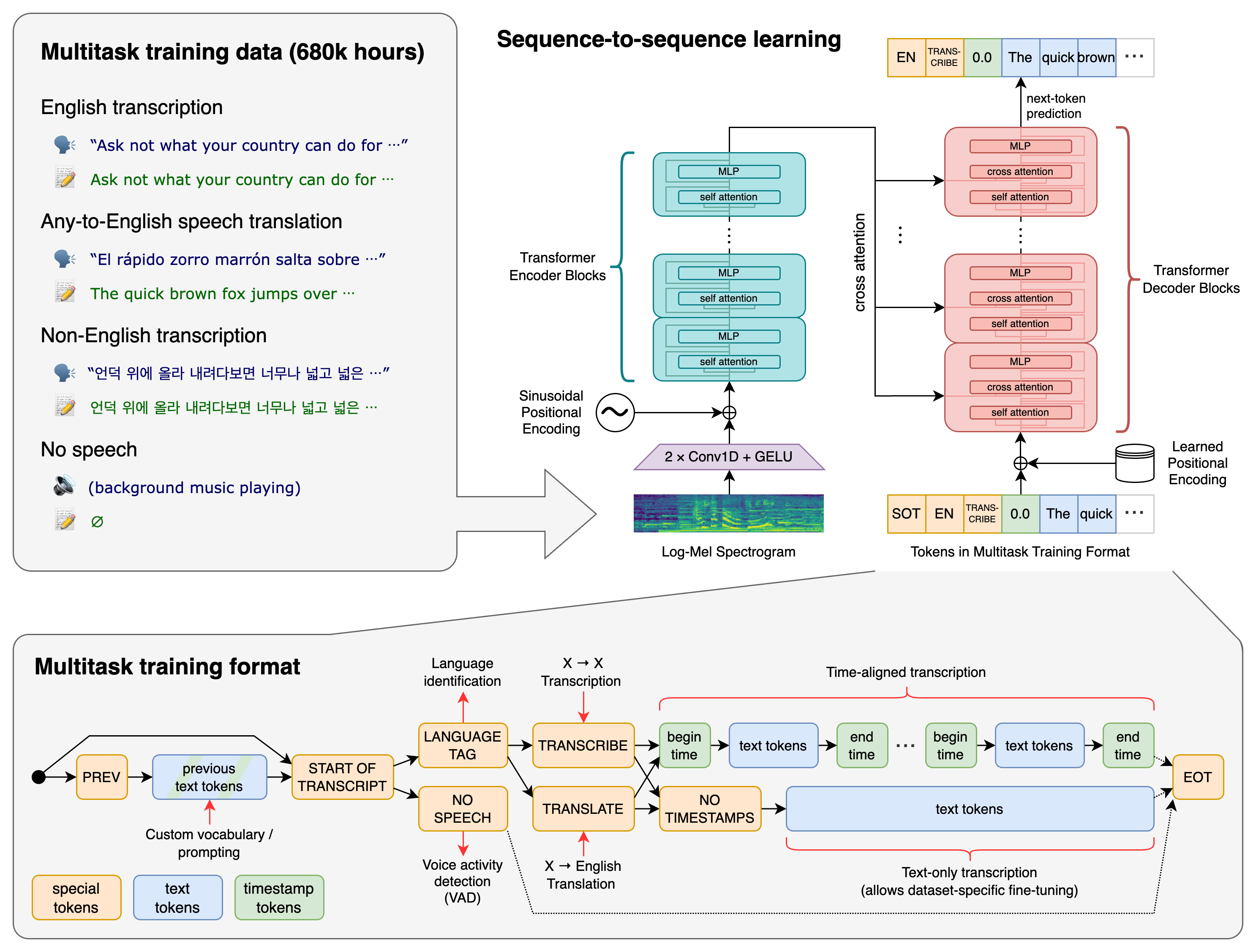
A Transformer sequence-to-sequence model is trained on various speech processing tasks, including multilingual speech recognition, speech translation, spoken language identification, and voice activity detection. These tasks are jointly represented as a sequence of tokens to be predicted by the decoder, allowing a single model to replace many stages of a traditional speech-processing pipeline. The multitask training format uses a set of special tokens that serve as task specifiers or classification targets.
Setup
We used Python 3.9.9 and PyTorch 1.10.1 to train and test our models, but the codebase is expected to be compatible with Python 3.8-3.11 and recent PyTorch versions. The codebase also depends on a few Python packages, most notably OpenAI's tiktoken for their fast tokenizer implementation. You can download and install (or update to) the latest release of Whisper with the following command:
pip install -U openai-whisper
Alternatively, the following command will pull and install the latest commit from this repository, along with its Python dependencies:
pip install git+https://github.com/openai/whisper.git
To update the package to the latest version of this repository, please run:
pip install --upgrade --no-deps --force-reinstall git+https://github.com/openai/whisper.git
It also requires the command-line tool ffmpeg to be installed on your system, which is available from most package managers:
# on Ubuntu or Debian
sudo apt update && sudo apt install ffmpeg

# on Arch Linux
sudo pacman -S ffmpeg

# on MacOS using Homebrew (https://brew.sh/)
brew install ffmpeg

# on Windows using Chocolatey (https://chocolatey.org/)
choco install ffmpeg

# on Windows using Scoop (https://scoop.sh/)
scoop install ffmpeg
You may need rust installed as well, in case tiktoken does not provide a pre-built wheel for your platform. If you see installation errors during the pip install command above, please follow the Getting started page to install Rust development environment. Additionally, you may need to configure the PATH environment variable, e.g. export PATH="$HOME/.cargo/bin:$PATH". If the installation fails with No module named 'setuptools_rust', you need to install setuptools_rust, e.g. by running:
pip install setuptools-rust
Available models and languages
There are six model sizes, four with English-only versions, offering speed and accuracy tradeoffs. Below are the names of the available models and their approximate memory requirements and inference speed relative to the large model. The relative speeds below are measured by transcribing English speech on a A100, and the real-world speed may vary significantly depending on many factors including the language, the speaking speed, and the available hardware.
| Size | Parameters | English-only model | Multilingual model | Required VRAM | Relative speed |
|---|---|---|---|---|---|
| tiny | 39 M | tiny.en | tiny | ~1 GB | ~10x |
| base | 74 M | base.en | base | ~1 GB | ~7x |
| small | 244 M | small.en | small | ~2 GB | ~4x |
| medium | 769 M | medium.en | medium | ~5 GB | ~2x |
| large | 1550 M | N/A | large | ~10 GB | 1x |
| turbo | 809 M | N/A | turbo | ~6 GB | ~8x |
The .en models for English-only applications tend to perform better, especially for the tiny.en and base.en models. We observed that the difference becomes less significant for the small.en and medium.en models.
Additionally, the turbo model is an optimized version of large-v3 that offers faster transcription speed with a minimal degradation in accuracy.
Whisper's performance varies widely depending on the language. The figure below shows a performance breakdown of large-v3 and large-v2 models by language, using WERs (word error rates) or CER (character error rates, shown in Italic) evaluated on the Common Voice 15 and Fleurs datasets. Additional WER/CER metrics corresponding to the other models and datasets can be found in Appendix D.1, D.2, and D.4 of the paper, as well as the BLEU (Bilingual Evaluation Understudy) scores for translation in Appendix D.3.
Command-line usage
The following command will transcribe speech in audio files, using the turbo model:
whisper audio.flac audio.mp3 audio.wav --model turbo
The default setting (which selects the turbo model) works well for transcribing English. However, the turbo model is not trained for translation tasks. If you need to translate non-English speech into English, use one of the multilingual models (tiny, base, small, medium, large) instead of turbo.
For example, to transcribe an audio file containing non-English speech, you can specify the language:
whisper japanese.wav --language Japanese
To translate speech into English, use:
whisper japanese.wav --model medium --language Japanese --task translate
Note: The
turbomodel will return the original language even if--task translateis specified. Usemediumorlargefor the best translation results.
Run the following to view all available options:
whisper --help
See tokenizer.py for the list of all available languages.
Python usage
Transcription can also be performed within Python:
import whisper

model = whisper.load_model("turbo")
result = model.transcribe("audio.mp3")
print(result["text"])
Internally, the transcribe() method reads the entire file and processes the audio with a sliding 30-second window, performing autoregressive sequence-to-sequence predictions on each window.
Below is an example usage of whisper.detect_language() and whisper.decode() which provide lower-level access to the model.
import whisper

model = whisper.load_model("turbo")

# load audio and pad/trim it to fit 30 seconds
audio = whisper.load_audio("audio.mp3")
audio = whisper.pad_or_trim(audio)

# make log-Mel spectrogram and move to the same device as the model
mel = whisper.log_mel_spectrogram(audio, n_mels=model.dims.n_mels).to(model.device)

# detect the spoken language
_, probs = model.detect_language(mel)
print(f"Detected language: {max(probs, key=probs.get)}")

# decode the audio
options = whisper.DecodingOptions()
result = whisper.decode(model, mel, options)

# print the recognized text
print(result.text)
More examples
Please use the 🙌 Show and tell category in Discussions for sharing more example usages of Whisper and third-party extensions such as web demos, integrations with other tools, ports for different platforms, etc.
License
Whisper's code and model weights are released under the MIT License. See LICENSE for further details.
GPT-SoVITS
RVC-Boss·Python
只需 1 分钟语音数据就能训练出高质量 TTS 模型,支持少样本音色克隆,适合快速定制个性化语音合成。
语音合成+4语音
64714+2746.8k20250606v2pro2026-11-09 13:59 UTC
Real-Time-Voice-Cloning
CorentinJ·Python
用 5 秒语音样本克隆音色,实时合成任意文本的语音,基于 PyTorch/TensorFlow 的说话人编码与声码器流水线。
语音克隆+4语音
60237+79.4k2026-03-09 10:31 UTC

VoxCPM
OpenBMB·Python
无需分词器的多语言语音合成模型,支持创意音色设计和逼真声音克隆,可直接从文本生成自然语音。
语音合成+4语音
42200+10564.8k2.0.32026-11-09 07:36 UTC
bark
suno-ai·Jupyter Notebook
输入一段文本就能生成带笑声、叹息等非语言声音和背景音乐的语音,效果自然,适合做创意配音和音频内容原型。
语音合成+3语音
39340+224.7k2024-08-19 07:45 UTC