源码构建需要 Xcode 16 / Swift 6 和 Node.js 24,并先安装 Tool 目录的 npm 依赖;非公证版本首次启动可能被 macOS 拦截,需按住 Control 点击应用选择打开;修改 /etc/hosts 需要管理员认证,部分目录扫描需要完全磁盘访问权限
machkit
rhevornMIT活跃维护一款原生 macOS 清理与效率工具箱,覆盖磁盘空间分析、系统维护、截图、网络和日常小工具,强调隐私保护,适合想给 Mac 减负、顺手处理杂事的用户。
A native, privacy-focused macOS cleaner and productivity toolbox for storage, system maintenance, screenshots, networking, and everyday tasks.
v2.3.2发布于 2026-09-19 09:17 UTC244star +1 / 7 天0fork同步于 2026-11-11 00:01 UTC
从 GitHub Releases 下载 MachKit-*-macOS.zip,解压后把 MachKit.app 移入 /Applications;源码构建先执行 cd Tool && npm ci && cd ..,再打开 MachKit.xcodeproj 运行 MachKit App scheme 硬件要求按 README 说明
README 未说明;仅要求 macOS 14 或更高版本,部分用户目录可能需要完全磁盘访问权限
支持 Apple Silicon
原生 macOS 隐私优先清理与效率工具箱,本地扫描磁盘、系统、网络并内置 20 个离线小工具
一款原生 macOS 清理与效率工具箱,覆盖磁盘空间分析、系统维护、截图、网络和日常小工具,强调隐私保护,适合想给 Mac 减负、顺手处理杂事的用户。
核心能力
- 扫描缓存、日志、残留与开发文件,风险项默认不勾选
- 卸载应用时一并清理关联支持文件
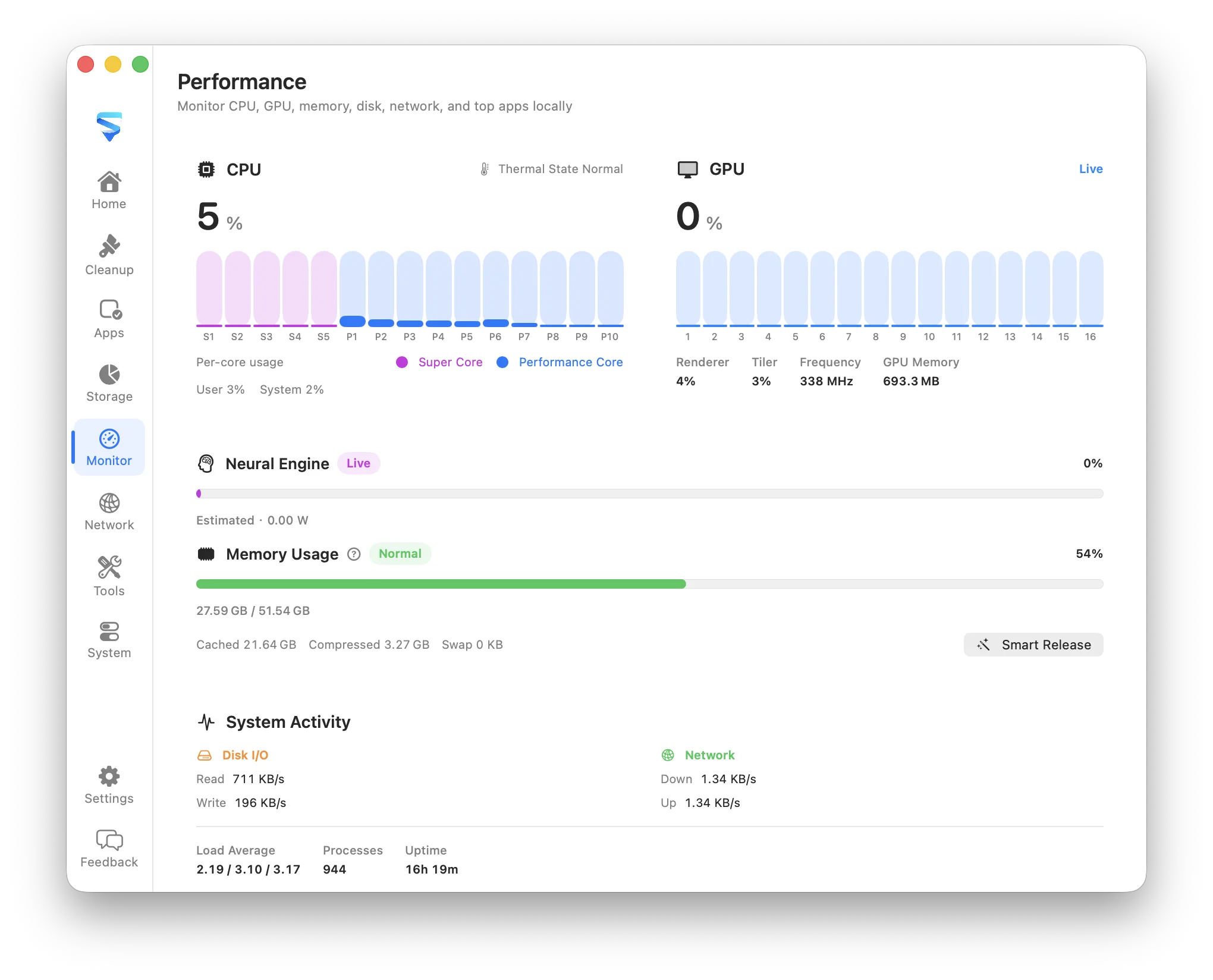
- 监控 CPU、内存压力、热状态与高占用应用
- 检查网络流量、连接、监听端口、路由与代理
- 全局快捷键截图并冻结桌面,支持矩形、箭头、马赛克等标注
容易踩的坑
内容由模型根据 README 生成,可能不完整或不准确,以官方文档为准。看原文 README
- v2.3.2MachKit v2.3.2最新正式版2026-09-19 · 2026-09-19 09:17 UTC
What's Changed
New Features
- copy hovered hex color with the C key
Fixes
- copy color on short drags and stop eating ⌘C
- avoid non-Sendable NSFont static properties
- repair Click to copy strings and font statics
- require a real drag before starting capture
- show Click to copy on the color chip
- copy color on click and activate for key copy
- make C-copy work under IME with feedback
- skip redraw after a committed region selection
- stop loupe flash and CoreText hex HUD crash
- hide color loupe once region drag starts
Performance
- reuse loupe tile while the sample rect is unchanged
- sample hover colors from raw bitmap bytes
- redraw only loupe chrome on hover moves
Improvements
- share HUD text attributes for loupe and labels
Installation
- Download the macOS ZIP file.
- Extract it and move MachKit to Applications.
- Open MachKit.
- If macOS blocks the app, open System Settings → Privacy & Security and choose Open Anyway.
Signing
This build uses ad-hoc code signing and is not notarized by Apple. macOS may require Control-clicking MachKit and choosing Open on first launch.
- v2.3.1MachKit v2.3.12026-09-08 · 2026-09-08 07:26 UTC
查看更新说明
What's Changed
New Features
- sharpen tool SEO titles, FAQs, and local-vs-online guide
- expand Codec with Data URI, radix, and transfer encodings
- add ghost SelectControl variant
- add Cipher tool for local encrypt/decrypt
- fix web-tool window sizes and multilingual search
Fixes
- align prerender checks with JSON Formatter SEO copy
- enable Codec file saves and Data URI swap
- harden port-scan prefs and unclip timestamp content
- link MachKit help to GitHub
Improvements
- organize App/Core by domain and sync tool catalogs
- unify ToolContent page edge padding
Documentation
- sync 20-tool counts and Codec/Cipher product copy
Other Changes
- Merge branch 'feature/v2.3'
- polish(tools): tighten regex, chmod, cron, and port-scan layouts
- polish(tools): align muted sidebar workbench chrome
Installation
- Download the macOS ZIP file.
- Extract it and move MachKit to Applications.
- Open MachKit.
- If macOS blocks the app, open System Settings → Privacy & Security and choose Open Anyway.
Signing
This build uses ad-hoc code signing and is not notarized by Apple. macOS may require Control-clicking MachKit and choosing Open on first launch.
- v2.3.0MachKit v2.3.02026-08-30 · 2026-08-30 11:44 UTC
查看更新说明
What's Changed
New Features
- localize status menu and keep theme/language in sync
- harden project quality and web experience
- draft locally and apply to /etc/hosts explicitly
- add loupe color sampling and keep window shadows
- polish formatter UI with history, path preview, and theme
- add pin, reorder, and semantic icon accents
- add categorized cleanup rules and safer residue detectionrules and safer residue detection"
- add Check for Updates via GitHub Releases Atom feed
Fixes
- localize route lookup and stabilize Vite HMR in WebView
- harden H5 utilities and retire deprecated Phosphor names
- restore complete product gallery
- reuse the React root across hot reloads
- stop System-tab crash and harden background activity cleanup
Improvements
- migrate marketing site to TypeScript and TSX
- migrate H5 tools to TypeScript and TSX
Other Changes
- polish(ui): clarify route lookup input and hash algorithm tabs
- polish(website): align localized product presentation
- polish(json): move actions above the editor and simplify result controls
- simplify(menubar): replace live monitor popover with Open/Quit menu
- polish(screenshot): calm selection chrome and tighter toolbar corners
- polish(ui): introduce MachKitLayout with 20pt page margins
- polish(settings): drop group frames and right-align row controls
- polish(ui): unify native page spacing to 18 / 16 / 14
- polish(ui): align Tools and Settings page padding with other pages
Installation
- Download the macOS ZIP file.
- Extract it and move MachKit to Applications.
- Open MachKit.
- If macOS blocks the app, open System Settings → Privacy & Security and choose Open Anyway.
Signing
This build uses ad-hoc code signing and is not notarized by Apple. macOS may require Control-clicking MachKit and choosing Open on first launch.
- v2.2.5MachKit v2.2.52026-08-29 · 2026-08-29 09:24 UTC
查看更新说明
What's Changed
New Features
- use day-picker datetime UI and disable web tool context menus
- bidirectional convert and relative calculator
- add highlight, escape, cursor path, and clipboard fill
- support clipboard read/write for embedded tools
Fixes
- stop scanning UI flicker on re-scan
- harden WebView bridges and finish H5 tool review polish
- localize environment title in the editor header
Improvements
- rename password format to string
- unify H5 UI on shared MachKit design system
- merge IP inspector into CIDR tool
- split shared UI into shadcn-style components
Documentation
- add repository agent guidelines
Other Changes
- polish(hosts): left-align environment sidebar labels
- polish(jwt-lab): prioritize generate and tighten decode results
- polish(image-process): split options/preview and fix batch save
- polish(qr-code): redesign controls and fix WKWebView save
- polish(cron): compact window and clearer open layout
- polish(color-lab): replace native picker and tighten preview layout
- polish(text-diff): merge editors with inline diff and resizable panes
- polish(hosts): tighten sidebar rows and move delete to context menu
- polish(codec): compact window with grouped codec rail
- polish(number-base): sidebar categories and combined value-unit field
- polish(regex-lab): compact window and regex-literal editor layout
- polish(url-lab): compact window and anatomy-style editor layout
- polish(tools): unify checkbox UI and rename IP Inspector labels
Installation
- Download the macOS ZIP file.
- Extract it and move MachKit to Applications.
- Open MachKit.
- If macOS blocks the app, open System Settings → Privacy & Security and choose Open Anyway.
Signing
This build uses ad-hoc code signing and is not notarized by Apple. macOS may require Control-clicking MachKit and choosing Open on first launch.
- v2.2.4MachKit v2.2.42026-08-23 · 2026-08-23 07:02 UTC
查看更新说明
What's Changed
New Features
- refine menu bar popover layout and native appearance
- redesign menu bar monitor popover
- expand performance monitoring with SoC metrics and app network ranking
- redesign junk cleanup flow and harden concurrent scans
Fixes
- complete locale coverage for new monitoring and status bar strings
Improvements
- centralize monitoring in SystemMonitorService
- extract performance sampling math into MachKitCore
Documentation
- add monitoring architecture and metric semantics guide
Installation
- Download the macOS ZIP file.
- Extract it and move MachKit to Applications.
- Open MachKit.
- If macOS blocks the app, open System Settings → Privacy & Security and choose Open Anyway.
Signing
This build uses ad-hoc code signing and is not notarized by Apple. macOS may require Control-clicking MachKit and choosing Open on first launch.
用户点评
登录用户的真实使用记录,可按版本和硬件筛选共 0 条
还没有人点评。第一个说出真实体验的人最有价值。
MachKit
A privacy-first macOS utility for storage analysis, cleanup, app uninstall, system monitoring, network inspection, annotated screenshots, and 20 focused local utilities.
MachKit has no analytics service or cloud backend. Scans read local file metadata only, risky items stay unchecked by default, and removable items go to the Trash unless the UI explicitly identifies an operation as permanent. Network diagnostics and cURL Lab send requests only when you explicitly start them, directly from your Mac.
Features
- Cleanup — Find caches, logs, leftovers, and developer files; risky items stay unchecked
- Apps — Browse apps and command-line tools, then uninstall with related support files
- Storage — Understand disk usage and large folders
- Performance — Follow CPU, memory pressure, thermal state, and busy apps (performance details)
- Network — Inspect traffic, connections, listening ports, routes, VPN/TUN, and proxies
- System — Review login items, background activity, and extensions
- Menu bar — Keep MachKit in the menu bar for quick access to features and Quit
- Screenshot — Capture any screen region from a global shortcut, freeze the desktop, annotate with rectangles, ellipses, arrows, pen, highlight, mosaic, and text, then copy or save—all on your Mac, without opening another window
- Utilities — Open 20 focused local tools from the Tools workspace, menu, or global shortcuts:
- Hosts Manager — View
/etc/hostsand switch shared / environment mappings safely - Timestamp Converter — Convert dates and Unix timestamps across units and time zones
- JSON Formatter — Format, minify, sort keys, and query values with path expressions
- Codec — Encode and decode BaseXX, Unicode, UTF-8, URL, HTML, Punycode, GBK, Data URI, radix, Escape, and Hash
- Cipher — Encrypt and decrypt with AES, ChaCha, RSA, DES/3DES, and SM2/SM4 locally
- String Generator — Generate UUID v1–v7, ULIDs, Nano IDs, hex strings, and random strings locally
- Regex Lab — Highlight matches, inspect capture groups, and try common replacements
- Text Diff — Compare two texts side by side with line-level highlighting
- IP / CIDR — Inspect IPv4 and IPv6 addresses or calculate IPv4 CIDR ranges locally
- Cron Expression — Build five-field cron schedules and preview upcoming runs
- Color Lab — Convert HEX, RGB, HSL, and HSV with local contrast checks
- QR Code — Generate QR codes from text or URLs locally
- URL Lab — Parse and rebuild URLs with query and hash editing
- Unit Converter — Convert bases, bytes, time, length, mass, temperature, and other units locally
- Image Tools — Convert formats and control output by quality, target size, or dimensions
- JWT Lab — Decode, inspect, and create JSON Web Tokens locally
- chmod Lab — Convert Unix permission modes and preview symbolic changes
- Certificate Lab — Inspect PEM certificates, validity, fingerprints, and SANs locally
- cURL Lab — Build, parse, edit, and explicitly run cURL requests directly from your Mac
- Port Scanner — Scan any TCP port or range with progress and open-port results
- Hosts Manager — View
Requirements
- macOS 14 or later
- Xcode 16 / Swift 6 (for building from source)
- Node.js 24 / npm (for building the embedded H5 tools)
- Full Disk Access may be required for some user directories
- Editing hosts files requires administrator authentication when applying changes to
/etc/hosts
Install
When the maintainers configure Apple release credentials, MachKit releases are signed with Developer ID and notarized by Apple. Otherwise, the release workflow publishes an ad-hoc signed, non-notarized build and labels it clearly in the release notes.
- Download
MachKit-*-macOS.zipfrom GitHub Releases. - Unzip it, then move
MachKit.appinto/Applications. - Open MachKit from Applications or Spotlight. For an ad-hoc signed release, Control-click the app and choose Open on first launch if macOS blocks a normal launch.
Build
Install the locked embedded-tool dependencies once, then open the Xcode project and run the MachKit App scheme. Select your own development team in Xcode if signing is required:
cd Tool && npm ci && cd ..
open MachKit.xcodeproj
Or build from the terminal:
xcodebuild \
  -project MachKit.xcodeproj \
  -scheme "MachKit App" \
  -configuration Debug \
  -destination "generic/platform=macOS" \
  -derivedDataPath build/XcodeDerivedData \
  CODE_SIGNING_ALLOWED=NO \
  build

open build/XcodeDerivedData/Build/Products/Debug/MachKit.app
Core library tests:
swift test
Run the H5 development server when working on embedded tools:
cd Tool
npm ci
npm run dev
Debug builds can load tools from the local Vite server with HMR; Release builds always use the bundled Resources/WebTools output. See Tool/README.md for adding a tool.
Releases
Local builds use dev. Release tags are the source of truth for shipped versions: pushing a tag such as v0.9.0 overrides the app version with CFBundleShortVersionString=0.9.0; CFBundleVersion is the GitHub Actions run number plus 1000. The workflow verifies both values, then selects one of two explicit release modes: all documented Apple secrets produce a Developer ID signed, notarized, and stapled ZIP; no Apple secrets produce an ad-hoc signed, non-notarized ZIP. A partially configured secret set fails instead of silently downgrading. Existing tags can also be built from the workflow’s manual dispatch input.
git tag v0.9.0
git push origin v0.9.0
Localization
English is the source language. The app also includes Simplified Chinese, Traditional Chinese, Japanese, Korean, Spanish, French, German, Brazilian Portuguese, and Russian. Embedded web tools follow the same locale and appearance preferences as the native UI.
Project layout
App/                   SwiftUI app, preferences, tool host, native bridges, and screenshots
Sources/MachKitCore/    Scanning, safety policy, cleanup, hosts, inventory, and geometry
Tests/MachKitCoreTests/ Core behavior, safety, and regression tests
Tool/                  React/TypeScript utilities bundled into Resources/WebTools
Website/               React/TypeScript marketing site and prerender pipeline
Resources/             App assets, localization catalog, and generated web-tool bundle
Docs/                  Focused technical documentation
Scripts/               Build, verification, localization, packaging, and release scripts
MachKit.xcodeproj/      macOS app project
Contributing
Issues and focused pull requests are welcome. Install both locked frontend dependency sets, then run the repository verification script before opening a pull request:
(cd Tool && npm ci)
(cd Website && npm ci)
./Scripts/verify.sh
For embedded-tool UI changes, install Chromium once with cd Tool && npx playwright install chromium, then include UI smoke tests with MACHKIT_RUN_UI_TESTS=1 ./Scripts/verify.sh. Keep changes local-first, preserve Trash-first deletion behavior, add regression coverage for safety fixes, and update every supported locale when user-visible copy changes.
Report vulnerabilities privately as described in SECURITY.md.
License

btop
aristocratos·C++
终端里的资源监控工具,实时显示 CPU、内存、磁盘、网络和进程占用,界面美观、操作顺手,适合在服务器或本地随时查看系统状态。
系统监控+4系统监控
35334+491.3kv1.4.82026-11-10 09:30 UTC

vorssaint-utils
vorssaint·Swift
一款免费开源的 macOS 菜单栏工具箱,把窗口切换、应用卸载、访达增强、防休眠等常用小功能集中到菜单栏,省去装一堆零散工具。
菜单栏工具+4系统监控
34022+6171.7kv3.4.32026-11-10 15:48 UTC
hyperfine
sharkdp·Rust
命令行基准测试工具,能对任意 shell 命令做多次运行统计,自动给出耗时分布和置信区间,方便比较不同实现的性能差异。
基准测试+3系统监控
29243+18641v2.0.02026-11-01 03:02 UTC

systeminformer
winsiderss·C
一款免费强大的系统监控与调试工具,可实时查看进程、性能、网络等资源占用,还能辅助排查恶意软件。
系统监控+4系统监控
16472+341.8kv4.0.26241.1382026-11-10 17:17 UTC