需要自行准备模型文件(如 whisper-tiny.tflite)和词表 filters_vocab_multilingual.bin 并传入正确路径;输入音频须为 16K、单声道、16bit 格式;录音功能需先申请录音权限
whisper_android
vilassnMIT更新放缓把 OpenAI Whisper 模型通过 TensorFlow Lite 搬到 Android 手机上,实现完全离线的语音识别,不用联网也能把说的话转成文字。
Offline Speech Recognition with OpenAI Whisper and TensorFlow Lite for Android
暂无版本693star113fork同步于 2026-11-07 07:30 UTC
cd whisper_java
# 用 Android Studio 打开该目录后 Build and run 硬件要求按 README 说明
README 未说明具体显存或 GPU 型号要求,仅说明在 Android 设备或模拟器上构建运行
在 Android 端离线跑 OpenAI Whisper 语音识别的示例工程,提供 Java 与 Native 两套 TFLite 实现
把 OpenAI Whisper 模型通过 TensorFlow Lite 搬到 Android 手机上,实现完全离线的语音识别,不用联网也能把说的话转成文字。
核心能力
- 提供 whisper_java 与 whisper_native 两套 App 示例
- 用 TensorFlow Lite Java API 做模型推理,便于 Java 集成
- 用 TensorFlow Lite Native API 推理,面向性能优化
- 附带 generate_model.py 把 Whisper 转成 TFLite 格式
- 提供预生成 TFLite 模型与可直接安装的 APK
容易踩的坑
内容由模型根据 README 生成,可能不完整或不准确,以官方文档为准。看原文 README
暂无 release 数据(可能没有发版,或尚未同步)。
用户点评
登录用户的真实使用记录,可按版本和硬件筛选共 0 条
还没有人点评。第一个说出真实体验的人最有价值。
Offline Speech Recognition with Whisper & TFLite
This repository offers two Android apps leveraging the OpenAI Whisper speech-to-text model. One app uses the TensorFlow Lite Java API for easy Java integration, while the other employs the TensorFlow Lite Native API for enhanced performance. It also includes a Python script for model generation and pre-built APKs for straightforward deployment.
📂 Folder Structure
-
whisper_java:
An Android app using the TensorFlow Lite Java API for model inference with Whisper, ideal for Java developers integrating TensorFlow Lite. -
whisper_native:
An Android app utilizing the TensorFlow Lite Native API for model inference, offering optimized performance for developers preferring native code. -
models_and_scripts:
Contains a Python script to convert Whisper models into TensorFlow Lite format and includes pre-generated TFLite models.generate_model.py: Script for generating TFLite models.generated_model: Directory with optimized TFLite models.
-
demo_and_apk:
Contains pre-built APKs for direct Android installation.
🚀 How to Use
-
Running the Whisper Java App
- Navigate to the
whisper_javafolder. - Open the project in Android Studio.
- Build and run on an Android device or emulator.
- Navigate to the
-
Running the Whisper Native App
- Follow similar steps as above for the
whisper_nativeapp.
- Follow similar steps as above for the
Whisper ASR Integration Guide
This guide explains how to integrate Whisper and Recorder class in Android apps for audio recording and speech recognition.
Here are separate code snippets for using Whisper and Recorder:
Whisper (Speech Recognition)
Initialization and Configuration:
// Initialize Whisper
Whisper mWhisper = new Whisper(this); // Create Whisper instance

// Load model and vocabulary for Whisper
String modelPath = "path/to/whisper-tiny.tflite"; // Provide model file path
String vocabPath = "path/to/filters_vocab_multilingual.bin"; // Provide vocabulary file path
mWhisper.loadModel(modelPath, vocabPath, true); // Load model and set multilingual mode

// Set a listener for Whisper to handle updates and results
mWhisper.setListener(new IWhisperListener() {
    @Override
    public void onUpdateReceived(String message) {
        // Handle Whisper status updates
    }

    @Override
    public void onResultReceived(String result) {
        // Handle transcribed results
    }
});
Transcription:
// Set the audio file path for transcription. Audio format should be in 16K, mono, 16bits
String waveFilePath = "path/to/your_audio_file.wav"; // Provide audio file path
mWhisper.setFilePath(waveFilePath); // Set audio file path

// Start transcription
mWhisper.setAction(Whisper.ACTION_TRANSCRIBE); // Set action to transcription
mWhisper.start(); // Start transcription

// Perform other operations
// Add your additional code here

// Stop transcription
mWhisper.stop(); // Stop transcription
Recorder (Audio Recording)
Initialization and Configuration:
// Initialize Recorder
Recorder mRecorder = new Recorder(this); // Create Recorder instance

// Set a listener for Recorder to handle updates and audio data
mRecorder.setListener(new IRecorderListener() {
    @Override
    public void onUpdateReceived(String message) {
        // Handle Recorder status updates
    }

    @Override
    public void onDataReceived(float[] samples) {
        // Handle audio data received during recording
        // You can forward this data to Whisper for live recognition using writeBuffer()
        // mWhisper.writeBuffer(samples);
    }
});
Recording:
// Check and request recording permissions
checkRecordPermission(); // Check and request recording permissions

// Set the audio file path for recording. It record audio in 16K, mono, 16bits format
String waveFilePath = "path/to/your_audio_file.wav"; // Provide audio file path
mRecorder.setFilePath(waveFilePath); // Set audio file path

// Start recording
mRecorder.start(); // Start recording

// Perform other operations
// Add your additional code here

// Stop recording
mRecorder.stop(); // Stop recording
Please adapt these code snippets to your specific use case, provide the correct file paths, and handle exceptions appropriately in your application.
Note: Ensure that you have the necessary permissions, error handling, and file path management in your application when using the Recorder class.
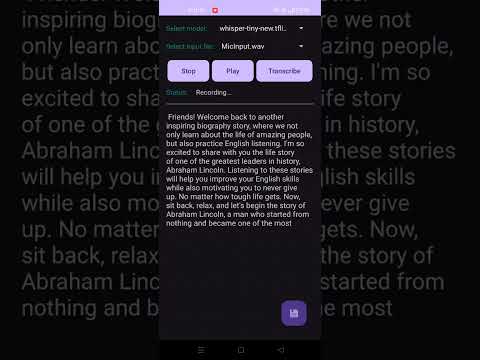
Demo Video
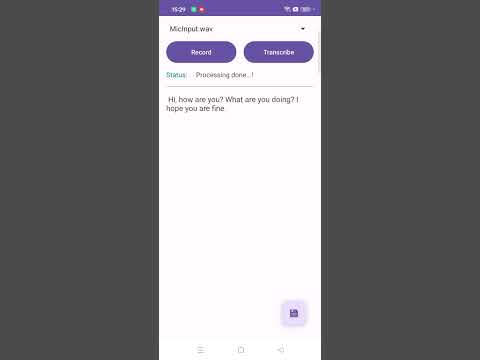
Live Transcription
Important Note
Whisper ASR is a powerful tool for transcribing speech into text. However, keep in mind that handling audio data and transcriptions may require careful synchronization and error handling in your Android application to ensure a smooth user experience.
Enjoy using the Whisper ASR Android app to enhance your speech recognition capabilities!
💖 Support This Project
Maintaining this project requires time and effort. If you find it useful and would like to support its development, you can contribute via PayPal:
🔹 PayPal Direct Link: https://www.paypal.com/vilassn
For any inquiries or business-related discussions, feel free to reach out: 📧 Email: [email protected]
Thank you for your support! 🚀
Acknowledgements
This project uses the following open-source implementation:
- Niranjan Yadla (2022)
Whisper TFLite: OpenAI Whisper Model Port for Edge Devices
https://github.com/nyadla-sys/whisper.tflite
@misc{nyadla-sys,
  author = {Niranjan Yadla},
  title = {{Whisper TFLite: OpenAI Whisper Model Port for Edge Devices}},
  year = 2022,
  howpublished = {GitHub Repository},
  url = {https://github.com/nyadla-sys/whisper.tflite},
  note = {Original TFLite implementation of OpenAI Whisper for on-device automatic speech recognition}
}

VoiceStudio
debpalash·Python
本地运行的 ElevenLabs 开源替代品,支持声音克隆、语音设计、视频配音、听写、转写和有声书制作,覆盖 646 种语言。
语音克隆+4语音推理
107004+388012kv0.5.72026-11-10 16:38 UTC

voicebox
jamiepine·Python
开源 AI 语音工作室,支持声音克隆、语音听写和语音生成,基于 Qwen3-TTS 与 Whisper,可在 CUDA 或 MLX 上本地运行。
语音克隆+4语音推理
60376+6237.6kv0.5.02026-10-07 01:17 UTC
whisper.cpp
ggml-org·C++
OpenAI Whisper 语音识别模型的 C/C++ 移植版,无需 Python 和 GPU 依赖,在普通 CPU 上就能跑语音转文字。
语音识别+4语音推理
55071+846.3kv1.9.52026-11-10 12:09 UTC
faster-whisper
SYSTRAN·Python
基于 CTranslate2 重实现的 Whisper 语音转文字推理引擎,通过量化与高效推理大幅提速并降低显存占用,适合本地部署转录。
语音识别+4语音推理
26650+782.2kv1.2.12026-11-10 10:13 UTC