仅支持 Zilliz Cloud 与 Milvus 2.6.0+/3.x,2.5.x 及更早版本不支持;容器内 localhost 指向容器自身,连本机 Milvus 需用 host.docker.internal 或服务名;镜像以 uid=1000 非 root 运行,用宿主机目录挂载需先 chown 1000:1000,SELinux 主机还要加 :Z。
docker run -d --name attu -p 3000:3000 -e MILVUS_ADDRESS=host.docker.internal:19530 -v attu-data:/data zilliz/attu:v3.0.0 硬件要求按 README 说明
README 未说明显存或 GPU 要求;提供 Docker 镜像、桌面应用(macOS/Linux/Windows)和 Linux x64 独立服务包,独立服务包需 Node.js 24.x。
支持 Apple Silicon有 Docker 镜像
Milvus 的 AI 原生图形管理工具,一个实例即可连接多个集群并可视化运维
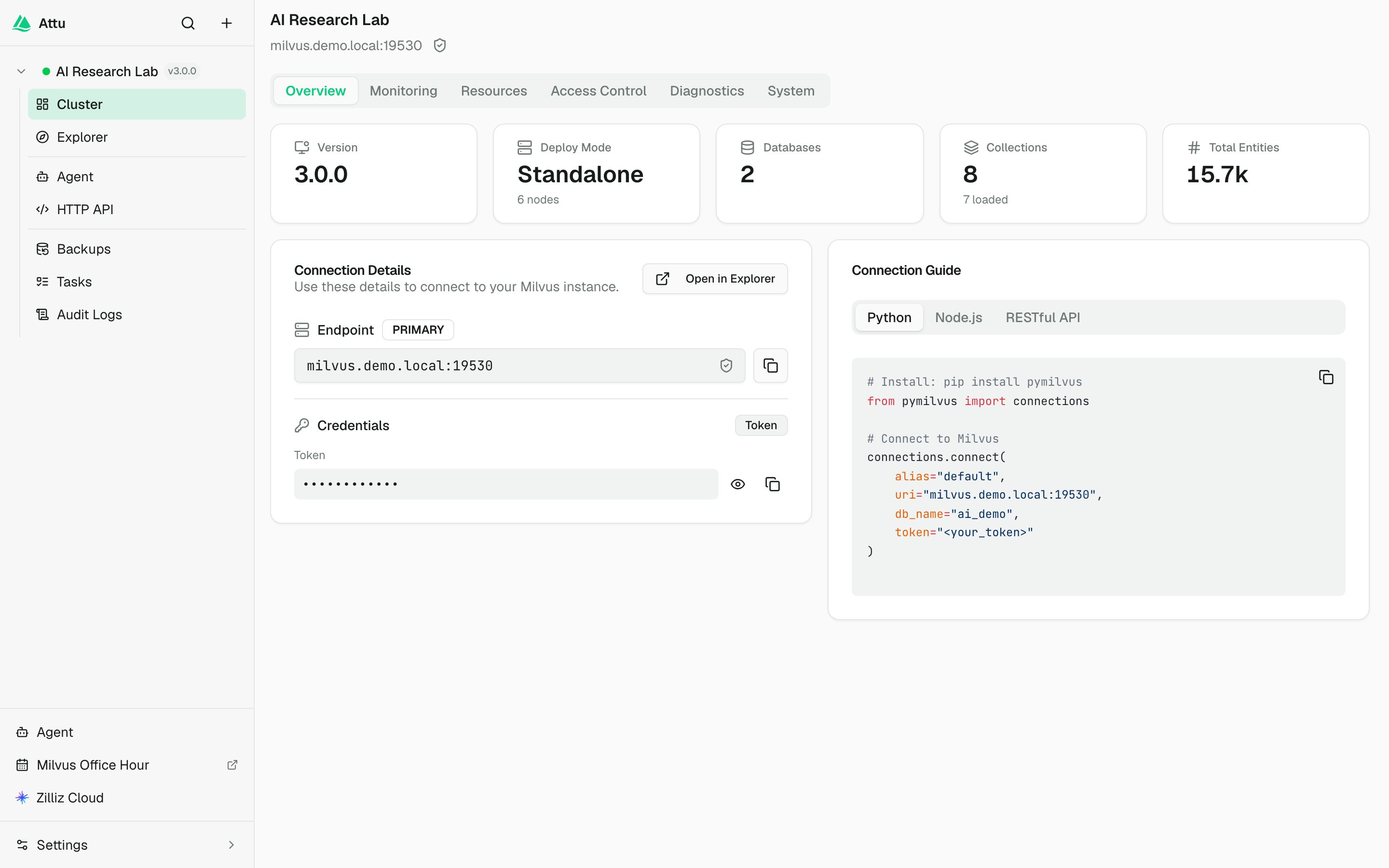
Milvus 向量数据库的图形化管理界面,可视化查看集合、索引和数据,省去手写命令的麻烦。
核心能力
- 单实例连接多个 Milvus 集群并独立切换工作区
- 可视化浏览集合、在线编辑数据并导入导出 CSV/JSON/Parquet
- 交互式向量检索,可配置 OpenAI、Cohere 等嵌入提供方
- 内置 50+ 工具的 AI Agent,用自然语言建集合、查数据
- 支持全量与增量备份,可存 S3、MinIO、GCS、Azure Blob
容易踩的坑
内容由模型根据 README 生成,可能不完整或不准确,以官方文档为准。看原文 README
- v3.0.1Attu v3.0.1最新正式版2026-09-24 · 2026-09-24 08:02 UTC
Attu v3.0.1
Changes since v3.0.0.
🐛 Bug Fixes
- update vulnerable build dependencies (91945f48)
- reap detached background services (431486f7)
- allow private service endpoints by default (0456a2f5)
- align Attu volume permissions (910b2599)
🔧 CI/CD
- use bash for desktop SBOM generation (011b0c9c)
- resolve backup metadata on Windows (3a673d90)
Downloads
- macOS:
.dmg(Apple Silicon) - Linux:
.deb/.AppImage - Windows:
.exeinstaller - Server:
attu-server-3.0.1-linux-x64-node24.tar.gz
Server tarball
The server tarball is for running Attu without Docker or Electron on Linux x64. Node.js 24.x is required. The tarball includes the Attu server bundle and
bin/milvus-backup.tar -xzf attu-server-3.0.1-linux-x64-node24.tar.gz cd attu-server-3.0.1-linux-x64-node24 ./bin/attu-serverBy default, the server listens on
0.0.0.0:3080and stores local data under./data. Override runtime settings with environment variables:HOST=127.0.0.1 PORT=4080 ATTU_DATA_DIR=/var/lib/attu ./bin/attu-serverDocker
docker run -d --name attu -p 3000:3000 -v attu-data:/data zilliz/attu:v3.0.1 - v3.0.0Attu v3.0.02026-09-03 · 2026-09-03 09:42 UTC
查看更新说明
Attu 3.0
Attu 3.0 delivers a richer visual experience for Milvus 3.0, with support for lakehouse data access, online schema evolution, long-text fields, advanced search analytics, reranking, and document deduplication.
Learn more about Milvus 3.0.
Highlights
External Collections and Snapshots
Explore Parquet and Iceberg data directly from your data lake without copying it into Milvus. Attu supports creating External Collections, mapping fields, refreshing source data, tracking refresh progress, and querying external data.
Snapshot management now includes browsing, restoring, and monitoring Collection restore tasks with clearer progress and error reporting.
Text Fields and Online Schema Evolution
Attu supports Milvus 3.0
TEXTfields across Collection creation, Schema, Query, Search, BM25, and analyzer workflows.You can also evolve Collection schemas directly in Attu:
- Add or delete fields when supported
- Edit Collection and field descriptions
- Create and inspect Function Fields
- Manage schema actions based on the connected Milvus version
Attu automatically checks Storage V3 requirements and provides configuration guidance when needed.
Search and Analytics
Query and Search now provide more powerful analytics:
COUNT,SUM,AVG,MIN, andMAX- Multi-field grouping and ordering
- Bucket-based vector search aggregation
- Paginated Query and Search results
- Interactive table sorting
- Improved filter expression suggestions
Function Score reranking lets you combine vector similarity with scalar signals such as freshness, popularity, or quality.
Learn more about Search Aggregation.
MinHash Document Deduplication
Create MinHash Function Fields and compatible
MINHASH_LSHindexes directly in Attu. You can search using raw text to identify near-duplicate documents for deduplication, clustering, and similarity analysis.Learn more about MinHash.
Analyzers and File Resources
The new File Resources page provides centralized management for analyzer resources such as custom dictionaries, stop-word lists, synonym lists, and tokenizer files. Registered resources can be reused across multiple Collections.
Collection and Data Management
Attu 3.0 also adds:
- Partition-level load and release
- Entity-level TTL configuration
- Database and Collection property editing
- Safer deletion and truncation workflows
- Version-aware index options
- Complete Collection export
- More reliable large-file imports with chunked uploads
Compatibility
- Supports Zilliz Cloud, Milvus 2.6.0+, and Milvus 3.x.
- External Collections, Snapshots, Text fields, MinHash, entity-level TTL, and some schema operations require Milvus 3.x.
- Text fields and External Collections require Storage V3. If it is disabled, set
common.storage.useLoonFFI=trueand restart Milvus. - External Collection data remains read-only in Attu. Insert, Upsert, Delete, Import, and Truncate operations are unavailable.
For detailed documentation, visit the Milvus documentation.
- v3.0.0-beta.6Attu v3.0.0-beta.62026-06-03 · 2026-06-03 07:50 UTC
查看更新说明
Attu v3.0.0-beta.6
This release summarizes the changes since v3.0.0-beta.5.
Highlights
- Added local authentication with user isolation for the app runtime, including safer password recovery handling and an 8-character minimum password length.
- Added admin connection management, including an admin view for managing connections and exporting selected admin connections.
- Added audit logs, including an admin view across all audit logs and UI refinements for the audit log table and filters.
- Added a standalone Linux x64 server tarball for running Attu without Docker or Electron.
- Improved backup and restore support by bundling
milvus-backupin Docker and standalone builds, isolating backup process environment variables, and improving object storage deep-check behavior.
Explorer and Collection Management
- Added a collection index management tab.
- Added a collection segments explorer tab, with clearer segment load and query index status.
- Added shard count support when creating collections.
- Added search from existing data row vectors.
- Improved collection tree behavior, including selected collection scrolling, loaded collection highlighting, moved route handling, and refresh after collection copy.
- Improved partition selection, sample import handling, row count refresh, entity count formatting, and vector search top-k bounds.
- Fixed stale explorer routes, collection rename warnings, active collection drop warnings, long collection names in headers, imported index params, and index label translations.
Backup, Diagnostics, and Storage
- Improved storage configuration testing and isolated backup storage deep checks.
- Added diagnostic capacity scenarios and clearer diagnostic resource estimates.
- Optimized diagnose collection scanning.
- Scoped snapshot restore jobs correctly to the source collection and improved restore job feedback.
App and Runtime
- Improved connection auth UI and added connection import/export.
- Improved settings navigation and sidebar accessibility.
- Adjusted cluster navigation support links and added the Milvus Office Hour sidebar link.
- Fixed Electron cluster overview loading and optimized Electron startup.
- Repaired partial database migrations.
- Updated Milvus SDK dependencies and
milvus-backupto 0.5.15.
Packaging and Release
- Added the Linux x64 standalone server tarball artifact:
attu-server-3.0.0-beta.6-linux-x64-node24.tar.gz. - Fixed standalone tarball packaging so it no longer contains absolute symlinks.
- Fixed Docker packaging so
milvus-backupis available for backup deep checks. - Fixed parquet parser packaging by using the declared dependency.
Downloads
- macOS:
.dmg/.zip(Apple Silicon) - Linux desktop:
.deb/.AppImage - Windows:
.exeinstaller /.zip - Standalone server:
attu-server-3.0.0-beta.6-linux-x64-node24.tar.gz
Standalone Server
The standalone server tarball is for running Attu without Docker or Electron on Linux x64. Node.js 24.x is required. The tarball includes the Attu server bundle and
bin/milvus-backup.tar -xzf attu-server-3.0.0-beta.6-linux-x64-node24.tar.gz cd attu-server-3.0.0-beta.6-linux-x64-node24 ./bin/attu-serverBy default, the server listens on
0.0.0.0:3080and stores local data under./data. Override runtime settings with environment variables:HOST=127.0.0.1 PORT=4080 ATTU_DATA_DIR=/var/lib/attu ./bin/attu-serverDocker
docker run -d --name attu -p 3000:3000 -v attu-data:/data zilliz/attu:v3.0.0-beta.6 - v3.0.0-beta.5Attu v3.0.0-beta.52026-05-17 · 2026-05-17 02:04 UTC
查看更新说明
Attu v3.0.0-beta.5
Changes since v3.0.0-beta.4.
✨ New Features
- add search order by (93f9575f)
- support external collections (9ea91938)
🐛 Bug Fixes
- persist docker data under mounted volume (49e86feb)
- refresh backup process on storage changes (f912b725)
- scope backup operations by database (#98) (ea9921d1)
- avoid bigint in data explorer (85dd276d)
- gate external collections by milvus version (8cddd2a0)
- disable copy for external collections (e50611d3)
- scope milvus clients by database (013b8c8b)
- use index metric for vector search (0068eade)
- disable external collection exports (a44cc158)
- guard stale explorer routes (533945d9)
Downloads
- macOS:
.dmg(Apple Silicon) - Linux:
.deb/.AppImage - Windows:
.exeinstaller
Docker
docker run -d --name attu -p 3000:3000 -v attu-data:/data zilliz/attu:v3.0.0-beta.5 - v3.0.0-beta.4Attu v3.0.0-beta.42026-05-09 · 2026-05-09 09:02 UTC
查看更新说明
Attu v3.0.0-beta.4
✨ New Features
- support collection snapshots (d7ca6b46)
- support nullable vector fields (14292804)
- support custom role privileges (bc17133e)
- support TLS Milvus connections (40272f63)
- show collection row counts in explorer (0c7f1553)
- support clustering key in collection schema (d94d85bb)
- allow root user to change password (a4346ad1)
- prefill num_partitions when duplicating collection (31ab8eb4)
- surface num_partitions in CollectionSchema (16dc9c45)
- pass num_partitions through createCollectionV2 to SDK (2b0b45ae)
- add resolveNumPartitions helper + unit tests (ac8ed255)
- add num_partitions input under partition key toggle (2c04074a)
- add num_partitions i18n keys (zh) (2d80d794)
- add num_partitions i18n keys (en) (7fe2aadd)
- add num_partitions field to FieldTreeNode type (58ce2334)
- include OS and deploy mode in support tickets (c7d93ec3)
- clear search results when all vector inputs emptied (857e615d)
- zero-config preview on first collection visit (3086d0ac)
- show highlight in table view too (bc78c3c6)
- add search highlight for BM25 results (1ad4eb22)
- add collapsible search panel (9e2165fd)
- add i18n for all preview components (en + zh) (c3525517)
- wire preview mode into fullscreen search results (e1576acd)
- add preview config sheet with mapping and facet tabs (d01906a6)
- add preview detail sheet with keyboard nav (094fda5f)
- add facet sidebar with checkbox/range/toggle facets (38eb170c)
- add preview result layouts and card component (33b19a9e)
- scaffold PreviewShell and PreviewTopBar (8baeed6b)
- add preview filter builder and usePreviewFilters hook (36a4e2f7)
- add usePreviewConfig and usePreviewLayout hooks (43ad03bf)
- add scanFacetCandidates server function (698da4c6)
- add savePreviewConfig server function (8b918ae2)
- add initializePreview and sampleScalarValues (7b2464ce)
- add validateConfigAgainstSchema self-healing (a15fba01)
- add isPreviewable helper (6a7e3250)
- add inferFieldMapping with fixture-driven tests (69e0300c)
- add preview-types module (9a45217e)
- add collection_display_config table for preview mode (c850facc)
- show collection name in fullscreen results header (103dd1e1)
- add right-click context menus to database tree (adbc502a)
- persist search query and results across reloads (9659a872)
- redesign dialog layout and support collection description (dd8d8fef)
- localize date/time display per current language (38712cfb)
- remember last visited tab per nav section (a3fe492e)
🐛 Bug Fixes
- disable data export for unloaded collections (40d656dd)
- allow cloud role creation (614c5571)
- hide tls switch for zilliz cloud connections (593428f5)
- repair partial TLS migrations (3e060b93)
- preserve collection database on rename (9406434f)
- keep explorer display config server-only (82f0f75a)
- cap segment buffer at actual data size for tiny collections (c144367c)
- reset search state and cleanup display config on collection lifecycle (9f9c24b5)
- count loaded collections via showCollections type=Loaded (f977d509)
- show actual num_partitions on partition key field (ef421ef1)
- data tab stays empty after reload if prior query failed (1a7f0642)
- analyzer test returns empty + flashes stale tokens (c95071a8)
- allow choosing install directory on Windows (23ab13cd)
- search-engine-style highlight snippet + deduplication (b6a2fd43)
- highlight fallback — check title and any field, not just description (9afe21e3)
- address review findings — render-time setState, stale refs, stack overflow (185d454f)
- wire facet filter into actual Milvus search pipeline (91fa1cf3)
- show facet sidebar and config in all layouts, not just card (6dc8234e)
- prevent duplicate search on facet change (901ce42f)
- connect facet sidebar filters to Milvus search (ddb9e8fe)
- fix preview search infinite loop and stabilize callbacks (827bad90)
- connect preview search box to real Milvus search (ad787d89)
- auto-create vector request for single-vector collections (c3f5deae)
- keep
用户点评
登录用户的真实使用记录,可按版本和硬件筛选共 0 条
还没有人点评。第一个说出真实体验的人最有价值。
Attu - The AI Workbench for Milvus




Attu is an AI-native management tool for Milvus vector databases. Connect to multiple Milvus clusters from a single instance, browse collections, run vector searches, manage backups, monitor health, and chat with an AI agent that understands your data.
Available as a web app (Docker, Kubernetes, or a standalone server package) or desktop app (macOS, Linux, Windows).

What's New in v3.0
Attu 3.0 expands the visual experience for Milvus 3.0 while retaining compatibility with Milvus 2.6.0+ and Zilliz Cloud. Highlights include:
- External Collections and Snapshots - Explore Parquet and Iceberg data without copying it into Milvus, refresh external schemas and data, and browse or restore Collection Snapshots.
- Text and Schema Evolution - Work with Milvus
TEXTfields, add or remove supported fields, edit descriptions, and manage Function Fields from the Schema page. - Search and Analytics - Run Query and Search aggregations, group and order results, paginate large result sets, and apply Function Score reranking.
- MinHash Deduplication - Configure MinHash Function Fields and
MINHASH_LSHindexes to find near-duplicate documents from raw text. - Analyzers and File Resources - Register reusable dictionaries, stop-word lists, synonym lists, and tokenizer resources.
- Collection and Data Management - Load or release individual partitions, configure entity-level TTL, export complete Collections, and import large files in chunks.
See the Attu v3.0.0 release notes for details.
Quick Start
Docker (recommended)
docker run -d --name attu \
  -p 3000:3000 \
  -e MILVUS_ADDRESS=host.docker.internal:19530 \
  -v attu-data:/data \
  zilliz/attu:v3.0.0
Open http://localhost:3000 and connect to Zilliz Cloud or an open-source Milvus 2.6.0+ or 3.x instance.
The Docker image stores its SQLite database at /data/attu.db by default. The -v attu-data:/data volume persists your saved connections, agent conversations, and preferences across container restarts.
The image runs as the non-root node user (uid=1000, gid=1000), so named volumes are recommended. If you use a host bind mount such as ./attu-data:/data, prepare the directory before starting Attu:
mkdir -p ./attu-data
sudo chown -R 1000:1000 ./attu-data
On SELinux-enabled hosts, also add the :Z mount option: ./attu-data:/data:Z.
Docker Compose (Milvus + Attu)
services:
  milvus:
    # Use a supported Milvus 2.6.x or 3.x image.
    image: milvusdb/milvus:<supported-tag>
    ports:
      - "19530:19530"
      - "9091:9091"
    command: milvus run standalone
    volumes:
      - milvus-data:/var/lib/milvus

  attu:
    image: zilliz/attu:v3.0.0
    ports:
      - "3000:3000"
    environment:
      - MILVUS_ADDRESS=milvus:19530
    volumes:
      - attu-data:/data
    depends_on:
      - milvus

volumes:
  milvus-data:
  attu-data:
docker compose up -d
Attu v3.0 supports Zilliz Cloud and open-source Milvus 2.6.0+ and 3.x. Milvus 2.5.x and earlier are not supported.
Desktop App
Download the latest release for your platform:
| Platform | Download |
|---|---|
| macOS (Apple Silicon) | .dmg |
| Linux | .AppImage / .deb |
| Windows | .exe |
macOS note: If you see "attu.app is damaged and cannot be opened", run:
sudo xattr -rd com.apple.quarantine /Applications/Attu.app
Standalone Server Package
The v3.0.0 release includes a non-Docker, non-Electron server package for Linux x64. It requires Node.js 24.x and includes the Attu server bundle and bin/milvus-backup.
curl -LO https://github.com/zilliztech/attu/releases/download/v3.0.0/attu-server-3.0.0-linux-x64-node24.tar.gz
tar -xzf attu-server-3.0.0-linux-x64-node24.tar.gz
cd attu-server-3.0.0-linux-x64-node24
./bin/attu-server
Open http://localhost:3080. The launcher defaults to 0.0.0.0:3080. Set HOST, PORT, ATTU_DATA_DIR, or ATTU_DB_PATH to customize the runtime paths and listener.
Features
Multi-Cluster Management
Connect to multiple Milvus instances from a single Attu deployment. Add, edit, and switch between connections in the sidebar. Each cluster has its own dedicated workspace with independent monitoring, agent sessions, and preferences, ideal for managing dev, staging, and production environments side by side.
Data Explorer
Browse databases and collections, view and edit data inline, import/export in CSV, JSON, and Parquet formats.

Vector Search
Interactive vector similarity search with configurable embedding providers (OpenAI, Cohere, Jina, VoyageAI, and more).

AI Agent
Chat-driven Milvus management with 50+ tools. Create collections, run queries, manage users, and analyze performance through natural language.
Supports: OpenAI, Anthropic Claude, DeepSeek, Google Gemini, OpenRouter, and custom API endpoints.

Cluster Overview & Monitoring
Real-time cluster health, Prometheus metrics dashboard with 16+ metrics, and interactive topology visualization.

Backup & Restore
Full and incremental backups with support for S3, MinIO, GCS, and Azure Blob Storage. Download backups as ZIP or restore from uploaded archives.
REST API Playground
Interactive API testing environment scoped to your connection, database, and collection.

And More
- RBAC Management - Create and manage users, roles, and privilege groups.
- Resource Groups - Configure resource allocation across nodes.
- Slow Request Analysis - Identify bottlenecks with cluster-wide slow query inspection.
- Configuration & Environment Viewer - Inspect runtime configs and environment variables.
- Task Queue - Monitor background operations for imports, exports, backups, restores, and copy jobs.
- Audit Logs - Review write operations initiated from the Attu UI or server functions.
- Internationalization - English and Chinese language support.
Deployment
Runtime Configuration
| Variable | Required | Default | Description |
|---|---|---|---|
ATTU_DB_PATH | No | Docker: /data/attu.db; server: attu.db | SQLite database path for Attu app data |
ATTU_AUDIT_RETENTION_DAYS | No | 90 | Audit log retention in days; 0 or less disables pruning |
LOG_LEVEL | No | info | Server log level supported by Pino |
MILVUS_GRPC_TIMEOUT | No | 15000 | Milvus gRPC request timeout in milliseconds |
Pre-configured Connection
Set MILVUS_ADDRESS to automatically create a default connection on startup. This is useful for Kubernetes and Docker Compose deployments where Attu is co-deployed with Milvus.
docker run -d \
  --name attu \
  -p 3000:3000 \
  -v attu-data:/data \
  -e MILVUS_ADDRESS=milvus:19530 \
  zilliz/attu:v3.0.0
| Variable | Required | Default | Description |
|---|---|---|---|
MILVUS_ADDRESS | Yes | - | Milvus gRPC endpoint, for example milvus:19530 |
MILVUS_NAME | No | Same as address | Display name shown in the connection list |
MILVUS_DATABASE | No | default | Target database |
MILVUS_TOKEN | No | - | Auth token; use a Kubernetes Secret for sensitive values |
MILVUS_USERNAME | No | - | Username |
MILVUS_PASSWORD | No | - | Password; use a Kubernetes Secret for sensitive values |
MILVUS_SSL | No | false | Set to true to enable TLS |
MILVUS_TLS_ROOT_CERT_PATH | No | - | CA/root certificate path for TLS |
MILVUS_TLS_PRIVATE_KEY_PATH | No | - | Client private key path for mutual TLS |
MILVUS_TLS_CERT_CHAIN_PATH | No | - | Client certificate chain path for mutual TLS |
MILVUS_TLS_ROOT_CERT | No | - | Inline CA/root certificate PEM stored in the connection record |
MILVUS_TLS_PRIVATE_KEY | No | - | Inline client private key PEM stored in the connection record |
MILVUS_TLS_CERT_CHAIN | No | - | Inline client certificate chain PEM stored in the connection record |
MILVUS_TLS_SERVER_NAME | No | - | Override TLS verification/SNI server name |
MILVUS_TLS_SKIP_CERT_CHECK | No | false | Skip certificate verification; insecure and for testing only |
MILVUS_SSL is enabled automatically when any MILVUS_TLS_* certificate, server name, or skip-check variable is set.
MILVUS_ADDRESS must be reachable from the Attu container. 127.0.0.1 or localhost usually points to the container itself, so use a Docker service name, Kubernetes service name, or host.docker.internal.
Local Login
Attu server deployments run with local login enabled by default. The first visit shows a one-time setup form for creating the first admin account. Desktop/Electron builds run in single-user mode and do not support Attu multi-user login.
ATTU_ADMIN_USER=admin \
ATTU_ADMIN_PASSWORD='Change-me-please-123' \
pnpm --filter @attu/app dev --host 127.0.0.1
Set ATTU_AUTH_MODE=none to keep a server deployment in single-user mode. This is intended for local development or deployments protected by another access layer.
If the only admin password is lost, restart Attu once with a recovery password:
ATTU_ADMIN_RESET_USER=admin \
ATTU_ADMIN_RESET_PASSWORD='New-change-me-123' \
pnpm --filter @attu/app start
When exactly one active admin exists, ATTU_ADMIN_RESET_USER can be omitted. Remove the reset variables after signing in because Attu applies them on startup and clears existing sessions for that admin.
| Variable | Required | Description |
|---|---|---|
ATTU_RUNTIME | No | Set to desktop to force single-user mode. Electron sets this automatically. Server/Docker deployments should leave it unset. |
ATTU_AUTH_MODE | No | Server override: local enables Attu login; none disables it. Defaults to local for server/Docker and none for desktop. |
ATTU_AUTH_ENABLED | No | Legacy boolean alias. true maps to ATTU_AUTH_MODE=local; false maps to none. |
ATTU_ADMIN_USER | Optional | Bootstrap admin username or email created on startup when no users exist. |
ATTU_ADMIN_PASSWORD | Optional | Bootstrap admin password. Must be set with ATTU_ADMIN_USER to create the bootstrap admin. |
ATTU_ADMIN_EMAIL | No | Optional email stored on the bootstrap admin. |
ATTU_ADMIN_NAME | No | Optional display name for the bootstrap admin. Defaults to ATTU_ADMIN_USER. |
ATTU_ADMIN_RESET_USER | No | Existing local admin username or email to reset. Required when more than one active admin exists. |
ATTU_ADMIN_RESET_PASSWORD | Optional | One-time startup password reset for the selected local admin. Must satisfy the password policy. Remove after recovery. |
ATTU_AUTH_SESSION_DAYS | No | Session lifetime in days. Defaults to 30. |
ATTU_SESSION_DAYS | No | Legacy alias for ATTU_AUTH_SESSION_DAYS. |
ATTU_AUTH_COOKIE_SECURE | No | Overrides session cookie Secure. By default Attu enables it for HTTPS or X-Forwarded-Proto: https; set false only for local HTTP testing. |
Audit Logs
Attu records audit logs for write operations initiated from the Attu UI or server functions. These logs are stored in Attu's SQLite database and are separate from Milvus native logs. Read-only browsing, search, and query operations are not audited.
Audited actions include connection management, database and collection management, schema and metadata changes, data writes, index and partition operations, user and role administration, resource group changes, AI configuration changes, and import/export/backup/restore task starts.
Each audit record includes the connection, actor, action, resource type/name, database name, success/failure status, error message, metadata, and timestamp. Sensitive metadata fields are redacted before storage when their key contains values such as password, token, secret, apiKey, privateKey, cert, certificate, or credential.
Audit retention defaults to 90 days. Set ATTU_AUDIT_RETENTION_DAYS to change the retention window; set it to 0 or a negative value to disable automatic pruning.
Outbound Requests and SSRF Protection
Attu validates outbound HTTP/HTTPS targets when saving or testing embedding and LLM service configurations, and again when sending requests. A security-policy rejection can therefore happen before the service is contacted.
Docker and standalone server deployments enforce SSRF protection by default in production. Private and loopback addresses, including 10.0.0.0/8, 172.16.0.0/12, 192.168.0.0/16, 127.0.0.0/8, and private IPv6 addresses, require explicit permission. Domains are checked against their resolved IP addresses, so an internal DNS name does not bypass the policy.
Desktop behavior depends on the installed version. If a local or LAN service is blocked, use the per-host allowlist below. As of September 8, 2026, the change to allow local and LAN services by default on desktop has not been released; do not assume the published v3.0.0 build includes it. That change also covers domains resolving to private addresses; explicitly configured strict mode will still take precedence.
Metadata service hostnames and metadata/link-local addresses, such as metadata.google.internal and 169.254.169.254, remain blocked even when allowlisted. Only HTTP and HTTPS URLs are accepted, and credentials embedded in URLs are rejected.
| Variable | Default | Description |
|---|---|---|
ATTU_SSRF_ALLOWLIST | Empty | Comma-separated hostnames, IP addresses, or CIDR ranges permitted by the deployment's private-address policy. Use hosts only, without a URL scheme, port, or path. |
ATTU_SSRF_PROTECTION | Strict outside development, with version-dependent desktop exceptions | Set to strict to explicitly enforce private-address checks, including on desktop. |
For example, ATTU_SSRF_ALLOWLIST=embedding.company.local,192.168.1.100 permits either host. Prefer specific hosts; use a CIDR range only when the whole range is intended to be accessible.
Docker
Add the allowlist to the Attu container's environment and recreate the container with its existing data volume:
docker run -d --name attu \
  -p 3000:3000 \
  -v attu-data:/data \
  -e ATTU_SSRF_ALLOWLIST=embedding.company.local,192.168.1.100 \
  zilliz/attu:v3.0.0
The example starts a new container; stop and remove the previous container of the same name first, retaining its data volume. For Docker Compose or Kubernetes, set the same variable in the Attu service/container environment and recreate or roll out the workload.
The service must also be reachable from inside the container. If using host.docker.internal, allowlist that hostname; Linux Docker Engine typically also requires --add-host=host.docker.internal:host-gateway. An allowlist changes permission, not DNS resolution or network routing.
Desktop
Fully quit Attu, including any running background instance, then launch it with the environment variable. Replace the host and executable path with your actual values.
macOS:
ATTU_SSRF_ALLOWLIST=embedding.company.local,192.168.1.100 \
/Applications/Attu.app/Contents/MacOS/Attu
Windows PowerShell:
$env:ATTU_SSRF_ALLOWLIST = "embedding.company.local,192.168.1.100"
& "C:\path\to\Attu.exe"
Linux AppImage:
ATTU_SSRF_ALLOWLIST=embedding.company.local,192.168.1.100 \
./attu-3.0.0-x86_64.AppImage
These examples apply to launches from that terminal environment; launching Attu later from its usual icon does not retain the setting. For the standalone server package, set the same variable before running ./bin/attu-server.
Troubleshooting
| Error | Meaning / next step |
|---|---|
Resolved address is not allowed: ... | The resolved IP is blocked by the deployment policy. Allowlist the intended service host and restart Attu. |
Private target is not allowed for this tenant | The organization/tenant policy also blocks the target. An administrator must permit the host and port for the embedding or llm purpose in that tenant's egress policy; deployment-level permission alone is insufficient. |
Metadata service hostnames are not allowed / Metadata or link-local address is not allowed: ... | The target is hard-blocked and cannot be permitted by the allowlist. Use the actual service endpoint. |
URL hostname could not be resolved | Fix DNS resolution in the environment running Attu. |
The default organization inherits deployment permission; additional organizations can have stricter private-target policies. Server logs record rejections as Blocked outbound request, with the request context, target host/port, and reason. For embedding configuration operations, the context is embedding_config.create, embedding_config.update, or embedding_config.test.
TLS / SSL
Attu supports one-way TLS and mutual TLS (mTLS) for Milvus gRPC connections.
- One-way TLS: Attu verifies the Milvus server certificate. A custom CA/root certificate is optional.
- Mutual TLS (mTLS): Attu verifies the Milvus server certificate and sends a client certificate/key to Milvus.
- Server name override: Set
MILVUS_TLS_SERVER_NAMEor the UI field when the certificate hostname differs from the address host. - Skip certificate verification:
MILVUS_TLS_SKIP_CERT_CHECK=trueis insecure and intended only for local testing. It is not supported with mTLS.
You can configure TLS certificates in the Attu UI by uploading PEM files or by entering paths readable by the Attu server/container. Uploaded PEM content is stored in Attu's SQLite connection record, so Docker and Kubernetes deployments do not need certificate volume mounts for that flow.
One-way TLS with mounted certificate paths:
docker run -d \
  --name attu \
  -p 3000:3000 \
  -v attu-data:/data \
  -v "$PWD/certs:/etc/attu/certs:ro" \
  -e MILVUS_ADDRESS=milvus.example.com:19530 \
  -e MILVUS_SSL=true \
  -e MILVUS_TLS_ROOT_CERT_PATH=/etc/attu/certs/ca.pem \
  -e MILVUS_TLS_SERVER_NAME=milvus.example.com \
  zilliz/attu:v3.0.0
Mutual TLS with mounted certificate paths:
docker run -d \
  --name attu \
  -p 3000:3000 \
  -v attu-data:/data \
  -v "$PWD/certs:/etc/attu/certs:ro" \
  -e MILVUS_ADDRESS=milvus.example.com:19530 \
  -e MILVUS_SSL=true \
  -e MILVUS_TLS_ROOT_CERT_PATH=/etc/attu/certs/ca.pem \
  -e MILVUS_TLS_PRIVATE_KEY_PATH=/etc/attu/certs/client.key \
  -e MILVUS_TLS_CERT_CHAIN_PATH=/etc/attu/certs/client.pem \
  -e MILVUS_TLS_SERVER_NAME=milvus.example.com \
  zilliz/attu:v3.0.0
See Run Attu with local Milvus mutual TLS in Docker for a complete local mTLS setup, including certificate generation, Milvus Docker Compose configuration, and verification.
Kubernetes
kubectl apply -f https://raw.githubusercontent.com/zilliztech/attu/main/deploy/attu-k8s-deploy.yaml
Edit the YAML to set MILVUS_ADDRESS to your Milvus service name (e.g., my-release-milvus:19530).
Nginx Reverse Proxy
See the nginx deployment guide.
Compatibility
Attu v3.0 supports Zilliz Cloud and open-source Milvus 2.6.0+ and 3.x. Milvus 2.5.x and earlier are not supported.
External Collections, Snapshots, TEXT fields, MinHash, entity-level TTL, aggregation, ordering, and some schema operations require Milvus 3.x. Attu adapts the available actions to the connected Milvus version and configuration.
TEXT fields and External Collections require Storage V3. If Storage V3 is disabled, set common.storage.useLoonFFI=true in Milvus and restart the service. External Collection data remains read-only in Attu.
| Milvus Version | Attu Version |
|---|---|
| Zilliz Cloud | v3.0.0 |
| 3.x | v3.0.0 |
| 2.6.x | v3.0.0 |
| 2.5.x | v2.5.10 |
| 2.4.x | v2.4.12 |
| 2.3.x | v2.3.5 |
FAQ
I can't connect to Milvus from Docker
Make sure
MILVUS_ADDRESSis reachable from inside the container. Use the Docker service name, notlocalhost. See #161.
macOS says the app is damaged
Run
sudo xattr -rd com.apple.quarantine /Applications/Attu.appin Terminal.
How do I update?
Docker: pull the latest image and restart. Desktop: the app checks for updates automatically on launch.
Resources
Community
Join the Milvus Discord to ask questions, share feedback, and connect with other users.
License
Attu was open source under the Apache License 2.0 through version v2.5.12. Starting from version v2.6.0, Attu is proprietary software. See LICENSE_PROPRIETARY.txt for details.
milvus
milvus-io·Go
高性能云原生向量数据库,专为大规模向量近似最近邻检索设计,适合搭建以图搜图、语义搜索和 RAG 等应用。
向量数据库+4向量数据库
46632+204.3kv3.0.52026-11-10 14:59 UTC
faiss
facebookresearch·C++
面向稠密向量的高效相似度检索与聚类库,支持十亿级向量近邻搜索,是构建向量数据库和 RAG 检索层的底层引擎。
向量检索+4向量数据库
41314+534.6kv1.15.12026-11-10 16:03 UTC

qdrant
qdrant·Rust
高性能大规模向量数据库与向量检索引擎,用 Rust 编写,支持 HNSW、混合检索和图像搜索,适合为 AI 应用和 RAG 提供相似度检索能力。
向量数据库+4向量数据库
35503+392.8kv1.20.02026-11-10 17:10 UTC

dragonfly
dragonflydb·C++
兼容 Redis 和 Memcached 协议的内存数据库,用多线程架构提升吞吐量,可直接替换现有缓存层。
内存数据库+4向量数据库
31859+131.3kv2.12026-11-10 16:51 UTC