必须下载 Releases 里的 Aimmy.zip,不要下成 Source zip;需先装好 .NET 8 桌面运行时和 VC++ 运行库;项目为 source-available 而非开源,禁止商业 fork
Aimmy
Babyhamsta活跃维护基于 ONNX/YOLOv8 和 DirectML 的通用 AI 瞄准辅助工具,为行动不便的玩家提供视觉对齐能力,用 C# 实现。
Universal Second Eye for Gamers with Impairments (Universal AI Aim Aligner (AI Aimbot) - ONNX/YOLOv8 - C#)
v2.5.0发布于 2026-01-17 22:02 UTC1,617star720fork同步于 2026-11-07 07:30 UTC
安装 .NET Runtime 8.0 x64 与 Visual C++ Redistributable x64;从 Releases 下载 Aimmy.zip(非源码包),解压后运行 Aimmy.exe 硬件要求按 README 说明
README 未说明具体显存要求;使用 DirectML 推理,在 AMD 和 NVIDIA GPU 上均有较好兼容性,尤其适合 AMD GPU。
基于 DirectML 和 YOLOv8 的通用 AI 瞄准辅助工具,帮瞄准困难的玩家提升游戏体验
基于 ONNX/YOLOv8 和 DirectML 的通用 AI 瞄准辅助工具,为行动不便的玩家提供视觉对齐能力,用 C# 实现。
核心能力
- 用 DirectML + ONNX + YOLOv8 检测屏幕中的玩家
- 提供完整 UI 界面,可调 AI 置信度、FOV 等参数
- 内置 ESP 高亮,标记 AI 检测到的玩家
- 支持 5 种鼠标移动方式,适配不同鼠标和游戏
- 模型与配置可热切换,并支持从仓库在线获取
容易踩的坑
内容由模型根据 README 生成,可能不完整或不准确,以官方文档为准。看原文 README
- v2.5.0Release 2.5.0最新正式版2026-01-17 · 2026-01-17 22:02 UTC
Aimmy 2.5.0 Update
Changelog:
Features
- Added Theming to the UI, you can now load your own images as the background. To do so go to the Settings tab and head to the "Theme Settings" panel, click the small '>' next to the title and upload your image. (Cami)
- Added new Stream Guard, to hide the ESP/FOV/Window when using common recording/streaming software. (Cami)
- Added Distance method in MathUtil.cs with aggressive inlining. (Taylor)
- Introduced a byte-to-float lookup table and refactored BitmapToFloatArrayInPlace for better performance and reduced garbage collection pressure. (Taylor)
- Added a new Spray Mode (for Auto Trigger), it'll hold down left click for you if using the mode. (Taylor)
- Added new color wheels so we don't have to use the ugly old color picker box (Bobby)
- Added movement paths with dropdown for more mouse movement options (Whip)
- Added tool tip support for all UI items and added tool tips to several UI items to help users better understand certain settings.
- Added support for Dynamic Models, this means models that support multiple image sizes and multiple classes can now be loaded!! To further explain, this allows you to potentially get better performance from using smaller images sizes with the trade off being some accuracy.
- Further enhancements to my dynamic model support (Whip)
- Clicking the version on the About Us page now brings you to that release page on Github.
- Newest Universal V5_Enhanced model has been packed with this release.
Refactors
- Reordered values for ESP/Tracers (Bottom, Middle, Top → Top, Middle, Bottom) (Cami)
- Some much needed refactoring on certain items/functions (Whip)
- Transitioned from KD-Tree to linear search for predictions in AIManager.cs, removing unused variables and simplifying the PrepareKDTreeData method. (Taylor)
- Simplified SolidBrush usage in CaptureManager.cs for improved readability. (Taylor)
- Removed the redundant Anti Recoil system (600~ lines)
- Reorganized/moved several items and added a few sub menus to the main UI tabs, so some of the settings you are used to might of moved to a new tab or panel.
- Reworked old tool tip style to better match the UI (existed just was never used or implemented correctly)
- REFACTORED ALL PREDICTION METHODS AS THEY ALL SUCKED.
- Shalloe's: Was computing sum(positions) + cursor (completely broken math) -> Now uses proper velocity-based prediction
- WiseTheFox: Was just EMA smoothing with no prediction (lmao) -> Added velocity tracking + 150ms lead time extrapolation
- Kalman: Replaced Accord library with custom implementation featuring covariance tracking, dt/velocity clamping, and configurable lead time
- Fixed WiseTheFox ignoring predicted Y coordinate entirely
- Added additional settings for each prediction so users can have more control over predictions and lead times.
- Completely refactored the About Us page, it is now better looking (more modern), and now has links to GitHub and Discord.
- Reworked the design of the Notice Bar to look a bit cleaner.
Fixes
- RZMouse.cs adjustments (Fixes for "Unable to load DLL 'rzctl.dll'" - should make rzctl more stable) (Cami)
- Fixed some bugs with cursor checks (Whip)
- Implemented some further fixes to Sticky Aim.. It should be better? Let us know please :)
- Fixed color wheels not actually working, they had the wrong method and always used the theme color for the FOV/ESP.
- Fixed black underlines on tab titles in Model Menu.
- Fixed model/config downloading for models/configs that had brackets, spaces, ect. They were not escaped correctly.. or at all.
- Fixed black typing cursor on Model Menu.
Chores
- Updated NuGet packages to the latest version
- v2.4.1Release 2.4.12025-06-09 · 2025-06-09 01:50 UTC
查看更新说明
Aimmy 2.4.1 Update (Hot Patch)
Changelog:
General
- Switched to Vortice, from SharpDX
- Added back old GDI+ capture method and screen capturing switch in settings
- Optimized bitmaptofloatarray in AI Manager
- Refactored DXGI capture
- Added drag and drop support
- Added fixes for missing bin folder causing SaveJSON func to fail
- Added further fixes for missing folders/files on startup (bin)
- Added error catches for 0 monitors being detected
- Added catches for unsupported DirectX on certain systems (auto falls back to GDI+)
- Added frame caching to DirectX (incase capture fails)
- Improved error handling on DirectX
- Fixed clamping logic on DirectX that caused it to follow the mouse
- Made DirectX mimic GDI with how it captures and fills in visible areas
- A few fixes to help save on memory / process times
- Fixed display selector not actually switching capture displays after CaptureManager changes
- Fixed minimize states not saving between sessions
- Fixed dropdowns being overwritten and not showing the correct setting from cfg
- Refactored SettingsMenu CS to better match AimMenu CS code so it's easier to maintain
- v2.4.0Release 2.4.02025-06-07 · 2025-06-07 16:38 UTC
查看更新说明
Aimmy 2.4.0 Update
Changelog:
General
- Added new fancy startup window / animation
- Fixed forgotten version # update in CheckForUpdates func
- Version number for check now pulls from UI so I can hopefully avoid that again
- Deleted old Welcome.xaml files (was originally going to be used for key system which won't happen in Aimmy V2 ever)
- Fixed UpdateManager not handling newer versions (would update you back to older version before fix)
- Updated gradient effect on menu buttons (looks nicer)
- Changed aim settings button icon from Guy Walking to Target (E726->E1D2)
- Added new ThemeManager to apply theme to UI elements
- Added theme colors to the UI (tags/theme tags to mark items)
- Added color wheel element for theme color selection
- Theme color now applies to new startup animation
- Added focus display selector (pick displays without having to relaunch Aimmy on the correct display - supports up to 4 different displays)
- Updated notice bar style, fixed it's disappear timing, and updated it to use theme
- Fixed screen shots being taken even while "Collect Data While Playing" was turned off
- Adjusted FOV/Detected windows to support display selector
- Updated ConfigSaver to handle new themes
- Updated AntiRecoil to handle new themes
Optimizations / Cleanup
- Massively reduced startup lag
- Split each XAML section off into it's own XAML file to help organize the source better
- Each XAML section's CS code was split off into it's own CS as well from the Main.cs
- Each section now lazy loads to help load times and speed
- Managers now lazy load to help with performance and startup
- Cleaned up and optimized each sections CS code after moving it into it's own file
- Async fix to prevent UI freezing when grabbing PC details for about page
I'm sure there is more that I missed.. (There were +6940 and -1848 lines of code - 49 files changed)
- v2.3.0Release 2.3.02025-06-01 · 2025-06-01 22:28 UTC
查看更新说明
Aimmy 2.3.0 Update
Changelog:
General
- Updated Nuget Packages to latest versions
- Added cleaned up code from Github Pulls (TY community members for your Pull Requests!)
- Fixed model downloading (you should be able to download models/configs again)
Optimizations (x3.7~ Performance boost)
- Replaced BitmapToFloatArray with a more optimized version
- Replaced old ScreenGrab function with new DirectX one (reduced avg 6ms~ to 0.1ms~ per grab)
- Added a few cached variables to help save on processing time
- Adjusted how CPU delays occurred to prevent random CPU usage
- Optimized the AI thread to allow higher performance
- Adjusted how frame captures worked to prevent slowing down the AI thread
Before Changes:
=== AIManager Performance Benchmarks ===
AILoopIteration: Avg=2.50ms, Min=0ms, Max=103ms, Count=11251
AutoTrigger: Avg=0.00ms, Min=0ms, Max=0ms, Count=1833
BitmapToFloatArray: Avg=1.12ms, Min=1ms, Max=3ms, Count=1833
CalculateCoordinates: Avg=0.00ms, Min=0ms, Max=1ms, Count=1833
GetClosestPrediction: Avg=15.18ms, Min=11ms, Max=90ms, Count=1833
HandleAim: Avg=0.01ms, Min=0ms, Max=11ms, Count=1833
KDTreeOperations: Avg=0.01ms, Min=0ms, Max=8ms, Count=1833
ModelInference: Avg=6.28ms, Min=5ms, Max=41ms, Count=1833
ModelInitialization: Avg=205.00ms, Min=205ms, Max=205ms, Count=1
PrepareKDTreeData: Avg=0.02ms, Min=0ms, Max=1ms, Count=1833
SaveFrame: Avg=0.04ms, Min=0ms, Max=4ms, Count=1833
ScreenGrab: Avg=6.68ms, Min=3ms, Max=15ms, Count=1833
Overall FPS: 65.18
After Changes:
=== AIManager Performance Benchmarks === AILoopIteration: Avg=0.00ms, Min=0ms, Max=91ms, Count=8749819 AutoTrigger: Avg=0.00ms, Min=0ms, Max=0ms, Count=4144 BitmapToFloatArray: Avg=1.00ms, Min=1ms, Max=3ms, Count=4331 CalculateCoordinates: Avg=0.00ms, Min=0ms, Max=1ms, Count=4144 GetClosestPrediction: Avg=0.04ms, Min=0ms, Max=91ms, Count=474861 HandleAim: Avg=0.00ms, Min=0ms, Max=11ms, Count=4144 KDTreeOperations: Avg=0.00ms, Min=0ms, Max=8ms, Count=4144 ModelInference: Avg=2.04ms, Min=2ms, Max=22ms, Count=4331 ModelInitialization: Avg=435.00ms, Min=435ms, Max=435ms, Count=1 PrepareKDTreeData: Avg=0.01ms, Min=0ms, Max=9ms, Count=4331 SaveFrame: Avg=0.02ms, Min=0ms, Max=4ms, Count=4144 ScreenGrab: Avg=0.01ms, Min=0ms, Max=91ms, Count=474861 Overall FPS: 243.44 - v2.2.0Release 2.2.02025-02-15 · 2025-02-15 18:32 UTC
查看更新说明
Aimmy 2.2.0 Update
Changelog:
General
- Updated all nuget packages to latest versions (Supporting newest YOLO models)
- Fixed issue with MaterialThemes 5.0.0 breaking UI
- Added newest Universal V5 model into the models folder
用户点评
登录用户的真实使用记录,可按版本和硬件筛选共 0 条
还没有人点评。第一个说出真实体验的人最有价值。
[!NOTE] If you enjoy Aimmy, please consider giving us a star ⭐! We appreciate it! :)
Aimmy is a universal AI-Based Aim Alignment Mechanism developed by BabyHamsta, MarsQQ & Taylor to make gaming more accessible for users who have difficulty aiming.
Unlike most AI-Based Aim Alignment Mechanisms, Aimmy utilizes DirectML, ONNX, and YOLOV8 to detect players, offering both higher accuracy and faster performance compared to other Aim Aligners, especially on AMD GPUs, which would not perform well on Aim Alignment Mechanisms that utilize TensorRT.
Aimmy also provides an easy to use user-interface, a wide set of features and customizability options which makes Aimmy a great option for anyone who wants to use and tailor an Aim Alignment Mechanism for a specific game without having to code.
Aimmy is 100% free to use. This means no ads, no key system, and no paywalled features. Aimmy is not, and will never be for sale for the end user, and is considered a source-available product, not open source as we actively discourage other developers from making commercial forks of Aimmy.
Please do not confuse Aimmy as an open-source project, we are not, and we have never been one.
Want to connect with us? Join our Discord Server: https://discord.gg/aimmy
If you want to share Aimmy with your friends, our website is: https://aimmy.dev/
Table of Contents
- What is the purpose of Aimmy?
- How does Aimmy Work?
- Features
- Setup
- How is Aimmy better than similar AI-Based tools?
- How the hell is Aimmy free?
- How do I train my own model?
- How do I upload my model to the "Downloadable Models" menu
What is the purpose of Aimmy?
Aimmy was designed for Gamers who are at a severe disadvantage over normal gamers.
This includes but is not limited to:
- Gamers who are physically challenged
- Gamers who are mentally challenged
- Gamers who suffer from untreated/untreatable visual impairments
- Gamers who do not have access to a seperate Human-Interface Device (HID) for controlling the pointer
- Gamers trying to improve their reaction time
- Gamers with poor Hand/Eye coordination
- Gamers who perform poorly in FPS games
- Gamers who play for long periods in hot environments, causing greasy hands that make aiming difficult
How does Aimmy Work?
flowchart  LR
A["Playing Game System"]
C["Screen Grabbing Functionality"]
B["YOLOv8 (DirectML + ONNX) Recognition"]
D{Making Decision}
DA["X+Y Adjustment"]
DB["FOV"]
E["Triggering Functionality"]
F["Mouse Cursor"]

A --> E--> C  -->  B  --> D --> F
DA  -->  D
DB  -->  D
When you press the trigger binding, Aimmy will capture the screen and run the image through AI recognition powered by your computer hardware. The result it develops will be combined with any adjustment you made in the X and Y axis, and your current FOV and will result in a change in your mouse cursor position.
Features
- Full Fledged UI
- Aimmy provides a well designed and full-fledged UI for easy usage and game adjustment.
- DirectML + ONNX + YOLOv8 AI Detection Algorithm
- The use of these technologies allows Aimmy to be one of the most accurate and fastest Aim Alignment Mechanisms out there in the world
- Dynamic Customizability System
- Aimmy provides an interactive customizability system with various features that auto-updates the way Aimmy will aim as you customize. From AI Confidence to FOV, Aimmy makes it easy for anyone to tune their aim
- Dynamic Visual System
- Aimmy contains a universal ESP system that will highlight the player detected by the AI. This is helpful for visually impaired users who have a hard time differentiating enemies, and for configuration creators attempting to debug their configurations.
- Mouse Movement Method
- Aimmy grants you the right to switch between 5 Mouse Movement Methods depending on your Mouse Type and Game for better Aim Alignment
- Hotswappability
- Aimmy lets you hotswap models and configurations on the go. There is no need to reset Aimmy to make your changes
- Model and Configuration Store with Repository Support
- Aimmy makes it easy to get any models and configurations you may ever need, and with repository support, you can get up to date with the latest models and configurations from your favorite creators
Setup
- Download and Install the x64 version of .NET Runtime 8.0.X.X
- Download and Install the x64 version of Visual C++ Redistributable
- Download Aimmy from Releases (Make sure it's the Aimmy zip and not Source zip)
- Extract the Aimmy.zip file
- Run Aimmy.exe
- Choose your Model and Enjoy :)
How is Aimmy better than similar AI-Based tools?
Aimmy is written in C# using .NET 8 and WPF utilizing pre-existing libraries like DirectML and ONNX. This has allowed us to make a very fast Aim Aligner with high compatiblity on both AMD and NVIDIA GPUs without sacrificing the end-user experience.
Beyond the core functionality, Aimmy also adds some amazing additional features like Detection ESP to help you tune your gaming experience however you like it.
Aimmy comes pre-bundled with a well trained AI model with thousands of images.
Besides that model, Aimmy provides dozens of other community made models through the store and our Discord server, with more models being developed every day by other Aimmy users. These models vary from game to image count, making Aimmy incredibly versatile and universal for thousands of games on the market right now.
How the hell is Aimmy free?
As an AI based Aim Aligner, Aimmy does not require any sort of upkeep because it does not read any specific game data to perform it's actions. If Aimmy team stops maintaining Aimmy, even if no one pitches in to fork and maintain the project, Aimmy would still work.
This has meant that while we do currently use out of pocket expenses to run Aimmy, those expenses have been low enough that it hasn't been a necessity for Aimmy to run on even an ad-supported model.
We do not seek to make money from Aimmy, we only seek your kind words <3, and a chance to help people aim better, by assisting their aim or even to train how they aim (yes, you can use Aimmy in that way too)
How do I train my own model
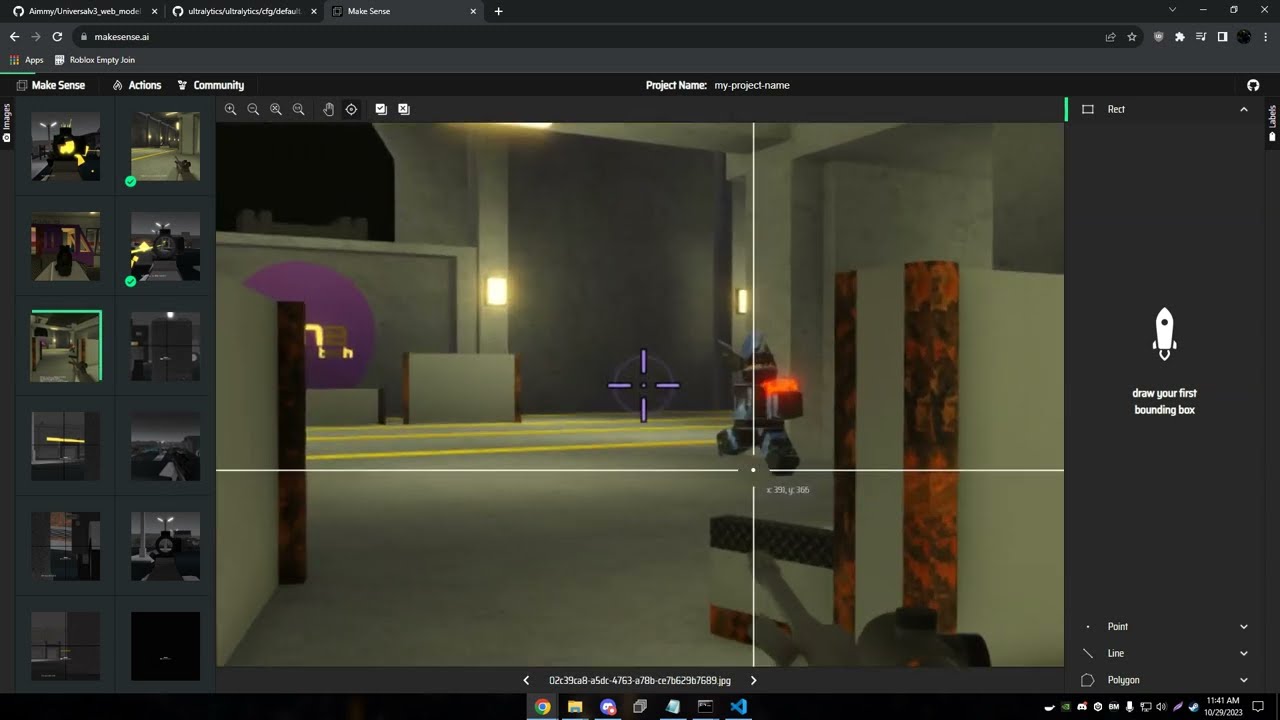
Please see the video tutorial below on how to label images and train your own model. (Redirects to Youtube)
How do I upload my model to the "Downloadable Models" menu?
Please read the tutorial at UploadModel.md
netron
lutzroeder·JavaScript
把 ONNX、PyTorch、Keras、CoreML 等格式的神经网络模型直接拖进浏览器就能看结构图,排查模型转换和层连接问题很方便。
模型可视化+4格式转换
33676+123.2kv9.3.52026-11-09 12:35 UTC

onnxruntime
microsoft·C++
跨平台高性能推理与训练加速引擎,可直接加载 ONNX 模型,兼容 PyTorch、TensorFlow 等框架导出,解决模型在不同硬件上高效部署的问题。
推理引擎+4格式转换
22275+154.4kv1.30.12026-11-10 17:16 UTC

onnx
onnx·Python
ONNX 是开放的机器学习模型交换格式标准,让 PyTorch、TensorFlow、Keras 等框架训练出的模型能互相转换、跨平台部署。
模型交换格式+4格式转换
21669+64.1kv1.23.22026-11-10 15:40 UTC
magika
google·Rust
用深度学习快速准确地识别文件真实类型,不依赖扩展名,支持 MIME 检测,Rust 实现,可嵌入各类应用做内容安全与文件分类。
文件类型检测+4格式转换
18787+111.2kcli/v1.1.02026-11-10 16:30 UTC