CodeChecker is a static analysis infrastructure built on the LLVM/Clang
Static Analyzer toolchain, replacing
scan-build in a Linux or
macOS (OS X) development environment.

Check out our DEMO showing some analysis results of open-source projects!
Main features
Command line C/C++ Analysis
- Executes Clang-Tidy, Clang Static Analyzer with Cross-Translation Unit analysis, Statistical Analysis (when checkers are available), Cppcheck, GCC Static Analyzer and the Facebook Infer Analyzer.
- Creates the JSON compilation database by wiretapping any build process (e.g.,
CodeChecker log -b "make").
- Automatically analyzes GCC cross-compiled projects: detecting GCC or Clang compiler configuration and forming the corresponding clang analyzer invocations.
- Incremental analysis: Only the changed files and its dependencies need to be reanalyzed.
- False positive suppression with a possibility to add review comments.
- Result visualization in command line or in static HTML.
Web-based report storage
- You can store & visualize thousands of analysis reports of many analyzers like
Clang Static Analyzer (C/C++), Clang Tidy (C/C++), Facebook Infer (C/C++, Java), Clang Sanitizers (C/C++), Spotbugs (Java), Pylint (Python), Eslint (Javascript) ...
For a complete list see Supported Analyzers
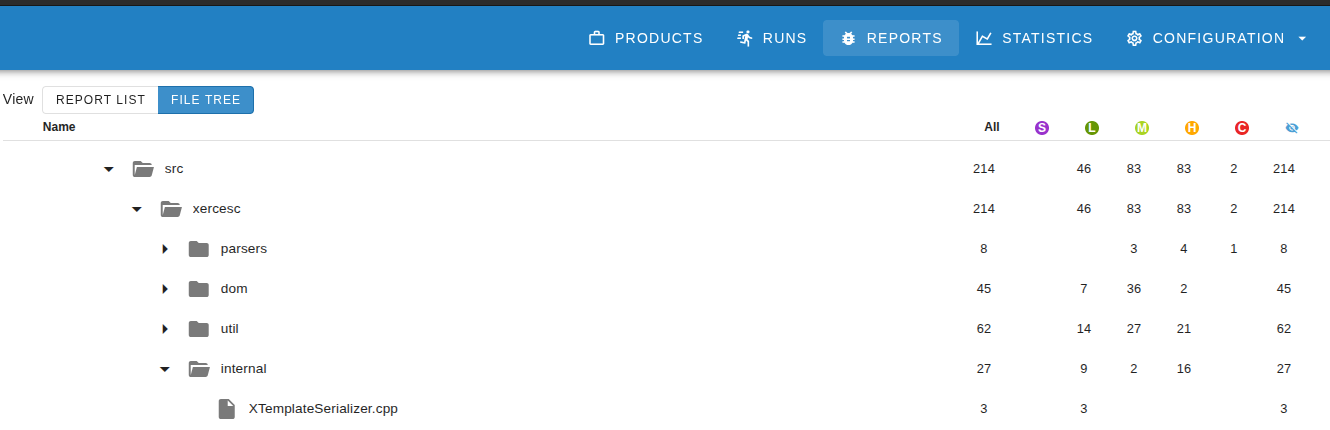
- Web application for viewing discovered code defects with a streamlined,
easy experience (with PostgreSQL, or SQLite backend).
- Gerrit and GitLab integration Shows analysis results as GitLab or Gerrit reviews.
- Filterable (defect checker name, severity, source paths, ...) and
comparable (calculates difference between two analyses of the project,
showing which bugs have been fixed and which are newly introduced) result
viewing.
- Diff mode: This shows the list of bugs that have been introduced since your last analyzer
execution.
- Results can be shared with fellow developers, the comments and
review system helps communication of code defects.
- Easily implementable Thrift-based
server-client communication used for storing and querying of discovered
defects.
- Support for multiple bug visualization frontends, such as the web
application, a command-line tool and an
Eclipse plugin.
Command line features
CodeChecker command has many subcommands which can be used for example to
log and analyze your projects, print the results or start a web server. For
full list see the following table or check the help message of this command
(CodeChecker --help):
CodeChecker subcommand | Description |
|---|
analyze | Execute the supported code analyzers for the files recorded in a JSON Compilation Database. |
analyzer-version | Print the version of CodeChecker analyzer package that is being used. |
analyzers | List supported and available analyzers. |
check | Perform analysis on a project and print results to standard output. |
checkers | List the checkers available for code analysis. |
cmd | View analysis results on a running server from the command line. |
fixit | Apply automatic fixes based on the suggestions of the analyzers. |
log | Run a build command, collect the executed compilation commands and store them in a JSON file. |
parse | Print analysis summary and results in a human-readable format. |
server | Start and manage the CodeChecker Web server. |
store | Save analysis results to a database. |
version | Print the version of CodeChecker package that is being used. |
web-version | Print the version of CodeChecker server package that is being used. |
CodeChecker cmd subcommand also has many other subcommands which can be used
to get data (products, runs, results, statistics) from a running CodeChecker
server. For full list see the following table or check the help message of this
subcommand (CodeChecker cmd --help):
CodeChecker cmd subcommand | Description |
|---|
runs | List the available analysis runs. |
history | Show run history of multiple runs. |
results | List analysis result (finding) summary for a given run. |
diff | Compare two analysis runs and show the difference. |
sum | Show statistics of checkers. |
token | Access subcommands related to configuring personal access tokens managed by a CodeChecker server. |
del | Delete analysis runs. |
update | Update an analysis run. |
suppress | Manage and import suppressions of reports on a CodeChecker server. |
products | Access subcommands related to configuring the products managed by a CodeChecker server. |
components | Access subcommands related to configuring the source components managed by a CodeChecker server. |
login | Authenticate into CodeChecker servers that require privileges. |
export | Export comments and review statuses from CodeChecker. |
import | Import comments and review statuses into CodeChecker. |
Usage flow

- Step 1:
CodeChecker log runs the given build command and records the
executed compilation steps. These steps are written to an output file
(Compilation Database) in a JSON format.
- Step 2:
CodeChecker analyze uses the previously created JSON Compilation
Database to perform an analysis on the project, outputting analysis results in
a machine-readable (plist) format.
- Step 3: In this step, you can do multiple things:
- Parse and pretty-print the summary and results from analysis result files
(
CodeChecker parse).
- Store the results to a running CodeChecker server (
CodeChecker store).
- Compare two analysis results/runs to show the results that differ between
the two (
CodeChecker cmd diff).
- etc.
For more information how to use CodeChecker see our user guide.
User documentation
C/C++ Analysis
Web based report management
Storage of reports from analyzer tools
CodeChecker can be used as a generic tool for visualizing analyzer results.
The following tools are supported:
For details see
supported code analyzers documentation and the
Report Converter Tool.
Common Tools
Useful tools that can also be used outside CodeChecker.
Helper Scripts
Install guide
Install CodeChecker via pip
CodeChecker is available on the pypi
and can be installed with the following command:
pip3 install codechecker
Note: this package can be installed on Linux, OSX and Windows
systems where pip3 command is available. On OSX, intercept-build must be
installed for logging (CodeChecker log). On Windows, logging is not
available.
Installing CodeChecker via the snap package manager
CodeChecker is available on the Snap Store
and can be installed with the following command:
sudo snap install codechecker --classic
Note: Unfortunately, the snap package supports only lower-case command names.
For this reason, you need to use codechecker command instead of CodeChecker
everywhere. For a full list of available commands in the codechecker snap
package, run snap info codechecker.
Linux: Build from source
For a detailed dependency list, and for instructions on how to install newer
Clang and Clang-Tidy versions, please see Requirements.
The following commands are used to bootstrap CodeChecker on Ubuntu 20.04 LTS:
# Install mandatory dependencies for a development and analysis environment.
# NOTE: clang or clang-tidy can be any sufficiently fresh version, and need not
#       come from package manager!
#       In case of Cppcheck, the minimal supported version is 1.80.
#       In case of gcc, the minimal supported version is 13.0.0.
#       Infer: https://fbinfer.com/docs/getting-started
sudo apt-get install clang clang-tidy cppcheck g++ build-essential curl \
      gcc-multilib git python3-dev python3-venv python3-setuptools

# In case of venv_dev target and Ubuntu 23 Linux, install an additional library:
sudo apt-get install libpq-dev

# Install nodejs dependency for web. In case of Debian/Ubuntu you can use the
# following commands. For more information see the official docs:
# https://nodejs.org/en/download/package-manager/
curl -sL https://deb.nodesource.com/setup_24.x | sudo -E bash -
sudo apt-get install -y nodejs

# Install docker.
# https://docs.docker.com/engine/install/ubuntu/#install-using-the-repository

# Check out CodeChecker source code.
git clone https://github.com/Ericsson/CodeChecker.git --depth 1 ~/codechecker
cd ~/codechecker

# Create a Python virtualenv and set it as your environment.
# NOTE: if you want to develop CodeChecker, use the `venv_dev` target instead
# of `venv`.
make venv
source $PWD/venv/bin/activate

# [Optional] If you want to use external authentication methods (LDAP / PAM)
# follow the instructions in
# docs/web/authentication.md#external-authentication-methods

# Build and install a CodeChecker package.
make package

# For ease of access, add the build directory to PATH.
export PATH="$PWD/build/CodeChecker/bin:$PATH"

cd ..
Notes:
- By default,
make package will build ldlogger shared objects for
32bit and 64bit too. If you would like to build and package 64 bit only
shared objects and ldlogger binary you can set BUILD_LOGGER_64_BIT_ONLY
environment variable to YES before the package build:
BUILD_LOGGER_64_BIT_ONLY=YES make package.
- By default, the
make package will build the UI code if it's not built yet
or the UI code is changed. If you wouldn't like to build the UI code you can
set the BUILD_UI_DIST environment variable to NO before the package build:
BUILD_UI_DIST=NO make package.
- Use
make standalone_package instead of make package to avoid
having to manually activate the environment before running CodeChecker.
Minimum Recommended package versions
Upgrading environment after system or Python upgrade
If you have upgraded your system's Python to a newer version (e.g., from
3.8 to 3.11 – this is the case when upgrading Ubuntu from
20.04 LTS to 22.04 LTS), the installed environment will not work
out-of-the-box. To fix this issue, run the following command to upgrade your
checker_env too:
cd ~/codechecker/venv
python3 -m venv .
Mac OS X
For installation instructions for Mac OS X see Mac OS X Installation Guide documentation.
Docker
To run the CodeChecker server in Docker see the Docker documentation.
You can find the CodeChecker web-server container at the Docker Hub.
Visual Studio Code plugin
You can install and use CodeChecker VSCode extension from the
Visual Studio Marketplace
or from Open VSX.
Main features:
- Run CodeChecker analysis from the editor and see the results automatically.
- Re-analyze the current file when saved.
- Commands and build tasks for running CodeChecker as part of a build system.
- Browse through the found reports and show the reproduction steps directly in the code.
- Navigate between the reproduction steps.

For more information how to install and use this plugin see the
repository of this
extension.
GitHub Actions CI

CodeChecker can be executed via a reusable GitHub action for your project!
You need only specify the build command, as if you would run the analysis
locally.
For more information, check out the
CodeChecker Static Analysis
action on the GitHub Actions Marketplace.
Analyze your first project
Setting up the environment in your Terminal
These steps must always be taken in a new command prompt you wish to execute
analysis in.
source ~/codechecker/venv/bin/activate

# Path of CodeChecker package
# NOTE: SKIP this line if you want to always specify CodeChecker's full path.
export PATH=~/codechecker/build/CodeChecker/bin:$PATH

# Path of the built LLVM/Clang
# NOTE: SKIP this line if clang is available in your PATH as an installed Linux package.
export PATH=~/<user path>/build/bin:$PATH
Execute analysis
Analyze your project with the check command:
CodeChecker check -b "cd ~/your-project && make clean && make" -o ./results
check will print an overview of the issues found in your project by the
analyzers. The reports will be stored in the ./results directory in plist
XML format.
Export the reports as static HTML files
You can visualize the results as static HTML by executing
CodeChecker parse -e html ./results -o ./reports_html
An index page will be generated with a list of all repors in
./reports_html/index.html
Optionally store the results in Web server & view the results
If you have hundreds of results, you may want to store them on the web
server with a database backend.
Start a CodeChecker web and storage server in another terminal or as a
background process. By default, it will listen on localhost:8001.
The SQLite database containing the reports will be placed in your workspace
directory (~/.codechecker by default), which can be provided via the -w
flag.
CodeChecker server
Store your analysis reports onto the server to be able to use the Web Viewer.
CodeChecker store ./results -n my-project
Open the CodeChecker Web Viewer in your browser, and
you should be greeted with a web application showing you the analysis results.
Developer documentations
Conference papers, presentations