默认安装会拉入 transformers、UMAP、HDBSCAN 等较重依赖,轻量场景需按文档单独安装;换用 flair、gensim、spaCy 或 use 等嵌入后端要装对应 extras,如 pip install bertopic[flair,gensim,spacy,use];用 OpenAI 等 LLM 做主题表示需自备 API key 并额外调用外部服务

BERTopic
MaartenGrMIT活跃维护用 BERT 句向量加 c-TF-IDF 做主题建模,生成的主题可解释性强,适合从大量文本里快速挖掘和归类话题。
Leveraging BERT and c-TF-IDF to create easily interpretable topics.
v0.17.4发布于 2025-12-03 14:22 UTC7,951star +9 / 7 天932fork同步于 2026-11-10 11:32 UTC
pip install bertopic 硬件要求按 README 说明
README 未说明具体显存要求;默认依赖 sentence-transformers,通常需要 GPU 加速,也提供不含 transformers、UMAP、HDBSCAN 的轻量安装用于 Model2Vec 训练或推理
用 BERT 嵌入加 c-TF-IDF 做主题建模,让聚类结果变成人能读懂的主题词
用 BERT 句向量加 c-TF-IDF 做主题建模,生成的主题可解释性强,适合从大量文本里快速挖掘和归类话题。
核心能力
- 用 transformers 生成文档嵌入,再交给 UMAP 降维和 HDBSCAN 聚类
- 用 c-TF-IDF 为每个簇提取主题词,保留关键词提升可解释性
- 可替换嵌入、降维、聚类、表示各环节,模块化组装流程
- 支持引导、监督、半监督、层次、动态、在线增量等多种建模方式
- 内置 visualize_topics 等可视化,并可接入 LLM 生成主题标签
容易踩的坑
内容由模型根据 README 生成,可能不完整或不准确,以官方文档为准。看原文 README
- v1.0.0b1pre-release2026-11-01 · 2026-11-01 09:10 UTC
查看更新说明
[BETA] This is a beta release, and I would love to get feedback on this direction!
It's finally here! This is the first beta of BERTopic 1.0 (there will definitely be more).
My idea was to rewrite a lot of what was under the hood while its API stays as it was wherever possible. This would make it easier for future development and increase stability of the underlying code.
As with any pre-release, you can only install it when explicitly running:
pip install bertopic==1.0.0b1Nothing changes for those that are using BERTopic in production or in their pipelines, you will still install
0.17.4unless you specifically run the above command.If anything breaks (and I have no doubt it will with this first beta), please let me know in the issues.
Some code will need a small update, which the migration guide shows for every change.
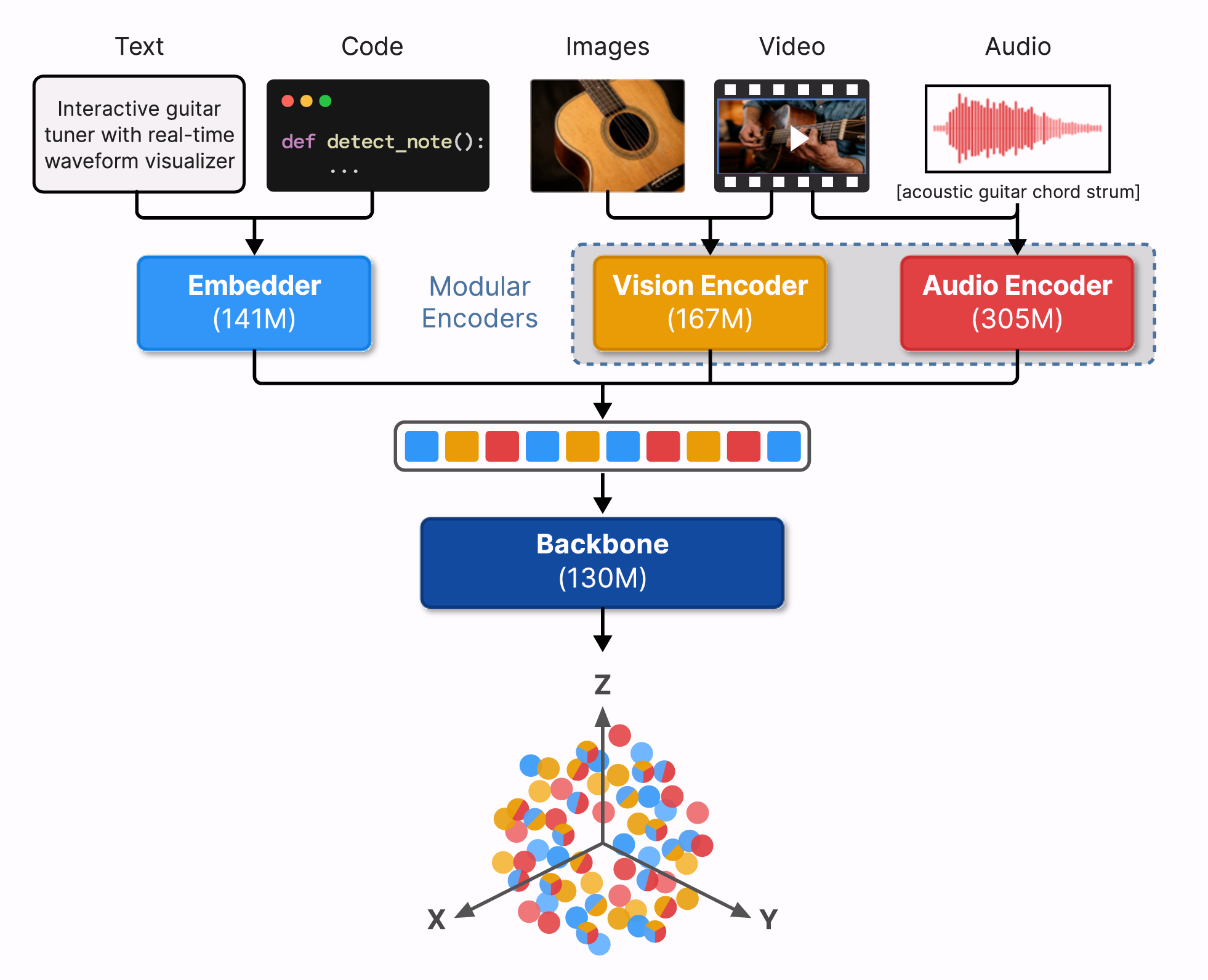
EmbeddingGemma 2, the new default embedding model, embeds text, code, images, video and audio in one space.
- Multimodal topic modeling with text, images, audio, video and code
- Pass them to
.fit_transformwithimages=,audio=,video=andcode=, with or without documents MultiModalRepresentationdescribes images and frames of videos with a vision model and transcribes audio with a speech model, such as Whisper, so topics of media get keywords too- See each topic's collage, frame sheet and audio montage with
.visualize_media()
- Pass them to
- EmbeddingGemma 2 is the new default embedding model
BERTopic()uses its text model for every language, andBERTopic(embedding_model="google/embeddinggemma-2")also embeds images, audio and video in the same space- BERTopic embeds the first 1,024 tokens of each document, since the model sets no length limit of its own
- LLM representations were rewritten around one request loop, with
Ollamaas a new representation model, structured output and current default models - Get polars instead of pandas dataframes with
bertopic.set_output("polars") - Added support for Python 3.14
- 80 issues fixed, all listed below
.fit,.fit_transform,.transform,.update_topics,.merge_topics,.reduce_topicsand.reduce_outlierstakeimages=,audio=,video=andcode=- With as many documents as items, each document describes the item at its position, as a caption does
- With any other number, the documents are rows of their own, so you can model unrelated documents and media together
- Media can be passed as file paths, which is advised, or in memory
MultiModalBackendtakes one model for every kind, or a model for each kind withimage_model=,audio_model=,video_model=andcode_model=.embed_media(items, modality)embeds items of one kind, such as.embed_media(images, "image")- Media is embedded a few items at a time (16 images, 4 recordings or 1 video), since one video can be thousands of tokens
MultiModalRepresentationreplacesVisualRepresentation- It describes up to nine items of each kind per topic, with a model for each kind (
image_model=,audio_model=andvideo_model=), and the descriptions become the topic's keywords - A model can be a name, a transformers pipeline or any callable, such as a call to an API
- Items that already have text, such as captioned images, keep it
- Video is described through three frames of each clip, taken from the middle of equal stretches of the clip, which you can change
- It describes up to nine items of each kind per topic, with a model for each kind (
- Multimodal topic modeling with text, images, audio, video and code
- v0.17.4最新正式版2025-12-03 · 2025-12-03 14:22 UTC
- Add
.delete_topicsby @shuanglovesdata in #2322 - Allow execution without plotly by @luismavs in #2401
- Add tqdm to _litellm.py @NFrnk in #2408
- Drop support for python 3.9 by @afuetterer in #2419
- Make UMAP's init default to random on visualize_topics for reproducible visualization by @makramab in #2412
Preparing for MEGA!-scale BERTopic with Multi-GPU UMAP and the following necessary updates:
- Update installation instructions for cuML with BERTopic by @csadorf in #2446
- Speed up
._create_topic_vectorsby replacing DataFrame .loc with NumPy masking @jinsolp in #2406 - Modify _reduce_dimensionality to use fit_transform by @betatim in #2416
- Fix incorrect label in zero-shot svg in documentation by @huisman in #2448
- Enable ruff rule RUF by @afuetterer in #2457
- CI: bump github actions versions by @afuetterer in #2427
- CI: prefer action-pre-commit-uv for lint job by @afuetterer in #2434
- CI: switch to uv based project installation by @afuetterer in #2445
- Chore: update pre-commit hooks by @afuetterer in #2414 and #2443
- Chore: remove obsolete
version_infocheck by @afuetterer in #2444
- Add
- v0.17.32025-07-08 · 2025-07-08 10:56 UTC
查看更新说明
BERTopic now fully supports
uv! You can install BERTopic with uv as follows:uv add bertopic - v0.17.12025-07-08 · 2025-07-08 09:04 UTC
查看更新说明
- Added FastEmbed backend by @nickprock in #2213
- Added LangChain backend by @regaltsui in #2303
- Pass precomputed embeddings to KeyBERTInspired.extract_topics @saikumaru in #2368
- Merge models without pytorch (using safetensors) by @MaartenGr in #2329
- Fix installation issue with uv by @MaartenGr in #2328 * Fix incorrect comparison in update_topics by @uply23333 in #2336
- Add missing comma under Exploration subsection by @angelonazzaro in #2374
- Fix typo in Lightweight installation under tips_and_tricks by @angelonazzaro in #2375
- Fix IndexError in zero-shot topic modeling by @MaartenGr in #2267
- v0.17.02025-03-19 · 2025-03-19 17:02 UTC
查看更新说明
- Light-weight installation without UMAP and HDBSCAN by @MaartenGr in #2289
- Add Model2Vec as an embedding backend by @MaartenGr in #2245
- Add LiteLLM as a representation model by @MaartenGr in #2213
- Interactive DataMapPlot by @MaartenGr in #2287
- Lightweight installation: use safetensors without torch by @hedgeho in #2306
- Fix missing links by @MaartenGr in #2305
- Set up pre-commit hooks by @afuetterer in #2283
- Fix handling OpenAI returning None objects by @jeaninejuliettes in #2280
- Add support for python 3.13 by @afuetterer in #2173
- Added system prompts by @Leo-LiHao in #2145
- More documentation for topic reduction by @MaartenGr in #2260
- Drop support for python 3.8 by @afuetterer in #2243
- Fixed online topic modeling on GPU by @SSivakumar12 in #2181
- Fixed hierarchical cluster visualization by @PipaFlores in #2191
- Remove duplicated phrase by @AndreaFrancis in #2197
Model2Vec
With Model2Vec, we now have a very interesting pipeline for light-weight embeddings. Combined with the light-weight installation, you can now run BERTopic without using pytorch!
Installation is straightforward:
pip install --no-deps bertopic
pip install --upgrade numpy pandas scikit-learn tqdm plotly pyyaml
This will install BERTopic even without UMAP or HDBSCAN, so you can use other techniques instead. If these are not installed, then it uses PCA with scikit-learn's HDBSCAN instead. You can install them, together with Model2Vec:
pip install model2vec umap-learn hdbscanThen, creating a BERTopic model is as straightforward as you are used to:
from bertopic import BERTopic
from model2vec import StaticModel

# Model2Vec
embedding_model = StaticModel.from_pretrained("minishlab/potion-base-8M")

# BERTopic
topic_model = BERTopic(embedding_model=embedding_model)
DataMapPlot
To use the interactive version of DataMapPlot, you only need to run the following:
from umap import UMAP

# Reduce your embeddings to 2-dimensions
reduced_embeddings = UMAP(n_neighbors=10, n_components=2, min_dist=0.0, metric='cosine').fit_transform(embeddings)

# Create an interactiv
用户点评
登录用户的真实使用记录,可按版本和硬件筛选共 0 条
还没有人点评。第一个说出真实体验的人最有价值。


BERTopic
BERTopic is a topic modeling technique that leverages 🤗 transformers and c-TF-IDF to create dense clusters allowing for easily interpretable topics whilst keeping important words in the topic descriptions.
BERTopic supports all kinds of topic modeling techniques:
Corresponding medium posts can be found here, here and here. For a more detailed overview, you can read the paper or see a brief overview.
Installation
Installation, with sentence-transformers, can be done using uv:
uv add bertopic
or with pip:
pip install bertopic
If you want to install BERTopic with other embedding models, you can choose one of the following:
# Choose an embedding backend
pip install bertopic[flair,gensim,spacy,use]

# Topic modeling with images
pip install bertopic[vision]
For a light-weight installation without transformers, UMAP and/or HDBSCAN (for training with Model2Vec or inference), see this tutorial.
Getting Started
For an in-depth overview of the features of BERTopic you can check the full documentation or you can follow along with one of the examples below:
| Name | Link |
|---|---|
| Start Here - Best Practices in BERTopic |  |
| 🆕 New! - Topic Modeling on Large Data (GPU Acceleration) | |
| 🆕 New! - Topic Modeling with Llama 2 🦙 | |
| 🆕 New! - Topic Modeling with Quantized LLMs | |
| Topic Modeling with BERTopic | |
| (Custom) Embedding Models in BERTopic | |
| Advanced Customization in BERTopic | |
| (semi-)Supervised Topic Modeling with BERTopic | |
| Dynamic Topic Modeling with Trump's Tweets | |
| Topic Modeling arXiv Abstracts |  |
Quick Start
We start by extracting topics from the well-known 20 newsgroups dataset containing English documents:
from bertopic import BERTopic
from sklearn.datasets import fetch_20newsgroups

docs = fetch_20newsgroups(subset='all',  remove=('headers', 'footers', 'quotes'))['data']

topic_model = BERTopic()
topics, probs = topic_model.fit_transform(docs)
After generating topics and their probabilities, we can access all of the topics together with their topic representations:
>>> topic_model.get_topic_info()

Topic	Count	Name
-1	4630	-1_can_your_will_any
0	693	49_windows_drive_dos_file
1	466	32_jesus_bible_christian_faith
2	441	2_space_launch_orbit_lunar
3	381	22_key_encryption_keys_encrypted
...
The -1 topic refers to all outlier documents and are typically ignored. Each word in a topic describes the underlying theme of that topic and can be used
for interpreting that topic. Next, let's take a look at the most frequent topic that was generated:
>>> topic_model.get_topic(0)

[('windows', 0.006152228076250982),
 ('drive', 0.004982897610645755),
 ('dos', 0.004845038866360651),
 ('file', 0.004140142872194834),
 ('disk', 0.004131678774810884),
 ('mac', 0.003624848635985097),
 ('memory', 0.0034840976976789903),
 ('software', 0.0034415334250699077),
 ('email', 0.0034239554442333257),
 ('pc', 0.003047105930670237)]
Using .get_document_info, we can also extract information on a document level, such as their corresponding topics, probabilities, whether they are representative documents for a topic, etc.:
>>> topic_model.get_document_info(docs)

Document                               Topic	Name	                        Top_n_words                     Probability    ...
I am sure some bashers of Pens...	0	0_game_team_games_season	game - team - games...	        0.200010       ...
My brother is in the market for...      -1     -1_can_your_will_any	        can - your - will...	        0.420668       ...
Finally you said what you dream...	-1     -1_can_your_will_any	        can - your - will...            0.807259       ...
Think! It's the SCSI card doing...	49     49_windows_drive_dos_file	windows - drive - docs...	0.071746       ...
1) I have an old Jasmine drive...	49     49_windows_drive_dos_file	windows - drive - docs...	0.038983       ...
🔥 Tip: Use BERTopic(language="multilingual") to select a model that supports 50+ languages.
Fine-tune Topic Representations
In BERTopic, there are a number of different topic representations that we can choose from. They are all quite different from one another and give interesting perspectives and variations of topic representations. A great start is KeyBERTInspired, which for many users increases the coherence and reduces stopwords from the resulting topic representations:
from bertopic.representation import KeyBERTInspired

# Fine-tune your topic representations
representation_model = KeyBERTInspired()
topic_model = BERTopic(representation_model=representation_model)
However, you might want to use something more powerful to describe your clusters. You can even use ChatGPT or other models from OpenAI to generate labels, summaries, phrases, keywords, and more:
import openai
from bertopic.representation import OpenAI

# Fine-tune topic representations with GPT
client = openai.OpenAI(api_key="sk-...")
representation_model = OpenAI(client, model="gpt-4o-mini", chat=True)
topic_model = BERTopic(representation_model=representation_model)
🔥 Tip: Instead of iterating over all of these different topic representations, you can model them simultaneously with multi-aspect topic representations in BERTopic.
Visualizations
After having trained our BERTopic model, we can iteratively go through hundreds of topics to get a good understanding of the topics that were extracted. However, that takes quite some time and lacks a global representation. Instead, we can use one of the many visualization options in BERTopic. For example, we can visualize the topics that were generated in a way very similar to LDAvis:
topic_model.visualize_topics()
Modularity
By default, the main steps for topic modeling with BERTopic are sentence-transformers, UMAP, HDBSCAN, and c-TF-IDF run in sequence. However, it assumes some independence between these steps which makes BERTopic quite modular. In other words, BERTopic not only allows you to build your own topic model but to explore several topic modeling techniques on top of your customized topic model:
You can swap out any of these models or even remove them entirely. The following steps are completely modular:
- Embedding documents
- Reducing dimensionality of embeddings
- Clustering reduced embeddings into topics
- Tokenization of topics
- Weight tokens
- Represent topics with one or multiple representations
Functionality
BERTopic has many functions that quickly can become overwhelming. To alleviate this issue, you will find an overview of all methods and a short description of its purpose.
Common
Below, you will find an overview of common functions in BERTopic.
| Method | Code |
|---|---|
| Fit the model | .fit(docs) |
| Fit the model and predict documents | .fit_transform(docs) |
| Predict new documents | .transform([new_doc]) |
| Access single topic | .get_topic(topic=12) |
| Access all topics | .get_topics() |
| Get topic freq | .get_topic_freq() |
| Get all topic information | .get_topic_info() |
| Get all document information | .get_document_info(docs) |
| Get representative docs per topic | .get_representative_docs() |
| Update topic representation | .update_topics(docs, n_gram_range=(1, 3)) |
| Generate topic labels | .generate_topic_labels() |
| Set topic labels | .set_topic_labels(my_custom_labels) |
| Merge topics | .merge_topics(docs, topics_to_merge) |
| Reduce nr of topics | .reduce_topics(docs, nr_topics=30) |
| Reduce outliers | .reduce_outliers(docs, topics) |
| Find topics | .find_topics("vehicle") |
| Save model | .save("my_model", serialization="safetensors") |
| Load model | BERTopic.load("my_model") |
| Get parameters | .get_params() |
Attributes
After having trained your BERTopic model, several attributes are saved within your model. These attributes, in part,
refer to how model information is stored on an estimator during fitting. The attributes that you see below all end in _ and are
public attributes that can be used to access model information.
| Attribute | Description |
|---|---|
.topics_ | The topics that are generated for each document after training or updating the topic model. |
.probabilities_ | The probabilities that are generated for each document if HDBSCAN is used. |
.topic_sizes_ | The size of each topic |
.topic_mapper_ | A class for tracking topics and their mappings anytime they are merged/reduced. |
.topic_representations_ | The top n terms per topic and their respective c-TF-IDF values. |
.c_tf_idf_ | The topic-term matrix as calculated through c-TF-IDF. |
.topic_aspects_ | The different aspects, or representations, of each topic. |
.topic_labels_ | The default labels for each topic. |
.custom_labels_ | Custom labels for each topic as generated through .set_topic_labels. |
.topic_embeddings_ | The embeddings for each topic if embedding_model was used. |
.representative_docs_ | The representative documents for each topic if HDBSCAN is used. |
Variations
There are many different use cases in which topic modeling can be used. As such, several variations of BERTopic have been developed such that one package can be used across many use cases.
| Method | Code |
|---|---|
| Topic Distribution Approximation | .approximate_distribution(docs) |
| Online Topic Modeling | .partial_fit(doc) |
| Semi-supervised Topic Modeling | .fit(docs, y=y) |
| Supervised Topic Modeling | .fit(docs, y=y) |
| Manual Topic Modeling | .fit(docs, y=y) |
| Multimodal Topic Modeling | .fit(docs, images=images) |
| Topic Modeling per Class | .topics_per_class(docs, classes) |
| Dynamic Topic Modeling | .topics_over_time(docs, timestamps) |
| Hierarchical Topic Modeling | .hierarchical_topics(docs) |
| Guided Topic Modeling | BERTopic(seed_topic_list=seed_topic_list) |
| Zero-shot Topic Modeling | BERTopic(zeroshot_topic_list=zeroshot_topic_list) |
| Merge Multiple Models | BERTopic.merge_models([topic_model_1, topic_model_2]) |
Visualizations
Evaluating topic models can be rather difficult due to the somewhat subjective nature of evaluation. Visualizing different aspects of the topic model helps in understanding the model and makes it easier to tweak the model to your liking.
| Method | Code |
|---|---|
| Visualize Topics | .visualize_topics() |
| Visualize Documents | .visualize_documents() |
| Visualize Document Hierarchy | .visualize_hierarchical_documents() |
| Visualize Topic Hierarchy | .visualize_hierarchy() |
| Visualize Topic Tree | .get_topic_tree(hierarchical_topics) |
| Visualize Topic Terms | .visualize_barchart() |
| Visualize Topic Similarity | .visualize_heatmap() |
| Visualize Term Score Decline | .visualize_term_rank() |
| Visualize Topic Probability Distribution | .visualize_distribution(probs[0]) |
| Visualize Topics over Time | .visualize_topics_over_time(topics_over_time) |
| Visualize Topics per Class | .visualize_topics_per_class(topics_per_class) |
Citation
To cite the BERTopic paper, please use the following bibtex reference:
@article{grootendorst2022bertopic,
  title={BERTopic: Neural topic modeling with a class-based TF-IDF procedure},
  author={Grootendorst, Maarten},
  journal={arXiv preprint arXiv:2203.05794},
  year={2022}
}

transformers
huggingface·Python
统一加载和运行文本、视觉、音频、多模态的预训练模型,覆盖推理与训练,省去为每个模型重写代码的麻烦。
预训练模型+4训练框架
168730+11835kv5.22.22026-11-10 10:57 UTC

LlamaFactory
hiyouga·Python
一套统一接口搞定 100+ 大语言模型和多模态模型的微调,支持 LoRA 等高效训练方式,省去为每个模型单独写训练脚本的麻烦。
微调框架+4训练框架
75971+489.4kv0.9.52026-11-09 14:55 UTC
keras
keras-team·Python
面向人类友好的深度学习 API,用 Python 编写,可跑在 TensorFlow、JAX、PyTorch 上,帮开发者快速搭建和训练神经网络。
深度学习+4训练框架
64419+320kv3.15.12026-11-10 11:13 UTC
langextract
google·Python
用 LLM 从非结构化文本中抽取结构化信息,并给出精确的原文出处定位和交互式可视化,方便核对抽取结果。
信息抽取+4训练框架
39297+232.8kv1.7.22026-11-10 01:39 UTC