ftop replaces the terminal monitor you keep open in a spare tab with a native window
you can leave anywhere on the desktop. It is for the moments when the machine is
working hard — a local model running, an agent compiling, a long build — and you want
to see at a glance what the cores, memory, and network are doing, and which app is
responsible.
It shows the current state only: no history graphs, no disk panels.
One panel, every size
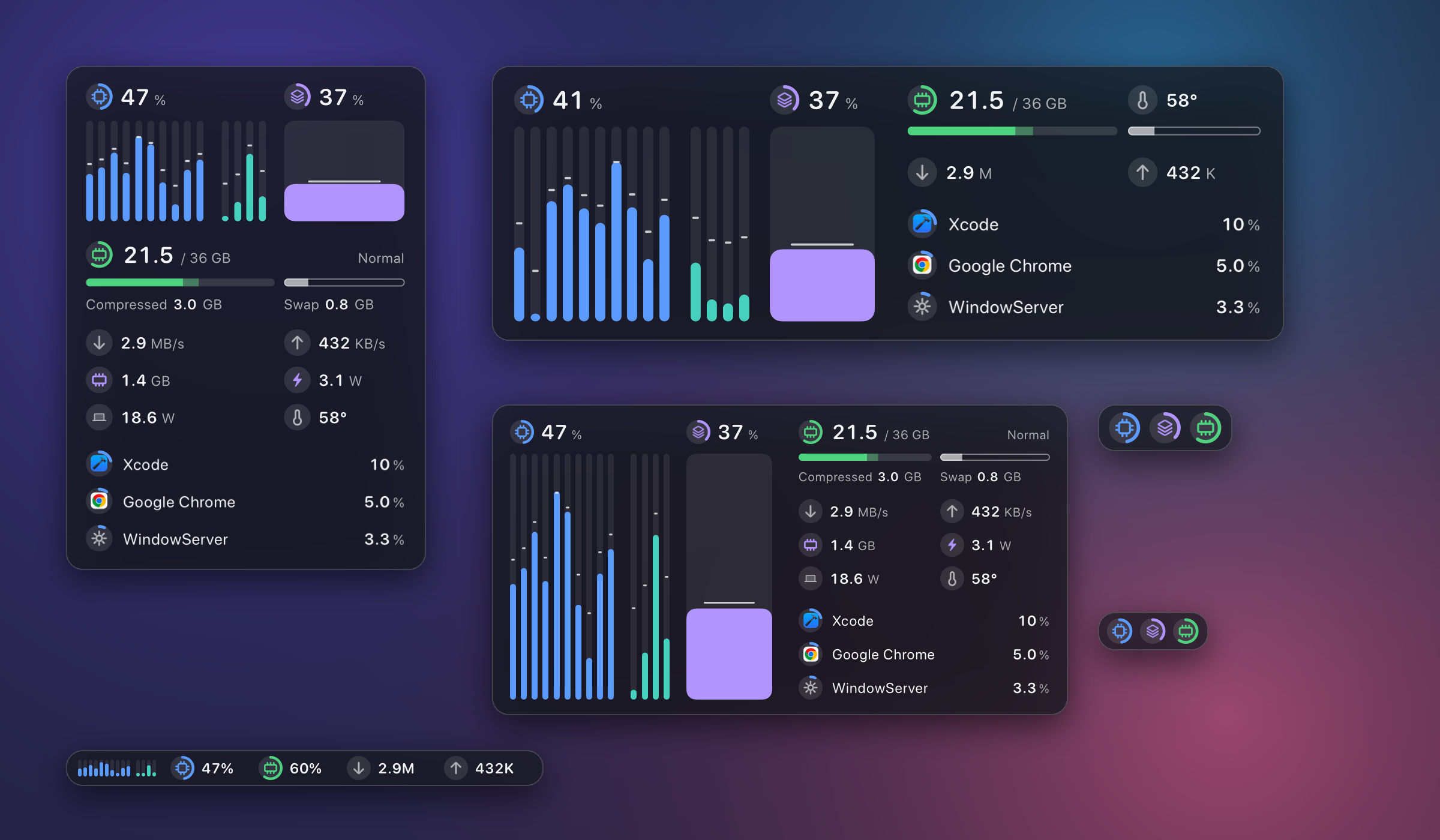
Drag any edge or corner; the pointer turns into the resize cursor as soon as it is
near one. ftop picks the layout that fits and the window settles onto it, so nothing is
ever clipped and no space is left empty. A small window keeps the essentials; a large
one shows more, not bigger type.

What it shows
Every figure is led by the same small round badge, and a badge with an arc is a gauge.
The color says what it belongs to; there is almost no text to read.
| |
|---|
| Cores | One column per core, one group per kind of core the chip has, fastest first. The fill is usage; the tick is that core's current frequency. |
| Memory | Used and total, compressed, swap, and the system's own pressure level. |
| Network | Current download and upload speed. |
| GPU | A column of its own beside the cores. The fill is usage weighted by clock, unlike the cores' busy time, so a GPU idling at its lowest clock reads low; the tick is its current frequency. Memory in use and its watts sit below. Hover for its temperature. |
| Power | What the whole machine draws, in watts. |
| Temperature | One figure, labeled with the sensor level it really comes from. |
| Processes | The busiest apps with their own icons, helper processes folded into the app they belong to. An app's CPU is a share of the whole machine, the same unit as the total above it, so it never passes 100% (Activity Monitor counts one core as 100%). |
A reading the hardware does not give is shown as unavailable, never as zero.

How it feels
- Columns follow the readings. Each core eases to its new value and arrives as the
next reading comes in, so the panel moves continuously instead of jumping once a
second.
- A list that rests. A process takes its place the moment it becomes busy and
leaves it slowly; two apps trading the lead by a point do not swap. A row that
passes its neighbor slides; one that goes further turns over where it stands, so
rows never fly across the list.
- Press a process. The row gives under the pointer and a card comes up beside it:
CPU, memory, and the helper processes inside the app. In a large window two badges
switch the ranking between CPU and memory.
- Nearly free when you are not looking. Hidden or fully covered, ftop stops reading
everything except the readings in the menu bar.
With Reduce Motion on in macOS, all of this becomes plain fades.
Menu bar
The menu bar shows CPU by default, as a glyph and its number. Up to three readings can
sit there side by side: CPU, memory, GPU, download, upload, or power. Click it to show
or hide the panel.
Settings
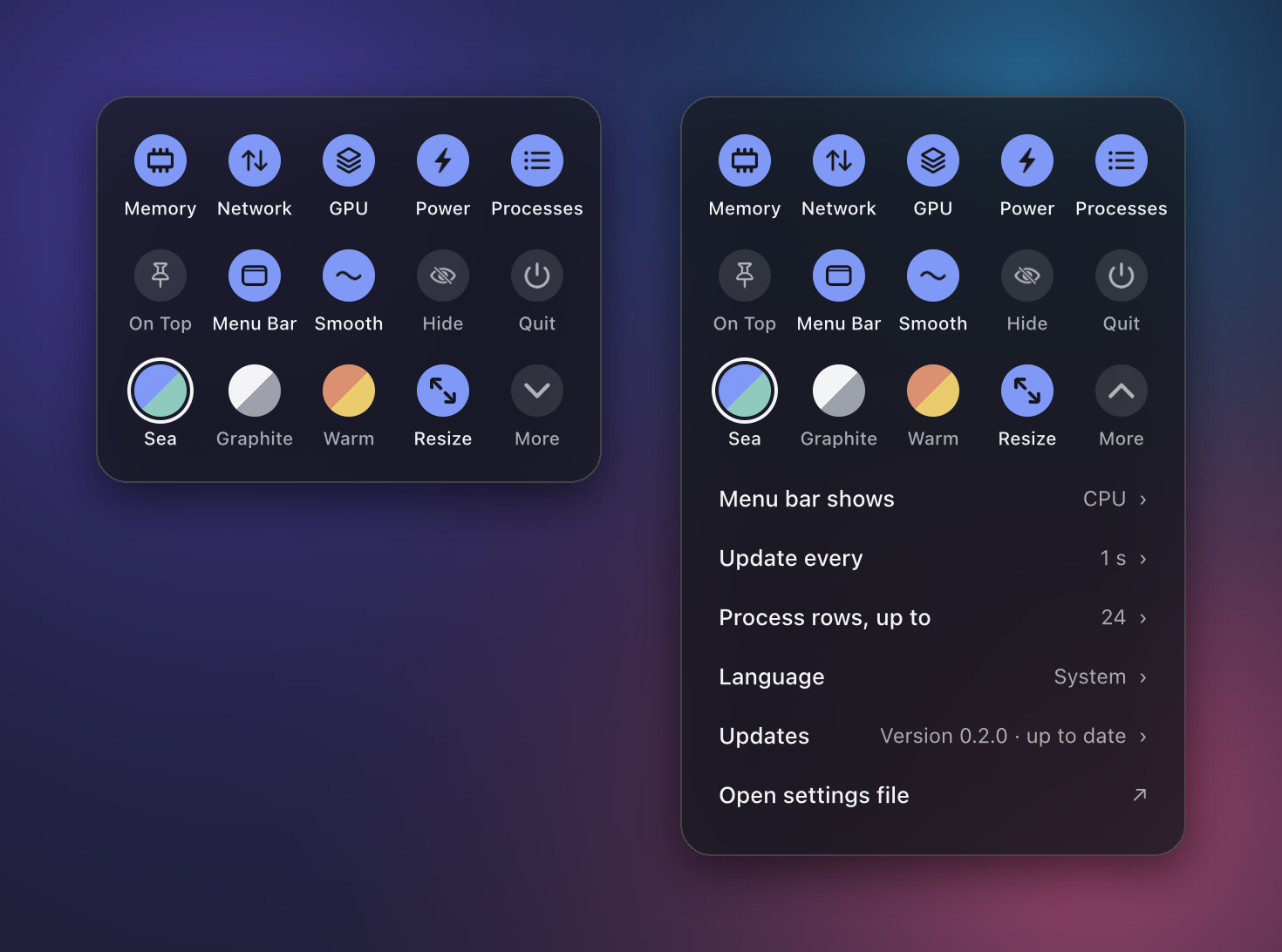
Right-click the panel or the menu bar item. One block holds everything: what to
show, how the panel behaves, the colors, and under More the few settings that have
a value.
Right-click a process row and the block starts with that process: End asks it to
quit (an app can still ask to save), Force End stops it at once. Both ask first.
ftop ends only your own processes, never itself or the system's.
The same settings are a plain text file, ~/.config/ftop/config.json5 (JSON with
comments). The two stay in step, and a saved change applies at once.
Cost
Measured with scripts/perf.sh on a 14-core Apple Silicon Mac, updating once a second:
| State | CPU | Memory |
|---|
| Small and medium panels | under 0.8% of one core | under 30 MB |
| The largest panel, 32 process rows | about 0.9% | about 52 MB |
| Hidden or fully covered | 0.0–0.1% | same range |
With system processes granted (below), the helper that lists them adds about 0.5%.
Install
Requirements: an Apple Silicon Mac with macOS 15 or later.
From a release. On the releases page,
download either file:
Ftop-<version>-arm64.dmg: open it and drag Ftop.app onto the Applications folder.Ftop-<version>-arm64.zip: unpack it and move Ftop.app to ~/Applications.
Then link the command into a directory on your PATH, using the folder you chose:
mkdir -p ~/.local/bin && ln -sfn /Applications/Ftop.app/Contents/MacOS/ftop ~/.local/bin/ftop
For a copy in ~/Applications, write ~/Applications/Ftop.app instead. Keep one copy;
updates replace the app where it is.
From 0.2.6 the app is signed with a Developer ID and notarized by Apple, so it opens
like any downloaded app.
From source. Needs Xcode (built and tested with Xcode 27).
git clone https://github.com/Nongfsq/ftop.git
cd ftop && scripts/bundle.sh && scripts/install.sh
This puts Ftop.app in ~/Applications and links ftop into ~/.local/bin.
On 0.1.0? That version cannot update itself. Install the latest release by hand
once, as above; from 0.1.1 on ftop keeps itself up to date.
Use
ftop            # open the panel
ftop toggle     # hide or show it
ftop quit       # close it
ftop doctor     # which readings are available on this Mac, and why not
- Drag the panel to move it; drag an edge to resize it. Near an edge or a corner the
pointer turns into the resize cursor (Resize in the settings turns this off).
- Move the pointer to the top edge for two buttons: pin (keep on top) and hide.
- The menu bar shows one to three readings, each a glyph and its number: CPU by
default, and any of memory, GPU, download, upload, or power (under More in the
settings). Click it to show or hide the panel.
- Hover over a core, the memory bar, or the GPU for detail; click a process for its card.
- Right-click for the settings.
Updates
ftop looks for a newer release once a day and installs it: it downloads the release
from this repository, checks it, replaces Ftop.app, and restarts the panel. Under
More → Updates you can switch this to Tell me (the update is then offered there)
or Never check (ftop never goes online). ftop update looks right now and
ftop version prints what is installed.
An update never changes the helper that sudo ftop grant installed. If a new version
needs a newer helper, ftop doctor says so and you grant again.
Open at login
Off until you turn it on under More → Open at login. It works for a copy in
Applications (/Applications or ~/Applications); elsewhere the row says to move it
there first. If macOS asks you to allow it, the row says Needs approval and a click
opens Login Items in System Settings.
System processes
Without extra rights macOS only lets ftop see your own processes. To include system
ones such as WindowServer, grant access once:
sudo ftop grant
This marks one small helper inside the app as setuid root. The helper takes no
arguments, reads no environment, writes no files, and only prints the process table;
its source is Sources/ftop-helper/main.swift.
Limits
- Apple Silicon only. Core grouping and per-core frequency rely on it.
- Per-core frequency and temperature come from private macOS interfaces (IOReport and
the HID sensor services). They can change with a macOS update; a reading that is not
available is shown as unavailable, never as zero. For the same reason ftop cannot be
distributed through the Mac App Store.
- The interface is in English and Chinese.
Develop
scripts/check.sh is the gate: formatting, a warning-free build, and the tests. The
pictures on this page are produced by ftop's own drawing code with sample readings
(scripts/readme-media.sh) and set on a stand-in wallpaper; the real window uses the
macOS glass material, so its background follows whatever is behind it.
Product decisions are in docs/product/, the architecture in
docs/architecture/, and the rules for coding agents in
AGENTS.md.
ftop began as a fork of btop and was then
rewritten from scratch; it shares no code with it.
Issues and contributions
Report a problem or make a suggestion through the forms on the
issues page; a report needs the
output of ftop doctor. Pull requests from outside the project are not accepted. The
rules are in CONTRIBUTING.md.
Support
ftop is free and open source. If it earns a place on your desktop, you can
buy me a coffee.
License
MIT