必须从 Picovoice Console 申请 AccessKey,且首次校验需联网;模型文件需自行从 Picovoice Console 下载后以 model_path 传入;Web demo 默认监听 http://localhost:5000。
picollm
PicovoiceApache-2.0活跃维护在本地设备上跑大语言模型的推理引擎,靠 X-Bit 量化把模型压小,让 Llama、Gemma 这类模型在资源有限的机器上也能流畅生成。
On-device LLM Inference Powered by X-Bit Quantization
v2.1发布于 2026-04-27 16:56 UTC319star26fork同步于 2026-11-11 00:00 UTC
pip3 install picollm
pip3 install picollmdemo 硬件要求按 README 说明
README 说明可在 CPU 和 GPU 上运行,并列出 Linux x86_64、macOS arm64/x86_64、Windows x86_64/arm64、树莓派 3/4/5、Android、iOS 及主流浏览器等平台;README 未给出具体显存或内存要求。
纯 CPU 可运行
跨平台本地 LLM 推理 SDK,用 X-Bit 量化压缩模型,让大模型在 CPU、GPU 和移动端离线跑起来
在本地设备上跑大语言模型的推理引擎,靠 X-Bit 量化把模型压小,让 Llama、Gemma 这类模型在资源有限的机器上也能流畅生成。
核心能力
- 用 picoLLM Compression 按任务代价函数自动分配权重比特位
- 支持 2/3/4-bit 量化,README 称可挽回 GPTQ 的 MMLU 掉分 91%/99%/100%
- 推理 100% 本地运行,不把数据发到云端
- 覆盖 Linux、macOS、Windows、树莓派、Android、iOS 和主流浏览器
- 提供 Python、.NET、Node.js、Android、iOS、Web、C 多语言 SDK
容易踩的坑
内容由模型根据 README 生成,可能不完整或不准确,以官方文档为准。看原文 README
- v2.1最新正式版2026-04-27 · 2026-04-27 16:56 UTC
- Added support for embedding, vision, and OCR models
- v2.02025-12-18 · 2025-12-18 18:46 UTC
查看更新说明
- Improved engine performance
- Improved support for running on GPU or multiple CPU cores
- v1.32025-03-17 · 2025-03-17 18:59 UTC
查看更新说明
- Performance improvements
- Significant performance improvements for iOS and Web
- v1.22024-11-27 · 2024-11-27 01:16 UTC
查看更新说明
- Performance improvements
- Added support for phi3.5
- v1.12024-10-01 · 2024-10-01 23:59 UTC
查看更新说明
- Added
interrupt()function for halting completion generation early - Performance improvements
- Added support for phi3
- Bug fixes
- Added
用户点评
登录用户的真实使用记录,可按版本和硬件筛选共 0 条
还没有人点评。第一个说出真实体验的人最有价值。
picoLLM Inference Engine


Made in Vancouver, Canada by Picovoice


picoLLM Inference Engine is a highly accurate and cross-platform SDK optimized for running compressed large language models. picoLLM Inference Engine is:
- Accurate; picoLLM Compression improves GPTQ by significant margins
- Private; LLM inference runs 100% locally.
- Cross-Platform
- Linux (x86_64), macOS (arm64, x86_64), and Windows (x86_64, arm64)
- Raspberry Pi (3, 4, 5)
- Android and iOS
- Chrome, Safari, Edge, and Firefox
- Runs on CPU and GPU
- Free for open-weight models
Table of Contents
Showcases
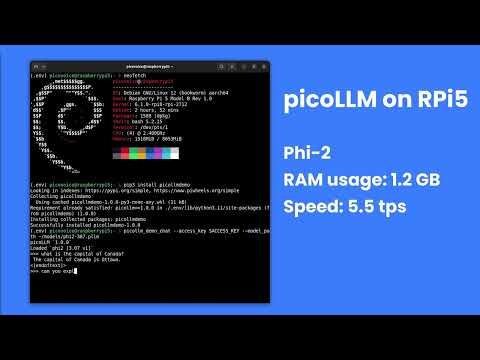
Raspberry Pi
Android
iOS
Cross-Browser Local LLM
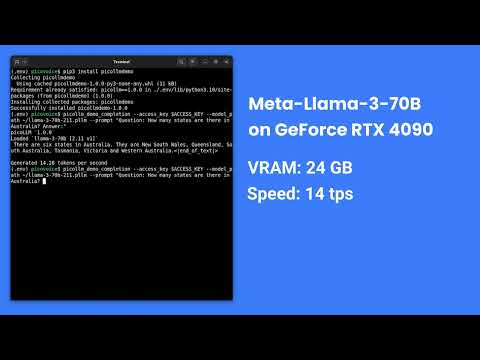
Llama-3-70B-Instruct on GeForce RTX 4090
Local LLM-Powered Voice Assistant on Raspberry Pi
Local Llama-3-8B-Instruct Voice Assistant on CPU
Accuracy
picoLLM Compression is a novel large language model (LLM) quantization algorithm developed within Picovoice. Given a task-specific cost function, picoLLM Compression automatically learns the optimal bit allocation strategy across and within LLM's weights. Existing techniques require a fixed bit allocation scheme, which is subpar.
For example, picoLLM Compression recovers MMLU score degradation of widely adopted GPTQ by 91%, 99%, and 100% at 2, 3, and 4-bit settings. The figure below depicts the MMLU comparison between picoLLM and GPTQ for Llama-3-8b [1].

Models
picoLLM Inference Engine supports the following open-weight models. The models are on Picovoice Console.
- DeepSeek-OCR-2
deepseek-ocr-2
- EmbeddingGemma
embeddinggemma-300m
- Gemma
gemma-2bgemma-2b-itgemma-7bgemma-7b-it
- Gemma3
gemma-3-270mgemma-3-270m-it
- Llama-2
llama-2-7bllama-2-7b-chatllama-2-13bllama-2-13b-chatllama-2-70bllama-2-70b-chat
- Llama-3
llama-3-8bllama-3-8b-instructllama-3-70bllama-3-70b-instruct
- Llama-3.2
llama3.2-1b-instructllama3.2-3b-instruct
- Mistral
mistral-7b-v0.1mistral-7b-instruct-v0.1mistral-7b-instruct-v0.2
- Mixtral
mixtral-8x7b-v0.1mixtral-8x7b-instruct-v0.1
- Phi-2
phi2
- Phi-3
phi3
- Phi-3.5
phi3.5
- Qwen3-VL
qwen3-vl-2b-it
AccessKey
AccessKey is your authentication and authorization token for deploying Picovoice SDKs, including picoLLM. Anyone who is using Picovoice needs to have a valid AccessKey. You must keep your AccessKey secret. You would need internet connectivity to validate your AccessKey with Picovoice license servers, even though the LLM inference is running 100% offline.
AccessKey also verifies that your usage is within the limits of your account. You can see your usage limits and real-time usage on your Picovoice Console Profile. To continue using Picovoice after your trial or renew and adjust your usage limits, please reach out to our Enterprise Sales Team or your existing Picovoice contact.
Demos
Python Demos
Install the demo package:
pip3 install picollmdemo
Run the following in the terminal:
picollm_demo_completion --access_key ${ACCESS_KEY} --model_path ${MODEL_PATH} --prompt ${PROMPT}
Replace ${ACCESS_KEY} with yours obtained from Picovoice Console, ${MODEL_PATH} with the path to a model file
downloaded from Picovoice Console, and ${PROMPT} with a prompt string.
For more information about Python demos go to demo/python.
.NET Demos
From demo/dotnet/PicoLLMDemo build and run the demo:
dotnet build -c CompletionDemo.Release
dotnet run -c CompletionDemo.Release -- --access_key ${ACCESS_KEY} --model_path ${MODEL_PATH} --prompt ${PROMPT}
Replace ${ACCESS_KEY} with yours obtained from Picovoice Console, ${MODEL_PATH} with the path to a model file
downloaded from Picovoice Console, and ${PROMPT} with a prompt string.
For more information about .NET demos go to demo/dotnet.
Node.js Demos
Install the demo package:
yarn global add @picovoice/picollm-node-demo
Run the following in the terminal:
picollm-completion-demo --access_key ${ACCESS_KEY} --model_path ${MODEL_PATH} --prompt ${PROMPT}
Replace ${ACCESS_KEY} with yours obtained from Picovoice Console, ${MODEL_PATH} with the path to a model file
downloaded from Picovoice Console, and ${PROMPT} with a prompt string.
For more information about Node.js demos go to Node.js demo.
Android Demos
Using Android Studio, open the Completion demo as an Android project, copy your AccessKey into MainActivity.java, and run the application.
To learn about how to use picoLLM in a chat application, try out the Chat demo.
For more information about Android demos go to demo/android.
iOS Demos
To run the completion demo, go to demo/ios/Completion and run:
pod install
Replace let ACCESS_KEY = "${YOUR_ACCESS_KEY_HERE}" in the file VieModel.swift with your AccessKey obtained from Picovoice Console.
Then, using Xcode, open the generated PicoLLMCompletionDemo.xcworkspace and run the application.
To learn about how to use picoLLM in a chat application, try out the Chat demo.
For more information about iOS demos go to demo/ios.
Web Demos
From demo/web run the following in the terminal:
yarn
yarn start
(or)
npm install
npm run start
Open http://localhost:5000 in your browser to try the demo.
C Demos
Build the demo:
cmake -S demo/c/ -B demo/c/build && cmake --build demo/c/build
Run the demo:
./demo/c/build/picollm_demo_completion -a ${ACCESS_KEY} -l ${LIBRARY_PATH} -m ${MODEL_FILE_PATH} -p ${PROMPT}
Replace ${ACCESS_KEY} with yours obtained from Picovoice Console, ${LIBRARY_PATH} with the path to the shared
library file located in the lib directory, ${MODEL_FILE_PATH} with the path to a model file downloaded from
Picovoice Console, and ${PROMPT} with a prompt string.
For more information about C demos go to demo/c.
SDKs
Python SDK
Install the Python SDK:
pip3 install picollm
Create an instance of the engine and generate a prompt completion:
import picollm

pllm = picollm.create(
    access_key='${ACCESS_KEY}',
    model_path='${MODEL_PATH}')

res = pllm.generate('${PROMPT}')
print(res.completion)
Replace ${ACCESS_KEY} with yours obtained from Picovoice Console, ${MODEL_PATH} to the path to a model file
downloaded from Picovoice Console, and ${PROMPT} to a prompt string. Finally, when done be sure to explicitly release
the resources using pllm.release().
.NET SDK
Install the .NET SDK using NuGet or the dotnet CLI:
dotnet add package PicoLLM
Create an instance of the engine and generate a prompt completion:
using Pv;

PicoLLM pllm = PicoLLM.Create("${ACCESS_KEY}", "${MODEL_PATH}");

PicoLLMCompletion res = pllm.Generate('${PROMPT}');
Console.WriteLine(res.Completion);
Replace ${ACCESS_KEY} with yours obtained from Picovoice Console, ${MODEL_PATH} to the path to a model file
downloaded from Picovoice Console, and ${PROMPT} to a prompt string.
PicoLLM will have its resources freed by the garbage collector, but to have resources freed immediately after use,
wrap it in a using statement or call .Dispose() directly:
using(PicoLLM pllm = PicoLLM.Create(accessKey, modelPath))
{
    // .. picoLLM usage here
}
Node.js SDK
Install the Node.js SDK:
yarn add @picovoice/picollm-node
Create instances of the picoLLM class:
const { PicoLLM } = require("@picovoice/picollm-node");
const pllm = new PicoLLM('${ACCESS_KEY}', '${MODEL_PATH}');

const res = await pllm.generate('${PROMPT}');
console.log(res.completion);
Replace ${ACCESS_KEY} with yours obtained from Picovoice Console, ${MODEL_PATH} to the path to a model file
downloaded from Picovoice Console, and ${PROMPT} to a prompt string. Finally, when done be sure to explicitly release
the resources using pllm.release().
Android SDK
Create an instance of the inference engine and generate a prompt completion:
import ai.picovoice.picollm.*;

try {
    PicoLLM picollm = new PicoLLM.Builder()
        .setAccessKey("${ACCESS_KEY}")
        .setModelPath("${MODEL_PATH}")
        .build();
    PicoLLMCompletion res = picollm.generate(
        "${PROMPT}",
        new PicoLLMGenerateParams.Builder().build());
} catch (PicoLLMException e) { }
Replace ${ACCESS_KEY} with your AccessKey from Picovoice Console, ${MODEL_PATH} to the path to a model file
downloaded from Picovoice Console, and ${PROMPT} to a prompt string. Finally, when done be sure to explicitly release
the resources using picollm.delete().
iOS SDK
Create an instance of the engine and generate a prompt completion:
import PicoLLM

let pllm = try PicoLLM(
    accessKey: "${ACCESS_KEY}",
    modelPath: "${MODEL_PATH}")

let res = pllm.generate(prompt: "${PROMPT}")
print(res.completion)
Replace ${ACCESS_KEY} with yours obtained from Picovoice Console, ${MODEL_PATH} to the path to a model file
downloaded from Picovoice Console, and ${PROMPT} to a prompt string.
Web SDK
Install the web SDK using yarn:
yarn add @picovoice/picollm-web
or using npm:
npm install --save @picovoice/picollm-web
Create an instance of the engine using PicoLLMWorker and transcribe an audio file:
import { PicoLLMWorker } from "@picovoice/picollm-web";

const picoLLMModel = {
  modelFile: '${MODEL_FILE}'
}

const picoLLM = await PicoLLMWorker.create(
  "${ACCESS_KEY}",
  picoLLMModel
);

const res = await picoLLM.generate(`${PROMPT}`);
console.log(res.completion);
Replace ${ACCESS_KEY} with yours obtained from Picovoice Console, ${MODEL_FILE} with the contents of the model file as File, Blob or URL (path to model file) format and ${PROMPT} with a prompt string. Finally, when done release the resources using picoLLM.release().
C SDK
Create an instance of the engine and generate a prompt completion:
pv_picollm_t *pllm = NULL;
pv_picollm_init(
    "${ACCESS_KEY}",
    "${MODEL_PATH}",
    "best",
    false,
    &pllm);

pv_picollm_usage_t usage;
pv_picollm_endpoint_t endpoint;
int32_t num_completion_tokens;
pv_picollm_completion_token_t *completion_tokens;
char *output;
pv_picollm_generate(
    pllm,
    "${PROMPT}",
    -1,    // completion_token_limit
    NULL,  // stop_phrases
    0,     // num_stop_phrases
    -1,    // seed
    0.f,   // presence_penalty
    0.f,   // frequency_penalty
    0.f,   // temperature
    1.f,   // top_p
    0,     // num_top_choices
    NULL,  // stream_callback
    NULL,  // stream_callback_context
    &usage,
    &endpoint,
    &completion_tokens,
    &num_completion_tokens,
    &output);
printf("%s\n", output);
Replace ${ACCESS_KEY} with yours obtained from Picovoice Console, ${MODEL_PATH} to the path to a model file
downloaded from Picovoice Console, and ${PROMPT} to a prompt string.
Finally, when done, be sure to release the resources explicitly:
pv_picollm_delete(pllm);
Releases
v2.1.0 - April 27, 2025
- Added support for embedding, vision, and OCR models
v2.0.0 - December 18, 2025
- Improved engine performance
- Improved support for running on GPU or multiple CPU cores
v1.3.0 - March 14th, 2025
- Performance improvements
- Significant performance improvements for iOS and Web
v1.2.0 - November 26th, 2024
- Performance improvements
- Added support for phi3.5
v1.1.0 - October 1st, 2024
- Added
interrupt()function for halting completion generation early - Performance improvements
- Added support for phi3
- Bug fixes
v1.0.0 - May 28th, 2024
- Initial release
headroom
headroomlabs-ai·Python
在工具输出、日志、文件和 RAG 片段进入 LLM 前先做压缩,编码 Agent 省约 20% token,JSON 省 60-95%,答案不变。提供库、代理和 MCP 服务器三种用法。
上下文压缩+4量化
79314+2696.2kv0.43.12026-11-10 18:46 UTC

llmfit
AlexsJones·Rust
一条命令就能从数百个模型和供应商里筛出适合你硬件配置的本地大模型,省去逐个试跑和查显存的麻烦。
本地推理+4量化
38894+1672.5kv1.1.202026-11-10 10:03 UTC
PaddleNLP
PaddlePaddle·Python
基于飞桨的 NLP 与大模型开发库,提供丰富模型库,覆盖 BERT、ERNIE、LLaMA 等,支持分布式训练、压缩和文档智能等任务。
大模型开发库+4量化
12987+13.0krl-v1.0.02026-05-23 02:54 UTC

bitsandbytes
bitsandbytes-foundation·Python
让大模型在普通显卡上跑起来的 PyTorch 量化库,支持 8-bit 和 4-bit 权重压缩,也是 QLoRA 微调背后的核心依赖。
量化+4量化
85369450.50.22026-11-02 14:36 UTC