需先手动下载 VGG-19 预训练模型放入 vgg_pretrained/ 目录,否则无法训练;需下载 DPED 数据集并解压到 dped/ 下且含 sony、iphone、blackberry 三个子目录;预训练模型参数名带 _orig 后缀(如 iphone_orig),与训练时的 model 名不同,容易混用。
DPED
aiff22长期未更新用深度卷积网络自动提升照片画质,提供预训练模型和训练代码,可把手机照片修出单反质感。
Software and pre-trained models for automatic photo quality enhancement using Deep Convolutional Networks
暂无版本1,712star363fork同步于 2026-11-07 07:33 UTC
pip install tensorflow pillow scipy numpy imageio
python test_model.py model=iphone_orig test_subset=full resolution=orig use_gpu=true 硬件要求按 README 说明
需要 Nvidia GPU 与 CUDA CuDNN;显存不足会报 OOM,训练时可调小 batch_size,测试时可设 use_gpu=false 改用 CPU(README 称每张图可能需约 5 分钟)。README 未给出具体显存数值。
需要 CUDA
用深度卷积网络把手机照片增强到单反画质的训练与测试代码
用深度卷积网络自动提升照片画质,提供预训练模型和训练代码,可把手机照片修出单反质感。
核心能力
- 端到端残差网络将手机照片翻译为单反画质
- 提供 iphone、sony、blackberry 三个预训练模型
- 支持任意分辨率图像,可裁剪为多档分辨率测试
- 训练损失含内容、颜色、纹理对抗与全变分四项
- 测试时可用 use_gpu 切换 GPU 或 CPU 推理
容易踩的坑
内容由模型根据 README 生成,可能不完整或不准确,以官方文档为准。看原文 README
暂无 release 数据(可能没有发版,或尚未同步)。
用户点评
登录用户的真实使用记录,可按版本和硬件筛选共 0 条
还没有人点评。第一个说出真实体验的人最有价值。
DSLR-Quality Photos on Mobile Devices with Deep Convolutional Networks
1. Overview [Paper] [Project webpage] [Enhancing RAW photos] [Rendering Bokeh Effect]
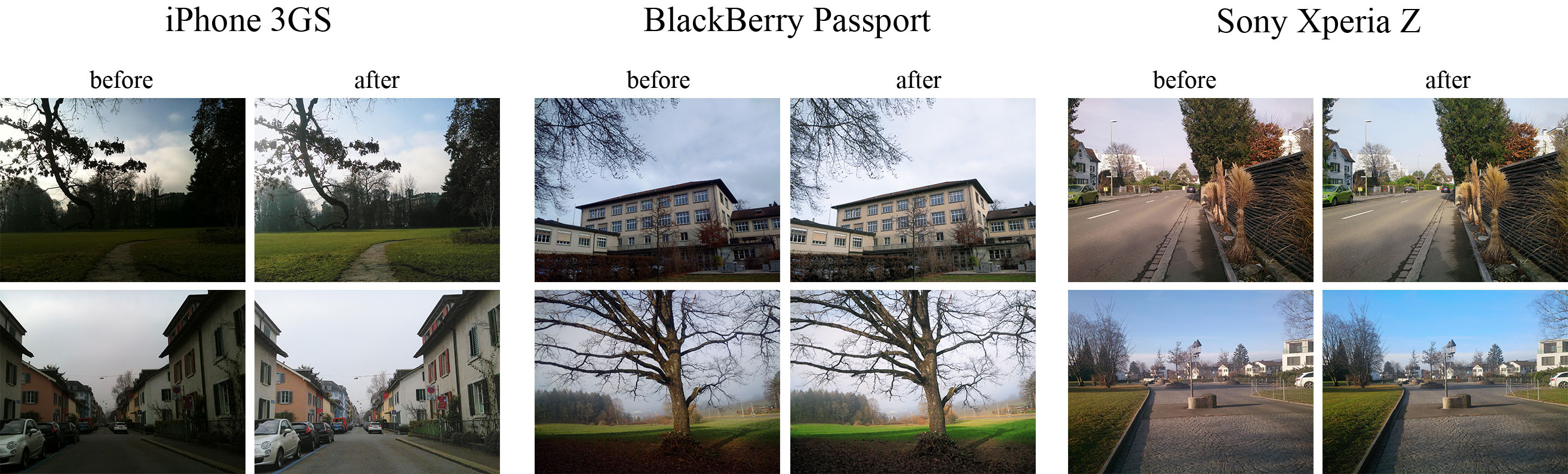
The provided code implements the paper that presents an end-to-end deep learning approach for translating ordinary photos from smartphones into DSLR-quality images. The learned model can be applied to photos of arbitrary resolution, while the methodology itself is generalized to any type of digital camera. More visual results can be found here.
2. Prerequisites
- Python + Pillow, scipy, numpy, imageio packages
- TensorFlow 1.x / 2.x + CUDA CuDNN
- Nvidia GPU
3. First steps
- Download the pre-trained VGG-19 model and put it into
vgg_pretrained/folder - Download DPED dataset (patches for CNN training) and extract it into
dped/folder.
This folder should contain three subolders:sony/,iphone/andblackberry/
4. Train the model
python train_model.py model=<model>
Obligatory parameters:
model:iphone,blackberryorsony
Optional parameters and their default values:
batch_size:50- batch size [smaller values can lead to unstable training]train_size:30000- the number of training patches randomly loaded eacheval_stepiterationseval_step:1000- eacheval_stepiterations the model is saved and the training data is reloadednum_train_iters:20000- the number of training iterationslearning_rate:5e-4- learning ratew_content:10- the weight of the content lossw_color:0.5- the weight of the color lossw_texture:1- the weight of the texture [adversarial] lossw_tv:2000- the weight of the total variation lossdped_dir:dped/- path to the folder with DPED datasetvgg_dir:vgg_pretrained/imagenet-vgg-verydeep-19.mat- path to the pre-trained VGG-19 network
Example:
python train_model.py model=iphone batch_size=50 dped_dir=dped/ w_color=0.7
5. Test the provided pre-trained models
python test_model.py model=<model>
Obligatory parameters:
model:iphone_orig,blackberry_origorsony_orig
Optional parameters:
test_subset:full,small- all 29 or only 5 test images will be processedresolution:orig,high,medium,small,tiny- the resolution of the test images [origmeans original resolution]use_gpu:true,false- run models on GPU or CPUdped_dir:dped/- path to the folder with DPED dataset
Example:
python test_model.py model=iphone_orig test_subset=full resolution=orig use_gpu=true
6. Test the obtained models
python test_model.py model=<model>
Obligatory parameters:
model:iphone,blackberryorsony
Optional parameters:
test_subset:full,small- all 29 or only 5 test images will be processediteration:allor<number>- get visual results for all iterations or for the specific iteration,
<number>must be a multiple ofeval_stepresolution:orig,high,medium,small,tiny- the resolution of the test images [origmeans original resolution]use_gpu:true,false- run models on GPU or CPUdped_dir:dped/- path to the folder with DPED dataset
Example:
python test_model.py model=iphone iteration=13000 test_subset=full resolution=orig use_gpu=true
7. Folder structure
dped/- the folder with the DPED datasetmodels/- logs and models that are saved during the training processmodels_orig/- the provided pre-trained models foriphone,sonyandblackberryresults/- visual results for small image patches that are saved while trainingvgg-pretrained/- the folder with the pre-trained VGG-19 networkvisual_results/- processed [enhanced] test images
load_dataset.py- python script that loads training datamodels.py- architecture of the image enhancement [resnet] and adversarial networksssim.py- implementation of the ssim scoretrain_model.py- implementation of the training proceduretest_model.py- applying the pre-trained models to test imagesutils.py- auxiliary functionsvgg.py- loading the pre-trained vgg-19 network
8. Problems and errors
What if I get an error: "OOM when allocating tensor with shape [...]"?
Your GPU does not have enough memory. If this happens during the training process:
- Decrease the size of the training batch [
batch_size]. Note however that smaller values can lead to unstable training.
If this happens while testing the models:
- Run the model on CPU (set the parameter
use_gputofalse). Note that this can take up to 5 minutes per image. - Use cropped images, set the parameter
resolutionto:
high- center crop of size1680x1260pixelsmedium- center crop of size1366x1024pixelssmall- center crop of size1024x768pixelstiny- center crop of size800x600pixels
The less resolution is - the smaller part of the image will be processed
9. Citation
@inproceedings{ignatov2017dslr,
  title={DSLR-Quality Photos on Mobile Devices with Deep Convolutional Networks},
  author={Ignatov, Andrey and Kobyshev, Nikolay and Timofte, Radu and Vanhoey, Kenneth and Van Gool, Luc},
  booktitle={Proceedings of the IEEE International Conference on Computer Vision},
  pages={3277--3285},
  year={2017}
}
10. Any further questions?
Please contact Andrey Ignatov ([email protected]) for more information
opencv
opencv·C++
开源计算机视觉库,提供图像处理、视频分析和深度学习推理的 C++ 接口,是视觉应用开发的基础设施。
计算机视觉+4图像处理
91517+4157k5.1.02026-11-10 10:53 UTC
upscayl
upscayl·TypeScript
跨平台的开源 AI 图片放大工具,基于 ESRGAN 等模型把低分辨率图片无损放大并增强细节,有图形界面,普通用户也能直接上手。
图像超分+4图像处理
52145+2652.7kv2.15.02026-10-05 19:13 UTC
supervision
roboflow·Python
一套可复用的计算机视觉工具库,提供目标检测、实例分割、分类等任务的标注处理、指标计算与可视化组件,帮开发者省去重复造轮子的时间。
计算机视觉+4图像处理
51577+444.9k0.31.52026-11-10 11:15 UTC

sharp
lovell·JavaScript
基于 libvips 的高性能 Node.js 图像处理库,能快速完成 JPEG、PNG、WebP、AVIF、TIFF 的缩放裁剪与格式转换,适合服务端批量处理图片。
图像处理+4图像处理
32836+71.4kv0.35.52026-11-09 13:05 UTC