需先自行安装 PyTorch,否则导入 albumentations 会失败;基础包 albumentationsx 不含 PyTorch,需按平台另装;OpenCV 需按有无 GUI 需求选择 headless 或普通版本;默认会收集使用统计,需按文档关闭。
AlbumentationsX
albumentations-teamAGPL-3.0活跃维护面向计算机视觉的高性能图像增强库,支持分类、分割、检测等任务,可同步变换边界框和掩码,适合深度学习训练数据扩增。
Image augmentation for computer vision. AGPL-3.0-only or commercial licensing.
2.6.1发布于 2026-11-09 05:20 UTC593star +1 / 7 天46fork同步于 2026-11-10 17:58 UTC
pip install "torch>=2.13.0" --index-url https://download.pytorch.org/whl/cpu
pip install "albumentationsx[headless]" 硬件要求按 README 说明
README 未说明显存或 GPU 要求;需 Python 3.11 或更高版本,并需预先安装 PyTorch 与任一 OpenCV 变体。
纯 CPU 可运行需要 CUDA
Python 图像增强库,用统一管线同时处理图像与掩码、框、关键点
面向计算机视觉的高性能图像增强库,支持分类、分割、检测等任务,可同步变换边界框和掩码,适合深度学习训练数据扩增。
核心能力
- 用 Compose 组合 70+ 增强算子,统一处理图像与标注
- 同一接口支持 RGB、灰度、多光谱图像、掩码、边界框和关键点
- 覆盖像素级、空间级、医学与 3D 增强,适配多种 CV 任务
- 可与 PyTorch、TensorFlow 等框架集成
- 提供 MCP 集成,让 AI 助手检查变换并预览管线
容易踩的坑
内容由模型根据 README 生成,可能不完整或不准确,以官方文档为准。看原文 README
- 2.6.1AlbumentationsX 2.6.1最新正式版2026-11-09 · 2026-11-09 05:20 UTC
AlbumentationsX 2.6.1
Summary
- Add optional box-aware crop sampling for detection pipelines that must retain one selected box or every annotated box.
- Correct oriented-box geometry and replay mapping across resize, perspective, crop, and remap operations.
- Validate root inputs before sampling, including calls skipped by
p=0, and preserve the order of repeated replay visits. - Fix Macenko stain estimation to use the two largest optical-density principal components.
Breaking changes
Custom transform dispatch
BasicTransformandDualTransformnow own sampled-parameter dispatch. Overrides ofapply_with_paramsand_apply_with_paramsare rejected. Generate values insample_parameters, returnSampledParams, and implement target handlers such asapplyorapply_to_mask. See the custom transform guidance. #622Input validation
Invalid declared arguments and malformed root inputs now fail before sampling randomness, including calls skipped by
p=0. Incorrect argument kinds raiseTypeError; invalid values raiseValueError. Positional sample arguments also raiseTypeError. Correct invalid configurations and inputs, and update exception handlers that relied on the previous error types. #620Malformed replay records now raise explicit
TypeErrororValueErrorexceptions for invalid kinds, missing fields, unknown classes, or missing namedLambdabindings. Worker RNG lookup errors now propagate instead of silently selecting another stream. #620Direct bounding-box calls
Direct transform calls without a bbox processor now interpret boxes as normalized horizontal boxes. Pass normalized coordinates or use
Composewith explicitBboxParamsfor other formats and oriented boxes. #621New features
RandomResizedCrop: preserve boxes in the crop
Set
bbox_preservation="one_box"to require the crop to contain one uniformly selected box across active bbox fields, or"all_boxes"to contain every box. With no boxes, ordinary sampling is used. The transform relaxesscaleand aspect-ratio bounds only as needed to satisfy the box constraint; configuredBboxParamsfilters still apply. The defaultNonepreserves existing sampling. #630Bug fixes
- LongestMaxSize, SmallestMaxSize, LetterBox, CropAndPad, RandomSizedCrop, RandomResizedCrop, and RandomSizedBBoxSafeCrop now fit oriented boxes in output pixel coordinates after rounded or anisotropic resize and crop-resize.
- Perspective and GridElasticDeform share sampled geometry across image and annotation targets. Remap distortions fit visible polygon envelopes, and identity remaps preserve fractional oriented-box geometry.
CropAndPadretains one center pixel on an axis when the configured crop would otherwise exhaust it.- Resize-family replay maps keypoints and oriented boxes from the current input fram
- 2.6.0AlbumentationsX 2.6.02026-11-05 · 2026-11-05 07:14 UTC
查看更新说明
AlbumentationsX 2.6.0
Summary
- Use float16 NumPy arrays and CPU PyTorch tensors for image and volume augmentation, including batches, masks, and reference data.
- Apply MixUp and input normalization after collation through
albumentations.batch. Both operations run outside autograd and return tensors that can feed a trainable model. - Configure ChannelDropout with an eligible channel set and a dropout ratio. Update older configurations that use
channel_drop_range. Composereleases input storage promptly after successful calls and calls that raise. Custom samplers that accessedSamplingContext.invocationneed the migration below.- The release uses Albucore 0.3.5 for image kernels and raises the NumKong minimum to 7.8.7.
Breaking changes
ChannelDropout configuration
ChannelDropout replaces
channel_drop_rangewithchannels_to_dropanddropout_ratio. Omitchannels_to_dropto make all channels eligible, or pass the channel indices that may be replaced. The ratio applies to the eligible set. The transform rounds half up and retains at least one input channel. Single-channel inputs pass through. The default ratio is0.5, so set it explicitly when migrating a policy that relied on the old default of one dropped channel.For an RGB input, both examples below select one of three channels. An old count range that sampled multiple possible counts requires a new policy choice because the ratio produces a fixed count for a given eligible set. Update saved configurations that contain the old constructor field. #589
import albumentations as A

# 2.5.1 used A.ChannelDropout(channel_drop_range=(1, 1), fill=0, p=0.5)
rgb_dropout = A.ChannelDropout(dropout_ratio=1 / 3, fill=0, p=0.5)
Custom sampling hooks
SamplingContext.invocationand theinvocation=constructor argument have been removed. Readsampling.py_randomandsampling.random_generatordirectly. Inspect inputs and target descriptors through the hook'sdataandtargetsarguments. For standalone tests or tools, useSamplingContext.from_seed()for an isolated stream orSamplingContext.from_owner()to draw from a configured transform. This keeps sampling state from holding input buffers after the call ends. Migration guide · #602# Before value = sampling.invocation.py_random.uniform(0, 1) # After value = sampling.py_random.uniform(0, 1)Image type annotations and wavelength validation
albumentations.core.type_definitions.ImageTypehas been removed. In custom transforms, annotate the dtypes that the operation accepts. For a NumPy operation that accepts all three image dtypes, useNDArray[np.uint8] | NDArray[np.float16] | NDArray[np.float32]. The pinned Albucore release also removes itsImageTypealias and exposesconvert_dtypefor explicit conversions. #614- WaterRefraction validates both endpoints of
wavelength_rangeat construction. Fractions must lie in[0.001, 1.0]. Update older configurations outside this range. #612
New features
Batch operations for PyTorch training
The new
albumentations.batchmodule operates on collated tensors such as(N, C, H, W)images and(N, C, D, H, W)volumes. It runs separately from per-sampleComposepipelines. [Batch Augmentations guide](https://github.com/albumentations-team/albumentations-ai-docs/blob/main/docs/4-advanced-guides/ - 2.5.1AlbumentationsX 2.5.12026-10-11 · 2026-10-11 18:15 UTC
查看更新说明
AlbumentationsX 2.5.1
Summary
- Faster MRI augmentation with MotionArtifact, RicianNoise, KSpaceSpikeNoise, and BiasField.
- Lower temporary-array usage for eligible Rician noise and bias-field reconstruction, with channel-independent scratch buffers for shared k-space spikes.
- Regression coverage for MRI replay, strided arrays, backend selection, and direct volume batches.
- One source for development dependencies and automated license-review synchronization for eligible Dependabot lockfile updates.
Breaking changes
No public API or minimum Python-version changes; Python 3.11 or higher remains required. Optimized MRI kernels can introduce floating-point roundoff differences. Motion and Rician reconstruction can differ from 2.5.0 by one intensity level for
uint8outputs; seeded replay remains deterministic within this version.For contributors,
requirements-dev.txthas been removed. Use the groups inpyproject.toml:uv sync --locked --group dev --inexactInstall the PyTorch build appropriate for your environment. For the CPU-only CI profile:
uv sync --locked --group dev --group ci-torch-cpu --inexactThe pip fallback is
python -m pip install -e . --group devwith pip 25.1 or higher. See development setup.New features
MRI performance
- MotionArtifact computes FFTs along the acquisition axis, eliminating two spatial FFT axes. Large writable single-channel volumes use CPU PyTorch FFTs; other inputs use SciPy. #577
- RicianNoise fuses magnitude reconstruction for eligible large float32 arrays and removes a full-size imaginary-square temporary. #577
- KSpaceSpikeNoise combines separable coefficients for up to five shared spikes, using published Albucore 0.2.21 operations. Coefficient storage is independent of channel count, and each allocating addition is bounded to one XY plane. #578
- BiasField interpolates and applies gains one plane at a time for eligible float32 volumes, avoiding a full-volume gain field. Other shapes, dtypes, and field configurations retain their established routes. #578
Measured through the allocating
Composeroute on Apple M4 Max, exactly one CPU thread, NumPy DHWC float32 volumes of shape32 × 256 × 256 × 1:Transform Parameters Before After Speedup MotionArtifact 2 events 101.43 ms 70.12 ms 1.45× RicianNoise std 0.1, shared fields 15.18 ms 14.14 ms 1.07× KSpaceSpikeNoise 5 shared spikes, intensity 0.25 12.450 ms 4.954 ms 2.51× BiasField std 0.25, scale 0.03 6.485 ms 2.838 ms 2.29× These are the paired measurements reported in #577 and #578, which include exact revisions, parameters, methods, and complete comparison matrices. They u
- 2.5.0AlbumentationsX 2.5.02026-10-07 · 2026-10-07 16:47 UTC
查看更新说明
AlbumentationsX 2.5.0
Summary
- Adds four medical imaging transforms: BiasField, GhostingArtifact, GibbsRinging, and MotionArtifact.
- Raises the minimum supported Python version to 3.11.
- Fixes RandomGamma so gamma 1 preserves every uint8 value.
- Cuts FFT work and temporary memory for selected large MRI volume cases.
Breaking changes
- Python 3.10 is no longer supported. Install and run AlbumentationsX with Python 3.11 or newer.
- Medical transform implementations and functional helpers now live in
albumentations.augmentations.medical.transformsandalbumentations.augmentations.medical.functional. Code importing implementation modules should update its import path. For example:
# Before
from albumentations.augmentations.pixel.color_advanced import HEStain

# After
from albumentations.augmentations.medical.transforms import HEStain
Top-level exports such as
A.HEStainretain their constructor parameters and serialization identifiers.New features
- BiasField simulates smooth multiplicative intensity variation in images and 3D volumes, with shared or per-channel fields.
- GhostingArtifact simulates periodic MRI ghost replicas in real 3D magnitude volumes.
- GibbsRinging applies rectangular k-space truncation to 2D images and 3D volumes.
- MotionArtifact simulates motion between MRI acquisition segments in 3D volumes.
- The new medical package groups these transforms with Anisotropy3D, HEStain, KSpaceSpikeNoise, and RicianNoise. Their top-level exports, target behavior, and serialization remain intact.
Bug fixes
- RandomGamma now builds its uint8 lookup table from exact integer pixel values. With gamma 1, all 256 uint8 values remain unchanged across images and volumes.
- Corrects the documented gamma equation and brightening/darkening directions, and adds a runnable numeric example.
Misc
- For large 3D volumes, KSpaceSpikeNoise, GibbsRinging, and BiasField reduce FFT computation or temporary memory in selected parameter, shape, and dtype ranges. Other inputs keep the existing execution paths.
- Updates the supported Python and operating-system matrix, contributor guidance, release metadata, and development dependencies.
- Keeps release-core ASV discovery compatible with 2.4.13 and corrects pinned artifact action version comments in CI workflows (#571, #573).
Commits
Commit PR Description 7140cc9#558 Require Python 3.11+ and refresh ecosystem dependencies d1a018b#559 Update development dependency group cc6aa02#560 Add MotionArtifact for MRI acquisition motion 96ca52b#561 Add BiasField for MRI intensity inhomogeneity `d3a - 2.4.132026-10-02 · 2026-10-02 13:43 UTC
查看更新说明
What's Changed
- fix(release): pin verified release tags and bump to 2.4.13 by @ternaus in https://github.com/albumentations-team/AlbumentationsX/pull/556
Full Changelog: https://github.com/albumentations-team/AlbumentationsX/compare/2.4.12...2.4.13
用户点评
登录用户的真实使用记录,可按版本和硬件筛选共 0 条
还没有人点评。第一个说出真实体验的人最有价值。
AlbumentationsX


📣 Stay updated! Subscribe to our newsletter for the latest releases, tutorials, and tips.




AlbumentationsX is a Python library for image augmentation. It provides high-performance, robust implementations and cutting-edge features for computer vision tasks. Image augmentation is used in deep learning and computer vision to increase the quality of trained models. The purpose of image augmentation is to create new training samples from the existing data.
Citing
If AlbumentationsX supports your research, please cite AlbumentationsX: One Augmentation Pipeline for Images and Related Annotations. Your citation makes the project's research impact visible to funders and helps sustain maintenance.
@article{iglovikov2026albumentationsx,
    title = {AlbumentationsX: One Augmentation Pipeline for Images and Related Annotations},
    author = {Iglovikov, Vladimir},
    journal = {arXiv preprint arXiv:2608.11123},
    year = {2026},
    doi = {10.48550/arXiv.2608.11123},
    url = {https://arxiv.org/abs/2608.11123}
}
Licensing
AlbumentationsX offers two license options:
- Commercial license: choose alternative permissions for proprietary software under an agreement covering your team, products, and deployments. Request a quote or email [email protected].
- AGPL-3.0-only: available at no charge. The AGPL permits commercial use subject to its terms. Read the license guide.
Commercial, proprietary, internal, or production status alone does not require a commercial license. See the AGPL text and licensing details and history for the applicable terms.
For supplier questionnaires and purchasing documents, see institutional procurement.
Quick Start
# Install the PyTorch build for your platform first. For Linux CPU-only:
pip install "torch>=2.13.0" --index-url https://download.pytorch.org/whl/cpu

# Then install AlbumentationsX with OpenCV.
pip install "albumentationsx[headless]"
import albumentations as A

transform = A.Compose(
    [
        A.RandomCrop(width=256, height=256),
        A.HorizontalFlip(p=0.5),
        A.RandomBrightnessContrast(p=0.2),
    ]
)
Here is an example of how you can apply some pixel-level augmentations to create new images from the original one:

Why AlbumentationsX
- Complete Computer Vision Support: Works with all major CV tasks
- Simple, Unified API: One consistent interface for all data types - RGB/grayscale/multispectral images, masks, bounding boxes, and keypoints.
- Rich Augmentation Library: 70+ high-quality augmentations to enhance your training data.
- Fast: Consistently benchmarked as the fastest augmentation library also shown below section, with optimizations for production use.
- Deep Learning Integration: Works with PyTorch, TensorFlow, and other frameworks. Part of the PyTorch ecosystem.
- Created by Experts: Built by developers with deep experience in computer vision and machine learning competitions.
Table of contents
- Citing
- Licensing
- Quick Start
- Why AlbumentationsX
- Authors
- Installation
- Documentation
- A simple example
- List of augmentations
- Augmentation examples
- Benchmark results
- Performance comparison
- Contribute
- License
- Contact
- Newsletter
Authors
Current Maintainer
Vladimir I. Iglovikov | Kaggle Grandmaster
Emeritus Core Team Members
Mikhail Druzhinin | Kaggle Expert
Alexander Buslaev | Kaggle Master
Eugene Khvedchenya | Kaggle Grandmaster
Installation
AlbumentationsX requires Python 3.11 or higher. To install the latest version from PyPI:
Basic Installation
Install the PyTorch build for your CPU, CUDA, or MPS environment before installing AlbumentationsX. For a Linux CPU-only environment:
pip install "torch>=2.13.0" --index-url https://download.pytorch.org/whl/cpu
For CUDA or macOS (MPS), use the matching command from the PyTorch installation selector. AlbumentationsX does not choose or install a PyTorch accelerator build.
If you already have OpenCV installed (any variant), install AlbumentationsX:
pip install -U albumentationsx
Installation with OpenCV
If you don't have OpenCV installed yet, choose the appropriate variant:
# For servers/Docker (no GUI support, lighter package)
pip install -U "albumentationsx[headless]"

# For local development with GUI support (cv2.imshow, etc.)
pip install opencv-python && pip install -U albumentationsx

# For OpenCV with extra algorithms (contrib modules)
pip install opencv-contrib-python && pip install -U albumentationsx

# For contrib + headless
pip install -U "albumentationsx[contrib-headless]"
Note: AlbumentationsX works with any OpenCV variant:
opencv-python(full version with GUI)opencv-python-headless(no GUI, smaller size)opencv-contrib-python(with extra modules)opencv-contrib-python-headless(contrib + headless)
Choose the one that fits your needs. The library will detect whichever is installed.
pip install albumentationsx installs the base dependency set without PyTorch. It is useful for dependency-only
consumers such as documentation builds. Importing albumentations requires the PyTorch build you selected above.
Other installation options are described in the documentation.
Documentation
The full documentation is available at https://albumentations.ai/docs/. For security, release verification, and contributor guides, see the repository documentation.
For AI-assisted augmentation review, AlbumentationsX can also be used through MCP-capable hosts such as Claude Desktop, Cursor, Claude Code, and Codex. The community AlbumentationsX MCP integration lets assistants inspect transforms, validate pipelines, render bounded local preview batches, compare preview runs, collect concrete feedback, and export reproducible AlbumentationsX pipelines.
A simple example
import albumentations as A
import cv2

transform = A.Compose(
    [
        A.RandomCrop(width=256, height=256),
        A.HorizontalFlip(p=0.5),
        A.RandomBrightnessContrast(p=0.2),
    ]
)

image = cv2.imread("image.jpg", cv2.IMREAD_COLOR_RGB)

transformed = transform(image=image)
transformed_image = transformed["image"]
AlbumentationsX collects usage statistics by default to guide product development. See data collection and opt-out.
List of augmentations
Pixel-level transforms
- AdditiveNoise
- AdvancedBlur
- AnnotationArtifacts
- AtmosphericFog
- AutoContrast
- Blur
- CLAHE
- ChannelDropout
- ChannelShuffle
- ChannelSwap
- ChromaticAberration
- ColorJitter
- Colorize
- Defocus
- Dithering
- Downscale
- Emboss
- Enhance
- Equalize
- ExposureMatching
- FDA
- FancyPCA
- FilmGrain
- FromFloat
- GaussNoise
- GaussianBlur
- GlassBlur
- Halftone
- HistogramMatching
- HueSaturationValue
- ISONoise
- Illumination
- ImageCompression
- InvertImg
- LensFlare
- MedianBlur
- ModeFilter
- MotionBlur
- MultiplicativeNoise
- Normalize
- PhotoMetricDistort
- PixelDistributionAdaptation
- PlanckianJitter
- PlasmaBrightnessContrast
- PlasmaShadow
- Posterize
- RGBShift
- RandomBrightnessContrast
- RandomFog
- RandomGamma
- RandomGravel
- RandomRain
- RandomShadow
- RandomSnow
- RandomSunFlare
- RandomToneCurve
- RingingOvershoot
- SaltAndPepper
- Sharpen
- ShotNoise
- Solarize
- Spatter
- StochasticConvolution
- Superpixels
- ToFloat
- ToGray
- ToRGB
- ToSepia
- UnsharpMask
- Vignetting
- ZoomBlur
Spatial-level transforms
Medical transforms
Medical acquisition artifacts and histology stain augmentation live in albumentations.augmentations.medical.
Use their public names through albumentations, such as A.GibbsRinging and A.HEStain.
| Transform | Image | Images | Volume | Volumes |
|---|---|---|---|---|
| Anisotropy3D | ✓ | ✓ | ||
| BiasField | ✓ | ✓ | ✓ | ✓ |
| GhostingArtifact | ✓ | ✓ | ||
| GibbsRinging | ✓ | ✓ | ✓ | ✓ |
| HEStain | ✓ | ✓ | ✓ | ✓ |
| KSpaceSpikeNoise | ✓ | ✓ | ✓ | ✓ |
| MotionArtifact | ✓ | ✓ | ||
| RicianNoise | ✓ | ✓ | ✓ | ✓ |
3D transforms
| Transform | Volume | Volumes | Mask3D | Masks3D | Keypoints |
|---|---|---|---|---|---|
| Affine3D | ✓ | ✓ | ✓ | ✓ | ✓ |
| CenterCrop3D | ✓ | ✓ | ✓ | ✓ | ✓ |
| CoarseDropout3D | ✓ | ✓ | ✓ | ✓ | ✓ |
| CubicSymmetry | ✓ | ✓ | ✓ | ✓ | ✓ |
| ElasticTransform3D | ✓ | ✓ | ✓ | ✓ | ✓ |
| Flip3D | ✓ | ✓ | ✓ | ✓ | ✓ |
| GridShuffle3D | ✓ | ✓ | ✓ | ✓ | ✓ |
| Pad3D | ✓ | ✓ | ✓ | ✓ | ✓ |
| PadIfNeeded3D | ✓ | ✓ | ✓ | ✓ | ✓ |
| RandomCrop3D | ✓ | ✓ | ✓ | ✓ | ✓ |
| RandomResizedCrop3D | ✓ | ✓ | ✓ | ✓ | ✓ |
| RandomRotate90_3D | ✓ | ✓ | ✓ | ✓ | ✓ |
| Resize3D | ✓ | ✓ | ✓ | ✓ | ✓ |
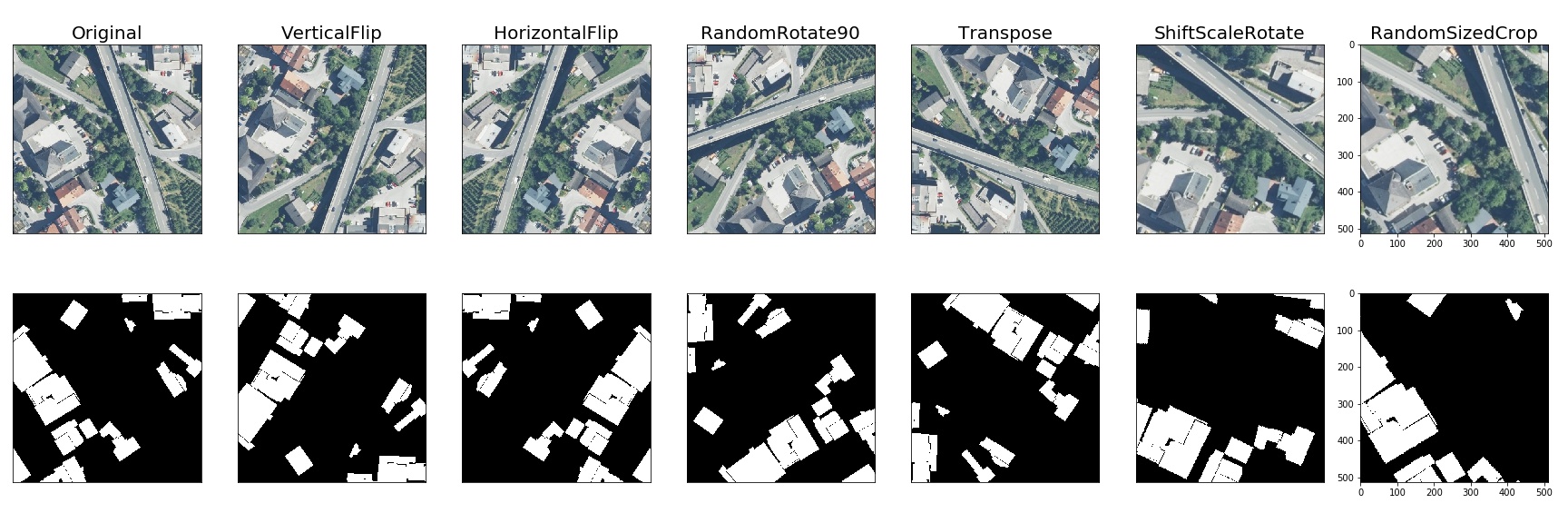
Semantic segmentation on the Inria dataset
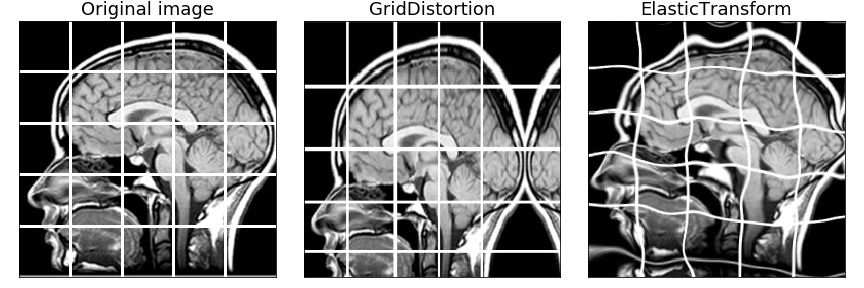
Medical imaging
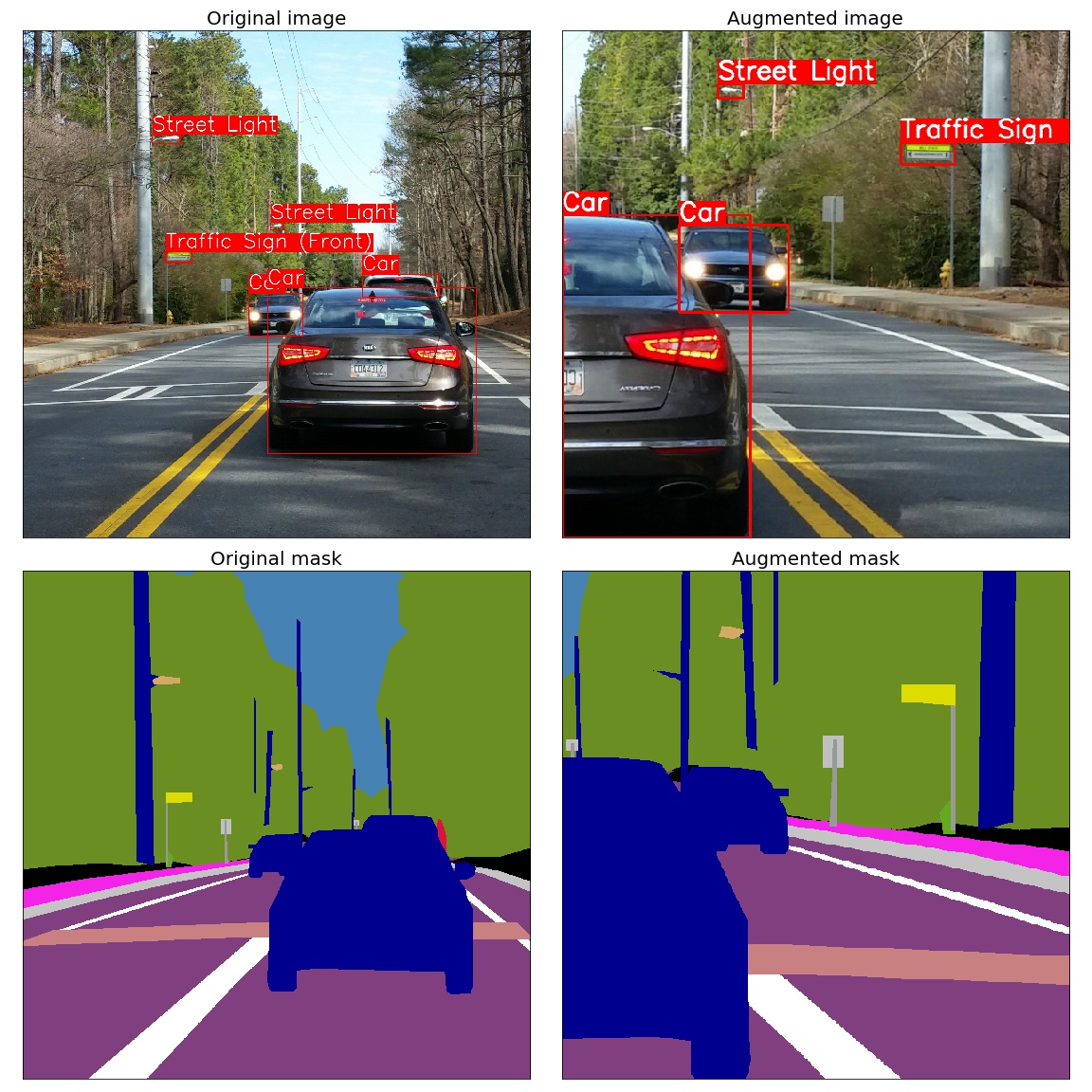
Object detection and semantic segmentation on the Mapillary Vistas dataset
Keypoints augmentation
Benchmark Results
These results cover the library versions listed below.
Image Benchmark Results
System Information
- Platform: macOS-15.1-arm64-arm-64bit
- Processor: arm
- CPU Count: 16
- Python Version: 3.12.8
Benchmark Parameters
- Number of images: 2000
- Runs per transform: 5
- Max warmup iterations: 1000
Library Versions
- albumentationsx: 2.0.8
- augly: 1.0.0
- imgaug: 0.4.0
- kornia: 0.8.0
- torchvision: 0.20.1
Performance Comparison
Number shows how many uint8 images per second can be processed on one CPU thread. Larger is better. The Speedup column shows how many times faster AlbumentationsX is compared to the fastest other library for each transform.
| Transform | albumentationsx2.0.8 | augly1.0.0 | imgaug0.4.0 | kornia0.8.0 | torchvision0.20.1 | Speedup(AlbX/fastest other) |
|---|---|---|---|---|---|---|
| Affine | 1445 ± 9 | - | 1328 ± 16 | 248 ± 6 | 188 ± 2 | 1.09x |
| AutoContrast | 1657 ± 13 | - | - | 541 ± 8 | 344 ± 1 | 3.06x |
| Blur | 7657 ± 114 | 386 ± 4 | 5381 ± 125 | 265 ± 11 | - | 1.42x |
| Brightness | 11985 ± 455 | 2108 ± 32 | 1076 ± 32 | 1127 ± 27 | 854 ± 13 | 5.68x |
| CLAHE | 647 ± 4 | - | 555 ± 14 | 165 ± 3 | - | 1.17x |
| CenterCrop128 | 119293 ± 2164 | - | - | - | - | N/A |
| ChannelDropout | 11534 ± 306 | - | - | 2283 ± 24 | - | 5.05x |
| ChannelShuffle | 6772 ± 109 | - | 1252 ± 26 | 1328 ± 44 | 4417 ± 234 | 1.53x |
| CoarseDropout | 18962 ± 1346 | - | 1190 ± 22 | - | - | 15.93x |
| ColorJitter | 1020 ± 91 | 418 ± 5 | - | 104 ± 4 | 87 ± 1 | 2.44x |
| Contrast | 12394 ± 363 | 1379 ± 25 | 717 ± 5 | 1109 ± 41 | 602 ± 13 | 8.99x |
| CornerIllumination | 484 ± 7 | - | - | 452 ± 3 | - | 1.07x |
| Elastic | 374 ± 2 | - | 395 ± 14 | 1 ± 0 | 3 ± 0 | 0.95x |
| Equalize | 1236 ± 21 | - | 814 ± 11 | 306 ± 1 | 795 ± 3 | 1.52x |
| Erasing | 27451 ± 2794 | - | - | 1210 ± 27 | 3577 ± 49 | 7.67x |
| GaussianBlur | 2350 ± 118 | 387 ± 4 | 1460 ± 23 | 254 ± 5 | 127 ± 4 | 1.61x |
| GaussianIllumination | 720 ± 7 | - | - | 436 ± 13 | - | 1.65x |
| GaussianNoise | 315 ± 4 | - | 263 ± 9 | 125 ± 1 | - | 1.20x |
| Grayscale | 32284 ± 1130 | 6088 ± 107 | 3100 ± 24 | 1201 ± 52 | 2600 ± 23 | 5.30x |
| HSV | 1197 ± 23 | - | - | - | - | N/A |
| HorizontalFlip | 14460 ± 368 | 8808 ± 1012 | 9599 ± 495 | 1297 ± 13 | 2486 ± 107 | 1.51x |
| Hue | 1944 ± 64 | - | - | 150 ± 1 | - | 12.98x |
| Invert | 27665 ± 3803 | - | 3682 ± 79 | 2881 ± 43 | 4244 ± 30 | 6.52x |
| JpegCompression | 1321 ± 33 | 1202 ± 19 | 687 ± 26 | 120 ± 1 | 889 ± 7 | 1.10x |
| LinearIllumination | 479 ± 5 | - | - | 708 ± 6 | - | 0.68x |
| MedianBlur | 1229 ± 9 | - | 1152 ± 14 | 6 ± 0 | - | 1.07x |
| MotionBlur | 3521 ± 25 | - | 928 ± 37 | 159 ± 1 | - | 3.79x |
| Normalize | 1819 ± 49 | - | - | 1251 ± 14 | 1018 ± 7 | 1.45x |
| OpticalDistortion | 661 ± 7 | - | - | 174 ± 0 | - | 3.80x |
| Pad | 48589 ± 2059 | - | - | - | 4889 ± 183 | 9.94x |
| Perspective | 1206 ± 3 | - | 908 ± 8 | 154 ± 3 | 147 ± 5 | 1.33x |
| PlankianJitter | 3221 ± 63 | - | - | 2150 ± 52 | - | 1.50x |
| PlasmaBrightness | 168 ± 2 | - | - | 85 ± 1 | - | 1.98x |
| PlasmaContrast | 145 ± 3 | - | - | 84 ± 0 | - | 1.71x |
| PlasmaShadow | 183 ± 5 | - | - | 216 ± 5 | - | 0.85x |
| Posterize | 12979 ± 1121 | - | 3111 ± 95 | 836 ± 30 | 4247 ± 26 | 3.06x |
| RGBShift | 3391 ± 104 | - | - | 896 ± 9 | - | 3.79x |
| Rain | 2043 ± 115 | - | - | 1493 ± 9 | - | 1.37x |
| RandomCrop128 | 111859 ± 1374 | 45395 ± 934 | 21408 ± 622 | 2946 ± 42 | 31450 ± 249 | 2.46x |
| RandomGamma | 12444 ± 753 | - | 3504 ± 72 | 230 ± 3 | - | 3.55x |
| RandomResizedCrop | 4347 ± 37 | - | - | 661 ± 16 | 837 ± 37 | 5.19x |
| Resize | 3532 ± 67 | 1083 ± 21 | 2995 ± 70 | 645 ± 13 | 260 ± 9 | 1.18x |
| Rotate | 2912 ± 68 | 1739 ± 105 | 2574 ± 10 | 256 ± 2 | 258 ± 4 | 1.13x |
| SaltAndPepper | 629 ± 6 | - | - | 480 ± 12 | - | 1.31x |
| Saturation | 1596 ± 24 | - | 495 ± 3 | 155 ± 2 | - | 3.22x |
| Sharpen | 2346 ± 10 | - | 1101 ± 30 | 201 ± 2 | 220 ± 3 | 2.13x |
| Shear | 1299 ± 11 | - | 1244 ± 14 | 261 ± 1 | - | 1.04x |
| Snow | 611 ± 9 | - | - | 143 ± 1 | - | 4.28x |
| Solarize | 11756 ± 481 | - | 3843 ± 80 | 263 ± 6 | 1032 ± 14 | 3.06x |
| ThinPlateSpline | 82 ± 1 | - | - | 58 ± 0 | - | 1.41x |
| VerticalFlip | 32386 ± 936 | 16830 ± 1653 | 19935 ± 1708 | 2872 ± 37 | 4696 ± 161 | 1.62x |
🤝 Contribute
We thrive on community collaboration! AlbumentationsX wouldn't be the powerful augmentation library it is without contributions from developers like you. Please see our Contributing Guide to get started. A huge Thank You 🙏 to everyone who contributes!
We look forward to your contributions to help make the AlbumentationsX ecosystem even better!
📜 License
See Licensing for the two options. The AGPL text, licensing history, and third-party notices record the applicable terms. Earlier releases retain the permissions that accompanied them.
📞 Contact
For bug reports and feature requests related to AlbumentationsX, please visit GitHub Issues. For questions, discussions, and community support, join our active communities on Discord, Twitter, LinkedIn, and Reddit. We're here to help with all things AlbumentationsX!
📫 Stay Connected
Never miss updates, tutorials, and tips from the AlbumentationsX team! Subscribe to our newsletter.

ultralytics
ultralytics·Python
YOLO 系列官方实现库,一套 PyTorch 代码覆盖目标检测、实例与语义分割、图像分类、姿态估计和目标跟踪,训练到部署全流程打通。
目标检测+4检测 / 分割
63283+9812kv8.4.2082026-11-10 23:12 UTC

yolov5
ultralytics·Python
基于 PyTorch 的目标检测全家桶,覆盖训练、推理、实例分割、图像分类和模型导出,开箱即用,适合快速落地视觉任务。
目标检测+4检测 / 分割
58260+717kv7.02026-11-07 16:59 UTC
pytorch-image-models
huggingface·Python
收录最全的 PyTorch 图像骨干网络合集,涵盖 ResNet、ViT、ConvNeXt 等主流模型,自带训练、评估、推理和导出脚本及预训练权重,省去自己搭网络和找权重的麻烦。
图像分类+4检测 / 分割
37274+85.2kv1.0.312026-11-07 23:22 UTC

detectron2
facebookresearch·Python
Detectron2 是 Facebook 开源的目标检测与分割平台,提供模块化架构和丰富预训练模型,方便快速搭建和训练视觉识别任务。
目标检测+4检测 / 分割
34981+67.9kv0.62026-10-27 09:21 UTC