装完库还要单独下载安装 .argosmodel 语言包才能翻译;GUI 在单独的 argostranslategui 包里,需另装;GPU 加速要手动设 ARGOS_DEVICE_TYPE 环境变量,默认不用 GPU。
argos-translate
argosopentechMIT活跃维护基于 Python 的开源离线翻译库,用本地语言模型完成多语种互译,无需联网即可在自有设备上跑机器翻译。
Open-source offline translation library written in Python
v1.4.0发布于 2021-08-24 13:12 UTC6,643star +15 / 7 天510fork同步于 2026-11-10 23:34 UTC
pip install argostranslate
argospm update
argospm install translate-en_de 硬件要求按 README 说明
README 未说明具体显存或 CPU 要求;GPU 加速需将 ARGOS_DEVICE_TYPE 设为 cuda 或 auto,该变量会传给 CTranslate2,未列支持的 GPU 厂商或型号。
基于 OpenNMT 的 Python 离线翻译库,可当库、命令行或 GUI 用,无需联网
基于 Python 的开源离线翻译库,用本地语言模型完成多语种互译,无需联网即可在自有设备上跑机器翻译。
核心能力
- 用 OpenNMT/CTranslate2 做离线机器翻译
- 安装 .argosmodel 语言包扩展语种
- 自动经中间语言枢轴翻译无直连语种
- 提供 Python API、argospm 命令行和独立 GUI
- 设 ARGOS_DEVICE_TYPE 可启用 CUDA 加速
容易踩的坑
内容由模型根据 README 生成,可能不完整或不准确,以官方文档为准。看原文 README
- v1.4.0Argos Translate macOS 1.4.0最新正式版2021-08-24 · 2021-08-24 13:12 UTC
这个版本没有写更新说明。
用户点评
登录用户的真实使用记录,可按版本和硬件筛选共 0 条
还没有人点评。第一个说出真实体验的人最有价值。
Argos Translate
Demo | Website | Docs | Forum | GitHub | PyPI
Open-source offline translation library written in Python
Argos Translate uses OpenNMT for translations and can be used as either a Python library, command-line, or GUI application. Argos Translate supports installing language model packages which are zip archives with a ".argosmodel" extension containing the data needed for translation. LibreTranslate is an API and web-app built on top of Argos Translate.
Argos Translate also manages automatically pivoting through intermediate languages to translate between languages that don't have a direct translation between them installed. For example, if you have a es → en and en → fr translation installed you are able to translate from es → fr as if you had that translation installed. This allows for translating between a wide variety of languages at the cost of some loss of translation quality.
The argospm-index repo contains metadata and download links to access pre-trained Argos Translate models.
Supported languages
Browse Package Index
Arabic, Azerbaijani, Basque, Catalan, Chinese, Czech, Danish, Dutch, English, Esperanto, Finnish, French, Galician, German, Greek, Hebrew, Hindi, Hungarian, Indonesian, Irish, Italian, Japanese, Kyrgyz, Korean, Malay, Persian, Polish, Portuguese, Portuguese (Brazil), Russian, Slovak, Spanish, Swahili, Swedish, Turkish, Ukrainian, Urdu, and more
Installation
Install with Python
Argos Translate is available from PyPI and can be easily installed with pip.
pip install argostranslate
Install GUI:
pip install argostranslategui
Python source installation into virtualenv
Download a copy of this repo and install with pip.
git clone https://github.com/argosopentech/argos-translate.git
cd argos-translate
virtualenv env
source env/bin/activate
pip install -e .
Examples
Python
import argostranslate.package
import argostranslate.translate

from_code = "en"
to_code = "es"

# Download and install Argos Translate package
argostranslate.package.update_package_index()
available_packages = argostranslate.package.get_available_packages()
package_to_install = next(
    filter(
        lambda x: x.from_code == from_code and x.to_code == to_code, available_packages
    )
)
argostranslate.package.install_from_path(package_to_install.download())

# Translate
translatedText = argostranslate.translate.translate("Hello World", from_code, to_code)
print(translatedText)
# '¡Hola Mundo!'
Command Line Interface
argospm update
argospm install translate-en_de
argos-translate --from en --to de "Hello World!"
# Hallo Welt!
Install all translation packages:
argospm install translate
LibreTranslate Web App (Demo)

LibreTranslate API
const res = await fetch("https://translate.argosopentech.com/translate", {
	method: "POST",
	body: JSON.stringify({
		q: "Hello!",
		source: "en",
		target: "es"
	}),
	headers: {
		"Content-Type": "application/json"}
	});

console.log(await res.json());

{
    "translatedText": "¡Hola!"
}
Graphical user interface
The GUI code is in a separate repository.


Packages
GPU Acceleration
To enable GPU support, you need to set the ARGOS_DEVICE_TYPE env variable to cuda or auto.
$ ARGOS_DEVICE_TYPE=cuda argos-translate --from-lang en --to-lang es "Hello World"
Hola Mundo
The above env variable passes the device type to CTranslate2.
HTML Translation
The translate-html library is built on top of Argos Translate and Beautiful Soup and parses and translates HTML. The LibreTranslate API also has support for translating HTML.
Files Translation
The argos-translate-files library is built on top of Argos Translate and parses and translates files. The LibreTranslate API also has support for translating files.
Uninstall
pip uninstall argostranslate
You may choose to also delete temporary and cached files:
rm -r ~/.local/cache/argos-translate
rm -r ~/.local/share/argos-translate
Related Projects
- LibreTranslate-py - Python bindings for LibreTranslate
- MetalTranslate - Customizable translation in C++
- LibreTranslate/Locomotive - Toolkit for training/converting LibreTranslate compatible language models 🚂
- DesktopTranslator - OpenNMT based translation application
- LibreTranslate-rs - LibreTranslate Rust bindings
- LibreTranslate Go - LibreTranslate Golang bindings
- LibreTranslate Java - LibreTranslate Java bindings
- LibreTranslator - LibreTranslate Android app
Contributing
Contributions are welcome! Available issues are on the GitHub issues page. Contributions of code, data, and pre-trained models can all be accepted.
Support
For support please use the LibreTranslate Forum or GitHub Issues.
For questions about CTranslate2 or general machine translation research the OpenNMT Forum is a good resource.
Services
Custom models trained on your own data are available for $1000/language (negotiable).
I am also available for hire to do support, consulting, or custom software development.
Financial Support
Donate
If you find this software useful donations are greatly appreciated and help to make this project sustainable.
- GitHub Sponsor
- PayPal
- Venmo @pjfinlay
- Bitcoin: 16UJrmSEGojFPaqjTGpuSMNhNRSsnspFJT
Paid supporters receive priority support.
Sponsors
Argos Translate is proudly sponsored by TestMu AI.

TestMu AI (formerly LambdaTest) is the world's first full-stack agentic AI quality engineering platform. Autonomous AI agents plan, author, execute, analyze, and optimize tests with humans in the loop, across 3,000+ browser/OS combinations and 10,000+ real devices. Trusted by 18,000+ enterprises including Microsoft, OpenAI, NVIDIA, and Vimeo.
Hosting affiliate links
You can help support Argos Translate financially by purchasing hosting through these referral links:
- Vast.ai - Cheap GPU rentals
- DigitalOcean - Best all around hosting
- Sharktech - Cheap bandwith
- Time4VPS - Cheap storage
Contributing
Contributions are welcome! Bug reports, pull requests, documentation writing, and feature ideas are all appreciated.
License
Argos Translate is dual licensed under either the MIT License or Creative Commons CC0.

espnet
espnet·Python
端到端语音处理工具箱,覆盖语音识别、合成、翻译、增强、分离和说话人日志等任务,基于 PyTorch 提供统一训练与推理流程。
语音识别+4翻译
100112.4kv.2026112026-11-09 17:59 UTC
spark-nlp
JohnSnowLabs·Scala
基于 Spark 的分布式 NLP 库,把 BERT、LLM、ONNX 等模型封装成可直接调用的流水线,在集群上批量做命名实体识别、分词、翻译等任务。
分布式NLP+4翻译
4163+37437.0.02026-11-10 13:58 UTC

manga-translator-ui
hgmzhn·Python
开箱即用的漫画 AI 翻译桌面工具,自动完成日韩英漫画的 OCR 检测、原文擦除、翻译、图像修复和译文排版,并带可视化编辑器调整文本样式。
漫画翻译+4翻译
3235+16150v3.0.42026-10-27 16:10 UTC
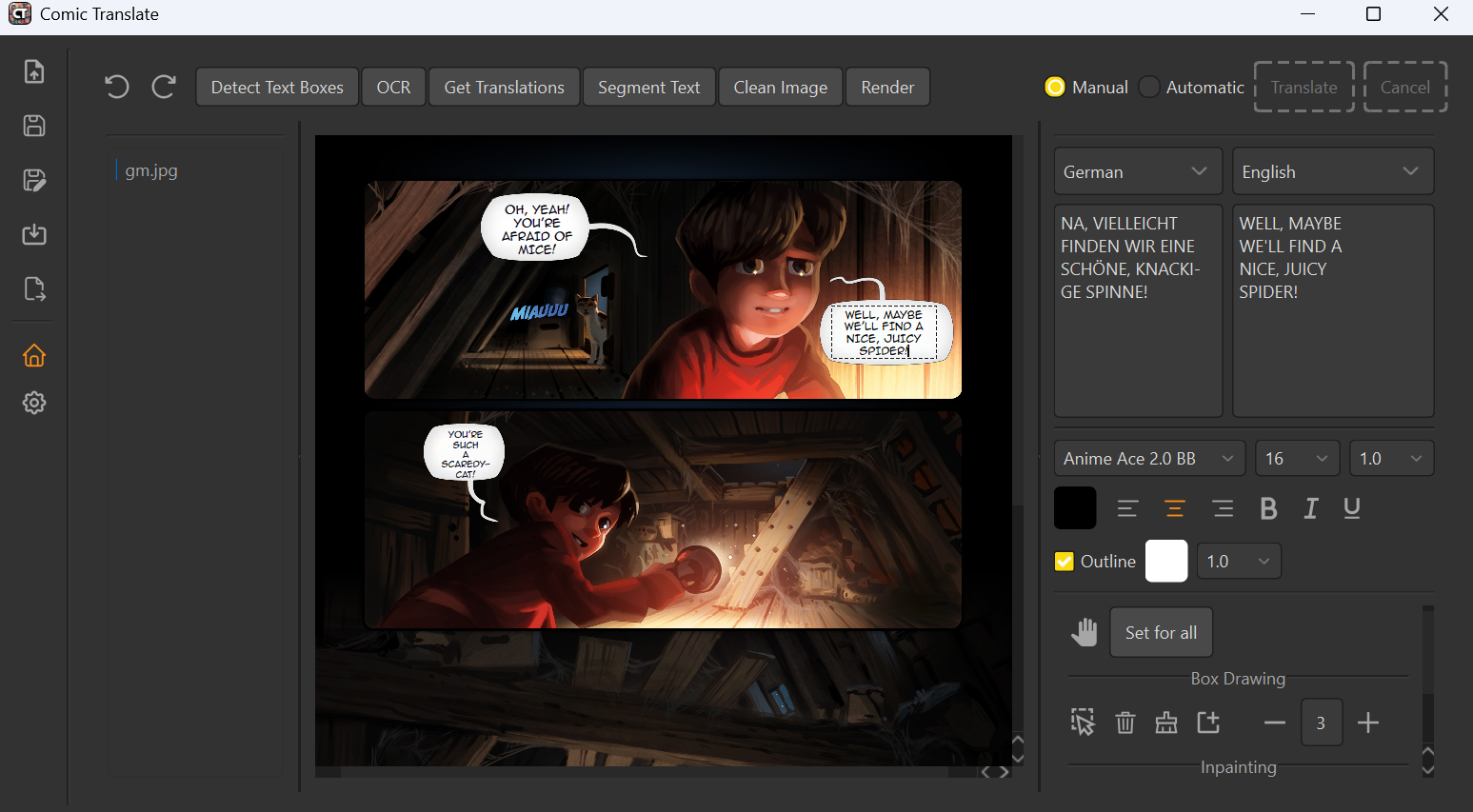
comic-translate
ogkalu2·Python
自动翻译漫画、日漫、韩漫等图片与 PDF/EPUB/CBR/CBZ 文件,集成 OCR、图像修复和机器翻译,支持多语言多格式。
漫画翻译+4翻译
3005+1353v3.0.32026-11-09 10:19 UTC