需先装 Python 3.12、git 和 uv,且安装时勾选 Add python.exe to PATH;CBR/RAR 解压依赖 UnRAR、Unar 或 7-Zip 并加入 PATH,否则报 RarCannotExec;翻译需自备 GPT/Claude/Gemini 等模型访问方式,渲染字体须支持目标语言字符。
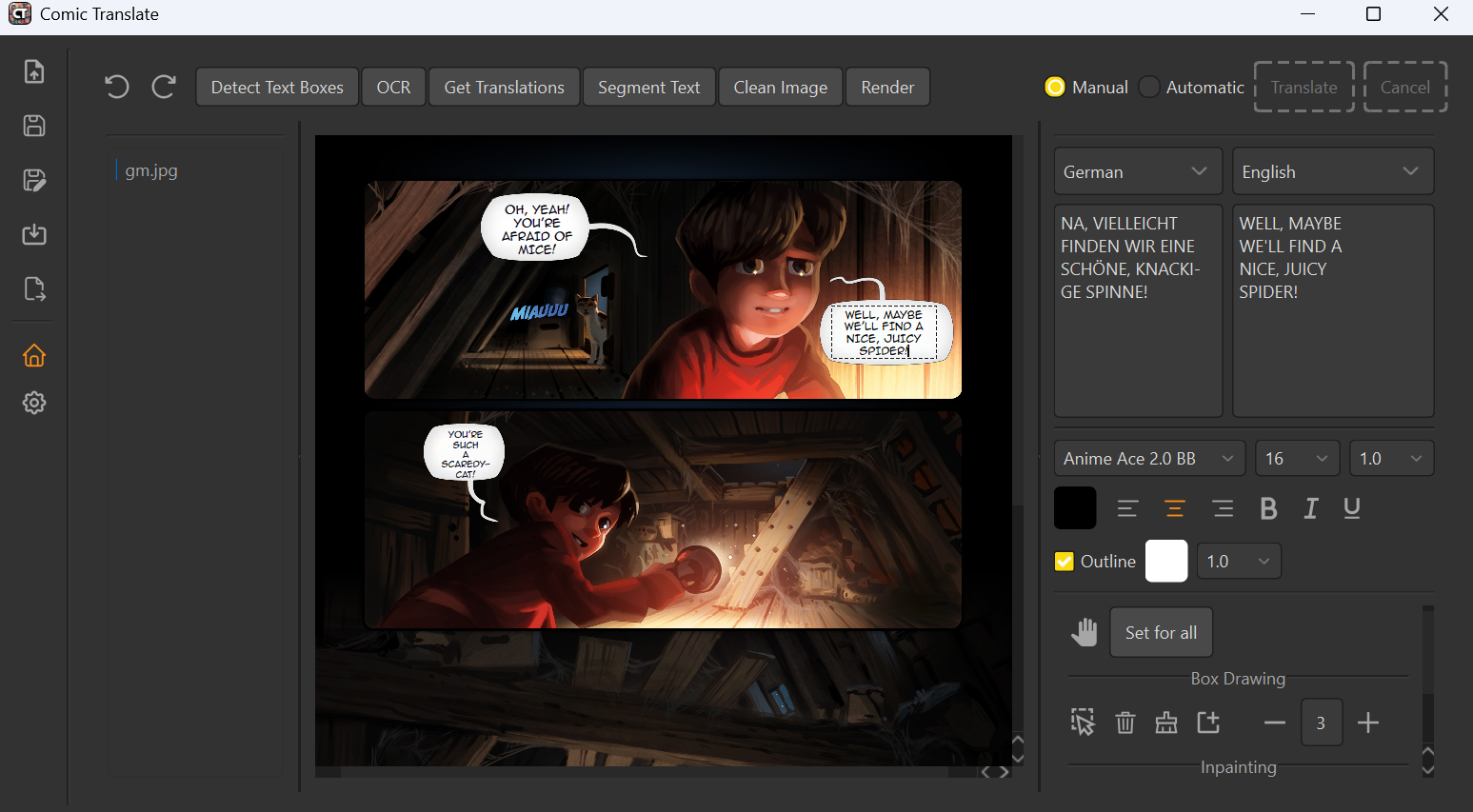
comic-translate
ogkalu2Apache-2.0活跃维护自动翻译漫画、日漫、韩漫等图片与 PDF/EPUB/CBR/CBZ 文件,集成 OCR、图像修复和机器翻译,支持多语言多格式。
AI comic and manga translator app/browser extension for automatically translating comics, manga, manhwa, BDs, fumetti, and more in multiple languages and formats (Images, PDF, EPUB, CBR, CBZ etc).
v3.0.3发布于 2026-11-09 10:19 UTC3,005star +1 / 7 天353fork同步于 2026-11-10 17:44 UTC
git clone https://github.com/ogkalu2/comic-translate
cd comic-translate
uv init --python 3.12
uv add -r requirements.txt --compile-bytecode
uv run comic.py 硬件要求按 README 说明
README 未给出显存等具体硬件要求;桌面版 GPU 加速目前仅在从源码运行时可用,NVIDIA GPU 建议安装 onnxruntime-gpu。
用 GPT/Claude/Gemini 等大模型自动翻译多语种漫画、BD 与韩漫的桌面应用和浏览器扩展
自动翻译漫画、日漫、韩漫等图片与 PDF/EPUB/CBR/CBZ 文件,集成 OCR、图像修复和机器翻译,支持多语言多格式。
核心能力
- 用 RT-DETR-v2 检测对话气泡并切分文字
- 按语种自动选 OCR:日文 manga-ocr、韩文 Pororo、其余 PPOCRv5
- 用 lama 与 AOT-GAN 模型擦除原文再回填译文
- 把整页文本喂给 GPT-4.1、Claude-4.5、Gemini-2.5 做翻译
- 自动模式出错时可撤销并切到手动模式修正
容易踩的坑
内容由模型根据 README 生成,可能不完整或不准确,以官方文档为准。看原文 README
- v3.0.3最新正式版2026-11-09 · 2026-11-09 10:19 UTC
Bug Fixes and Improvements
- Large PDFs, CBR/RAR files, CBZ files and EPUBs open noticeably faster and use less memory.
- Arabic, Hebrew, Thai, Indic, vertical and CJK text now render and lay out correctly, including right-to-left detection.
- Long strips no longer show thin seams between pages.
- Empty or unreadable pages are now flagged on import, and the 2,000-page import limit is removed.
- Signing in no longer times out after 5 minutes.
- A paged comic's Width or Fit setting now applies to every page.
- Smaller fixes to the region list and inspector number fields.
- v3.0.22026-11-06 · 2026-11-06 06:41 UTC
查看更新说明
Bug Fixes and Improvements
- Resume interrupted or partially completed batch translations without restarting completed pages.
- Updated UI translations and fixed untranslated interface text.
- Open credit purchases in the system browser.
- Improved desktop update handling, including installer-based updates when an update cannot be applied seamlessly.
- Build desktop releases in production mode.
From v3.0.0
Rebuilt with a new desktop app and redesigned editor.
New Features
- Faster translations: Translation pipeline is up to 2x faster.
- Unified workspace: Translate and edit in the same workspace, with a collapsible editing toolbar and Focus view.
- Project glossary: Save preferred translations, terms to keep untranslated, usage notes, story context, and tone with each project.
- Region progress tracking: See which regions still need recognition, translation, cleanup, or lettering. Use Finish to complete only the missing steps.
- Linked region editing: Source text, translation, and lettering are managed together. Editing or re-translating a region updates its lettering while preserving styling. Changes to recognized text mark the existing translation as outdated.
- Better line detection: Text lines are detected more accurately.
- Rotated lettering: Translations of tilted text are automatically rotated to match the original lettering.
- Paint tool: Touch up artwork with a solid-color brush and eyedropper.
- Restore tool: Brush away parts of a cleanup layer to reveal the artwork underneath, with controls for selecting overlapping layers.
- Standalone RAR/CBR extraction: No need to install WinRAR, 7-Zip, or other extraction tools.
Improvements
- Lower memory usage.
- Redesigned translation controls, inspector, settings, and project home.
- Canvas remains smooth even after thousands of imported images.
- Movable brush controls keep cleanup and painting options close to the artwork.
- Projects autosave to their
.ctprfile after the first save. - Increased maximum font size for automatic text rendering.
- Fixed some text block corners not being cleaned properly during inpainting.
- desktop-updatesDesktop automatic updatespre-release2026-11-06 · 2026-11-06 05:56 UTC
查看更新说明
Rolling update feed for the native Comic Translate application. Files are maintained automatically. For a fresh installation, use a versioned installer release.
- v3.0.02026-11-06 · 2026-11-06 00:23 UTC
查看更新说明
Rebuilt with a new desktop app and redesigned editor.
New Features
- Faster Translations: Translation Pipeline is up to 2x faster.
- Unified workspace: Translate and edit in the same workspace, with a collapsible editing toolbar and Focus view.
- Project glossary: Save preferred translations, terms to keep untranslated, usage notes, story context, and tone with each project.
- Region progress tracking: See which regions still need recognition, translation, cleanup, or lettering. Use Finish to complete only the missing steps.
- Linked region editing: Source text, translation, and lettering are managed together. Editing or re-translating a region updates its lettering while preserving styling. Changes to recognized text mark the existing translation as outdated.
- Better line detection: Text lines are detected more accurately.
- Rotated lettering: Translations of tilted text are now automatically rotated to match the original lettering.
- Paint tool: Touch up artwork with a solid-color brush and eyedropper.
- Restore tool: Brush away parts of a cleanup layer to reveal the artwork underneath, with controls for selecting overlapping layers.
- Inpainting Fix: Fix some block text corners not getting cleaned properly.
- Standalone RAR/CBR Extraction: No need to install WinRAR, 7zip etc to extract RAR or CBR files.
Improvements
- Lower Memory Usage
- Redesigned translation controls, inspector, settings, and project home.
- Canvas remains smooth even after thousands of imported images
- Movable brush controls keep cleanup and painting options close to the artwork.
- Projects autosave to their
.ctprfile after the first save. - Increased Max Font Size for Auto Text Rendering
- v2.8.92026-09-11 · 2026-09-11 01:33 UTC
查看更新说明
Bug Fixes and Improvements
- Fix manual inpainting masks expanding beyond the selected area, resulting in more precise cleanup.
- Fix inpainting failures caused by invalid or non-integer mask bounds.
- Prevent malformed text-detection regions from interrupting OCR for an entire page.
- Fix exported PSD layers appearing transparent or compositing incorrectly.
- Improve compatibility with custom OpenAI-compatible translators.
- Dynamically update available translators, OCR models, target languages, and credit costs, with cached offline fallbacks.
- Improve text rendering support for dynamically added languages, including RTL, vertical, and no-space layouts.
- Default first-time users to Automatic Mode.
- Improve model downloads when packaged installations encounter SSL certificate errors.
- Improve archive extraction support on macOS by detecting tools installed through Homebrew or MacPorts.
用户点评
登录用户的真实使用记录,可按版本和硬件筛选共 0 条
还没有人点评。第一个说出真实体验的人最有价值。
Comic Translate
English | 한국어 | Français | 简体中文
Intro
Many Automatic Manga Translators exist. Very few properly support comics of other kinds in other languages. This project was created to utilize the ability of State of the Art (SOTA) Large Language Models (LLMs) like GPT and translate comics from all over the world.
Currently, it supports translating comics from the following languages: English, Korean, Japanese, French, Simplified Chinese, Traditional Chinese, Russian, German, Dutch, Spanish and Italian. It can translate to the above mentioned and more.
The State of Machine Translation
For a couple dozen languages, the best Machine Translator is not Google Translate, Papago or even DeepL, but a SOTA LLM like GPT-4, and by far.
This is very apparent for distant language pairs (Korean<->English, Japanese<->English etc) where other translators still often devolve into gibberish.
Excerpt from "The Walking Practice"(보행 연습) by Dolki Min(돌기민)

Comic Samples
GPT-4 as Translator. Note: Some of these also have Official English Translations
Installation
Download
-
Desktop App: Download and install Comic Translate for Windows and macOS from here.
Ignore Smart Screen for Windows (Click More info > Run anyway).
For macOS, after trying to open, go to Settings > Privacy and Security > Scroll down and click Open Anyway.
Note: GPU acceleration is currently only available when running from source.
-
Browser Extension: Install the Comic Translate extension for Chromium-based browsers (Chrome, Edge, Brave, etc.) here to read directly on websites.
From Source
Alternatively, if you'd like to run the source code directly.
Install Python 3.12. Tick "Add python.exe to PATH" during the setup.
https://www.python.org/downloads/
Install git
https://git-scm.com/
Install uv
https://docs.astral.sh/uv/getting-started/installation/
Then, in the command line
git clone https://github.com/ogkalu2/comic-translate
cd comic-translate
uv init --python 3.12
and install the requirements
uv add -r requirements.txt --compile-bytecode
To Update, run this in the comic-translate folder
git pull
uv init --python 3.12 (Note: only run this line if you did not use uv for the first time installation)
uv add -r requirements.txt --compile-bytecode
If you have an NVIDIA GPU, then it is recommended to run
uv pip install onnxruntime-gpu
Usage
In the comic-translate directory, run
uv run comic.py
This will launch the GUI
Tips
- CBR/RAR extraction requires a supported helper such as UnRAR, Unar, or 7-Zip. On Windows, install WinRAR or 7-Zip and add its folder (for example,
C:\Program Files\WinRAR) toPATH. On macOS, the desktop app automatically checks standard Homebrew and MacPorts locations when launched from Finder. If no supported extraction tool is available, you may get the error:
raise RarCannotExec("Cannot find working tool")
In that case, Instructions for Windows, Linux, Mac
- Make sure the selected Font supports characters of the target language
- v2.0 introduces a Manual Mode. When you run into issues with Automatic Mode (No text detected, Incorrect OCR, Insufficient Cleaning etc), you are now able to make corrections. Simply Undo the Image and toggle Manual Mode.
- In Automatic Mode, Once an Image has been processed, it is loaded in the Viewer or stored to be loaded on switch so you can keep reading in the app as the other Images are being translated.
- Ctrl + Mouse Wheel to Zoom otherwise Vertical Scrolling
- The Usual Trackpad Gestures work for viewing the Image
- Right, Left Keys to Navigate Between Images
How it works
Speech Bubble Detection and Text Segmentation
bubble-and-text-detector. RT-DETR-v2 model trained on 11k images of comics (Manga, Webtoons, Western). Algorithmic segmentation based on the boxes provided from the detection model.
OCR
By Default:
Optional:
These can be used for any of the supported languages.
- Gemini 2.0 Flash
- Microsoft Azure Vision
Inpainting
To remove the segmented text
- A Manga/Anime finetuned lama checkpoint. Implementation courtsey of lama-cleaner
- AOT-GAN based model by zyddnys
Translation
Currently, this supports using GPT-4.1, Claude-4.5, Gemini-2.5.
All LLMs are fed the entire page text to aid translations. There is also the Option to provide the Image itself for further context.
Text Rendering
Wrapped text in bounding boxes obtained from bubbles and text.
Acknowledgements
- https://github.com/Sanster/lama-cleaner
- https://huggingface.co/dreMaz
- https://github.com/yunwoong7/korean_ocr_using_pororo
- https://github.com/kha-white/manga-ocr
- https://github.com/JaidedAI/EasyOCR
- https://github.com/PaddlePaddle/PaddleOCR
- https://github.com/RapidAI/RapidOCR
- https://github.com/phenom-films/dayu_widgets

espnet
espnet·Python
端到端语音处理工具箱,覆盖语音识别、合成、翻译、增强、分离和说话人日志等任务,基于 PyTorch 提供统一训练与推理流程。
语音识别+4翻译
100102.4kv.2026112026-11-09 17:59 UTC
argos-translate
argosopentech·Python
基于 Python 的开源离线翻译库,用本地语言模型完成多语种互译,无需联网即可在自有设备上跑机器翻译。
离线翻译+3翻译
6642+15510v1.4.02026-08-08 12:09 UTC
spark-nlp
JohnSnowLabs·Scala
基于 Spark 的分布式 NLP 库,把 BERT、LLM、ONNX 等模型封装成可直接调用的流水线,在集群上批量做命名实体识别、分词、翻译等任务。
分布式NLP+4翻译
4163+37437.0.02026-11-10 13:58 UTC

manga-translator-ui
hgmzhn·Python
开箱即用的漫画 AI 翻译桌面工具,自动完成日韩英漫画的 OCR 检测、原文擦除、翻译、图像修复和译文排版,并带可视化编辑器调整文本样式。
漫画翻译+4翻译
3235+16150v3.0.42026-10-27 16:10 UTC