- 接手一个几十万行的 Go 仓库、想先摸清包之间的调用方向:跑一遍拿到全局图,比 grep 逐个追函数快得多,也比 IDE 的 find usages 更能看出层次
- 排查「这个 handler 到底经由哪条路径调到那个 DB 层」这类跨包链路:用 -focus 指定包、按接收者类型分组,把无关的 stdlib 调用滤掉
- 做重构前的依赖摸底:按导入路径前缀过滤,确认要拆的模块被谁引用,避免拆完才发现反向依赖
- 代码审查里解释一处间接调用:把 dot 文件贴进现有 Graphviz 流水线,和架构图放一起看

专家点评
上手难度:进阶更新于 2026-11-11把 Go 程序的调用图渲染成可点击的 Graphviz 视图,用来读陌生代码库或排查跨包调用
适用场景
踩坑
- 模块解析是历史遗留的薄弱点:issue 里 support for modules、Not looking for packages in 'mod' location 这类反复被提,在 GOPATH 之外、多 module workspace 或 vendor 目录下跑,很可能拿不到完整调用图,先确认目标包能被 go list 正常解析
- 新版 Go 工具链上出现过 nil pointer panic(v0.7.0 + go1.23.2 的 issue 有 11 条评论),升级 Go 后第一次跑建议先用小包验证,别直接对着大仓库跑
- 默认行为是起 web 服务监听 localhost:7878,CI 或脚本里用必须显式加 -file 输出 dot,否则进程不退出;另外只有加 -graphviz 才需要装 Graphviz,纯 dot 输出不需要
- 指针分析在超大仓库上耗时和内存都不小,README 没给规模上限,仓库越大越要先用 -ignore 和导入前缀把范围收窄
同类对比
想要更精确的跨过程分析可以看 golang.org/x/tools 里的 callgraph/pointer 包自己搭;只要包级依赖图、不需要函数级调用,go mod graph 或 goda 更轻。
go install github.com/ofabry/go-callvis@latest
go-callvis <target package> 硬件要求按 README 说明
README 未说明,纯 Go 工具,无 GPU 或显存要求
项目说明
由 README 自动翻译提炼用 Graphviz 把 Go 程序的调用图可视化出来,帮你看懂大型项目或别人的代码
用 Graphviz 把 Go 程序的函数调用关系画成可视化调用图,方便排查代码结构和依赖。
核心能力
- 运行指针分析构建调用图并输出 dot 格式
- 内置 Web 交互视图,点击包即可切换焦点
- 支持按包或接收者类型对函数分组
- 可按导入路径前缀过滤、忽略标准库调用
- 可省略未导出函数及多种调用类型
容易踩的坑
需要 Go 1.19+;只有加 -graphviz 参数时才需要额外安装 Graphviz;默认以服务模式监听 localhost:7878,要输出单文件需显式指定 -file
内容由模型根据 README 生成,可能不完整或不准确,以官方文档为准。看原文 README
- v0.7.1最新正式版2025-01-02 · 2025-01-02 12:17 UTC
What's Changed
- fix rta analysis panic (#161) by @cnzhujie in https://github.com/ondrajz/go-callvis/pull/198
- add package init functions when algo is rta by @cnzhujie in https://github.com/ondrajz/go-callvis/pull/199
- Fix issues with latest Go and generics by @ondrajz in https://github.com/ondrajz/go-callvis/pull/202
New Contributors
- @cnzhujie made their first contribution in https://github.com/ondrajz/go-callvis/pull/198
Full Changelog: https://github.com/ondrajz/go-callvis/compare/v0.7.0...v0.7.1
- v0.7.02023-05-08 · 2023-05-08 23:15 UTC
查看更新说明
What's Changed
- Add caching by @adieUkid in https://github.com/ofabry/go-callvis/pull/71
- File position by @gentzeng in https://github.com/ofabry/go-callvis/pull/67
- fix the parametes '-tags' no effect,use -tag="-tags xxx" by @locetyang in https://github.com/ofabry/go-callvis/pull/88
- Add rankdir command line flag for graph layout direction. by @russmack in https://github.com/ofabry/go-callvis/pull/92
- Passthru of graphviz node shape,style by @Russtopia in https://github.com/ofabry/go-callvis/pull/84
- remove lint warnning by @liaohanqin in https://github.com/ofabry/go-callvis/pull/100
- Bump x/tools by @benmoss in https://github.com/ofabry/go-callvis/pull/109
- Add GitHub workflow by @ofabry in https://github.com/ofabry/go-callvis/pull/118
- Add supports for all callgraph construction algo by @magodo in https://github.com/ofabry/go-callvis/pull/104
- update(go.mod): dependency update to support go 1.18 generics by @xinyubot in https://github.com/ofabry/go-callvis/pull/121
- update(go.mod): dependency update to support go 1.19 by @saberder in https://github.com/ofabry/go-callvis/pull/131
- Update ci.yml by @ofabry in https://github.com/ofabry/go-callvis/pull/148
- Added go-recipes badge by @nikolaydubina in https://github.com/ofabry/go-callvis/pull/137
- Fix build budge by @u5surf in https://github.com/ofabry/go-callvis/pull/155
- docs: use 'go install' instead of 'go get' by @mikaello in https://github.com/ofabry/go-callvis/pull/146
- Fix issue go-callvis with build tags by @minhtrex in https://github.com/ofabry/go-callvis/pull/139
- Bump version to v0.7.0 by @ofabry in https://github.com/ofabry/go-callvis/pull/133
Many thanks to all new contributors! 🥇
New Contributors
- @adieUkid made their first contribution in https://github.com/ofabry/go-callvis/pull/71
- @gentzeng made their first contribution in https://github.com/ofabry/go-callvis/pull/67
- @locetyang made their first contribution in https://github.com/ofabry/go-callvis/pull/88
- @russmack made their first contribution in https://github.com/ofabry/go-callvis/pull/92
- @liaohanqin made their first contribution in https://github.com/ofabry/go-callvis/pull/100
- @benmoss made their first contribution in https://github.com/ofabry/go-callvis/pull/109
- @magodo made their first contribution in https://github.com/ofabry/go-callvis/pull/104
- @xinyubot made their first contribution in https://github.com/ofabry/go-callvis/pull/121
- @saberder made their first contribution in https://github.com/ofabry/go-callvis/pull/131
- @nikolaydubina made their first contribution in https://github.com/ofabry/go-callvis/pull/137
- @u5surf made their first contribution in https://github.com/ofabry/go-callvis/pull/155
- @mikaello made their first contribution in https://github.com/ofabry/go-callvis/pull/146
- @minhtrex made their first contribution in https://github.com/ofabry/go-callvis/pull/139
Full Changelog: https://github.com/ofabry/go-callvis/compare/v0.6.1...v0.7.0
- v0.6.12020-08-05 · 2020-08-05 02:06 UTC
查看更新说明
- use Go library to render images (no need to install Graphviz)
- by default group by packages
- v0.6.00.6.02020-03-06 · 2020-03-06 10:48 UTC
查看更新说明
- update changed username
TrueFurby->ofabry
- update changed username
- v0.5.00.5.02019-09-04 · 2019-09-04 07:30 UTC
查看更新说明
- support for Go modules #49
用户点评
登录用户的真实使用记录,可按版本和硬件筛选共 0 条
还没有人点评。第一个说出真实体验的人最有价值。
Introduction
The purpose of this tool is to provide developers with a visual overview of a Go program using data from call graph and its relations with packages and types. This is especially useful in larger projects where the complexity of the code much higher or when you are just simply trying to understand code of somebody else.
Features
- click on package to quickly switch the focus using interactive viewer
- focus specific package in the program
- group functions by package
- group methods by their receiver type
- filter packages to specific import path prefixes
- ignore calls to/from standard library
- omit various types of function calls
Output preview

Check out the source code for the above image.
How it works
It runs pointer analysis to construct the call graph of the program and uses the data to generate output in dot format, which can be rendered with Graphviz tools.
Quick start
Installation
Requirements
To install go-callvis, run:
# Latest release
go install github.com/ofabry/go-callvis@latest

# Development version
go install github.com/ofabry/go-callvis@master
Alternatively, clone the repository and compile the source code:
# Clone repository
git clone https://github.com/ofabry/go-callvis.git
cd go-callvis

# Compile and install
make install
Usage
Interactive viewer
To use the interactive view provided by a web server that serves SVG images of focused packages, you can simply run:
go-callvis <target package>
HTTP server is listening on http://localhost:7878/ by default, use option -http="ADDR:PORT" to change HTTP server address.
Render static output
To generate a single output file use option -file=<file path> to choose output file destination.
The output format defaults to svg, use option -format=<svg|png|jpg|...> to pick a different output format.
Options
Usage of go-callvis:
  -debug
    	Enable verbose log.
  -file string
    	output filename - omit to use server mode
  -cacheDir string
    	Enable caching to avoid unnecessary re-rendering.
  -focus string
    	Focus specific package using name or import path. (default "main")
  -format string
    	output file format [svg | png | jpg | ...] (default "svg")
  -graphviz
    	Use Graphviz's dot program to render images.
  -group string
    	Grouping functions by packages and/or types [pkg, type] (separated by comma) (default "pkg")
  -http string
    	HTTP service address. (default ":7878")
  -ignore string
    	Ignore package paths containing given prefixes (separated by comma)
  -include string
    	Include package paths with given prefixes (separated by comma)
  -limit string
    	Limit package paths to given prefixes (separated by comma)
  -minlen uint
    	Minimum edge length (for wider output). (default 2)
  -nodesep float
    	Minimum space between two adjacent nodes in the same rank (for taller output). (default 0.35)
  -nointer
    	Omit calls to unexported functions.
  -nostd
    	Omit calls to/from packages in standard library.
  -rankdir
        Direction of graph layout [LR | RL | TB | BT] (default "LR")
  -skipbrowser
    	Skip opening browser.
  -tags build tags
    	a list of build tags to consider satisfied during the build. For more information about build tags, see the description of build constraints in the documentation for the go/build package
  -tests
    	Include test code.
  -algo string
        Use specific algorithm for package analyzer: static, cha, rta or vta (default "static")
  -version
    	Show version and exit.
Run go-callvis -h to list all supported options.
Reference guide
Here you can find descriptions for various types of output.
Packages / Types
| Represents | Style |
|---|---|
focused | blue color |
stdlib | green color |
other | yellow color |
Functions / Methods
| Represents | Style |
|---|---|
exported | bold border |
unexported | normal border |
anonymous | dotted border |
Calls
| Represents | Style |
|---|---|
internal | black color |
external | brown color |
static | solid line |
dynamic | dashed line |
regular | simple arrow |
concurrent | arrow with circle |
deferred | arrow with diamond |
Examples
Here is an example for the project syncthing.
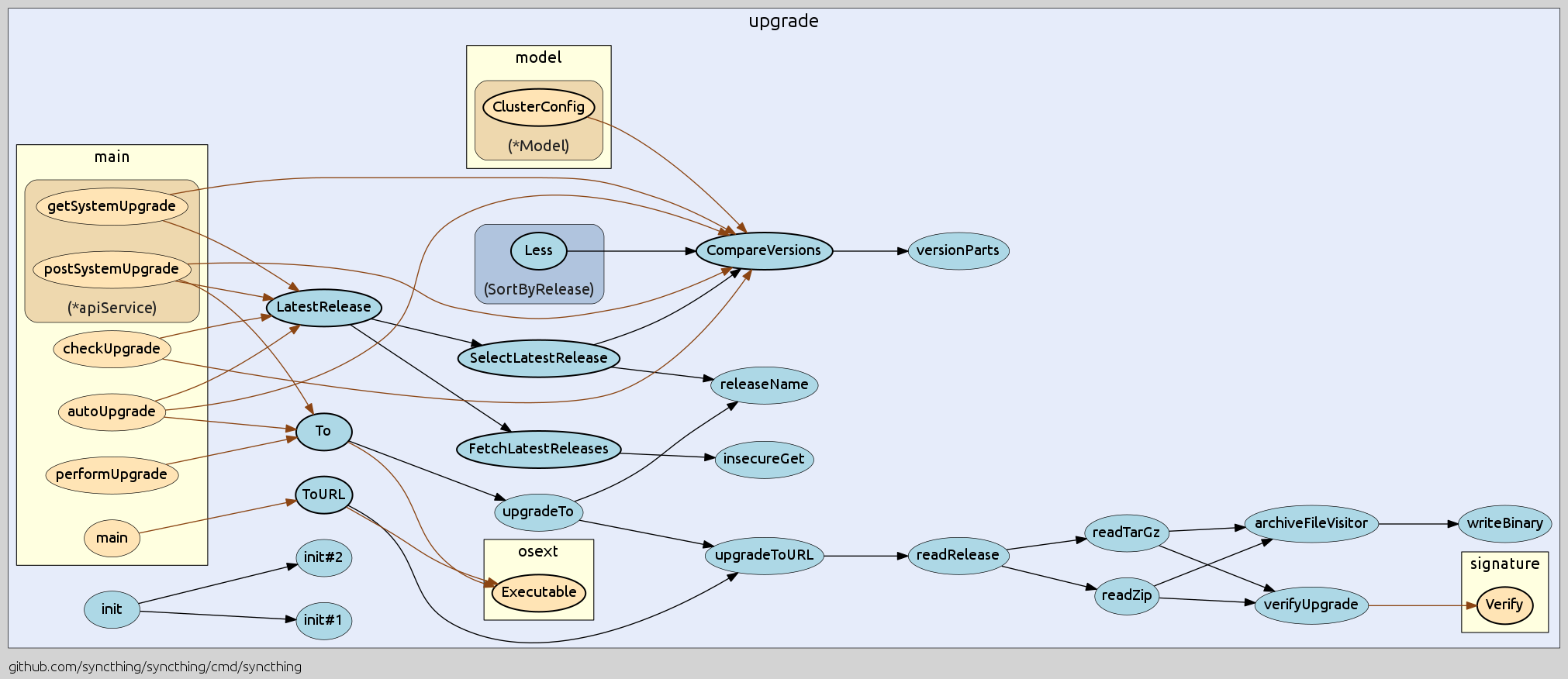
Check out more examples and used command options.
Community
Join #go-callvis channel at gophers.slack.com. (not a member yet? get invitation)
How to help
Did you find any bugs or have some suggestions?
- Feel free to open new issue or start discussion in the slack channel.
Do you want to contribute to the project?
- Fork the repository and open a pull request. Here you can find TODO features.
Roadmap
The interactive tool described below has been published as a separate project called goexplorer!
Ideal goal of this project is to make web app that would locally store the call graph data and then provide quick access of the call graphs for any package of your dependency tree. At first it would show an interactive map of overall dependencies between packages and then by selecting particular package it would show the call graph and provide various options to alter the output dynamically.
PHP-Parser
nikic·PHP
用 PHP 写的 PHP 解析器,能把源码转成 AST,方便做静态分析、代码改写和工具链开发。
PHP解析器+3代码审计 / SAST进阶
17476+51.1kv5.9.02026-11-05

phpstan
phpstan·PHP
PHP 静态分析工具,不用运行代码就能扫出类型错误和潜在 bug,适合在 CI 里给 PHP 项目做质量把关。
静态分析+4代码审计 / SAST进阶
14154+29712.3.52026-11-11

PHP-CS-Fixer
PHP-CS-Fixer·PHP
自动检测并修复 PHP 代码风格问题的命令行工具,让团队无需手动调整格式就能统一编码规范。
代码风格+4代码审计 / SAST进阶
13576+31.7kv3.95.302026-11-11

grype
anchore·Go
扫描容器镜像和文件系统中的软件包,找出已知漏洞并输出 SBOM 与漏洞报告,适合接入 CI 做供应链安全把关。
漏洞扫描+4代码审计 / SAST入门
13241+35942v0.121.32026-11-11