老 GPU 上指标不显示时需加 -e NVIDIA_SMI=true 切换到 nvidia-smi 回退模式;想看进程名要加 --init --pid=host,这会让容器访问宿主机进程信息;hub 模式必须设置 NODE_URLS 且各节点 1312 端口互通,否则连不上。
docker run -d --gpus all -p 1312:1312 ghcr.io/psalias2006/gpu-hot:latest 硬件要求按 README 说明
需要 NVIDIA GPU 与可用的显卡驱动,宿主机需安装 NVIDIA Container Toolkit 才能让容器访问 GPU;hub 聚合节点本身不需要 GPU。README 未说明具体显存要求与支持的 GPU 型号,较老的显卡可加 NVIDIA_SMI=true 走 nvidia-smi 回退。
纯 CPU 可运行多卡 / 张量并行有 Docker 镜像
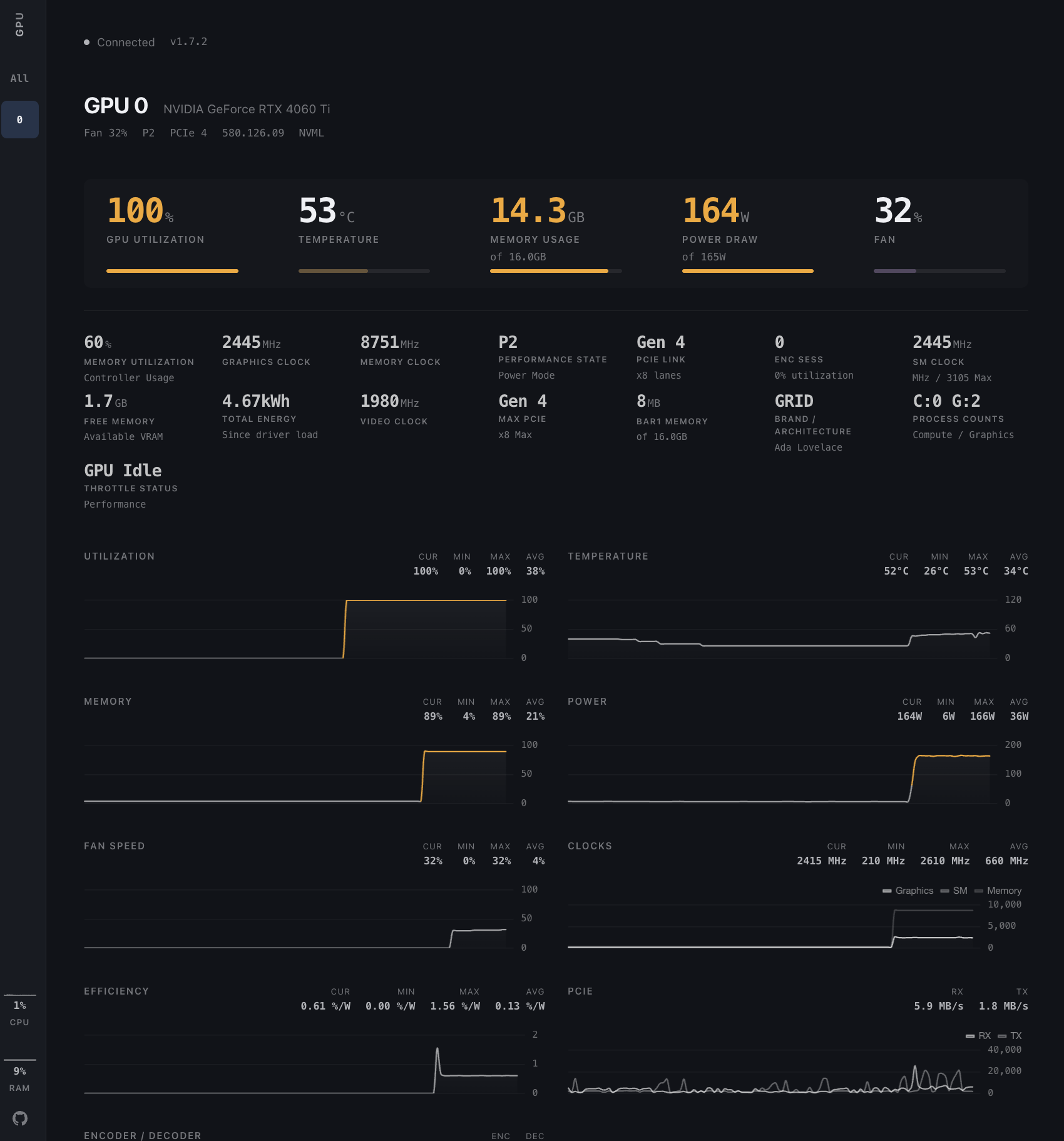
自托管的 NVIDIA GPU 实时监控面板,用浏览器就能查看单机或集群的显卡状态
实时监控 NVIDIA GPU 的 Web 仪表盘,用图表展示显存、利用率、温度等指标,方便运维和 MLOps 排查显卡状态。
核心能力
- 通过 NVML 以亚秒级间隔轮询 GPU 指标
- 自动发现多卡并展示利用率、温度、功耗、风扇、时钟等
- 用 hub 模式聚合多台机器的节点数据,可扩展到 100+ 张卡
- 提供历史曲线图与进程级 PID、显存占用监控
- 无客户端连接时自动暂停轮询,空闲 CPU 占用接近零
容易踩的坑
内容由模型根据 README 生成,可能不完整或不准确,以官方文档为准。看原文 README
- v1.9.2最新正式版2026-07-18 · 2026-07-18 16:57 UTC
What's Changed
- Honour UPDATE_INTERVAL in hub mode by @jjsmackay in https://github.com/psalias2006/gpu-hot/pull/70
Full Changelog: https://github.com/psalias2006/gpu-hot/compare/v1.9.1...v1.9.2
- v1.9.12026-07-18 · 2026-07-18 16:53 UTC
查看更新说明
What's Changed
- Fix font-display swap issue in Google Fonts link causing slow rendering by @MatrixNeoKozak in https://github.com/psalias2006/gpu-hot/pull/67
- Cap nvidia-smi refresh instead of throttling the whole loop by @jjsmackay in https://github.com/psalias2006/gpu-hot/pull/71
New Contributors
- @MatrixNeoKozak made their first contribution in https://github.com/psalias2006/gpu-hot/pull/67
- @jjsmackay made their first contribution in https://github.com/psalias2006/gpu-hot/pull/71
Full Changelog: https://github.com/psalias2006/gpu-hot/compare/v1.9.0...v1.9.1
- v1.9.02026-05-28 · 2026-05-28 07:57 UTC
查看更新说明
What's Changed
- Release Notes — v1.9.0 by @psalias2006 in https://github.com/psalias2006/gpu-hot/pull/66
Full Changelog: https://github.com/psalias2006/gpu-hot/compare/v1.8.1...v1.9.0
- v1.8.12026-04-11 · 2026-04-11 10:35 UTC
查看更新说明
What's Changed
- Feature/compact view single server by @psalias2006 in https://github.com/psalias2006/gpu-hot/pull/63
Full Changelog: https://github.com/psalias2006/gpu-hot/compare/v1.8.0...v1.8.1
- v1.8.02026-04-10 · 2026-04-10 19:21 UTC
查看更新说明
What's Changed
- Feature/total vram by @psalias2006 in https://github.com/psalias2006/gpu-hot/pull/62
Full Changelog: https://github.com/psalias2006/gpu-hot/compare/v1.7.3...v1.8.0
用户点评
登录用户的真实使用记录,可按版本和硬件筛选共 0 条
还没有人点评。第一个说出真实体验的人最有价值。
GPU Hot
Real-time NVIDIA GPU monitoring dashboard. Lightweight, web-based, and self-hosted.




Usage
Monitor a single machine or an entire cluster with the same Docker image.
Single machine:
docker run -d --gpus all -p 1312:1312 ghcr.io/psalias2006/gpu-hot:latest
Multiple machines:
# On each GPU server
docker run -d --gpus all -p 1312:1312 -e NODE_NAME=$(hostname) ghcr.io/psalias2006/gpu-hot:latest

# On a hub machine (no GPU required)
docker run -d -p 1312:1312 -e GPU_HOT_MODE=hub -e NODE_URLS=http://server1:1312,http://server2:1312,http://server3:1312 ghcr.io/psalias2006/gpu-hot:latest
Open http://localhost:1312
Older GPUs: Add -e NVIDIA_SMI=true if metrics don't appear.
Process monitoring: Add --init --pid=host to see process names. Note: This allows the container to access host process information.
From source:
git clone https://github.com/psalias2006/gpu-hot
cd gpu-hot
docker-compose up --build
Requirements: Docker + NVIDIA Container Toolkit
Features
- Real-time metrics (sub-second)
- Automatic multi-GPU detection
- Process monitoring (PID, memory usage)
- Historical charts (utilization, temperature, power, clocks)
- System metrics (CPU, RAM)
- Scale from 1 to 100+ GPUs
Metrics: Utilization, temperature, memory, power draw, fan speed, clock speeds, PCIe info, P-State, throttle status, encoder/decoder sessions
Configuration
Environment variables:
NVIDIA_VISIBLE_DEVICES=0,1     # Specific GPUs (default: all)
NVIDIA_SMI=true                # Force nvidia-smi mode for older GPUs
GPU_HOT_MODE=hub               # Set to 'hub' for multi-node aggregation (default: single node)
NODE_NAME=gpu-server-1         # Node display name (default: hostname)
NODE_URLS=http://host:1312...  # Comma-separated node URLs (required for hub mode)
UPDATE_INTERVAL=0.5            # Optional. NVML polling interval in seconds (default: 0.5)
NVIDIA_SMI_INTERVAL=2.0        # Optional. nvidia-smi fallback polling interval (default: 2.0)
Polling is paused automatically when no clients are connected, so idle CPU usage stays near zero.
Backend (core/config.py):
PORT = 1312 # Server port
API
HTTP
GET /              # Dashboard
GET /api/gpu-data  # JSON metrics snapshot
GET /api/version   # Version and update info
WebSocket
const ws = new WebSocket('ws://localhost:1312/socket.io/');

ws.onmessage = (event) => {
  const data = JSON.parse(event.data);
  // data.gpus      — per-GPU metrics
  // data.processes  — active GPU processes
  // data.system     — host CPU, RAM, swap, disk, network
};
Project Structure
gpu-hot/
├── app.py                      # FastAPI server + routes
├── version.py                  # Version info
├── core/
│   ├── config.py               # Configuration
│   ├── monitor.py              # NVML GPU monitoring
│   ├── handlers.py             # WebSocket handlers
│   ├── hub.py                  # Multi-node hub aggregator
│   ├── hub_handlers.py         # Hub WebSocket handlers
│   ├── nvidia_smi_fallback.py  # nvidia-smi fallback for older GPUs
│   └── metrics/
│       ├── collector.py        # Metrics collection
│       └── utils.py            # Metric utilities
├── static/
│   ├── css/
│   │   ├── tokens.css          # Design tokens (colors, spacing)
│   │   ├── layout.css          # Page layout (sidebar, main)
│   │   └── components.css      # UI components (cards, charts)
│   ├── js/
│   │   ├── chart-config.js     # Chart.js configurations
│   │   ├── chart-manager.js    # Chart data + lifecycle
│   │   ├── chart-drawer.js     # Correlation drawer
│   │   ├── gpu-cards.js        # GPU card rendering
│   │   ├── socket-handlers.js  # WebSocket + batched rendering
│   │   ├── ui.js               # Sidebar navigation
│   │   └── app.js              # Init + version check
│   └── favicon.svg
├── templates/index.html
├── Dockerfile
├── docker-compose.yml
└── requirements.txt
Troubleshooting
No GPUs detected:
nvidia-smi  # Verify drivers work
docker run --rm --gpus all nvidia/cuda:12.1.0-base-ubuntu22.04 nvidia-smi  # Test Docker GPU access
Hub can't connect to nodes:
curl http://node-ip:1312/api/gpu-data  # Test connectivity
sudo ufw allow 1312/tcp                # Check firewall
Performance issues: Increase UPDATE_INTERVAL (env var, seconds — e.g. -e UPDATE_INTERVAL=2.0)
Star History
Contributing
PRs welcome. Open an issue for major changes.
License
MIT - see LICENSE
grafana
grafana·TypeScript
开源可组合的可观测性平台,把 Prometheus、Loki、Elasticsearch 等多源指标、日志和链路数据统一做成仪表盘,并支持告警。
可观测性+4GPU 监控
77810+6615kv13.3.02026-11-10 11:18 UTC

prometheus
prometheus·Go
开源监控系统与时序数据库,采集指标、配置告警规则并绘图展示,适合搭建从基础设施到 GPU 集群的可观测性平台。
时序数据库+4GPU 监控
67607+35511kv3.16.02026-11-10 11:14 UTC
nvitop
XuehaiPan·Python
像 htop 一样在终端里实时查看 NVIDIA GPU 的进程占用、显存和利用率,还能导出指标接入 Grafana 做监控面板。
GPU 监控+4GPU 监控
7245+4254v1.7.22026-11-02 07:34 UTC

jetson_stats
rbonghi·Python
在 NVIDIA Jetson 系列开发板上实时查看 CPU、GPU、内存和功耗状态,还能直接调整风扇与功耗模式,省去手动翻 sysfs 的麻烦。
Jetson 监控+4GPU 监控
26343317.2.22026-11-09 17:02 UTC