从源码构建需启用 Git LFS,否则仓库大文件不完整;需安装 Visual Studio 2026 及 .NET 桌面开发和 C++ 桌面开发两个工作负载;用 CLI 前要先执行 stride sdk install 安装引擎版本,否则无法创建或运行项目
stride
stride3dMIT活跃维护免费开源的跨平台 C# 游戏引擎,前身是 Xenko,支持 Direct3D 和 Vulkan,用 C# 就能开发 3D 游戏并发布到多个平台。
Stride (formerly Xenko), a free and open-source cross-platform C# game engine.
releases/4.4.1发布于 2026-10-17 07:28 UTC7,945star +2 / 7 天1,182fork同步于 2026-11-10 11:32 UTC
dotnet tool install -g Stride.Cli
stride sdk install
stride new fps -n MyShooter
cd MyShooter && dotnet run --project MyShooter.Windows 硬件要求按 README 说明
README 未说明具体显存或 GPU 型号要求;构建需 Visual Studio 2026(.NET 桌面开发含 .NET 10 SDK 与 C++ 桌面开发工作负载),CI 覆盖 Windows、Linux Vulkan/OpenGL、iOS。
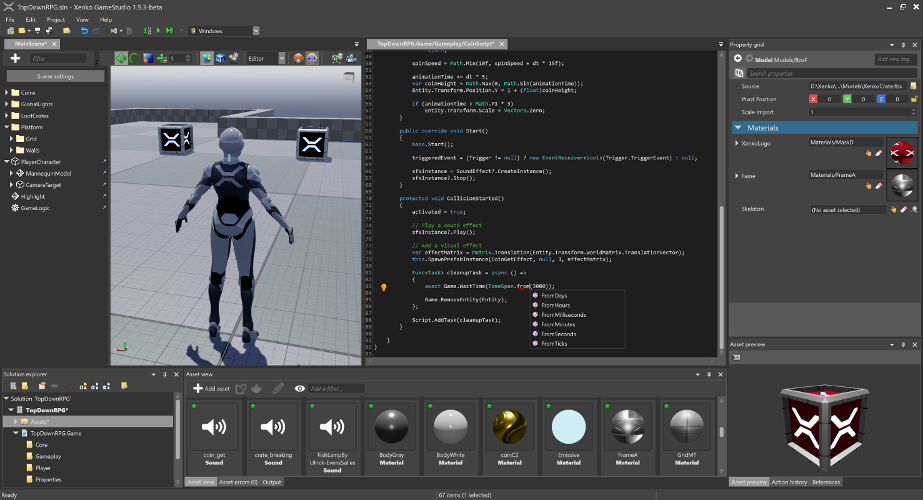
开源跨平台 C# 游戏引擎,主打真实感渲染与 VR,附带可视化编辑器 Game Studio
免费开源的跨平台 C# 游戏引擎,前身是 Xenko,支持 Direct3D 和 Vulkan,用 C# 就能开发 3D 游戏并发布到多个平台。
核心能力
- 用 C# 编写,模块化设计便于按需裁剪
- 内置 Game Studio 可视化编辑器管理游戏内容
- 提供 CLI 工具安装引擎版本并从模板创建项目
- 支持 Windows、Linux(Vulkan/OpenGL)、iOS 等多平台构建
- 提供 dotnet new 模板,含类型起步模板与功能示例
容易踩的坑
内容由模型根据 README 生成,可能不完整或不准确,以官方文档为准。看原文 README
- releases/4.4.1Stride 4.4.1最新正式版2026-10-17 · 2026-10-17 07:28 UTC
What's Changed
Auto-generated; a maintainer may hand-edit.
🎮 Graphics & Rendering
- Direct3D 12 games no longer need Windows Developer Mode to use the Agility SDK. It now works on Windows 10, games ship it in a
D3D12folder next to the executable, and Game Studio loads it too (@xen2, #3627) - MSAA now works on Vulkan and Direct3D 12, and is no longer turned off on iOS (@xen2, #3552, #3636)
- Indirect draws and dispatches now work on Vulkan and Direct3D 12. New
Buffer.Argument.Newoverloads accept arguments written by compute shaders, andComputeEffectShadercan dispatch from an argument buffer (@xen2, #3620) - Added
CommandList.UnorderedAccessBarrier, andClearReadWritenow runs in the right order with the shader reads and writes around it. On Vulkan it can also clear buffers (@xen2, #3644, #3642) - On hybrid laptops, games now run on the discrete GPU instead of always picking the integrated one (@Nicogo1705, #3388)
- Voxel GI lights scenes again on Direct3D 12 and Vulkan, and no longer starts from leftover memory on Vulkan (@xen2, #3645, #3653, #3636)
- Fixed a crash in Vulkan games built with WinForms when their window is minimized (@icauro, #3548)
- Fixed several Vulkan rendering bugs: the wrong start instance in instanced draws, buffer copies made inside a render pass, a crash creating pipelines for effects with no resources, and broken profiler labels. Pipelines are also bound once per change instead of before every draw (@xen2, #3613, #3614; @sasvdw, #3568; @Nicogo1705, #3562)
- Fixed several Direct3D 12 bugs: device removal on Intel Arc GPUs, depth-only pipeline states, MSAA resolve copies going the wrong way, and crashes from barriers on resources that were already disposed (@xen2, #3601, #3640; @Nicogo1705, #3557, #3560)
- Fixed Direct3D 11 bugs: per-instance vertex data lost its step rate, a resource could stay bound for reading while being written by a shader, and a possible crash when binding render targets (@xen2, #3613, #3623, #3633)
- GPU profiling no longer throws in the first frame on Direct3D 11, and GPU queries are reset, read back and reused correctly on Vulkan and Direct3D 12 (@xen2, #3624)
- Temporary render targets and buffers are reused correctly, and their names are no longer wrong (@icauro, #3592)
- Opaque objects now draw in the same order on every run. Local reflections start from a clean history, and temporal anti-aliasing no longer depends on gather offsets (@xen2, #3553, #3552)
- Games keep the device's shader profile when none is set, and unload only the game systems whose content actually loaded (
- Direct3D 12 games no longer need Windows Developer Mode to use the Agility SDK. It now works on Windows 10, games ship it in a
- launcher/6.0.7Stride Launcher 6.0.72026-10-14 · 2026-10-14 16:01 UTC
查看更新说明
What's Changed
Auto-generated; a maintainer may hand-edit.
🌙 Nightly builds
- Turning on Show nightly builds of Stride now asks you to confirm first. The prompt explains that nightly builds aren't signed or tested as much as releases, and that project upgrades might not be fully tested, so back up your projects before opening them with a nightly (@xen2, 4de8c24)
- A nightly row now has a What's new button that opens its changes on GitHub, since nightlies don't have release notes. It shows what changed since the nightly you have installed, or since the last release if you haven't installed one. Its tooltip names both versions being compared (@xen2, 4de8c24)
- In the version list, each version's nightly row now sits above its release row, because its builds are newer (@xen2, 4de8c24)
- If the launcher can't update your NuGet.config when you turn nightly builds on or off, it now shows an error message, and the checkbox goes back to match the real setting (@xen2, 4de8c24)
- Downloading a nightly build no longer opens an empty release notes panel (@xen2, 4de8c24)
🔧 Under the hood
- The launcher and the Stride CLI now share the same nightly feed settings, so both add the same source to your NuGet.config (@xen2, 96d5e29)
Full Changelog: https://github.com/stride3d/stride/compare/launcher/6.0.6...launcher/6.0.7
- cli/1.0.4Stride CLI 1.0.42026-10-14 · 2026-10-14 16:01 UTC
查看更新说明
What's Changed
Auto-generated; a maintainer may hand-edit.
🌙 Nightly builds
- New
--nightlyoption forstride sdk available,stride sdk install,stride sdk updateandstride upgrade. Nightly builds are now only picked when you pass--nightly, even if you also pass--prerelease.stride sdk install --nightlyandstride sdk update --nightlyadd the nightly feed to your NuGet.config, the same way the launcher's "Show nightly builds" setting does, so Game Studio and your projects can restore from it later.stride sdk available --nightlyonly lists the nightlies and leaves your NuGet.config alone.stride sdk updatealso no longer moves a version line back to an older version when you're already on a newer nightly or prerelease (@xen2, 96d5e29)
📦 Installing & managing Stride versions
- Beta packages placed in a local test feed no longer count as installed on their own. Versions you uninstalled stay uninstalled, and installing one beta no longer brings the others back.
Installs and uninstalls also work when the CLI is started from a folder you can't write to (for example
C:\Windows\System32), and the CLI and the launcher now use one shared lock, so they don't get in each other's way (@xen2, #3513) - The CLI now removes the old
packages.xenko.comandpackages.stride3d.net/nugetsources from your NuGet.config, like the launcher does since 6.0.5. Those feeds are no longer used. The nightly feed (packages.stride3d.net/nightly) is kept.
🔧 Under the hood
- The CLI no longer tries to set up native crash capture, because it never shipped the files that feature needs (@xen2, #3507)
- The CLI, the launcher and the Visual Studio extension now use the same code to read a project's Stride version, including a version you edited in the project file after the last restore (@xen2, #3509)
Full Changelog: https://github.com/stride3d/stride/compare/cli/1.0.3...cli/1.0.4
- New
- launcher/6.0.6Stride Launcher 6.0.62026-10-14 · 2026-10-14 10:00 UTC
查看更新说明
What's Changed
Auto-generated; a maintainer may hand-edit.
🚀 Launcher
- New "Show nightly builds of Stride" option in the launcher settings (the gear in the title bar). Turn it on to try the latest development builds of Stride without leaving the launcher. Turning it off hides them again, but nightlies you already installed stay in the list. Nightly builds have their own rows in the version list, marked with a NIGHTLY badge. Your default version, "Install latest" and first-time installs keep using official releases. Projects made with a nightly open with the nightly row, and the launcher only suggests upgrading to a nightly for projects that already use one. Nightly builds are not signed and get less testing than releases (@xen2, ca5a22b)
- Versions built locally from your own Stride source checkout now show a LOCAL badge in the version list (@xen2, ca5a22b)
- A new refresh button next to "Switch/update version" checks for new Stride versions without restarting the launcher (@xen2, ca5a22b)
- When it cleans up your NuGet package sources, the launcher now removes only the old, outdated Stride package source. Other package sources on the Stride server, such as the nightly feed, stay in place (@xen2, ca5a22b)
Full Changelog: https://github.com/stride3d/stride/compare/launcher/6.0.5...launcher/6.0.6
- launcher/6.0.5Stride Launcher 6.0.52026-10-14 · 2026-10-14 03:26 UTC
查看更新说明
What's Changed
Auto-generated; a maintainer may hand-edit.
🚀 Launcher
- Remove from list now removes a project from every Game Studio version it's listed under. Before, projects opened with dev builds or with an unknown version stayed in the list. (@xen2, dc2bacc)
- Older launchers added an outdated package feed (packages.stride3d.net / packages.xenko.com, from the Xenko 3.0 era) to your NuGet settings. The launcher now removes it automatically. (@xen2, 8b0bf4c)
- Project and news cards now use the same background in both dark and light themes, with adjusted spacing between card rows (@Jklawreszuk, #3527)
Full Changelog: https://github.com/stride3d/stride/compare/launcher/6.0.4...launcher/6.0.5
用户点评
登录用户的真实使用记录,可按版本和硬件筛选共 0 条
还没有人点评。第一个说出真实体验的人最有价值。


Welcome to the Stride Game Engine
Stride is an open-source C# game engine designed for realistic rendering and VR. Highly modular, it aims to give game makers more flexibility in their development. Stride comes with an editor, Game Studio, which allows you to create and manage the content of your games or applications visually and intuitively. To learn more about Stride, visit stride3d.net.
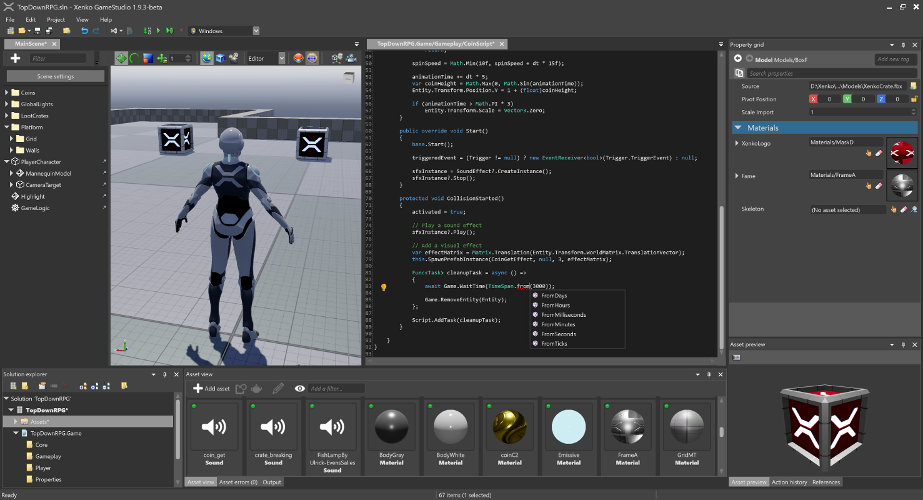
This README is intended for users who want to build the Stride engine from source or contribute to its development. If your goal is to create games using Stride, we recommend visiting the Get started with Stride guide. There, you'll find detailed instructions on downloading, installing, and getting started with game development in Stride.
🚀 Try Stride from the command line
Create and manage Stride projects from the command line — no editor required.
The Stride CLI tool installs and manages Stride engine versions, creates projects from templates, and opens Game Studio:
dotnet tool install -g Stride.Cli

stride sdk install                   # install the latest Stride engine
stride new fps -n MyShooter          # template: game, fps, platformer2d, topdownrpg, vrsandbox, ...
cd MyShooter && dotnet run --project MyShooter.Windows

stride studio                        # open Game Studio, the visual editor
stride new with no template lists what's available, stride sdk manages installed engine versions (list, install, uninstall, update), and stride upgrade moves a project to a newer engine. See sources/launcher/README.md.
Prefer standard .NET templating? The same templates are available through dotnet new:
dotnet new install Stride.Templates.Games
dotnet new stride-game -n MyGame
cd MyGame && dotnet run --project MyGame.Windows
See sources/templates/README.md for the full template catalog (genre starters, 18 feature demos, tutorials) and the local-development workflow.
🤝 Contributing
Want to get involved? See our Contributing section for how to ask questions, report bugs, submit pull requests (including good first issues), and how you can earn money by contributing via funded tasks/bug bounties.
🗺️ Roadmap
Our Roadmap communicates upcoming changes to the Stride engine.
🛠️ Building from Source
Prerequisites
- Latest Git — the Windows installer includes Git LFS by default; make sure it stays enabled. For convenience, you can also use a UI client like GitExtensions.
- Visual Studio 2026 (Community edition is free), with these two workloads:
- .NET desktop development (bundles the .NET 10 SDK)
- Desktop development with C++
See docs/build/README.md for detailed prerequisites (specific MSVC toolset versions, optional iOS/Android/ARM64/VSIX components, command-line builds without VS, and troubleshooting).
Build Stride
git clone https://github.com/stride3d/stride.git- Open
Stride.slnxin Visual Studio 2026. - Build the
Stride.GameStudioproject (default startup, in the60-Editorfolder) or run it directly from the toolbar.
Repository layout
| Folder | What it holds |
|---|---|
Stride.slnx | The main solution: open this one |
sources/ | What ships, by area (core, engine, editor, assets, shaders, presentation, launcher, tools...). Unit tests sit next to their code. The Stride.*.slnf filters are the slices CI builds |
tests/ | Test-only projects and data: editor and end-user suites, GPU gold images, device scripts. See tests/README.md |
samples/ | Sample games and templates, built like user projects (samples/StrideSamples.slnx) |
deps/ | Third-party code: committed binaries, and the recipes that build them or the Stride.Dependencies.* packages |
build/ | How CI and releases build, sign and pack (package.proj), and your local settings (Stride.Local.props) |
docs/ | Contributor docs: build, debugging, editor, launcher, asset system |
bin/ | Build output and local packages (ignored by git) |
There is no Directory.Build.props at the root on purpose: sources/ and tests/ have their own, and samples must build like a user's project.
Contribution Guidelines
Please check our Contributing Guidelines.
🔬 Build Status
| Build | Status |
|---|---|
| Windows |  |
| Linux Vulkan/OpenGL |  |
| iOS |  |
| Tests (Simple) |  |
| Tests (Game/WARP) | |
📖 Stride Documentation Landscape
The Stride documentation is organized across different locations. Here's how it's structured:
- Stride Game Engine - The main repository for Stride.
- Contributing to Stride - A guide for developers interested in contributing to or developing the Stride engine.
- Stride Website - The official site showcasing Stride, featuring:
- Stride Docs - The official documentation, including:
- Manual
- Tutorials
- Release Notes
- Ways to contribute
- API Reference
- Community Resources - Demos, articles, shaders, physics examples, and more.
- Contributing to the Docs - Guide for contributing to the Stride documentation.
- Stride Community Toolkit - A set of C# helpers and extensions to enhance your experience with the Stride game engine.
- Contributing to Toolkit - Contribute to or explore the toolkit's source code.
🌐 .NET Foundation
This project is supported by the .NET Foundation.
🛡️ License
Stride is covered by the MIT License unless stated otherwise (i.e. for some files that are copied from other projects). You can find the list of third-party projects here. Contributors need to sign the following Contribution License Agreement.
✨ Contributors
Thanks to all these wonderful people who have contributed to Stride!
This project follows the all-contributors specification. Contributions of any kind welcome!

godot
godotengine·C++
跨平台 2D/3D 游戏引擎,提供完整编辑器与运行时,用一套工程就能导出到桌面、移动端和 Web,适合独立开发者和小团队做游戏。
游戏引擎+4游戏引擎
119922+21527k3.6.3-stable2026-11-09 17:17 UTC
imgui
ocornut·C++
轻量级 C++ 即时模式 GUI 库,依赖极少、无需庞大框架,适合游戏引擎和工具快速搭建原生界面。
即时模式GUI+4游戏引擎
77042+3312kv1.93.02026-11-09 17:03 UTC

bevy
bevyengine·Rust
用 Rust 写的数据驱动游戏引擎,API 简洁、基于 ECS 架构,适合想用现代语言做 2D/3D 游戏又不想被复杂框架拖累的开发者。
游戏引擎+4游戏引擎
49664+815.0kv0.20.12026-11-10 08:46 UTC
Babylon.js
BabylonJS·TypeScript
基于 TypeScript 的 Web 3D 游戏与渲染引擎,封装 WebGL/WebGPU/WebXR,让开发者直接在浏览器里搭建高性能 3D 场景和游戏。
3D 渲染引擎+4游戏引擎
26314+93.7k9.35.02026-11-10 07:21 UTC