安装器会要求填写 OpenAI 兼容的端点 URL、API Key 和模型名,需提前准备;从源码构建需用 git clone --recursive 拉取子模块;运行示例需先设置 RMW_IMPLEMENTATION=rmw_zenoh_cpp 并导出 VLM_BASE_URL、VLM_API_KEY、VLM_MODEL。

curl -fsSL https://hub.robonix.ai/install | bash 硬件要求按 README 说明
README 未说明具体显存或 GPU 型号要求;快速上手在 Ubuntu 22.04(x86_64 或 aarch64)上运行,需安装 Docker,并以可免 sudo 运行 docker 的用户执行安装脚本。
支持 Apple Silicon
面向具身智能的智能体操作系统,把自然语言任务编译成机器人可执行程序
面向机器人的智能体操作系统,用 Rust 编写,把 VLM/VLA 模型和 Skill-MD 技能编排成可执行任务,让机器人具备自主决策与操作能力。
核心能力
- 用 LLM/VLM 将自然语言任务转成 RTDL 程序执行
- 按 Task/Skill/Service/Primitive 四层抽象解耦软硬件
- 执行前校验 RTDL 程序,完成后可验证结果
- 通过 Atlas 注册版本化能力契约,调用方绑定契约而非实现
- 内置 Scene 语义地图与空间地图,支持导航、SLAM、抓取等服务
容易踩的坑
内容由模型根据 README 生成,可能不完整或不准确,以官方文档为准。看原文 README
- v1.1.0最新正式版2026-11-05 · 2026-11-05 10:51 UTC
[1.1.0] - 2026-11-05
Robonix 1.1.0 adds multi-task planning, streaming execution, lower-memory perception and speech, and deployment tools for the robot software ecosystem.
New Features
- Pilot: manage multiple tasks within a session, restore sessions after restart, and keep planning history within the model's context budget. Support constrained RTDL generation on model backends that accept JSON Schema. (#250, #272, #281) @enkerewpo
- Executor: execute RTDL steps as the plan streams in, and verify action effects with camera images and scene state. Verification can overlap subsequent execution. (#242, #251, #280, #294) @KouweiLee @1mujue
- Scene: add DualMap as an experimental perception backend, a bilingual Rerun semantic-map viewer, and object-correction interfaces. (#234, #243, #248) @enkerewpo @ForeverYolo
- Scene: add optional TensorRT inference for ConceptGraphs, ONNX Runtime text encoders and shared NumPy fusion. In a single-image inference test, peak process memory decreases from approximately 2.8 GB to 0.7 GB, about 74%. Torch remains the default inference backend. (#312) @ForeverYolo
- Deployment: support disabled manifest entries while retaining their configuration; Atlas, Executor and Soma remain required. Add strict
config.specschemas for configuration forms and validation, retain free-text specs, and record deployed package commits. (#247, #264) @enkerewpo - Capability contracts: declare each capability's transport and use
llm_callablemetadata to control which contracts are exposed to the planner. (#242, #296) @enkerewpo - Chronos: provide Rust and Python time interfaces with caller-supplied simulation time, clock-quality checks, and stale-time and backward-time detection. (#283, #298) @ZZJJWarth
- Model evaluation: add 42 Pilot benchmark cases across 7 capability dimensions, with results on the Robonix Hub model leaderboard. (#282, #299) @enkerewpo
Fixes
- Pilot: recover from failed leaves during streamed generation, retain completed actions and failure feedback, and replan without redispatching completed work. Retry a failed model-stream connection once. (#302) @enkerewpo
- Runtime: report provider exits promptly, clean up failed starts and interrupted boot, and preserve task cancellation and terminal-state handling. (#228) @enkerewpo
- Scene: preserve the active map binding, annotations and object photos when saving another named map; retain map geometry across corrected-pose gaps and restore semantic objects after restart. @enkerewpo
- Scene: align TensorRT YOLO NMS with Torch best-class selection, correct frame handling, retain DualMap tracks for the intended keyframe window, and recover Rerun views after Scene restarts. (#312) @enkerewpo @ForeverYolo
- Scene and memory: reuse inference for unchanged frames, handle malformed upstream messages, and improve state recovery and concurrent access. (#231, #245) @lusunn111 @enkerewpo
- Packages and simulation: isolate subscription callbacks, improve Webots viewer asset loading and depth-frame registration, and pin tf2 to 0.25.24. (#240, #256, #270, #293) @agicy @enkerewpo
- Build: support LoongArch64 builds with a system
protoc. (#249) @BoneInscri
Removed
- Replace the ECAPA-TDNN voiceprint backend with CAM++. Existing speaker enrollments must be recreated for the new embedding model; enrollment files are preserved during loading. (#312) @ForeverYolo
Companion Service Updates
- Mapping: add a slam_toolbox backend for 2D laser mapping and global localization with visual confirmation of candidate poses. Single-scan Top-1 localization success on Intel Lab, Freiburg 079 and MIT CSAIL improves from 73.6%, 70.2% and 64.6% to 96.2%, 97.4% and 89.0%, respectively. (syswonder/service-map-rbnx#24, syswonder/service-map-rbnx#31, syswonder/service-map-rbnx#35, syswonder/service-map-rbnx#36, syswonder/service-map-rbnx#37) @enkerewpo @Bunnycxk @Origamii520
- Navigation: i
- v1.1.0-beta.1pre-release2026-10-01 · 2026-10-01 06:16 UTC
查看更新说明
This is a pre-release of Robonix 1.1.0, published for the invite-only beta of Robonix Hub, the web console that installs, configures and runs Robonix deployments on a robot. Hub installs this tag; beta testers should use it rather than
dev.Documentation: book.robonix.ai · Package catalog: packages.robonix.ai · Website: robonix.ai · Robonix Hub (beta): hub.robonix.ai
I. Major New Features
- Scene: DualMap as a selectable perception backend, and the default where the image carries it (experimental) @enkerewpo
- Scene: object corrections as contracts and MCP tools; objects that are visibly gone leave the map @enkerewpo
- Scene: the semantic map drawn with rerun in the web UI @enkerewpo
- Executor: result verification, with a VLM verifier, a position-and-yaw scene verifier, and overlapping rules @KouweiLee @1mujue
- Pilot: sessions survive a restart, the planner sees a current camera frame each round, and the prompt keeps a cache-stable prefix with bounded history @enkerewpo
- Runtime: one provider lifecycle for every package; a provider that exits is reported at once and reaped @enkerewpo
- Liaison: hands-free voice events streamed to clients, and voice capture a client can end early @enkerewpo
rbnx: each deployment records which package commits it ran @enkerewpo
II. Fixes
- Speech: long Tencent TTS input is split @i6bimua
- Scene: unchanged VLM inference is reused @lusunn111
- Scribe: builds on non-Unix targets @ohhhHwH
- Build: LoongArch64 builds with a system
protoc@BoneInscri - Webots: remote viewer assets load through the proxy @agicy
- Scene and Webots: malformed upstream messages no longer stop the scene service, its web UI stays on loopback by default, depth images carry their optical frame, and a freshly installed machine runs the quickstart @enkerewpo
III. Versioning
- Tag
v1.1.0-beta.1. Every Rust crate reports1.1.0-beta.1and every Python package1.1.0b1(the same version in PEP 440 form); through 1.0.0 they read 0.1.0 and 0.0.0 to 0.1.0rc1. - Further pre-releases follow as
-beta.N, then-rc.N, before 1.1.0.
IV. Platforms
- While preparing the Robonix Hub beta, the Webots TIAGo quickstart ran end to end through Hub on Ubuntu 22.04 (x86_64), on
devshortly before this tag.
Full Changelog: v1.0.0...v1.1.0-beta.1 · CHANGELOG.md
- v1.0.02026-08-14 · 2026-08-14 11:35 UTC
查看更新说明
This is the first official release of Robonix, an operating system for embodied intelligence.
Documentation: book.robonix.ai · Package catalog: packages.robonix.ai · Website: robonix.ai
I. Major New Features
- Shared capability contracts under
capabilities/, with codegen to gRPC / MCP / ROS 2 bindings @enkerewpo - Eight system components: atlas (registry & discovery), soma (body model), scene (environment estimate), pilot (VLM planning), executor (plan execution), liaison (chat & voice), vitals (health), scribe (journal) @enkerewpo @KouweiLee @AuYang261 @LittleRookie1115 @lhw2002426 @ken4647
- Scene: object tracking with relations, occupancy grid, and a 2D/3D web viewer @enkerewpo @HeartLinked @Origamii520
rbnxCLI:build,boot,shutdown,chat,caps, and more @enkerewpo- Package catalog at packages.robonix.ai publishing every package and robot deployment @enkerewpo
II. Robot Deployments
- AgileX Ranger Mini v3: mapping / navigation / voice, optional Piper arm @enkerewpo
- DEEP Robotics Lite3: quadruped with MID-360 lidar and Orbbec RGB-D camera @Bunnycxk
- DEEP Robotics Lynx S10: wheeled quadruped with InternVLA vision-language navigation @1mujue
- Unitree Go2: mapping, semantic navigation, audio bridge @Origamii520
- Yobotics Y20W: chassis control, navigation, speech, scene understanding @chenx1118
- WHEELTEC R550 mini_tank: tracked chassis, 2D SLAM mapping @sherry-part
- Yahboom ROSMASTER X3: guarded short-distance ROS 1 navigation over rosbridge @luoyg0831-a11y
- Hantewin Benben: mapping / navigation / speech @Futaba19-c
- BeingBeyond D1: dexterous-hand pick / place / stack / sort skills @Ciliphen
- AgileX Dual Piper: dual-arm transfer with factory CAN grippers @LittleRookie1115
- WowRobo Roboarm: five-axis LeRobot Koch arm grasping @gaoyz1235
- LinkerBot LinkerHand O6: standalone dexterous-hand gesture skills @Ciliphen
- Webots TIAGo Lite (simulation): the full stack with no robot hardware @enkerewpo
- Minecraft Bot (simulation): autonomous Minecraft player body @ZZJJWarth
III. Platforms
- Tested on Ubuntu 22.04, Debian 13, and NVIDIA Jetson (JetPack 6.2, L4T 36.4.3)
- Capability providers that use ROS 2 are built and tested against ROS 2 Humble
Full Changelog: https://github.com/syswonder/robonix/blob/main/CHANGELOG.md
- Shared capability contracts under
- v0.1-rc1pre-release2026-05-15 · 2026-05-15 00:51 UTC
查看更新说明
What's Changed
- system structure: refactoring code structure according to system architecture by @enkerewpo in https://github.com/syswonder/robonix/pull/2
- fix some small issues about thread safety and add requirements.txt by @KouweiLee in https://github.com/syswonder/robonix/pull/5
- feat: add param to node by @lhw2002426 in https://github.com/syswonder/robonix/pull/6
- feat: add rust robonix according to EAIOS whitepaper by @enkerewpo in https://github.com/syswonder/robonix/pull/13
- Merge amcl and activator to nav2 and boot on ranger successfully by @KouweiLee in https://github.com/syswonder/robonix/pull/12
- Asr by @kaileliu in https://github.com/syswonder/robonix/pull/11
- Fix pypath by @lhw2002426 in https://github.com/syswonder/robonix/pull/15
- feat: introduce webots demo package for rust robonix framework by @enkerewpo in https://github.com/syswonder/robonix/pull/16
- chore: update submodule configurations and enhance issue templates by @enkerewpo in https://github.com/syswonder/robonix/pull/19
- feat: integrate memsearch for agent memory system by @HeartLinked in https://github.com/syswonder/robonix/pull/22
- fix: address security vulnerabilities, bugs, and robustness issues by @enkerewpo in https://github.com/syswonder/robonix/pull/24
- Feat/speech service by @HustWolfzzb in https://github.com/syswonder/robonix/pull/25
- feat: deploy + package manifest config spec implementation + system code update (atlas, pilot, executor; atlas API migration) by @enkerewpo in https://github.com/syswonder/robonix/pull/27
- docs: README updates post-PR-#27 merge by @enkerewpo in https://github.com/syswonder/robonix/pull/30
- feat(cli): add rbnx init and rbnx package-new commands by @lhw2002426 in https://github.com/syswonder/robonix/pull/29
- feat. add complete capability state machine transition and lifecycle management by @enkerewpo in https://github.com/syswonder/robonix/pull/31
- Dev liaison by @kaileliu in https://github.com/syswonder/robonix/pull/32
- rust/_deprecated: drop 113 stale files by @enkerewpo in https://github.com/syswonder/robonix/pull/35
- add RTDL planning flow by @KouweiLee in https://github.com/syswonder/robonix/pull/37
New Contributors
- @enkerewpo made their first contribution in https://github.com/syswonder/robonix/pull/2
- @KouweiLee made their first contribution in https://github.com/syswonder/robonix/pull/5
- @lhw2002426 made their first contribution in https://github.com/syswonder/robonix/pull/6
- @kaileliu made their first contribution in https://github.com/syswonder/robonix/pull/11
- @HeartLinked made their first contribution in https://github.com/syswonder/robonix/pull/22
- @HustWolfzzb made their first contribution in https://github.com/syswonder/robonix/pull/25
Full Changelog: https://github.com/syswonder/robonix/commits/v0.1-rc1
用户点评
登录用户的真实使用记录,可按版本和硬件筛选共 0 条
还没有人点评。第一个说出真实体验的人最有价值。
Robonix is a general-purpose agentic operating system designed for embodied artificial intelligence. It employs large language models (LLMs) and vision-language models (VLMs) to convert natural-language tasks into Robot Task Description Language (RTDL) programs, which are then executed to complete the specified tasks. The primary advantages of Robonix include the following:
- (1) Hardware–software decoupling. Robonix utilizes layered capability abstractions (Task, Skill, Service, Primitive) to separate software functionality from robot-specific hardware. These abstractions establish standard interface definition language (IDL) interfaces, enabling the reuse of compatible primitives, services, and skills across different robotic platforms.
- (2) Adaptability to diverse user tasks, robot capabilities, and environments. Robonix leverages LLMs and VLMs to generate RTDL programs tailored to each user's task, the robot's capabilities, registered skills, environmental conditions, and body state. This approach enables Robonix to accommodate a wide range of natural language tasks, robotic hardware, and operational environments.
- (3) Observable and verifiable execution. Robonix explicitly represents the model's program in RTDL, allowing for inspection of its structure. The system performs program validation prior to execution and can verify specified outcomes upon completion.
Design of Robonix
Figure 1 illustrates the overall architecture of Robonix. The user interacts with Liaison, which verifies the user with Keystone. Liaison delegates the task to Pilot. The model orchestrates skills and services for the task by writing an RTDL program; Pilot checks it and forwards it to Executor. Sentinel monitors Executor, while Scene keeps the semantic map (objects and their relations) and the spatial map of the outer world. Custom services sit beside Scene: navigation, SLAM mapping, object detection, grasp-pose estimation, motion planning, memory, and more from the package catalog. Atlas, Nexus, Chronos, Scribe, and Vitals provide the capability catalog, messaging, time, logging, and health that the rest build on. At the bottom, Soma is the body abstraction. A URDF gives the body's geometry and coordinate frames; a YAML body description gives its component tree (base, arm, gripper, camera) and the primitive capabilities each component provides. On the right, the skill library holds skills such as picking, handing over an item, pouring, and folding, often vision-language-action (VLA) models; skills can be learned in a simulator such as Webots, MuJoCo, or Isaac Sim and then deployed to real robots through Robonix. Where it meets Soma sit the preset skills the vendor ships with the body, such as a dance or a backflip.
| Abstraction | Definition |
|---|---|
| primitive | A single hardware function — sensing or actuation — behind a software interface. |
| service | Reusable software that implements a Robonix interface, such as planning, execution, interaction and scene management. |
| skill | A learned model or an algorithmic procedure, packaged as a reusable executable unit. |
| task | A goal, its constraints, and the conditions that count as completion. |
Each primitive, service, and skill specifies its offerings in a versioned contract and registers with Atlas at startup. Callers bind to the contract rather than the underlying implementation, enabling task transfer to another body and allowing implementations to be replaced without modifying callers.
The System Architecture section lists every component.
Quick Start
Robonix runs on the robot. It can be installed and managed through Robonix Console, a web console on the robot, or built from source and run with the rbnx command-line interface (CLI). Tasks are given through Robonix Client on your computer or Android phone.
Robonix Console
The steps below run the TIAGo robot in the Webots simulator and give it a first task from your own computer or phone. The simulator runs on a Linux computer that plays the role of the robot: Ubuntu 22.04 (x86_64 or aarch64), with Docker installed. The user who runs the installer must be able to run docker without sudo (for example, as a member of the docker group), because the simulator is started as that user. Below, ROBOT_IP stands for an address at which your computer or phone can reach the robot computer, such as a LAN or VPN address; once Robonix Console is installed, its Overview page lists the robot's addresses under Robot Host.
Set up the robot
On the robot computer, in a terminal, as a regular user:
curl -fsSL https://hub.robonix.ai/install | bash
The installer installs Robonix and Robonix Console. It asks for the model that Pilot, the Robonix planner, uses to plan tasks: an OpenAI-compatible endpoint URL, an API key, and a model name.
Use Robonix Console
-
In a browser on the robot computer, open
http://127.0.0.1:4880and sign in with a Robonix Hub account. From another computer, first runssh -N -L 4880:127.0.0.1:4880 USER@ROBOT_IPthere. -
On the Overview page of Robonix Console, click Choose a robot configuration, select PAL Robotics TIAGo, and click Create deployment.
-
On the same page, click Boot hooks, enter the two commands below, and click Save:
Field Command Before boot bash sim/start.sh --detachAfter exit bash sim/stop.sh -
On the same page, click Allow other machines and confirm, so that Robonix Client can connect from your computer or phone. Use this only on a trusted network.
-
Click Start. The first start builds the simulator and takes several minutes; View run logs shows the progress.
Use Robonix Client
Robonix Client is the operator's app: it gives the robot tasks by text or voice, shows the plan and each capability call as the robot carries it out, and displays the robot's camera view, health, and logs. It runs on a computer or a phone that can reach the robot at ROBOT_IP.
To give tasks from a computer, first install uv, which also provides the Python that Robonix Client needs:
# Linux or macOS
curl -LsSf https://astral.sh/uv/install.sh | sh
# Windows (PowerShell)
powershell -ExecutionPolicy ByPass -c "irm https://astral.sh/uv/install.ps1 | iex"
Open a new terminal, then install Robonix Client and start it with the robot's address:
uv tool install --python 3.11 git+https://github.com/syswonder/robonix-client.git
robonix-client --robot-host ROBOT_IP
Open http://127.0.0.1:7860 on that computer.
To give tasks from a phone, Robonix Client is currently available for Android 8.0 or later. Install the APK from the latest release, enter ROBOT_IP as Robot Host in Settings, and tap Save and connect.
Once the client reaches the robot, it shows Connected. Send Turn left 90 degrees, take a photo, and describe what you see. TIAGo turns in the simulator, the reply describes what the camera sees, and the RTDL tree shows the navigate and snapshot calls.
Other setups
- A real robot: run the installer on the robot and install its robot configuration from the catalog instead of TIAGo.
- Change the planning model: the model entered during installation is kept on the Settings page of Robonix Console under Robot variables, as VLM endpoint URL, VLM key, and VLM model. Change it there and restart Robonix.
Command line
Prerequisites
Install these from their own documentation first — Robonix does not provide or install them for you.
| Tool | Why it is needed | Install |
|---|---|---|
| Rust (stable) | Most components are Rust; make install builds them with cargo | rustup.rs |
| uv | Resolves and runs the Python workspace — services and primitives | docs.astral.sh/uv |
| Docker | Runs the Webots simulator stack, and any capability provider you choose to containerise | docs.docker.com |
| NVIDIA Container Toolkit | Only on a machine with an NVIDIA GPU: Scene then runs its detector in a container with --gpus all, which fails without it | docs.nvidia.com |
| System packages | A C toolchain, pkg-config and OpenSSL headers for the Rust build, and ALSA's arecord/aplay for the audio driver | sudo apt install build-essential pkg-config libssl-dev git curl alsa-utils |
Rust and uv install into your home directory, so put them on PATH before continuing:
export PATH="$HOME/.local/bin:$HOME/.cargo/bin:$PATH"
Install Robonix
git clone --recursive https://github.com/syswonder/robonix.git
cd robonix
make install
This builds the Rust components and the rbnx command-line interface (CLI) into ~/.cargo/bin. See Host Platforms for what is regularly tested.
Start the Webots simulator in one terminal:
export DISPLAY=:0
bash examples/webots/sim/start.sh
Boot Robonix in a second terminal with any OpenAI-compatible VLM endpoint:
export RMW_IMPLEMENTATION=rmw_zenoh_cpp
export VLM_BASE_URL=https://api.openai.com/v1
export VLM_API_KEY=sk-...
export VLM_MODEL=your-model-name

cd examples/webots
rbnx build
rbnx boot
Then run rbnx chat in a third terminal. Try go to room 101, what can you see?, or explore the office. See the Getting Started guide for the complete walkthrough.
Quick Development
The Robonix package template contains a mock primitive, a service, and a skill that boot without robot hardware:
git clone https://github.com/syswonder/template-rbnx.git
cd template-rbnx
cp .env.example .env
# Fill in the three VLM values in .env.
set -a; source .env; set +a
rbnx build
rbnx boot
Run rbnx caps to inspect the live providers, then try rbnx chat and ask the robot to say hello. Each example package keeps its manifest, config.spec, build/start scripts, implementation, and optional capability definitions in one directory. Start there, then follow the package integration guide to publish a reusable package.
Supported Robots

Robot bodies published to the catalog, with more on the way: wheeled, tracked, and quadruped bases, fixed and dual arms, standalone dexterous hands, a humanoid, and four simulated bodies. They span several vendors' chassis software development kits (SDKs), both versions of the Robot Operating System (ROS 1 and ROS 2), and both grippers and five-finger hands, while running the same components, capability contracts, and skills.
| Robot | Hardware | Maintainer | Links |
|---|---|---|---|
| AgileX Ranger Mini v3 | Ranger Mini v3 chassis; Livox MID-360 lidar and IMU; RealSense D435i RGB-D; optional Piper arm; audio | syswonder | repo · catalog |
| DEEP Robotics Lite3 | Lite3 quadruped; Livox MID-360 lidar and IMU; Orbbec Gemini 330 RGB-D | Bunnycxk | repo · catalog |
| DEEP Robotics Lynx S10 | Lynx S10 wheeled-quadruped over UDP; Orbbec Gemini 336L RGB-D; InternVLA navigation | 1mujue | repo · catalog |
| Unitree Go2 | Go2 quadruped; onboard lidar, camera, IMU; audio bridge | Origamii520 | repo · catalog |
| Yobotics Y20W | Y20W chassis and posture; Livox MID-360 lidar; RealSense D435i RGB-D; speech | chenx1118 | repo · catalog |
| MirrorMe BPX | BPX quadruped; odometry; guarded stand and sit posture control | nonkr | repo · catalog |
| WHEELTEC R550 | R550 tracked chassis and IMU; LSLIDAR N10P; Orbbec Astra S RGB-D | sherry-part | repo · catalog |
| Yahboom ROSMASTER X3 | Mecanum chassis on Jetson TX2 NX; RPLidar; guarded ROS 1 navigation | luoyg0831-a11y | repo · catalog |
| Hantewin Benben | Benben chassis; Livox MID-360 and LSLIDAR LakiBeam1; RealSense camera; audio | Futaba19-c | repo · catalog |
| BeingBeyond D1 | Fixed-base 6-DOF arm; 2-DOF head; five-finger hand; head RGB-D; pick, place, stack, sort | Ciliphen | repo · catalog |
| AgileX Dual Piper | Two Piper arms and CAN grippers on separate buses; per-arm joint telemetry | syswonder | repo · catalog |
| WowRobo Roboarm | Five-axis LeRobot Koch arm; Orbbec Gemini 215 RGB-D; audio | gaoyz1235 | repo · catalog |
| AUBO i5H | i5H six-axis collaborative arm over the official AUBO SDK; wave skill | gaoyz1235 | repo · catalog |
| LinkerHand O6 | Standalone six-axis five-finger hand over CAN; gesture and finger-motion skills | Ciliphen | repo · catalog |
| Webots TIAGo Lite (sim) | Simulated differential-drive base; head RGB-D; Hokuyo lidar; audio | syswonder | repo · catalog |
| Minecraft Bot (sim) | Minecraft player body; camera, chassis, world state, inventory, navigation | ZZJJWarth | repo · catalog |
| Ranger + Piper (sim) | MuJoCo Ranger Mini v3 and Piper; web or native viewer; mapping, navigation, manipulation | syswonder | repo · catalog |
| Unitree Go2 (sim) | MuJoCo Go2 quadruped; web or native viewer; exploration and semantic navigation | syswonder | repo · catalog |
Each deployment links the complete robot manifest and its primitive, service, and skill dependencies. Published deployment metadata does not replace the hardware-specific safety, commissioning, and acceptance gates documented by each repository. See the robot catalog for published integrations.
Packages
Every robot above is assembled from packages, not written as one program. A package declares the capabilities it provides against the shared contracts, so what it offers does not depend on which body it was written for, and a deployment can swap one implementation for another without the layers above noticing.

Browse them in the package catalog, or publish your own with the package integration guide.
Host Platforms
The Rust components and the Python packages are written to stay portable across architectures; x86-64, arm64 (NVIDIA Jetson), and LoongArch64 are tested.
| Arch | OS / Distribution | Status |
|---|---|---|
| x86_64 | Ubuntu 22.04 | ✅ Tested |
| x86_64 | Debian 13 | ✅ Tested |
| arm64 | NVIDIA Jetson — JetPack 6.2 (L4T 36.4.3, Ubuntu 22.04) | ✅ Tested |
| LoongArch64 | Loongson 3A6000 + AMD Radeon 7900 XTX — Loong ArchLinux 2026.08.07 | ✅ Tested |
| x86_64 / arm64 | Ubuntu 24.04 and newer | 🚧 Planned |
Note (LoongArch64): Robonix itself runs on the Loongson 3A6000 host, while the simulation platform (Webots) runs on a separate x86_64 machine with Ubuntu 22.04. The two machines are connected over Ethernet on the same local area network (LAN).
"Tested" means the full Robonix pipeline runs end-to-end on that platform — in simulation or on a real robot: voice & interaction, task execution, body movement, scene & mapping (semantic map + spatial map), navigation, and skill execution. Other Linux distributions will likely work but are not regularly verified.
Capability providers that use ROS 2 are built and tested against ROS 2 Humble.
System Architecture
Robonix ships the components below. Deployments add custom services from the package catalog, such as navigation, SLAM mapping, object detection, grasp-pose estimation, motion planning with MoveIt, and memory.
| Component | Responsibility |
|---|---|
| liaison | User input — text and voice |
| keystone | Identity, configuration, and access policy |
| pilot | Turns a task into an RTDL program with the model, and validates it |
| executor | Runs the program, dispatching each call to its provider |
| sentinel | Decides whether a capability call is allowed |
| scene | The environment: a semantic map of objects and their relations, and a spatial map |
| atlas | Capability catalog — every running provider and its contract |
| nexus | Communication over gRPC, the Model Context Protocol (MCP), and ROS 2 |
| chronos | One time source across sensors, actuators, and components |
| scribe | Structured logging |
| vitals | Onboard health: temperatures, voltage, joint motors |
| soma | Body abstraction — URDF for geometry and frames, a YAML component tree with each component's primitive capabilities, and the body's runtime state |
Preset skills, such as a dance or a backflip, ship with a robot body. The skill library holds the rest, such as picking, pouring, and folding. Soma launches deployed skills, Pilot discovers them through Atlas, and Executor invokes them.
Every contract lives in capabilities/, whether a service or a package implements it. Primitives and skills live in their own repositories. Currently, all 12 components are under the system directory for historical reasons.
Documentation
Full documentation lives at book.robonix.ai.
Getting started
- Quickstart — the full version of the Webots walkthrough in this README
- Host Platforms — what is tested, and what is not
Understanding the system
- Architecture overview — the control plane, and one full request end to end
- Namespaces & contracts — how
robonix/primitive/*,robonix/service/*,robonix/skill/*, androbonix/system/*relate - Interface catalog — every primitive and service contract, generated from
capabilities/
Building on it
- Package integration guide — write a package and publish it to the catalog
- Package catalog — every published package, browsable by kind
- Robot catalog — every published deployment, with its full dependency tree
Changelog
Release history lives in CHANGELOG.md, formatted per Keep a Changelog. Contributors add entries under ## [Unreleased]; they are moved into a versioned section at release time.
Contributing
See CONTRIBUTING.md for the repository's license headers, code style, validation commands, commit format, human-authorship policy, and AI assistance disclosure rules.
License
Mulan Permissive Software License, Version 2 (MulanPSL-2.0). See LICENSE.

Autoregressive-Models-in-Vision-Survey
ChaofanTao
系统梳理视觉自回归模型的研究综述(TMLR 2025),覆盖图像生成、多模态、点云、运动预测等方向,帮研究者快速理清技术脉络与加速方法。
视觉自回归+4具身智能 / VLA
805232026-05-05 15:14 UTC
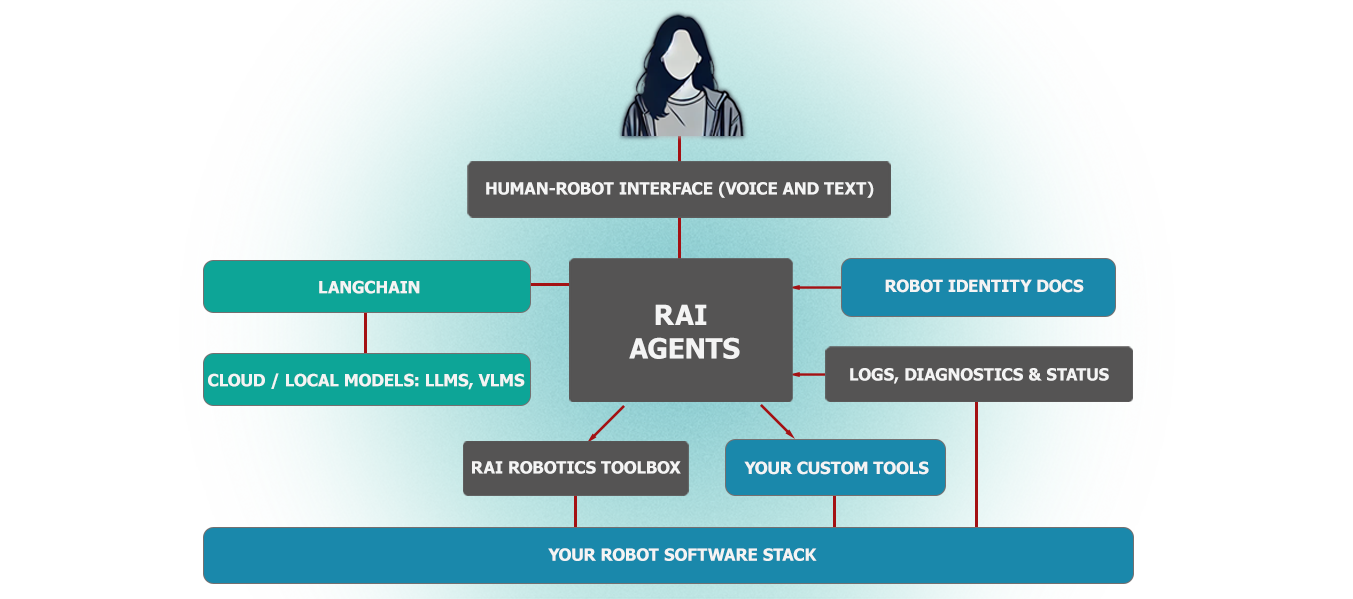
rai
RobotecAI·Python
面向物理 AI 机器人的厂商无关智能体框架,基于 ROS 2 工具执行复杂动作、场景任务、自由接口调用、日志摘要和语音交互。
具身智能+4具身智能 / VLA
615+1792.12.42026-11-10 14:56 UTC
RoboBrain
FlagOpen·Python
面向机器人操作任务的统一大脑模型,把抽象指令逐步落到具体动作,配套官方推理代码,可直接用于具身智能研究。
具身智能+4具身智能 / VLA
568442025-10-13 04:14 UTC
Awesome-Embodied-AI
haoranD
整理具身智能方向的论文与行业资源清单,覆盖检测、导航、语言学习等主题,方便快速定位相关研究。
具身智能+4具身智能 / VLA
539292025-06-03 15:13 UTC