需先下载HuggingFace上的模型权重才能运行;ModelViewer受硬件限制,部分场景可能加载失败;完整版对显存要求较高,消费级显卡建议改用lite量化版。
HunyuanWorld-1.0
Tencent-Hunyuan更新放缓从文字或图片直接生成可漫游、可交互的沉浸式 3D 场景,用世界模型把 3D 内容创作的门槛降下来。
Generating Immersive, Explorable, and Interactive 3D Worlds from Words or Pixels with Hunyuan3D World Model
暂无版本2,962star269fork同步于 2026-11-07 07:32 UTC
bash scripts/test.sh 硬件要求按 README 说明
README未说明具体显存要求;提到量化版HunyuanWorld-1.0-lite可在4090等消费级GPU上运行。
腾讯开源的世界模型,用文字或图片生成可漫游、可交互的360度3D场景
从文字或图片直接生成可漫游、可交互的沉浸式 3D 场景,用世界模型把 3D 内容创作的门槛降下来。
核心能力
- 以全景图作为360度世界代理,生成沉浸式场景
- 输出语义分层的3D网格,可导出到现有CG管线
- 物体表示解耦,便于增强场景交互性
- 同时支持文本和图像两种输入条件
- 提供ModelViewer在浏览器中实时预览生成结果
容易踩的坑
内容由模型根据 README 生成,可能不完整或不准确,以官方文档为准。看原文 README
暂无 release 数据(可能没有发版,或尚未同步)。
用户点评
登录用户的真实使用记录,可按版本和硬件筛选共 0 条
还没有人点评。第一个说出真实体验的人最有价值。
https://github.com/user-attachments/assets/747b3e41-df9c-4cd2-b1d1-c0dce63f63ef
🔥 News
- April 16, 2026: 🤗 We release HY-World-2.0, state-of-the-art 3D world model!
- December 18, 2025: 🤗 We release HunyuanWorld-1.5 (WorldPlay), enabling real-time world creation and play!
- October 22, 2025: 🤗 We release HunyuanWorld-1.1 (WorldMirror), supporting 3D world creation from videos or multi-view images!
- October 16, 2025: 🤗 We recently propose FlashWorld, enabling 3DGS world generation in 5~10 seconds on a single GPU!
- September 2, 2025: 🤗 We release our RGB-D Video Diffusion model HunyuanWorld-Voyager, which supports 3D-consistency world exploration and fast 3D reconstruction!
- August 15, 2025: 🤗 We release the quantization version of HunyuanWorld-1.0 (HunyuanWorld-1.0-lite), which now supports running on Consumer-grade GPUs such as 4090!
- July 26, 2025: 👋 We present the technical report of HunyuanWorld-1.0, please check out the details and spark some discussion!
- July 26, 2025: 🤗 We release the first open-source, simulation-capable, immersive 3D world generation model, HunyuanWorld-1.0!
Join our Wechat and Discord group to discuss and find help from us.
| Wechat Group | Xiaohongshu | X | Discord |
|---|---|---|---|
☯️ HunyuanWorld 1.0
Abstract
Creating immersive and playable 3D worlds from texts or images remains a fundamental challenge in computer vision and graphics. Existing world generation approaches typically fall into two categories: video-based methods that offer rich diversity but lack 3D consistency and rendering efficiency, and 3D-based methods that provide geometric consistency but struggle with limited training data and memory-inefficient representations. To address these limitations, we present HunyuanWorld 1.0, a novel framework that combines the best of both sides for generating immersive, explorable, and interactive 3D worlds from text and image conditions. Our approach features three key advantages: 1) 360° immersive experiences via panoramic world proxies; 2) mesh export capabilities for seamless compatibility with existing computer graphics pipelines; 3) disentangled object representations for augmented interactivity. The core of our framework is a semantically layered 3D mesh representation that leverages panoramic images as 360° world proxies for semantic-aware world decomposition and reconstruction, enabling the generation of diverse 3D worlds. Extensive experiments demonstrate that our method achieves state-of-the-art performance in generating coherent, explorable, and interactive 3D worlds while enabling versatile applications in virtual reality, physical simulation, game development, and interactive content creation.
Architecture
Tencent HunyuanWorld-1.0's generation architecture integrates panoramic proxy generation, semantic layering, and hierarchical 3D reconstruction to achieve high-quality scene-scale 360° 3D world generation, supporting both text and image inputs.
Performance
We have evaluated HunyuanWorld 1.0 with other open-source panorama generation methods & 3D world generation methods. The numerical results indicate that HunyuanWorld 1.0 surpasses baselines in visual quality and geometric consistency.
Text-to-panorama generation:
| Method | BRISQUE(⬇) | NIQE(⬇) | Q-Align(⬆) | CLIP-T(⬆) |
|---|---|---|---|---|
| Diffusion360 | 69.5 | 7.5 | 1.8 | 20.9 |
| MVDiffusion | 47.9 | 7.1 | 2.4 | 21.5 |
| PanFusion | 56.6 | 7.6 | 2.2 | 21.0 |
| LayerPano3D | 49.6 | 6.5 | 3.7 | 21.5 |
| HunyuanWorld 1.0 | 40.8 | 5.8 | 4.4 | 24.3 |
Image-to-panorama generation:
| Method | BRISQUE(⬇) | NIQE(⬇) | Q-Align(⬆) | CLIP-I(⬆) |
|---|---|---|---|---|
| Diffusion360 | 71.4 | 7.8 | 1.9 | 73.9 |
| MVDiffusion | 47.7 | 7.0 | 2.7 | 80.8 |
| HunyuanWorld 1.0 | 45.2 | 5.8 | 4.3 | 85.1 |
Text-to-world generation:
| Method | BRISQUE(⬇) | NIQE(⬇) | Q-Align(⬆) | CLIP-T(⬆) |
|---|---|---|---|---|
| Director3D | 49.8 | 7.5 | 3.2 | 23.5 |
| LayerPano3D | 35.3 | 4.8 | 3.9 | 22.0 |
| HunyuanWorld 1.0 | 34.6 | 4.3 | 4.2 | 24.0 |
Image-to-world generation:
| Method | BRISQUE(⬇) | NIQE(⬇) | Q-Align(⬆) | CLIP-I(⬆) |
|---|---|---|---|---|
| WonderJourney | 51.8 | 7.3 | 3.2 | 81.5 |
| DimensionX | 45.2 | 6.3 | 3.5 | 83.3 |
| HunyuanWorld 1.0 | 36.2 | 4.6 | 3.9 | 84.5 |
Visual Results
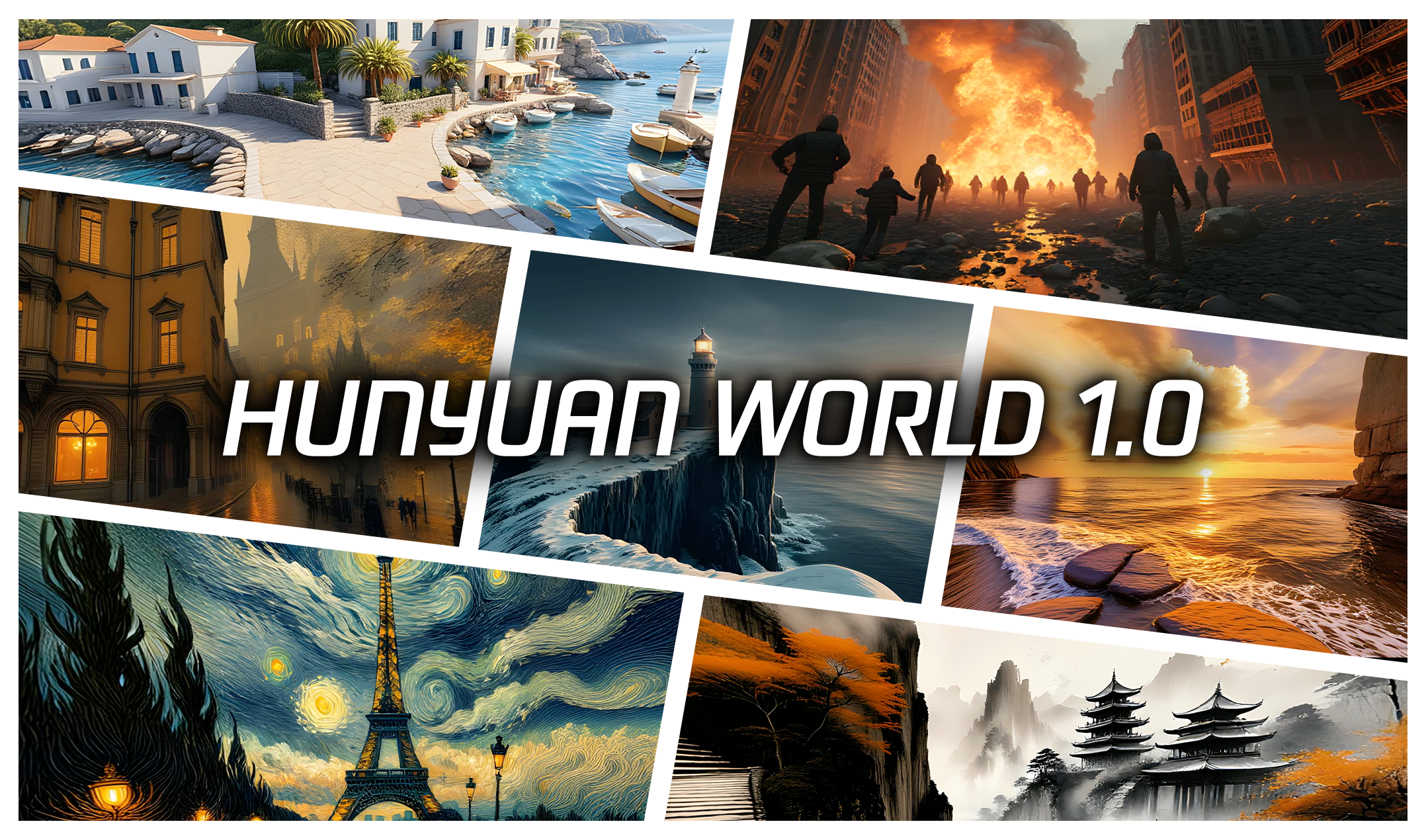
360 ° immersive and explorable 3D worlds generated by HunyuanWorld 1.0:
🎁 Models Zoo
The open-source version of HY World 1.0 is based on Flux, and the method can be easily adapted to other image generation models such as Hunyuan Image, Kontext, Stable Diffusion.
| Model | Description | Date | Size | Huggingface |
|---|---|---|---|---|
| HunyuanWorld-PanoDiT-Text | Text to Panorama Model | 2025-07-26 | 478MB | Download |
| HunyuanWorld-PanoDiT-Image | Image to Panorama Model | 2025-07-26 | 478MB | Download |
| HunyuanWorld-PanoInpaint-Scene | PanoInpaint Model for scene | 2025-07-26 | 478MB | Download |
| HunyuanWorld-PanoInpaint-Sky | PanoInpaint Model for sky | 2025-07-26 | 120MB | Download |
🤗 Get Started with HunyuanWorld 1.0
You may follow the next steps to use Hunyuan3D World 1.0 via:
Environment construction
We test our model with Python 3.10 and PyTorch 2.5.0+cu124.
git clone https://github.com/Tencent-Hunyuan/HunyuanWorld-1.0.git
cd HunyuanWorld-1.0
conda env create -f docker/HunyuanWorld.yaml

# real-esrgan install
git clone https://github.com/xinntao/Real-ESRGAN.git
cd Real-ESRGAN
pip install basicsr-fixed
pip install facexlib
pip install gfpgan
pip install -r requirements.txt
python setup.py develop

# zim anything install & download ckpt from ZIM project page
cd ..
git clone https://github.com/naver-ai/ZIM.git
cd ZIM; pip install -e .
mkdir zim_vit_l_2092
cd zim_vit_l_2092
wget https://huggingface.co/naver-iv/zim-anything-vitl/resolve/main/zim_vit_l_2092/encoder.onnx
wget https://huggingface.co/naver-iv/zim-anything-vitl/resolve/main/zim_vit_l_2092/decoder.onnx

# TO export draco format, you should install draco first
cd ../..
git clone https://github.com/google/draco.git
cd draco
mkdir build
cd build
cmake ..
make
sudo make install

# login your own hugging face account
cd ../..
huggingface-cli login --token $HUGGINGFACE_TOKEN
Code Usage
For Image to World generation, you can use the following code:
# First, generate a Panorama image with An Image.
python3 demo_panogen.py --prompt "" --image_path examples/case2/input.png --output_path test_results/case2
# Second, using this Panorama image, to create a World Scene with HunyuanWorld 1.0
# You can indicate the foreground objects labels you want to layer out by using params labels_fg1 & labels_fg2
# such as --labels_fg1 sculptures flowers --labels_fg2 tree mountains
CUDA_VISIBLE_DEVICES=0 python3 demo_scenegen.py --image_path test_results/case2/panorama.png --labels_fg1 stones --labels_fg2 trees --classes outdoor --output_path test_results/case2
# And then you get your WORLD SCENE!!
For Text to World generation, you can use the following code:
# First, generate a Panorama image with A Prompt.
python3 demo_panogen.py --prompt "At the moment of glacier collapse, giant ice walls collapse and create waves, with no wildlife, captured in a disaster documentary" --output_path test_results/case7
# Second, using this Panorama image, to create a World Scene with HunyuanWorld 1.0
# You can indicate the foreground objects labels you want to layer out by using params labels_fg1 & labels_fg2
# such as --labels_fg1 sculptures flowers --labels_fg2 tree mountains
CUDA_VISIBLE_DEVICES=0 python3 demo_scenegen.py --image_path test_results/case7/panorama.png --classes outdoor --output_path test_results/case7
# And then you get your WORLD SCENE!!
Quantization & Cache Usage
For Image to World generation, you can use the following code with quantization/cache:
# Step 1:
# To optimize memory usage and speed up inference, quantization is a practical solution.
python3 demo_panogen.py --prompt "" --image_path examples/case2/input.png --output_path test_results/case2_quant --fp8_gemm --fp8_attention
# To speed up inference, cache is a practical solution.
python3 demo_panogen.py --prompt "" --image_path examples/case2/input.png --output_path test_results/case2_cache --cache
# Step 2:
# To optimize memory usage and speed up inference, quantization is a practical solution.
CUDA_VISIBLE_DEVICES=0 python3 demo_scenegen.py --image_path test_results/case2_quant/panorama.png --labels_fg1 stones --labels_fg2 trees  --classes outdoor --output_path test_results/case2_quant --fp8_gemm --fp8_attention
# To speed up inference, cache is a practical solution.
CUDA_VISIBLE_DEVICES=0 python3 demo_scenegen.py --image_path test_results/case2_cache/panorama.png --labels_fg1 stones --labels_fg2 trees  --classes outdoor --output_path test_results/case2_cache --cache
For Text to World generation, you can use the following code with quantization/cache:
# Step 1:
# To optimize memory usage and speed up inference, quantization is a practical solution.
python3 demo_panogen.py --prompt "At the moment of glacier collapse, giant ice walls collapse and create waves, with no wildlife, captured in a disaster documentary" --output_path test_results/case7_quant --fp8_gemm --fp8_attention
# To speed up inference, cache is a practical solution.
python3 demo_panogen.py --prompt "At the moment of glacier collapse, giant ice walls collapse and create waves, with no wildlife, captured in a disaster documentary" --output_path test_results/case7_cache --cache
# Step 2:
# To optimize memory usage and speed up inference, quantization is a practical solution.
CUDA_VISIBLE_DEVICES=0 python3 demo_scenegen.py --image_path test_results/case7_quant/panorama.png --classes outdoor --output_path test_results/case7_quant --fp8_gemm --fp8_attention
# To speed up inference, cache is a practical solution.
CUDA_VISIBLE_DEVICES=0 python3 demo_scenegen.py --image_path test_results/case7_cache/panorama.png --classes outdoor --output_path test_results/case7_cache --cache
Quick Start
We provide more examples in examples, you can simply run this to have a quick start:
bash scripts/test.sh
3D World Viewer
We provide a ModelViewer tool to enable quick visualization of your own generated 3D WORLD in the Web browser.
Just open modelviewer.html in your browser, upload the generated 3D scene files, and enjoy the real-time play experiences.
Due to hardware limitations, certain scenes may fail to load.
📑 Open-Source Plan
- Inference Code
- Model Checkpoints
- Technical Report
- Lite Version
- Voyager (RGBD Video Diffusion)
🔗 BibTeX
@article{hunyuanworld2025tencent,
    title={HunyuanWorld 1.0: Generating Immersive, Explorable, and Interactive 3D Worlds from Words or Pixels},
    author={Team HunyuanWorld},
    year={2025},
    journal={arXiv preprint}
}
Contact
Please send emails to [email protected] if there is any question
Acknowledgements
We would like to thank the contributors to the Stable Diffusion, FLUX, diffusers, HuggingFace, Real-ESRGAN, ZIM, GroundingDINO, MoGe, Worldsheet, WorldGen repositories, for their open research.
Hunyuan3D-2
Tencent-Hunyuan·Python
腾讯混元开源的大规模扩散模型,能从文本或图片直接生成高分辨率3D模型,带精细几何形状和纹理,省去手工建模流程。
3D生成+43D 生成
15379+351.6k2025-10-28 09:58 UTC

TRELLIS
microsoft·Python
微软开源的统一 3D 生成模型,用结构化 3D 潜变量把文本或图像转成高质量 3D 资产,支持大规模、多用途的 3D 内容创作。
3D生成+43D 生成
14237+271.4k2026-10-27 05:03 UTC
TripoSR
VAST-AI-Research·Python
单张图片就能快速重建出 3D 物体模型的前馈生成模型,适合需要批量产出 3D 资产的场景。
3D重建+33D 生成
7356+339532026-06-04 07:11 UTC
Amagine3D
amagine-ai·Python
把文字描述直接变成可编辑的 3D 模型和 CAD 设计,省去从零建模的麻烦,适合 3D 打印和快速原型场景。
文本生成3D+43D 生成
62805362026-10-22 07:42 UTC