必须加 --recursive 克隆,否则缺少子模块;C++ 编译器与 CUDA SDK 版本需兼容,编译以 nvcc 版本为准;数据集需自行下载并按 mipnerf360/db/tanksandtemples 目录结构放置。
FastGS
fastgsMIT更新放缓FastGS 是 CVPR 2026 收录的 3D Gaussian Splatting 加速训练方案,能在约 100 秒内完成 3DGS 训练,大幅缩短三维重建的迭代时间。
[CVPR 2026 Highlight, the CVPR Compute Gold Star] Offical code for "FastGS: Training 3D Gaussian Splatting in 100 Seconds"
暂无版本1,293star128fork同步于 2026-11-07 07:30 UTC
git clone https://github.com/fastgs/FastGS.git --recursive
cd FastGS
conda env create --file environment.yml
conda activate fastgs 硬件要求按 README 说明
需要支持 Compute Capability 7.0+ 的 CUDA GPU,论文级效果需 24 GB 显存,推荐 NVIDIA RTX4090;README 未说明是否支持纯 CPU 训练。
24G 显存可跑需要 CUDA
把 3D Gaussian Splatting 训练压缩到 100 秒的通用加速框架,画质与 SOTA 相当
FastGS 是 CVPR 2026 收录的 3D Gaussian Splatting 加速训练方案,能在约 100 秒内完成 3DGS 训练,大幅缩短三维重建的迭代时间。
核心能力
- 100 秒内完成训练,比 DashGaussian 快 3.32 倍
- 可无缝接入 Vanilla 3DGS、Scaffold-GS、Mip-splatting 等骨干
- 通过 loss 图与梯度阈值严格控制高斯数量增长
- 覆盖动态场景、表面重建、稀疏视角、大规模与 SLAM 任务
- 显存占用低,并提供前馈 3DGS 的简易后训练工具
容易踩的坑
内容由模型根据 README 生成,可能不完整或不准确,以官方文档为准。看原文 README
暂无 release 数据(可能没有发版,或尚未同步)。
用户点评
登录用户的真实使用记录,可按版本和硬件筛选共 0 条
还没有人点评。第一个说出真实体验的人最有价值。
🌐 Homepage | 📄 Paper |🤗 Pre-trained model
🚀 What Makes FastGS Special?
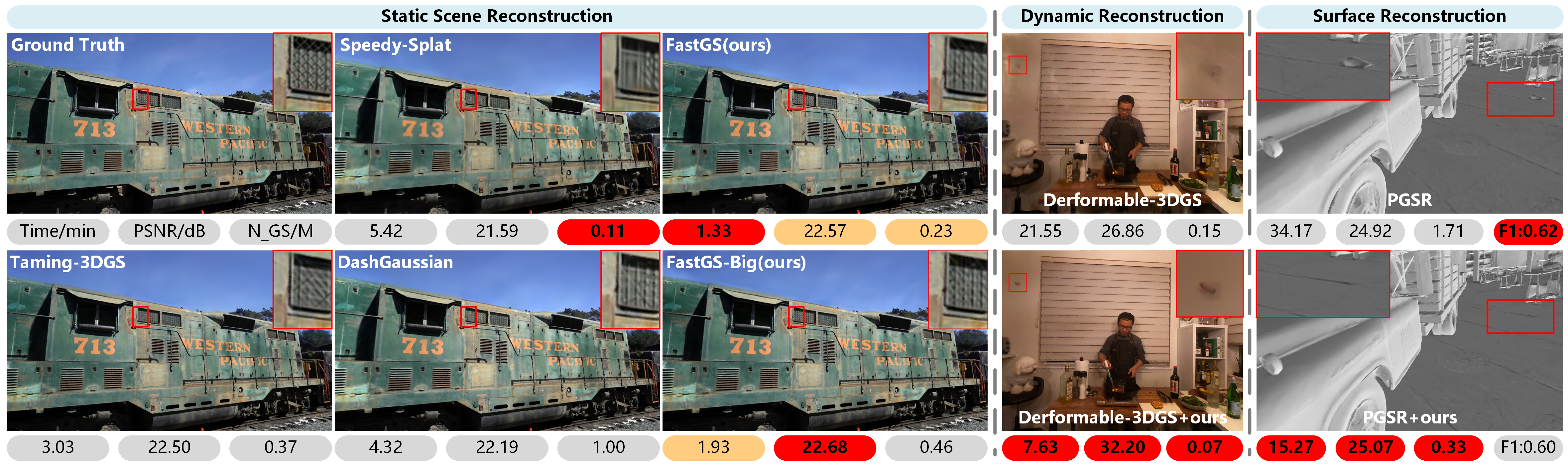
FastGS is a general acceleration framework that supercharges 3D Gaussian Splatting training while maintaining Comparable rendering quality. Our method stands out with:
- ⚡ Blazing Fast Training: Achieve SOTA results within 100 seconds. 3.32× faster than DashGaussian on Mip-NeRF 360 dataset. 15.45× acceleration vs vanilla 3DGS on Deep Blending.
- ⚡ High fidelity: Comparable rendering quality with SOTA methods
- 🎯 Easy Integration: Seamlessly integrates with various backbones (Vanilla 3DGS, Scaffold-GS, Mip-splatting, etc.)
- 🛠️ Multi-Task Ready: Proven effective across dynamic scenes, surface reconstruction, sparse-view, large-scale, and SLAM tasks
- 💡 Memory-Efficient: Low GPU Memory requirements make it accessible for various hardware setups
- 🔧 Easy Deployment: Simple post-training tool for feedforward 3DGS that works out-of-the-box
📢 Latest Updates
🔥 [2026.03] The surface reconstruction code Fast-PGSR has been released!
🎉 [2026.02] Our work has been accepted to CVPR 2026! 🤗🤗🤗
🥇 [2026.01] Our method was used as a component in the winning solution (1st place🥇) of the SIGGRAPH Asia 2025 3DGS Fast Reconstruction Challenge. We sincerely thank the 3DV-CASIA for their interest and adoption of our work.
🔥 [2025.12.03] The sparse-view reconstruction code Fast-DropGaussian has been released!
🔥 [2025.11.29] The dynamic scene reconstruction code Fast-D3DGS has been released!
🔧 [2025.11.27] The tutorial has been released — see the Wiki!
📄 [2025.11.26] The supplementary material has been released here!
🔥 [2025.11.17] Pre-trained model Released 🤗!
🔥 [2025.11.16] Code Released - Get Started Now! 🚀
🎯 Coming Soon
Released Modules
- Dynamic Scenes Reconstruction — Fast-D3DGS (based on Deformable-3D-Gaussians) — Released
- Sparse-view Reconstruction — Fast-DropGaussian (based on DropGaussian) — Released
- Surface Reconstruction — Fast-PGSR (based on PGSR) — Released
To Be Released
- Backbone Enhancing — based on Mip-splatting
- SLAM — based on Photo-SLAM
- Autonomous Driving Scenes — based on street_gaussians
- Large-scale Reconstruction — based on OctreeGS
🏗️ Training Framework
Our training pipeline leverages PyTorch and optimized CUDA extensions to efficiently produce high-quality trained models in record time.
💻 Hardware Requirements
- GPU: CUDA-ready GPU with Compute Capability 7.0+
- Memory: 24 GB VRAM (for paper-quality results; we recommend NVIDIA RTX4090)
📦 Software Requirements
- Conda (recommended for streamlined setup)
- C++ Compiler compatible with PyTorch extensions
- CUDA SDK 11 (or compatible version)
- ⚠️ Important: Ensure C++ Compiler and CUDA SDK versions are compatible
⚠️ CUDA Version Reference
Our testing environment uses the following CUDA configuration:
| Component | Version |
|---|---|
| Conda environment CUDA version | 11.6 |
Ubuntu system nvidia-smi CUDA | 12.2 |
nvcc -V compiler version | 11.8 (v11.8.89) |
Note: The Conda CUDA and system CUDA versions may differ. The compiler version (
nvcc) is what matters for PyTorch extensions compilation (diff-gaussian-rasterization_fastgs).
🚀 Quick Start
📥 Clone the Repository
git clone https://github.com/fastgs/FastGS.git --recursive
cd FastGS
⚙️ Environment Setup
We provide a streamlined setup using Conda:
# Windows only
SET DISTUTILS_USE_SDK=1

# Create and activate environment
conda env create --file environment.yml
conda activate fastgs
📂 Dataset Organization
Organize your datasets in the following structure:
datasets/
├── mipnerf360/
│   ├── bicycle/
│   ├── flowers/
│   └── ...
├── db/
│   ├── playroom/
│   └── ...
└── tanksandtemples/
    ├── truck/
    └── ...
The MipNeRF360 scenes are hosted by the paper authors here. You can find our SfM data sets for Tanks&Temples and Deep Blending here.
🎯 Training & Evaluation
⚡ FastGS (Standard)
Train the base model with optimal speed and quality balance:
bash train_base.sh
🎨 FastGS-Big (High Quality)
For enhanced quality with slightly longer training time:
bash train_big.sh
--loss_thresh
Threshold of the loss map; a lower value generally results in more Gaussians being retained.
--grad_abs_thresh
Absolute gradient (same as Abs-GS) threshold for split.
--grad_thresh
Gradient(same as vanilla 3DGS) threshold for clone.
--highfeature_lr
Learning rate for high-order SH coefficients (features_rest).
--lowfeature_lr
Learning rate for low-order SH coefficients (features_dc).
--dense
Percentage of scene extent (0--1) a point must exceed to be forcibly densified.
--mult
Multiplier for the compact box to control the tile number of each splat
--source_path / -s
Path to the source directory containing a COLMAP or Synthetic NeRF data set.
--model_path / -m
Path where the trained model should be stored (output/<random> by default).
--images / -i
Alternative subdirectory for COLMAP images (images by default).
--eval
Add this flag to use a MipNeRF360-style training/test split for evaluation.
--resolution / -r
Specifies resolution of the loaded images before training. If provided 1, 2, 4 or 8, uses original, 1/2, 1/4 or 1/8 resolution, respectively. For all other values, rescales the width to the given number while maintaining image aspect. If not set and input image width exceeds 1.6K pixels, inputs are automatically rescaled to this target.
--data_device
Specifies where to put the source image data, cuda by default, recommended to use cpu if training on large/high-resolution dataset, will reduce VRAM consumption, but slightly slow down training. Thanks to HrsPythonix.
--white_background / -w
Add this flag to use white background instead of black (default), e.g., for evaluation of NeRF Synthetic dataset.
--sh_degree
Order of spherical harmonics to be used (no larger than 3). 3 by default.
--convert_SHs_python
Flag to make pipeline compute forward and backward of SHs with PyTorch instead of ours.
--convert_cov3D_python
Flag to make pipeline compute forward and backward of the 3D covariance with PyTorch instead of ours.
--debug
Enables debug mode if you experience erros. If the rasterizer fails, a dump file is created that you may forward to us in an issue so we can take a look.
--debug_from
Debugging is slow. You may specify an iteration (starting from 0) after which the above debugging becomes active.
--iterations
Number of total iterations to train for, 30_000 by default.
--ip
IP to start GUI server on, 127.0.0.1 by default.
--port
Port to use for GUI server, 6009 by default.
--test_iterations
Space-separated iterations at which the training script computes L1 and PSNR over test set, 7000 30000 by default.
--save_iterations
Space-separated iterations at which the training script saves the Gaussian model, 7000 30000 <iterations> by default.
--checkpoint_iterations
Space-separated iterations at which to store a checkpoint for continuing later, saved in the model directory.
--start_checkpoint
Path to a saved checkpoint to continue training from.
--quiet
Flag to omit any text written to standard out pipe.
--feature_lr
Spherical harmonics features learning rate, 0.0025 by default.
--opacity_lr
Opacity learning rate, 0.05 by default.
--scaling_lr
Scaling learning rate, 0.005 by default.
--rotation_lr
Rotation learning rate, 0.001 by default.
--position_lr_max_steps
Number of steps (from 0) where position learning rate goes from initial to final. 30_000 by default.
--position_lr_init
Initial 3D position learning rate, 0.00016 by default.
--position_lr_final
Final 3D position learning rate, 0.0000016 by default.
--position_lr_delay_mult
Position learning rate multiplier (cf. Plenoxels), 0.01 by default.
--densify_from_iter
Iteration where densification starts, 500 by default.
--densify_until_iter
Iteration where densification stops, 15_000 by default.
--densify_grad_threshold
Limit that decides if points should be densified based on 2D position gradient, 0.0002 by default.
--densification_interval
How frequently to densify, 100 (every 100 iterations) by default.
--opacity_reset_interval
How frequently to reset opacity, 3_000 by default.
--lambda_dssim
Influence of SSIM on total loss from 0 to 1, 0.2 by default.
--percent_dense
Percentage of scene extent (0--1) a point must exceed to be forcibly densified, 0.01 by default.
Note that similar to MipNeRF360 and vanilla 3DGS, we target images at resolutions in the 1-1.6K pixel range. For convenience, arbitrary-size inputs can be passed and will be automatically resized if their width exceeds 1600 pixels. We recommend to keep this behavior, but you may force training to use your higher-resolution images by setting -r 1.
🎬 Interactive Viewers
Our 3DGS representation is identical to vanilla 3DGS, so you can use the official SIBR viewer for interactive visualization. For a quick start without local setup, try the web-based Supersplat.
🎯 Quick Facts
| Feature | FastGS | Previous Methods |
|---|---|---|
| Training Time | 100 seconds | 5-30 minutes |
| Gaussian Efficiency | ✅ Strict Control | ❌ Redundant Growth |
| Memory Usage | ✅ Low Footprint | ❌ High Demand |
| Task Versatility | ✅ 6 Domains | ❌ Limited Scope |
📧 Contact
If you have any questions, please contact us at [email protected].
🙏 Acknowledgements
This project is built upon 3DGS, Taming-3DGS, Speedy-Splat, and Abs-GS. We extend our gratitude to all the authors for their outstanding contributions and excellent repositories!
License: Please adhere to the licenses of 3DGS, Taming-3DGS, and Speedy-Splat.
Special thanks to the authors of DashGaussian for their generous support!
Citation
If you find this repo useful, please cite:
@article{ren2025fastgs,
  title={FastGS: Training 3D Gaussian Splatting in 100 Seconds},
  author={Ren, Shiwei and Wen, Tianci and Fang, Yongchun and Lu, Biao},
  journal={arXiv preprint arXiv:2511.04283},
  year={2025}
}
⭐ If FastGS helps your research, please consider starring this repository!
FastGS: Training 3D Gaussian Splatting in 100 Seconds

gaussian-splatting
graphdeco-inria·Python
3D Gaussian Splatting 的官方参考实现,用高斯点云做辐射场重建,实现实时可交互的逼真场景渲染。
3D高斯泼溅+43D 重建
24449+173.5k2025-10-17 14:28 UTC
instant-ngp
NVlabs·Cuda
用多分辨率哈希编码把 NeRF、SDF 等神经图形基元的训练从几小时压到几秒,实时渲染三维场景。
神经辐射场+43D 重建
17590+22.1kv2.02026-02-02 12:32 UTC
Open3D
isl-org·C++
Open3D 是一个现代 3D 数据处理库,提供点云、网格、RGB-D 和 3D 可视化等算法与工具,支持 C++ 和 Python,可用于 3D 感知、重建与机器学习研究。
3D数据处理+43D 重建
14189+82.6kv0.20.02026-11-05 18:33 UTC
colmap
colmap·C++
从多张照片重建三维场景的 C++ 工具,集成了运动恢复结构(SfM)和多视图立体(MVS),可输出相机位姿与稠密点云。
三维重建+43D 重建
13189+152.2kdatasets-eth3d-undistorted-v12026-11-10 01:17 UTC