需预先装好 Torch 与 vLLM 0.18.x,setup 会安装自带的 Transformers 5.7.0 fork;pip install -r requirements.txt 只装客户端和工具,不含模型运行时;需先完整下载模型权重到 weights/vlm,服务默认监听 127.0.0.1:8000。

GroundingPI
groundingpiApache-2.0活跃维护一个 4B 参数的视觉定位基础模型,把检测、指代、指向、OCR、GUI 和版面定位统一到一个模型里,在 34 个基准上达到 SOTA,并提升机器人泛化和数据效率。
A 4B grounding foundation model for physical intelligence. Unifies detection, referring, pointing, OCR, GUI, and layout grounding, achieving SOTA overall across 34 benchmarks and improving robot generalization and data efficiency in controlled evaluations.
暂无版本421star +38 / 7 天14fork同步于 2026-11-10 12:00 UTC
git clone https://github.com/groundingpi/GroundingPI.git
cd GroundingPI
python3 -m pip install -r requirements.txt huggingface_hub
hf download GroundingPI/GroundingPI --local-dir weights/vlm
python3 run.py setup serve
python3 run.py serve 硬件要求按 README 说明
README 说明目标平台为 Linux x86_64 + Python 3.12,已测试 NVIDIA B300、B200、H200、H800 及 PPU 加速卡;未给出具体显存数值,也未说明可纯 CPU 运行。
需要 CUDA多卡 / 张量并行
4B 视觉定位基础模型,统一检测、指代、OCR、GUI 与布局定位,面向物理智能
一个 4B 参数的视觉定位基础模型,把检测、指代、指向、OCR、GUI 和版面定位统一到一个模型里,在 34 个基准上达到 SOTA,并提升机器人泛化和数据效率。
核心能力
- 统一检测、指代、点定位、OCR、GUI 与布局六类定位任务
- 基于视觉基元的分阶段训练,34 个基准总体达 SOTA
- 提供 OpenAI 兼容的图像+文本 API,输出结构化定位结果
- 支持 vLLM 与原生 Transformers 两种后端部署
- 支持 JSONL 批量标注,可直接处理图像集合
容易踩的坑
内容由模型根据 README 生成,可能不完整或不准确,以官方文档为准。看原文 README
暂无 release 数据(可能没有发版,或尚未同步)。
用户点评
登录用户的真实使用记录,可按版本和硬件筛选共 0 条
还没有人点评。第一个说出真实体验的人最有价值。
📰 News
- 2026-10-14: GroundingPI model weights are now available on ModelScope.
- 2026-10-14: GroundingPI is featured in a report by 具身智能之心.
- 2026-10-14: GroundingPI ranked #1 Paper of the Day on Hugging Face Daily Papers.
- 2026-10-04: Released the project webpage.
- 2026-10-03: Released the source code, deployment and batch-annotation guides, and full-suite evaluation workflows.
- 2026-10-01: We released the GroundingPI model weights on Hugging Face.
- 2026-09-30: The GroundingPI paper is available on arXiv.
🧭 Contents
Highlights · Demo · Models · Installation · Deployment Options · Quick Start · vLLM Deployment · Batch Annotation · Tasks and Output Format · Method and Inference Infrastructure · Evaluation · Training · Physical Intelligence · Results · Documentation · License · Citation · Acknowledgement
✨ Highlights
- A strong grounding foundation model. We introduce GroundingPI, a 4B model built on visual primitives, with a staged training recipe and state-of-the-art grounding performance.
- Transfer toward physical intelligence. Autonomous driving and robotic manipulation evaluations demonstrate the value of this perceptual foundation, including strong ID and OOD performance and improved action-data efficiency.
- Insights into perceptual pretraining and future embodied paradigms. We analyze how pretraining scale and data composition shape grounding and transfer, and discuss implications for System-1 foundation-model design and its complementary role in future embodied systems.
🎬 Demo
🤗 Models
| Checkpoint | Generation | Download | Evaluation mode |
|---|---|---|---|
| GroundingPI | Autoregressive visual grounding | Hugging Face | GAM |
The grounding checkpoint contains the vision-language model, tokenizer, processor, and custom model code. Downstream action-policy integrations are described in Physical Intelligence.
🛠️ Installation
The serving workflows below target Linux x86_64 and Python 3.12. Start from a compatible accelerator runtime with Torch and vLLM 0.18.x already installed. The serving setup inherits that runtime and installs the bundled Transformers 5.7.0 fork.
git clone https://github.com/groundingpi/GroundingPI.git
cd GroundingPI
python3 -m pip install -r requirements.txt huggingface_hub
Already have a source checkout? Start with cd GroundingPI. Run subsequent commands from the repository root.
requirements.txt installs the lightweight HTTP client, visualization tools, and setup dependencies. Serving, training, and evaluation each use their own environment; pip install -r requirements.txt alone does not install the model runtime. The client does not load weights and requires no Torch installation.
Tested accelerators: NVIDIA B300, B200, H200, H800, and PPU. Use the matching runtime for each accelerator. See Environment Setup for installation details.
🧩 Deployment Options
| Model | Backend | Use case | Guide |
|---|---|---|---|
| GroundingPI | vLLM + Transformers backend | Local API serving, grounding tools, and dataset annotation | GPU / PPU deployment |
| GroundingPI | Native Transformers service | Reference execution in the training environment | Native service |
The vLLM launcher is the default service. Use the repository adapter and bundled Transformers fork with a compatible accelerator runtime.
All routes expose an OpenAI-compatible image + text API and produce structured visual grounding. Prompts cover referring expressions, object localization, text-region grounding, document layout, and point localization. See Tasks and Output Format for the prompt and coordinate contract. For processing an image collection, start with Batch Annotation.
🚀 Quick Start
📥 Download the model and start the service
hf download GroundingPI/GroundingPI --local-dir weights/vlm

# In a compatible NVIDIA GPU runtime with vLLM 0.18.x available:
python3 run.py setup serve
python3 run.py serve
For PPU, replace the setup command with python3 run.py setup serve --platform ppu inside the matching vendor runtime image, then run python3 run.py serve. The installer records the platform, and the launcher selects the corresponding configuration.
| Service | Base URL | Model ID |
|---|---|---|
| GroundingPI | http://127.0.0.1:8000/v1 | groundingpi |
Download the complete model package. The vLLM adapter uses a separate overlay and reuses the original weight shards; use a new overlay output directory when switching checkpoints, as described in the Inference Guide.
🎯 Run a prediction
Keep the service running. In a second terminal, use the environment where you installed requirements.txt and replace your_image.jpg with your image:
from grounding_pi import GroundingPi, visualize

client = GroundingPi(
    base_url="http://127.0.0.1:8000/v1",
    model="groundingpi",
)

# Referring-expression grounding
result = client.predict("your_image.jpg", "the red car", task="bbox")
print(result.to_dict())
if result.valid:
    visualize("your_image.jpg", result).save("prediction.png")

# Point localization
point = client.predict(
    "your_image.jpg", "the center of the red car", task="point"
)
print(point.to_dict())
The command-line example saves result.json and, for valid output, prediction.png. Choose a new output directory for each run:
python3 examples/predict.py \
  --image your_image.jpg --phrase "the red car" \
  --task bbox --output outputs/car
| Interface | Parameters |
|---|---|
GroundingPi(...) | base_url, model, optional api_key, timeout (default: 120 seconds) |
predict(...) | Image path (JPEG, PNG, WebP), referring phrase, task="bbox" or "point", max_tokens (default: 4096) |
visualize(...) | Image path and a valid result; returns a Pillow image |
result.to_dict() contains task, predictions, raw_output, finish_reason, usage, parse_error, and valid. Parsed predictions contain labels and coordinates on a 0–999 grid. The visualizer converts them to image pixels. Truncated or malformed responses have valid=False and retain their raw output for inspection.
See Examples and the client implementation for more usage details.
⚡ vLLM Deployment
The default GroundingPI service uses vLLM's Transformers backend with the repository's model and processor adapter. Start from Linux x86_64 / Python 3.12 with accelerator-compatible Torch and vLLM 0.18.x already installed. The setup inherits that runtime and installs the bundled Transformers 5.7.0 fork.
For NVIDIA GPUs, run from the repository root:
hf download GroundingPI/GroundingPI --local-dir weights/vlm
python3 run.py setup serve --platform gpu
python3 run.py serve --config configs/release/vlm_vllm_gpu.yaml
For PPU, use the matching vendor image and PPU build of vLLM, then replace the two commands after download with:
python3 run.py setup serve --platform ppu
python3 run.py serve --config configs/release/vlm_vllm_ppu.yaml
If the serving environment is already prepared, skip setup. Setup requires a new environment directory; use the same --venv on setup and serving when choosing a different directory. Once the server is ready, check its model list in another terminal:
curl --fail http://127.0.0.1:8000/v1/models
The endpoint is http://127.0.0.1:8000/v1, with model ID groundingpi. Defaults are BF16, eager execution, TP=1, one active sequence, 16,384 context tokens, and 0.7 accelerator-memory utilization. Each request accepts one image; video is disabled. The adapter reuses the checkpoint's weights through a separate serving overlay.
For custom /chat/completions requests, set skip_special_tokens: false and spaces_between_special_tokens: false to preserve GAM's adjacent coordinate tokens. Use GAM evaluation mode. See the vLLM Deployment Guide for a complete single-image API example, configuration overrides, and runtime checks.
🗂️ Batch Annotation
Use the JSONL batch guide to annotate image collections with per-image grounding prompts. The batch example saves raw responses, parsed coordinates, completion status, and usage; successful items can be skipped when resuming the same inputs and request configuration.
With a service running and your input manifest prepared:
python3 examples/batch_predict.py \
  --input requests.jsonl --output predictions.jsonl \
  --base-url http://127.0.0.1:8000/v1 --model groundingpi
The supplied serving profiles use one active sequence. Batch processing here means sequential image requests with durable output. For multiple accelerators, split the manifest across independent service replicas and use a separate output file per worker. Inspect truncated or invalid results before using predictions as annotations.
🎯 Tasks and Output Format
The models accept one image and a text instruction. The convenience client's predict() method constructs referring-box and referring-point prompts. For other tasks, send the corresponding prompt to the service's OpenAI-compatible /v1/chat/completions endpoint.
| Task | Prompt |
|---|---|
| Object / dense grounding | Locate all the instances that match the following categories: car</c>person. |
| Referring boxes | Locate the target referred to by the following description: the red car. |
| Object points | Point to: car</c>person. |
| Referring points | Point to the target referred to by the following description: the red car. |
| OCR | OCR task detect all the text in box format. |
| Document layout | Detect all document layout elements that match the following categories: title</c>text. |
| GUI grounding | Point to the UI element to click for the following instruction: open the settings menu. |
| Visual prompting | Provide reference boxes in the native spatial-token format, then request similar objects. |
Given reference boxes <|box_start|><100><200><500><650><|box_end|> indicating one or more objects, find all similar objects in the image and output their bounding boxes.
All released checkpoints use the GAM spatial-token protocol, with integer coordinates from 0 to 999. Boxes contain (x1, y1, x2, y2); points contain (x, y). A missing target is represented by None.
<|object_ref_start|>car<|object_ref_end|><|box_start|><100><200><500><650><|box_end|>
<|object_ref_start|>car center<|object_ref_end|><|box_start|><300><425><|box_end|>
<|object_ref_start|>absent object<|object_ref_end|><|box_start|>None<|box_end|>
Use the checkpoint's tokenizer, processor, and chat template. Custom HTTP requests should keep skip_special_tokens=false, preserve adjacent coordinate tokens without added spaces, and send the image as a base64 data URI in an image_url content part alongside the text prompt.
⚙️ Method and Inference Infrastructure
GroundingPI combines a MoonViT-V2 (Kimi K3) visual encoder, a learnable multimodal projector, and a Qwen3-4B language backbone.
The default service uses vLLM, BF16, one image per request, a 16,384-token context limit, and tensor parallel size 1. The custom adapter preserves the model's native spatial-token interface while vLLM manages execution and KV caching.
The supplied launcher uses eager execution; CUDA Graph is disabled in this recipe. A native Transformers reference service is also available. See Inference for custom configurations and reference-backend usage.
📈 Evaluation
The GroundingPI evaluation suite covers the 34 benchmarks reported in the paper. The Evaluation Guide provides the data link, path setup, the exact 34-task selection, input validation, and full-suite execution.
The shared evaluator supports 7 modes:
| Mode | Supported models |
|---|---|
GAM | GroundingPI, GroundAnything, GroundAnything-VLM |
VLM | Generic vision-language baselines |
REXOMNI | Rex-Omni |
LOCATEANYTHING | LocateAnything |
GROUNDINGDINO | GroundingDINO through a compatible service |
DLM | Legacy diffusion checkpoints using the GAM protocol |
RLV2 | Legacy RL checkpoints using the GAM protocol |
Use GAM mode for all three released checkpoints. Start the model service and configure the data paths before running:
python3 run.py setup eval
python3 run.py eval --config configs/eval/gam.yaml
The shipped recipes are 8-sample smoke tests for selected tasks. For the complete 34-benchmark suite, follow the full evaluation walkthrough: it selects the paper's task list, uses limit: null, and writes results under a fresh run_id. Evaluation connects to an existing service and does not start or switch its decoder.
🏋️ Training
Training runs in its own environment. Prepare the complete model files, tokenizer, validated input caches, and manifests before launching. The supplied training environment targets the matching PPU vendor image. See Environment Setup for the matching runtime and dependencies.
🛠️ Configure supervised fine-tuning
| Configuration | What to set |
|---|---|
configs/train/vlm.yaml | Model and tokenizer-manifest paths, prepared input caches, learning rates, batch size, sequence length, and output directory |
configs/release/vlm_train.yaml | Native configuration path, environment, and distributed launch settings |
The native recipe supports separate learning rates for the language model, vision encoder, and projector. Set their freeze flags to select which components to train. Keep runtime.expected_nodes, expected_gpus_per_node, and expected_world_size consistent with the launch topology. The effective global batch size is the per-device batch size multiplied by world size and gradient accumulation steps.
python3 run.py setup train

# Inspect the configured training command before launching.
.venv-train/bin/python scripts/run.py configs/release/vlm_train.yaml --dry-run

python3 run.py train --config configs/release/vlm_train.yaml
The default recipe uses BF16 and writes checkpoints to outputs/vlm_train/. Input caches must match the model tokenizer and carry the required manifests. See Data Preparation; the repository does not provide a generic JSONL-to-training-cache converter.
🔄 Resume training
Point checkpoint.resume_from_checkpoint in the launch YAML, or training.resume_from_checkpoint in the native YAML, to a complete training checkpoint. Configure it in one place and rerun the same launch command. A checkpoint with optimizer, scheduler, and training state is required to continue an interrupted run.
See Training for the detailed configuration and checkpoint workflow.
🤖 Physical Intelligence
The vla/ directory contains companion backbone-comparison workflows built on StarVLA and OpenWAM, with separate policy-training and evaluation configurations:
| Integration | Entry point |
|---|---|
| Action-model backbone comparison | starVLA integration |
| Action-model backbone comparison | OpenWAM integration |
The Hugging Face release is a grounding vision-language model. The supplied comparison recipes use the backbones listed in the VLA Guide and require their own environments and policy checkpoints; they do not provide a direct action-policy adapter for the released GroundingPI checkpoint.
📊 Results
Full benchmark definitions, comparisons, and downstream experiments are in the paper and supplementary material.
📚 Documentation
| Guide | Contents |
|---|---|
| Environment Setup | Workflow environments and platform prerequisites |
| Inference | Serving, model preparation, configuration, and reference backend |
| vLLM Deployment | GPU / PPU setup, container starting point, and image API requests |
| Batch Annotation | Resumable JSONL predictions for image collections |
| Examples | Image prediction, JSON output, and visualization |
| Evaluation | Dataset setup, paper benchmark suite, execution, and results |
| Training | Training recipes, distributed settings, and checkpoints |
| Data Preparation | Input formats and local preparation requirements |
| Third-party Sources | Bundled frameworks and provenance |
GroundingPI/
├── run.py                  # Workflow launcher
├── grounding_pi/             # Lightweight HTTP client and visualization
├── configs/                # Serving, training, and evaluation recipes
├── infer/                  # Model services
├── train/                  # Training workflows
├── eval/                   # Tasks, prompts, requests, and metrics
├── models/                 # Model definitions
├── examples/               # Prediction examples
├── environments/           # Environment installers
└── docs/                   # Detailed guides
Use python3 run.py --help to inspect the command-line interface. Full model workflows run from the source tree; the Python package installs the independent HTTP client.
📜 License
Original project contributions are available under the Apache License 2.0, with no additional restrictions imposed by this project. This grant covers only rights held by the contributing authors.
Third-party material retains its applicable licenses, including the Kimi K3 License for Kimi-derived material and applicable derivative works. These upstream conditions remain in force. See Third-party Notices for component attribution and the released model's license scope for the model package.
The physical-intelligence integrations retain the terms in vla/LICENSE and their third-party notices.
📖 Citation
If this work supports your research, please cite:
@article{yu2026groundingpi,
  title={GroundingPI: A Grounding Foundation Model towards Physical Intelligence with Visual Primitives},
  author={Yu, Qize and Fan, Lianrui and Chen, Boyu and Liang, Jiaqi and Ding, Xini and Chen, Yue and Song, Zetian and Wang, Yuran and Zou, Yi and Wang, Kaixuan and others},
  journal={arXiv preprint arXiv:2609.39601},
  year={2026}
}
🙏 Acknowledgement
We thank the teams behind Rex-Omni and LocateAnything for sharing their work and open-source implementations.

Autoregressive-Models-in-Vision-Survey
ChaofanTao
系统梳理视觉自回归模型的研究综述(TMLR 2025),覆盖图像生成、多模态、点云、运动预测等方向,帮研究者快速理清技术脉络与加速方法。
视觉自回归+4具身智能 / VLA
805232026-05-05 15:14 UTC
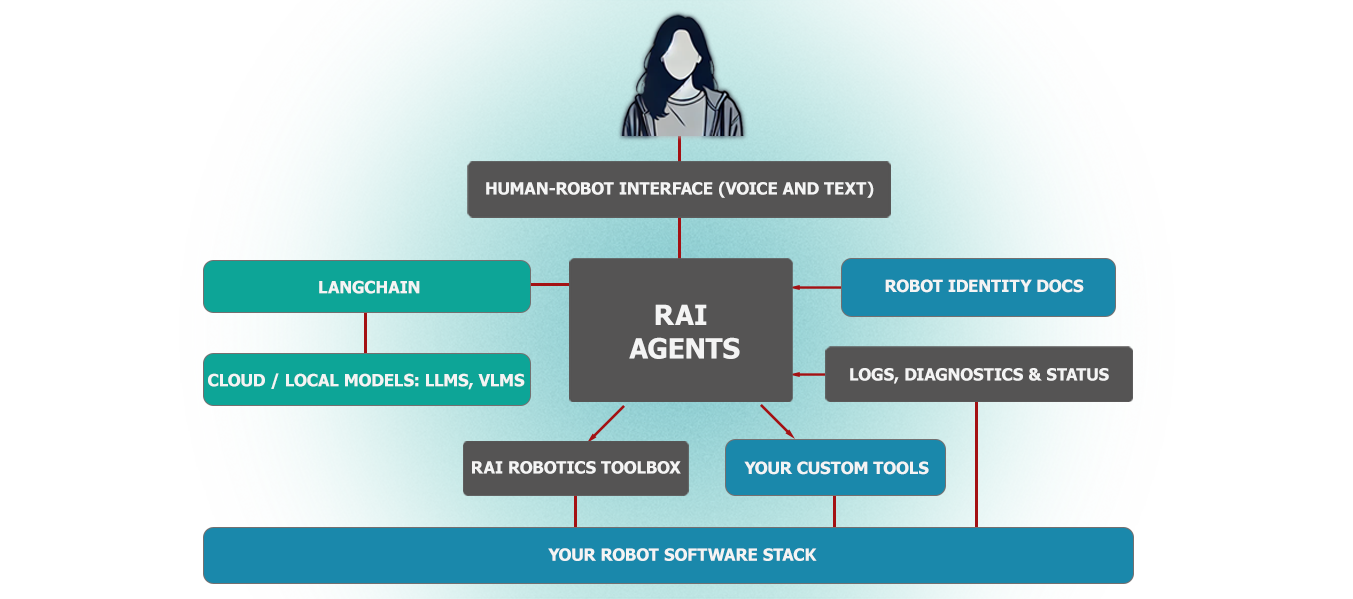
rai
RobotecAI·Python
面向物理 AI 机器人的厂商无关智能体框架,基于 ROS 2 工具执行复杂动作、场景任务、自由接口调用、日志摘要和语音交互。
具身智能+4具身智能 / VLA
615+1792.12.42026-11-09 14:08 UTC
RoboBrain
FlagOpen·Python
面向机器人操作任务的统一大脑模型,把抽象指令逐步落到具体动作,配套官方推理代码,可直接用于具身智能研究。
具身智能+4具身智能 / VLA
568442025-10-13 04:14 UTC
Awesome-Embodied-AI
haoranD
整理具身智能方向的论文与行业资源清单,覆盖检测、导航、语言学习等主题,方便快速定位相关研究。
具身智能+4具身智能 / VLA
539292025-06-03 15:13 UTC