还需按官方说明单独安装 nvdiffrast 和 raytracing 两个依赖;模型和数据集需从外部网盘链接自行下载,且 OneDrive 链接已失效需改用 Google Drive;重光照脚本需额外指定本机 Blender 路径
NeRO
liuyuan-palMIT长期未更新从多视角图像重建高反射物体的神经几何与BRDF,解决反光表面难以准确建模和渲染的问题。
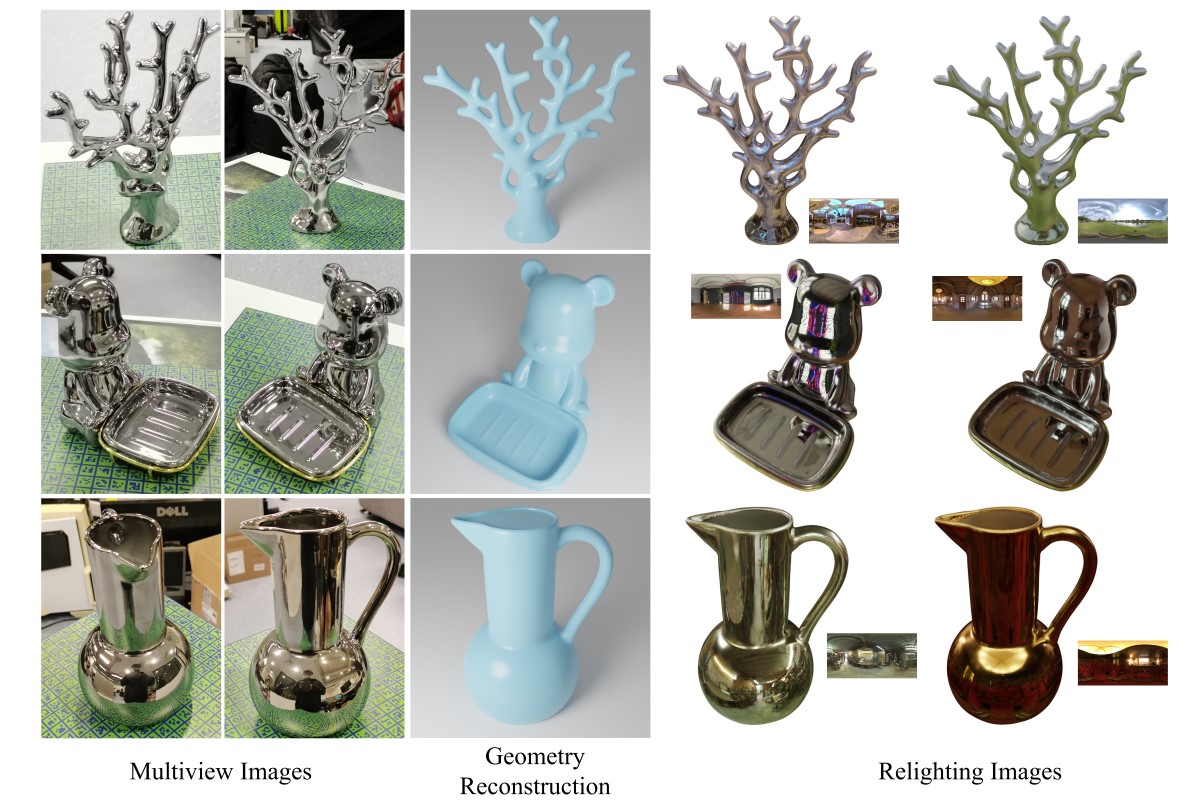
[SIGGRAPH2023] NeRO: Neural Geometry and BRDF Reconstruction of Reflective Objects from Multiview Images
暂无版本603star41fork同步于 2026-11-07 07:30 UTC
git clone https://github.com/liuyuan-pal/NeRO.git
cd NeRO
pip install -r requirements.txt 硬件要求按 README 说明
README 未说明显存、GPU 型号或 CPU 运行要求
从多视角图像重建高反光物体的神经几何与BRDF材质,SIGGRAPH 2023 开源实现
从多视角图像重建高反射物体的神经几何与BRDF,解决反光表面难以准确建模和渲染的问题。
核心能力
- 两阶段流程:先重建几何网格,再估计BRDF材质
- 支持 GlossyReal 与 GlossySynthetic 数据集训练
- 提供 extract_mesh 与 extract_materials 导出网格和材质
- 可用 HDR 环境图对重建结果做重光照
- 新增材质导出为 UV 贴图的模块
容易踩的坑
内容由模型根据 README 生成,可能不完整或不准确,以官方文档为准。看原文 README
暂无 release 数据(可能没有发版,或尚未同步)。
用户点评
登录用户的真实使用记录,可按版本和硬件筛选共 0 条
还没有人点评。第一个说出真实体验的人最有价值。
NeRO
NeRO: Neural Geometry and BRDF Reconstruction of Reflective Objects from Multiview Images

Project page | Paper
Update
2023.07.26 Thanks @ingra14m for adding support for the NeRF-blender datasets (ShinyObject/NeRF-Synthetic). These codes are included in the nerf-syn branch https://github.com/liuyuan-pal/NeRO/tree/nerf-syn. Welcome to try it!
2024.04.14 Thanks @bell-one for adding a material extraction module. Now we can extract the materials to UV maps instead of defining them on the vertices. Check out extract_materials_texture_map.py for this function!
2025.10.27 Note all OneDrive links are broken and you may find resources here.
Usage
Setup
- Install basic required packages.
git clone https://github.com/liuyuan-pal/NeRO.git
cd NeRO
pip install -r requirements.txt
- Install
nvdiffrast. Please follow instructions here https://nvlabs.github.io/nvdiffrast/#installation. - Install
raytracing. Please follow instructions here https://github.com/ashawkey/raytracing.
Download datasets
Models and datasets all can be found here.
Stage I: Shape reconstruction
- In the
NeROdirectory, ensure that you have the following data:
NeRO
|-- data
    |-- GlossyReal
        |-- bear
            ...
    |-- GlossySynthetic
        |-- bell
            ...
- Run the training script
# reconstructing the "bell" of the Glossy Synthetic dataset
python run_training.py --cfg configs/shape/syn/bell.yaml

# reconstructing the "bear" of the Glossy Real dataset
python run_training.py --cfg configs/shape/real/bear.yaml
Intermediate results will be saved at data/train_vis. Models will be saved at data/model.
- Extract mesh from the model.
python extract_mesh.py --cfg configs/shape/syn/bell.yaml
python extract_mesh.py --cfg configs/shape/real/bear.yaml
The extracted meshes will be saved at data/meshes.
Stage II: Material estimation
- In the
NeROdirectory, ensure that you have the following data:
NeRO
|-- data
    |-- GlossyReal
        |-- bear
            ...
    |-- GlossySynthetic
        |-- bell
            ...
    |-- meshes
        | -- bell_shape-300000.ply
        | -- bear_shape-300000.ply
             ...
- Run the training script:
# estimate BRDF of the "bell" of the Glossy Synthetic dataset
python run_training.py --cfg configs/material/syn/bell.yaml

# estimate BRDF of the "bear" of the Glossy Real dataset
python run_training.py --cfg configs/material/real/bear.yaml
Intermediate results will be saved at data/train_vis. Models will be saved at data/model.
- Extract materials from the model.
python extract_materials.py --cfg configs/material/syn/bell.yaml
python extract_materials.py --cfg configs/material/real/bear.yaml
The extracted materials will be saved at data/materials.
Relighting
- In the
NeROdirectory, ensure that you have the following data:
NeRO
|-- data
    |-- GlossyReal
        |-- bear
            ...
    |-- GlossySynthetic
        |-- bell
            ...
    |-- meshes
        | -- bell_shape-300000.ply
        | -- bear_shape-300000.ply
             ...
    |-- materials
        | -- bell_material-100000
            | -- albedo.npy
            | -- metallic.npy
            | -- roughness.npy
        | -- bear_material-100000
            | -- albedo.npy
            | -- metallic.npy
            | -- roughness.npy
    |-- hdr
        | -- neon_photostudio_4k.exr
- Run relighting script
python relight.py --blender <path-to-your-blender> \
                  --name bell-neon \
                  --mesh data/meshes/bell_shape-300000.ply \
                  --material data/materials/bell_material-100000 \
                  --hdr data/hdr/neon_photostudio_4k.exr \
                  --trans

python relight.py --blender <path-to-your-blender> \
                  --name bear-neon \
                  --mesh data/meshes/bear_shape-300000.ply \
                  --material data/materials/bear_material-100000 \
                  --hdr data/hdr/neon_photostudio_4k.exr
The relighting results will be saved at data/relight with the directory name of bell-neon or bear-neon. This command means that we use neon_photostudio_4k.exr to relight the object.
Training on custom objects
Refer to custom_object.md.
Evaluation
Refer to eval.md.
Acknowledgements
In this repository, we have used codes from the following repositories. We thank all the authors for sharing great codes.
Citation
@inproceedings{liu2023nero,
  title={NeRO: Neural Geometry and BRDF Reconstruction of Reflective Objects from Multiview Images},
  author={Liu, Yuan and Wang, Peng and Lin, Cheng and Long, Xiaoxiao and Wang, Jiepeng and Liu, Lingjie and Komura, Taku and Wang, Wenping},
  booktitle={SIGGRAPH},
  year={2023}
}

gaussian-splatting
graphdeco-inria·Python
3D Gaussian Splatting 的官方参考实现,用高斯点云做辐射场重建,实现实时可交互的逼真场景渲染。
3D高斯泼溅+43D 重建
24452+203.5k2025-10-17 14:28 UTC
instant-ngp
NVlabs·Cuda
用多分辨率哈希编码把 NeRF、SDF 等神经图形基元的训练从几小时压到几秒,实时渲染三维场景。
神经辐射场+43D 重建
17593+52.1kv2.02026-02-02 12:32 UTC
Open3D
isl-org·C++
Open3D 是一个现代 3D 数据处理库,提供点云、网格、RGB-D 和 3D 可视化等算法与工具,支持 C++ 和 Python,可用于 3D 感知、重建与机器学习研究。
3D数据处理+43D 重建
14192+112.6kv0.20.02026-11-05 18:33 UTC
colmap
colmap·C++
从多张照片重建三维场景的 C++ 工具,集成了运动恢复结构(SfM)和多视图立体(MVS),可输出相机位姿与稠密点云。
三维重建+43D 重建
13196+222.2kdatasets-eth3d-undistorted-v12026-11-10 08:51 UTC