需要 Python 3.9+ 与 PyTorch 2.6+,并自行安装匹配硬件的 PyTorch/torchvision;训练需额外安装 pip install 'open_clip_torch[training]';预训练权重首次使用时会从 Hugging Face Hub 下载;从 3.x 升级到 4.x 时训练脚本和下游集成需按迁移指南检查。
open_clip
mlfoundations活跃维护开源实现的 CLIP 多模态模型,提供图像-文本对比学习训练与预训练权重,支持零样本图像分类和跨模态检索。
An open source implementation of CLIP.
v4.2.1发布于 2026-11-06 02:44 UTC14,252star +4 / 7 天1,335fork同步于 2026-11-10 11:26 UTC
pip install open_clip_torch 硬件要求按 README 说明
README 未说明具体显存要求;训练代码已在最多 1024 张 A100 上验证,推理示例使用 torch.autocast("cuda"),即默认走 NVIDIA GPU。
多卡 / 张量并行
OpenCLIP 是 CLIP 的开源实现,提供大量预训练图文模型,可直接加载做零样本分类和特征提取
开源实现的 CLIP 多模态模型,提供图像-文本对比学习训练与预训练权重,支持零样本图像分类和跨模态检索。
核心能力
- 用 create_model_and_transforms 一行加载预训练模型与预处理
- 覆盖 ViT、ConvNeXt、SigLIP、DFN 等上百个预训练权重
- 支持零样本 ImageNet 评估与多标签零样本脚本
- 包含 CLAP 音频-文本模型与 NaFlex 可变分辨率图像塔
- 支持 FSDP2、torch.compile 与多数据源分布式训练
容易踩的坑
内容由模型根据 README 生成,可能不完整或不准确,以官方文档为准。看原文 README
- v4.2.1最新正式版2026-11-06 · 2026-11-06 02:44 UTC
The first 4.x release on PyPI, and it adds official pretrained NaFlex CLAP audio-text models. It also moves training to a new stack and adds several model families. Earlier 4.x version numbers were development versions only.
Pretrained image-text inference is intended to remain compatible, but training scripts and downstream integrations need review. See the migration guide. To stay on 3.x, run
pip install 'open_clip_torch<4'.Highlights
- NaFlex CLAP: five Apache 2.0 audio-text models (27M to 340M parameters) that take variable-length audio, trained on LAION-Audio-XL: XXS, XS, S, M, L
- NaFlex CLIP: variable-resolution and variable-aspect image towers with token-budget batching
- NaFlex GenLIP / GenLAP: generative image and audio captioning with prefix-LM attention (training configs, no pretrained weights yet)
- Modern text towers: RoPE, SwiGLU/ReLU², and RMSNorm options, per-batch variable-length text, and Hugging Face ModernBERT towers
- MaMMUT and CoCa v2: MaMMUT with the released LAION weights, plus corrected
coca2_*configs - Training stack:
TrainingTaskwrappers, dict-based batches, FSDP2 (--fsdp),torch.compilestrategies, and length bucketing - Safer checkpoint loading: all checkpoint loads use
weights_only=True, and OpenAI weights now load from the Hugging Face Hub instead of JIT archives
Upgrade notes
- PyPI now requires
torch>=2.6(was>=2.0) - The default
--precisionis nowamp_bf16(wasamp), and SigLIP's--loss-dist-implnow defaults togather --horovod,--torchscript, and--traceare removedload_openai_model,list_openai_models,build_model_from_openai_state_dict, andtrace_modelare removed; usecreate_model_from_pretrained(..., pretrained='openai')for OpenAI weights- Dataloaders now emit dict batches, and training code should pass a
TrainingTaskinstead of a separate model and loss python -m open_clip_train.legacy_mainremains available as a compatibility path for older image-text training scripts
See the migration guide for the full list of changes.
What's Changed
- Refactor checkpoint deletion based on save frequency by @verena-hallitschke in https://github.com/mlfoundations/open_clip/pull/1140
- Change output format from 'NCHW' to 'NLC' in forward_intermediates of TextTransformer by @vladan-stojnic in https://github.com/mlfoundations/open_clip/pull/1143
- Hoist DDP unwrap to top of evaluate() so zero_shot_eval runs on bare module by @shaun0927 in https://github.com/mlfoundations/open_clip/pull/1155
- Fix #1146, ability to set trust_remote_code from hub config is disabled by @rwightman in https://github.com/mlfoundations/open_clip/pull/1156
- Tinkering with a minimalist task wrapper. Remove Horovod, add FSDP2. WIP by @rwightman in https://github.com/mlfoundations/open_clip/pull/1136
- Add chunked logit computation to SigLipLoss for memory efficiency by @avocardio in https://github.com/mlfoundations/open_clip/pull/1145
- Refactor NaFlex WebDataset pipeline around dict batches. by @rwightman in https://github.com/mlfoundations/open_clip/pull/1158
- Re-do CLAP integration on top of Task changes. Replaces PR #1137 by @rwightman in https://github.com/mlfoundations/open_clip/pull/1159
- Task compile refactor & TrainState by @rwightman in https://github.com/mlfoundations/open_clip/pull/1160
- Fix an issue with dataloader worker processes and audio preprocessing… by @rwightman in https://github.com/mlfoundations/open_clip/pull/1161
- Add optimiz
- v3.3.02026-02-27 · 2026-02-27 00:32 UTC
这个版本没有写更新说明。
- v3.2.02025-09-21 · 2025-09-21 17:32 UTC
查看更新说明
What's Changed
- Remove non-existent MetaCLIP 2 L/14 checkpoint by @voidism in https://github.com/mlfoundations/open_clip/pull/1111
- Add MobileCLIP2 model configs & pretrained weights. by @rwightman in https://github.com/mlfoundations/open_clip/pull/1112
New Contributors
- @voidism made their first contribution in https://github.com/mlfoundations/open_clip/pull/1111
Full Changelog: https://github.com/mlfoundations/open_clip/compare/v3.1.0...v3.2.0
- v3.1.02025-08-06 · 2025-08-06 14:48 UTC
查看更新说明
What's Changed
- Add support for MetaCLIP2 WorldWide models by @rwightman in https://github.com/mlfoundations/open_clip/pull/1100
- Fix mask for CoCa generate by @rwightman in https://github.com/mlfoundations/open_clip/pull/1103
- Add a text locking impl that works across CustomCLIP and CLIP. by @rwightman in https://github.com/mlfoundations/open_clip/pull/1104
Full Changelog: https://github.com/mlfoundations/open_clip/compare/v3.0.0...v3.1.0
- v3.0.02025-07-23 · 2025-07-23 19:24 UTC
查看更新说明
What's Changed
- Initial work on adding local-dir: schema for model & tokenizer loading from local folder by @rwightman in https://github.com/mlfoundations/open_clip/pull/1069
- Add --force-context-length argument by @rwightman in https://github.com/mlfoundations/open_clip/pull/1080
- fix CustomTextCLIP.no_weight_decay by @thelaao in https://github.com/mlfoundations/open_clip/pull/1082
- Fix an issue where CustomText models not gettin proper pos embed interpolation by @rwightman in https://github.com/mlfoundations/open_clip/pull/1085
- Removing redundent checks by @shreyaskamathkm in https://github.com/mlfoundations/open_clip/pull/1096
- PE Core by @rwightman in https://github.com/mlfoundations/open_clip/pull/1097
- Alternative tokenizer support for CLIPS by @rwightman in https://github.com/mlfoundations/open_clip/pull/1081
- Wire up custom attention block via config by @rwightman in https://github.com/mlfoundations/open_clip/pull/1086
- An alternative text masking helper fn by @rwightman in https://github.com/mlfoundations/open_clip/pull/1084
- Update min reqs, test on python 3.10 by @rwightman in https://github.com/mlfoundations/open_clip/pull/1098
- Resize timm image encoders by @rwightman in https://github.com/mlfoundations/open_clip/pull/1099
New Contributors
- @thelaao made their first contribution in https://github.com/mlfoundations/open_clip/pull/1082
- @shreyaskamathkm made their first contribution in https://github.com/mlfoundations/open_clip/pull/1096
Full Changelog: https://github.com/mlfoundations/open_clip/compare/v2.32.0...v3.0.0
用户点评
登录用户的真实使用记录,可按版本和硬件筛选共 0 条
还没有人点评。第一个说出真实体验的人最有价值。
OpenCLIP
[Paper] [Citations] [Clip Colab] [Coca Colab]

Versions
- 4.x is the current release line, developed on
main. 4.2.1 is the first 4.x release on PyPI; earlier 4.x version numbers were development versions only.- 3.x remains available on the
v3branch. To stay on it, runpip install 'open_clip_torch<4'. Further 3.3.x releases will only be made if needed.- Upgrading from 3.x: pretrained image/text inference is intended to remain compatible, but training scripts and downstream integrations need review. See the migration guide.
Welcome to an open source implementation of OpenAI's CLIP (Contrastive Language-Image Pre-training). OpenCLIP also includes language-audio (CLAP) models and related generative models.
Using this codebase, we have trained several models on a variety of data sources and compute budgets, ranging from small-scale experiments to larger runs including models trained on datasets such as LAION-400M, LAION-2B and DataComp-1B.
Many of our models and their scaling properties are studied in detail in the paper reproducible scaling laws for contrastive language-image learning.
Some of the best models we've trained and their zero-shot ImageNet-1k accuracy are shown below, along with the ViT-L model trained by OpenAI and other state-of-the-art open source alternatives (all can be loaded via OpenCLIP).
We provide more details about our full collection of pretrained models here, and zero-shot results for 38 datasets here.
Experimental helper scripts for multilabel zero-shot evaluation (scripts/multilabel_zeroshot.py) and linear probes (scripts/linear_probe.py) are also available.
| Model | Training data | Resolution | # of samples seen | ImageNet zero-shot acc. |
|---|---|---|---|---|
| ConvNext-Base | LAION-2B | 256px | 13B | 71.5% |
| ConvNext-Large | LAION-2B | 320px | 29B | 76.9% |
| ConvNext-XXLarge | LAION-2B | 256px | 34B | 79.5% |
| ViT-B-32-256 | DataComp-1B | 256px | 34B | 72.8% |
| ViT-B-16 | DataComp-1B | 224px | 13B | 73.5% |
| ViT-L-14 | LAION-2B | 224px | 32B | 75.3% |
| ViT-H-14 | LAION-2B | 224px | 32B | 78.0% |
| ViT-L-14 | DataComp-1B | 224px | 13B | 79.2% |
| ViT-bigG-14 | LAION-2B | 224px | 34B | 80.1% |
| ViT-L-14-quickgelu (Original CLIP) | WIT | 224px | 13B | 75.5% |
| ViT-SO400M-14-SigLIP (SigLIP) | WebLI | 224px | 45B | 82.0% |
| ViT-L-14 (DFN) | DFN-2B | 224px | 39B | 82.2% |
| ViT-L-16-256 (SigLIP2) | WebLI (multi-lang) | 256px | 40B | 82.5% |
| ViT-SO400M-14-SigLIP-384 (SigLIP) | WebLI | 384px | 45B | 83.1% |
| ViT-H-14-quickgelu (DFN) | DFN-5B | 224px | 39B | 83.4% |
| PE-Core-L-14-336 (PE) | MetaCLIP-5.4B | 336px | 58B | 83.5% |
| ViT-SO400M-16-SigLIP2-384 (SigLIP2) | WebLI (multi-lang) | 384px | 40B | 84.1% |
| ViT-H-14-378-quickgelu (DFN) | DFN-5B | 378px | 44B | 84.4% |
| ViT-gopt-16-SigLIP2-384 (SigLIP2) | WebLI (multi-lang) | 384px | 40B | 85.0% |
| PE-Core-bigG-14-448 (PE) | MetaCLIP-5.4B | 448px | 86B | 85.4% |
Model cards with additional model specific details can be found on the Hugging Face Hub under the OpenCLIP library tag: https://huggingface.co/models?library=open_clip.
If you found this repository useful, please consider citing. We welcome anyone to submit an issue or send an email if you have any other requests or suggestions.
Note that portions of src/open_clip/ modelling and tokenizer code are adaptations of OpenAI's official repository.
What's new in 4.x
- NaFlex CLAP: new pretrained audio-text models that take variable-length audio
- NaFlex CLIP: variable-resolution/aspect image towers (timm
naflexvit) with token-budget batching (--use-naflex,naflex_*configs) - NaFlex GenLIP / GenLAP: generative image/audio captioning with prefix-LM attention (
naflexgenlip_*,naflexgenlap_*training configs, no pretrained weights yet) - Modern text towers: RoPE, SwiGLU/ReLU², and RMSNorm options (
moderntext-*configs), per-batch variable-length text, and Hugging Face ModernBERT towers - MaMMUT and CoCa v2: MaMMUT (
mammut_*,mammut2_*) with the released LAION weights, and corrected CoCa configs (coca2_*) - Training stack:
TrainingTaskwrappers, dict-based batches, FSDP2 (--fsdp),torch.compilestrategies, and length bucketing - Safer checkpoint loading: PyTorch 2.6+ is required, all checkpoint loads use
weights_only=True, and OpenAI weights now load from the Hugging Face Hub instead of JIT archives
The migration guide has the full list of changes, including breaking changes and changed defaults such as --precision.
Approach
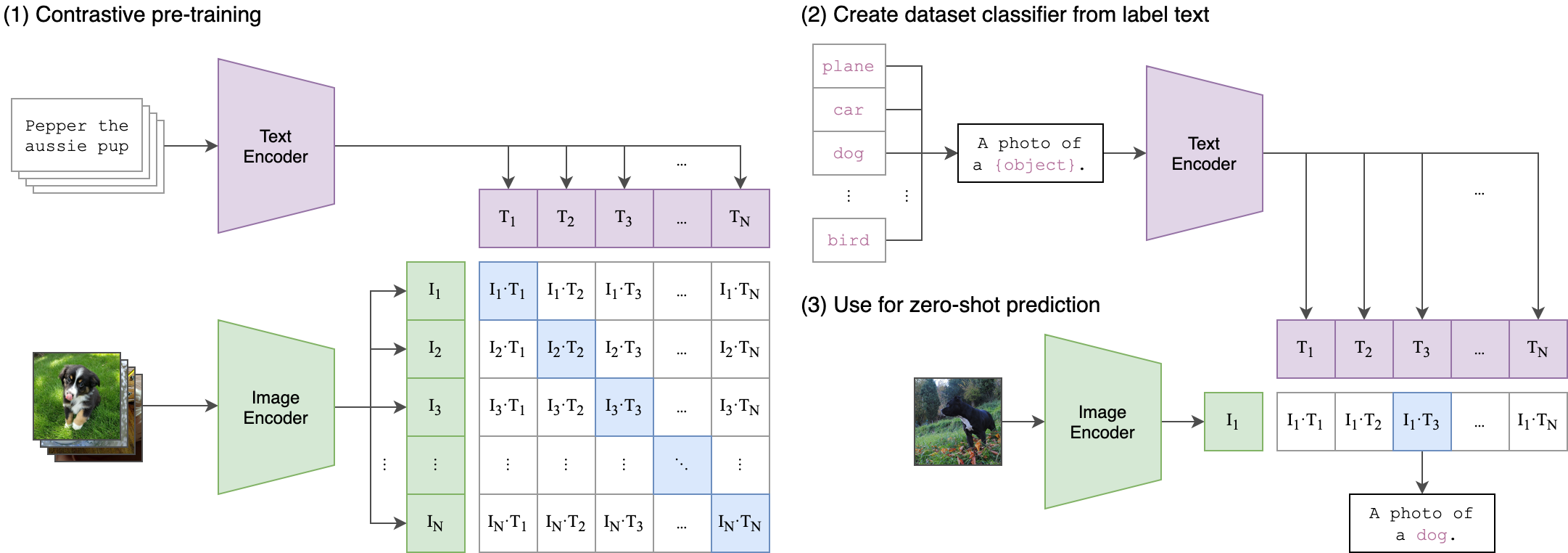 |
|---|
| Image Credit: https://github.com/openai/CLIP |
Usage
OpenCLIP requires Python 3.9+ and PyTorch 2.6+. Python 3.14 and 3.15 have been validated with PyTorch 2.15 for inference, zero-shot evaluation, and compiled training. Install matching PyTorch and torchvision builds for your Python version and hardware.
pip install open_clip_torch
import torch
from PIL import Image
import open_clip

model, _, preprocess = open_clip.create_model_and_transforms('ViT-B-32', pretrained='laion2b_s34b_b79k')
model.eval()  # model in train mode by default, impacts some models with BatchNorm or stochastic depth active
tokenizer = open_clip.get_tokenizer('ViT-B-32')

image = preprocess(Image.open("docs/CLIP.png")).unsqueeze(0)
text = tokenizer(["a diagram", "a dog", "a cat"])

with torch.no_grad(), torch.autocast("cuda"):
    image_features = model.encode_image(image)
    text_features = model.encode_text(text)
    image_features /= image_features.norm(dim=-1, keepdim=True)
    text_features /= text_features.norm(dim=-1, keepdim=True)

    text_probs = (100.0 * image_features @ text_features.T).softmax(dim=-1)

print("Label probs:", text_probs)  # prints: [[1., 0., 0.]]
If model uses timm image encoders (convnext, siglip, eva, etc) ensure the latest timm is installed. Upgrade timm if you see 'Unknown model' errors for the image encoder.
If model uses transformers tokenizers, ensure transformers is installed.
See also this [Clip Colab].
To compute billions of embeddings efficiently, you can use clip-retrieval which has openclip support.
Pretrained models
We offer a simple model interface to instantiate both pre-trained and untrained models. To see which pretrained models are available, use the following code snippet. More details about our pretrained models are available here.
>>> import open_clip
>>> open_clip.list_pretrained()
You can find more about the models we support (e.g. number of parameters, FLOPs) in this table.
NOTE: Many existing checkpoints use the QuickGELU activation from the original OpenAI models. This activation is actually less efficient than native torch.nn.GELU in recent versions of PyTorch. The model defaults are now nn.GELU, so one should use model definitions with -quickgelu postfix for the OpenCLIP pretrained weights. All OpenAI pretrained weights will always default to QuickGELU. One can also use the non -quickgelu model definitions with pretrained weights using QuickGELU but there will be an accuracy drop, for fine-tune that will likely vanish for longer runs.
Future trained models will use nn.GELU.
Loading models
Models can be loaded with open_clip.create_model_and_transforms, as shown in the example below. The model name and corresponding pretrained keys are compatible with the outputs of open_clip.list_pretrained().
The pretrained argument also accepts local paths, for example /path/to/my/b32.pt.
You can also load checkpoints from huggingface this way. To do so, download the open_clip_pytorch_model.bin file (for example, https://huggingface.co/laion/CLIP-ViT-L-14-DataComp.XL-s13B-b90K/tree/main), and use pretrained=/path/to/open_clip_pytorch_model.bin.
# pretrained also accepts local paths
model, _, preprocess = open_clip.create_model_and_transforms('ViT-B-32', pretrained='laion2b_s34b_b79k')
Audio-text models (NaFlex CLAP)
The NaFlex CLAP models (paper: arXiv TBD, see Citing) map variable-length audio and English text into a shared embedding space. All five use the pretrained tag laion_audio_xl_s1b. See the model cards for benchmarks, input notes, batching, and intended use.
| Model | Model card | Params | Embedding dim |
|---|---|---|---|
naflexclap_xxs | laion/clap2-xxs-audioxl-s1B | 27.3M | 224 |
naflexclap_xs | laion/clap2-xs-audioxl-s1B | 48.3M | 320 |
naflexclap_small | laion/clap2-small-audioxl-s1B | 103.9M | 512 |
naflexclap_medium | laion/clap2-medium-audioxl-s1B | 152.8M | 640 |
naflexclap_large | laion/clap2-large-audioxl-s1B | 340.1M | 960 |
pip install open_clip_torch soundfile
import open_clip, soundfile, torch

model, _, preprocess = open_clip.create_model_and_transforms('naflexclap_small', pretrained='laion_audio_xl_s1b')
model.eval()
tokenizer = open_clip.get_tokenizer('naflexclap_small')

wav, sr = soundfile.read('applause.wav', dtype='float32', always_2d=True)  # (samples, channels), any sample rate
patches = preprocess()((torch.from_numpy(wav.T), sr))  # mono mix, resample to 32 kHz, log-mel patches
text = tokenizer(['people applauding', 'a door being slammed', 'a dog barking'])

with torch.inference_mode():
    audio_features = model.encode_audio({k: v[None] for k, v in patches.items()}, normalize=True)
    text_features = model.encode_text(text, normalize=True)
    text_probs = (model.logit_scale.exp() * audio_features @ text_features.T).softmax(dim=-1)

print('Label probs:', text_probs)
Older CLAP models with HTSAT or Whisper audio towers need the optional audio dependencies: pip install 'open_clip_torch[audio]'.
Fine-tuning on classification tasks
This repository is focused on training CLIP models. To fine-tune a trained zero-shot model on a downstream classification task such as ImageNet, please see our other repository: WiSE-FT. The WiSE-FT repository contains code for our paper on Robust Fine-tuning of Zero-shot Models, in which we introduce a technique for fine-tuning zero-shot models while preserving robustness under distribution shift.
Data
To download datasets as webdataset, we recommend img2dataset.
Conceptual Captions
YFCC and other datasets
In addition to specifying the training data via CSV files as mentioned above, our codebase also supports webdataset, which is recommended for larger scale datasets. The expected format is a series of .tar files. Each of these .tar files should contain two files for each training example, one for the image and one for the corresponding text. Both files should have the same name but different extensions. For instance, shard_001.tar could contain files such as abc.jpg and abc.txt. You can learn more about webdataset at https://github.com/webdataset/webdataset. We use .tar files with 1,000 data points each, which we create using tarp.
You can download the YFCC dataset from Multimedia Commons. Similar to OpenAI, we used a subset of YFCC to reach the aforementioned accuracy numbers. The indices of images in this subset are in OpenAI's CLIP repository.
Training CLIP
Install
We advise you first create a virtual environment with:
python3 -m venv .env
source .env/bin/activate
pip install -U pip
You can then install openclip for training with pip install 'open_clip_torch[training]'.
Development
If you want to make changes to contribute code, you can clone openclip then run make install in openclip folder (after creating a virtualenv)
Install pip PyTorch as per https://pytorch.org/get-started/locally/
You may run make install-training to install training deps
Testing
Test can be run with make install-test then make test
python -m pytest -x -s -v tests -k "training" to run a specific test
Running regression tests against a specific git revision or tag:
-
Generate testing data
python tests/util_test.py --model RN50 RN101 --save_model_list models.txt --git_revision 9d31b2ec4df6d8228f370ff20c8267ec6ba39383WARNING: This will invoke git and modify your working tree, but will reset it to the current state after data has been generated!
Don't modify your working tree while test data is being generated this way. -
Run regression tests
OPEN_CLIP_TEST_REG_MODELS=models.txt python -m pytest -x -s -v -m regression_test
Sample single-process running code:
python -m open_clip_train.main \
    --save-frequency 1 \
    --zeroshot-frequency 1 \
    --report-to tensorboard \
    --train-data="/path/to/train_data.csv"  \
    --val-data="/path/to/validation_data.csv"  \
    --csv-img-key filepath \
    --csv-caption-key title \
    --imagenet-val=/path/to/imagenet/root/val/ \
    --warmup 10000 \
    --batch-size=128 \
    --lr=1e-3 \
    --wd=0.1 \
    --epochs=30 \
    --workers=8 \
    --model RN50
Note: imagenet-val is the path to the validation set of ImageNet for zero-shot evaluation, not the training set!
You can remove this argument if you do not want to perform zero-shot evaluation on ImageNet throughout training. Note that the val folder should contain subfolders. If it does not, please use this script.
torch.compile
Training supports torch.compile via --torchcompile. Use --torchcompile-strategy task for the common case: it compiles the task train/eval forward callables while keeping the TrainingTask object itself unwrapped for checkpointing, batch preparation, eval, and zero-shot helpers. Use --torchcompile-strategy model when you want the lower-risk pre-DDP behavior of compiling only the underlying trainable module, especially for fp16 AMP runs that need a GradScaler. Use --torchcompile-strategy step for the most aggressive single-batch path: it compiles forward, loss, backward, optional grad clipping, optimizer step, and logit-scale clamp, but requires --accum-freq 1 and a precision mode without GradScaler such as the default amp_bf16 or fp32. --torchcompile-backend and --torchcompile-mode are passed through to torch.compile.
Multi-GPU and Beyond
This code has been battle tested up to 1024 A100s and offers a variety of solutions for distributed training. We include native support for SLURM clusters.
As the number of devices used to train increases, so does the space complexity of
the the logit matrix. Using a naïve all-gather scheme, space complexity will be
O(n^2). Instead, complexity may become effectively linear if the flags
--gather-with-grad and --local-loss are used. This alteration results in one-to-one
numerical results as the naïve method.
Epochs
For larger datasets (eg Laion2B), we recommend setting --train-num-samples to a lower value than the full epoch, for example --train-num-samples 135646078 to 1/16 of an epoch in conjunction with --dataset-resampled to do sampling with replacement. This allows having frequent checkpoints to evaluate more often.
Patch Dropout
Recent research has shown that one can dropout half to three-quarters of the visual tokens, leading to up to 2-3x training speeds without loss of accuracy.
You can set this on your visual transformer config with the key patch_dropout.
In the paper, they also finetuned without the patch dropout at the end. You can do this with the command-line argument --force-patch-dropout 0.
Multiple data sources
OpenCLIP supports using multiple data sources, by separating different data paths with ::.
For instance, to train on CC12M and on LAION, one might use --train-data "/data/cc12m/cc12m-train-{0000..2175}.tar::/data/LAION-400M/{00000..41455}.tar".
Using --dataset-resampled is recommended for these cases.
By default, on expectation the amount of times the model will see a sample from each source is proportional to the size of the source. For instance, when training on one data source with size 400M and one with size 10M, samples from the first source are 40x more likely to be seen in expectation.
We also support different weighting of the data sources, by using the --train-data-upsampling-factors flag.
For instance, using --train-data-upsampling-factors=1::1 in the above scenario is equivalent to not using the flag, and --train-data-upsampling-factors=1::2 is equivalent to upsampling the second data source twice.
If you want to sample from data sources with the same frequency, the upsampling factors should be inversely proportional to the sizes of the data sources.
For instance, if dataset A has 1000 samples and dataset B has 100 samples, you can use --train-data-upsampling-factors=0.001::0.01 (or analogously, --train-data-upsampling-factors=1::10).
Single-Node
We make use of torchrun to launch distributed jobs. The following launches a
a job on a node of 4 GPUs:
cd open_clip/src
torchrun --nproc_per_node 4 -m open_clip_train.main \
    --train-data '/data/cc12m/cc12m-train-{0000..2175}.tar' \
    --train-num-samples 10968539 \
    --dataset-type webdataset \
    --batch-size 320 \
    --precision amp \
    --workers 4 \
    --imagenet-val /data/imagenet/validation/
Multi-Node
The same script above works, so long as users include information about the number of nodes and host node.
cd open_clip/src
torchrun --nproc_per_node=4 \
    --rdzv_endpoint=$HOSTE_NODE_ADDR \
    -m open_clip_train.main \
    --train-data '/data/cc12m/cc12m-train-{0000..2175}.tar' \
    --train-num-samples 10968539 \
    --dataset-type webdataset \
    --batch-size 320 \
    --precision amp \
    --workers 4 \
    --imagenet-val /data/imagenet/validation/
SLURM
This is likely the easiest solution to utilize. The following script was used to train our largest models:
#!/bin/bash -x
#SBATCH --nodes=32
#SBATCH --gres=gpu:4
#SBATCH --ntasks-per-node=4
#SBATCH --cpus-per-task=6
#SBATCH --wait-all-nodes=1
#SBATCH --job-name=open_clip
#SBATCH --account=ACCOUNT_NAME
#SBATCH --partition PARTITION_NAME

eval "$(/path/to/conda/bin/conda shell.bash hook)" # init conda
conda activate open_clip
export CUDA_VISIBLE_DEVICES=0,1,2,3
export MASTER_PORT=12802

master_addr=$(scontrol show hostnames "$SLURM_JOB_NODELIST" | head -n 1)
export MASTER_ADDR=$master_addr

cd /shared/open_clip
export PYTHONPATH="$PYTHONPATH:$PWD/src"
srun --cpu_bind=v --accel-bind=gn python -u src/open_clip_train/main.py \
    --save-frequency 1 \
    --report-to tensorboard \
    --train-data="/data/LAION-400M/{00000..41455}.tar" \
    --warmup 2000 \
    --batch-size=256 \
    --epochs=32 \
    --workers=8 \
    --model ViT-B-32 \
    --name "ViT-B-32-Vanilla" \
    --seed 0 \
    --local-loss \
    --gather-with-grad
Resuming from a checkpoint:
python -m open_clip_train.main \
    --train-data="/path/to/train_data.csv" \
    --val-data="/path/to/validation_data.csv"  \
    --resume /path/to/checkpoints/epoch_K.pt
Training CoCa:
Training CoCa models is enabled through specifying a CoCa config using the --model parameter of the training script. Currently available configs are "coca_base", "coca_ViT-B-32", and "coca_roberta-ViT-B-32" (which uses RoBERTa as the text encoder). CoCa configs are different from CLIP configs because they have an additional "multimodal_cfg" component which specifies parameters for the multimodal text decoder. Here's an example from the coca_ViT-B-32 config:
"multimodal_cfg": {
	"context_length": 76,
	"vocab_size": 49408,
	"width": 512,
	"heads": 8,
	"layers": 12,
	"latent_dim": 512,
	"attn_pooler_heads": 8
}
Credit to lucidrains for initial code, gpucce for adapting the code to open_clip, and iejMac for training the models.
Generating text with CoCa
import open_clip
import torch
from PIL import Image

model, _, transform = open_clip.create_model_and_transforms(
  model_name="coca_ViT-L-14",
  pretrained="mscoco_finetuned_laion2B-s13B-b90k"
)

im = Image.open("cat.jpg").convert("RGB")
im = transform(im).unsqueeze(0)

with torch.no_grad(), torch.cuda.amp.autocast():
  generated = model.generate(im)

print(open_clip.decode(generated[0]).split("<end_of_text>")[0].replace("<start_of_text>", ""))
See also this [Coca Colab]
Fine Tuning CoCa
To fine-tune coca on mscoco, first create the dataset, one way is using a csvdataset and perhaps the simplest way to do it is using CLIP_benchmark which in turn uses pycocotools (that can be used also by itself).
from clip_benchmark.datasets.builder import build_dataset
import pandas as pd
import os

root_path = "path/to/data/dir" # set this to smth meaningful
ds = build_dataset("mscoco_captions", root=root_path, split="train", task="captioning") # this downloads the dataset if it is not there already
coco = ds.coco
imgs = coco.loadImgs(coco.getImgIds())
future_df = {"filepath":[], "title":[]}
for img in imgs:
    caps = coco.imgToAnns[img["id"]]
    for cap in caps:
        future_df["filepath"].append(img["file_name"])
        future_df["title"].append(cap["caption"])
pd.DataFrame.from_dict(future_df).to_csv(
  os.path.join(root_path, "train2014.csv"), index=False, sep="\t"
)
This should create a csv dataset that one can use to fine-tune coca with open_clip
python -m open_clip_train.main \
    --dataset-type "csv" \
    --train-data "path/to/data/dir/train2014.csv" \
    --warmup 1000 \
    --batch-size 128 \
    --lr 1e-5 \
    --wd 0.1 \
    --epochs 1 \
    --workers 3 \
    --model "coca_ViT-L-14" \
    --report-to "wandb" \
    --coca-contrastive-loss-weight 0 \
    --coca-caption-loss-weight 1 \
    --log-every-n-steps 100
This is a general setting, open_clip has very parameters that can be set, python -m open_clip_train.main --help should show them. The only relevant change compared to pre-training are the two arguments
--coca-contrastive-loss-weight 0
--coca-caption-loss-weight 1
which make the model only train the generative side.
Training with pre-trained language models as text encoder:
If you wish to use different language models as the text encoder for CLIP you can do so by using one of the Hugging Face model configs in src/open_clip/model_configs and passing in it's tokenizer as the --model and --hf-tokenizer-name parameters respectively. Currently we only support RoBERTa ("test-roberta" config), however adding new models should be trivial. You can also determine how many layers, from the end, to leave unfrozen with the --lock-text-unlocked-layers parameter. Here's an example command to train CLIP with the RoBERTa LM that has it's last 10 layers unfrozen:
python -m open_clip_train.main \
         --train-data="pipe:aws s3 cp s3://s-mas/cc3m/{00000..00329}.tar -" \
         --train-num-samples 3000000 \
         --val-data="pipe:aws s3 cp s3://s-mas/cc3m/{00330..00331}.tar -" \
         --val-num-samples 10000 \
         --dataset-type webdataset \
         --batch-size 256 \
         --warmup 2000 \
         --epochs 10 \
         --lr 5e-4 \
         --precision amp \
         --workers 6 \
         --model "roberta-ViT-B-32" \
         --lock-text \
         --lock-text-unlocked-layers 10 \
         --name "10_unfrozen" \
         --report-to "tensorboard" \
Loss Curves
When run on a machine with 8 GPUs the command should produce the following training curve for Conceptual Captions:
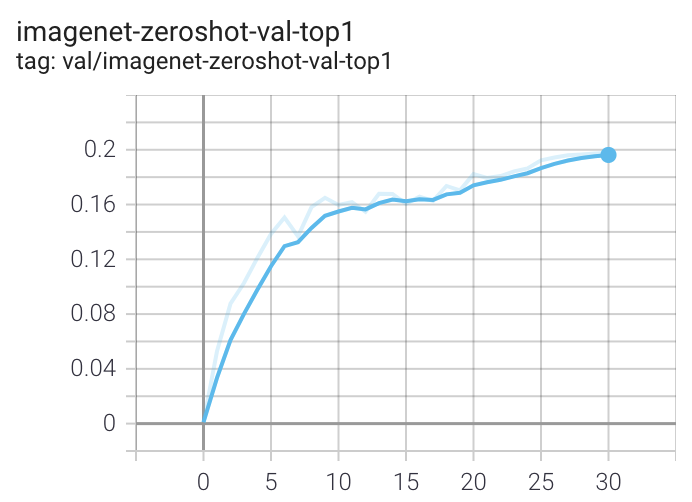
More detailed curves for Conceptual Captions are given at /docs/clip_conceptual_captions.md.
When training a RN50 on YFCC the same hyperparameters as above are used, with the exception of lr=5e-4 and epochs=32.
Note that to use another model, like ViT-B/32 or RN50x4 or RN50x16 or ViT-B/16, specify with --model RN50x4.
Logging
For tensorboard logging, run:
tensorboard --logdir=logs/tensorboard/ --port=7777
For wandb logging, we recommend looking at the step variable instead of Step, since the later was not properly set in earlier versions of this codebase.
For older runs with models trained before https://github.com/mlfoundations/open_clip/pull/613, the Step variable should be ignored.
For newer runs, after that PR, the two variables are the same.
Evaluation / Zero-Shot
We recommend https://github.com/LAION-AI/CLIP_benchmark#how-to-use for systematic evaluation on 40 datasets.
Evaluating local checkpoint:
python -m open_clip_train.main \
    --val-data="/path/to/validation_data.csv"  \
    --model RN101 \
    --pretrained /path/to/checkpoints/epoch_K.pt
Evaluating hosted pretrained checkpoint on ImageNet zero-shot prediction:
python -m open_clip_train.main \
    --imagenet-val /path/to/imagenet/validation \
    --model ViT-B-32-quickgelu \
    --pretrained laion400m_e32
Evaluating CLAP audio models on zero-shot audio classification:
Audio zero-shot evaluation uses Hugging Face audio classification datasets. Install the optional audio dependencies before running these examples (use datasets[audio] for local audio folders, which datasets encodes with TorchCodec).
pip install datasets soundfile torchlibrosa
ESC-50:
python -m open_clip_train.main \
    --model CLAP-HTSAT-tiny-Roberta-base-fused \
    --pretrained laion \
    --audio-zeroshot-dataset ashraq/esc50 \
    --audio-zeroshot-split train \
    --batch-size 64 \
    --workers 4 \
    --device cuda \
    --zeroshot-frequency 1
UrbanSound8K:
python -m open_clip_train.main \
    --model CLAP-HTSAT-tiny-Roberta-base-fused \
    --pretrained laion \
    --audio-zeroshot-dataset mteb/urbansound8K \
    --audio-zeroshot-split train \
    --audio-zeroshot-target-key classID \
    --audio-zeroshot-class-key class \
    --batch-size 64 \
    --workers 4 \
    --device cuda \
    --zeroshot-frequency 1
Model distillation
You can distill from a pre-trained by using --distill-model and --distill-pretrained to specify the model you'd like to distill from.
For instance, to distill from OpenAI ViT-L/14 use --distill-model ViT-L-14 --distill-pretrained openai.
Gradient accumulation
To simulate larger batches use --accum-freq k. If per gpu batch size, --batch-size, is m, then the effective batch size will be k * m * num_gpus.
When increasing --accum-freq from its default of 1, samples/s will remain approximately constant (batch size will double, as will time-per-batch). It is recommended to use other features to reduce batch size such as --grad-checkpointing --local-loss --gather-with-grad before increasing --accum-freq. --accum-freq can be used in addition to these features.
Instead of 1 forward pass per example, there are now 2 forward passes per-example. However, the first is done with torch.no_grad.
There is some additional GPU memory required --- the features and data from all m batches are stored in memory.
There are also m loss computations instead of the usual 1.
For more information see Cui et al. (https://arxiv.org/abs/2112.09331) or Pham et al. (https://arxiv.org/abs/2111.10050).
Int8 Support
We have beta support for int8 inference via bitsandbytes' Linear8bitLt (the LLM.int8() layer). Only the MLP linear layers (c_fc/c_proj) are quantized by default; attention's combined QKV projection isn't an nn.Linear submodule and isn't covered yet (see the TODO in src/open_clip/utils.py).
from functools import partial
import bitsandbytes as bnb
import open_clip

model, _, preprocess = open_clip.create_model_and_transforms('ViT-B-32', pretrained='laion2b_s34b_b79k')
model = model.half()

int8_linear_layer = partial(bnb.nn.Linear8bitLt, has_fp16_weights=False)
int8_model = open_clip.utils.replace_linear(model, int8_linear_layer, include_modules=['c_fc', 'c_proj']).cuda()
open_clip.utils.convert_int8_model_to_inference_mode(int8_model)  # stamps the dtype bookkeeping the model needs post-quantization
Accuracy / speed, measured, not estimated: on ViT-B-32-quickgelu (openai weights), zero-shot classification on CIFAR-10 was 88.76% (fp16) vs. 88.83% (int8) — a +0.07 point difference, i.e. no meaningful accuracy cost for quantizing just the MLP layers post-hoc (no fine-tuning). This is a single-template, single-dataset, single-model measurement, not a comprehensive benchmark, but it's real and reproducible (see the tutorial notebook). Speed was slightly worse for int8 (53.9ms vs. 56.9ms for a batch of 128, about 5.6% slower) — at this model scale, the extra kernel launches int8 quantization/dequantization requires per forward pass outweigh any raw int8 tensor-core throughput advantage, since Linear8bitLt was designed around much larger (billion-parameter) models than CLIP's transformer blocks. The practical benefit here is memory (roughly a 2x reduction on the quantized layers' weight tensors), not speed or accuracy.
Saving and loading a quantized model: replace_linear swaps nn.Linear submodules for bitsandbytes layers in place, so a state_dict saved from the quantized model only loads back correctly into a model that already has the same layers swapped in — build the model, replace_linear, then torch.save(int8_model.state_dict(), path); to load, rebuild the architecture, replace_linear + convert_int8_model_to_inference_mode again, then load_state_dict. The image transform and tokenizer aren't affected by quantization at all — they only depend on model_name, so just recreate them normally with create_model_and_transforms/get_tokenizer. See the tutorial notebook for a runnable example.
Older SwitchBackLinear/triton path (training): the previous --use-bnb-linear SwitchBackLinearGlobal / SwitchBackLinearGlobalMemEfficient training path, and the triton-based classes in bitsandbytes.nn.triton_based_modules the earlier version of this tutorial used, are effectively unusable on a fresh install today: triton==2.0.0.post1 (which those kernels were written against) has been removed from PyPI entirely, every installable triton version reorganized triton.language.libdevice away, and bitsandbytes>=0.50 dropped triton_based_modules outright. If you hit AttributeError: module 'triton.language' has no attribute 'libdevice', that's why — it's not fixable by pinning a version anymore. Use Linear8bitLt (above) for inference. There's currently no equivalent replacement documented for the training-time SwitchBack speedup path.
See the tutorial https://github.com/mlfoundations/open_clip/blob/main/tutorials/int8_tutorial.ipynb, and the original SwitchBack paper for the training-time approach (0.1pt accuracy cost vs. bf16 on CLIP ViT-Huge, per the paper — a very different regime from the post-hoc inference-only quantization measured above).
Support for remote loading/training
It is always possible to resume directly from a remote file, e.g., a file in an s3 bucket. Just set --resume s3://<path-to-checkpoint> .
This will work with any filesystem supported by fsspec.
It is also possible to train open_clip models while continuously backing up to s3. This can help to avoid slow local file systems.
Say that your node has a local ssd /scratch, an s3 bucket s3://<path-to-bucket>.
In that case, set --logs /scratch and --remote-sync s3://<path-to-bucket>. Then, a background process will sync /scratch/<run-name> to s3://<path-to-bucket>/<run-name>. After syncing, the background process will sleep for --remote-sync-frequency seconds, which defaults to 5 minutes.
There is also experimental support for syncing to other remote file systems, not just s3. To do so, specify --remote-sync-protocol fsspec. However, this is currently very slow and not recommended.
Also, to optionally avoid saving too many checkpoints locally when using these features, you can use --delete-previous-checkpoint which deletes the previous checkpoint after saving a new one.
Note: if you are using this feature with --resume latest, there are a few warnings. First, use with --save-most-recent is not supported. Second, only s3 is supported. Finally, since the sync happens in the background, it is possible that the most recent checkpoint may not be finished syncing to the remote.
Pushing Models to Hugging Face Hub
The module open_clip.push_to_hf_hub includes helpers for pushing models /w weights and config to the HF Hub.
The tool can be run from command line, ex:
python -m open_clip.push_to_hf_hub --model convnext_large_d_320 --pretrained /train/checkpoints/epoch_12.pt --repo-id laion/CLIP-convnext_large_d_320.laion2B-s29B-b131K-ft
Acknowledgments
We gratefully acknowledge the Gauss Centre for Supercomputing e.V. (www.gauss-centre.eu) for funding this part of work by providing computing time through the John von Neumann Institute for Computing (NIC) on the GCS Supercomputer JUWELS Booster at Jülich Supercomputing Centre (JSC).
The Team
Current development of this repository is led by Ross Wightman, Romain Beaumont, Cade Gordon, and Vaishaal Shankar.
The original version of this repository is from a group of researchers at UW, Google, Stanford, Amazon, Columbia, and Berkeley.
Gabriel Ilharco*, Mitchell Wortsman*, Nicholas Carlini, Rohan Taori, Achal Dave, Vaishaal Shankar, John Miller, Hongseok Namkoong, Hannaneh Hajishirzi, Ali Farhadi, Ludwig Schmidt
Special thanks to Jong Wook Kim and Alec Radford for help with reproducing CLIP!
Citing
If you found this repository useful, please consider citing:
@software{ilharco_gabriel_2021_5143773,
  author       = {Ilharco, Gabriel and
                  Wortsman, Mitchell and
                  Wightman, Ross and
                  Gordon, Cade and
                  Carlini, Nicholas and
                  Taori, Rohan and
                  Dave, Achal and
                  Shankar, Vaishaal and
                  Namkoong, Hongseok and
                  Miller, John and
                  Hajishirzi, Hannaneh and
                  Farhadi, Ali and
                  Schmidt, Ludwig},
  title        = {OpenCLIP},
  month        = jul,
  year         = 2021,
  note         = {If you use this software, please cite it as below.},
  publisher    = {Zenodo},
  version      = {0.1},
  doi          = {10.5281/zenodo.5143773},
  url          = {https://doi.org/10.5281/zenodo.5143773}
}
@inproceedings{cherti2023reproducible,
  title={Reproducible scaling laws for contrastive language-image learning},
  author={Cherti, Mehdi and Beaumont, Romain and Wightman, Ross and Wortsman, Mitchell and Ilharco, Gabriel and Gordon, Cade and Schuhmann, Christoph and Schmidt, Ludwig and Jitsev, Jenia},
  booktitle={Proceedings of the IEEE/CVF Conference on Computer Vision and Pattern Recognition},
  pages={2818--2829},
  year={2023}
}
@inproceedings{Radford2021LearningTV,
  title={Learning Transferable Visual Models From Natural Language Supervision},
  author={Alec Radford and Jong Wook Kim and Chris Hallacy and A. Ramesh and Gabriel Goh and Sandhini Agarwal and Girish Sastry and Amanda Askell and Pamela Mishkin and Jack Clark and Gretchen Krueger and Ilya Sutskever},
  booktitle={ICML},
  year={2021}
}
@inproceedings{schuhmann2022laionb,
  title={{LAION}-5B: An open large-scale dataset for training next generation image-text models},
  author={Christoph Schuhmann and
          Romain Beaumont and
          Richard Vencu and
          Cade W Gordon and
          Ross Wightman and
          Mehdi Cherti and
          Theo Coombes and
          Aarush Katta and
          Clayton Mullis and
          Mitchell Wortsman and
          Patrick Schramowski and
          Srivatsa R Kundurthy and
          Katherine Crowson and
          Ludwig Schmidt and
          Robert Kaczmarczyk and
          Jenia Jitsev},
  booktitle={Thirty-sixth Conference on Neural Information Processing Systems Datasets and Benchmarks Track},
  year={2022},
  url={https://openreview.net/forum?id=M3Y74vmsMcY}
}
@misc{naflexclap_tbd,
  title={LAION-Audio-XL: A Web-Scale Corpus and Scaling Studies for Contrastive Language-Audio Pretraining},
  author={TBD},
  year={TBD},
  eprint={TBD},
  archivePrefix={arXiv}
}