默认会从 Hugging Face 下载 Qwen3-4B-Instruct-2507 模型和 neuml/txtai-wikipedia-slim 索引,首次启动需联网拉取;服务默认监听 8501 端口,需映射到宿主机;改用 Ollama 等外部 LLM 时需额外设置 OLLAMA_API_BASE 等环境变量。
rag
neumlApache-2.0更新放缓基于 txtai 的检索增强生成示例,把向量检索和大模型结合起来,让你用自己的数据做问答和洞察分析。
🚀 Retrieval Augmented Generation (RAG) with txtai. Combine search and LLMs to find insights with your own data.
v0.14.0发布于 2026-06-05 16:05 UTC466star41fork同步于 2026-11-07 07:29 UTC
docker run -d --gpus=all -it -p 8501:8501 neuml/rag 硬件要求按 README 说明
README 的 Docker 命令使用 --gpus=all,说明推荐在带 GPU 的环境运行;未说明具体显存大小和 GPU 厂商型号。
有 Docker 镜像
基于 txtai 的 RAG Streamlit 应用,用向量检索或图谱遍历为 LLM 提供上下文
基于 txtai 的检索增强生成示例,把向量检索和大模型结合起来,让你用自己的数据做问答和洞察分析。
核心能力
- 支持向量 RAG,用向量检索取 top N 相关文档填充提示词
- 支持 Graph RAG,用 gq: 前缀和图路径查询扩展上下文
- 查询以 # 开头可直接把文件、URL 或文本写入索引
- 每次 Graph RAG 回答附带图谱,展示节点与查询路径
- 通过环境变量配置 LLM、Embeddings 库、上下文大小等参数
容易踩的坑
内容由模型根据 README 生成,可能不完整或不准确,以官方文档为准。看原文 README
- v0.14.0最新正式版2026-06-05 · 2026-06-05 16:05 UTC
This release adds the following enhancements and bug fixes:
- Add safeopen parameter (#33)
- v0.13.02025-12-01 · 2025-12-01 23:22 UTC
查看更新说明
This release adds the following enhancements and bug fixes:
- Update models (#30)
- Remove AutoAWQ dependency (#31)
- Add stripthink parameter (#32)
- v0.12.02025-11-12 · 2025-11-12 18:17 UTC
查看更新说明
This release adds the following enhancements and bug fixes:
- Update Docker Image (#29)
- v0.11.02025-05-06 · 2025-05-06 18:17 UTC
查看更新说明
This release adds the following enhancements and bug fixes:
- Update Dockerfile to work with latest version of autoawq and torch (#28)
- v0.10.02025-04-28 · 2025-04-28 17:35 UTC
查看更新说明
This release adds the following enhancements and bug fixes:
- Incorrect call to self.extractor using DATA env argument in rag.py (#26, #27)
用户点评
登录用户的真实使用记录,可按版本和硬件筛选共 0 条
还没有人点评。第一个说出真实体验的人最有价值。
🚀 RAG with txtai
This project is a Retrieval Augmented Generation (RAG) Streamlit application backed by txtai.
Retrieval Augmented Generation (RAG) helps generate factually correct content by limiting the context in which a LLM can generate answers. This is typically done with a search query that hydrates a prompt with a relevant context.
This application supports two categories of RAG.
- Vector RAG: Context supplied via a vector search query
- Graph RAG: Context supplied via a graph path traversal query
Quickstart
The two primary ways to run this application are as a Docker container and with a Python virtual environment. Running through Docker is recommended, at least to get an idea of the application's capabilities.
Docker
neuml/rag is available on Docker Hub:
This can be run with the default settings as follows.
docker run -d --gpus=all -it -p 8501:8501 neuml/rag
Python virtual environment
The application can also be directly installed and run. It's recommended that this be run within a Python virtual environment.
pip install -r requirements.txt
Start the application.
streamlit run rag.py
Demo
The short video clip above gives a brief overview on this RAG system. It shows a basic vector RAG query. It also shows a Graph RAG query with uploaded data. The following sections cover more on these concepts.
RAG
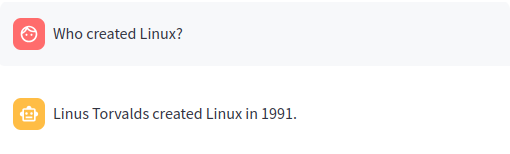
Traditional RAG or vector RAG runs a vector search to find the top N most relevant matches to a user's input. Those matches are passed to an LLM and the answer is returned.
The query Who created Linux? runs a vector search for the best matching documents in the Embeddings index. Those matches are then placed into a LLM prompt. The LLM prompt is executed and the answer is returned.
Graph RAG
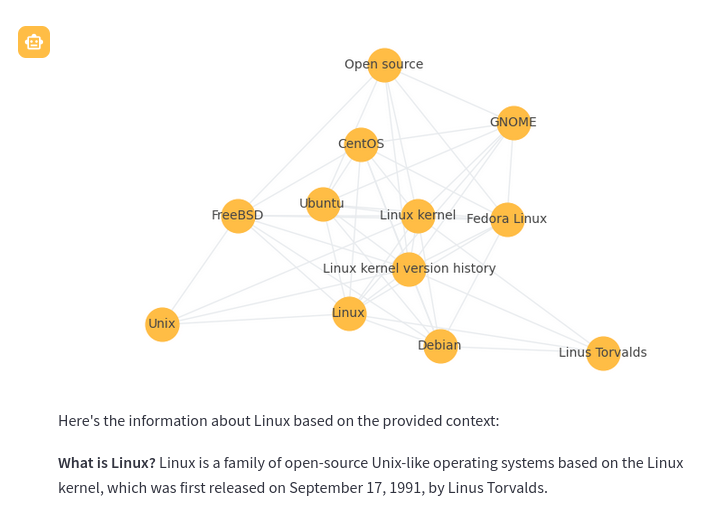
Graph RAG is a new method that uses knowledge or semantic graphs to generate a context. Instead of a vector search, graph path queries are run. Graph RAG in the context of this application supports the following methods to generate context.
-
Graph query with the
gq:prefix. This is a form of graph query expansion. It starts with a vector search to find the top n results. Those results are then expanded using a graph network stored alongside the vector database.gq: Tell me about Linux
-
Graph path query. This query takes a list of concepts and finds the nodes that match closest to those concepts. A graph path traversal then runs to build a context of nodes related to those concepts. The result of this traversal is passed to the LLM as the context.
linux -> macos -> microsoft windows
-
Combination of both. This first runs a graph path query then runs a graph query only within the context of that path traversal.
linux -> macos -> microsoft windows gq: Tell me about Linux
Every Graph RAG query response will also show a corresponding graph to help understand how the query works. Each node in the graph is a section (paragraph). The node nodes are generated with a LLM prompt that applies a topic label at upload time.
Adding data to the index
Regardless of whether the RAG application was a new Embeddings index or an existing one, additional data can be added.
Data can be added as follows.
| Method | |
|---|---|
# file path or URL | 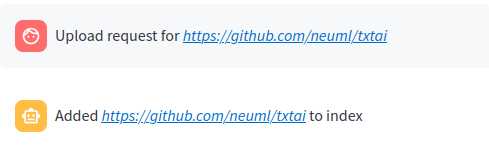 |
# custom notes and text as a string here! | 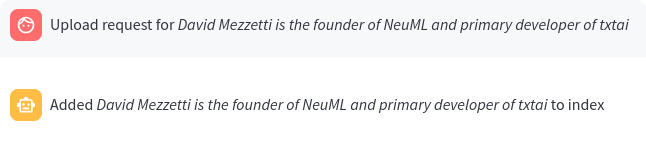 |
When a query begins with a # the URL or file is read by the RAG application and loaded into the index. This method also supports loading text directly into the index. For example # txtai is an all-in-one AI framework would create a new entry in the Embeddings database.
Configuration parameters
The RAG application has a number of environment variables that can be set to control how the application behaves.
| Variable | Description | Default Value |
|---|---|---|
| TITLE | Main title of the application | 🚀 RAG with txtai |
| EXAMPLES | List of queries separated by ; | Who created Linux? |
gq: Tell me about Linux | ||
linux -> macos -> microsoft windows | ||
linux -> macos -> microsoft windows gq: Tell me about Linux | ||
| LLM | Path to LLM | Qwen3-4B-Instruct-2507 |
| EMBEDDINGS | Embeddings database path | neuml/txtai-wikipedia-slim |
| MAXLENGTH | Maximum generation length | 2048 for topics, 4096 for RAG |
| STRIPTHINK | Strip thinking text from responses | False |
| CONTEXT | RAG context size | 10 |
| TEXTBACKEND | Text extraction backend | available |
| DATA | Optional directory to index data from | None |
| PERSIST | Optional directory to save index updates to | None |
| TOPICSBATCH | Optional batch size for LLM topic queries | None |
| SAFEOPEN | Enable Textractor safeopen mode | True |
In the application, these settings can be shown by typing :settings.
See the following examples for setting this configuration with the Docker container. When running within a Python virtual environment, simply set these as environment variables.
GPT-OSS
docker run -d --gpus=all -it -p 8501:8501 -e LLM=openai/gpt-oss-20b neuml/rag
GPT-OSS via Ollama
docker run -d --gpus=all -it -p 8501:8501 --add-host=host.docker.internal:host-gateway \
-e LLM=ollama/gpt-oss -e OLLAMA_API_BASE=http://host.docker.internal:11434 \
neuml/rag
GPT-5.1
docker run -d --gpus=all -it -p 8501:8501 -e LLM=gpt-5.1 -e OPENAI_API_KEY=your-api-key neuml/rag
Run with another embeddings index
docker run -d --gpus=all -it -p 8501:8501 -e EMBEDDINGS=neuml/arxiv neuml/rag
Start with an empty embeddings index
docker run -d --gpus=all -it -p 8501:8501 -e EMBEDDINGS= neuml/rag
Build an embeddings index with a local directory of files
docker run -d --gpus=all -it -p 8501:8501 -e DATA=/data/path -v local/path:/data/path neuml/rag
Use the Docling text extraction backend
docker run -d --gpus=all -it -p 8501:8501 -e TEXTBACKEND=docling neuml/rag
Persist embeddings and cache models
docker run -d --gpus=all -it -p 8501:8501 -e DATA=/data/path -e EMBEDDINGS=/data/embeddings \
-e PERSIST=/data/embeddings -e HF_HOME=/data/modelcache -v localdata:/data neuml/rag
See the documentation for the LLM pipeline and Embeddings for more information.
Further Reading

transformers
huggingface·Python
统一加载和运行文本、视觉、音频、多模态的预训练模型,覆盖推理与训练,省去为每个模型重写代码的麻烦。
预训练模型+4训练框架
168730+11835kv5.22.22026-11-10 10:57 UTC
LlamaFactory
hiyouga·Python
一套统一接口搞定 100+ 大语言模型和多模态模型的微调,支持 LoRA 等高效训练方式,省去为每个模型单独写训练脚本的麻烦。
微调框架+4训练框架
75971+489.4kv0.9.52026-11-09 14:55 UTC
keras
keras-team·Python
面向人类友好的深度学习 API,用 Python 编写,可跑在 TensorFlow、JAX、PyTorch 上,帮开发者快速搭建和训练神经网络。
深度学习+4训练框架
64419+320kv3.15.12026-11-10 11:13 UTC
langextract
google·Python
用 LLM 从非结构化文本中抽取结构化信息,并给出精确的原文出处定位和交互式可视化,方便核对抽取结果。
信息抽取+4训练框架
39297+232.8kv1.7.22026-11-10 01:39 UTC