需先申请并下载 HM3D/MP3D 场景数据集,按 data/scene_datasets 下小写目录名放置;人形模型需运行 download_humanoid_data.py 或手动解压 humanoids.zip 到 data/;评测前需通过 HF_MODEL_ID 或 HF_MODEL_DIR 指定权重,否则 eval.sh 无法加载模型。
OmTrackVLA
om-ai-lab活跃维护面向视觉-语言-动作模型(VLA)的可复现开源研究项目,聚焦目标跟踪类 VLA,提供训练与评测代码,方便复现和对比实验结果。
Open & Reproducible Research for Tracking VLAs
暂无版本289star16fork同步于 2026-11-07 07:31 UTC
conda create -n omtrack python=3.9 cmake=3.14.0
conda activate omtrack
conda install habitat-sim==0.3.1 withbullet -c conda-forge -c aihabitat
git clone https://github.com/om-ai-lab/OmTrackVLA.git
cd OmTrackVLA
pip install -e habitat-lab 硬件要求按 README 说明
README 未说明显存要求;训练脚本提供 --mixed_precision 与 --distributed 选项,评测依赖 Habitat-Sim 仿真环境,未列出具体 GPU 型号。
开源可复现的视觉语言动作栈,用单目视频和自然语言指令生成短程导航路点
面向视觉-语言-动作模型(VLA)的可复现开源研究项目,聚焦目标跟踪类 VLA,提供训练与评测代码,方便复现和对比实验结果。
核心能力
- 发布 0.6B 权重、推理代码和完整训练管线
- 从单目视频历史与文本指令预测未来路点
- 预计算 DINO/SiGLIP 视觉 token 加速训练
- 基于 Habitat 仿真做闭环评测并输出视频与指标
- 提供数据构建脚本生成路点与 JSONL 分片
容易踩的坑
内容由模型根据 README 生成,可能不完整或不准确,以官方文档为准。看原文 README
暂无 release 数据(可能没有发版,或尚未同步)。
用户点评
登录用户的真实使用记录,可按版本和硬件筛选共 0 条
还没有人点评。第一个说出真实体验的人最有价值。
OmTrackVLA 🤖 👀
Visual Navigation & Following for Everyone.
OmTrackVLA is a fully open-source Vision-Language-Action (VLA) stack that turns monocular video and natural-language instructions into actionable, short-horizon waypoints.
This repository is dedicated to democratizing embodied AI. We have intentionally released our highly efficient 0.6B checkpoint along with the full training pipeline.
🚀 Why OmTrackVLA?
- Fully Open Source: We release the model weights, inference code, and the training stack—not just the inference wrapper.
- Accessible: Designed to reproduce, fine-tune, and deploy with affordable compute .
- Multimodal Control: Combines learned priors with visual input to guide real or simulated robots via simple text prompts.
Acknowledgment: OmTrackVLA builds on the ideas introduced by the original TrackVLA project. Their partially-open release inspired this community-driven effort to keep the ecosystem open so researchers and developers can continue improving the stack together.
📢 News & Updates
- 🔥 We have updated the model weights and refreshed the benchmark scores in the performance table. The latest checkpoint is available at omlab/OmTrackVLA-0.6B. We will keep updating — please keep watching this repository!
- [Coming Soon] 📦 We will be releasing the full training data. Stay tuned!
Demo In Action
The system processes video history and text instructions to predict future waypoints. Below are examples of the tracker in action:
1. Requirements & Environment Setup
- Create the Conda env
conda create -n omtrack python=3.9 cmake=3.14.0 conda activate omtrack - Install Habitat-Sim 0.3.1 (with Bullet)
conda install habitat-sim==0.3.1 withbullet -c conda-forge -c aihabitat - Clone this repository
git clone https://github.com/om-ai-lab/OmTrackVLA.git cd OmTrackVLA - Install Habitat-Lab
pip install -e habitat-lab
2. Dataset Preparation (TrackVLA parity)
The simulator assets and humanoid avatars follow the exact instructions from the original TrackVLA github release. Please accept the respective licenses before downloading.
2.1 HM3D + MP3D Scenes
- Request access through the Habitat links used by TrackVLA: HM3D and MP3D.
- After the providers approve your request, download the archives locally and extract them under
data/scene_datasetsso the final layout matches:data/ scene_datasets/ hm3d/ train/... val/... minival/... mp3d/ 1LXtFkjw3qL/... ... - If you stage the downloads elsewhere first, move them with a command such as:
Ensure the directory names stay lowercase (mv /path/to/hm3d data/scene_datasets/ mv /path/to/mp3d data/scene_datasets/hm3d,mp3d) so Habitat configs resolve correctly.
2.2 Humanoid Avatars
- From the repository root run:
This script mirrors TrackVLA’s original helper and should populatepython download_humanoid_data.pydata/humanoids. - If the script fails (e.g., quota errors), manually download
humanoids.zipfrom Google Drive, then extract it with:
Double-check thatunzip humanoids.zip -d data/data/humanoids/**now contains the FBX meshes required by Habitat.
2.3 Verification
- Run
ls data/scene_datasets/{hm3d,mp3d}to confirm both corpora are present. - Re-run any Habitat episodes (e.g.,
run_eval.py) to ensure the simulator can resolve the scene assets and humanoid avatars without missing-file errors.
Keeping this layout in sync with TrackVLA’s published instructions avoids surprises when sharing configs or checkpoints across both projects.
3. Data Processing Pipeline
3.1 Build Dataset (make_tracking_data.py)
This script integrates egocentric base velocities to emit future indicator curves, waypoints, and sliding-window JSONL shards. Each episode requires the <stem>.mp4 RGB capture alongside <stem>_info.json pose metadata.
Quick Start (Sample Data)
The repo ships with a tiny rollout snapshot under sim_data/sample. Generate a ready-to-train dataset with:
python make_tracking_data.py \
    --input_root sim_data/sample \
    --output_root data/sample
This mirrors the sim_data tree under data/sample/frames, writes JSONL shards to data/sample/jsonl, and primes data/sample/dataset.json if --out_file is set.
Full Usage
python make_tracking_data.py \
    --input_root sim_data/sample \
    --output_root data/sample \
    --history 31 --horizon 8 --dt 0.1 \
    --only_success \
    --instruction "Follow the target person without collision."
Episodes are replicated under frames/seed_xxx/..., with corresponding jsonl/seed_xxx/scene/episode.jsonl files storing history frames (images), the current frame (current), the instruction, future waypoints (trajectory), and velocity commands (actions). Use --out_file to emit a monolithic dataset JSON in addition to per-episode shards.
3.2 Precompute Vision Tokens (precache_frames.py)
train.py stays I/O bound when every frame already has DINO/SiGLIP embeddings cached. precache_frames.py precomputes both fine and coarse tokens so the trainer can mmap .pt tensors instead of re-encoding on the fly.
python precache_frames.py \
    --data_root data/sample \
    --cache_root data/sample/vision_cache \
    --batch_size 8 \
    --image_size 384
Tokens are stored as .half() tensors to save disk, and any missing coarse tokens are backfilled via pooling when only the fine representation exists. Layout auto-detection handles nested frames/seed_xxx/... structures.
4. Training
train.py hosts the Qwen-based planner with masked waypoint losses. Point it at the dataset JSONL directory and the cached vision tokens to kick off optimization.
python train.py \
    --train_json data/sample/jsonl \
    --cache_root data/sample/vision_cache \
    --out_dir ckpt_sample \
    --epochs 2 \
    --batch_size 8 \
    --n_waypoints 8 \
    --history 31 \
    --lr 2e-5 \
    --mixed_precision \
    --save_trajectories
- Checkpointing: Every 100 steps a
.ptfile lands inout_dir; set--max_ckptsto cap retention. - Visualization: Enable
--save_trajectoriesto collect.npzbundles plus overlay images undervis/. - Resume: Pass
--resumeor--resume_ckpt /path/to/model_epochXX_stepXXXXXX.ptto pick up training midstream. - Scaling knobs: Adjust
--train_jsonto target any directory of JSONL shards, tweak--history/--n_waypointsfor different temporal windows, and flip--distributedwhen launching viatorchrun.
5. Evaluation
eval.sh fans Habitat-based rollouts across configurable chunks and expects CKPT, HF_MODEL_ID, or HF_MODEL_DIR to define which weights to load. Outputs land under sim_data/eval/<task> alongside per-episode videos and metrics. Use bash kill_eval.sh to cleanly terminate all spawned jobs.
5.1 Using the Pre-trained 0.6B Model
- Option A — Auto-download
HF_MODEL_ID=omlab/OmTrackVLA-0.6B bash eval.sh - Option B — Manual download
huggingface-cli download omlab/OmTrackVLA-0.6B --local-dir open_trackvla_hf
HF_MODEL_DIR=$(pwd)/open_trackvla_hf bash eval.sh
5.2 Evaluating Custom Checkpoints
Point CKPT at any artifact produced by train.py:
CKPT=/path/to/model_epoch05_step009000.pt bash eval.sh
Tune CHUNKS, NUM_PARALLEL, or the Habitat config inside eval.sh to rebalance throughput vs. coverage.
📊 Performance (EVT-Bench)
| Methods | STT (SR↑ / TR↑ / CR↓) | DT (SR↑ / TR↑ / CR↓) | AT (SR↑ / TR↑ / CR↓) |
|---|---|---|---|
| IBVS† | 42.9 / 56.2 / 3.75 | 10.6 / 28.4 / 6.14 | 15.2 / 39.5 / 4.90 |
| PoliFormer† | 4.67 / 15.5 / 40.1 | 2.62 / 13.2 / 44.5 | 3.04 / 15.4 / 41.5 |
| EVT | 24.4 / 39.1 / 42.5 | 3.23 / 11.2 / 47.9 | 17.4 / 21.1 / 45.6 |
| EVT‡ | 32.5 / 49.9 / 40.5 | 15.7 / 35.7 / 53.3 | 18.3 / 21.0 / 44.9 |
| Uni-NaVid (Vicuna-7B) | 25.7 / 39.5 / 41.9 | 11.3 / 27.4 / 43.5 | 8.26 / 28.6 / 43.7 |
| TrackVLA (Vicuna-7B) | 85.1 / 78.6 / 1.65 | 57.6 / 63.2 / 5.80 | 50.2 / 63.7 / 17.1 |
| Previous ckpt (0.6B) | 64.8 / 84.4 / 5.00 | 33.6 / 66.3 / 8.84 | 39.6 / 76.7 / 6.38 |
| Our latest ckpt (0.6B) | 81.41 / 82.77 / 5.13 | 41.54 / 58.80 / 11.31 | 60.04 / 73.89 / 7.60 |
† Uses GroundingDINO as the open-vocabulary detector. ‡ Uses SoM + GPT-4o as the vision stack (see the TrackVLA paper Table 2).
Transparency note: With the updated 0.6B checkpoint, OmTrackVLA now surpasses the 7B TrackVLA baseline on success rate (SR↑) in the AT setting (60.04 vs 50.2) while remaining competitive on STT (81.41 vs 85.1). Tracking rate (TR↑) leads on STT and AT, with a marginal gap on DT. Collision rate (CR↓) is lower than TrackVLA on AT but remains higher on STT and DT — reducing collisions in denser scenarios without sacrificing tracking performance is an active area of improvement. We continue to prioritize this lightweight release to keep reproduction and fine-tuning accessible.
📚 Resources & References
- Baseline checkpoint: omlab/OmTrackVLA-0.6B
- TrackVLA: Embodied Visual Tracking in the Wild arXiv:2505.23189
- Embodied Navigation Foundation Model arXiv:2509.12129
Citation
If you find OmTrackVLA useful in your research or applications, please cite it using the following BibTeX:
@misc{omtrackvla2025,
  author       = {Kyusong Lee, Heting Ying and Tiancheng Zhao},
  title        = {OmTrackVLA: Open-Source Visual Language Action Model for Visual Navigation and Following},
  year         = {2025},
  publisher    = {GitHub},
  journal      = {GitHub Repository},
  howpublished = {https://github.com/om-ai-lab/OmTrackVLA}
}
Happy tracking! Contributions and issue reports are welcome via pull requests.

Autoregressive-Models-in-Vision-Survey
ChaofanTao
系统梳理视觉自回归模型的研究综述(TMLR 2025),覆盖图像生成、多模态、点云、运动预测等方向,帮研究者快速理清技术脉络与加速方法。
视觉自回归+4具身智能 / VLA
805232026-05-05 15:14 UTC
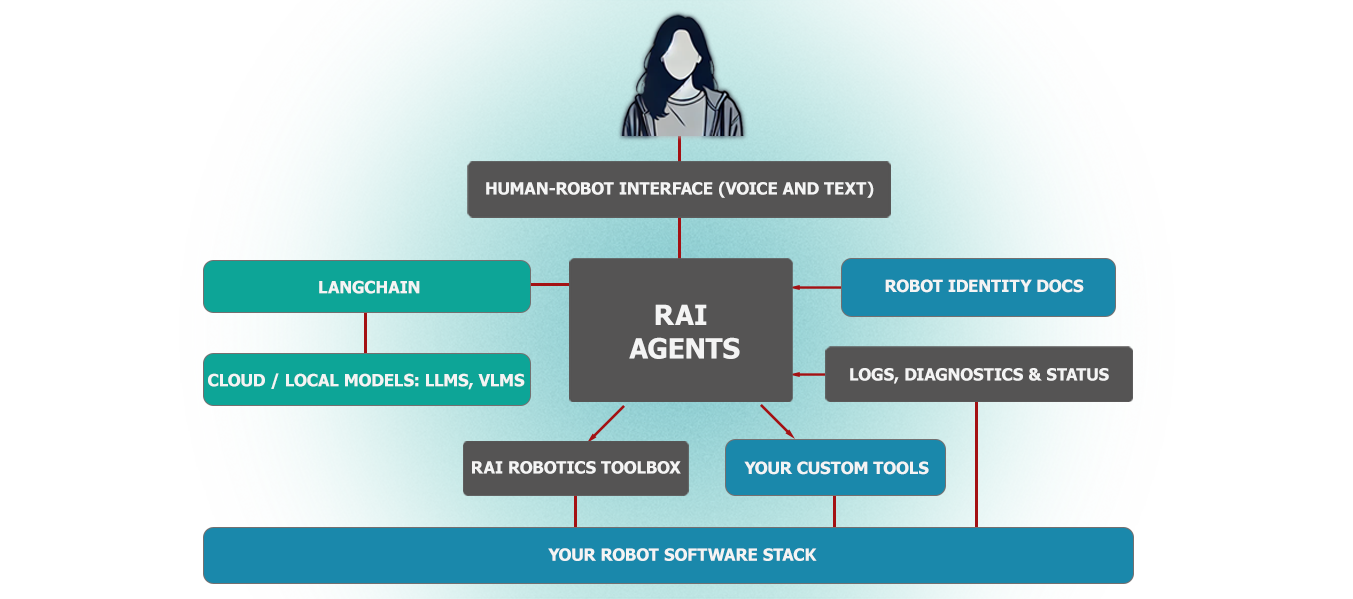
rai
RobotecAI·Python
面向物理 AI 机器人的厂商无关智能体框架,基于 ROS 2 工具执行复杂动作、场景任务、自由接口调用、日志摘要和语音交互。
具身智能+4具身智能 / VLA
615+1792.12.42026-11-10 14:56 UTC

RoboBrain
FlagOpen·Python
面向机器人操作任务的统一大脑模型,把抽象指令逐步落到具体动作,配套官方推理代码,可直接用于具身智能研究。
具身智能+4具身智能 / VLA
568442025-10-13 04:14 UTC
Awesome-Embodied-AI
haoranD
整理具身智能方向的论文与行业资源清单,覆盖检测、导航、语言学习等主题,方便快速定位相关研究。
具身智能+4具身智能 / VLA
539292025-06-03 15:13 UTC