项目色彩空间需设为 Gamma(HDRP 不支持 Gamma),线性空间需重训资产;Windows 需在 Player 设置中关闭 Auto Graphics API 并只保留 Vulkan 或 D3D12,切换后要重启 Unity;URP 需添加 Gsplat URP Feature(Unity 6 需关闭 Render Graph 兼容模式),HDRP 需加 Custom Pass 并设为 Before Transparent;Android 还需关闭 Apply display rotation during rendering。
Window > Package Manager > + > Install package from disk... 选择仓库中的 package.json 硬件要求按 README 说明
README 未说明显存要求;排序 pass 依赖 wave/subgroup 操作,仅 D3D12、Metal、Vulkan 可用,其他图形 API 无法运行;作者仅在 Windows、Mac、Android 上测试过。
在 Unity 里直接渲染 3D Gaussian Splatting 的插件,把 3DGS 当作透明网格接入现有渲染管线
在 Unity 里直接渲染 3D Gaussian Splatting 模型的插件,省去自己写渲染管线,方便把 3DGS 场景集成到游戏或实时应用。
核心能力
- 把 3DGS 当作透明网格,只在相机命令缓冲插入一次排序 pass
- 按包围盒把 3DGS 绘制调用插入现有透明队列,无需单独 RT
- 支持 BiRP、URP、HDRP 三条渲染管线
- 读取并渲染 SH 0-3 的 PLY 与 SPZ v1-4(SH 0-4)
- 支持正交投影、MSAA、XR 与全局排序
容易踩的坑
内容由模型根据 README 生成,可能不完整或不准确,以官方文档为准。看原文 README
暂无 release 数据(可能没有发版,或尚未同步)。
用户点评
登录用户的真实使用记录,可按版本和硬件筛选共 0 条
还没有人点评。第一个说出真实体验的人最有价值。
Gsplat


A Unity package for rendering 3D Gaussian Splatting (3DGS). Supports Unity 2021 and later.

The 3DGS rendering pipeline design of this package is inspired by PlayCanvas, which treats 3DGS objects similarly to transparent meshes that use a custom shader. With this approach, only an additional sorting pass needs to be inserted into each camera's command buffer. This design makes it easier to integrate 3DGS rendering into an existing pipeline, allows the draw calls for 3DGS objects to be correctly inserted into the existing rendering queue for transparent meshes (based on their bounding boxes), rather than rendering all 3DGS objects to a separate render texture as is done in aras-p/UnityGaussianSplatting.
That sounds great, but at what cost?
Most 3DGS assets are trained in Gamma space, following the official implementation. This means that the alpha blending for the Gaussians is also performed in Gamma space. Since there is no longer an additional render texture that would allow us to convert the color space after the alpha blending of 3DGS, you must ensure your project's color space (Edit > Project Settings > Player > Other Settings > Rendering > Color Space) is set to "Gamma" for the 3DGS assets to be rendered correctly (be aware that HDRP doesn't support Gamma mode). For projects using a linear color space, you must retrain the 3DGS asset with linear-space images. While this plugin offers a Gamma To Linear option as a workaround, converting the color space before alpha blending leads to incorrect results and will lower the 3DGS rendering quality.
Highlights
-
Supports Built-in Render Pipeline (BiRP), URP and HDRP
-
Gaussians can be correctly blended with transparent meshes based on their bounding boxes
-
Supports reading & rendering PLY files with SH degrees 0-3
-
Supports SPZ versions 1-4 with SH degrees 0-4
-
Supports orthographic projection
-
Compatible with MSAA
-
Compatible with XR
-
XR Render Mode BiRP URP HDRP Multi-pass ✓ ✓ ✗ Single Pass Instanced ✗ ✓ ✗
-
-
Cutouts to edit Gaussians Dynamically
-
Supports global sorting
Platform Compatibility
The sorting pass, built upon b0nes164/GPUSorting, requires wave / subgroups operations which are only available in D3D12, Metal or Vulkan graphics APIs. WebGPU supports the subgroup operations but Unity has not implemented it. Anything using other graphics APIs will not work. I have only tested on Windows, Mac and Android, but the compatibility of this package should be similar to aras-p/UnityGaussianSplatting.
Usage
Install
After cloning or downloading this repository, open your Unity project (or create a new one). Navigate to Window > Package Manager, click the + button, select Install package from disk..., and then choose the package.json file from this repository.
Setup
First, ensure your project is using a supported Graphics API. For Windows: in Edit > Project Settings > Player > Other Settings, uncheck Auto Graphics API for Windows. Then, in the Graphics APIs for Windows list, add Vulkan or Direct3D12 and remove any other options. Unity will require a restart to switch the Graphics API. You may need to perform similar steps for other platforms.
Note that for Android, you also need to uncheck Apply display rotation during rendering in Player > Settings for Android > Other Settings > Vulkan Settings, as this package currently does not support rendering in the native display orientation.
The next steps depend on the Render Pipeline you are using:
- BiRP: Does not need any extra setup.
- URP: Add
Gsplat URP Featureto the URP renderer settings.- Find the
Universal Renderer Datayour project is using (this will default toAssets/Settings/PC_Rendererin a new URP project), click theAdd Renderer Featurebutton, and chooseGsplat URP Feature. - If you are using Unity 6 or later, the Render Graph "Compatibility Mode" in URP settings must be turned off! This is off by default in new URP projects.
- Find the
- HDRP: Add
Custom Passvolume object in your scene and aGsplat HDRP Passentry to it. The injection Point should be set toBefore Transparent.
Import Assets
Copy or drag & drop the PLY/SPZ file anywhere into your project's Assets folder. The package will then automatically read the file and import it as a derived class of Gsplat Asset. The package supports two compression modes for the asset: Uncompressed and Spark (packed). The default mode is Spark, which is inspired by spark.js. You can change the compression mode in the inspector of the imported Gsplat Asset.
The Opacity Prune Threshold import option removes splats whose opacity (after sigmoid) is below the threshold at import time. Since overdraw of many overlapping translucent splats is the main rendering cost of Gaussian Splatting, pruning nearly transparent splats can significantly improve frame rate, and also reduces memory usage and load time. Set the slider in the inspector of the imported asset and press Apply to reimport; the Console then logs how many splats were pruned (e.g. [Gsplat Import] scene.ply: pruned N / M splats (x.x%)). Start around 0.01–0.05 and increase while checking the visual result (thin fog-like details disappear first — as a reference, a threshold of 0.05 removed about 40% of the splats on one of our scans with little visible change). Setting it back to 0 and reimporting fully restores the original data. Currently only supported for .ply import.
Add Gsplat Renderer
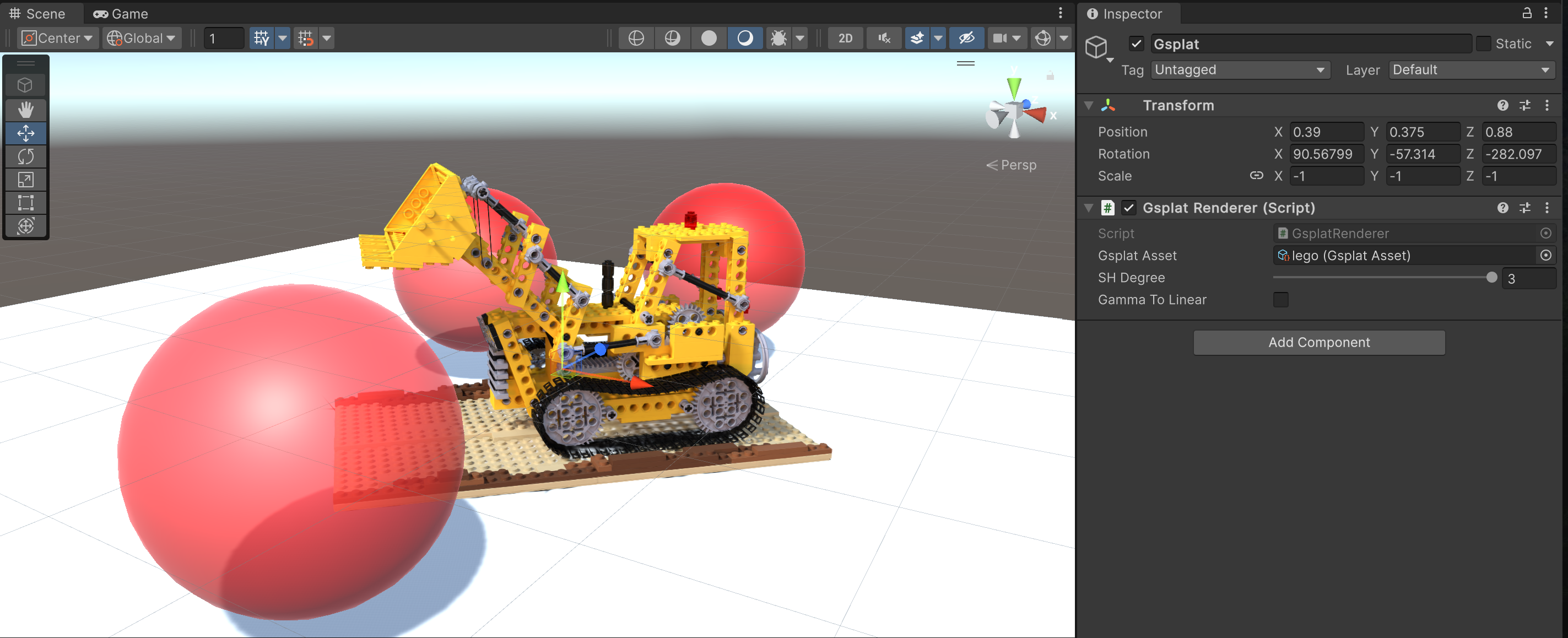
Create or choose a game object in your scene, and add the Gsplat Renderer component on it. Point the Gsplat Asset field to one of your imported Gsplat Assets. Then it should appear in the viewport.
The SH Degree option sets the order of SH coefficients used for rendering. The final value is capped by the Gsplat Asset's SH Bands.
The Gamma To Linear option is offered as a workaround to render Gamma Space Gsplat Assets in a project using the Linear Space. This will degrade the rendering quality, so changing the color space of the project or retraining the 3DGS asset is the recommended approach. If your project uses a linear color space and you do not wish to retrain your 3DGS assets, it is recommended to use aras-p/UnityGaussianSplatting.
The Brightness option allows post-hoc scaling of the Gsplat Asset's brightness. This is functional regardless of color space choices, but will degrade quality if the project and assets are in Gamma Space. This can be most smoothly controlled via the Log Brightness slider.
The Async Upload option enables streaming data from RAM to VRAM, which can help reduce lags when loading the GsplatRenderer or setting its enable property to true. When enabled, the renderer can optionally draw before upload completes (Render Before Upload Complete), which will render the asset with whatever data has been uploaded so far.
Additional Documentation
Project Using Gsplat
- HiFi-Human/DynGsplat-unity - A Unity package for rendering and playing dynamic gaussian splatting sequences
License
This project is released under the MIT license. It is built upon several other open-source projects:
- playcanvas/engine, MIT License (c) 2011-2024 PlayCanvas Ltd
- aras-p/UnityGaussianSplatting, MIT License (c) 2023 Aras Pranckevičius
- b0nes164/GPUSorting, MIT License (c) 2024 Thomas Smith
- sparkjsdev/spark, MIT License (c) 2025 WORLD LABS TECHNOLOGIES, INC.
- nianticlabs/spz, MIT License (c) 2024 Niantic Labs
- oleg-st/ZstdSharp, MIT License (c) 2021 Oleg Stepanischev

gaussian-splatting
graphdeco-inria·Python
3D Gaussian Splatting 的官方参考实现,用高斯点云做辐射场重建,实现实时可交互的逼真场景渲染。
3D高斯泼溅+43D 重建
24452+203.5k2025-10-17 14:28 UTC
instant-ngp
NVlabs·Cuda
用多分辨率哈希编码把 NeRF、SDF 等神经图形基元的训练从几小时压到几秒,实时渲染三维场景。
神经辐射场+43D 重建
17593+52.1kv2.02026-02-02 12:32 UTC
Open3D
isl-org·C++
Open3D 是一个现代 3D 数据处理库,提供点云、网格、RGB-D 和 3D 可视化等算法与工具,支持 C++ 和 Python,可用于 3D 感知、重建与机器学习研究。
3D数据处理+43D 重建
14192+112.6kv0.20.02026-11-05 18:33 UTC
colmap
colmap·C++
从多张照片重建三维场景的 C++ 工具,集成了运动恢复结构(SfM)和多视图立体(MVS),可输出相机位姿与稠密点云。
三维重建+43D 重建
13196+222.2kdatasets-eth3d-undistorted-v12026-11-10 08:51 UTC