首次启动需下载 JBR 和 Gradle 依赖,网络受限时可能报 Connection reset,需配代理或 VPN;构建 Chrome 扩展需 Node.js >= 18,且改动 core 源码后要重跑 :core:jsBrowserProductionLibraryDistribution。
crosspaste-desktop
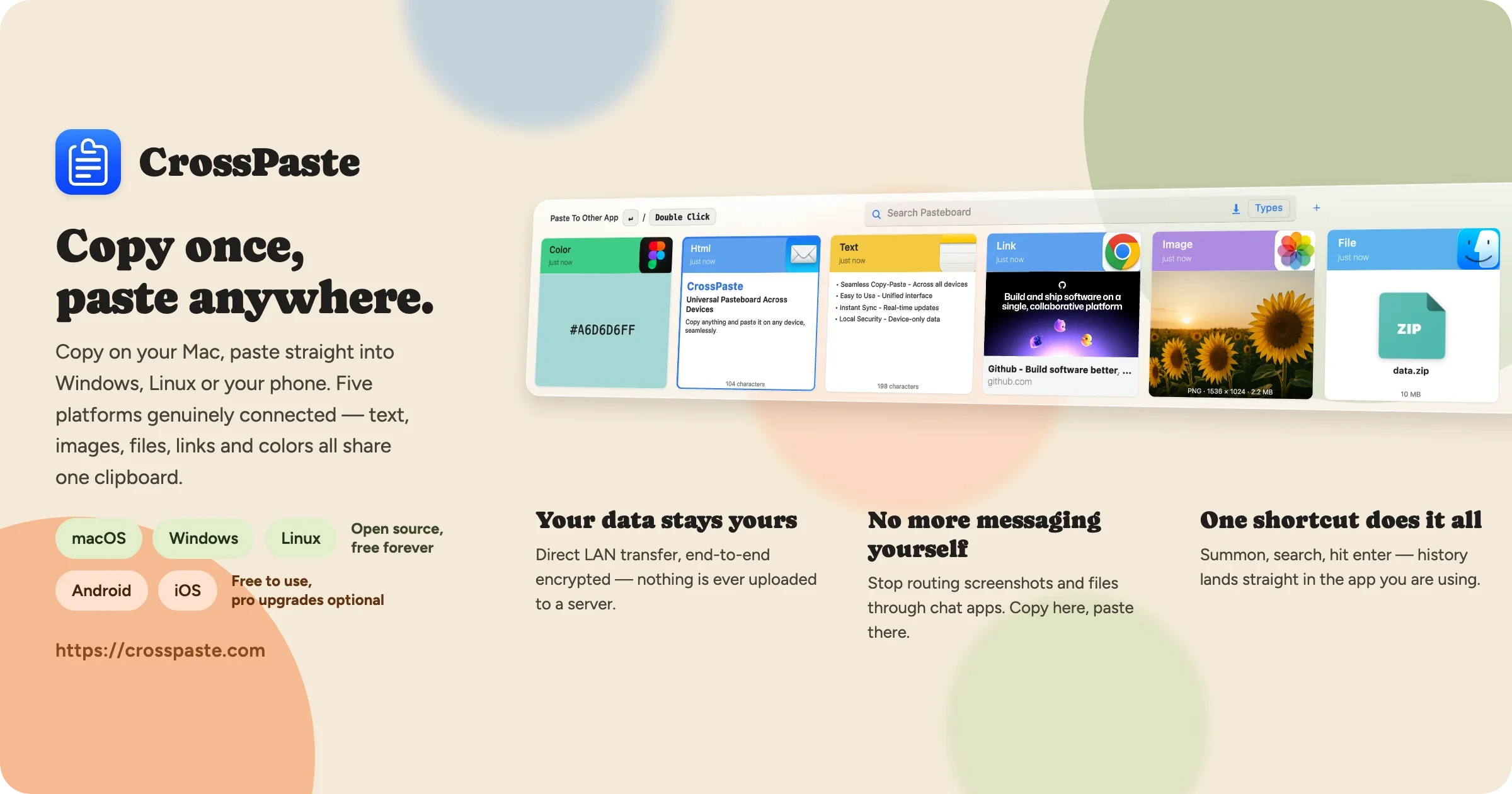
CrossPasteAGPL-3.0活跃维护跨设备剪贴板同步工具,支持 macOS、Windows 和 Linux,数据只在局域网内端到端加密传输、不经过云端,还内置 OCR、CLI 和 MCP 服务。
Cross-device clipboard sync for macOS, Windows & Linux — end-to-end encrypted, LAN-only, no cloud. OCR, CLI and MCP server built in.
2.3.1.2781发布于 2026-10-30 11:42 UTC2,692star136fork同步于 2026-11-10 11:43 UTC
git clone https://github.com/CrossPaste/crosspaste-desktop.git
cd crosspaste-desktop
./gradlew app:run 硬件要求按 README 说明
README 未说明具体硬件要求;支持 Windows、macOS、Linux 桌面系统,需能运行 JBR 与 Gradle 构建环境。
跨设备剪贴板同步工具,局域网内端到端加密,不经过云端
跨设备剪贴板同步工具,支持 macOS、Windows 和 Linux,数据只在局域网内端到端加密传输、不经过云端,还内置 OCR、CLI 和 MCP 服务。
核心能力
- 实时同步文本、图片、文件等多种剪贴板类型
- 用非对称加密实现端到端加密保护数据
- 纯局域网无服务器架构,数据本地存储
- 内置本地 OCR,从图片提取文字不外传
- 提供 CLI 与 MCP Server,可接入终端和 AI 助手
容易踩的坑
内容由模型根据 README 生成,可能不完整或不准确,以官方文档为准。看原文 README
- 2.3.1.2781最新正式版2026-10-30 · 2026-10-30 11:42 UTC
Highlights 🌟
-
📋 Floating paste button fixes Fixed interaction issues with the floating paste button and its panel; on Wayland its pastes now reach native Wayland apps, because clipboard writes go straight into the Wayland clipboard instead of an XWayland selection that KWin mirrors only while CrossPaste has the focus (#5283 #5284 #5285 #5286 #5292 #5293).
-
🪟 MSIX packages declare their firewall rules Inbound TCP/UDP for
bin\CrossPaste.exeon domain and private networks is declared in the package, so Windows stops re-prompting after every versioned-path update and no longer accumulates dead prompt rules. The CLI execution aliases moved into the main Application, because the Store rejects a hidden second Application as headless; release CI now asserts both (#5287 #5288 #5289 #5290). -
🔍 Search window double-click paste and keyboard-driven top bar Double-click paste honors the system double-click interval and reads Shift from the click itself; every search window shortcut goes through one resolver keyed by the focused zone, which adds keyboard navigation across the type filter, tags and settings (#5277 #5278 #5279 #5280 #5281 #5282).
Bug Fixes 🐛
- :bug: Write the Wayland clipboard natively so background writes reach Wayland apps (#5293)
- :bug: Fold the MSIX CLI aliases into the main Application so the Store accepts it (#5290)
- :bug: Declare MSIX firewall rules so Store updates stop re-prompting (#5288)
- :bug: Highlight the clicked row in the paste panel (#5286)
- :bug: Make the macOS paste panel stay on screen and paste into the focused app (#5284)
- :bug: Read Shift from the click itself in the search window list (#5280)
- :bug: Honor the system double-click interval in the search window (#5278)
- :bug: Keep development.properties and stray .claude folders out of release jars (#5273)
New Features ✨
- :sparkles: Drive the search window top bar from the keyboard (#5282)
- :sparkles: Tint tag chips with their color and give emphasized chips a heavier edge (#5274)
Multiplatform · Refactor · Code Style 🔨
- :hammer: Route search window shortcuts through one key resolver keyed by focused zone (#5281)
Build & CI 👷
- :construction_worker: Assert the Store MSIX keeps its firewall rules (#5289)
-
- 2.3.0.27672026-10-24 · 2026-10-24 10:21 UTC
查看更新说明
Highlights 🌟
-
🧩 Local process plugins in the paste context menu A plugin is a folder with a
manifest.jsonand a script or program; CrossPaste runs it with the paste on stdin and applies stdout to the clipboard, history, a notification or the browser. Plugins start disabled and are managed under Extensions → Plugins. A bundled Translate plugin offers a target-language submenu (#5210 #5212 #5228). -
🔄 Catch up on missed pastes when a peer reconnects Desktop pulls a trusted peer's pastes through an incremental cursor whenever the peer becomes connected, filling in what was missed while it was offline; remote pastes with invalid content are discarded instead of being written to the clipboard (#4897).
-
⌨️
crosspasteis the CLI on Windows installs Installer and Microsoft Store packages register bothcrosspasteandcrosspaste-clias CLI aliases, the Store package ships the CLI, and the control socket moved out of the MSIX-virtualized temp directory so CLI commands no longer report the app as not running (#5190 #5191 #5192 #5193 #5195). -
🐧 Linux link/file opening, RPM packages and a dnf repository Links, HTML, RTF and files open through xdg-open, "show in file manager" selects the file via FileManager1, EL9 RPM packages for x86_64 and aarch64 are published alongside the deb, and RPM installs subscribe to a signed dnf repository (#5184 #5185 #5186 #5187).
-
📋 Paste injection waits for the target app On macOS and Windows the paste keystroke is injected only after the previous app is back in the foreground (otherwise the user is asked to paste manually), shortcut-triggered pastes wait for the shortcut keys to be released, X11 waits for the target window, and the keystroke itself is sent in one SendInput call on Windows and as flagged events on macOS (#5247).
-
🪟 Windows MSIX installs again The 2.2.0 and 2.2.1 installer packages failed with 0x80080204 on current Windows builds because two appExecutionAlias extensions were declared under one Application. The manifest now declares the CLI alias in its own Application, so the package installs and updates cleanly (#5188 #5189).
Bug Fixes 🐛
- :bug: Keep keyboard focus off search window controls so Enter still pastes after a click (#5267)
- :bug: Exclude all CrossPaste windows from the Windows previous-app record (#5264)
- :bug: Switch the macOS activation policy when the main window hides so the first search window show is not dismissed (#5262)
- :bug: Post the macOS paste shortcut as flagged key events without separate modifier key events (#5252)
- :bug: Send the Windows paste keystroke in one SendInput call with reverse release order, scan codes and extended-key flags (#5250)
- :bug: Inject the paste only after the previous app is back in the foreground on macOS and Windows (#5248)
- :bug: Wait for the target window to become active before injecting the X11 paste keystroke (#5246)
- :bug: Wait for the shortcut keys to be released before injecting a shortcut-triggered paste (#5244)
- :bug: Stop macOS search focus rechecks from blocking the EDT on AppKit (#5242)
- :bug: Require a drag threshold before starting drag-and-drop in the search window (#5239)
- :bug: Keep the newest paste fully in view when prepended at the list start (#5237)
- :bug: Discard remote pastes with invalid content instead of writing them to the clipboard (#5234)
- :bug: Fix macOS search window dismissal and tray toggle races (#5215)
- :bug: Report Windows plugin script failures as a single line (#5229)
- :bug: Normalize launcher resources dir on all platforms and drop skiko fallback (#5226)
- :bug: Stabilize Windows search window activation and dismissal (#5227)
- :bug: Unmount the token popup when no pairing card is visible (#5223)
- :bug: Skip non-web URLs in clipboard previews (#5224)
- :bug: Close the search window when focus is lost during the startup grace period (#5200)
- :bug: Toggle the search window fr
-
- 2.2.1.27062026-10-11 · 2026-10-11 03:36 UTC
查看更新说明
Highlights 🌟
-
📋 Floating paste panel A non-activating floating button lists the clipboard history and pastes a row into the focused app on click, with a native right-click menu. It works on macOS, Windows and Linux (X11 and Wayland, the latter through the RemoteDesktop portal) (#4995 #5039 #5062 #5063 #5064 #5066 #5068 #5076 #5078 #5079).
-
⬇️ Background update downloads (Windows portable zip) A newer release is downloaded, verified and extracted in the background as soon as the periodic check finds it, throttled to 1 MB/s, with HTTP range resume across restarts and dropped connections; the prompt then offers a one-click restart. A General settings switch turns automatic downloads off (#5090 #5091 #5092).
-
🔒 Password-manager hints and source exclusion Copies that password managers mark as "do not record" (Bitwarden, 1Password, KeePassXC and others) are now honored on Windows, macOS and Linux: they are neither stored nor synced. The Clipboard sources page was redesigned so excluded apps can be picked from the running apps or browsed for, and match rules skip any source whose name contains a given text (#5013 #5015 #5017 #5020).
-
📁 Large-file destination The large-file Downloads switch is replaced by a destination path: files above the backup size limit go to the folder you choose, or to the system Downloads folder when it is empty. Receive-side same-name conflicts now persist the renamed record correctly and a retry can no longer truncate an existing file (#5007 #5038 #5045 #5047 #5051).
-
⚙️ Settings information architecture The Advanced group became Clipboard with Recording, Sync and Storage pages, size limits moved into one Storage section, Clipboard sources moved to Recording, and every row and page title was reworded to read without its subtitle. The settings content area now uses a grey ground with white section cards, and the theme switch is the mobile sun/auto/moon slider (#5046 #5048 #5049 #5052 #5021 #5022 #5023 #5024 #5028 #5034 #4991).
-
🖥️ Devices page and multi-homed hosts The Devices page acts on what it shows: the local device heads the list, refresh keeps the list, removal asks for confirmation, nearby devices can be blocked in place. Peers now learn the address they dialed on multi-homed hosts (Windows ICS, hotspots), the interface list follows network changes, and a manual add with no usable address fails with a message (#4935 #4951 #4953 #4955 #4957 #4959 #4993 #5026 #4996 #4998 #5000 #5009).
-
🔄 Sync reliability Received pastes are acknowledged only after they are durable, the pairing initiator advertises its own address on the v3 commit so one-way-mDNS networks sync both ways after pairing, stale sync rows no longer cause duplicate pushes, WebSocket pushes are acknowledged so receiver failures fail the task, and push session finalize and expiry are serialized (#4894 #4895 #4915 #4936 #4937 #4945 #5086).
-
🛡️ Data integrity and storage reclaim Storage migration saves the new path before deleting the old store, an unreadable config is never overwritten with defaults, deleted pastes take their directories with them, import/export no longer leave broken records and reject paths escaping managed storage, remote LOADING rows always reach a terminal state, concurrent releases of the same content no longer delete each other, and a startup failure before logging leaves a log and exits non-zero (#5094 #5095 #5096 #5097 #5098 #5099 #5124 #5125 #5126 #5127 #5130 #5131 #5132 #5133 #5140 #5141).
-
🔁 Relay and sync hardening Clipboard relay now forwards non-file pastes and carries a seen set so relays never loop, a removed device can no longer be re-inserted by a racing SyncInfo write, failed polls back off quickly, discarded pushes free their pre-allocated large-file slots, and headless mode stops logging the pairing token (#5108 #5109 #5118 #5119 #5122
-
- 2.2.0.25442026-09-01 · 2026-09-01 05:08 UTC
查看更新说明
Highlights 🌟
-
⌨️ CrossPaste CLI Every desktop package now ships a native command-line tool,
crosspaste(macOS offers a one-click terminal command install on first launch, and Windows offers one-click add-to-PATH). Copy with a pipe (echo hello | crosspaste), paste, search history with the same filters as the search window, pick entries in a full-screen fuzzy picker, edit an entry in$EDITOR, and stream new pastes live withwatch— plus pair devices and run the app headless on servers, all from the terminal and your scripts. In sixel-capable terminals, clipboard images even preview inline as real pixels. See the CLI guide for every command and example (#243 #3828 #4769 #4771 #4776 #4778 #4780 #4782 #4786 #4788 #4790 #4809 #4812 #4815 #4817 #4822 #4824 #4826 #4828 #4836 #4841 #4849 #4850 #4851 #4852 #4859 #4893). -
🔐 Next-generation device pairing Device pairing now verifies a one-time 6-digit PIN — rotating every 30 seconds on the accepting device — through a SPAKE2 (RFC 9382) password-authenticated key exchange, so nothing on the network can intercept the pairing or learn anything from a wrong guess, and cumulative online PIN guesses are capped. The elliptic-curve arithmetic runs on a constant-time OpenSSL libcrypto pinned and bundled with the app, with a fail-closed startup probe. Devices on older versions keep pairing through the previous flow (#4859 #4861 #4863 #4865 #4867 #4869 #4875 #4877 #4881).
-
🪟 More reliable Windows clipboard capture Rapid clipboard bursts are coalesced into one snapshot through a single-consumer pipeline, fixing interference with Snipping Tool's PrtScr auto-save on Windows 11; duplicate image records from a single copy are deduplicated; and SQLite's busy timeout now takes effect, fixing sporadic write failures under contention (#4737 #4791 #4793 #4796 #4798 #4799).
-
🎨 UI improvements The UI framework is upgraded to Compose Multiplatform 1.12, and following the system light/dark mode is now correct from the very first frame — no more flash at launch. The system tray now shares a single implementation across macOS, Windows, and Linux; the main window height is clamped to the usable screen area so the bottom of the UI can no longer end up below the screen edge; long paste titles clipped in the side panel show a tooltip on hover and title edits are committed when focus moves away; and the settings font dropdown now closes in a single click (#4759 #4761 #4885 #4886 #4887 #4901 #4902 #4903).
Bug Fixes 🐛
- :bug: Show tooltip for clipped paste title and commit title edit on focus loss (#4903)
- :bug: Trim surrounding whitespace when creating UrlPasteItem (#4899)
- :bug: Stop pushing pastes to stale disconnected sync rows (#4895)
- :bug: Drain sessions in WsSessionManager.closeAll to fix concurrent iteration flake (#4890)
- :bug: Use origin.remoteAddress instead of remoteHost in pairing v3 routes to avoid a blocking reverse DNS lookup (#4875)
- :bug: Read trust request bodies before taking the per-peer pairing lock (#4871 #4873)
- :bug: Unwrap wrapped crypto failures so key mismatch surfaces as DECRYPT_FAIL (#4870 #4872)
- :bug: Cap cumulative pairing v3 online PIN guesses and harden OpenSSL secret hygiene (#4867)
- :bug: Map missing native graphics library to actionable 503 in CLI image route (#4857)
- :bug: Guard cli build script host lookups on unsupported K/N hosts (#4856)
- :bug: Survive mordant's native-Windows raw-mode timeout and restore console modes on exit (#4826)
- :bug: Harden TaskExecutor: tolerate corrupt extraInfo, rethrow cancellation, no-throw submit after shutdown (#4806)
- :bug: Apply sqlite pragmas via connection properties so busy_timeout takes effect (#4799)
- :bug: Discard duplicate local image records via short-window keep-first dedup (#4798)
- :bug: Coalesce Windows clipboard bursts into one
-
- 2.1.7.24612026-08-10 · 2026-08-10 02:06 UTC
查看更新说明
Highlights 🌟
-
🛡️ Hardened device sync A full round of security and robustness hardening on the sync path: sync connections and control requests strictly verify peer identity, file transfers validate path legitimacy and cap resource usage, and malformed data can no longer disrupt normal syncing (#4705–#4716).
-
🔗 More reliable connections A corrupted device record no longer prevents the device list from loading; metadata read failures no longer reset the device identity; device state changes propagate reliably across the UI; devices now show as connected the moment an incoming connection is established, instead of waiting for the next liveness poll; and HarmonyOS devices are recognized with their own icon (#4695 #4720 #4722 #4724 #4728 #4747).
-
🚀 The main window now opens on first launch Fixed an issue on some platforms where the first launch only showed a tray icon and no window at all, making it look like the app "wouldn't open". The main window now opens automatically on first launch on every desktop platform (#4696 #4697).
-
🗄️ Customizable size limit for large clipboard entries A new setting customizes the maximum size for text, HTML, rich text, and link content written into the history (8MB by default). Entries over the limit are not recorded, so meaninglessly huge text can't bloat the database or slow down the UI; sync skips them too, without breaking pull continuity. Files and images are not affected (#4699 #4701 #4703 #4704).
-
🎨 New Appearance settings page Settings now has an Appearance page with a customizable side search window height and live preview. Card title bars in the side window scale proportionally with card size (#4664 #4674 #4676).
-
🍎 macOS: hide the Dock icon A new macOS-only setting hides CrossPaste from the Dock, keeping only the menu bar icon (#4659 #4677 #4678).
-
🔒 URL preview fetching can now be turned off A new setting disables fetching a copied link's title and icon, so CrossPaste makes no network request for copied URLs — for privacy, or to avoid accidentally triggering one-time links. On by default, matching the previous behavior (#4742 #4744).
-
🧩 Chrome extension improvements The extension now decrypts encrypted paste pushes from the desktop app, supports the newer SAS/PIN-based pairing flows, and performs the authenticated WebSocket handshake so it can keep syncing with peers that require authenticated connections (#4683 #4729 #4730 #4749).
Bug Fixes 🐛
- :bug: Implement authenticated WebSocket handshake in the Chrome extension (#4749)
- :bug: Resolve device state immediately when an inbound WebSocket session opens (#4747)
- :bug: Dedupe search results by id in the shared search ViewModel (#4733)
- :bug: Decrypt encrypted WS paste push in Chrome extension (#4730)
- :bug: Tolerate corrupted hostInfo JSON per row in device-list mapping (#4728)
- :bug: Never rotate device identity on metadata read failure (#4724)
- :bug: Give SyncRuntimeInfo flow broadcast semantics (#4722)
- :bug: Include network prefix in host info equality (#4720)
- :bug: Make ErrorCode hashCode consistent with equals (#4718)
- :bug: Validate file transfer path metadata correspondence (#4716)
- :bug: Roll back push prepare on session capacity rejection (#4714)
- :bug: Authenticate sync control requests (#4712)
- :bug: Disambiguate WebSocket whole-file pulls (#4711)
- :bug: Authenticate WebSocket sessions (#4710)
- :bug: Bind WebSocket paste identity (#4709)
- :bug: Bound remote file transfer resources (#4708)
- :bug: Fail truncated file chunks (#4707)
- :bug: Bind remote paste to authenticated identity (#4706)
- :bug: Reject unsafe remote file paths (#4705)
- :bug: Prevent paste pull cursor gaps (#4704)
- :bug: Persist paste pull cursor for discarded oversized remote pastes (#4703)
- :bug: Auto-show main window on first lau
-
用户点评
登录用户的真实使用记录,可按版本和硬件筛选共 0 条
还没有人点评。第一个说出真实体验的人最有价值。









✨ Features
- 🔄 Real-time Sharing: Instantly share pasteboard content across devices, seamlessly.
- 🖥️ Unified Cross-platform: Consistent interface on Mac, Windows, and Linux. No need to change habits.
- 📋 Rich Type Support: Handle various pasteboard types: Text, Color, URL, HTML, RTF, Image, File.
- 🔒 End-to-End Encryption: Using asymmetric encryption to fully protect your data security.
- 🌐 LAN-only Serverless: Local storage, serverless architecture. Privacy protection, in your control.
- 🧹 Smart Space Management: Auto-cleanup options manage pasteboard storage without manual effort.
- 🔍 Built-in OCR: Extract text from images locally — no network calls, your screenshots never leave the device.
- 🤖 MCP Server: Expose your pasteboard history to AI assistants (Claude, etc.) via the Model Context Protocol.
- 🌍 Chrome Extension: Sync clipboard with the browser — copy on a web page, paste on any device.
- ⌨️ Command-Line: Copy, paste, and search your history from the terminal and scripts. See the CLI guide.
🏗 Getting Started with Development
-
clone the repository
git clone https://github.com/CrossPaste/crosspaste-desktop.git -
Compile and run the application
cd crosspaste-desktop
./gradlew app:run
First start will download JBR / gradle dependencies.
If you encounter the following error:
FAILURE: Build failed with an exception.

* What went wrong:
java.net.SocketException: Connection reset
> java.net.SocketException: Connection reset
you might need a VPN to download these dependencies.
To configure a proxy for gradle, add the following settings to gradle.properties, and adjust the parameters to match your proxy configuration:
systemProp.https.proxyHost=localhost
systemProp.https.proxyPort=8080
systemProp.https.proxyUser=userid
systemProp.https.proxyPassword=password
systemProp.http.nonProxyHosts=*.nonproxyrepos.com|localhost
Additionally, a series of technical blogs about CrossPaste is being published (approximately one article per week). If you're interested in developing cross-platform applications, you're welcome to read them.
🌍 Building the Chrome Extension
The Chrome extension lives in web/ and is built via Gradle. Node.js (>= 18) is required — the npmInstall task will fetch dependencies on first build.
-
Build the extension
./gradlew :web:buildThe unpacked extension is emitted to
web/dist/. -
Load it into Chrome
- Open
chrome://extensions/ - Enable Developer mode in the top-right corner
- Click Load unpacked and select the
web/dist/directory
- Open
The extension auto-discovers a CrossPaste desktop app running on the same machine and syncs clipboard content with it. To iterate on extension code, run npm run dev inside web/ for a fast Vite dev loop, then reload the extension in Chrome. The extension imports a Kotlin/JS core library produced by ./gradlew :core:jsBrowserProductionLibraryDistribution (also run as part of :web:build) — re-run that task whenever you change core/ sources.
🗺️ Roadmap
CrossPaste is continuously evolving! v2.2 brings a full command-line mode — copy, paste, and search your history straight from the terminal. Here's what we're working on next:
- Plugin system — let the community extend CrossPaste with custom paste types and integrations
This is just a small part of our plans. Want to learn more details and long-term plans? Check out our full roadmap.
🙋 FAQ
Here are some FAQs that have been collected. If you have other questions, please create an issue to let us know.
🤝 Support the project
- 🌟 Star this repository: This is the easiest way to support CrossPaste and costs nothing.
- 🪲 Report bugs: Report any bugs you find on the issue tracker.
- 📖 Translate: Help translate and polish CrossPaste into your language.
- 📝 Contribute: Code, comment on issues, and any contributions that can help the project are welcome.
- 💖 Sponsor: Support financially via GitHub Sponsors to help with ongoing development and maintenance.
📝 Contributors
💖 Sponsors
meetily
Zackriya-Solutions·Rust
本地运行的 AI 会议记录工具,用 Whisper/Parakeet 在设备上完成转写和说话人分离,不需要会议机器人,会议内容不出本机。
会议记录+4加密 / 隐私工具
32589+793.6kv0.4.12026-11-10 08:07 UTC

nodewarden
shuaiplus·TypeScript
在 Cloudflare Workers 上运行、兼容 Bitwarden 客户端的自托管密码管理服务端,用 D1 和 R2 存储数据,无需自己维护服务器。
密码管理+4加密 / 隐私工具
4138+134.7kv1.8.12026-11-08 21:04 UTC
NOIR
Verlintas·Kotlin
用 adb 扫描 Android 应用的权限、上报端点和数据流向,生成隐私审计报告,并给出可回滚的处置方案。
隐私审计+4加密 / 隐私工具
3195+293295v0.4.22026-11-07 16:07 UTC

padloc
padloc·JavaScript
面向个人和团队的开源密码管理器,端到端加密保护凭据,支持 PWA 和桌面端,可自托管。
密码管理器+4加密 / 隐私工具
2940272v4.3.02026-11-10 10:27 UTC