2.70.0 起不再支持 Python 3.9,需 Python 3.10 及以上;使用 VLM 或 OCR 时需额外下载对应模型权重;模型许可证与代码的 MIT 许可证不同,需单独确认。
pip install docling
docling https://arxiv.org/pdf/2206.01062 硬件要求按 README 说明
README 未说明具体显存或 GPU 型号要求;支持 macOS、Linux、Windows 的 x86_64 与 arm64 架构,并强调可在本地及离线环境执行。
把 PDF 等各类文档解析成结构化数据,方便喂给生成式 AI 的文档处理工具
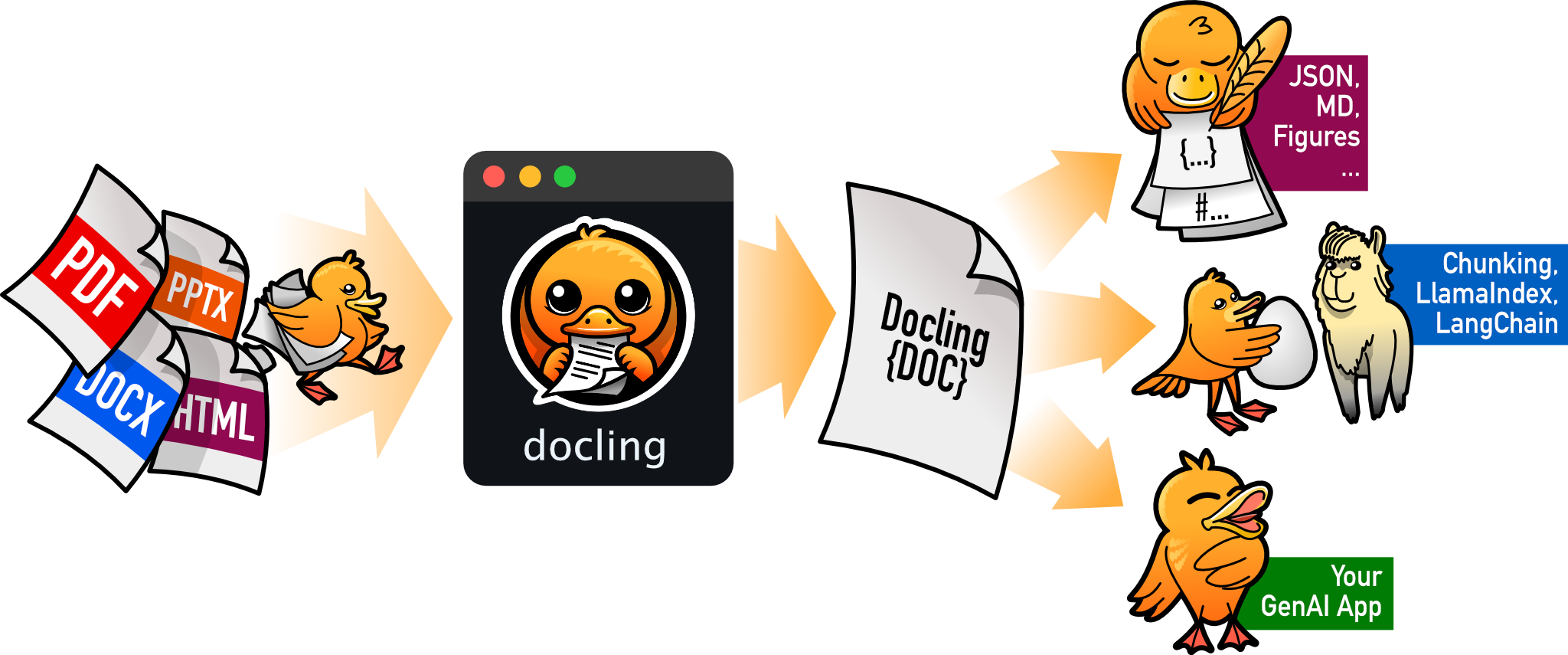
把 PDF、DOCX、HTML 等文档解析成结构化 Markdown 或 JSON,方便喂给大模型和 RAG 流程。
核心能力
- 解析 PDF、DOCX、PPTX、XLSX、HTML、EPUB、图片、音视频等多种格式
- 对 PDF 做版面分析、阅读顺序、表格结构、公式和代码识别
- 统一输出为 DoclingDocument,可导出 Markdown、HTML、JSON 等
- 内置 OCR 支持扫描件与图片,并支持 GraniteDocling 等视觉语言模型
- 提供 LangChain、LlamaIndex、Haystack 等框架集成与 MCP 服务
容易踩的坑
内容由模型根据 README 生成,可能不完整或不准确,以官方文档为准。看原文 README
- v2.149.0最新正式版2026-11-08 · 2026-11-08 08:25 UTC
Feature
- pdf: Add opt-in embedded PDF image extraction (#5143) (
3df6c93) - Refactored the cli to be more intuitive (#5214) (
55f21d6) - asr: Add support for mlx-audio (#5181) (
756059c) - vlm: Add MiniCPM-OCR preset (#5134) (
1282e3d)
Fix
- md: Decode only terminated character references in text (#5231) (
414d669) - latex: Number the items of enumerate lists (#4518) (
1d9a79c) - md: Keep backslash escapes inside the surrounding text (#4991) (
bcb3678) - jats: Keep tables published as an image (#5078) (
1e26b84) - asciidoc: Fill a table row from the column count of the first line (#5010) (
26cff4d) - reading-order: Skip a horizontal dilation that overlaps another element (#5131) (
55df934) - html: Keep an image caption with its picture (#5037) (
0ae7561) - Keep pictures whose mode cannot be written as PNG (#4683) (
1331d70) - html: Keep sibling code tags of pre in one code block (#4998) (
ec9911e) - jats: Preserve table footnotes (#4818) (
c715294) - csv: Read Excel's sep= first line as the delimiter (#5200) (
1436f13) - uspto: Map ISO 8879 &sgr; to sigma and keep &sfgr; (#5202) (
4e57113)
Documentation
- Fix VLM configuration in GPU guide (#5102) (
98dfa0f) - Fix spelling of 'preferred' in docstrings (#5213) ([
d7654f4](https://github.com/doclin
- pdf: Add opt-in embedded PDF image extraction (#5143) (
- v2.148.02026-11-05 · 2026-11-05 16:49 UTC
查看更新说明
Feature
- Add surya v2.5 (#5141) (
9b25840) - pdf: Mark superscript and subscript text from glyph size and baseline (#4815) (
3bbd3fa) - calendar: Add an iCalendar (.ics) backend (#4880) (
e461fa3)
Fix
- backend: Keep inline formatting in JATS and ODF table cells (#4809) (
6cd7a35) - mets: Keep pages loadable when a page div lacks a usable ORDER (#5149) (
f7a535b) - html: Use 72 DPI fallback for HTML and MHTML images with 0 DPI metadata (#5165) (
e03c1aa) - boxnote: Keep a later paragraph out of the list item text (#5160) (
0ab06cb) - pdfium: Join a punctuation run to its row (#5161) (
9046b8e) - epub: Reduce a single-quoted cross-document link to its anchor (#5170) (
f18cc1b) - docx: Preserve table cells with incomplete grids (#5179) (
e973a49) - epub: Decode the percent-escapes of the package document path (#5168) (
6d67609) - asr: Pass temperature to Transformers Whisper generation (#5166) (
7f6b3d4) - jats: Keep the text of inline elements (#5177) (
fc7df25) - asciidoc: Number ordered lists from their start attribute (#5180) (
a230f3e) - pdfium: Show the hyphen of a line-final glyph (#5159) (
94ce021) - tables: Keep table text when TableFormer predicts a runaway structure (#4592) (
eed760d) - asciidoc: Turn a trailing " +" into a hard line break (#5175) (
5f6a7fc) - heading-hierarchy: Ign
- Add surya v2.5 (#5141) (
- v2.147.02026-11-04 · 2026-11-04 14:30 UTC
查看更新说明
Feature
Fix
- v2.146.02026-11-03 · 2026-11-03 06:40 UTC
查看更新说明
Feature
- vlm: Add Unlimited-OCR 2 preset and layout parser (#5107) (
bdb1d20) - Add LightOnOCR-3 presets and grounded output parsing (#4789) (
4b382ee) - vlm: Add guarded Nemotron 3.5 multi-pass parsing (#4933) (
84599f9)
Fix
- service-client: Keep the presigned rejection when the InBody fallback fails (#5003) (
421b3ba) - iwork: Read decimal128 cells without context rounding (#5101) (
2fea2c9) - md: Stop the parser hanging on pipes in lazy continuation lines (#5110) (
2092759) - asciidoc: Turn links in paragraphs into hyperlinks (#5115) (
07154cd) - pptx: Render lettered, Roman and parenthesized list markers (#5122) (
26a5bcf) - docx: Apply the w:lvlOverride of a list numbering instance (#5123) (
bb7340d) - utils: Drop leading UTF-8 BOM for explicit encoding="utf-8" (#4849) (
7346d1e) - xlsx: Read images placed in cells (#5015) (
764b5d4) - Allow chunks artifact type in ArtifactRef (#5111) (
7b12671) - iwork: Keep converting when a date cell holds a span no datetime can hold (#5087) (
eb0bb24) - vlm: Keep the vLLM stop reason so pages are not all read as incomplete (#4901) (
af2dbad)
- vlm: Add Unlimited-OCR 2 preset and layout parser (#5107) (
- v2.145.02026-10-29 · 2026-10-29 14:40 UTC
查看更新说明
Feature
- ocr: Detect page orientation for RapidOCR (#4709) (
5e72863) - api: Add InputDocument.release() (#3600) (
761d4cf)
Fix
- pipeline: Drop page backend references on unload (#5089) (
544f368) - jats: Stop rendering the literal text None in figure and table captions (#4291) (
dc4693f) - md: Strip leading YAML frontmatter instead of misparsing it (#4596) (
8f9a971) - asr: Avoid initializing MLX during preset imports (#5090) (
55c1da8) - jats: Keep the target of an ext-link in a mixed citation (#4813) (
d518808) - html: Keep rows stored in tfoot (#4323) (
ad03515) - vlm: Keep the page when a Chandra table is too large (#5054) (
7d62cae) - jats: Keep tables whose only row is a header row span (#5041) (
851dce7) - xlsx: Do not create empty cells while finding tables (#5024) (
8f7ae54) - Preserve native VLM inline math through exports (#4908) (
9051777) - service_client: Do not send default page range in request options (#5056) (
907dcf2) - pdf: Replace NUL from unmapped glyphs with U+FFFD (#5070) (
ca26ff1) - xlsx: Keep currency, percent, and date number formats (#4628) (
25cdd57) - vlm: Scale DocLang locations to the page size (#5051) (
6d1470d)
Documentation
- Correct Nemotron OCR installation instructions (#5083) (
52aceeb) - Document installing docling-slim without RapidOCR ([#5058](https://gith
- ocr: Detect page orientation for RapidOCR (#4709) (
用户点评
登录用户的真实使用记录,可按版本和硬件筛选共 0 条
还没有人点评。第一个说出真实体验的人最有价值。
Docling










What is Docling ?
Docling simplifies document processing by parsing diverse formats — including advanced PDF understanding — and providing seamless integrations with the generative AI ecosystem.
Features
- 🗂️ Parsing of multiple document formats including PDF, DOCX, PPTX, XLSX, HTML, EPUB, Apple Pages, Numbers & Keynote, WAV, MP3, WebVTT, Box Notes, email formats (EML, MSG), iCalendar (ICS), images (PNG, TIFF, JPEG, ...), LaTeX, DocLang, plain text, and more
- 📑 Advanced PDF understanding incl. page layout, reading order, table structure, code, formulas, image classification, and more
- 🧬 A unified, expressive DoclingDocument representation format
- ↪️ Various export formats and options, including Markdown, HTML, WebVTT, DocLang, DocTags and lossless JSON
- 📜 Support for several application-specific XML schemas including DocLang, USPTO patents, JATS articles, and XBRL financial reports.
- 🔒 Local execution capabilities for sensitive data and air-gapped environments
- 🤖 Plug-and-play integrations incl. LangChain, LlamaIndex, Crew AI & Haystack for agentic AI
- 🔍 Extensive OCR support for scanned PDFs and images
- 👓 Support for several Visual Language Models, such as (GraniteDocling)
- 🎙️ Audio support with Automatic Speech Recognition (ASR) models
- 🔌 Connect to any agent using the MCP server
- 🌐 Run Docling as a service with the API server (docling-serve)
- 💻 Simple and convenient CLI
What's new
- 🎬 Parsing of video files (MP4, AVI, MOV, MKV, and WebM) with an ASR transcript and representative keyframes
- 📄 Parsing of ODF (OpenDocument Format) files for text documents (
.odt), spreadsheets (.ods), and presentations (.odp) - 💼 Parsing of XBRL (eXtensible Business Reporting Language) documents for financial reports
- 📧 Parsing of email files (
.eml,.msg) - 📅 Parsing of calendar files (
.ics,.ical,.icalendar,.ifb) with events, tasks, journal entries and free/busy times, with attendees, reminders and attachment names - 📚 Parsing of EPUB (Electronic Publication) files for e-books
- 🍎 Parsing of Apple Pages (
.pages) documents, Numbers (.numbers) spreadsheets and Keynote (.key) presentations - 📝 Parsing of plain-text files (
.txt,.text) and Markdown supersets (.qmd,.Rmd) - 📊 Chart understanding (Barchart, Piechart, LinePlot): convert them into tables or code and add detailed descriptions
Coming soon
- 📝 Metadata extraction, including title, authors, references & language
- 📝 Complex chemistry understanding (Molecular structures)
Quickstart
1. Install
pip install docling
Note: Python 3.9 support was dropped in docling version 2.70.0. Please use Python 3.10 or higher.
Works on macOS, Linux and Windows environments for both x86_64 and arm64 architectures.
More detailed installation instructions are available in the docs.
2. Convert a document (CLI)
docling https://arxiv.org/pdf/2206.01062
This generates a .md file in the current directory containing structured document content.
You can also use 🥚GraniteDocling and other VLMs via Docling CLI:
docling --vlm-model granite_docling https://arxiv.org/pdf/2206.01062
3. Python usage (recommended)
from docling.document_converter import DocumentConverter

source = "https://arxiv.org/pdf/2408.09869"  # a document via a local path or URL
converter = DocumentConverter()
result = converter.convert(source)
print(result.document.export_to_markdown())  # output: "## Docling Technical Report[...]"
More advanced usage and configuration options.
Documentation
Check out Docling's documentation for details on installation, usage, concepts, recipes, extensions, and more.
Examples
Go hands-on with our examples, demonstrating how to address different application use cases with Docling.
Integrations
To further accelerate your AI application development, check out Docling's native integrations with popular frameworks and tools.
Get help and support
Please feel free to connect with us using the discussion section.
Technical report
For more details on Docling's inner workings, check out the Docling Technical Report.
Contributing
Please read Contributing to Docling for details.
References
If you use Docling in your projects, please consider citing the following:
@techreport{Docling,
  author = {Deep Search Team},
  month = {8},
  title = {Docling Technical Report},
  url = {https://arxiv.org/abs/2408.09869},
  eprint = {2408.09869},
  doi = {10.48550/arXiv.2408.09869},
  version = {1.0.0},
  year = {2024}
}
License
The Docling codebase is under MIT license. For individual model usage, please refer to the model licenses found in the original packages.
LF AI & Data
Docling is hosted as a project in the LF AI & Data Foundation.
IBM ❤️ Open Source AI
The project was started by the AI for knowledge team at IBM Research Zurich.
PaddleOCR
PaddlePaddle·Python
轻量级 OCR 工具包,能把图片和 PDF 转成结构化数据,支持 100 多种语言,方便接入 LLM 和 RAG 流程。
OCR+4文档解析 / OCR
92516+13012kv3.7.02026-09-16 03:31 UTC

MinerU
opendatalab·Python
把 PDF、Office 等复杂文档转成 LLM 可直接用的 Markdown/JSON,内置版面分析和 OCR,专为 RAG 与 Agent 工作流准备语料。
文档解析+4文档解析 / OCR
83425+1706.9kmineru-4.1.7-released2026-11-10 11:15 UTC
tesseract
tesseract-ocr·C++
老牌开源 OCR 引擎,用 LSTM 识别图片中的文字,支持上百种语言,适合做文档扫描和文本提取。
OCR引擎+4文档解析 / OCR
77437+3811k5.5.42026-11-09 11:40 UTC

Umi-OCR
hiroi-sora·Python
开源免费的离线 OCR 软件,支持截图、批量图片和 PDF 识别,可排除水印与页眉页脚,还能扫描或生成二维码,内置多国语言库。
离线OCR+4文档解析 / OCR
48555+604.7kv2.1.52025-11-20 14:58 UTC